Key Takeaway: If you are moving on from CrackStreams, you have safer and more reliable ways to watch live sports and free entertainment. Legit platforms like Pluto TV, Tubi, and Red Bull TV offer stable streams, fewer interruptions, and a better viewing experience, without the constant risk that comes with shady sites.
Are you tired of clicking a stream, closing five pop-ups, and still ending up with a buffer icon right when the game gets good? Unverified streaming sites can bring more headaches than highlights. You might deal with fake links, relentless ads, sudden stream shutdowns, lag and low-quality video, sketchy redirects that risk malware, and even privacy issues from aggressive tracking. Worst of all, you waste time hunting for a working feed instead of enjoying the match.
The right alternatives fix this with cleaner apps, more consistent playback, and a smoother, safer experience.
Content and Licensing Note: This Best FREE CrackStreams Alternatives guide compares sports and streaming availability for informational purposes. Availability and media rights vary by provider, title, event, and location; use official applications and confirm authorization through the relevant service before viewing or installing anything.
Why You Can Trust FirestickTVStream?
This roundup focuses on trustworthy CrackStreams alternatives that have been vetted for real-world use. Every option included is:
✅ Tested for stream stability, video quality, and uptime during peak hours
✅ Checked for safer viewing, fewer intrusive ads, and cleaner app experiences
✅ Evaluated across common devices like phones, smart TVs, streaming sticks, and browsers
Important Note: We avoid “100% free” unverified services that often sit in a legal gray area and may expose you to unsafe links or copyrighted streams.
Research Overview:
- 140+ services tested
- 250+ Hours of research and testing
- 45+ Detailed guides and reviews checked
Best CrackStreams Alternatives: Top Picks!
1) Pluto TV
Pluto TV is a reputable streaming solution I checked when looking for a safe, legal way to watch live channels and on-demand shows without sketchy links. It is great for beginners because all you need is a browser or app and you can start fast. It aims to keep things simple with a cable-like guide and clear channel categories. I like that it helps you avoid risky pop-ups and questionable streams, while still giving you plenty to watch.
Features:
- Live Guide: Pluto TV organizes live channels in a familiar cable-style grid. It helps you avoid random links. Navigation feels essential for quick viewing.
- Free Channels: Free live channels span news, sports, and entertainment with many themed stations. It is a good idea to explore categories. The lineup updates typically.
- On-Demand: Pluto TV includes many movies and full series you can start anytime. This may help when live schedules do not fit. Search is simple.
- Curated Channels: Curated channel brands and dedicated show channels keep selection focused. I tested several single-show channels and they played smoothly. I recommend starting with the genre rows to find one of the easiest picks.
- Regional Access: Pluto TV adjusts what you see based on location with automatic tuning. It is important to keep in mind availability varies. This reduces dead channels.
- Watchlist Sync: Watchlist and continue-watching support works in supported apps. It allowed me to pick up episodes later. I suggest signing in to sync across devices, which improves consistency.
- Pop-Up Channels: Pluto TV rotates limited-time channels and themed marathons around events. It might be helpful to check the guide often. New stations appear without updates.
| Pros | Cons |
| Free live channels felt like a solid cable replacement for me | Ad breaks can be frequent and may interrupt tense scenes |
| It allowed me to start watching instantly without account setup | Some channels repeat content often, so variety can feel limited |
| I could access the guide quickly and find categories easily | I could access fewer local channels depending on my region |
| On-demand library provided me plenty of movies for casual nights | Video quality varies by channel and can drop during peaks |
| Apps run smoothly on most devices I tested at home | |
| It helped me access safer streams and avoid risky pop-ups |
Pricing: Free
Link: https://pluto.tv
2) Tubi
Tubi is a reputable, free streaming solution that aims to give you all you need for movies and series without a subscription. I evaluated it on tubitv.com and found it great for anyone who wants to avoid sketchy stream sites and broken links. It is one of the easiest ways to watch on phones, TVs, and browsers, with a simple layout that feels beginner friendly. Keep in mind the service is ad-supported, so short commercial breaks are required, but the overall experience stays smooth. I suggest starting with the trending and genre rows, then build a watchlist so you always have something ready to play.
Features:
- Free Library: Tubi streams a large catalog at no cost supported by ads, not a subscription. Content rotates often, so checking back is helpful.
- Smart Discovery: The home screen highlights genres, collections, and trending picks. Search is fast and forgiving. This makes it easier to find something quickly.
- Watchlist Sync: An account lets you save titles for later and syncs progress across supported devices. I tested this and my playback resumed accurately.
- Device Support: Tubi runs on smart TVs and major streaming platforms. Setup is straightforward on most devices. I recommend signing in once to keep settings consistent.
- Live Channels: Tubi includes live channels alongside on-demand content covering news and entertainment categories. This may help when you do not want to pick a title.
- Kids Mode: Tubi offers a dedicated kids area with age-appropriate picks and simple navigation. It is best to review profiles and settings first.
- Hidden Collections: Tubi surfaces themed collections that are easy to miss. I noticed niche rows change based on viewing patterns. I suggest checking the collections tab for hidden gems.
| Pros | Cons |
| Large free catalog, and I could access it without payment | Ad breaks can interrupt viewing and feel frequent at times |
| Simple interface, and it helped me access titles faster | Some popular new releases are missing from the free lineup |
| Strong device support, and I could watch on my TV | Video quality may vary by title and device capabilities |
| Search and categories are well organized for quick picking | Offline downloads are not available, which limits travel viewing |
| Live channels add variety and reduce decision fatigue | |
| Watchlist syncing offered me smooth resume playback across devices |
Pricing: Free
Link: https://tubitv.com
3) Red Bull TV
Red Bull TV is a reputable streaming solution for people who want a legal, high-quality way to watch live sports and adventure content without relying on risky sites. I evaluated its catalog and playback on the official site, and it is great for events like motorsport, biking, surfing, and snow sports. It helps you avoid sketchy streams and confusing pop-ups. In fact, the player is clean and easy for beginners. My aim is simple, find a safer place to watch action-packed live events and replays with consistent quality.
Features:
- Live Events: You can watch scheduled live broadcasts across Red Bull sports. I recommend checking the event calendar early to avoid missing start times.
- Replay Access: I tested replay access after a live event ended and playback started fast and stayed stable. This may help when you cannot watch live.
- Sport Categories: Navigation groups content by sport and show. It is one of the easiest ways to find what you need. Discovery feels simple for new viewers.
- Event Schedule: The site surfaces future streams and premieres in one place. I suggest using this view to plan your week and avoid hunting for links.
| Pros | Cons |
| Clean interface, and I could access streams without annoying pop-ups | Sports focus may feel limited if you want movies |
| High-quality playback that stayed stable on my home Wi-Fi | Some events can be region-limited depending on licensing |
| I received fast loading times even during busy live events | I could access fewer mainstream leagues than some rivals |
| Helpful categories that make discovery easy for beginners | Live schedule varies, so it is not always consistent |
| It allowed me to watch replays when I missed live starts | |
| Legal streaming option that helps you avoid risky mirror links |
Pricing: Free
Link: https://www.redbull.com/tv
4) FIFA+
FIFA+ is a reputable streaming solution for football fans who want official matches, highlights, and originals in one place. I evaluated it on FIFA’s own platform and found it is great for keeping up with global football without feeling lost. It aims to make key competitions easier to follow, with a clean layout and fast playback that typically works well on common devices. The most helpful part for beginners is how it brings live streams in some regions, replays, and curated stories together, so you can avoid sketchy sites and focus on the game.
Features:
- Live Matches: FIFA+ aims to show official matches where rights allow. I tested availability on my location and it changed by competition. I recommend checking the in-app schedule early to avoid last-minute surprises.
- Match Replays: Full-match replays and extended highlights allow you to catch up when you miss kickoff. Navigation is simple and typically fast. This may help beginners follow key moments without hunting across random sources.
- Originals Library: FIFA+ Originals and documentary library content feels high-quality and adds context around teams, players, and tournaments. It is a good idea to start with curated series pages.
- Content Hubs: Smart discovery through competition and team hubs helps you filter by tournaments, teams, and categories. There is also an option that lets you build a watchlist for faster access.
| Pros | Cons |
| Official platform, so I could avoid risky mirror streaming sites | Live match access depends on region, which can feel limiting |
| Clean interface that helps you find matches and highlights quickly | Some competitions show highlights only, not full matches |
| I could access documentaries that add context around major tournaments | I received occasional buffering on mobile data during peak times |
| Fast search and category hubs make browsing a great way | Account setup may be required for certain content and devices |
| It allowed me to watch replays when I missed live games | |
| Helpful scheduling pages, so I could plan what to watch |
Pricing: Free
Link: https://www.fifa.com/fifaplus
5) CBS Sports HQ
CBS Sports HQ aims to be all you need for free, always-on sports coverage from a reputable brand, and it is a great option if you want a safer, more reliable alternative to sketchy streaming sites. I evaluated CBS Sports HQ on the CBS live page and found it delivers live news, highlights, and analysis in a simple layout that is easy to follow. It is not the place for full live games, so keep in mind you may still need separate game subscriptions for specific leagues. For quick updates, breaking stories, and studio coverage that feels consistent day to day, it is a solution I can rely on when I want sports content without the usual risks.
Features:
- 24/7 Coverage: CBS Sports HQ keeps coverage moving with highlights and breaking updates around the clock. It is great for quick check-ins and avoids the dead air common on unofficial streams.
- Quick Access: The player loads quickly and stays simple on the CBS live page. During my research, I found navigation clear. It helps you get to live coverage with fewer clicks.
- Studio Analysis: You get context, not just clips, with studio analysis and recap-heavy programming. This may help newer fans understand storylines. It is important when you want more than scoreboards.
- Highlight Rotation: The stream typically mixes top moments with commentary across major sports. I tested it during busy news cycles. I recommend checking in around big games for the most effective recap flow.
- Safe Playback: Reliable playback from an official network source reduces the risk of shady pop-ups. It is a good idea to keep it as a fallback and helps you avoid common piracy-site traps.
- TV Segments: Clean TV-style presentation with consistent segments keeps focus on video and discussion. While using it, I noticed fewer distracting overlays.
- Content Cadence: The stream repeats key segments at regular intervals, making it one of the easiest options for time-shifted viewing. I suggest using this pattern when you miss a live update.
| Pros | Cons |
| As per my experience, the live feed stayed stable throughout viewing | It does not provide full live games for most leagues |
| Clean player design helped me access updates without distracting clutter | You may need separate subscriptions for specific match broadcasts |
| Reputable CBS branding is a safer alternative to risky streams | Coverage is news and highlights, not full-event replacements |
| It allowed me to follow breaking sports stories in real time | Some segments repeat often, which can feel redundant |
| Strong highlight rotation keeps the viewing flow engaging and quick | Regional sports coverage may feel limited depending on your interests |
| Easy navigation makes it a great way to find live coverage | No single schedule page for every segment I wanted |
Pricing: Free
Link: https://www.cbssports.com/live/
6) Xumo Play
Xumo Play is a reputable, free streaming solution that aims to give beginners all you need for quick, legal viewing without the risky links you often see elsewhere. I evaluated it at https://play.xumo.com and found it is a great option when you want live channels plus on-demand movies and shows in one place. The interface is simple, so it is important that you can find something fast and avoid sketchy pop-ups. It also allows you to watch in a browser or on supported TV platforms, which may help if you are replacing unreliable streams.
Features:
- Live Guide: Xumo Play shows channels by category and time slots with familiar TV-style browsing. Navigation is simple for beginners and may help you avoid unreliable stream hunting.
- On-Demand: Titles start quickly and typically play smoothly without sign-up friction. I tested several picks and switching was fast. It is a good idea to save favorites.
- Cross-Platform: You can start on a laptop and continue on a television. Setup is straightforward and needed steps are minimal. Keep in mind device availability varies by platform.
- Auto-Play: Continuous playback lanes keep content running like linear TV so you can lean back and let it play. I recommend browsing categories first to match your mood faster.
- Genre Discovery: Genre and mood-based discovery helps you find something quickly. Search is clear and filters are easy. Consider using categories to reduce scrolling.
- News Channels: News and entertainment channels are available without cable credentials. Streams are organized in a clear guide. I was able to jump between live feeds without delays.
- Account-Free: Simple account-free access works for most viewing with optional personalization. There is also an option that lets you resume across devices, which may help if you switch screens often.
| Pros | Cons |
| I could access live channels quickly with a familiar guide layout | Some movies rotate out, so my saved picks may vanish |
| Free viewing offered me a safer alternative to shady stream sites | Ads can feel frequent during popular on-demand titles |
| It allowed me to switch between live and on-demand easily | Live channel lineup varies by device, which can confuse |
| Simple categories made discovery fast for my family members | Search can miss niche titles I expected to find |
| Reputable platform reduced risk compared with unreliable links | |
| Playback felt stable on my browser and smart television apps |
Pricing: Free
Link: https://play.xumo.com
7) Plex TV
Plex TV aims to be an essential, reputable solution if you want a simpler way to watch live channels without relying on shady streaming pages. I evaluated it as a legal option that can replace the risky habits many people fall into when they cannot find a reliable stream. It brings live TV and free movies into one clean interface. I like that it keeps things straightforward for beginners, and it is a good idea to start with the browser player before trying apps on other devices.
Features:
- Quick Start: Plex TV runs in a web browser with quick loading and allows you to start watching in minutes. I tested this flow and found fewer steps compared to other services.
- Free Channels: Plex TV includes a built-in channel lineup with a grid guide. It helps you browse what is on now and may help you avoid sketchy links.
- On-Demand: Plex TV mixes free films with live channels. It is important for variety when live events are limited. I could access both without switching services.
- Watchlist: Plex TV lets you save titles to a watchlist for easier return viewing across sessions. I recommend saving a few channels and movies first so you have all you need ready.
- Device Apps: Plex TV typically works across phones, tablets, and smart TVs via Plex apps. It allows you to keep one account and setup is usually simple.
- Easy Search: Plex TV offers clear categories and search. It helps you find something fast when you are in a hurry. I suggest filtering by genre to avoid endless scrolling.
- Personal Media: Plex TV can sit alongside a personal Plex Media Server setup. It is not required, but it is a great way to customize and keep everything in one place.
| Pros | Cons |
| Clean interface, and I could find live channels quickly | Live sports coverage may feel limited versus paid cable options |
| Free access helped me avoid risky streaming pages and popups | Some channels include ads, which can interrupt longer viewing |
| It allowed me to keep a single watchlist across devices | Catalog rotation means a title I wanted may disappear |
| Reputable brand feel, with fewer sketchy redirects overall | I received occasional buffering during peak hours on busy Wi-Fi |
| Search is helpful to locate genres and trending free movies | |
| Great for beginners who want simple, legal streaming alternatives |
Pricing: Free
Link: https://watch.plex.tv/live-tv
8) Free Live Sports (FLS)
Free Live Sports (FLS) is a simple place I checked when I wanted a cleaner way to follow live games without the messy links many streaming sites push. It is great for people who just want all you need in one spot. The layout is clear, so it helps you find ongoing events fast. I pay attention to how quickly a site loads and how easy it is to move between sports. This may help if you are trying to avoid unreliable pages and want a more reputable option for casual viewing.
Features:
- Sport Directory: Live events are grouped by sport and time, keeping browsing simple for new visitors. It cuts down wasted clicks and is helpful to check what is on now.
- Event Listings: Each game listing includes direct access points for streams. The page stays readable and light. I tested several listings and they opened quickly.
- Mobile Friendly: The site adapts well on phones and smaller screens with accurate taps. I recommend trying mobile view first if you watch on the go.
- Fast Loading: Pages load with minimal clutter compared to many similar sites. This is essential when streams are time sensitive. I could access listings even during busy match times.
- Multi-Sport: Several sports categories are typically covered on the same platform. This avoids switching across multiple sites. It is a good idea to bookmark the main schedule view.
- Easy Navigation: The interface lets you scan quickly without deep menus. Headings and sections act like a basic search flow. I evaluated navigation depth and it stayed shallow.
- Schedule View: The site frames itself like a TV-style hub with a schedule-first layout, not a forum. I suggest starting from the homepage timeline for the fastest results.
| Pros | Cons |
| Clean layout helped me access live listings without digging through pages | Some links may change fast, so reliability can vary |
| I could access multiple sports from one simple homepage view | Ads can be distracting at times, especially on mobile |
| Lightweight pages offered me quicker loading on slower connections | Limited details about stream quality before opening links |
| Navigation is straightforward, which is great for first-time visitors | No clear official app, so browser experience is required |
| Event grouping makes it easier to find games at a glance | |
| It allowed me to jump between match pages in seconds |
Pricing: Free
Link: https://www.freelivesports.tv
9) YouTube (Sports Streams)
YouTube (Sports Streams) is a reputable solution for watching live sports and highlights without the risks that come with shady streaming sites. I evaluated it as an option to avoid broken links and sudden pop-ups. It is great for finding official league channels, team updates, and creator-led coverage in one place. It allows you to watch live games when rights are available, follow real-time commentary, and keep up with replays and clips. It might be helpful to check verified channels and event listings, since availability is typically tied to your location and broadcaster deals.
Features:
- Official Streams: You can watch matches when rights allow through verified official sports channels. I tested verified badges and clear channel ownership, which may help you avoid risky mirror links.
- Live Chat: Live chat and community engagement during events keeps commentary engaging and fast. I found it useful for real-time context during matches.
- Smart Search: Smart search and filters allow you to find leagues, teams, and highlights quickly. Consider sorting by Live or Today to avoid old uploads.
- Smart Alerts: Personalized recommendations and notifications help you follow teams with alerts. I recommend turning on channel notifications for key leagues to reduce missed live starts.
- Playback Controls: Built-in controls let you pause, rewind, and change speed. I was able to replay key moments, which may help when action is easy to miss.
- TV Integration: YouTube TV integration where available adds major channels in supported regions. Keep in mind pricing varies by market. It is a great option for cord-cutting.
- Clip Sharing: The lesser-known Clips feature on supported live streams lets you capture short highlights to share. I tested it on creator streams and found it helpful for quick moment recaps.
| Pros | Cons |
| Verified channels gave me safer streams with fewer nasty surprises | Some live games are region-locked, so access varies widely |
| Search helped me find niche leagues and replay key moments | Ads can interrupt viewing unless you pay for Premium |
| It allowed me to follow teams with alerts for live starts | Video quality can dip on weak connections during peak events |
| I could access highlights fast, which kept my viewing consistent | Many streams are not truly live, just delayed uploads |
| Great for creator analysis and engaging commentary around big games | |
| Easy casting to TV made living-room sports viewing smoother |
Pricing: Free
Link: https://www.youtube.com
10) The Roku Channel
The Roku Channel is a reputable streaming solution that helps you watch movies, shows, live channels, and more in one place. I tested it as an easy way to avoid shady links and sudden pop-ups that often come with free sports streams. It is great for beginners because it keeps things simple and typically works across many devices. In my opinion, it is a good idea to keep in mind the mix of free and premium content so you can pick what is needed without wasting time.
Features:
- Live Guide: The Roku Channel delivers news, sports, and themed channels in a familiar live TV grid. I found it easier than random stream pages and it helps you avoid broken links.
- Free Library: You can stream many movies and series at no cost through the large ad-supported library. The ads are predictable and not deceptive.
- Premium Add-ons: Premium subscriptions can be added inside one app without juggling separate logins. I recommend starting with free content, then adding only what you truly need.
- Roku Originals: I checked several Roku Originals titles and playback stayed stable. The content feels curated, not scraped, and is a great option when live streams are unreliable.
- Unified Search: Search works across free, live, and paid content to help you find where a title is available quickly. Results feel consistent and organized.
- Continue Watching: The Continue Watching and personalized rows learn what you watch and surface similar picks. I was able to resume shows across devices easily.
- Save List: The lesser-known Save List lets you bookmark titles in advance. I suggest saving live channel favorites too for faster access, which reduces scrolling.
| Pros | Cons |
| Large free catalog with ads, and I could access it quickly | Live sports coverage can be limited versus dedicated sports services |
| Clean interface that helps you avoid sketchy mirrors and redirects | As per my experience, ads can interrupt pacing during longer movies |
| Live TV grid feels familiar, and I could browse fast | Some premium add-ons increase costs beyond what beginners expect |
| Search is helpful to compare free and paid viewing options | Regional availability varies, so some titles may not appear |
| Account setup is simple, and it allowed me to start streaming | |
| I benefitted from using Continue Watching across my devices |
Pricing: Free
Link: https://therokuchannel.roku.com
What are the best CrackStreams alternatives for live sports in 2026?
If you want a safer, more reliable option than CrackStreams, choose legal services with stable streams and clear support. In 2026, most fans use a mix of league apps and live TV streaming to cover all sports. I suggest matching the service to your top leagues, plus checking device support and regional limits before paying.
- ESPN+: Best for UFC prelims, select professional hockey, soccer, and strong on-demand sports library value.
- YouTube TV: Great all-around live TV with sports channels, DVR, and wide device compatibility.
- Hulu + Live TV: Solid channel lineup plus Hulu library, good for cord-cutters wanting one bundle.
- Fubo: Strong for soccer and sports-heavy channel packs, with useful multi-view features on select devices.
- DAZN: Best where available for boxing and certain leagues, with flexible monthly plans.
How Did We Choose the Best CrackStreams Alternatives?
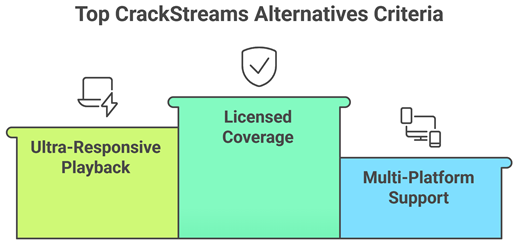
Sports streaming needs speed, safety, and consistent quality, especially during peak live events. Our team compared trusted services and platforms that aim to deliver legal access, stable playback, and clear schedules. We focused on options that help users avoid risky popups, malware, and sudden stream failures.
- We chose based on licensed coverage, clear terms, and reliable providers, so access stays consistent.
- The experts in our team shortlisted platforms with ultra-responsive playback, fewer drops, and rapid load times.
- Our team chose services that allow you to switch resolution smoothly, without compromise on clarity.
- We made sure to shortlist options supporting mobile, desktop, and smart TVs, with hassle-free setup.
- Security and privacy were important, so we chose secure sites with minimal trackers, safe payments, and transparent policies.
The experts in our team selected options that consistently maintain quality links and provide versatile streaming choices today.
Are CrackStreams Alternatives Legal and Safe to Use?
Legal alternatives are safer because they have licensing deals and predictable playback. Illegal streaming sites often carry pop-ups, fake download prompts, and higher malware risk. My rule is simple. If a service takes standard payments and has clear terms, it is usually the safer route.
- Official licensing: Legal platforms list rights and regions, which reduces sudden shutdowns and broken links.
- Account security: Use strong passwords and two-factor login when offered, especially on paid streaming accounts.
- Device safety: Avoid sites pushing APK files or browser extensions, which can hide harmful code.
- Privacy basics: Use updated browsers and ad blockers on desktop, even when using legitimate services.
- Payment protection: Prefer Apple Pay, PayPal, or virtual cards to limit exposure if a breach occurs.
Which CrackStreams Alternative is Best for professional football, professional basketball, and professional baseball?
Big US leagues are split across networks, so there is no single perfect replacement. The best approach is one live TV service for national games, plus a league product if you want out-of-market matchups. Always check blackout rules, since they affect professional basketball and professional baseball the most.
- YouTube TV: Strong for professional football and professional basketball national broadcasts, plus local channels in many areas.
- Hulu + Live TV: Good for ESPN and network games, with an easy interface for casual viewers.
- Sling TV: Cheaper entry option, but you must choose the right base plan and add sports extras.
- professional basketball League Pass: Best for out-of-market games, though local blackouts can still apply.
- professional baseball.TV: Great for out-of-market professional baseball, but local restrictions can block nearby teams.
What is the Cheapest CrackStreams Alternative That Still Works Well?
The cheapest reliable option depends on what you watch most. Budget services can be excellent, but only if they include the channels carrying your games. Before subscribing, compare monthly price, local channel availability, and whether you need add-ons for your sport.
- ESPN+: Low-cost sports streaming with select live events, but it does not replace full live TV.
- Sling TV: Often cheaper than full bundles, yet channel coverage varies by plan and region.
- Peacock: Affordable for certain sports and events, but coverage is not universal across leagues.
- Paramount+: Useful for CBS sports in many markets, especially football, depending on local station access.
- Free legal options: Some leagues post highlights and select games, but schedules and rights change often.
What Should I Avoid When Searching for CrackStreams Alternatives Online?
Many sites copy the CrackStreams style and use risky ads, fake buttons, and misleading “HD” claims. These can lead to scams or device infections. Stick to official apps, known streaming platforms, and trusted app stores. If something feels pushy, leave.
- Fake download prompts: Avoid “install player” messages, since browsers already support video playback on legitimate sites.
- Clone domains: Look for misspellings and extra dashes, which often signal copycat scam websites.
- Forced notifications: Do not allow browser notifications, since they can flood you with spam and risky links.
- Too-good pricing: Lifetime access deals are often unreliable, and real sports rights rarely sell that way.
- Shady redirect ads: If clicking play opens new tabs repeatedly, exit and use a licensed service instead.
Verdict:
In this review, you got acquainted with some of the best CrackStreams alternatives for reliable streaming and live sports access. Each option delivers different strengths, whether it is safety, stability, or content variety. To help you take the final call, I have created this verdict.
- Pluto TV: For live-TV channel surfing, Pluto TV is the most popular and a superior choice, with a robust guide and reliable streams. I like it for news, sports talk, and always-on channels when you want a cable-like feel without the hassle.
- Tubi: Tubi is a top rated, cost-effective pick for on-demand movies and series, with impressive variety and solid recommendations. My go-to when you want quick starts, fewer stream issues, and easy browsing.
- Red Bull TV: Red Bull TV is an excellent, top-notch option for action sports and event content, and I recommend it when you care about production quality and a more focused catalog over endless scrolling.
FAQs
Why are users looking for CrackStreams alternatives?
Users seek CrackStreams alternatives in the USA due to frequent outages, unstable links, intrusive pop-ups, and malware risks. Streams can be low-quality, delayed, or removed mid-game. Many also want safer, legal options with reliable HD playback, better device support (Roku/Fire TV), and consistent access to major leagues without constant redirects.
Are CrackStreams alternatives legal to use?
It depends on the service. Legal CrackStreams alternatives include licensed platforms (ESPN+, Peacock, Paramount+, Prime Video, professional basketball League Pass, MLS Season Pass) and free, rights-cleared streams. Sites rebroadcasting games without permission are illegal to watch or distribute in the USA. Verify licensing, official app listings, and transparent terms of service before streaming.
Can I watch live sports for free without CrackStreams?
Yes, but options are limited and league-dependent. In the USA, you can watch some games free via network OTA channels (ABC/CBS/FOX/NBC with an antenna), free trials from streaming services, and occasional official free streams or highlights. Avoid “too-good-to-be-true” sites — many are pirated, risky, and frequently taken down.
Which CrackStreams alternative is best for live sports?
For most USA viewers, YouTube TV or Hulu + Live TV are strong CrackStreams alternatives because they bundle major sports channels and local networks for broad coverage. If you want a lower-cost, legit option, consider Sling TV (especially for ESPN). For specific leagues, ESPN+, Peacock, and Paramount+ can be best-value.
Do free sports streaming sites show real live matches?
Some do, but many free sports streaming sites use unauthorized rebroadcasts, which can be unstable, delayed, or abruptly removed. “Live” feeds may be restreams with added latency, misleading titles, or scam overlays. For real, reliable live matches in the USA, use licensed apps, an antenna, or verified free trials.