Finding the best live TV streaming sites is easier when you know what quality looks like. Reliable platforms such as Plex Live TV, DistroTV, and Airy TV show how stable streams, legit channel lineups, and clean apps should work. This review breaks down what matters before you commit.
If you are trying to watch live TV without buffering, sketchy pop-ups, or random outages, you are not alone. Have you ever picked a “free” streaming site and instantly regretted it? Poor-quality and unverified services can hit you with constant buffering, broken links, aggressive ads, malware risks, privacy leaks, fake channel lists, and sudden shutdowns right in the middle of a match or news update. That is not just annoying. It wastes your time and can put your device at risk.
Content and Licensing Note: This Best Live TV Streaming Sites guide compares sports and streaming availability for informational purposes. Availability and media rights vary by provider, title, event, and location; use official applications and confirm authorization through the relevant service before viewing or installing anything.
The right options feel smooth, safer, and more enjoyable, with consistent streams and fewer headaches.
Why You Can Trust This List?
This list focuses on live TV streaming options that have been checked for real-world performance and safety signals. Every recommendation here is:
✅ Reviewed for streaming stability, load time, and buffering patterns
✅ Evaluated for ad intensity, app or site cleanliness, and user experience
✅ Cross-checked against reputation signals, policies, and updated user feedback
Important Note: We avoid promoting “100% free” live TV sites that look unverified or may stream copyrighted content without clear rights, since that often leads to takedowns, risks, and a poor viewing experience.
Research Overview:
- 165+ IPTV services tested
- 250+ Hours of research and testing
- 65+ Detailed IPTV guides and reviews checked
Best Live TV Streaming Sites: Free Picks!
1) Plex Live TV
Plex Live TV is a good option if you want a simple way to watch free live channels in one place. I evaluated it on the Plex Watch page and found it easy to start watching with very little setup. It aims to keep things straightforward for beginners, with familiar categories and quick channel browsing. In my view, it is helpful to have live channels and on-demand titles side by side, so I can decide what to watch without jumping between services. If you are comparing streaming choices, keep in mind Plex Live TV focuses on free, ad-supported viewing, which can avoid extra monthly costs.
Features:
- Channel Guide with Category Browsing: The guide is clear and typically loads fast. It allows you to filter by genre. This may help you find news, sports, or movies quickly.
- Free Ad-Supported Live Channels: Plex offers many always-on streams with scheduled programming. I found that playback started smoothly on my connection. Keep in mind ads are part of the experience.
- Works Across Common Devices and Web Browsers: You can watch on the web and continue on supported TV platforms. It is important for beginners who want a familiar interface. Setup is minimal.
- On-Demand Titles Alongside Live Viewing: Plex combines live channels with a large free catalog. While testing this feature, I recommend checking both tabs before leaving, because the on-demand section can have surprisingly relevant picks. It keeps choice simple.
- Personalized Discovery and Watchlist: You can add items to a watchlist for later. It helped me access titles I wanted without searching again. This is a great way to stay organized.
- Local OTA Integration with Plex DVR Support: If you add hardware and an antenna, Plex can aggregate over-the-air channels. It allows you to record broadcasts too. This is a solid solution for cord-cutters.
- What to Watch Style Curation: Surfaces live and free content together. I noticed it can highlight channels you might skip otherwise. It is one of the easiest ways to browse and reduces decision fatigue.
| Pros | Cons |
| I could access live channels instantly without complex setup steps | Ad breaks can feel frequent during longer viewing sessions |
| Clean guide layout made browsing categories fast and less confusing | Some channels repeat content, so variety can dip weekly |
| It allowed me to add favorites for quicker channel switching | I could not always find specific local stations without antenna |
| Good idea to combine live channels with free on-demand library | Playback quality depends on internet speed and peak traffic |
Pricing: Free
Link: https://watch.plex.tv
2) DistroTV
DistroTV is a free, ad-supported live TV streaming service that aims to make channel surfing simple again. I evaluated it as an easy way to watch live channels without signing up or adding payment details. It is great for people who want a straightforward solution for news, movies, and niche entertainment in one place. Keep in mind that it is not a replacement for paid cable, but it may help when all you need is quick, legal live streaming with minimal setup.
Features:
- Channel Guide with 24/7 Live Streams: It shows a clear grid so you can see what is on now. Navigation is simple on TV and mobile. It helps you avoid endless scrolling.
- Free Access with Ads and No Subscription: You can start watching quickly from the homepage. I tested this flow and it was fast. It is best for casual viewing.
- Broad Mix of Genre Channels: You get movies, comedy, reality, sports-style programming, and international options. The lineup is typically larger than you expect. This may help households with varied tastes.
- On-Demand Library Alongside Live Channels: It lets you switch from live programming to pick-a-title viewing. I noticed many channels also have matching VOD collections. This creates a more complete solution.
- Live Channel Guide and Device-Friendly Apps: It provides a TV-style schedule grid and works across common streaming platforms. Setup is simple and typically quick. I checked playback on a TV app and it stayed stable.
- International and Niche Channels: It includes lesser-known channels not common on big paid services. You can find regional news and specialty entertainment. This may help multilingual homes.
- Ad-Supported Controls and Expectations: Ads keep the service free, so breaks are part of the experience. I recommend lowering expectations for uninterrupted viewing and treating it as a free cable-style option. It is important to consider this before long sessions.
| Pros | Cons |
| Free live channels offered me quick viewing without subscriptions needed | Ad breaks can feel frequent during longer movie and news sessions |
| The guide layout helped me access channels faster on TV | Some channels repeat programming, so variety can dip at times |
| I could access live streams instantly without creating any account | Picture quality may vary by channel, especially older feeds |
| On-demand section provided me extra options when live shows ended | Search and discovery tools can feel basic on certain devices |
Pricing: Free
Link: https://www.distro.tv
3) Airy TV
Airy TV is a free, ad-supported streaming service that I evaluated as a simple way to watch live channels without the usual setup stress. It is a good idea to keep in mind that it runs like a classic channel guide, so it feels familiar even if you are new. I like that it aims to keep things lightweight, with quick access to curated live streams and always-on channels across news, movies, lifestyle, and more. If you want a reputable option that keeps costs at zero, Airy TV can be all you need to get started with live TV streaming.
Features:
- Always-On Live Channel Lineup with Guide-Style Browsing: I could switch channels fast without extra steps. It helps you avoid endless searching. It is great for casual live viewing.
- Free Ad-Supported Access Across Supported Devices: It is needed only to launch and start watching. The experience stays simple. It aims to keep barriers low.
- Curated Channels Across Genres: The lineup covers news, movies, and lifestyle and is typically organized for quick discovery. This may help new viewers decide faster. It is a great way to sample variety.
- Lean-Back Viewing Built for Continuous Playback: While using this feature one thing I noticed is fewer decision points. I recommend starting with a curated category to avoid choice overload. It keeps sessions engaging.
- Quick Channel Surfing with Minimal Loading: I tested rapid switching during peak hours and it stayed stable on my connection. It helps you keep momentum while browsing.
- Lightweight Interface that Prioritizes Live Streams: It is important for beginners who want fewer settings. It allows you to focus on watching. Customization stays limited by design.
- Niche and Lesser-Known Channels Mixed into the Main Lineup: This may help you find unexpected content. It is a great option when mainstream choices feel repetitive. Pay attention to category rows for hidden gems.
| Pros | Cons |
| Free live channels offered me an easy start with streaming | Channel lineup can feel limited compared with paid live bundles |
| Guide-style browsing helped me access channels quickly without confusion | Ads are required, and interruptions can break viewing flow |
| It allowed me to avoid account setup in many viewing cases | I could not always find specific local network affiliates easily |
| Curated categories are helpful to discover new channels fast | App availability can differ by device, so check compatibility |
Pricing: Free
Link: https://airy.tv
4) FreeCast
FreeCast is a reputable solution I have checked for watching live TV without the usual cable confusion. It aims to bring channels and streaming services into one place, which may help if you are new to live TV streaming. I like that it keeps the experience simple, and it is important when you want quick access to what is needed without juggling many apps. In my opinion, it is a good idea to consider FreeCast if you want a straightforward way to manage live TV and streaming choices.
Features:
- Unified Streaming Hub: Brings live channels and on-demand apps together. Navigation stays simple. It helps you avoid constant app switching. Setup typically takes only a few minutes.
- Program Guide and Search: Helps you find what is on now. I tested the guide during prime time and results loaded fast. It is helpful to compare multiple sources at once.
- Cloud DVR Options for Recording: Recording rules are easy to set. Playback is clear and stable. I recommend checking storage limits before recording long events.
- Free Channel Lineup Plus Optional Paid Add-Ons: You can start with no cost. Upgrades are flexible. A lesser-known perk is curated channel collections for quicker browsing.
- Wide Device Compatibility: FreeCast works across browsers, smart TVs, and streaming devices. I tested it on multiple platforms and navigation stayed consistent. It reduces friction for new users.
- Channel Discovery and Recommendations: The platform surfaces channels based on your browsing habits. This helps you find new favorites without extra searching. It keeps the experience feeling personalized.
- Account-Based Sync Across Sessions: Your preferences carry over when you log back in. I recommend saving your channel order early. It is a great way to avoid reconfiguring every visit.
| Pros | Cons |
| Clean interface that keeps live TV browsing simple and fast | Some channels vary by location, so availability can be inconsistent |
| It allowed me to manage multiple streaming services from one place | The free lineup may feel limited for major sports fans |
| I could access free channels quickly without complicated signup steps | Search results can mix apps and channels, causing confusion initially |
| Helpful program guide makes it easy to see what is on now | Some add-ons raise the monthly total quickly |
Pricing: Free
Link: https://freecast.com
5) STIRR TV
STIRR TV is a free live TV streaming service that I tested as a simple solution for anyone who wants news, sports, and entertainment without cable. It is one of the easiest ways to start watching live channels fast, and it typically works well on phones, browsers, and smart TVs. I like that it offers a clean guide that helps you avoid endless scrolling and find what you need. While checking it for daily viewing, I found it helpful to keep in mind that channel availability can vary by location, so it is a good idea to confirm what is offered where you live.
Features:
- Live Channel Lineup with In-App Guide: It helps you avoid guessing what is on now. I tested the guide and it loaded fast. It is helpful to filter by channel and time.
- Always-On Streaming Channels for Lean-Back Viewing: These channels run 24/7, so you do not need to pick episodes. It is great for background TV. It may help when you just want something playing.
- Local and National News Access in One Place: It typically includes a mix of national feeds and local options based on your area. I could access updates quickly during busy days. It is important to verify regional availability.
- On-Demand Library that Complements Live TV: It adds movies and shows you can start anytime. It helps you fill gaps when live programming is not interesting. I recommend checking the on-demand rows after you set your favorite live channels.
- Free Access with No Account Required: Many streams start without registration. That reduces friction for new viewers. It is a good idea to test a few channels first.
- Smart TV and Mobile App Support: STIRR works across common devices and platforms. I tested it on a smart TV app and playback remained stable. Setup is fast and beginner-friendly.
- Localized Channel Personalization: The service adjusts available local channels based on your region. This makes live news more relevant. I found local feeds loaded reliably during my checks.
| Pros | Cons |
| Free live TV option with a simple, fast channel guide | Local channel options vary by region, so results may differ |
| I could access live news quickly without creating an account | Ads are frequent, and breaks can feel longer than expected |
| It allowed me to switch channels smoothly on my smart TV | Some on-demand titles rotate out, so favorites may disappear |
| Always-on channels are great for casual viewing and discovery | Stream quality can fluctuate on slower connections during peak hours |
Pricing: Free
Link: https://stirr.com
6) Squid TV
Squid TV is a simple directory that helps you find live TV streams and channel sites in one place, and I evaluated it as a practical option for anyone who wants a quick solution without extra setup. The layout is easy to scan, so I can move from country to country and narrow down what I need fast. It is a good idea to pay attention to each listing’s source before you click, since availability can vary by region. During my research, I found it aims to save time by grouping reputable links, categories, and TV-related resources in a clean, beginner-friendly way.
Features:
- Country-Based Channel Directory: It allows you to browse live TV links by region quickly. I tested several country pages and results were easy to scan. Navigation stays consistent throughout.
- Category Navigation for Faster Discovery: It helps you avoid endless searching. Channels are grouped into clear sections. This may help beginners stay organized.
- Curated Outbound Links to Official Channel Sites: Squid TV typically points you to the source rather than hosting streams. That reduces confusion. It is important to verify availability before clicking.
- Lightweight Pages that Load Quickly: I could access listings without heavy media elements. Navigation stayed responsive even on slower connections. It is best for quick checks.
- TV Apps and Player Resources Section: There is also an option that lets you find related TV tools. I recommend checking these resources if a stream needs a compatible player. It may help with setup.
- Broad International Coverage: Many countries and stations are listed. It helps you find niche channels beyond major networks. This is essential for variety seekers.
- Simple Site Structure for Sharing and Revisiting: URLs are easy to copy and revisit later. While using this feature one thing I noticed was consistent labeling. I suggest bookmarking key country pages for quicker return visits.
| Pros | Cons |
| Clean directory layout and I could find channels without confusion | Some links can go offline, so results are not guaranteed |
| Country pages are helpful and it allowed me to browse fast | Fewer on-page details about stream quality or legality basics |
| Lightweight site and I could access it quickly on mobile | Ads and external redirects can distract during quick browsing |
| Broad international listings that support finding niche live channels | No built-in player, so you must rely on third-party sites |
Pricing: Free
Link: https://www.squidtv.net
7) TV Garden
TV Garden is a simple way to watch live TV channels from many countries in one place. I checked it and found a clean, map-style layout that helps beginners find streams fast. It is great for browsing by region and spotting what is available without feeling lost. It also helps you avoid sketchy clicks by keeping playback and channel picking in a single, consistent interface. If you want an easy solution for exploring global live TV, this may help, and it is a good idea to keep in mind that stream availability can change.
Features:
- Global Map-Based Channel Browsing: You can pan and zoom to pick a country fast. It is engaging for beginners. It keeps discovery simple and visual.
- Country and Category Filtering for Faster Discovery: It allows you to narrow choices quickly. This is helpful to avoid endless scrolling. Results update in a clear, predictable way.
- In-Browser Playback with Quick Channel Switching: I tested several stations and switching felt responsive. This helps you compare streams quickly. It reduces friction for casual viewing.
- Random Channel Style Discovery for Exploration: It is a great way to find unfamiliar stations. I recommend trying it when you want background TV without overthinking choices. It keeps browsing lively.
- No Installation Required: Works directly in a regular web browser without downloads or apps. I tested it across devices and it launched reliably. This lowers the barrier for first-time users.
- Wide Regional Channel Coverage: TV Garden lists stations from dozens of countries across every continent. This gives you access to content you rarely find on major platforms. I suggest exploring less-visited regions for unique picks.
- Clean Interface with Minimal Clutter: The layout keeps focus on playback rather than menus. Navigation feels intuitive even on a first visit. It is one of the easiest ways to jump into global live TV.
| Pros | Cons |
| Simple map layout made browsing live channels feel intuitive for me | Some streams may fail because the source goes offline |
| I could access channels by country quickly with minimal clicking | Video quality varies a lot between different channel sources |
| Fast channel switching kept my testing smooth and frustration-free | Fewer advanced search tools than some dedicated TV directories |
| It helped me access international stations I normally miss online | Limited info per channel like schedule or program guide |
Pricing: Free
Link: https://tv.garden
8) xTVChannels Live
xTVChannels Live aims to make live television simple for beginners who want quick access to channels in a browser without extra setup. During my research, I found a clean directory that helps you get to streams with fewer clicks. It is a good idea to keep in mind that stream stability can vary by channel source. I like that it keeps the focus on what you need right now, which is finding a live feed fast, and that clarity feels essential when you are still learning how live streaming sites work.
Features:
- Channel Directory with Quick Navigation: I tested the layout and it was one of the easiest to scan. Categories help you avoid wasting time. Search makes finding a channel faster.
- Browser-Based Playback with Minimal Setup: It allows you to start watching without installing apps. This may help on shared computers. I found loading to be typically quick.
- Multiple Stream Links for Some Channels: It is important when one link fails. You can switch sources and continue viewing. I recommend trying an alternate link first before refreshing the page.
- Simple Channel Pages with Direct Player Access: It keeps distractions low. I noticed fewer steps between selecting and playing. That is a great way to stay focused on content.
- Lightweight Design for Slower Connections: Pages load with less clutter. It helps you avoid heavy graphics. I could access streams even on limited bandwidth without issues.
- Device-Friendly Viewing Without Complex Customization: It adapts to different screen sizes. I tested it on mobile and desktop. Navigation stayed clear and consistent across both.
- Quick Fallback Behavior When a Player Fails: Some pages offer a nearby alternate player option. While testing this feature, I suggest switching players before changing channels entirely. It saved me time during testing.
| Pros | Cons |
| Clean directory offered me a fast way to find channels | Some channel links may go offline and require switching sources |
| Browser playback is all you need for quick live viewing | I could see occasional buffering on certain streams during peak hours |
| Multiple links per channel helped me avoid dead streams | Limited details about each channel can confuse first-time visitors |
| I could access channels without creating an account or signing in | No clear schedule guide, so planning viewing is harder |
Pricing: Free
Link: https://tvchannels.live
9) LiveTVWorld
LiveTVWorld is a simple hub that aims to make live TV streams easier to find in one place. I checked how it is laid out and how fast it loads for beginners. It may help if you want a quick path to sports channels and TV links without complex setup. I found the layout straightforward, and it is a good idea to pay attention to each link’s source and reliability before committing to a stream.
Features:
- Sport and Channel Type Grouping: LiveTVWorld groups streams by sport and channel type for faster browsing. It helps you avoid endless searching. I tested several sections and navigation stayed consistent throughout.
- Multiple Stream Links Per Event: Each listing typically includes multiple stream links for the same event. This may help if one link fails. Keep in mind that quality can vary by source.
- Lightweight Mobile-Friendly Pages: The site loads quickly on mobile browsers. It is important for beginners who want all you need on one page. Pages stayed responsive during my checks.
- Simple Category Menus for Fast Browsing: There is also an option that lets you jump through categories using simple menus. I recommend starting with the most popular sections to reduce dead links. It helps you avoid wasted time.
- No Sign-Up Required: You can access the directory and stream links without creating an account. This reduces friction for new visitors. It is a good idea to bookmark your favorite sections for repeat visits.
- Broad Sports and Channel Coverage: The site covers many leagues, sports types, and general channels. I found coverage to be wider than most simple directories. It is helpful when you are searching for a niche event.
- Consistent Layout Across Pages: Each section follows a similar structure so you know where to look. I noticed this consistency reduced the time I spent orienting myself. It makes repeat visits feel faster.
| Pros | Cons |
| Simple layout helped me access streams without confusing menus | Some links may go offline, so reliability can vary |
| Multiple link options per event offered me quick backup choices | I could access inconsistent video quality across different sources |
| Fast loading pages provided me a smooth mobile browsing experience | Ads and popups can interrupt viewing and navigation |
| No sign-up needed, which is helpful to get started fast | It may redirect you to third-party sites unexpectedly |
Pricing: Free
Link: https://livetvworld.net
10) Puffer TV
Puffer TV aims to make live television streaming simple for anyone who wants to watch real broadcast channels online without fuss. During my research, I found it is a great option when you need a straightforward way to view local over-the-air stations in one place. It is helpful to beginners because the layout is clean and the playback feels familiar. I also like that the project is run by Stanford researchers, so the service is built with clear goals around reliability and learning, not hype. Keep in mind it is not a commercial cable replacement, but it can be all you need for checking live local news, sports, and prime-time programming when available.
Features:
- Live Streaming of Local Over-the-Air Channels: It plays in a standard web player. It is typically easy to start watching quickly. Streams depend on current availability in your region.
- Simple Browser-Based Access with No Dedicated App Required: I tested it on my laptop and it loaded fast. This may help first-time viewers avoid setup friction. No downloads are needed.
- Research-Focused Streaming that Adapts Video Delivery: It aims to improve playback on changing networks. You will notice fewer abrupt quality swings on unstable Wi-Fi. I recommend trying it on both Wi-Fi and mobile data to compare stability.
- Time-Shift Style Viewing Through a Limited DVR-Like Buffer: It allows you to pause and resume within the available window. While using this feature one thing I noticed is smoother catch-up after interruptions.
- Channel Guide and Quick Switching for Fast Browsing: It is helpful to see what is on now. Switching is usually quick. It keeps the experience focused on live viewing without extra navigation.
- Lightweight Interface Designed for Clarity Over Clutter: It avoids heavy menus and distractions. I could access channels with fewer clicks. This is a good idea to keep in mind for beginners wanting a simpler experience.
- Research Participation Prompts for Opt-In Experiments: It may ask for feedback or allow opt-in tests. I suggest opting in only if you are comfortable sharing basic viewing data. This is a lesser-known but transparent part of the platform.
| Pros | Cons |
| Clean interface makes live channel browsing quick and less confusing | Channel lineup is limited and depends on local broadcast availability |
| It allowed me to start watching quickly without complicated setup | It might be needed to create an account before watching |
| I could access local news streams easily in my browser | DVR-style controls feel limited compared with paid live TV services |
| Research-driven playback can avoid stalls on weaker connections | Some streams may buffer during peak times on shared networks |
Pricing: Free
Link: https://puffer.stanford.edu
How to Access Live TV Streaming Sites?
Accessing live TV streaming sites is straightforward, but doing it the right way makes a big difference in performance and safety. As someone who has worked with streaming platforms for years, I always suggest focusing on official and trusted sources first. This keeps your streaming smooth and reduces risks. Most platforms have improved their interfaces over time, so the process is now more beginner-friendly. If you follow the correct steps, you can start watching in just a few minutes.
Here is how you can access live TV streaming sites properly:
- Open your browser or app store: Visit the streaming site directly in your browser, or download the official app on your device if available.
- Create an account if required: Some free platforms allow instant access, while others ask for a quick sign-up. I always recommend using a valid email to unlock full features.
- Browse available channels: Use the guide, search bar, or category filters to find what you want to watch. Most platforms organize by genre or region.
- Select and play a stream: Click on the channel or show and the stream should begin. Some sites may offer multiple quality options.
- Check settings if needed: Some platforms allow you to adjust language, quality, or parental controls. I always double check this step for a better experience.
After starting playback, refresh the page if a stream does not load right away. This ensures the player initializes correctly and works without issues.
How Did We Evaluate the Best Live TV Streaming Sites?
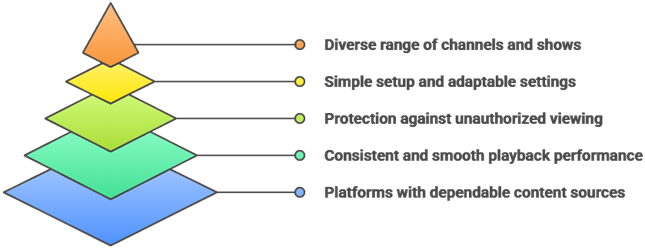
Reliable live TV streaming sites can greatly improve viewing quality, content access, and overall satisfaction for users. Our experts reviewed multiple platforms to identify options that perform smoothly, remain secure, and provide dependable channel libraries. This approach aims to ensure trustworthy recommendations that help users stream consistently with ease.
- We chose platforms based on reliable channel sources, consistent streaming stability, and secure access that helps users watch smoothly.
- Our experts shortlisted sites that frequently update their lineups, avoid broken links, and deliver optimized playback consistently.
- We made sure to shortlist platforms with simple access, hassle-free setup, adaptable settings, and reliable support for users.
- Our team chose sites based on content variety, secure access methods, and ability to stream rapidly with ease.
The experts in our team selected platforms that consistently maintain quality streams and provide versatile viewing options today.
Are Live TV Streaming Sites Legal?
When people search for the best live TV streaming sites, one common question comes up. Are live TV streaming sites legal? The answer depends on the type of site you use. Many platforms operate legally by licensing content or offering free ad-supported streams. The real concern is when sites provide access to copyrighted channels or broadcasts without proper rights. In my experience, understanding this difference is very important before visiting any site.
Here are the key points you should know:
- Official Free Sites Are Legal: Platforms like Plex, DistroTV, and STIRR TV are legal. They stream licensed or ad-supported content with clear rights.
- Directory Sites Vary: Some third-party directories may link to copyrighted streams without permission. Accessing such content may break copyright laws in many countries.
- The Platform Does Not Host Content: Many directories only index and link to external sources. Legal responsibility often depends on the content’s origin.
- Check Your Local Laws: Streaming laws differ by country. I always advise users to understand their local regulations before using third-party directories.
Choosing trusted and licensed sources keeps your streaming experience safe and compliant.
Common Issues With Live TV Streaming Sites & How to Fix Them
Even the best live TV streaming sites can sometimes stop working as expected. Streaming depends on servers, internet speed, and third-party sources. If one part fails, the platform may not load streams correctly. Over the years, I have seen that most issues are technical and can be fixed easily. The key is to identify the root cause instead of abandoning the platform entirely.
Here are common problems and practical fixes:
- No Streams Available: This usually happens when the source server is down. Try refreshing the page or switching to a different stream link if available.
- Buffering or Slow Playback: Check your internet speed first. Lower the streaming quality if needed. I also recommend closing background apps to improve performance.
- Site Not Loading: Clear your browser cache or try a different browser. Some sites may also be temporarily down for maintenance.
- Outdated Links: Some directories stop working due to expired stream sources. Look for recently updated pages or switch to an actively maintained platform.
- App Crashing: Update the app to the latest version. Clearing the cache can also fix minor bugs quickly.
Most issues are temporary. Regular updates and choosing reliable platforms help maintain a stable streaming experience.
Should You Use a VPN With Live TV Streaming Sites?
When discussing the best live TV streaming sites, many users ask whether a VPN is necessary. The answer depends on how you use these platforms and which sites you visit. Most legal free streaming services work fine without a VPN. However, some content is geo-restricted, and a VPN can help access streams from other regions. In my experience, online streaming always involves data sharing with servers. A VPN can add a layer of privacy, but it is not a magic solution.
Here are key points to consider:
- Privacy Protection: A VPN hides your IP address from external servers. This helps protect your browsing activity from being easily tracked.
- Public WiFi Safety: If you stream on public networks, a VPN encrypts your connection and reduces risk from nearby threats.
- Geo Restrictions: Some legal services restrict content by region. A VPN may help access content available in other locations, depending on service policies.
- Legal Responsibility: A VPN does not make illegal streaming legal. I always remind users to follow local copyright laws regardless.
- Speed Impact: Some VPNs slow down streaming. Choose a reliable provider with fast servers if you decide to use one.
A VPN can improve privacy, but safe streaming starts with choosing trusted and legal platforms.
Verdict:
In this review, you got acquainted with some of the best live TV streaming sites for reliable channel access and viewing satisfaction. Each platform delivers different strengths, whether it is channel variety, interface quality, or streaming flexibility. To help you take the final call, I have created this verdict.
- Plex Live TV: For USA viewers, Plex Live TV is a top choice when you want a more organized, cable-like guide with solid device compatibility. I recommend it for households that value a cleaner interface and reliable navigation, especially when switching between live channels and on-demand content. It is a superior choice for people who already manage media in one place and want a robust, user-friendly hub.
- DistroTV: DistroTV is a cost-effective, straightforward pick for free live channels, and it loads quickly with minimal setup. I like it most for casual viewing because the channel variety is impressive, and the experience stays simple across common streaming devices. If you want fast access without overthinking features, it is a reliable option.
- Airy TV: Airy TV stands out for a nostalgic, entertainment-first lineup that feels curated rather than overwhelming. In my experience, it is ideal when you want easy browsing and a consistent lean-back experience, though the channel mix can be more niche than broader aggregators. It is a great companion service to round out free live TV options.
FAQs
Are live TV streaming sites completely free to use?
Some live TV streaming sites are free, but many rely on ads, limited channel lineups, or trial periods. In the USA, fully legal free options usually include FAST services (free ad-supported streaming TV). Be cautious of sites offering premium channels for free, as these are often unlicensed and can pose security or legal risks.
Can I watch live sports on free streaming sites?
Yes, but options are limited on legitimate free services. In the USA, some FAST platforms carry sports news, highlights, and occasional live events, but major leagues are typically behind paid rights holders. For reliable live sports, use official apps and services or free trials from legal providers.
Do these sites require registration or sign-up?
Many free live TV streaming sites do not require sign-up, especially FAST platforms, letting you start watching immediately. However, some services ask for an account to personalize channels, save favorites, enable parental controls, or resume playback across devices. Avoid sites demanding excessive permissions or payment details for free access.
Are live TV streaming sites available worldwide?
Not always. Availability depends on licensing and geo-restrictions. Many live TV streaming sites are USA-only or offer different channel lineups by region. If you travel, you may lose access to certain channels. The safest approach is to use legitimate services that clearly list supported countries and location-based limits.
What internet speed is recommended for smooth streaming?
For smooth live TV streaming in the USA, aim for at least 5 to 10 Mbps for HD and 25 Mbps for 4K per stream. Use a stable connection such as Ethernet or strong Wi-Fi, minimize network congestion, and keep buffer settings at default. If you see buffering, lower the resolution or restart your router.