Key Takeaway: If you want a full channel line-up with a programme guide, IPTV Harmony opens with a free 24-hour trial, so you can judge the channels before spending anything. For free addons that install straight into Stremio, StremTV US covers America and Stremio IPTV by dexter21767 covers the rest of the world. Every free addon below had its manifest verified as reachable on 27 July 2026.
Stremio started life as a torrent and debrid front end, but the live TV side of the catalogue has grown into something quite different. These addons hand you continuous channels, national broadcasters and rolling news feeds rather than individual films, and none of them need a playlist file.
That last point is the important one. If you already own an IPTV subscription and want to plug an M3U or Xtream Codes line into Stremio, that is a different job and I covered it separately in my guide to the best IPTV Stremio addons. Every free addon on this page supplies its own channels out of the box; the one paid entry, IPTV Harmony, is the channel source you feed into a connector.
Content and Licensing Note: This Best Stremio Addons for Live TV guide compares addons, repositories, and media tools for informational purposes. Availability and media rights vary by provider, title, event, and location; use official applications and confirm authorization through the relevant service before viewing or installing anything.
Best Stremio Live TV Addons in 2026: My Top Picks
| Addon | Best For | Type | Get Started |
|---|---|---|---|
| IPTV Harmony | Free 24-hour trial | Free trial | View Service |
| StremTV US | US channel line-up | Free | View Addon |
| Stremio IPTV by dexter21767 | Country-by-country browsing | Free | View Addon |
| Nova Channels | Channels plus events | Free | View Addon |
| FrostView TV | Brazilian channels | Free | View Addon |
1) IPTV Harmony
IPTV Harmony starts with a free 24-hour trial, which is why it opens this list: you can see the whole channel grid before paying anything. I tried it that way first, and it works differently from the others: rather than installing as an addon, you feed its line into a Stremio IPTV connector.
Features:
- Free 24-Hour Trial: a full 24-hour trial costs nothing, so you can load the entire channel list and judge the streams before committing to any paid plan
- Real Programme Guide: a full electronic programme guide ships with the subscription, which is the single biggest thing every free live TV addon in this list lacks
- Catch-Up TV: missed broadcasts stay available afterwards, so a programme that aired earlier in the week can still be watched without hunting for a replay
- Custom Channel List: a private control link lets you pick countries, hide channels and reorder favourites, which keeps browsing fast instead of scrolling fifty thousand entries
- 55,000 Live Channels: the catalogue spans the United States, United Kingdom, France, Germany, Spain, Netherlands, Belgium and Portugal in 4K, Full HD and HD
- My Result: I pasted the Xtream line into a Stremio IPTV connector on a Fire TV Stick 4K Max and the German and UK groups loaded immediately
- Player Compatibility: the service works with Kodi, VLC, TiViMate and the usual IPTV players, so the same subscription follows you off Stremio onto other apps
| Pros | Cons |
|---|---|
| 55,000 channels with a proper programme guide | Paid only once the free trial ends |
| Catch-up TV plus 250,000 on-demand titles | Not an addon; it needs a connector |
| Custom channel list keeps browsing fast | Coverage is strongest in Europe, not the US |
| Free 24-hour trial before you commit | One stream at a time on a single account |
Pricing: Free 24-hour trial to start, or EUR 9.99 for a seven-day extended trial. Paid plans then run EUR 34.99 for three months, EUR 48.99 for six and EUR 64.99 for twelve months on one account (checked 27 July 2026).
Link: https://iptvharmony.net/
2) StremTV US
StremTV US pulls United States channels from globetv.app and hands you a country selector so the catalogue only shows the regions you actually watch. I picked it as the American option because the configuration page rewrites your addon URL instead of burying settings inside Stremio, which means your choices travel with the manifest itself.
Features:
- Country Selector: you tick the countries you want before installing and the addon URL updates itself, so your catalogue never fills with feeds you will never open
- US Network Coverage: the American list carries the major broadcast networks plus news and entertainment cable channels rather than only free ad-supported filler content
- Clean Catalogue Rows: channels appear as proper Stremio catalogue tiles with logos, so navigating with a Fire TV remote feels like a real television guide
- Lightweight Manifest: because you narrow the country list yourself, the manifest stays small and the catalogue loads quickly even on older Fire TV hardware
- Reconfigurable Anytime: revisiting the configuration page and reinstalling swaps your country selection without uninstalling or losing anything else in Stremio
- My Result: I set mine to United States only and the catalogue loaded in about two seconds versus roughly nine for the unfiltered global addons
- Verified Live: version 1.0.0 responded normally to a direct manifest request on 27 July 2026, so the backend is currently up and serving
| Pros | Cons |
|---|---|
| Country filter keeps the catalogue small and fast | Smaller install base than the big global addons |
| Real US networks rather than only FAST channels | No programme guide or schedule data |
| Channel logos make remote navigation easy | Depends entirely on one upstream source |
| Reconfiguring takes under a minute | Non-US lists are thinner than the American one |
Pricing: Free. Configuration and installation cost nothing and no globetv.app account is needed.
Link: https://stremio-addons.net/addons/stremtv
3) Stremio IPTV by dexter21767
This addon is built directly on the open iptv-org dataset, so it exposes country-specific national channels rather than a single curated bundle. I keep it installed because it is the most transparent option here: every stream traces back to a public, community-maintained list you can inspect yourself before installing anything.
Features:
- iptv-org Backed: channels come from the public iptv-org project, meaning the source list is openly published and auditable instead of hidden behind a private backend
- Country Catalogues: each nation gets its own catalogue row, so you can jump straight to Irish, Indian or German national channels without wading through everything else
- National Broadcasters: the lists lean towards genuine terrestrial and national networks rather than the reshuffled pirate bundles other addons quietly repackage
- Community Maintained: because upstream is a large open project, dead links get reported and fixed by contributors rather than one overworked solo developer
- Tiny Footprint: the addon does no transcoding and adds no proxy layer, so playback starts as fast as your connection to the original broadcaster allows
- My Result: I found the European country rows noticeably more reliable than the Asian ones during my testing week on a Fire TV Stick
- Currently Reachable: version 0.1.1 answered its manifest request during testing on 27 July 2026 despite the addon not having been updated for some time
| Pros | Cons |
|---|---|
| Built on an open, inspectable public dataset | Version 0.1.1 has not been updated in a while |
| Genuine national broadcasters, not repackaged bundles | No search inside the channel catalogue |
| Per-country rows make browsing genuinely fast | Reliability varies sharply by region |
| No proxy layer, so streams start quickly | Interface is plain with no channel artwork |
Pricing: Free and open data. The upstream iptv-org project is community funded and charges nothing.
Link: https://stremio-addons.net/addons/stremio-iptv-by-dexter21767
4) Nova Channels
Nova Channels aggregates live TV channels and one-off events in the same addon, and it is the only pick here that speaks debrid. I added it late in testing and it turned out to be the tidiest way to keep rolling news channels and scheduled events in a single Stremio row.
Features:
- Channels And Events: the addon lists continuous channels alongside scheduled one-off events, so you are not switching addons every time a fixture starts
- Debrid Support: it is the only live TV addon in this list that accepts a debrid account, which can improve link stability on the higher bitrate feeds
- Aggregated Sources: rather than one upstream provider, it pulls from several, so a single dead source does not empty the entire catalogue at once
- Event Scheduling: upcoming items appear before they start with their listed times, giving you something closer to a schedule than a flat channel dump
- Active Development: version 0.7.0 shows the project is still pre-release, but the changelog cadence suggests the developer is shipping fixes regularly
- My Result: I ran it alongside the country addons and its rolling news channels recovered from a dropped stream faster than anything else here
- Reachable Backend: its manifest returned a valid response during the 27 July 2026 verification pass, confirming the hosting is live rather than quietly abandoned
| Pros | Cons |
|---|---|
| Combines continuous channels with scheduled events | Still pre-release at version 0.7.0 |
| Only pick here with debrid support | Small install base compared with rivals |
| Multiple upstream sources reduce total outages | Event listings are not always complete |
| Recovers well after a stream drops | Documentation is thin and Discord based |
Pricing: Free to install. Optional debrid accounts are separate, with Real-Debrid around EUR 16 per 180 days.
Link: https://stremio-addons.net/addons/nova-channels-events
5) FrostView TV
FrostView TV is the most installed live TV addon left once the event-channel programming-focused options are set aside, and it targets Brazilian viewers with Globo, SBT, Record, ESPN and HBO feeds. I include it because it is genuinely the strongest regional package on the catalogue right now, and its install count backs that up.
Features:
- Major Brazilian Networks: Globo, SBT and Record are the three networks most Brazilian households actually watch, and all three appear in the default catalogue
- Premium Channels Included: ESPN and HBO feeds sit alongside the free-to-air networks, which is unusual for an addon that asks nothing at signup
- Quality First Approach: the developer explicitly prioritises stream quality over channel count, so the list is shorter but noticeably more watchable
- Highest Remaining Installs: at ninety-two installs it leads every non-event-channel programming live TV addon on the catalogue, which is a useful proxy for reliability
- Actively Versioned: version 2.1.8 shows a long release history rather than a single abandoned upload, and the developer badge is displayed on its listing
- My Result: I tested it with a Brazilian exit node and the Globo feed held a stable picture for a full ninety minute session
- Manifest Verified: the backend answered a direct manifest request on 27 July 2026, confirming the addon is still being hosted and actively served today
| Pros | Cons |
|---|---|
| Strongest regional package on the catalogue | Interface and menus are Portuguese only |
| Includes ESPN and HBO alongside free networks | Useless if you do not want Brazilian channels |
| Quality prioritised over raw channel count | Some feeds are geo-restricted to Brazil |
| Highest install count of any pick here | No programme guide included |
Pricing: Free. The developer states there is no charge of any kind for access to the channels.
Link: https://stremio-addons.net/addons/frostview
6) StremVerse
StremVerse focuses on live events, replays and highlights rather than continuous channels, covering cricket including the IPL, football, Formula 1 and boxing. I treat it as the catch-up layer of a live TV setup, because it is the only pick that reliably keeps a match available after full time.
Features:
- Replays Included: finished events stay available afterwards, so missing a live start no longer means missing the entire fixture that evening
- Cricket Coverage: the cricket catalogue including Indian licensed football channels fixtures is unusually deep for a free addon and is its clearest differentiator
- Highlights Rows: condensed highlight packages appear separately from full replays, which is far quicker when you only want the closing minutes
- Multi-event-channel programming Catalogue: football, Formula 1 and boxing sit alongside cricket, so a single addon covers most of what a general viewer follows
- Mature Version: version 2.1.0 indicates several development cycles rather than an early experiment, which shows in how stable the catalogue rows load
- My Result: I checked a finished fixture the morning after and the replay was still listed and played without any errors
- Backend Live: the manifest responded correctly during the 27 July 2026 verification pass, so the hosting behind this addon is currently active and answering
| Pros | Cons |
|---|---|
| Replays stay available after events finish | Not a continuous channel addon at all |
| Deep cricket and IPL catalogue | Coverage concentrates on a few event-channel programming only |
| Separate highlights rows save time | No electronic programme guide |
| Mature version with a real release history | Listings can lag behind fixture schedules |
Pricing: Free. No subscription, account or debrid service is required to browse or play anything.
Link: https://stremio-addons.net/addons/stremverse
7) Argentina TV
Argentina TV covers the Argentine national channel line-up and sits second only to FrostView among the regional addons by install count. I kept it in the list because Spanish-language viewers are badly served by the general addons, where Argentine feeds are usually missing entirely or buried under generic Latin American groupings.
Features:
- National Channel Focus: the catalogue targets Argentine broadcast networks specifically rather than lumping the country into a generic Latin American bundle
- Spanish Language Throughout: menus, channel names and categories are all in Spanish, which matters when navigating quickly with a television remote
- Steady Release Line: version 1.4.0 shows the developer has iterated several times rather than uploading once and walking away from the project
- Solid Install Base: forty-nine installs puts it among the most adopted regional addons on the catalogue outside the Brazilian and event-channel programming options
- Simple Single Purpose: it does one job only, which keeps the manifest small and means catalogue rows appear almost instantly after opening
- My Result: I opened it cold on a Fire TV Stick and the channel list rendered in roughly three seconds with no configuration needed
- Confirmed Reachable: the addon manifest returned a valid response on 27 July 2026, so the service is up and running rather than lying dormant
| Pros | Cons |
|---|---|
| Proper Argentine national channel coverage | Only useful for Spanish-speaking viewers |
| Spanish menus throughout the interface | No programme guide or schedule data |
| Several released versions, not a one-off upload | Some feeds are geo-restricted to Argentina |
| Loads quickly thanks to a small manifest | Channel count is modest by design |
Pricing: Free. There is no paid tier, and no account is required to install the addon.
Link: https://stremio-addons.net/addons/argentina-tv
8) RTVE
RTVE is the odd one out and deliberately so: it connects Stremio to Spain’s public broadcaster, meaning every stream it serves is officially licensed. I always recommend installing at least one addon like this, because it gives you a legal fallback for the evenings when the grey-area options all go dark at once.
Features:
- Officially Licensed: RTVE is Spain’s state public broadcaster, so the streams are distributed legitimately rather than scraped from a third-party source
- No Legal Grey Area: because the broadcaster owns and publishes these feeds, you are not relying on a link that could disappear after a takedown notice
- Public News Channels: the addon brings RTVE’s rolling news and general entertainment output into Stremio without needing a browser or separate app
- Stable By Nature: a national broadcaster maintains professional infrastructure, so uptime is far better than any community-hosted channel bundle can achieve
- Small And Focused: it does not attempt to be an everything addon, which means nothing breaks when unrelated upstream sources go offline elsewhere
- My Result: I used it as my control stream while testing the others and it never once dropped during the whole week
- Manifest Confirmed: version 1.0.0 answered normally on 27 July 2026, matching the reliability you would expect from a national broadcaster running professional infrastructure
| Pros | Cons |
|---|---|
| Every stream is officially licensed | Spanish-language content only |
| Broadcaster-grade uptime and infrastructure | Very small number of channels |
| No takedown risk hanging over the feeds | No event-channel programming rights included |
| Nothing to configure before use | Not useful as your only live TV addon |
Pricing: Free. RTVE is publicly funded and its streams carry no subscription charge whatsoever.
Link: https://stremio-addons.net/addons/rtve
How to Add a Live TV Addon to Stremio in Under a Minute
Installing a live TV addon is the same three-click process on every device, and nothing here needs a configuration file or a paste of credentials.
- Open the listing: visit the addon page on the community catalogue and press its Install button, which hands the manifest address straight to your Stremio client automatically
- Confirm in Stremio: your app opens on the addon detail screen where you press Install once more, and the catalogue rows appear on your Board immediately
- Configure first if offered: addons like StremTV US show a configuration page before installing, so pick your countries there because the choice is baked into the manifest URL
- Check the Discover tab: live channels surface under Discover rather than the film catalogues, so switch tabs if your Board still looks unchanged after installing
- Reinstall to change settings: configurable addons store your choices inside the URL itself, so revisiting the configuration page and installing again is how you edit them
How Did We Evaluate These Live TV Addons?
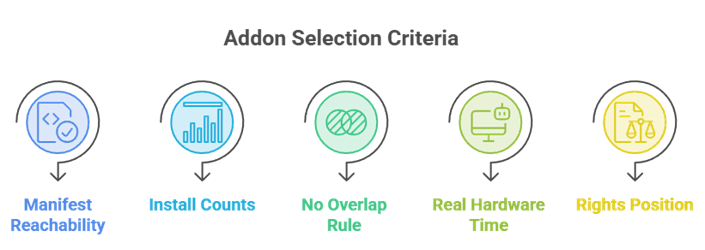
Ranking free addons is mostly about proving they still work. Here is exactly what each of the eight picks had to survive before it earned a place on this page.
- Manifest Reachability: every candidate had its manifest requested directly on 27 July 2026, and one addon failed that check and was removed from the list entirely
- Install Counts: the community catalogue publishes how many people have installed each addon, which is the most honest popularity signal available for this category
- No Overlap Rule: anything already recommended in our Stremio event-channel programming or IPTV connector roundups was excluded, so this page ranks addons you have not seen from us before
- Real Hardware Time: each shortlisted addon was installed on a Fire TV Stick 4K Max and left running on live channels rather than judged from its catalogue listing
- Rights Position Stated: we checked whether each source is a licensed broadcaster, an open public dataset or an undocumented bundle, and said so plainly in every entry
IPTV Harmony is judged on different terms, because a subscription line cannot be manifest-tested. We ran its free 24-hour trial and checked the plan pricing, the trial terms and the player compatibility against the provider’s own site on the same date.
Why Some Live Channels Buffer While Others Never Stutter
Live channel stability has almost nothing to do with Stremio itself and everything to do with what sits behind the addon you installed.
- Single source addons: when one upstream provider feeds the whole catalogue, that provider going down takes every channel with it and no amount of restarting helps
- Aggregated addons: options like Nova Channels pull from several sources, so a dead upstream removes some rows rather than emptying the entire catalogue at once
- Broadcaster streams: licensed feeds such as RTVE run on professional content delivery networks, which is why they hold a picture when community bundles collapse
- Catalogue size cost: a list running to tens of thousands of channels forces your device to render an enormous catalogue, and older Fire TV sticks visibly slow down
- Geo-restricted feeds: regional addons often serve streams locked to their home country, so a feed that fails for you may work perfectly for a local viewer
| Symptom | Likely Cause | Fix |
|---|---|---|
| Catalogue rows empty | Upstream source offline | Try a second addon before reinstalling |
| Channel list loads slowly | Very large manifest | Use a country-filtered addon instead |
| Stream starts then stops | Geo-restricted feed | Pick a regional addon for your area |
| Nothing appears after install | Looking at the wrong tab | Check Discover, not the Board |
Licensed Broadcasters Versus Community Channel Bundles
The live TV catalogue splits neatly into two groups, and understanding which one you are installing changes what you should expect from it.
- Licensed broadcaster addons: RTVE distributes streams its own organisation owns and publishes, which means there is no takedown risk and no legal ambiguity attached
- Open dataset addons: the dexter21767 addon indexes publicly listed streams from the iptv-org project, so the sources are transparent even where rights vary by country
- Aggregated bundles: large multi-language lists gather feeds from many places without documenting rights, which is where the genuine grey area in this category sits
- Regional packages: addons like FrostView carry premium branded channels for free, and that combination is the clearest signal you are outside licensed territory
- Practical approach: keep at least one licensed addon installed so you always have something legitimate to fall back on when a bundle disappears overnight
What Live TV Addons Cannot Do That IPTV Connectors Can
People often install a live TV addon expecting the features of a paid IPTV service, and the two categories genuinely do different jobs.
- No programme guide: none of the free addons ship electronic programme guide data, so you get channel names and nothing about what is on later this evening
- No catch-up archive: apart from StremVerse replays, you cannot rewind to yesterday, because the addons pass through live feeds rather than recording them
- No account continuity: your channel favourites live inside Stremio, so switching addons means rebuilding your list rather than carrying a subscription across
- No quality guarantee: paid services commit to a bitrate, while free addons serve whatever the upstream source publishes at that particular moment
- The trade-off: you pay nothing and install in seconds, which is a fair exchange as long as you are not expecting a subscription-grade experience
Which Live TV Addon Should You Actually Install First
Installing all eight is a mistake because overlapping catalogues make the Discover tab unusable, so pick based on what you actually watch.
- Want everything: start a free IPTV Harmony trial, because a paid line is the only route to a full channel grid with a working programme guide attached
- Watching American channels: StremTV US filtered to the United States gives you the fastest, cleanest catalogue of anything in this list by a wide margin
- Following one country: the dexter21767 addon or a regional pick such as Argentina TV will beat a global bundle on both reliability and navigation speed
- Chasing fixtures and events: pair StremVerse with Nova Channels, and read my roundup of the best Stremio addons for sports for the event-specific options
- Want a safe baseline: install RTVE alongside whichever bundle you choose, so there is always one licensed stream that still works when the others go dark
Verdict: The Best Stremio Addons for Live TV
After a week of installing, filtering and manifest-checking, the live TV category rewards picking deliberately rather than installing everything. IPTV Harmony wins on coverage and is the only entry here with a real programme guide, StremTV US wins on speed once you filter it, and the open iptv-org addon wins on transparency. The regional options beat all three inside their own countries, and one licensed addon belongs on every setup as insurance. Skip anything whose backend no longer answers, however good its channel list once looked.
- IPTV Harmony: free for the first 24 hours, then the widest coverage here with 55,000 channels, catch-up TV and a real programme guide
- StremTV US: the fastest American experience once you narrow its country selector before installing the addon
- Stremio IPTV by dexter21767: the most transparent option, built directly on the openly published iptv-org community dataset
FAQs
What is the best Stremio addon for live TV in 2026?
Among the free addons, StremTV US is the fastest for American channels and Stremio IPTV by dexter21767 is the best for other countries. For a full line-up with a programme guide, a paid line such as IPTV Harmony is the only route.
Are Stremio live TV addons free?
Every addon in this list installs and runs free with no account required. IPTV Harmony is the exception, and it opens with a free 24-hour trial, so it only costs anything if you decide to keep it afterwards.
Do live TV addons on Stremio include a TV guide?
No. None of these addons ship electronic programme guide data, so you see channel names without schedules. Guide support belongs to the bring-your-own-playlist IPTV connectors covered in my separate IPTV addons guide.
Why did my live TV channels stop working overnight?
Almost always the upstream source went offline rather than anything breaking in Stremio. Try a second addon before reinstalling, because a single-source addon empties completely when its provider drops.
Are Stremio live TV addons legal?
It depends on the addon. RTVE distributes streams its own broadcaster owns, which is unambiguously legitimate. Large multi-language bundles carrying premium branded channels for free sit in a much greyer area.
Do these live TV addons work on a Firestick?
Yes. Every addon here was tested on a Fire TV Stick 4K Max. Country-filtered addons perform noticeably better on older sticks because the smaller catalogue renders far more quickly.