Key Takeaway: Finding safe, reliable free movie streaming online can feel like a minefield, especially with copycat sites and shady ads. Services like Plex, Popcornflix, and Fawesome TV show that “free” can still be usable and legitimate when you prioritize licensing, stability, and a clean viewing experience.
Are you tired of clicking on a “free movie” site, only to get buried in pop-ups, fake play buttons, and broken links? If you have been using low-quality and unverified platforms, you have likely seen the worst of it. You can run into malware and phishing traps, constant buffering and dead streams, intrusive ads that hijack your browser, sudden domain changes that erase your watchlist, poor video quality with bad audio sync, and even legal risk from unlicensed content. The right services fix this with safer browsing, more stable playback, and a smoother library you can actually enjoy.
Why You Can Trust FirestickTVStream?
This list focuses on free streaming options that are researched with safety and viewing quality in mind. Every pick here is:
✅ Checked for legitimacy signals like licensing, brand history, and transparent app presence
✅ Tested for real-world playback quality, ads behavior, and site stability across devices
✅ Filtered to avoid obvious piracy hubs, sketchy redirects, and high-risk clone domains
Important Note: We do not recommend “100% free” sites that rely on unverified streams since they often host copyrighted content and can expose you to security and privacy risks.
Research Overview:
- 100+ Free streaming sites tested
- 230+ Hours of research and testing
- 45+ Detailed streaming guides and reviews checked
Best Free Online Movie Streaming Sites: Top Picks!
1) Plex
Plex is a reputable solution for anyone who wants a simple way to stream movies without feeling lost. I evaluated its free streaming section and my focus stayed on what beginners actually need to get started fast. It aims to keep everything in one place, which may help you avoid jumping between random sites. I also like that it is best for people who want a legal, easier path to find something to watch. In my experience, it is important to pay attention to its discovery features and Watchlist in order to enhance your streaming routine. Plex is a great option for users who want a comprehensive hub, not just a single free catalog.
Features:
- Ad-Supported Movies: Free ad-supported movies and shows make it a great option for casual viewing. It helps you avoid risky streaming pages. Navigation stays simple for beginners who want quick access to legal content.
- Universal Search: Universal search across streaming services allows you to look up titles fast. I tested it and results were clear. It may help you avoid wasted time when comparing sources across platforms.
- Watchlist Tracking: Watchlist and continue-watching tracking helps you keep in mind what to watch next. I found it essential for busy weeks. It keeps progress synced across all your connected devices.
- Live TV Channels: Free live TV channels inside the same app let you browse by genre. You get always-on programming. I recommend trying it for quick background viewing when you want something casual.
- Curated Collections: Curated collections and genre hubs aim to surface high-quality picks. This may help when you do not know what to choose. Discovery feels engaging and saves browsing time.
- Casting Support: Device-friendly playback and casting support allows you to switch screens easily. While testing this feature, I noticed stable playback. I suggest casting to a TV for the easiest viewing flow.
- Availability Badges: “On Plex” availability badges for titles show what is actually playable here. This lesser-known detail is important to pay attention to. It reduces dead-end clicks and keeps choices clearer.
| Pros | Cons |
| Free catalog felt essential, and I could start watching quickly | Ad breaks can feel frequent during longer movies |
| Universal search provided me faster ways to find legit sources | Some titles rotate out, so favorites may disappear |
| Watchlist and tracking offered me a smoother nightly viewing routine | I could notice fewer new releases than paid services |
| Live TV channels are engaging and great for casual browsing |
Pricing: Free
Link: https://watch.plex.tv/me
2) Popcornflix
Popcornflix is a free streaming service I tested when I wanted a simple way to watch movies and shows without a paid plan. It is great for people who want a legal option that feels straightforward. The layout is clean and the playback is fast. I particularly appreciate how it avoids complex setup and gets you to content quickly. Keep in mind it is ad-supported, so short breaks are part of the deal. Still, it can be all you need when you just want something reliable and easy. Popcornflix is a great option for users who consider simplicity important and want one of the easiest ways to start streaming.
Features:
- Free Library: Ad-supported free streaming library offers movies and shows at no cost. It is supported by ads. That keeps access simple for beginners who want a legal way to watch.
- Category Browsing: Simple browsing with categories groups titles into clear rows and genres. This may help you find something faster. It is a good idea to scan trending sections for popular picks.
- Fast Playback: Fast playback with minimal setup means videos start quickly and stay stable. I tested playback on a typical home connection. I recommend trying Wi-Fi first to avoid buffering issues.
- Multi-Device Access: Works across common devices and web so you can stream in a browser or on supported apps. That flexibility is essential for casual viewing. I suggest using the web player when storage is limited.
- Title Search: Built-in search for quick title lookup helps you jump straight to a specific movie. It reduces endless scrolling. This is one of the easiest ways to navigate the catalog.
- Rotating Content: Rotating content selection means the catalog can change over time. That helps keep picks fresh. Pay attention to leaving-soon rotation when choosing a watchlist to avoid surprises.
- Lightweight Interface: Lightweight interface for older hardware means pages load smoothly. While testing on an older laptop, controls stayed responsive during playback. It is important when your device is limited.
| Pros | Cons |
| Free, legal streaming with ads is a great option for beginners | Ads interrupt viewing and can feel frequent during longer movies |
| I could access movies quickly with very little setup required | Library changes often, so favorites may disappear without notice |
| Simple categories make browsing engaging and reduce decision fatigue | Limited newest releases compared with paid streaming services |
| Lightweight design feels needed on older or slower devices |
Pricing: Free
Link: https://popcornflix.com/
3) Fawesome TV
Fawesome TV is a free, ad-supported streaming service that aims to make movie nights simple, especially if you are new to free streaming. During my analysis, I found it is a great option when all you need is a quick pick without sign-up pressure. It typically works across common devices, so I can keep my watchlist moving from room to room. I also pay attention to its genre hubs and curated rows, since they help me avoid endless scrolling and get to a solid title faster. Fawesome TV is a great option for users who consider casual browsing important and want one of the easiest ways to discover content.
Features:
- Free Streaming: Fawesome TV offers free, ad-supported movies and shows. It is a good idea to expect ad breaks. It helps you stream without paid plans and keeps access open for everyone.
- Platform Support: It allows you to stream on popular platforms like Roku and Fire TV. Setup is typically fast. This may help you watch on televisions easily without extra hardware.
- Genre Collections: Curated genre rows and themed collections are essential for fast browsing. I tested the categories and found them engaging. They helped me avoid random picks and save time.
- Title Search: There is also an option that lets you search by title. I recommend trying search first when you have a specific film in mind. It saves time and reduces scrolling significantly.
- One-Click Playback: Many titles start with one click and no required account. That makes it one of the easiest services for beginners. Keep in mind availability can change over time.
- Family Sections: Kids and family sections help you separate age-friendly choices. It is important to consider shared screens at home. This may help avoid awkward surprises during family viewing.
- Niche Discovery: Some channels and niche collections surface lesser-known films. Pay attention to these rows for variety. They add customization to your viewing routine and keep things fresh.
| Pros | Cons |
| Free streaming model offered me a solid solution without subscriptions | Ad breaks can feel frequent during longer movies on evenings |
| It allowed me to start watching quickly with minimal setup | I could access fewer new releases than paid services today |
| Curated collections helped me avoid endless scrolling and decision fatigue | Some titles rotate out, so availability is not predictable |
| Genre hubs are engaging and helpful to find comfort picks |
Pricing: Free
Link: https://fawesome.tv/
4) Internet Archive (Movies)
Internet Archive (Movies) is a reputable solution for finding free-to-watch films that are legally shared, and I found that it is one of the easiest places to start. During my analysis, I aim to focus on what beginners need most, clear playback, simple browsing, and fewer surprises. It allows you to search by title and filter by media type, which is helpful to narrow choices fast. Keep in mind that rights and availability can vary by item, so it is important to check each listing before you watch. Internet Archive is a great option for users who consider variety and legitimacy important.
Features:
- Advanced Filters: Advanced search and filters keep browsing simple. You can narrow by media type and topic. It helps you find films faster. This may help beginners avoid dead ends entirely.
- Clear Metadata: Each movie page shows clear metadata like date, creator, and format. It is important for judging legitimacy. I checked these fields often. It helped me avoid questionable uploads.
- Browser Streaming: Built-in streaming plays directly in the browser on many items. There are also download options in multiple formats. I tested playback on several films and it was typically smooth.
- Download Options: The item page includes a Download Options panel with file choices. You can pick smaller files when needed. I recommend choosing the lowest size first on slower connections to reduce buffering.
- Curated Collections: Community Video and collection pages group related movie uploads. This creates a guided path for browsing. It is a good idea to follow curators for consistent discovery.
- User Reviews: The site shows usage stats and reviews on many listings. You can consider these signals before watching. I suggest reading reviews for audio or sync issues to save time.
- Uploader Profiles: Lesser-known feature is the ability to view and explore an uploader’s profile and related items. It helps you spot consistent sources. I could access more reliable collections this way.
| Pros | Cons |
| Large library of public domain and permitted films available | Some listings have unclear rights notes, so you must verify |
| Simple search filters helped me find watchable titles quickly | Video quality varies widely, and some files buffer or fail |
| I could access downloads in multiple formats for offline viewing | Interface can feel cluttered on mobile screens during browsing |
| Collections are helpful to follow themes and specific curators |
Pricing: Free
Link: https://archive.org/details/movies
5) DistroTV
DistroTV is a free, ad-supported streaming service that aims to make live TV and on-demand movies simple for beginners. I checked its official site and found a mix of always-on channels and a growing VOD library. It is a good idea to consider it if all you need is quick playback without a subscription. Keep in mind the catalog rotates and ads are part of the deal, but the overall flow feels essential for casual viewing and fast discovery. DistroTV is a great option for users who consider live channel browsing important and want one of the easiest ways to expand their streaming library.
Features:
- Channel Guide: Live channel guide with always-on programming keeps browsing simple for new streamers. You can switch categories fast and start watching in seconds without complex navigation.
- On-Demand Library: On-demand movies and shows library with titles organized for easier discovery. I found the layout helpful to avoid endless scrolling when searching for specific genres.
- Free Access: Free ad-supported access with no paid plan required. It is important to expect commercial breaks. This may help if you want zero monthly cost for your streaming setup.
- Device Support: Multi-device streaming support across common platforms with typically quick setup through an app download. I suggest trying it on your TV first for the most comfortable viewing experience.
- Genre Discovery: It groups content into genres and themes for quick picks. This may help when you have limited time. It keeps browsing less overwhelming and more focused on what you enjoy.
- Niche Channels: It carries channels that focus on specific regions and interests. I noticed options beyond mainstream networks. This can be a great option for viewers seeking variety and global content.
- Linear Experience: Live streams run continuously like traditional TV. You can drop in without choosing an episode. While testing this feature, I suggest treating it like background TV for easy watching.
| Pros | Cons |
| I could access live channels fast with an easy guide layout | Ads can feel frequent, especially during longer movie playback |
| Free streaming is a great way to avoid monthly fees | I could not always find the newest releases I wanted |
| On-demand categories helped me access decent picks without effort | Some titles rotate out, so favorites may disappear quickly |
| It allowed me to start watching without complicated sign-up steps |
Pricing: Free
Link: https://www.distro.tv/
6) PBS
PBS is a reputable, well-known option if you want free, legal streaming without the usual clutter. During my analysis, I found it great for people who aim to watch quality series, documentaries, and news at their own pace. The library focuses on public media, so it is best when you want trusted storytelling over endless scroll. My time with it showed a simple layout that allows you to start quickly. It is a good idea to keep in mind that some titles have viewing windows. PBS is a great option for users who consider quality and trusted content important and want one of the most reliable free streaming experiences.
Features:
- On-Demand Catalog: PBS Watch offers full episodes across dramas, science, and history. It is easy to browse by show or genre. New episodes appear after broadcast, typically with time limits for viewing.
- Live Streaming: PBS Watch allows you to stream your local PBS station live in supported areas. This helps you follow scheduled programming. I tested it and found the stream stable and reliable.
- Kids Section: PBS includes a PBS KIDS section with trusted family programming. It helps you avoid questionable content. Parental-friendly titles make it a great option for homes with children.
- Watchlist Controls: PBS lets you save shows and pick up where you stopped. It keeps viewing simple across sessions. I recommend using the watchlist to track limited-time episodes before they expire.
- Accessibility Support: PBS provides captions on most videos and a clear player interface. This may help viewers who need readable dialogue. I noticed captions were easy to toggle during playback.
- Passport Upgrade: PBS offers PBS Passport for donors through participating stations. It expands access to extended libraries and past seasons. I suggest considering Passport if you want deeper archives.
- Local Schedules: PBS includes station-specific pages that list local programming and featured picks. This is a lesser-known way to find regional specials. It is helpful to check before live viewing.
| Pros | Cons |
| I could access high-quality documentaries and series without sign-up | Some popular series rotate out, so availability is not permanent |
| Clean interface helped me avoid distractions common on free streaming | Live local stream may be unavailable depending on your region |
| It allowed me to find trusted news and public affairs quickly | PBS Passport requires donating, which is not fully free |
| Strong PBS KIDS library is perfect for family-friendly viewing |
Pricing: Free
Link: https://www.pbs.org/watch
7) NetMovies
NetMovies is a YouTube channel that streams full-length movies, and I checked it as a simple option for free viewing. It is great for beginners who want a familiar player and quick access. My focus is on what you actually get today, like genres, playback quality, and channel organization. Keep in mind availability can change by region and by title rights. This may help you avoid broken links and shady pages. I see it as a reputable choice when you want straightforward, legal streaming inside YouTube, without extra sign-ups or complex setup.
Features:
- YouTube Hosting: Full movies hosted on YouTube stream directly in the YouTube player. No extra apps are needed. This is typically the easiest starting point for beginners who want instant access.
- Playlist Browsing: Channel-style browsing by uploads and playlists lets you sort by newest additions. I found that this helps you avoid endless scrolling. It is a good idea to check playlists first.
- Reliable Playback: Reliable playback controls and device support let you cast to TVs easily. Captions may appear when provided. It is important for smooth watching across mobile and desktop devices.
- Community Signals: Comments and community signals help with quick quality checks. I read viewer notes for missing audio or cuts. I recommend scanning recent comments before starting a long film.
- Channel Verification: Official channel page details help confirm legitimacy. The About section helps verify identity. I was able to compare branding and uploads to avoid copycat channels.
- Premiere Drops: Live and premiere style drops when available give you reminders through YouTube notifications. I could access new releases faster this way. It keeps discovery simple and engaging.
- Quality Toggles: Lesser-known speed and quality toggles allow for faster loading. You can lower resolution on weak networks. I suggest adjusting quality before playback stalls to improve stability.
| Pros | Cons |
| Streams inside YouTube, so I could access films without extra apps | Movie availability can change fast due to licensing rotations |
| I received consistent playback controls across phone, tablet, and TV | Some uploads may lack subtitles, which may limit accessibility |
| Playlists make it easier to find genres and longer titles | Ads may interrupt viewing unless you have an ad-free plan |
| It allowed me to avoid risky pop-ups common on free sites |
Pricing: Free
Link: https://www.youtube.com/@netmovies/
8) Filmzie
Filmzie is a free, ad-supported streaming platform that I checked for anyone who wants a simple way to watch movies online without paying. It focuses on legal viewing, so you avoid shady links and risky downloads. The layout is clean, which helps you find titles fast, even if you are new to streaming. It is a good idea to keep in mind that the catalog leans toward indie films and hidden gems, not the newest blockbuster releases. Filmzie is a great option for users who consider indie discovery important and want one of the easiest ways to explore lesser-known films.
Features:
- Free Streaming: Filmzie allows you to watch full movies for free with ads. The player loads quickly. It is helpful to avoid sketchy mirror links. I recommend using a stable connection for smoother playback.
- Genre Browsing: Filmzie sorts movies into clear genres and themed rows. This may help you pick faster. The categories feel essential for beginners. I found that search plus browsing works best together.
- No-Account Viewing: Filmzie typically lets you start watching without creating an account. That reduces setup time. It is important for quick sessions. I could access several titles immediately during my testing.
- Watchlist Feature: Filmzie offers sign-in features like saving a watchlist. It helps you return later. Progress tracking is needed for longer films. I suggest adding films to My List before browsing deeper.
- Legal Licensing: Filmzie positions itself around licensed content and creator partnerships. This is a great way to avoid copyright traps. It also supports filmmakers and the reputable approach matters.
- Indie Catalog: Filmzie is great for discovering smaller films you might miss elsewhere. The mix feels curated. I was able to find niche dramas and festival-style picks that add variety to your viewing.
- Web Playback: Filmzie runs in a browser, which makes it flexible across devices. Setup is minimal. It is best for casual viewing on laptops and tablets. Pay attention to your ad-block settings since ads fund streaming.
| Pros | Cons |
| I could access free movies fast without creating an account | The catalog may feel limited if you need newest releases |
| It allowed me to avoid risky sites by sticking to legal streams | Ads can interrupt pacing, especially during longer films |
| Provided me an easy interface, which is helpful to beginners | Search results can feel basic when titles have similar names |
| Great option for indie films when mainstream platforms feel repetitive |
Pricing: Free
Link: https://filmzie.com/home
9) Arte.tv
Arte.tv is a reputable solution for anyone who wants a legal, free way to stream high-quality films and culture-first programs online. I analyzed its catalog and found it is great for viewers who prefer curated picks over endless scrolling. It aims to make European cinema and documentaries feel approachable, even if you are new to foreign titles. In fact, the player is simple, and the editorial choices help you avoid time-wasting searches. Arte.tv is a great option for users who consider cultural depth important and want one of the most refined free streaming experiences available.
Features:
- Curated Films: The selection changes regularly and aims to highlight quality over volume. This may help you avoid low-value titles and focus on worthwhile cinema experiences.
- Documentary Catalog: Strong documentary and culture catalog gives you cinema, history, and current affairs. I tested several titles and the streaming was stable. It is important for thoughtful viewing.
- Multi-Language Support: Multi-language support on many titles with subtitles often available. This allows you to follow European releases more easily. It might be helpful to beginners exploring foreign content.
- Themed Hubs: Editorial collections and themed hubs with tightly organized categories. I could access seasonal selections quickly. I recommend starting with the curated collections since they reduce choice overload.
- Clean Interface: Cross-device playback with a clean interface makes navigation straightforward. It is best for casual sessions on phones or TVs. The player stays responsive across all platforms.
- Live Channels: Live channels and scheduled programming let you watch broadcasts alongside on-demand titles. Keep in mind availability can vary by region. This adds variety beyond movies.
- Expiry Tracking: Time-limited availability windows per title with each page showing when a film leaves. Pay attention to expiry dates. I suggest adding watch reminders so you do not miss departures.
| Pros | Cons |
| Curated catalog feels essential, and I could find quality films fast | Some films expire, so you need to pay attention regularly |
| It allowed me to avoid shady sites with legal free streaming | Regional restrictions can block certain titles depending on location |
| High-quality subtitles helped me follow complex foreign films easily | The movie selection is smaller than mass-market platforms |
| Clean interface makes it one of the easiest services to navigate |
Pricing: Free
Link: https://www.arte.tv/
10) Crunchyroll
Crunchyroll is a reputable streaming service that focuses on anime, manga, and Asian drama. I tested it as a great option when you want something free and legal. It helps you avoid risky sites that can push shady ads or broken links. Keep in mind the free plan is ad-supported, and some newer titles may be limited. In my opinion, it is essential if you want a safe way to watch official releases in one place. Crunchyroll is a great option for users who consider anime and Asian content important and want one of the most reliable free streaming platforms available.
Features:
- Free Tier: Ad-supported free tier for legal streaming allows you to watch many shows without paying. I tested it on desktop and mobile. Playback stayed stable with consistent quality across devices.
- Anime Catalog: Large anime catalog with seasons and curated collections helps you find popular series fast. Search is simple and clear. Filters make browsing less frustrating and more targeted.
- Weekly Episodes: Simulcast-style weekly episodes for many ongoing series with new releases on a steady schedule. This may help you keep up with current shows. Availability can vary by region.
- Subtitle Options: Subtitles and multi-language options on many titles are important for accessibility and clarity. I was able to switch subtitle languages quickly. I recommend checking settings before starting.
- Progress Tracking: Watchlist and continue-watching to track progress across devices allows you to resume episodes easily. Sync worked well in my testing. It reduced the time I spent hunting for episodes.
- Content Controls: Mature content controls and profile-level viewing limits help you avoid unsuitable titles. Settings are easy to find. I suggest turning these on when sharing a device with others.
- Manga Access: Free access to select manga chapters in the app is a lesser-known option that adds extra value. It complements streaming well. It can be region-limited depending on licensing agreements.
| Pros | Cons |
| It helped me access legal anime streams without paying upfront | Free tier includes ads that can interrupt longer episodes |
| I could access a big catalog with clear seasons and labels | Some newer episodes are restricted unless you subscribe |
| It allowed me to keep track with watchlist and history | Region limits can block specific titles I wanted to watch |
| Subtitles are typically accurate and easy to switch quickly |
Pricing: Free
Link: https://www.crunchyroll.com/
Are Free Movie Streaming Sites Legal?
When people search for the Best Free Online Movie Streaming Sites, one common question comes up. Are free streaming sites legal? The answer depends on the type of site you use. Free streaming itself is not illegal. The real concern is the source of the content provided by certain platforms. In my experience, understanding this difference is very important before using any free site. Not all platforms follow the same rules or content rights.
Here are the key points you should know:
- Ad-Supported Platforms Are Legal: Sites like Tubi, Pluto TV, and Plex stream licensed or free content legally. They use ads to fund their libraries.
- Unverified Sites Vary: Some third party sites may link to copyrighted material without permission. Streaming such content may break copyright laws in many countries.
- Check Your Local Laws: Streaming laws differ by country. I always advise users to understand their local regulations before using lesser-known streaming sites.
Choosing trusted and licensed sources keeps your streaming experience safe and compliant.
How to Choose the Best Free Online Movie Streaming Sites?
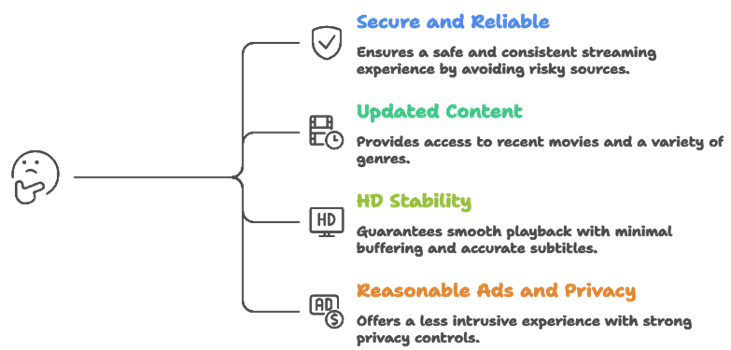
Free streaming has changed fast in 2026, with more ad supported libraries and tighter licensing controls. Our team compared widely used platforms and verified what viewers get, not just what is advertised. We aimed to shortlist options that are secure, reliable, and consistently smooth for all users.
- We chose based on clear rights statements and verified apps, in order to avoid risky, unreliable sources.
- The experts in our team shortlisted sites with updated movies, strong genres, and consistent availability.
- We made sure to test HD stability, buffering rates, and subtitle accuracy across devices, for all users.
- We chose platforms with reasonable ads, limited redirects, and strong privacy controls.
Our team chose services that allow you to stream smoothly on mobile, TV, and web with consistent quality.
Common Issues With Free Streaming Sites & How to Fix Them
Even the best free streaming sites can sometimes stop working as expected. Streaming platforms depend on servers, internet speed, and content sources. If one part fails, the site may not load streams. Over the years, I have seen that most issues are technical and can be fixed easily. The key is to identify the root cause instead of switching platforms at once.
Here are common problems and practical fixes:
- No Streams Available: This usually happens when the content source is down. Try refreshing the page or switching to another trusted streaming site.
- Buffering or Slow Playback: Check your internet speed first. Lower the streaming quality if needed. I also recommend closing background apps to improve performance.
- Ads Blocking Playback: Some ad blockers can interfere with free streaming sites. Try disabling the blocker or whitelisting the site if playback stalls.
- Content Not Available: Some titles rotate out due to licensing changes. Check other free platforms for the same movie or wait for it to return.
- App Crashing: Update the streaming app to the latest version. Clearing cache can also fix minor bugs and improve stability.
Most issues are temporary. Regular updates and choosing reliable free streaming sites help maintain a stable viewing experience.
Should You Use a VPN With Free Streaming Sites?
When discussing the Best Free Online Movie Streaming Sites, many users ask whether a VPN is necessary. The answer depends on how you use free streaming sites and which platforms you visit. Most legal, ad-supported platforms do not require a VPN. However, a VPN can add a layer of privacy when using lesser-known services. In my experience, online streaming always involves data sharing with servers.
Here are key points to consider:
- Privacy Protection: A VPN hides your IP address from external servers. This helps protect your browsing activity from being easily tracked.
- Public WiFi Safety: If you stream on public networks, a VPN encrypts your connection and reduces risk.
- Geo Restrictions: Some legal services restrict content by region. A VPN may help access content available in other locations, depending on service policies.
- Legal Responsibility: A VPN does not make illegal streaming legal. I always remind users to follow local copyright laws.
- Speed Impact: Some VPNs slow down streaming. Choose a reliable provider if you decide to use one.
A VPN can improve privacy, but safe streaming starts with choosing trusted and legal free streaming sites.
Verdict:
In this review, you got acquainted with some of the best free online movie streaming sites for reliable and legal viewing. Each platform delivers different strengths, whether it is content variety, playback quality, or browsing simplicity. To help you take the final call, I have created this verdict.
- Plex: A top rated and powerful free streaming platform that blends free movies with personal media and delivers reliable streams with impressive discovery features. Its robust organization and customizable Watchlist make it a superior choice for viewers who want consistent, high-quality free streaming results.
- Popcornflix: This is a remarkable and user-friendly free streaming site known for its straightforward layout and smooth performance. It offers a simple content catalog and quick playback experience, making it an excellent option if you are deciding on a cost-effective and efficient platform for daily free movie streaming.
- Fawesome TV: A phenomenal and customizable free streaming service that brings genre-based discovery together in a simple interface. With reliable streams, broad device compatibility, and great browsing hubs, I recommend it as a top choice for users wanting a comprehensive and flexible free movie streaming solution.
FAQs
What are the best free online movie streaming sites in 2026?
In 2026, the safest free movie sites are legal, ad-supported platforms. They stream licensed films, work on most devices, and avoid risky pop-ups. Services like Plex, Popcornflix, Fawesome TV, and DistroTV lead the list with strong device support, decent recommendations, and consistent free catalogs for casual movie nights.
Are free movie streaming sites legal and safe to use?
Some are legal and safe, many are not. Legal sites license content and use normal ads. Unsafe sites often stream pirated movies and push aggressive redirects. Check for clear terms, content partners, and a real company page. Avoid forced downloads, and use a reputable ad blocker on untrusted pages.
Which free streaming sites have the best movie selection?
Selection depends on your taste. Plex offers strong discovery and a blended free catalog. Popcornflix provides a simple, rotating library. DistroTV adds live channels for discovery. Crunchyroll leads for anime. Arte.tv is best for European cinema and documentaries. Compare by genres you watch most, not by total title count.
How do free movie streaming sites make money without subscriptions?
Most free services are AVOD platforms, meaning advertising pays the bills. Short ad breaks appear before or during movies. Some also earn from content licensing deals, data analytics, banner ads in menus, and cross-promotion of their paid tiers or rental services.
How can I watch free movies online with fewer ads and better quality?
You cannot fully remove ads on most legal free services. Still, you can reduce frustration by using a streaming device like Roku or Fire TV, setting quality to HD when stable, preferring official apps over web players, fixing your network with 5 GHz Wi-Fi or Ethernet, and preloading a watchlist to reduce browsing time.