Key Takeaway: The best StreamM4U alternatives are Tubi for broad free movies and shows, Plex for finding legal availability across services, and Shout! TV for cult and classic entertainment. Use accountable apps, library access, and transparent rentals instead of another disputed mirror.
StreamM4U became popular by putting movies and television inside a quick browser search without a subscription. The weakness is continuity: current results show several StreamM4U-labelled domains making competing official claims, while status discussions describe outages, redirects, and excessive pop-ups. A copied name or interface cannot establish who operates the player, whether a title is licensed, or what a download actually contains.
I reviewed nine accountable replacements through current official service, device, catalog, pricing, support, and library pages. The selection covers broad free movies, cross-service discovery, cult programming, independent films, local channels, protected library borrowing, and recent-release rentals. Each entry explains its real compromise—advertising, regional rights, account rules, tickets, limited downloads, or per-title prices—before you add it to Firestick.
Content and Licensing Note: This Best StreamM4U Alternatives guide compares sports and streaming availability for informational purposes. Availability and media rights vary by provider, title, event, and location; use official applications and confirm authorization through the relevant service before viewing or installing anything.
Best StreamM4U Alternatives for Firestick and Web Browsers
| Platform | Best For | Free Access | Get Started |
|---|---|---|---|
| Tubi | Broad licensed movies and shows | Free with ads | Visit Site |
| Plex | Free viewing plus title discovery | Free with ads | Visit Site |
| Shout! TV | Cult, classic, and genre entertainment | Free with ads; optional premium | Visit Site |
| Fawesome | No-login genre movie browsing | Free with ads | Visit Site |
| Fandango at Home | New-release rentals and purchases | Free titles; rentals vary | Visit Site |
1) Tubi
Tubi is the strongest StreamM4U alternative for viewers who want to press play without buying a subscription. Its licensed catalog includes films, series, originals, and live channels, with a native Fire TV app and no card requirement. I rank it first because basic viewing stays simple while a free profile adds watchlists, history, and synchronized progress.
Features:
- Immediate Access: Eligible movies and episodes can start without a paid plan, preserving StreamM4U’s low-friction appeal while replacing unknown players with a documented advertising model.
- Fire TV App: Amazon Fire TV and Fire Stick users can install Tubi from the official Appstore, keeping updates, permissions, developer identity, and removal inside Amazon’s system.
- Licensed Catalog: Tubi describes partnerships with established studios and offers movies, full television series, originals, documentaries, family programs, anime, Spanish-language shelves, and live channels today.
- Optional Profile: A free account adds a queue, recommendations, viewing history, and resume points across compatible televisions, phones, tablets, consoles, and current web browsers reliably.
- Accessibility Tools: Supported titles may include captions or audio description, while content ratings and children’s collections provide clearer household controls than an unidentified embedded video player.
- Source Review: I confirmed the free model, no-card rule, official Fire TV route, account benefits, device range, and advertising through Tubi’s current product and help pages.
- Main Tradeoff: Commercial breaks cannot be removed, title licenses rotate, and regional rights change the available movies, channels, languages, captions, and resolutions between supported countries.
| Pros | Cons |
|---|---|
| No subscription or payment card | Commercial breaks are mandatory |
| Broad movies and television catalog | Catalog rotates over time |
| Official Amazon installation | Regional libraries differ |
| Optional cross-device profile |
Pricing:
- Viewing: Free with advertising
- Account: Optional and free
- Checked: Official Tubi pages reviewed August 20, 2026
Link: https://tubitv.com/
2) Plex
Plex replaces more than StreamM4U playback: it helps locate where a title is legally available across selected services. Plex also supplies its own ad-supported movies and live channels through a Fire TV app, often without an account. I place it second because its universal Watchlist and optional personal-media server reduce repeated searching when one free catalog lacks a film.
Features:
- Free Streaming: Plex provides licensed, advertising-supported movies, television programs, and live channels, with exact catalogs controlled by distribution rights in each viewing territory over time.
- Discovery Layer: Universal search shows where selected titles stream, rent, or sell, preventing the frustrating cycle of opening numerous apps and copied StreamM4U domains manually.
- Universal Watchlist: A free profile can save titles from participating providers in one queue, helping viewers track releases even when availability changes between services or countries.
- Fire TV Client: The official Amazon app combines Plex’s free catalog, channel guide, watchlist, discovery results, rentals, and eligible household media inside a remote-friendly television interface.
- Personal Library: A separate Plex Media Server can organize video, music, and photos a household controls, clearly distinguishing personal files from Plex-supplied commercial programming locally.
- Source Review: I verified account-free playback, legal advertising support, broad device coverage, Fire TV compatibility, discovery features, and geographic variation through current official Plex resources.
- Main Tradeoff: Plex’s free movies include ads and generally lack offline downloads, while search providers, channels, rentals, resolutions, and available titles differ substantially by country.
| Pros | Cons |
|---|---|
| Free movies and live channels | Free videos contain advertisements |
| Cross-service availability search | Online catalog lacks downloads |
| Official Fire TV application | Availability varies geographically |
| Optional personal-media server |
Pricing:
- Free Streaming: Ad-supported movies and channels
- Plex Account: Optional for basic free playback
- Checked: Official Plex resources reviewed August 20, 2026
Link: https://watch.plex.tv/
3) Shout! TV
Shout! TV is a focused StreamM4U replacement for cult films, classic television, horror, comedy, and recognizable genre franchises. The service advertises more than 8,000 hours of programming plus themed FAST channels on Fire TV. I rank it third because viewers can watch free with ads or pay for fewer interruptions instead of chasing an unverified genre mirror.
Features:
- Curated Library: More than 8,000 hours cover cult movies, timeless television, comedy specials, original programs, and genre collections selected for fans rather than algorithmic volume alone.
- FAST Channels: Scheduled streams include Shout! TV, Scream Factory TV, MST3K, TokuSHOUTsu, Farscape, Johnny Carson, ALF, westerns, comedy, and other rotating themes around the clock.
- Free Tier: The advertising-supported library can be watched without a subscription, although selected videos may require a free account and availability changes under territorial rights.
- Premium Choice: A monthly membership removes ads from much on-demand programming, while live channels and a limited selection can still contain commercials under published service rules.
- Fire TV Support: The official Shout! TV application currently supports Amazon Fire TV alongside Android TV, Apple TV, Roku, mobile devices, and modern desktop browsers.
- Source Review: I checked Shout! TV’s catalog size, free access, premium price, trial, channel lineup, geographic limits, and current Fire TV requirements through official documentation.
- Main Tradeoff: The specialist catalog is smaller than broad movie platforms, North American rights dominate, premium playback is limited to one stream, and live channels retain advertisements.
| Pros | Cons |
|---|---|
| Distinctive cult and classic catalog | North American catalog emphasis |
| Free on-demand viewing available | One premium stream at a time |
| Official Fire TV application | Live channels still show ads |
| Optional ad-free membership |
Pricing:
- Free Plan: Advertising-supported access
- Monthly: $3.99 with a seven-day trial
- Annual: $39.99 after the trial when selected
Link: https://www.shout-tv.com/
4) Fawesome
Fawesome works well for StreamM4U users who browse by mood rather than a specific blockbuster. It offers free movies, series, documentaries, shorts, animation, and creator programming without registration or a subscription, including a Fire TV application. I put it fourth for fast access and strong genre shelves, while noting that commercials and a rotating catalog fund the experience.
Features:
- No Registration: Fawesome states that viewers can begin without creating an account or entering payment details, reducing signup friction for a quick, casual movie session.
- Genre Browsing: Action, thriller, comedy, horror, science fiction, romance, family, documentary, international, and seasonal collections make exploration easier when no exact title is planned today.
- Platform Reach: Fawesome distributes across more than fifteen platforms, including Amazon Fire TV, Roku, Samsung, LG, iOS, Android, and the web for flexible viewing overall.
- Creator Mix: The library accepts films, series, shorts, documentaries, animation, and professionally produced creator videos, giving independent work more visibility than mainstream-only catalogs typically receive.
- Licensed Model: Content partners retain ownership while granting distribution rights, and the platform shares advertising revenue, providing a documented funding model behind free playback today.
- Source Review: I confirmed no-registration access, the free model, Fire TV support, platform count, content categories, and nonexclusive distribution approach through Fawesome’s current official pages.
- Main Tradeoff: Advertising interrupts viewing, catalog depth varies by category, major current releases are uncommon, and availability can rotate as individual partner agreements or programming priorities change.
| Pros | Cons |
|---|---|
| No registration required | Commercials fund playback |
| Wide genre selection | Few brand-new studio releases |
| Official Fire TV support | Catalog rotates |
| Independent and creator programming |
Pricing:
- Access: Free with advertising
- Registration: Not required
- Checked: Official Fawesome pages reviewed August 20, 2026
Link: https://fawesome.tv/
5) Fandango at Home
Fandango at Home fills the gap no licensed free service can reliably promise: access to many recent releases during rental or purchase windows. It also maintains an advertising-supported free section and official 4K Fire TV playback. I rank it fifth because each title clearly shows whether it is free, rentable, purchasable, or temporarily unavailable before checkout.
Features:
- Three Access Modes: Free-with-ads, rental, and purchase shelves are separated clearly, letting viewers trade patience for price instead of assuming every current movie should cost nothing.
- Recent Releases: Premium rental and purchase windows provide an accountable legal route to newer studio films before they reach subscription, library, or advertising-supported services later.
- Free Section: A dedicated free catalog includes advertising-supported movies and television, useful when the specific title matters less than finding something legitimate to watch immediately.
- Search Controls: Filters for title, actor, director, genre, rating, critic score, release date, studio, and format support more precise discovery than a mirror homepage today.
- Fire TV Quality: Supported Amazon Fire TV hardware can play eligible 4K purchases and rentals, subject to title rights, device capability, display standards, and connection speed.
- Source Review: I verified free shelves, rental and purchase routes, Fire TV support, 4K compatibility, parental controls, territorial limits, and current storefront behavior through Fandango pages.
- Main Tradeoff: Transactions require an account, newer movies cost extra, free titles show advertising, browser quality can be limited, and streaming availability remains restricted to America.
| Pros | Cons |
|---|---|
| Recent release rentals | United States only |
| Free catalog also available | New releases cost extra |
| Detailed title filters | Account required for transactions |
| Eligible 4K Fire TV playback |
Pricing:
- Free Catalog: Advertising-supported titles cost nothing
- Rentals: Price varies by title and format
- Purchases: Price varies by edition, resolution, and promotion
Link: https://athome.fandango.com/
6) Local Now
Local Now is a practical StreamM4U alternative for households that want entertainment beside useful local information. Its free app combines on-demand movies and shows with channels, weather, traffic, and localized news for more than 220 U.S. cities. I include it because the Fire TV app adds daily utility, although the movie library is secondary to its local focus.
Features:
- Local Dashboard: A city or ZIP code personalizes news, weather, traffic, and community information, adding everyday usefulness that a single-purpose movie mirror cannot provide daily.
- Free Movies: The on-demand section carries thousands of movies and shows across popular, recently added, documentary, classic, family, action, romance, horror, and international shelves today.
- Live Channels: Scheduled streams supplement local updates with entertainment, lifestyle, news, weather, sports, documentaries, and rotating partner channels at no subscription cost throughout each day.
- Fire TV Route: Local Now lists an official Amazon Fire TV application alongside Roku, Apple TV, Google TV, Samsung, Vizio, mobile, and browser access directly.
- No Subscription: All movies, shows, channels, and localized information are free, with advertising supporting the service rather than an individual monthly entertainment bill today legally.
- Source Review: I verified the free model, Fire TV support, movie catalog, city coverage, location requirement, live weather access, and platform list through Local Now’s pages.
- Main Tradeoff: The service is U.S.-focused, local station access remains limited, some videos lack closed captions, and its film selection is smaller than broad movie-first platforms.
| Pros | Cons |
|---|---|
| Movies plus local information | United States focus |
| Completely free access | Limited local station feeds |
| Official Fire TV application | Captions are not universal |
| Personalized city coverage |
Pricing:
- Access: Free with advertising
- Subscription: No paid plan required
- Checked: Official Local Now pages reviewed August 20, 2026
Link: https://localnow.com/
7) Mometu
Mometu is the StreamM4U alternative for viewers tired of identical blockbuster rows. The free service emphasizes independent, international, classic, cult, and underseen films alongside live channels, with official support for Amazon Fire TV. I place it seventh because its niche programming rewards exploration, while the smaller profile, non-skippable ads, and rotating partner catalog may not suit everyone.
Features:
- Niche Programming: Independent features, international cinema, classics, cult titles, festival discoveries, documentaries, and seldom-seen television give Mometu an identity beyond mainstream studio shelves for viewers.
- Large Archive: Mometu has reported more than 50,000 hours of classic, international, and independent programming, although exact playable titles continue changing through distribution agreements today.
- Live Channels: The channel guide includes films, documentaries, crime, westerns, motorsports, music, faith, cooking, African programming, and other narrowly themed scheduled streams around the clock.
- Fire TV App: Viewers can download Mometu through Amazon’s Fire Store, with additional applications available on Roku, Apple TV, Android TV, mobile devices, and smart televisions.
- Free Funding: Advertising supports both on-demand and linear viewing, allowing access without a separate entertainment subscription while content partners receive managed monetization through the platform.
- Source Review: I checked Fire TV availability, platform coverage, free access, catalog positioning, channel examples, advertising behavior, and partner model through Mometu’s official device and company pages.
- Main Tradeoff: Ads are non-skippable, mainstream new releases are limited, catalog counts come from company materials, and specific channels or movies can rotate without long notice.
| Pros | Cons |
|---|---|
| Distinct independent catalog | Non-skippable advertising |
| International and classic films | Limited current blockbusters |
| Official Fire TV application | Smaller brand ecosystem |
| Free live channels |
Pricing:
- Access: Free with advertising
- Account: No subscription fee
- Checked: Official Mometu pages reviewed August 20, 2026
Link: https://watch.mometu.com/
8) Kanopy
Kanopy is the best StreamM4U alternative for documentaries, international cinema, independent films, classics, and educational viewing through a participating library or university. Public-library users receive monthly tickets determined by their institution, while some collections remain unlimited. I recommend it for ad-free playback, thoughtful curation, Kanopy Kids, and a Fire TV app supporting FireOS 6 or newer.
Features:
- Library Access: Eligible viewers connect a participating public-library card or university account, shifting payment from a personal subscription to an established institutional relationship today legally.
- Curated Cinema: Documentaries, international films, festival selections, independent productions, classics, educational programs, and thoughtful collections distinguish Kanopy from high-volume commercial recommendation rows for serious viewers.
- Ticket Rules: Each public library sets a monthly allowance, titles display required tickets and viewing periods, unused tickets expire, and available catalogs differ by institution.
- Unlimited Viewing: Kanopy Kids consumes no tickets, while participating libraries may identify additional unlimited titles that remain playable after an ordinary monthly allowance runs out.
- Fire TV Support: The official television application supports Fire TV devices running FireOS 6 or newer, plus current Roku, Apple TV, Google TV, and Samsung platforms.
- Source Review: I verified library signup, monthly tickets, unlimited collections, FireOS requirements, supported devices, account rules, and institutional variation through Kanopy’s updated official help pages.
- Main Tradeoff: A participating institution is mandatory, monthly tickets vary, university access can expire, and library budget decisions may temporarily restrict titles that appear in search.
| Pros | Cons |
|---|---|
| Ad-free curated films | Participating institution required |
| Strong documentary selection | Ticket allowances vary |
| Kanopy Kids uses no tickets | Catalog differs by library |
| Official Fire TV support |
Pricing:
- Patron Access: No direct charge through participating institution
- Tickets: Monthly allowance set by each library
- Checked: Official Kanopy pages reviewed August 20, 2026
Link: https://www.kanopy.com/
9) Hoopla
Hoopla is the strongest StreamM4U replacement when offline viewing matters. A participating public-library card unlocks instant digital borrows, and supported mobile apps can download eligible movies during the lending period. I place it ninth because monthly allowances and catalogs vary locally, but ad-free playback, Fire TV support, television, audiobooks, music, comics, and ebooks create unusual household value.
Features:
- Library Funded: A participating public library covers eligible access, allowing patrons to borrow digital entertainment with a card and email address instead of entering payment details.
- Offline Movies: Supported mobile apps download most eligible films for the lending period, providing protected offline playback without distributing unrestricted files from anonymous streaming hosts.
- Instant Borrowing: Many titles become available immediately without waiting lists, although each library controls monthly allowances, lending periods, Flex availability, BingePasses, and seasonal bonus programs.
- Fire TV App: Hoopla supports Fire TV Stick, Roku, Apple TV, Samsung, LG, and other approved routes for comfortable remote browsing and television playback today.
- Broader Library: One account may unlock movies, television, audiobooks, ebooks, comics, music, Kids Mode, and BingePass collections, depending on the participating library’s choices for families.
- Source Review: I confirmed library-card access, no subscription, mobile downloads, Fire TV support, immediate borrowing, content categories, and institutional limits through current official Hoopla resources.
- Main Tradeoff: Library participation is required, monthly limits differ, exact titles vary locally, downloads stay inside supported applications, and television devices generally emphasize streaming rather than offline playback.
| Pros | Cons |
|---|---|
| Protected mobile downloads | Library participation required |
| No ordinary commercials | Monthly limits vary |
| Official Fire TV support | Catalog differs by institution |
| Movies plus other digital media |
Pricing:
- Patron Access: No direct charge through participating library
- Borrowing: Monthly allowance set by each library
- Checked: Official Hoopla pages reviewed August 20, 2026
Link: https://www.hoopladigital.com/
Build a Three-Lane Replacement Instead of Chasing One StreamM4U Clone
No accountable service can promise every movie, every television season, every country, and every release window at zero cost. A better setup assigns different jobs to three applications: one broad free catalog for casual viewing, one specialist or library source for deeper choices, and one transparent rental store for new releases. This arrangement survives catalog rotation far better than another disappearing bookmark.
- Free Lane: Start with Tubi or Plex for spontaneous viewing because both combine broad licensed selections, normal television apps, understandable advertising, and useful browsing without mandatory subscriptions.
- Specialist Lane: Add Shout! TV, Fawesome, Mometu, Kanopy, or Hoopla according to your preferred genres, library eligibility, household needs, and tolerance for commercials or ticket limits.
- New-Release Lane: Use Fandango at Home when timing matters, checking rental periods, picture format, device compatibility, refund terms, and total price before completing any transaction.
- Discovery Habit: Search Plex, official storefronts, and library catalogs before assuming a missing title has vanished; distribution windows often move films between free, paid, and institutional services.
- Portable List: Keep a neutral watchlist or simple note outside one service, protecting planned movies from domain seizures, catalog removals, expired accounts, redesigns, and changing regional rights.
How I Evaluated StreamM4U Alternatives for Real Movie-Night Friction
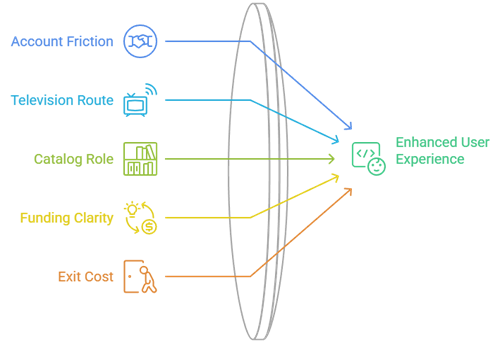
StreamM4U appealed because a visitor could search quickly, skip a monthly plan, and begin watching inside a browser. A useful replacement must reduce the same friction without hiding the operator, playback source, device route, or cost. I ranked each option by how reliably it gets a movie onto Fire TV, how clearly it explains access, and what happens when the desired title is missing.
- Account Friction: Services earned credit for browse-first playback, optional profiles, library-card login, or clearly explained transaction accounts rather than unexpected card-verification screens and forced registrations.
- Television Route: A documented Fire TV application mattered more than mobile-only availability because remote navigation, captions, updates, permissions, and uninstall controls remain easier to verify.
- Catalog Role: Each recommendation needed a defined strength, such as broad free movies, cult programming, independent films, new rentals, local channels, curated cinema, or downloads.
- Funding Clarity: Advertising, library support, rentals, purchases, and premium upgrades are labeled separately so readers understand the tradeoff before opening an app or creating an account.
- Exit Cost: I recorded regional blocks, rotating rights, commercials, ticket limits, missing downloads, account rules, and per-title charges instead of treating a successful homepage load as proof.
Tell an Accountable Streaming App From a StreamM4U Copycat
Search results now surface multiple StreamM4U-branded domains, and several claim to be the official destination. That contradiction is a reason to verify the operator rather than trust branding. Legitimate alternatives document their company or library relationship, explain how viewing is funded, publish device support, identify account rules, and distribute television software through recognizable stores instead of demanding a codec or modified APK.
- Operator Identity: Look for a named company, current support center, terms, privacy information, and consistent official social or app-store presence rather than an anonymous contact form alone.
- Funding Model: A free service should explain advertising or library support; a storefront should display rental or purchase terms before checkout instead of using refundable-card verification stories.
- Store Listing: On Fire TV, inspect the exact developer, app description, permissions, review history, screenshots, update date, and support address before selecting the install button.
- Player Behavior: Close any page that opens repeated tabs, requests notifications, presents fake virus alerts, downloads a codec, or demands a browser extension before ordinary playback.
- Rights Reality: A catalog containing every current theatrical release at no cost deserves scrutiny because legitimate distribution windows differ by film, country, platform, and negotiated studio agreement.
Make These StreamM4U Replacements Work Better on Firestick
Native television apps usually outperform browser mirrors on a couch: the remote works predictably, captions are easier to reach, playback resumes correctly, and updates arrive through Amazon. Install only the services that cover a distinct need, sign in after testing a free title, and remove abandoned copies. If playback becomes sluggish, troubleshoot the device before assuming every service has failed.
- Install Precisely: Search Amazon’s Appstore for the exact service name, confirm the developer and logo, then reject similarly named packages, download pages, shortened links, or unknown installers.
- Test First: Play a free movie and check seeking, captions, audio tracks, commercial breaks, remote behavior, picture quality, and resume progress before adding profiles or payments.
- Pair Carefully: Enter a television activation code only at the exact official address displayed inside the genuine app, using a trusted phone or computer on your network.
- Reduce Clutter: Keep one broad catalog, one specialist app, and one rental route on the home screen so duplicate services do not consume storage or complicate search.
- Fix Local Problems: Restart the device, update Fire OS and the app, test another title, then follow our guide to clearing Firestick cache safely when corrupted temporary data is likely.
Clean Up After StreamM4U Pop-Ups, Notifications, or Fake Updates
Switching sites does not revoke permissions already granted to an old page. Remove notification access, clear stored site data, delete unfamiliar downloads, and inspect browser extensions or sideloaded applications before signing into a replacement. The FTC warns that pirate streaming apps can spread malware, expose credentials, serve pop-ups, and threaten other devices connected to the same network.
- Notifications: Block every old StreamM4U-labelled domain from sending alerts because fake updates, prize messages, subscription warnings, and renamed mirror notices can continue after tabs close.
- Downloads: Delete unexpected codecs, installers, configuration profiles, browser packages, and mobile applications, then update reputable security software and run the operating system’s complete scan.
- Passwords: Change any credential reused on an uncertain streaming page, assign a unique replacement, and enable multifactor authentication on the connected email account immediately.
- Payment Review: Check card statements if a supposedly free player requested verification, and contact the issuer quickly about unfamiliar authorizations, recurring charges, or new digital subscriptions.
- Network Health: Update Fire OS, browsers, routers, and other connected devices, then investigate persistent redirects, changed search settings, unexplained extensions, sluggish behavior, or recurring pop-ups.
Best StreamM4U Alternatives Verdict
Tubi is the best overall free replacement, Plex is the smartest choice when title discovery matters, and Shout! TV delivers the strongest specialist catalog for cult and classic entertainment. StreamM4U convenience cannot be replaced safely by another mystery mirror. Combine one broad free app, a focused library, and transparent rentals when release timing matters.
- Tubi: Best overall for broad licensed movies and television, optional profiles, official Fire TV support, transparent advertising, and no subscription or payment card.
- Plex: Best for free playback plus cross-service discovery, a universal watchlist, broad device support, live channels, and optional household-media organization.
- Shout! TV: Best for cult films, classic series, horror, comedy, themed FAST channels, a free tier, and an inexpensive optional ad-free membership.
FAQs
What is the best free StreamM4U alternative?
Tubi is the strongest general choice in supported countries because it combines licensed films and shows, a native Fire TV application, optional profiles, and playback without a subscription or payment card.
Which StreamM4U alternative works without an account?
Tubi supports basic viewing without registration, Plex can play much of its free catalog without an account, and Fawesome advertises no-registration access. Availability and profile benefits vary by device and country.
Can I install these StreamM4U alternatives on Firestick?
Yes. All nine recommendations document an official Fire TV or Amazon Appstore route. Search the exact service name and verify the developer instead of sideloading an APK from a mirror.
Where can I watch newer movies legally?
Fandango at Home rents or sells many recent releases in the United States. Prices, formats, rental periods, and eligibility appear per title, while free services may receive films later.
Where can I compare more legal free movie choices?
Our best free online movie streaming sites guide covers additional licensed options. Recheck regional access, advertisements, accounts, device support, and current title availability before choosing.