Key Takeaway: Plex is best for rebuilding a portable watchlist, Tubi delivers the strongest free all-round catalog, and Sling Freestream combines no-account viewing with profiles and free DVR. Cineby says its services close on August 26, 2026, so save your queue now instead of trusting an unofficial official service pages.
Cineby has given viewers a firm deadline: the service says Cineby and its related systems will cease operation on August 26, 2026, after a period of instability, and every user account will be deleted. That makes this more than a routine search for another movie page. If your unfinished episodes, watch history, or saved films exist only inside Cineby, the urgent task is preserving those choices before the account disappears.
I compared nine licensed alternatives around the functions Cineby users repeatedly say they value: immediate playback, progress tracking, autoplay, subtitles, anime, a clean television interface, and minimal signup friction. The ranking separates broad free catalogs, live-channel services, library access, indie discovery, and a paid anime specialist. No clone domain is included, and every listed option has an official operator and documented Fire TV route.
Content and Licensing Note: This Best Cineby Alternatives : Free & Legal Options guide compares applications and viewing services for informational purposes. Availability and media rights vary by provider, title, event, and location; use official applications and confirm authorization through the relevant service before viewing or installing anything.
Best Cineby Alternatives Before the August 26 Shutdown
| Service | Best For | Access Model | Get Started |
|---|---|---|---|
| Plex | Rebuilding watchlists and discovery | Free with ads | Visit Site |
| Tubi | Broad free movies and series | Free with ads | Visit Site |
| Sling Freestream | Live channels, DVR, and watchlists | Free with ads | Visit Site |
| The Roku Channel | Free originals and channel browsing | Free with ads | Visit Site |
| Filmzie | Independent films and hidden gems | Free with ads | Visit Site |
1) Plex
Plex is my first Cineby alternative because it replaces more than playback. Its free movies and live channels sit beside a universal Watchlist, cross-service discovery, rentals, and personal-media tools. The official Fire TV app also keeps progress under an accountable account, making Plex especially useful when Cineby users need to rebuild saved titles before the announced account deletion.
Features:
- Universal Watchlist: Save films and series independently of one catalog, then see whether each title is available through Plex, another selected service, rental, or purchase.
- Free Streaming: Thousands of partner-supplied movies and television episodes plus more than 600 live channels stream with advertisements, though exact programming changes between countries and licenses.
- Fire TV App: Amazon Fire TV receives an official Plex application for free streaming, discovery, rentals, and personal libraries without browser redirects, mystery players, or sideloaded packages.
- Resume Tools: A Plex account synchronizes Watchlist items, viewing activity, service preferences, and continue-watching rows across supported televisions, phones, browsers, consoles, and streaming devices securely.
- Personal Media: Lawfully owned video files can remain in a separate Plex Media Server library, giving households control over content that rotating streaming agreements cannot preserve.
- Research Check: I verified Fire TV support, Watchlist behavior, free programming, rental windows, downloads, and personal-library distinctions in Plex current official documentation and support resources.
- Main Limitation: Free titles include commercials, provided streaming content cannot be downloaded, Plex Pass does not remove catalog ads, and programming differs significantly across distribution territories.
| Pros | Cons |
|---|---|
| Strong universal Watchlist | Free catalog contains ads |
| Official Fire TV application | Libraries vary by country |
| Free movies and live channels | No downloads for free titles |
| Supports personal media libraries |
Pricing:
- Free Streaming: $0 with advertising
- Rentals and Purchases: Variable by title and territory
- Plex Pass: Optional; does not remove free-catalog advertising
Link: https://watch.plex.tv/
2) Tubi
Tubi is the best straightforward Cineby replacement for viewers who want to open an official app and start a movie without entering payment details. Its licensed catalog spans films, complete series, originals, live channels, anime, and family shelves. I rank it second because optional registration restores watchlists and progress while every supported title remains funded by advertising, not a subscription.
Features:
- No Payment Card: Tubi says installation and viewing remain free, never requests credit-card information, and funds licensed movies and television through clearly disclosed commercial breaks.
- Fire TV Support: The official Amazon Appstore application runs on Fire TV devices, avoiding copied Cineby pages, notification prompts, fake updates, codecs, and unknown Android package files.
- Catalog Range: Movies, complete television seasons, originals, anime, documentaries, Spanish-language collections, family programming, and selected live channels serve households with varied everyday viewing habits comfortably.
- Optional Account: Basic playback does not require payment, while a free profile adds saved titles, viewing history, recommendations, resume points, and synchronization across compatible screens.
- Caption Access: Closed captions appear whenever distribution partners provide them, with supported television and streaming devices offering platform-level settings for size, style, color, and language.
- Research Check: I confirmed Tubi legal funding model, no-card promise, Fire TV availability, profiles, captions, and country differences through its latest official help-center documentation directly.
- Main Limitation: Advertisements cannot be removed, titles rotate when rights expire, and the available catalog, channels, applications, captions, or audio features can vary by country.
| Pros | Cons |
|---|---|
| No subscription or payment card | No ad-free upgrade |
| Broad licensed catalog | Titles rotate frequently |
| Official Fire TV route | Regional availability differs |
| Optional progress syncing |
Pricing:
- Catalog Access: $0 with advertising
- Account: Optional and free
- Payment Card: Never required for viewing
Link: https://tubitv.com/
3) Sling Freestream
Sling Freestream works well for Cineby users who mix on-demand episodes with channel surfing. Sling currently advertises more than 600 free channels and over 40,000 on-demand movies and shows without requiring an account. I place it third because a free profile adds watchlists, favorites, parental controls, user profiles, and ten hours of cloud DVR without attaching a credit card.
Features:
- Large Free Guide: More than 600 live channels cover movies, entertainment, news, international programming, sports, anime, family content, documentaries, reality, comedy, and other specialist interests.
- On-Demand Depth: Over 40,000 movies and television programs supplement scheduled channels, offering title-led viewing when a household does not want to follow a fixed program guide.
- No-Account Start: Visitors can watch basic Freestream programming without logging in, creating an immediate path that resembles Cineby convenience while retaining an identifiable service operator.
- Free Profile: Registration adds watchlists, channel favorites, parental settings, multiple profiles, rewards, and personalization without requiring a paid Sling package or stored payment card details.
- Cloud DVR: Eligible free accounts receive ten hours of cloud recording for selected channels, preserving scheduled films or episodes that would otherwise disappear after their broadcast slot.
- Research Check: I verified the current channel count, on-demand depth, account choices, Watchlist, profiles, parental controls, and free DVR through Sling official Freestream resources directly.
- Main Limitation: Commercial breaks remain, channel availability changes, some DVR programs are restricted, and the strongest Freestream lineup and device support depend on the viewer location.
| Pros | Cons |
|---|---|
| More than 600 free channels | Commercials remain required |
| No account needed to start | DVR excludes some programs |
| Ten hours of free DVR | Availability varies by location |
| Profiles and watchlists available |
Pricing:
- Freestream Access: $0 with advertising
- Free Account: $0; no credit card required
- Cloud DVR: 10 hours on eligible programming
Link: https://www.sling.com/freestream
4) The Roku Channel
The Roku Channel is a dependable Cineby alternative for free films, television, Roku Originals, and continuous programming in one interface. Roku documents more than 500 live channels and compatible Amazon Fire TV access in the United States. I include it fourth because an account can retain progress, while the catalog remains easy to sample before committing to any premium add-on.
Features:
- Free Collection: Advertising supports films, full television programs, Roku Originals, and more than 500 live channels, with licensing changes periodically rotating individual titles and networks.
- Original Programming: Exclusive documentaries, unscripted shows, films, and acquired series provide identifiable editions instead of copied listings whose source, version, or episode order remains uncertain.
- Fire TV Route: Compatible Amazon Fire TV devices can install the official application in the United States directly, avoiding Downloader codes, cloned APK pages, and web-player pop-ups.
- Cross-Device Progress: A free Roku account can synchronize viewing progress and saved choices across supported browsers, mobile applications, Roku hardware, Samsung televisions, and compatible Fire TV devices.
- Live Discovery: News, movies, reality, children programming, lifestyle, crime, sports, and single-series channels make relaxed browsing practical when viewers have no particular title selected beforehand.
- Research Check: I checked Roku current official guide for channel count, Fire TV compatibility, supported countries, account behavior, Originals, and premium-channel restrictions before ranking it.
- Main Limitation: Fire TV support is United States-focused, free programming contains advertisements, premium features vary by platform, and catalog or channel availability changes between territories.
| Pros | Cons |
|---|---|
| More than 500 live channels | Fire TV route is US-focused |
| Includes Roku Originals | Free titles contain ads |
| Compatible Fire TV app | Premium access varies by device |
| Useful resume synchronization |
Pricing:
- Free Catalog: $0 with advertising
- Roku Account: Free
- Premium Channels: Optional and separately priced where supported
Link: https://therokuchannel.roku.com/
5) Filmzie
Filmzie offers a curated Cineby replacement for viewers willing to trade blockbuster breadth for independent features, festival discoveries, documentaries, and less familiar series. The service identifies itself as legal and free, with Amazon Fire TV among its supported platforms. I rank it fifth because the smaller catalog encourages intentional browsing instead of repeating the same mass-market recommendations found everywhere else.
Features:
- Independent Focus: Filmzie emphasizes independent productions, festival selections, documentaries, shorts, and international discoveries that often receive limited visibility inside broader advertising-supported movie libraries available today.
- Legal Free Access: Advertising supports licensed streaming without an individual subscription fee, giving viewers a transparent exchange for access rather than unexplained embedded servers or mirror domains.
- Fire TV App: Filmzie lists Amazon Fire TV alongside Android TV, Samsung, LG, Hisense, mobile apps, and Chromecast, providing an official big-screen installation route directly.
- Fresh Additions: New movies arrive regularly, so returning viewers can discover unfamiliar filmmakers and categories even though the service does not promise every mainstream theatrical release.
- Simple Discovery: Curated rows and genre shelves help viewers select something quickly, reducing the endless server testing and duplicate poster pages common on unofficial streaming indexes.
- Research Check: I confirmed free legal streaming, supported televisions, Amazon Fire TV access, catalog positioning, and continuing additions through Filmzie current official corporate and device pages.
- Main Limitation: The library favors independent and catalog titles, commercial interruptions remain, regional rights may remove selections, and viewers seeking current blockbusters will need another service.
| Pros | Cons |
|---|---|
| Strong independent-film selection | Fewer mainstream blockbusters |
| Official Fire TV support | Advertising supports access |
| No subscription charge | Catalog differs by region |
| Useful curated discovery |
Pricing:
- Streaming Access: $0 with advertising
- Subscription: Not required
- Checked: Official Filmzie resources reviewed August 24, 2026
Link: https://filmzie.com/
6) Fawesome
Fawesome is a useful Cineby alternative when quick, account-free playback matters more than a synchronized watch history. Its free catalog spans mainstream library films, independent productions, documentaries, series, shorts, and genre collections across more than 15 platforms, including Fire TV. I place it sixth because registration is unnecessary, although viewers must accept advertising and a rotating rather than exhaustive library.
Features:
- No Registration: Fawesome lets visitors start free movies and television without creating an account, entering a payment method, starting a trial, or managing another recurring subscription.
- Fire TV Availability: The service documents distribution across more than 15 platforms, including Fire TV, Roku, Samsung, LG, web browsers, iOS, Android, and other connected televisions.
- Genre Shelves: Action, horror, comedy, thriller, family, romance, documentary, international, and independent sections support mood-based discovery when viewers do not know a specific title yet.
- Licensed AVOD: Advertising revenue funds programming under documented distribution relationships, providing a legal model that compensates rights holders while keeping ordinary viewer access completely free.
- Creator Variety: Professionally produced films, shows, documentaries, animation, shorts, and creator-owned programming bring unusual choices beyond the largest studio catalogs and predictable recommendation loops today.
- Research Check: I verified no-login access, the free legal model, Fire TV availability, platform reach, catalog types, and advertising funding through Fawesome official viewer and partnership pages.
- Main Limitation: Commercials interrupt playback, watch-history portability is limited without an account, subtitles vary by title, and premium first-window releases are uncommon in the catalog.
| Pros | Cons |
|---|---|
| No account required | Commercial interruptions remain |
| Available on 15+ platforms | Limited persistent watch history |
| Strong genre organization | Few first-window releases |
| Free legal streaming model |
Pricing:
- Viewer Access: $0 with advertising
- Registration: Not required
- Subscription: None
Link: https://fawesome.tv/
7) Kanopy
Kanopy is a high-quality Cineby replacement for world cinema, documentaries, independent films, classics, educational programs, and family viewing. Participating libraries and universities fund access instead of advertisements or a personal subscription. I include it seventh because Fire TV with FireOS 6 or newer is officially supported, but every institution controls eligibility, catalog selection, and monthly ticket allowances.
Features:
- Institutional Access: A participating public library or university authenticates eligible viewers, replacing a personal subscription bill with access funded and configured through the local institution.
- Monthly Tickets: Public-library users receive a locally determined ticket allowance that resets on the first day monthly, while unused tickets do not carry into later months.
- Unlimited Viewing: Zero-ticket collections remain watchable without using the allowance, and Kanopy Kids titles stay unlimited wherever the participating library provides that complete family collection.
- Fire TV Requirements: Kanopy officially supports Fire TV devices running FireOS 6 or newer, plus current Roku, Apple TV, Android TV, Google TV, and Samsung systems.
- Curated Catalog: Documentaries, independent productions, world cinema, educational films, classics, and thoughtful children programming provide depth when general free services feel repetitive or commercially narrow.
- Research Check: I verified July 2026 device requirements, current ticket rules, monthly resets, unlimited collections, and Kanopy Kids access through the latest official help resources.
- Main Limitation: Library participation is mandatory, allowances differ locally, some programs require multiple tickets, and the available collection reflects each institution agreements and selected service level.
| Pros | Cons |
|---|---|
| Curated high-quality cinema | Participating institution required |
| Many titles play without ads | Ticket allowances vary |
| Official Fire TV support | Catalog differs by library |
| Unlimited Kanopy Kids collection |
Pricing:
- Patron Cost: $0 with eligible library or university access
- Tickets: Monthly allowance set locally
- Unlimited Viewing: Selected titles and Kanopy Kids
Link: https://www.kanopy.com/
8) Hoopla
Hoopla is the best Cineby alternative for viewers whose participating library offers it and who dislike commercial breaks. Movies and television share one account with ebooks, comics, audiobooks, music, and BingePass collections. I rank it eighth because its Fire TV app keeps progress across supported devices, although local borrowing allowances and a library-wide daily budget can restrict availability.
Features:
- Library Funded: Eligible patrons use a participating public-library card instead of paying a subscription, encountering no personal streaming charge, traditional late fee, or commercial interruption.
- Instant Borrowing: Available movies and episodes can be checked out immediately without a hold queue, then return automatically after their lending period ends without overdue penalties.
- Fire TV App: Hoopla supports Amazon Fire TV alongside Roku, Apple TV, Google TV, Samsung, LG, mobile devices, computers, and selected tablets through official applications.
- Progress Sync: The service retains your place when moving between supported screens, directly replacing one Cineby convenience that users risk losing when its accounts are deleted.
- Broader Library: Movies and television sit beside audiobooks, ebooks, comics, manga, music, SeasonPasses, and BingePasses, letting one monthly allowance serve several different digital media formats.
- Research Check: I confirmed current Fire TV compatibility, free library-card access, progress syncing, instant loans, media types, and locally controlled limits through Hoopla official August resources.
- Main Limitation: Not every library participates, monthly allowances vary, title selection differs locally, and a collective daily spending cap can temporarily stop otherwise eligible borrowing.
| Pros | Cons |
|---|---|
| No ads or subscription fee | Library participation required |
| Official Fire TV application | Borrowing limits vary locally |
| Progress follows supported devices | Daily budget may pause checkouts |
| Includes several media formats |
Pricing:
- Patron Access: $0 with participating library card
- Subscription and Late Fees: None
- Borrow Limits: Set by each library
Link: https://www.hoopladigital.com/
9) Crunchyroll
Crunchyroll is the specialist Cineby replacement for anime viewers who care about episode order, simulcast timing, subtitle options, dubs, autoplay, and reliable progress tracking. It is not a free substitute: full access now requires Premium. I include it ninth because the official Fire TV application and 50,000-plus episodes offer a safer, organized answer for Cineby users rebuilding anime queues.
Features:
- Anime Depth: Crunchyroll reports more than 50,000 episodes across over 2,000 series and films, plus concerts, music videos, games, manga access, and seasonal simulcasts.
- Reliable Episode Order: Official season and episode metadata, queues, watch history, autoplay, skip controls, and continue-watching reduce the confusion created by mislabeled mirrors or missing players.
- Languages: Title pages list available audio and subtitle languages, though individual seasons and episodes can differ because each regional license covers only specific language versions.
- Fire TV Support: The official application runs on Amazon Fire TV, where viewers can subscribe through Amazon or sign into an existing Crunchyroll account for playback.
- Offline Viewing: Current Fan, Mega Fan, and Ultimate Fan tiers include downloads, while simultaneous streams increase from one to four or six devices across higher plans.
- Research Check: I verified current United States prices, catalog scale, profiles, autoplay, Fire TV support, simultaneous streams, downloads, subtitles, and dubs through official Crunchyroll sources.
- Main Limitation: Premium is required for complete access, prices differ internationally, trials need a payment method and renew automatically, while language rights and titles vary regionally.
| Pros | Cons |
|---|---|
| Large dedicated anime library | Complete access requires Premium |
| Current simulcasts and organized seasons | Regional catalogs and languages vary |
| Official Fire TV application | Trial converts automatically to paid |
| Downloads included on current plans |
Pricing:
- Fan: $9.99 per month in the United States
- Mega Fan: $13.99 per month in the United States
- Ultimate Fan: $17.99 per month in the United States
Link: https://www.crunchyroll.com/
Save Your Cineby Queue Before User Accounts Are Deleted
Cineby says all accounts will be deleted when service ends, so waiting for a future migration tool is risky. There is no reliable cross-platform export format for a private streaming queue. Use the remaining access window to make a simple, provider-neutral record, then rebuild only the titles you still care about inside Plex, Tubi, Crunchyroll, or another chosen service.
- Capture the Queue: Record saved titles, unfinished seasons, current episode numbers, and recently completed films in a note, spreadsheet, or screenshots before the announced shutdown date.
- Separate Status: Mark each entry Planned, Watching, Paused, or Finished so rebuilding does not fill a new Watchlist with titles you already completed months ago.
- Add Identifiers: Include release year, season, episode, and language when names are ambiguous, preventing the wrong remake, dub, similarly titled series, or special edition.
- Rebuild Selectively: Move current priorities into Plex Watchlist first, then add service-specific queues only after confirming where each title is legally available in your country.
- Protect Credentials: If your Cineby password was reused anywhere else, change those accounts immediately and avoid entering the old credentials into any page claiming to preserve history.
How I Ranked Services for the Features Cineby Users Will Lose
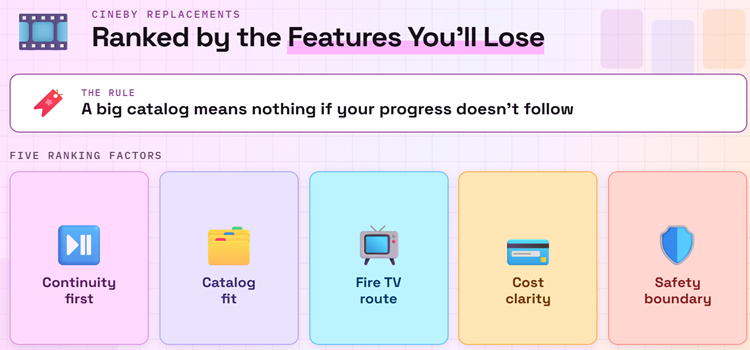
A large catalog alone does not replace Cineby. Viewers also mention autoplay, saved progress, subtitles, anime, clean search, fast servers, and low advertising friction. I scored each service against those actual habits, then ranked transparent operation and Fire TV support above claims about unlimited new releases, mirror counts, or suspicious download buttons.
- Continuity First: Watchlists, resume points, history, episode order, profiles, and cross-device synchronization received extra weight because Cineby says every account will be permanently deleted.
- Catalog Fit: General movies, complete series, live channels, anime, documentaries, independent cinema, children programming, or library collections needed to solve a distinct viewing need.
- Television Route: Every selection required an official Fire TV application or clearly documented big-screen path, with normal installation replacing unknown APK files and browser-only workarounds.
- Cost Clarity: Advertising, free profiles, library cards, ticket allowances, paid memberships, trials, and local limits were separated so access conditions are visible before signup.
- Safety Boundary: I excluded supposed Cineby successors, clone domains, unofficial APKs, mirrored player indexes, forced notification requests, and any destination lacking accountable ownership or distribution information.
Recreate Autoplay, Resume, Subtitles, and Anime Without a Clone
The hardest part of switching is often not finding a movie; it is restoring familiar playback behavior. Cineby users specifically discuss auto-next episodes, autoplay, saved progress, subtitles, and anime. Licensed replacements distribute those functions differently, so one broad free app may need a specialist companion rather than forcing every viewing habit into a single service.
- Progress Sync: Use a signed-in Plex, Tubi, Roku, Hoopla, or Crunchyroll profile when resume points matter, and verify synchronization on two devices before trusting it.
- Autoplay Check: Play the end of one episode and confirm the next starts as expected, because autoplay can differ by application, profile setting, title, region, or children mode.
- Subtitle Preview: Open the title details and test one full scene before movie night; available captions, subtitle languages, fonts, and dubbing vary between programs and licenses.
- Anime Route: Choose Crunchyroll for organized simulcasts, seasons, dubs, and subtitles when anime matters enough to justify Premium instead of relying on mislabeled embedded episodes.
- Independent Tracker: Keep a provider-neutral list for important shows because streaming rights, profile systems, regional catalogs, and even established services can change without preserving every preference.
Understand Why No Legal Service Can Copy Cineby Entire Catalog
Cineby presented films and series as if one index could offer nearly everything immediately. Licensed streaming works through separate contracts, territories, and release windows. A title may begin in cinemas, move to rental, enter a paid subscription, reach a library, and only later appear free with ads. Building a small service combination is more realistic than searching for one exact clone.
- FAST Catalogs: Tubi, Sling Freestream, Roku, Plex, Filmzie, and Fawesome exchange commercial breaks for licensed access, but each rotates titles as individual distribution agreements expire.
- Library Access: Kanopy and Hoopla can provide ad-free films through participating institutions, although local eligibility, catalog selection, tickets, monthly borrows, and daily budgets differ.
- Anime Licensing: Crunchyroll obtains specific shows, seasons, subtitle tracks, and dubs by territory, explaining why one language or installment may be unavailable where another works.
- Release Windows: Recent theatrical films commonly reach paid rental before subscription or free services, so a missing new release does not mean a secret mirror is trustworthy.
- Practical Mix: Combine one broad free app, one library service, and one specialist only when needed, minimizing recurring costs while covering general films, curated cinema, and anime.
Install Cineby Replacements on Firestick Without Fake APKs
Cineby worked in a browser, which makes fake Android packages an easy trap during shutdown. None of these services requires a Cineby-branded installer, codec, certificate, cleaner, or mystery Downloader code. Search Amazon Appstore for the exact official service, verify the developer, and test a free title before entering payment details or relying on the app for a full season.
- Search Officially: Use Fire TV Find or Alexa for the exact service name, then verify developer, icon, screenshots, age rating, permissions, reviews, and support destination.
- Check FireOS: Kanopy requires FireOS 6 or newer, while country restrictions may hide other legitimate applications even when your hardware otherwise meets their technical requirements.
- Pair Safely: When an app displays a code, enter it only on the operator official activation page, never on a lookalike domain reached through unsolicited advertising.
- Test Essentials: Confirm remote navigation, seeking, captions, audio, autoplay, resume, one advertisement break, and account synchronization before depending on any application for regular viewing.
- Review Sideloading: Our Downloader app for Firestick guide explains device setup, but installing Downloader never proves an unrelated Cineby APK is safe.
Best Cineby Alternatives Verdict
Plex is the strongest transition tool because its Watchlist can outlive one streaming catalog, Tubi offers the easiest broad free replacement, and Sling Freestream adds no-account viewing, profiles, and DVR. Save Cineby queues before August 26 rather than trusting a clone. Then combine one general service with Kanopy, Hoopla, or Crunchyroll only when library cinema or anime requires it.
- Plex: Best for rebuilding a portable Watchlist, discovering legal availability, watching free movies and channels, and combining streaming results with lawfully owned personal media.
- Tubi: Best all-round free replacement for licensed movies, complete series, originals, anime, live channels, Fire TV support, and optional progress synchronization without payment details.
- Sling Freestream: Best for more than 600 channels, extensive on-demand viewing, no-account playback, free profiles, watchlists, parental controls, and ten hours of eligible cloud DVR.
FAQs
Why is Cineby shutting down?
Cineby announcement confirms that the service and related systems will cease operation on August 26, 2026, but it does not provide a detailed public reason. The notice warns of instability, says support has ended, and states every user account will be permanently deleted.
What is the best free Cineby alternative?
Tubi is the most balanced free replacement for general movies and television because it asks for no payment card, supports Fire TV officially, and makes accounts optional. Plex is better when a portable Watchlist and cross-service discovery matter more than catalog simplicity.
How can I save my Cineby watchlist before shutdown?
Write down planned titles, unfinished seasons, and current episode numbers or capture screenshots before August 26. Rebuild priority entries in Plex Watchlist, then add service-specific queues after confirming availability. Avoid any unofficial migration page requesting your Cineby password.
Is there an official new Cineby domain or replacement app?
The shutdown notice says Cineby and all related services are ending, so a similar name, logo, or interface does not prove continuity. Do not install a Cineby APK, browser extension, codec, or profile-migration tool unless ownership can be verified independently.
Which alternative is best for tracking shows across services?
Plex Watchlist is the strongest option in this ranking because it can retain titles while pointing to several selected providers. For another account-based approach, our best Trakt addons guide compares integrations that track viewing without relying on one streaming catalog.