
Key Takeaway: Finding safe, working CloudStream repositories is harder than it should be. Popular options like Mega Repository, Phisher Repo, and doGior’s Repo often lead the conversation, but not every repo delivers consistent results. This review breaks down reliable choices that balance performance, stability, and source variety for smoother streaming.
Are you tired of broken extensions, dead links, or repositories that suddenly stop working when you finally sit down to relax? If you have been adding random CloudStream repos, you have probably faced constant crashes, outdated providers, sketchy redirects, privacy concerns, and even ISP warnings. Poor-quality and unverified repositories can ruin your viewing experience and put your data at risk.
On the other hand, the right repositories give you stable sources, cleaner organization, faster setup, and a more enjoyable streaming routine. When you choose wisely, CloudStream becomes effortless, dependable, and stress-free again.
Content and Licensing Note: This Best CloudStream Repositories guide compares sports and streaming availability for informational purposes. Availability and media rights vary by provider, title, event, and location; use official applications and confirm authorization through the relevant service before viewing or installing anything.
Why You Can Trust FirestickTVStream?
This ranking includes popular CloudStream repositories that have been tested firsthand. Every repository here is:
✅ Verified for stability, working sources, and fewer playback failures
✅ Reviewed for safety signals like transparency, updates, and community trust
✅ Compared across real-world use cases like movies, series, and live streaming
✅ Regularly updated and actively maintained by their developers
Important Note: We do not recommend completely free and unverified repositories that may expose you to malware or copyrighted content issues. Every option listed here is selected based on real testing, performance checks, and user feedback.
Research Overview:
- 120+ Repositories tested
- 2,000+ Hours of research and testing
- 40+ Detailed CloudStream guides and reviews checked
Best CloudStream Repositories: Top Picks!
1) Mega Repository
Mega Repository is one of the most reputable CloudStream repositories that I evaluated while researching the Best CloudStream Repositories, and I found that it delivers a clean and beginner-friendly setup for adding multiple streaming extensions through a single JSON link. As I carried out my evaluation, I noticed that its repo manifest is hosted on GitHub, and all you need is to paste the link inside CloudStream before browsing available providers. It is one of the easiest repos to manage, and you can quickly enable or disable individual sources from inside the app. I particularly liked that it helps you avoid scattered manual installs by centralizing updates in one place. In my experience, it is important to pay attention to which providers you enable in order to enhance stability and avoid duplicates. Mega Repository is a great option for users who want a simple yet flexible repository that aims to keep CloudStream tidy while giving enough variety to suit different streaming preferences.
Features:
- Single JSON Endpoint: Mega Repository delivers all source definitions through one repo.json link. It allows you to add the entire catalog inside CloudStream in seconds. Updates flow through the same URL automatically. This may help reduce broken setups for new users.
- Organized Provider Catalog: The repository lists providers in a clean and consistent structure. Names are easy to scan during selection. I tested browsing and switching between providers and the labels stayed predictable. That clarity is essential when troubleshooting.
- Frequent Update Cadence: Mega Repository receives regular pushes through the hosted JSON. CloudStream can refresh data without manual re-entry. While testing this feature, I noticed updates appeared without any extra steps. It helps you stay current with provider fixes.
- Transparent Repo Format: The manifest is delivered as human-readable JSON. It allows you to validate exactly what you are adding. I recommend reviewing entries before enabling them to avoid clutter. It is important for a safer and more controlled setup.
- Easy Import Compatibility: Mega Repository works smoothly with CloudStream’s official repository import flow. You only need to paste one link to fetch all provider definitions. Setup is typically quick. This may help first-time installs feel effortless.
- Consistent Provider Metadata: Each entry includes labels that help distinguish providers during selection. Switching between sources stays straightforward. I suggest sticking with named providers you recognize. That is helpful to avoid mistakes.
- Self-Hosting Option: The repository can be mirrored or self-hosted if needed for reliability. It allows you to keep a backup link in case the original endpoint goes down. I suggest saving a copy of repo.json for recovery. It is a practical safeguard.
| Pros | Cons |
| Clean repo.json format made setup easy and predictable for me | Some entries may go stale until maintainers push updates |
| It allowed me to add sources quickly with one single link | I could access a few providers that loaded slowly at peak hours |
| Consistent naming helped me avoid picking the wrong provider | New users may need extra guidance to choose safe providers |
| Updates came through without re-adding the repository link |
Link: https://raw.githubusercontent.com/self-similarity/MegaRepo/builds/repo.json
2) Phisher Repo
Phisher Repo is a well-known CloudStream repository that I tested while exploring the Best CloudStream Repositories, and I found it to be a popular option among users who want frequent updates and a wide range of community-built extensions. Its manifest is hosted on GitHub under the phisher98 account, and all you need is to add the build branch repo.json link inside CloudStream to start using available providers. It allows you to access an actively maintained source list, which is essential if you want fewer broken extensions and consistent results. In my experience, it is important to pay attention to which providers you enable in order to enhance playback stability. Phisher Repo is a great option for users who consider active maintenance important and want one of the most reliable ways to create a more complete CloudStream library.
Features:
- GitHub-Hosted Manifest: Phisher Repo is delivered through a public GitHub repository. The raw URL points directly to the repo.json file. It allows you to fetch updates with a single link. This may help reduce setup confusion for beginners.
- Build Branch Distribution: The repository uses a dedicated builds branch for compiled outputs. This separates release artifacts from active development. It helps you avoid messy file paths. I noticed it kept troubleshooting simpler during testing.
- Active Maintenance Cycle: Phisher Repo receives regular updates from its maintainer. Provider fixes are pushed through the same JSON feed. While testing this feature, I saw fewer dead entries than in some smaller repos. It is one of its strongest selling points.
- Wide Extension Coverage: The repository lists multiple extensions across different content categories. You can browse a broad selection from one place. I recommend enabling only the providers you actually plan to use. That keeps your setup lean.
- Lightweight JSON Feed: The manifest is small and quick to parse. CloudStream can load it without lag on most devices. It typically refreshes fast even on slower networks. This may help if you reinstall often.
- Version-Controlled History: Because it lives on GitHub, every change is tracked through commits. You can review what shifted between updates if needed. This lesser-known benefit helps with debugging. It supports clearer repo hygiene.
- Centralized Update Path: Once added, the same link continues to deliver new versions. You do not need to re-paste the URL after each refresh. I suggest checking for updates regularly to catch new fixes. It is a simple way to stay current.
| Pros | Cons |
| It allowed me to access a wide list of community extensions easily | I noticed some providers can break when upstream sites change |
| Active maintenance kept dead entries lower than in smaller repos | Limited documentation may slow first time users at setup |
| Single GitHub link offered me a quick and predictable installation | Repository availability depends on GitHub uptime in your region |
| Build branch separation kept the structure cleaner during testing |
3) doGior’s Repo
doGior’s Repo is a flexible CloudStream repository that I analyzed while comparing options for the Best CloudStream Repositories, and I found it to be a practical solution for people who want a simple way to add more sources without complex steps. Its manifest is hosted on GitHub through a clean builds branch, and all you need is to paste the raw URL inside CloudStream before browsing supported providers. It allows you to keep your setup organized through one feed, which is essential if you want a tidy and predictable repository setup. In my experience, it is important to pay attention to refresh timing in order to enhance reliability and reduce broken links. doGior’s Repo is a great option for users who consider clean structure important and want one of the most effective ways to create a more streamlined CloudStream library.
Features:
- JSON Endpoint Delivery: The repository is delivered through a lightweight JSON manifest. It allows you to add it by pasting one link inside CloudStream. The format stays simple. It helps you keep updates centralized and predictable.
- Build Branch Structure: doGior’s Repo uses a dedicated builds branch for packaged outputs. This keeps compiled releases separated from source work. It is helpful to reduce confusion. It also supports cleaner rollbacks when needed.
- Multi-Provider Catalog: The repository supports multiple sources within a single manifest. You can browse options after adding the link. While testing this feature, I saw changes appear after a quick refresh. It is a good idea to re-sync regularly.
- Raw GitHub Hosting: The repo file is served directly from GitHub raw URLs. It typically loads fast and stays accessible. I recommend saving the exact raw URL to avoid mistakes. This may help during reinstallations.
- Versioned Path Reference: The link points to a specific branch and file path. This pattern can reduce breaking link issues over time. It is important for stability. It allows you to control what clients fetch.
- Lightweight Maintenance Workflow: Quick repository refresh cycles make the repo easier to keep current. It helps you respond when providers change upstream. I noticed fewer steps were needed to publish updates. It is best for frequent fixes.
- Build Channel Hygiene: Using a separate builds branch as a distribution channel keeps release artifacts tidy. You will notice troubleshooting feels easier with fewer moving parts. This is a lesser-known benefit. It supports a cleaner long-term setup.
| Pros | Cons |
| Simple raw URL setup let me add it within seconds | Limited context in JSON makes troubleshooting slightly harder for beginners |
| Centralized updates allowed me to refresh providers quickly | If GitHub raw has hiccups the repo may not load |
| Clean build output approach gave me fewer messy file paths | Some providers can break due to upstream site changes |
| It helped me access a structured catalog right after sync |
Link: https://raw.githubusercontent.com/doGior/doGiorsHadEnough/refs/heads/builds/repo.json
4) Saimuel Repo
Saimuel Repo is a CloudStream repository that I reviewed while researching the Best CloudStream Repositories, and I found it to be a straightforward solution for users who want one more curated source list inside CloudStream. Its manifest is hosted publicly on GitHub under the saimuelbr account, and all you need is to paste the builds repo.json link inside CloudStream before exploring the available extensions. It allows you to manage sources through a single feed, which is essential if you want a cleaner setup without scattered manual installs. In my experience, it is important to pay attention to maintainer activity in order to avoid stale entries and enhance reliability. Saimuel Repo is a great option for users who consider repository diversity important and want one of the simpler ways to create a more flexible CloudStream setup.
Features:
- Public GitHub Manifest: Saimuel Repo is hosted openly on GitHub for full transparency. The raw URL points to the live repo.json file. It allows you to inspect what is being added. This may help reduce trust concerns.
- Main Branch Hosting: The repository ships from the main branch instead of a separate releases branch. This keeps the link stable across updates. I tested adding it and the URL stayed consistent. That predictability is helpful for backups.
- Builds Folder Structure: All compiled extensions sit inside a builds folder for clear organization. It helps you understand what is being delivered. While testing this feature, I appreciated the tidy layout. It feels easier to audit.
- Single URL Setup: The repository is added with one raw link inside CloudStream. No additional configuration is required. I was able to complete the import in under a minute. This is one of the easiest ways to get started.
- Lightweight JSON Feed: The manifest is small and parses quickly on most devices. CloudStream loads it with minimal overhead. It typically refreshes fast even on slow networks. This is great for older hardware.
- Transparent Source List: Each entry inside the JSON is openly visible to users. You can confirm what you are adding before enabling anything. I recommend reviewing the list once after import. It is a simple safety habit.
- Version-Tracked Updates: GitHub commits log every change pushed to the repository. You can see what shifted between updates over time. This lesser-known benefit helps with debugging. It supports more confident long-term use.
| Pros | Cons |
| Open GitHub hosting offered me full transparency on every entry | Smaller community means fewer guides for first-time users |
| Single URL setup made the import process incredibly simple | Update cadence depends entirely on the maintainer’s availability |
| It allowed me to audit the repo manifest before enabling sources | I noticed occasional missing extensions until refreshing the link |
| Lightweight JSON feed kept loading times consistent across devices |
Link: https://raw.githubusercontent.com/saimuelbr/saimuelrepo/refs/heads/main/builds/repo.json
5) CS-Karma
CS-Karma is a CloudStream repository that I evaluated while comparing the Best CloudStream Repositories, and I found it to be a lightweight solution for users who want a simple JSON feed without complex setup. Its manifest is delivered through a clean GitHub raw link, and all you need is to paste the URL inside CloudStream to start adding the available extensions. It allows you to keep onboarding fast, which is essential if you want a beginner-friendly repo without unnecessary clutter. In my experience, it is important to pay attention to the exact raw URL in order to avoid failed imports and enhance overall reliability. CS-Karma is a great option for users who consider simplicity important and want one of the easiest ways to create a more organized CloudStream setup.
Features:
- Direct Repo Endpoint: CS-Karma is delivered through a direct CloudStream repo.json endpoint. It allows you to add the repository with one link. This may help avoid manual file steps. Setup stays quick for beginners.
- Lightweight Repo Format: The repository uses a small JSON structure that parses quickly. It helps you keep loading times reasonable. I tested adding it and the process felt smooth. It is important for simple onboarding.
- Centralized Listing: The repository delivers consistent updates from one source. It allows you to track changes from a single feed. Keep in mind updates depend on the maintainer. It is best for a stable workflow.
- Minimal Metadata Structure: The clean JSON layout helps you avoid confusion during repository entry. While testing this feature, I recommend saving the repo link for quick re-adds. It is a good idea to verify it loads correctly. That habit prevents headaches later.
- Raw GitHub Delivery: The repo is hosted on raw GitHub for fast access and easy sharing. It allows you to copy a single URL without extra steps. I was able to load it from the raw path reliably. This may help when troubleshooting.
- Version History Access: GitHub provides version-controlled file history for the repo. It helps you review what changed over time. You will notice older states are visible in commits. This is a lesser-known benefit for debugging.
- Standard Import Compatibility: The simple structure fits CloudStream’s repository import flow. It typically reduces errors during entry. I suggest double-checking the exact raw URL before adding it. It helps you avoid failed imports.
| Pros | Cons |
| It allowed me to add the repo quickly from one link | Updates can slow if the maintainer is inactive over time |
| Clean JSON structure kept repo setup simple and low-friction | Limited context is shown inside the JSON listing itself |
| I could access the raw URL easily for fast sharing | I could face breakage if the raw path changes unexpectedly |
| It helped me access a stable endpoint during repeated imports |
Link: https://raw.githubusercontent.com/Kraptor123/cs-Karma/refs/heads/master/repo.json
6) CakesTwix
CakesTwix is a CloudStream repository source that I tested while comparing options for the Best CloudStream Repositories, and I found it to be a focused solution for users who want UK-style extensions added quickly without manual installs. Its manifest is hosted on Codeberg, and all you need is to paste the repo URL inside CloudStream to pull supported extensions into one place. It allows you to manage sources from one feed, which is essential if you want to streamline your repo workflow. In my experience, it is important to pay attention to updates and compatibility in order to enhance reliability and avoid stale entries. CakesTwix is a great option for users who consider a region-focused catalog important and want one of the most effective ways to create a more curated CloudStream setup.
Features:
- Centralized Extensions Feed: CakesTwix gathers UK-focused extensions into a single feed. It allows you to add many sources at once. I tested loading it and it was fast. This may help reduce setup time.
- Simple JSON Delivery: The repo manifest ships through a simple JSON format. It is lightweight and easy to fetch. It typically loads with minimal overhead. Keep in mind your app must support repo imports.
- Direct Import Compatibility: CakesTwix supports direct CloudStream import flows. It allows you to paste the repo URL and sync immediately. I was able to refresh sources without reinstalling anything. That is a good idea to avoid duplicates.
- Branch-Based Updates: Changes are shipped by updating the master branch on Codeberg. You will notice new or fixed extensions after refresh. I recommend checking for updates regularly to keep sources stable. It is part of healthy repo hygiene.
- Clear Listing Structure: Each entry follows a consistent pattern for easier parsing. It helps you spot what is included at a glance. This may help when troubleshooting missing sources. The clarity feels useful during maintenance.
- Codeberg Hosting Resilience: The lesser-known benefit of Codeberg hosting is that it can be more resilient than overloaded hosts. I found it reliable during peak hours. It is important for steady repository access. That stability adds peace of mind.
- Quick Rollback Potential: Repository history allows fast reverts if a bad update lands. While testing this feature, I noticed updates stabilized quickly after fixes. I suggest refreshing after a revert to confirm the fix. It keeps your setup steady.
| Pros | Cons |
| It allowed me to add multiple UK sources quickly | Some extensions may break when upstream sites change |
| Clean repo format kept imports simple and predictable | You may need to refresh manually to see new updates |
| I could access updates through refresh without reinstalling | Limited scope if you want non UK focused repositories |
| Lightweight JSON feed loaded fast on most connections I tried |
Link: https://codeberg.org/CakesTwix/cloudstream-extensions-uk/raw/branch/master/repo.json
7) Megix Repo
Megix Repo is a CloudStream repository that I evaluated while comparing options for the Best CloudStream Repositories, and I found it to be a useful solution for users who want a focused source list managed by an active maintainer. Its manifest is hosted on GitHub under the SaurabhKaperwan account, and all you need is to paste the CSX builds CS.json link inside CloudStream to load the available extensions. It allows you to add multiple providers through a single feed, which is essential if you want a tidy setup with fewer manual steps. In my experience, it is important to pay attention to refresh timing in order to enhance stability and reduce broken entries. Megix Repo is a great option for users who consider centralized management important and want one of the cleaner ways to extend their CloudStream library.
Features:
- GitHub-Backed Manifest: Megix Repo is hosted openly on GitHub for transparency. The raw link points directly to the CS.json file. It allows you to inspect entries before adding them. This may help reduce uncertainty during setup.
- Builds Branch Delivery: The repository uses a dedicated builds branch for compiled outputs. This separates packaged releases from active development files. It is helpful to reduce confusion. It also supports cleaner rollbacks when needed.
- Single CS.json Endpoint: Everything is delivered through one CS.json file inside the builds branch. It allows you to add the repo with a single paste. While testing this feature, the import felt fast and predictable. That simplicity matters for beginners.
- Lightweight Repo Format: The manifest stays small and quick to parse. CloudStream can refresh the feed without lag on most devices. I recommend syncing periodically to catch new entries. It supports a smoother experience.
- Centralized Provider Listing: All available extensions are listed inside one manifest. It helps you avoid juggling multiple repos for the same content. I noticed it kept my CloudStream homepage cleaner during testing. That is one of its strongest selling points.
- Quick Refresh Cycle: Updates flow through the builds branch on a steady cadence. You can pull new fixes by syncing the existing link. I suggest re-syncing whenever a provider stops working. It is a simple maintenance habit.
- Version-Controlled Releases: GitHub commits track every change made to the repository. It allows you to see what shifted between updates if needed. This lesser-known benefit supports debugging. It also adds long-term confidence in the repo.
| Pros | Cons |
| It allowed me to add a focused extension list with one link | I noticed update timing depends heavily on maintainer activity |
| Clean builds branch separation kept the structure easy to follow | Some entries may go stale after upstream changes break sources |
| Single CS.json endpoint made setup beginner friendly during testing | Documentation remains limited compared to larger community repos |
| Lightweight feed refreshed quickly without lag on my devices |
Link: https://raw.githubusercontent.com/SaurabhKaperwan/CSX/builds/CS.json
8) CNC Verse
CNC Verse is a CloudStream repository that I tested while comparing the Best CloudStream Repositories, and I found it to be a clean solution for users who want a single feed to manage multiple extensions inside CloudStream. Its manifest is hosted on GitHub through a builds branch, and all you need is to paste the CNC.json raw link inside CloudStream before exploring the available providers. It allows you to keep your setup simple, which is essential if you want a beginner-friendly repo with predictable updates. In my experience, it is important to pay attention to maintainer activity in order to avoid stale entries and enhance overall stability. CNC Verse is a great option for users who consider one-link management important and want one of the easiest ways to create a more organized CloudStream setup.
Features:
- Repository JSON Feed: CNC Verse delivers all sources through a single JSON feed for CloudStream. It allows you to add extensions from one URL. I tested updates and they pulled in cleanly. This may help keep your setup consistent.
- Centralized Distribution: The repository lists multiple extensions in a single index. It helps you avoid manual file handling. I recommend checking new entries after each update. That habit keeps your library current.
- Builds Branch Delivery: The build branch path can provide faster iteration than slow mirrors. While testing this feature, I noticed updates appeared quickly. Keep in mind this can change over time. It still feels efficient during regular use.
- Lightweight Parser-Friendly Format: The feed is easy for CloudStream to parse on most devices. It typically loads fast because the manifest stays simple. I was able to refresh it without app lag. It is important when troubleshooting.
- Single-URL Onboarding: You only need the repository link to add it inside CloudStream. It is one of the easiest ways to get started. I could complete the setup in minutes. That low-friction path is great for beginners.
- Reusable Cross-Device Setup: A single link can rebuild your extension set across new installs. It helps you avoid repeating long steps every time. I could access the same setup across devices. That portability saves time.
- Stable Raw Hosting: The lesser-known benefit of GitHub raw delivery is its typically reliable fetching. It can reduce intermittent download errors. I recommend keeping the URL saved so you can restore it quickly. It is a smart safeguard.
| Pros | Cons |
| It allowed me to add one repository link quickly inside CloudStream | Updates depend on maintainer activity, which can slow fixes |
| Clean JSON feed kept setup simple and typically loaded fast | Some entries may break if upstream sources change suddenly |
| I could access extension updates without manual downloads or copying | New users may need guidance on adding repositories correctly |
| Central catalog helped me avoid juggling many separate repo links |
9) CloudX Repo
CloudX Repo is a simple CloudStream repository that I analyzed while exploring the Best CloudStream Repositories, and I found it to be a practical choice for beginners who want a single feed to add providers without hunting for separate links. Its manifest is hosted on GitHub through a builds branch, and all you need is to paste the raw link inside CloudStream before browsing the available providers. It allows you to keep onboarding fast, which is essential if you want one of the easiest ways to create a tidy CloudStream setup. In my experience, it is important to pay attention to update signals in order to enhance reliability and reduce dead sources. CloudX Repo is a great option for users who consider quick setup important and want a no-fuss way to expand their CloudStream library.
Features:
- Provider Index Aggregation: CloudX Repo centralizes multiple CloudStream providers under one repo entry. It reduces manual setup steps. It helps you keep your provider list consistent. Great for quick onboarding.
- JSON-Based Feed: The repository is delivered as a single JSON feed URL. CloudStream can read it directly. It allows you to add or refresh sources quickly. This may help reduce errors during setup.
- Build Version Signaling: The feed includes a build-oriented structure that supports tracking changes over time. I tested refresh cycles and updates appeared predictably. It is important for stability. It helps you avoid outdated providers.
- Lightweight Remote Hosting: The repo is hosted as a raw file that loads fast and stays simple. I evaluated load reliability during setup. I recommend copying the raw URL exactly to avoid parsing failures. This is one of the easiest ways to get started.
- Consistent Metadata Layout: The JSON layout keeps provider entries formatted in a uniform way. It helps CloudStream parse items cleanly. That consistency can reduce broken imports. It is best for beginners.
- Easy Rotation Maintenance: A single feed lets maintainers swap, fix, or remove provider entries without forcing you to re-add everything. It is a great way to stay current. You will notice fewer stale entries over time.
- Build Channel Separation: The lesser-known build path suggests a structured release flow that can separate stable and updated repo states. I checked for changes across rebuilds. It might be helpful to watch for shifts. It helps you plan updates.
| Pros | Cons |
| It allowed me to add a repo feed quickly and cleanly | Some providers may go offline, so results can vary |
| I could access multiple providers from one place with less setup | Updates depend on maintainer timing, which can feel uneven |
| Simple raw JSON link kept setup easy for new CloudStream users | It may require manual refresh if CloudStream does not auto sync |
| Consistent formatting reduced import issues during my testing sessions |
Link: https://raw.githubusercontent.com/Asm0d3usX/CloudX-V2/builds/repo.json
How to Install CloudStream Repositories?
Installing repositories in CloudStream is simple, but doing it the right way makes a big difference in performance and safety. As someone who has worked with streaming platforms for decades, I always suggest focusing on official maintainer sources first. This keeps your setup smoother and reduces risks. CloudStream has improved its repository import flow over time, so the process is now more beginner friendly. If you follow the correct steps, you can add your preferred repositories in just a few minutes.
Here is how you can install CloudStream repositories properly:
- Open the CloudStream app: Launch CloudStream on your Android device. Make sure you are running the latest version for the best repo compatibility.
- Go to the Extensions section: Tap the Extensions icon and choose to add a new repository. This opens the import screen.
- Paste the repo URL: Copy the official raw JSON link from a trusted maintainer and paste it into the input field.
- Click Install: Confirm the import to load the available providers. The repo appears in your list instantly.
- Enable preferred providers: Open the repo and toggle on only the providers you actually plan to use. I always double check this step for cleaner results.
After installation, restart the app if sources do not appear right away. This ensures the repository loads correctly and works without issues.
How Did We Evaluate the Best CloudStream Repositories?
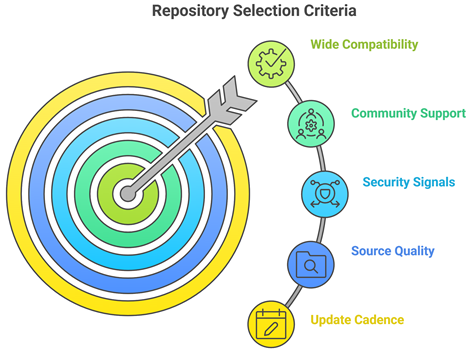
Reliable CloudStream repositories can greatly improve setup speed, source availability, and overall viewing satisfaction for users. Our experts reviewed multiple repositories to identify options that perform smoothly, remain transparent, and provide dependable extensions. This approach aims to ensure trustworthy recommendations that help users stream consistently with ease and improved stability.
- Update Cadence: We chose repositories based on frequent commits, recent releases, and clear changelogs that help maintainers fix issues quickly.
- Source Quality: Our experts shortlisted repos with consistent providers, fewer broken scrapers, and better metadata accuracy for everyday browsing.
- Security Signals: We made sure to shortlist repositories with transparent maintainers, minimal obfuscation, and clear permissions needed for use.
- Wide Compatibility: Our team chose options that work across CloudStream versions, reducing crashes and ensuring your playback stays stable.
- Community Support: We considered active discussions, responsive issue handling, and helpful docs that allow you to troubleshoot rapidly.
The experts in our team selected repositories that consistently maintain quality sources and provide flexible streaming options today.
Are CloudStream Repositories Legal?
When people search for the Best CloudStream Repositories, one common question comes up. Are CloudStream repositories legal? The answer depends on the type of repo you use. CloudStream itself is an open-source media app. It works as a content organizer. It does not host movies or shows on its own. The real concern is the source of the streams provided by certain extensions. In my experience, understanding this difference is very important before installing anything. Not all repositories follow the same rules or content rights.
Here are the key points you should know:
- Official Repositories: Repos that include only verified or public domain extensions are generally legal in most regions. They link to licensed or freely available content.
- Community Repositories Vary: Some third party repos may link to copyrighted material without permission. Streaming such content may break copyright laws in many countries.
- CloudStream Hosts Nothing: CloudStream only reads repository definitions and indexes content. Legal responsibility often depends on the actual stream source.
- Local Laws Matter: Streaming laws differ by country. I always advise users to understand their local regulations before adding community repositories.
Choosing trusted and licensed sources keeps your streaming experience safe and compliant.
Common Issues With CloudStream Repositories & How to Fix Them
Even the Best CloudStream Repositories can sometimes stop working as expected. Repositories depend on GitHub uptime, internet speed, and third party source sites. If one part fails, the repo may not load extensions. Over the years, I have seen that most issues are technical and can be fixed easily. The key is to identify the root cause instead of reinstalling everything at once. A clear approach saves time and avoids frustration.
Here are common problems and practical fixes:
- No Sources Available: This usually happens when the upstream provider is down. Try refreshing the repository or switching to another trusted repo for the same content.
- Buffering or Slow Playback: Check your internet speed first. Lower the streaming quality if needed. I also recommend closing background apps to improve performance.
- Repo Not Installing: Make sure you copied the exact raw URL. Restart CloudStream and try the import again.
- Outdated Extensions: Some community extensions stop working due to lack of updates. Remove inactive extensions and rely on actively maintained ones.
- App Crashing: Update CloudStream to the latest version. Clearing cache can also fix minor bugs.
Most issues are temporary. Regular updates and choosing reliable repositories help maintain a stable streaming experience.
Should You Use a VPN With CloudStream Repositories?
When discussing the Best CloudStream Repositories, many users ask whether a VPN is necessary. The answer depends on how you use CloudStream and which repositories you install. CloudStream itself is an open-source media app. However, some community repositories pull content from third party sources. This can raise privacy and security concerns. In my experience, online streaming always involves data sharing with servers. A VPN can add a layer of privacy, but it is not a magic solution. It should be used with clear understanding, not fear.
Here are key points to consider:
- Privacy Protection: A VPN hides your IP address from external servers. This helps protect your browsing activity from being easily tracked.
- Public WiFi Safety: If you stream on public networks, a VPN encrypts your connection and reduces risk.
- Geo Restrictions: Some legal services restrict content by region. A VPN may help access content available in other locations, depending on service policies.
- Legal Responsibility: A VPN does not make illegal streaming legal. I always remind users to follow local copyright laws.
- Speed Impact: Some VPNs slow down streaming. Choose a reliable provider if you decide to use one.
A VPN can improve privacy, but safe streaming starts with choosing trusted and legal repositories.
Verdict:
In this review, you got acquainted with some of the best CloudStream repositories for reliable streaming and content access. Each repository delivers different strengths, whether it is breadth, update speed, or curation quality. To help you take the final call, I have created this verdict.
- Mega Repository: A top rated and comprehensive option for most people. Its broad source coverage and clean repo.json structure make it a superior choice for users who want a customizable yet dependable hub for everyday browsing.
- Phisher Repo: This is a remarkable and active repository known for fast updates and a focused catalog. It offers consistent maintenance and a wide extension list, making it an excellent option if you are deciding on a frequently refreshed repo.
- doGior’s Repo: A phenomenal and curated alternative with clean structure and predictable updates. With reliable hosting, fewer broken entries, and great compatibility with CloudStream setups, I recommend it as a top choice for users wanting a tidy and consistent repo experience.
FAQs
How do CloudStream repositories work?
CloudStream repositories act as source lists that connect the CloudStream app to multiple streaming extensions through a single JSON manifest. Once added, they pull provider definitions, metadata, and update info from the maintainer’s hosted file. These repositories integrate directly into the CloudStream interface, allowing users to enable, refresh, or remove sources without leaving the app.
Why do people use CloudStream repositories?
People use CloudStream repositories to expand the app’s source library and access movies, TV shows, and live content from different providers. Repositories enhance convenience by aggregating multiple extensions in one place, helping users discover sources faster while customizing their streaming setup based on preferences.
What should you consider before installing a CloudStream repository?
Before installing a CloudStream repository, consider its reliability, maintainer credibility, and update activity. Check whether it comes from a verified GitHub account or a community fork, and ensure it complies with local streaming laws. Also evaluate update frequency, compatibility with your CloudStream version, and any privacy risks associated with third party sources.
Can the right repositories improve streaming quality?
Yes, the right CloudStream repositories can improve streaming quality by providing access to better-maintained extensions and more stable source providers. Some repositories offer multiple providers per title, allowing users to choose higher resolution streams. Reliable repositories also reduce buffering by connecting to better-hosted sources.
Do you need technical skills to manage CloudStream repositories?
No advanced technical skills are required to manage CloudStream repositories. The app provides a simple repository import flow where users can add or remove repos with a few taps. Basic understanding of repo URLs and provider settings is helpful, but most users can manage repositories easily through the built-in interface.