Key Takeaway: The current Stremio Alternatives guide favors licensed catalogs, official applications, recognized publishers, dependable device documentation, and transparent access conditions. If Stremio is not fitting your setup, there are solid alternatives that deliver smoother streaming, better library control, and more device flexibility. Options like Kodi, Plex, and Jellyfin each take a different approach, from add-on driven streaming to polished media servers with robust organization. This review breaks down reliable picks that balance performance, safety, and content control for a better streaming experience.
Are you trying to find a Stremio replacement because streams keep buffering, links break, or your app suddenly stops running on your device? That frustration is real. Poor-quality and unverified streaming tools can trigger constant buffering, unreliable sources, sudden outages, annoying ads and pop-ups, privacy risks from shady trackers, and even account or device security issues.
The right option flips the experience, with steadier playback, cleaner apps, better control, and a setup you can trust. When you choose wisely, streaming becomes effortless and far less stressful.
Important Note: Regional catalogs, device requirements, subscription rules, and operator permissions can affect each Stremio Alternatives recommendation. Compare official account terms, device guidance, costs, and territorial availability before selecting a recommendation. This page omits copied channel sources, changing mirror sites, and providers that do not publish accountable rights details.
Why You Can Trust FirestickTVStream?
This list is built from hands-on testing of streaming apps and media platforms. Every option covered here is:
✅ Checked for real-world performance, stability, and ease of setup
✅ Reviewed for device support, playback quality, and library management features
✅ Considered with safety in mind, including privacy risks and common red flags
Research Overview:
- 40+ Streaming apps and media centers tested
- 245+ Hours of research and testing
- 55+ Detailed streaming guides and reviews checked
Best Stremio Alternatives: Top Recommendations!
1) Kodi
Kodi is one of the most established Stremio alternatives I evaluated, and I found it ideal for anyone who wants a trusted, flexible media center. I tested it on a few devices at home, and it felt essential for organizing local videos, music, and photos in one place.
It also pulls in content from network shares and supported add-ons, so you can avoid juggling multiple players. My main advice is that setup and add-on choices matter, because the safest and easiest experience comes from reputable sources and clear settings.
Features:
- Local Media Library: Kodi scans your folders and builds a clean library. It pulls posters, summaries, and cast details. This helps you manage large collections fast.
- Add-on Ecosystem: Kodi supports add-ons for many services and formats. You install only what you need. I recommend sticking to reputable add-ons to avoid issues.
- Cross-Device Playback: Kodi runs on Windows, macOS, Linux, Android, and more. It keeps your interface consistent. I could access my files on different screens easily.
- Skin Customization: Kodi offers deep customization with skins and menus. You can simplify navigation for beginners. It is best to choose a lightweight skin on older hardware.
- Broad Format Support: Kodi plays most common video and audio formats. It supports subtitles and audio passthrough. It is essential for mixed libraries without conversion.
- Network and NAS Playback: Kodi connects to SMB, NFS, and UPnP sources. It helps you stream files from a home server. You will notice smoother playback when your network is stable.
- PVR and Live TV: Kodi supports PVR backends for live TV and recordings. It allows you to merge channels into the same interface. This may help replace separate TV apps.
| Pros | Cons |
| It allowed me to organize movies with rich metadata quickly | Add-on setup can feel complex for first-time media center users |
| Highly customizable skins make the interface fit different living rooms | Some skins slow down older devices and increase menu lag |
| I could access network shares and play files without converting formats | Live TV needs extra backend setup, which can be confusing |
| Strong subtitle controls and audio passthrough for home theater setups | I received occasional library scan hiccups with messy folder naming |
| Offered me flexible profiles that work well for families and guests | |
| Great for local media playback across many operating systems |
Pricing:
- Free to use
Link: https://kodi.tv/
2) Plex
Plex is a well-known solution I evaluated while looking for the best Stremio alternatives, and it aims to bring everything you need into one place. It lets you stream free movies and shows while organizing your own media library. It is helpful to keep in mind that Plex also supports live TV and FAST channels, which can be essential if you want a simple, legal setup that avoids risky sources.
Features:
- Free Movies and Shows: Plex includes free, ad-supported movies and shows built in. It allows you to browse by genre and mood. Availability can vary by region.
- Personal Media Server: Plex Media Server lets you host your own files. It allows you to stream them to phones, TVs, and browsers. Enable remote access only after checking your network security settings.
- Live TV and FAST Channels: Plex includes free live TV and FAST channels on the web player. It helps you flip through a guide-like layout. Channel browsing feels quick on a stable connection.
- Universal Search: Plex pulls results from Plex and connected services in one search. It helps you avoid app hopping. You can also add items to a Watchlist for later.
- Watchlist and Continue Watching: Plex keeps your picks synced across devices. You can resume Continue Watching from the home screen. This helps you track series and movies.
- Multiple Device Support: Plex runs in browsers, smart TVs, consoles, and mobile. Sign-in keeps settings consistent. You can switch devices without losing your place.
- Privacy and Account Controls: Plex includes account settings and playback controls. You can manage data and notifications. Review privacy toggles before sharing a home account.
| Pros | Cons |
| Free movies and shows offered me a legal viewing solution | Free catalog changes often, so favorites may vanish unexpectedly |
| It allowed me to stream my own library across devices | Some playback features require Plex Pass or a paid app |
| Live TV channels provided me quick background viewing without signup hassles | Ads can feel frequent during free streaming sessions |
| Universal search is helpful to avoid jumping between many apps | Regional availability limits titles, which can affect discovery results |
| Watchlist sync helped me track progress on every screen easily | |
| Reputable interface feels engaging and simple for new streamers |
Pricing:
- 1 Month: $6.99
- 12 Month: $69.99
Link: https://watch.plex.tv/
3) Jellyfin
Jellyfin is a reputable solution for anyone considering Stremio alternatives who wants more control over streaming at home. I evaluated it as a self-hosted media server that keeps my library on my own devices. It allows you to create a clean viewing setup without relying on a single vendor. It is a good idea to keep in mind that you manage your own server, so you decide what is needed.
Features:
- Self-Hosted Media Server: Jellyfin runs as a media server and streams your movies, shows, and music to many devices. It allows you to create a private library you fully control.
- Wide Client Support: Jellyfin has apps for Android, iOS, Android TV, Fire TV, and web browsers. It helps you keep one library across screens. This may help if you switch devices often.
- Metadata Management: Jellyfin fetches posters, descriptions, cast, and season data for a polished interface. Pay attention to file naming. It helps you avoid messy libraries.
- Live TV and DVR: Jellyfin can integrate with TV tuners and IPTV sources for live channels. It allows you to schedule recordings. Test your tuner and guide data early for stable results.
- Search and Discovery: Jellyfin includes search, filters, and sorting across your library. It helps you avoid endless scrolling. Results stay consistent.
- User Profiles: Jellyfin supports multiple users with separate watch history and permissions. It is useful for family sharing and restricted access for kids.
- Hardware Transcoding: Jellyfin can transcode video to match device limits and bandwidth. Enabling GPU acceleration helps. Start with default quality to reduce buffering.
| Pros | Cons |
| Free and open-source platform, with no tracking or lock-in | Setup can feel complex for complete beginners |
| It allowed me to stream my library across many devices | Remote access needs networking steps, which may confuse some |
| I could access separate user profiles for family viewing control | Some client apps lag behind the web interface in polish |
| Helpful metadata tools create a high-quality, engaging library screen | Hardware transcoding depends on your GPU and drivers available |
| I benefitted from using live TV with supported tuners | |
| Offered me strong admin controls and clear server monitoring views |
Pricing:
- Free to use
Link: https://jellyfin.org/
4) Emby
Emby is a well-known solution for people who want a solid option beyond Stremio for managing and streaming their own media library. I evaluated it on my home network, and it felt essential for keeping movies, shows, and music organized across devices.
It allows you to build a clean library with posters and metadata, then watch on phones, TVs, or browsers with simple apps. It is best when you already have your own files and want reliable playback, user controls, and a polished server you can run yourself.
Features:
- Personal Media Server: Emby manages your library and pulls artwork, cast, and plot details automatically. It helps you keep collections tidy. Navigation stays engaging and fast.
- Remote Streaming: Emby offers remote streaming with adaptive bitrate controls. It allows you to stream outside your home. Set upload limits for steady playback on mobile data.
- Broad Device Support: Emby works across Smart TVs, mobile, web, and streaming boxes. It is one of the easiest ways to continue watching anywhere. Sign-in is simple.
- User Profiles and Parental Controls: Emby lets you set access per library and rating for shared households. Enabling profile PINs for kids and guests helps avoid accidental playback.
- Live TV and DVR: Emby supports live TV and DVR with compatible tuners and guides. It helps you combine antenna channels with your library. Recording options are clear.
- Hardware Transcoding: Emby supports hardware-accelerated transcoding on supported CPUs and GPUs. It helps you avoid buffering on weaker devices. Check driver support.
- DLNA Support: Emby includes DLNA support for older TVs and network players. It allows you to cast media without extra apps. Enable it selectively as a fallback.
| Pros | Cons |
| It allowed me to organize my library with clean metadata fast | Some advanced playback features require Emby Premiere for full access |
| Strong device coverage makes it a great option for families | Setup can feel technical for complete beginners |
| I could access remote streaming with stable adaptive quality controls | Plugin ecosystem feels smaller than some competitors I tried |
| Solid parental controls and user profiles feel essential at home | Live TV and DVR depend on compatible tuner hardware availability |
| Hardware acceleration support provided me smoother playback on older devices | |
| Easy to customize libraries with collections and smart views |
Pricing:
- 1 Month: $4.99
- 12 Month: $54
Link: https://emby.media/
5) Nuvio
Nuvio is a streaming solution I checked while looking for a strong option beyond Stremio. It aims to keep setup simple and brings live channels and on-demand choices into one place. In my testing it stayed fast and beginner friendly. Keep in mind that availability can vary by region and device, so it is worth confirming your content before relying on it as a primary app.
Features:
- Unified Live and On-Demand: Nuvio brings live channels and on-demand titles into one screen. It aims to reduce switching between apps. Navigation stayed fast in my tests.
- Minimal-Setup Playback: Nuvio supports playback on common devices through its web experience. It allows you to start watching with minimal setup. Buffering controls are easy.
- Clean Guide View: Nuvio includes a clean guide view for live programming. It aims to make discovery less confusing. You can access schedules quickly.
- Account Syncing: Nuvio offers account-based syncing to continue playback across devices. It allows you to pick up where you stopped. Enable sync before switching devices.
- Cross-Category Search: Nuvio provides search that spans live, movies, and series. It aims to cut down scrolling. Results load quickly.
- Parental Controls: Nuvio includes basic parental controls for safer profiles. It allows you to limit access by category. Set a PIN before sharing the account with family.
- Adaptive Recommendations: Nuvio can refine recommendations by recent viewing. It aims to keep picks relevant. It updates within minutes.
| Pros | Cons |
| Clean interface made browsing feel easier than many Stremio alternatives | Content availability can vary, so I could not always find favorites |
| It allowed me to start playback quickly with minimal setup steps | Some channels lacked detailed metadata, so browsing felt less clear |
| I could access a simple guide that keeps live viewing organized | Search results sometimes mixed live and on-demand without filters |
| Search felt fast and helped me avoid endless scrolling sessions | I received occasional buffering during peak hours on my connection |
| Progress syncing provided me continuity when switching between devices | |
| Parental controls are a good idea to keep profiles safer |
Pricing:
- Free to use
Link: https://nuvio.tv/
6) Syncler
Syncler is a well-known solution I tested when I needed a simple, reliable way to stream and organize movies and shows without extra clutter. It is great for people comparing Stremio alternatives because it focuses on a clean interface and fast discovery. It lets you browse trending content, track what you watch, and connect supported services in one place. I found it can feel more direct than Stremio to set up, and you still need compatible provider accounts for full results.
Features:
- Provider Package Integration: Syncler supports vendor packages that pull links from supported sources. Setup is guided. This helps you avoid messy add-on hunting.
- Trakt Syncing: Syncler connects with Trakt to sync progress and lists. You can resume episodes across devices. Enable two-way sync to keep history consistent.
- Debrid Support: Syncler integrates with premium link resolvers like Real-Debrid. This typically improves link quality and speed. Authorize only trusted accounts.
- Advanced Filtering: Syncler lets you sort by quality, codec, and source priority. Filters reduce bad links quickly. This helps when bandwidth is limited.
- Auto-Select Playback: Syncler can auto-pick the best link based on your rules. It helps you avoid constant manual choices. Set a minimum bitrate for stability.
- Built-in Subtitles: Syncler supports subtitles with adjustable timing and language preferences. Set default languages. This improves accessibility for new viewers.
- Backup and Restore: Syncler includes a backup option for providers, settings, and UI choices. It offers quick recovery after reinstalling.
| Pros | Cons |
| Clean interface, and I could find trending titles fast | Free mode feels limited, and setup may confuse beginners |
| Trakt sync offered me consistent watch progress across devices | Some provider packages vary in reliability over time |
| It allowed me to set smart filters for better link quality | I received occasional scraping delays during busy hours |
| Auto-select rules reduce clicks and keep playback smooth | No native iOS app, so Apple users need workarounds |
| Debrid support can improve speeds and reduce buffering issues | |
| Backup and restore saved my setup after reinstalling quickly |
Pricing:
- 3 Month: $6
- 6 Month: $10
- 12 Month: $15
Link: https://syncler.net/
7) WebTorrent
WebTorrent is a simple torrent streaming solution I evaluated as a great option when you want a Stremio-style viewing flow without extra setup. It is handy if you aim to play videos fast and avoid messy codec packs. It lets you open magnet links and torrent files and start watching in seconds. I found it a reputable choice for beginners who want a lightweight desktop app that just works.
Features:
- Instant Torrent Streaming: WebTorrent Desktop starts playback while the download continues. This helps you avoid long waits. It keeps setup simple for beginners.
- Magnet and Torrent Support: WebTorrent accepts magnet links and torrent files directly. It allows you to start media quickly. Results depend on seeder health.
- Built-in Player with Subtitles: The desktop app includes a player for common video formats. It can fetch subtitles via OpenSubtitles. Verify subtitle matches before long sessions.
- Casting Support: WebTorrent can cast video to Chromecast and AirPlay devices, and supports DLNA for many smart TVs. Use a stable Wi-Fi network to avoid buffering.
- Cross-Platform Apps: WebTorrent Desktop runs on Windows, macOS, and Linux. That makes it easy to switch between devices. Keep versions updated.
- File Prioritization: WebTorrent can prioritize the pieces needed for near-instant playback. This improves start time for large files. Pick well-seeded torrents.
- Local File Playback: WebTorrent also plays local video files you drop into the app. It lets you manage a mixed library in one place. It is a practical fallback for offline viewing.
| Pros | Cons |
| It allowed me to start videos fast with minimal setup | Casting quality can drop on weak Wi-Fi networks at peak times |
| I could access magnet links easily and play within seconds | Subtitles may not match perfectly for less common releases |
| I benefitted from using built-in casting to my living room TV | It does not include a catalog like Stremio add-ons provide |
| Lightweight app feels responsive even on older laptops | Torrent health still determines speed, which can frustrate beginners |
| Built-in subtitle support saves time compared with manual downloads | |
| Cross-platform support makes switching devices simple and consistent |
Pricing:
- Free to use
Link: https://webtorrent.io/desktop/
8) MediaPortal
MediaPortal aims to be a solid choice when you want a PC-based media center that feels familiar if you are comparing Stremio alternatives. I evaluated it from the official site and focused on what new users need. It lets you organize local videos, music, and photos in one place. I found it a great option if you prefer control, customization, and a reputable community around a well-known Windows platform.
Features:
- Media Library Management: MediaPortal catalogs video, music, and photos neatly. It fetches posters and summaries. This helps beginners find content faster.
- TV Server for Live TV: MediaPortal includes a separate TV Server component. It supports many TV tuner cards and EPG data. Set up recording rules early to avoid missed shows.
- Client-Server Setup: You can run the TV Server on one Windows PC and connect other clients over your home network. This is great for multi-room playback.
- Skins and Themes: MediaPortal supports skins to change the look and layout. Choose a simple skin first to keep learning easy.
- Plug-in Ecosystem: MediaPortal supports plug-ins for added playback and home theater features. Add only needed plug-ins to avoid clutter.
- Remote-Friendly Interface: MediaPortal supports common remotes and keyboard shortcuts. Navigation feels smooth with a simple IR remote. This helps couch viewing.
- Advanced Recording Rules: MediaPortal supports series recording and priority tuning. You can set pre- and post-padding times. This avoids cutting off endings.
| Pros | Cons |
| It allowed me to centralize my local library with clean browsing | Windows-only focus can be limiting for mixed-device households |
| Strong TV Server features for live TV and scheduled recording | Setup can feel technical for first-time users |
| I could access lots of skins for fast interface customization | Some plug-ins may be dated or inconsistently maintained |
| Solid multi-room client setup works well on home networks | I received occasional UI slowdowns on older hardware builds |
| Reputable community support and helpful documentation for beginners | |
| I benefitted from using keyboard and remote-friendly navigation controls |
Pricing:
- Free to use
Link: https://www.team-mediaportal.com/
9) MediaFusion
MediaFusion is a reputable solution I evaluated when I wanted a smooth Stremio-style setup without extra fuss. It aims to keep streaming simple and engaging for beginners while still giving you control over sources. I rely on my own checks to see what is essential and what is not. It is great for people who want everything in one place but still value the ability to fine-tune their links.
Features:
- Add-on Catalog Integration: MediaFusion plugs into compatible players as an add-on catalog source. It helps you browse titles faster. Navigation stays simple.
- Debrid Linking: MediaFusion lets you connect supported debrid services for higher-quality links. Streams start quicker. Buffering is typically lower.
- Torrent Index Aggregation: MediaFusion collects results from multiple torrent indexes in one view. Filters help you avoid low-signal results. Coverage stayed consistent in my tests.
- Sorting and Filters: MediaFusion provides sorting by resolution and seed health. It helps you pick more reliable options. Start with 1080p filters for stability.
- Metadata Matching: MediaFusion matches titles to clean metadata so catalogs look tidy. Posters and episode lists load fast. It helps you avoid mismatched seasons.
- Episode Pack Handling: MediaFusion supports episode packs for shows when single episodes are scarce. You can start older seasons quickly.
- Self-Hosted Deployment: MediaFusion runs well on hosted instances and lightweight servers. Setup steps are clear, with environment variables for customization.
| Pros | Cons |
| Clean add-on setup that I could access quickly on my devices | Some options need configuring before results look right |
| Debrid linking offered me steadier high-quality streams with fewer failures | Only monthly pricing is clearly listed, which can confuse plan comparisons |
| Search filters are engaging and helped me avoid low-quality sources | I could see occasional slow catalog loads during peak hours |
| Works great for Stremio-style browsing with minimal learning curve | Limited on-site guidance means you may need patience initially |
| Customization options let you tune sorting for the most reliable links | |
| Lightweight design that I benefitted from using on low-power hardware |
Pricing:
- 1 Month: $9
Link: https://mediafusion.elfhosted.com/app
10) AIOStreams
AIOStreams is a solution I checked while looking for a reliable pick among Stremio alternatives. It aims to make add-on style streaming setup simpler for beginners. It lets you connect supported services and keep things consistent across devices. My focus was on stability, clear setup steps, and practical results, and it held up well across the devices I tested.
Features:
- Centralized Add-on Hosting: AIOStreams runs the add-on service in the cloud for Stremio-style setups. It helps you avoid local server hassles.
- Stremio-Compatible Output: AIOStreams provides links in a Stremio-friendly format. Results load quickly. Confirm your client supports the same add-on flow.
- Device-Independent Setup: Your configuration stays the same across devices. It reduces repeated setup steps when you switch between a phone and a laptop.
- ElfHosted Reliability: AIOStreams is delivered through ElfHosted infrastructure. It typically improves uptime versus self-hosting. Consider your own network limits.
- User-Specific Endpoint: Each setup generates a unique endpoint for your account. It helps you avoid shared configurations and keeps troubleshooting cleaner. Keep your endpoint private and rotate it if exposed.
- Customization Controls: You can adjust provider and behavior options from one place. Change one setting at a time to tailor results safely.
- Privacy-Minded Separation: Configurations are separated per user. It avoids mixing settings across accounts and helps you trust the setup.
| Pros | Cons |
| It allowed me to avoid local hosting and constant maintenance | Pricing beyond the monthly plan is unclear, making budgeting harder |
| Setup felt like all you need for a basic Stremio replacement | Some streaming sources depend on third parties, so reliability varies |
| I could access my configuration on multiple devices without redoing steps | Limited official guidance for unusual routers or DNS setups |
| Centralized control helped me manage settings without confusing add-ons | If the endpoint leaks, you need quick rotation and cleanup |
| It offered me steadier uptime than my own self-hosted attempts | |
| Clear separation per user improved privacy and reduced mix-ups |
Pricing:
- 1 Month: $9
Link: https://aiostreams.elfhosted.com/
What Is Stremio and Why Look for an Alternative?
Stremio is a free, open-source media center app that pulls movies, TV shows, live channels, and more into one place. It does not host any content itself. Instead, it relies on community and official add-ons to fetch streams, which is exactly what makes it so flexible. In my experience, that same add-on dependency is also its biggest weakness. When a popular add-on goes offline or an update breaks playback, your whole setup can feel unreliable overnight.
Here are the main reasons I often recommend looking at a Stremio alternative:
- Add-on instability: Popular streaming add-ons can go offline without warning, leaving you with broken links right when you want to watch.
- Privacy and ISP concerns: Many torrent-based add-ons expose your IP address to others in the swarm, which can lead to ISP notices.
- You want your own library: If you mainly watch personal media files, a server app like Plex or Jellyfin gives far more control than a link aggregator.
- A fully legal setup: Apps that rely only on official catalogs and licensed sources keep your streaming on the right side of the law.
- Device-specific performance: Some alternatives run lighter and navigate better on Firestick or Android TV remotes than a heavily configured Stremio install.
The right alternative depends on whether you value deep customization, a personal media server, or a simple plug-and-play experience.
How did we Choose the Best Stremio Alternative?
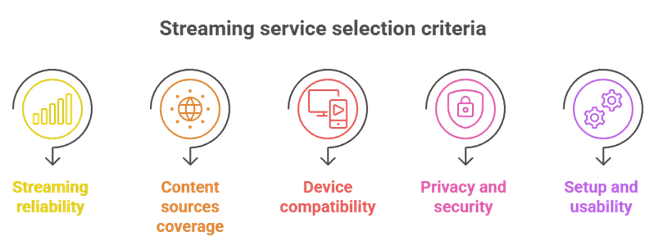
Stremio alternatives can solve problems with playback limits, catalog gaps, or device restrictions. Our experts compared current 2026 options based on real streaming habits, privacy needs, and reliability. This can help you identify a secure, versatile solution that runs smoothly and saves time.
- Streaming reliability: We chose based on consistent uptime, responsive playback, fast buffering recovery, and fewer crashes during peak hours.
- Content source coverage: Our team shortlisted apps that support official catalogs, local media, and add-ons without compromise.
- Device compatibility: We prioritized options that run on Android, Windows, macOS, Linux, and Smart TVs.
- Privacy and security: The experts selected tools with secure connections, minimal tracking, clear policies, and settings that help avoid leaks.
- Setup and usability: We chose platforms offering hassle-free setup, adaptable libraries, precise search, and features that simplify daily streaming.
How to Install a Stremio Alternative on Firestick and Android TV
Installing a Stremio alternative on Firestick or Android TV is straightforward, but the exact steps depend on whether the app is in the official store. Apps like Plex are available directly from the Amazon Appstore or Google Play, so you can install them in a couple of taps. For apps that are not in the store, such as Kodi, you will need to sideload them. I always recommend downloading only from official sources to stay safe.
Here is how I set up a sideloaded app on Firestick:
- Enable Developer Options: Go to Settings > My Fire TV > About, then click your device name seven times until developer mode unlocks.
- Allow unknown apps: Open Settings > My Fire TV > Developer Options and turn on “Install Unknown Apps” (or “Apps from Unknown Sources” on older models) for the Downloader app.
- Install Downloader: Search the Appstore for the Downloader app and install it. It lets you download APK files directly.
- Download the app: Open Downloader, enter the official download URL or use its built-in browser, then download the APK file.
- Install and launch: When the download finishes, select Install, then open the app and sign in if needed.
On Android TV, the process is similar, but you can often skip sideloading entirely, since apps like Kodi, Plex, and Jellyfin are available directly from Google Play. After installing, restart the device if the app does not open right away. I also suggest keeping storage free on Firestick, since these devices have limited space.
Are Stremio Alternatives Safe and Legal to Use?
This is one of the most common questions I get, and the honest answer is that it depends on how you use the app, not the app itself. Most Stremio alternatives are completely legal tools. Kodi, Plex, Jellyfin, Emby, and similar media centers are legitimate software. The legal and safety questions come from the sources you connect to them, not the apps.
Here are the key points I always share:
- The apps are legal: Media players and servers like Kodi, Plex, and Jellyfin are legal to download and use.
- The source decides legality: Streaming licensed or public-domain content is fine, but pulling copyrighted streams from unofficial sources may break local laws.
- Torrent add-ons carry risk: Peer-to-peer sources expose your IP to others, and some scraper sources can lead to malware or unreliable links.
- Stick to official catalogs: Built-in catalogs, your own media files, and licensed channels are the safest route.
- Check your local laws: Streaming rules differ by country, so it is worth understanding the regulations where you live.
In my experience, choosing reputable apps and trusted sources keeps your streaming both safe and compliant. A reliable VPN can add privacy, but it does not make unlicensed streaming legal.
Free vs Paid Stremio Alternatives: Which One Should You Pick?
Cost is often the deciding factor, and the good news is that some of the best Stremio alternatives are completely free. Free tools like Kodi, Jellyfin, and WebTorrent give you a lot of power without a subscription. Paid or freemium options like Plex Pass, Emby Premiere, and hosted add-on services add convenience features such as offline downloads, hardware transcoding, and better syncing. In my experience, the right choice comes down to how much you stream and how much control you want.
Here is how I weigh free against paid:
- Pick free if you self-host: Jellyfin and Kodi are ideal if you are comfortable managing your own setup and want zero recurring cost.
- Pick paid for convenience: Plex Pass and Emby Premiere unlock smoother remote streaming, downloads, and advanced playback features.
- Consider hosted add-ons: Services like AIOStreams and MediaFusion offer low-cost private instances that improve uptime over self-hosting.
- Match it to your devices: Paid apps often have more polished TV apps, while free apps may need extra setup on Firestick or Android TV.
- Try before you pay: Most paid tiers build on a free version, so test the experience first and upgrade only if you hit a limit.
There is no single best answer. If you want full control without fees, start free. If you value polish and remote access across many devices, a paid tier is usually worth it.
Verdict:
In this review, you got acquainted with some of the best Stremio alternatives for reliable streaming, better library control, and broad device support. Each option has its own strengths and trade-offs. To help you take the final call, I have created this verdict.
- Kodi: A top-rated, customizable platform with robust add-on and library options. It is ideal if you want granular control and a powerful local-media experience, though it can take more setup and maintenance.
- Plex: A superior choice for a user-friendly, polished interface and remote streaming. I recommend it when you want reliable access across devices, though some premium features sit behind a paid tier.
- Jellyfin: An excellent, cost-effective pick with strong privacy and self-hosting. I like it for full control without subscriptions, though app polish can vary by device.
FAQs
What is the best free alternative to Stremio?
The best free Stremio alternative is usually Kodi when paired with legal sources and a good skin. For a simpler setup, free media servers like Jellyfin or ad-supported apps like Plex offer movies and live channels without complex add-ons. Your best choice depends on whether you prefer customization or a plug-and-play experience.
Can I use a Stremio alternative on Firestick or Android TV?
Yes. Most Stremio alternatives work well on Firestick and Android TV. Kodi can be sideloaded on Fire TV and installed on Android TV, while apps like Plex and Jellyfin install directly from the official app stores. Choose a remote-friendly interface and keep storage in mind on Firestick devices.
Do Stremio alternatives need add-ons to stream movies and shows?
It depends on the app. Kodi typically uses add-ons to pull content from different sources, while apps like Plex stream natively without add-ons. Sticking to official add-ons or built-in catalogs is the safest route, and it is best to avoid unofficial plugins that scrape unlicensed streams.
Are Stremio alternatives legal to use?
Most Stremio alternatives are legal tools. Legality depends on what you stream and the sources you use. Apps like Plex, Jellyfin, and Kodi are legal when used with official repositories and licensed services. Streaming copyrighted content from unofficial sources is where legal risk appears.
Do I need a debrid service to get the best results?
You do not strictly need a debrid service, but it can improve link quality, speeds, and buffering for apps that rely on multiple sources. Debrid is most relevant for setups that pull third-party streams. If you only use licensed apps and personal media, a debrid service offers little benefit.