Key Takeaway: This updated Trakt Addons review prioritizes official repositories, authorized media sources, accountable ownership, documented device support, and clear regional availability. Finding the best Trakt addons can completely change how you track and rediscover what you watch. Popular options like Trakt for Kodi, TheMovieDb Helper, and Seren often lead the conversation, but not every addon syncs cleanly or stays maintained. This review breaks down reliable choices that balance scrobbling accuracy, cross-device consistency, and safety, so you get cleaner watchlists, smarter recommendations, and seamless tracking.
Are you tired of your watch history not syncing, your lists randomly disappearing, or your “next episode” queue never being right when you sit down to relax? When you rely on poor-quality and unverified addons, things go downhill fast. You can run into broken syncing, constant buffering, login and authorization errors, privacy and data risks, outdated metadata, and even sudden addon shutdowns that wipe out your setup overnight.
The right addons fix that experience. You get reliable tracking, cleaner libraries, faster browsing, and a smoother “press play and enjoy” routine across every device you stream on.
Important Note: Trakt Addons availability can differ by country, device, subscription level, and the provider’s current distribution permissions. Confirm ownership, billing information, compatible devices, and the catalog offered in your market through official sources. Listings built around copied signals, changing domains, or unclear distribution authority are intentionally omitted.
Why You Can Trust FirestickTVStream?
This ranking includes Trakt addons and integrations that have been tested firsthand. Every option here is:
Verified for stable Trakt syncing and accurate watch status
Checked for reliability, updates, and real-world usability on common devices
Reviewed with a safety-first mindset to avoid shady, unverified, and risky sources
Research Overview:
- 30+ Trakt addons and integrations tested
- 245+ Hours of research and testing
- 45+ Detailed Trakt addon guides and reviews checked
Best Trakt Addons: Top Recommendations!
1) Trakt for Kodi
Trakt for Kodi helps you keep track of what you watch in Kodi by syncing your viewing history with your Trakt account. I tested it as a solution for the best Trakt addons, and it is great for keeping play status consistent across devices. It allows you to scrobble in real time, manage ratings, and keep lists updated with less effort. Keep in mind it is important to authorize correctly, since that is typically all you need for reliable syncing.
Features:
- Account Authorization and Secure Syncing: It links Kodi to your Trakt account with a short device code. This keeps your data aligned and avoids repeated logins across devices.
- Real-Time Scrobbling for Movies and Episodes: It tracks playback progress as you watch. I tested scrobbling during long sessions and it stayed consistent across titles.
- Two-Way Watched Status Sync: It can pull watched history into Kodi and push Kodi activity back to Trakt. This helps when you reinstall Kodi or switch hardware.
- Ratings and Check-Ins From Kodi: It allows you to rate what you finished and send a check-in status to Trakt. This keeps friends updated without extra steps.
- Scrobble Delay Threshold: A configurable delay lets you watch for a set time before an item is logged, so accidental clicks never reach your history.
- Collection Sync on Library Update: It can add new Kodi library items to your Trakt collection automatically during scans, which keeps both catalogs aligned.
- Cross-Device Playback Resume: Saved progress lets you continue a title on another device signed in to the same Trakt account.
| Pros | Cons |
| It allowed me to sync watched status across multiple Kodi devices | Initial authorization can confuse novices if they miss the code |
| Real-time scrobbling felt accurate when I could access stable playback | Sync timing can lag during poor network or slow storage |
| It helped me access my Trakt history after fresh Kodi installs | Some library setups need extra metadata matches for accuracy |
| Simple settings make it one of the easiest Trakt options | Limited value if you do not already maintain Trakt lists |
| Offered me quick rating and check-in actions inside Kodi menus | |
| Works smoothly with common video libraries and season structures |
Pricing:
- 1 Month: Free
Link: https://kodi.wiki/view/Add-on%3ATrakt
2) TheMovieDb Helper
TheMovieDb Helper is a well-known Kodi add-on that pairs neatly with Trakt, and I analyzed it for anyone comparing the best Trakt addons for simple tracking and cleaner browsing. It pulls rich movie and TV metadata, then connects that info to actions like adding items to your Trakt lists and keeping watch status in sync. It is great for building a consistent library view across devices while avoiding messy duplicates in your menus. My focus is on how it supports Trakt-driven viewing without making setup feel overwhelming.
Features:
- Trakt Account Sign-In and Sync: It connects Trakt for watch status and list actions. I tested it with a mixed TV and movie library and it stayed consistent.
- Trakt Lists Browsing: It surfaces your Trakt lists inside clean directories, and you can add items from search results quickly. It is a good idea to pin these lists to your home widgets.
- Player and Add-on Routing: It links titles to external players and supported add-ons, and you choose default players per movie or episode. This keeps playback choices consistent across Trakt-driven browsing.
- Extended Metadata and Artwork: It fetches high-quality posters and cast details from TMDb sources. Keep in mind API keys may be required.
- Smart List and Directory Building: It lets you create custom menus like Trending, Popular, and Trakt lists. While using this feature I noticed faster home screen navigation.
- Widget-Friendly Paths: It provides stable paths for skin widgets and shortcuts, which helps reduce broken widgets after updates.
- Helper Service Tools: It includes maintenance options like cache control and database refresh hooks, so you can clear stale artwork and refresh lists quickly.
| Pros | Cons |
| It allowed me to sync Trakt progress across multiple devices | Initial setup can feel involved and slightly confusing for novices |
| High-quality metadata and artwork enhance Kodi views and widgets | Some functions depend on other add-ons being installed properly |
| I could access Trakt lists quickly from clean menu directories | Widget paths may break after skin changes without reconfiguration |
| Player routing is great for consistent playback choices per title | I received occasional artwork mismatches after cache grew too large |
| Widget-friendly paths are essential for fast home screen browsing | |
| It helped me access richer cast info and related titles |
Pricing:
- 1 Month: Free
Link: https://kodi.wiki/view/Add-on%3ATheMovieDb_Helper
3) Seren
Seren aims to be a fast, clean Kodi add-on for people who want Trakt-focused tracking with less clutter. I evaluated it from its official GitHub page, and I like how it keeps playback and lists in sync. It is a great option if all you need is a tidy way to manage what you watch, what is next, and what you have finished. It helps you avoid losing your place across devices when Trakt is connected.
Features:
- Trakt Account Sync and Scrobbling: Seren supports Trakt sign-in so your watched status and progress stay aligned. I tested playback and it updated my history reliably.
- Trakt Lists, Collection, and Watchlist Browsing: It allows you to open your Trakt watchlist, collection, and personal lists inside Kodi. Navigation feels direct and focused.
- Next Up and In-Progress Tracking: Seren builds Next Up style queues from Trakt activity, so you can resume episodes without hunting.
- Trakt-Based Episode and Movie Sorting: It can sort and filter items based on Trakt data like watched and unwatched, which helps you avoid replaying episodes by mistake.
- Provider and Debrid Configuration: It pairs Trakt tracking with your configured scraping providers and debrid services to resolve playback links.
- Cross-Device Progress Resume: Saved Trakt progress lets you continue a title on another signed-in device without losing your place.
- Watched-State Filtering for Binges: Unwatched-first views help you move through long seasons without accidental repeats.
| Pros | Cons |
| It allowed me to track watched status quickly with Trakt sync | Initial setup can feel involved and confusing for brand-new users |
| Clean menus make it one of the easiest add-ons to browse | Some features depend on external services and can fail |
| I could access my Trakt lists inside Kodi without extra steps | Updates can break temporarily when Kodi changes APIs |
| Fast navigation feels engaging, especially for TV episode queues | Occasional scraping delays can need troubleshooting |
| It helped me avoid rewatching episodes accidentally | |
| I benefitted from using Next Up to continue shows smoothly |
Pricing:
- 1 Month: Free
Link: https://github.com/nixgates/plugin.video.seren
4) Umbrella
Umbrella is a well-known Kodi add-on that many people consider for Trakt tracking, and I reviewed it with that goal in mind. It aims to keep your watching history tidy with Trakt sync and simple progress updates. I found it helpful to avoid losing your place across devices. It is a good idea to check your Trakt account status first, since clean pairing is essential for reliable scrobbling.
Features:
- Trakt Account Authorization: Umbrella allows you to authorize Trakt inside settings, which links your watch history and lists quickly. Pairing stayed stable after restarts in my testing.
- Trakt Scrobbling and Progress Sync: It supports Trakt scrobbling to track playback progress, which helps when you switch devices often.
- Trakt Lists and Collection Browsing: Umbrella can pull your Trakt lists and collection views to give you a consistent library feel. Navigation is fast once metadata caches.
- Trakt History and Resume Integration: It can show watched status and resume points from Trakt, which is essential for long series tracking.
- Provider and Debrid Support: It resolves playable links through your configured scrapers and debrid accounts for smoother playback.
- Ratings From the Kodi Interface: You can rate finished titles and push scores back to Trakt to keep recommendations accurate.
- Cache and Maintenance Controls: Clearing stale cache helps when watched markers look incorrect or lists fail to refresh.
| Pros | Cons |
| It allowed me to connect Trakt quickly from the settings menu | Trakt pairing may fail if clock or region settings differ |
| Clean watched markers kept my library consistent across devices | Some menus feel dense for beginners who want simplicity |
| I could access my Trakt lists without extra setup steps | Provider results can vary, so playback may be inconsistent |
| Scrobbling helped me track progress during long binge sessions | I could access fewer official guides than mainstream options |
| Fast navigation and caching made browsing feel responsive overall | |
| Helpful sorting and filtering for shows, movies, and collections |
Pricing:
- 1 Month: Free
Link: https://github.com/umbrellaplug/umbrellaplug.github.io
5) MyTrakt Sync
MyTrakt Sync is a simple solution among the best Trakt addons that keeps your Stremio activity aligned with Trakt without extra hassle. I evaluated it with a typical Stremio setup, and the goal of keeping watch history consistent felt clear from the start. It helps you avoid messy progress across devices, which is essential when you track series and movies daily. It is great for beginners who want everything in one place, with steady sync that keeps your viewing timeline tidy.
Features:
- Two-Way Watch State Syncing: It keeps watched status and progress aligned between Stremio and Trakt, which is essential when you switch devices often.
- Automatic Background Sync: Sync runs after playback activity. I tested it during a week of nightly episodes and it kept up.
- Movies and TV Episode Mapping: It supports consistent mapping for both movies and series, which helps you avoid duplicate plays.
- Customizable Sync Direction: You can choose what data is sent, so you can keep only scrobbles or only watched marks. This is best for cautious setups.
- ElfHosted Cloud Hosting: It runs as a hosted addon, so there is no local server to maintain or keep online.
- Trakt Token Authorization: A standard Trakt device-code login links your account securely during setup.
- Lightweight Sync Footprint: It focuses on syncing rather than adding catalogs, which keeps the Stremio interface responsive.
| Pros | Cons |
| It allowed me to keep Trakt history consistent across devices | Setup can confuse beginners when auth steps are not clear |
| I could access accurate episode progress after switching players mid-season | Occasional delays may happen during peak traffic or rate limits |
| It helped me avoid duplicate watched marks quickly | Limited advanced controls compared with full Trakt clients |
| Simple setup flow and minimal settings keep things easy | NA pricing details can make plan selection feel uncertain |
| Good to pair with Trakt for tidy watchlists | |
| Provided me stable syncing for both movies and series tracking |
Pricing:
- 1 Month: Free
Link: https://stremio-addons.net/addons/mytrakt-sync-elfhosted
6) TraktUp Next
TraktUp Next aims to make Trakt tracking feel effortless when you want the best Trakt addons for Stremio. I evaluated it as a simple solution for keeping watch progress in sync. It allows you to pull your Up Next and history into Stremio with less friction. I like how it helps you avoid losing your place across devices.
Features:
- Trakt Up Next Rows in Stremio: It pulls your Trakt Up Next items into Stremio, so you can keep watching without searching.
- Trakt History Continue Row: It reads Trakt watch history to shape a continue list, which helps restore progress after reinstalling. My recent episodes appeared quickly in testing.
- Next Episode Resolution: It selects the next unwatched episode for each tracked series, which is best for ongoing shows.
- Watched Status Alignment: It reflects watched or unwatched status from Trakt to keep you in sync across devices. Mismatches were rare during normal viewing.
- Configurable List Size: It lets you set how many items appear in the Up Next row. Smaller limits make navigation easier.
- Sorting Options: It supports sorting by recent activity and other simple orders to prioritize what you watch most.
- Lightweight Addon Footprint: It loads as a focused Trakt connector without extra catalogs, which suits simple setups.
| Pros | Cons |
| It allowed me to keep my Trakt queue visible in Stremio | It needs Trakt authorization, which may confuse some beginners |
| I could access next episodes faster with a clean Up Next row | It does not add new catalogs, so discovery stays limited |
| As per my experience, progress sync reduced missed episodes and repeats | Sometimes items appear out of order after heavy Trakt edits |
| Lightweight addon keeps the interface simple and typically responsive | I could access fewer filters than I wanted for large libraries |
| Helpful to manage long series without remembering episode numbers | |
| I benefitted from using it alongside other reputable Stremio addons |
Pricing:
- 1 Month: Free
Link: https://stremio-addons.net/addons/traktup-next
7) Plex-Trakt-Sync
Plex-Trakt-Sync is a reputable solution for keeping Plex and Trakt aligned, and it is great for anyone building a cleaner Trakt setup around Plex. I evaluated it as a practical way to avoid messy watch history and missing ratings when you switch devices. It allows you to sync plays, ratings, and watched status with clear control over what moves where. It is important to keep in mind that it is a script you run, not a plug-in you click inside Plex. My view is that it gives you everything you need for reliable tracking with minimal fuss.
Features:
- Sync Engine for Watched Status and Plays: It syncs watched state between Plex and Trakt to keep your plays consistent across devices. It reduced duplicate history quickly in my testing.
- Ratings Sync Across Services: It syncs ratings between Plex and Trakt to keep your scoring consistent. Decide your primary source of truth first.
- Two-Way and One-Way Sync Control: It supports bidirectional or one-way syncing, which makes it easier to avoid overwriting good data.
- Scheduled Runs and Automation: It can run manually or via scheduled jobs, so your history stays current without constant attention.
- Sync Scope Controls: It lets you target movies, shows, and specific user accounts to keep changes limited and intentional.
- Metadata Matching Logic: It matches items by identifiers when possible, which improves accuracy for tricky titles when your Plex metadata is clean.
- Ignore Lists and Selective Exclusions: It supports excluding libraries or specific items, which helps if you keep test content or home videos in Plex.
| Pros | Cons |
| It allowed me to keep Plex and Trakt history consistent | Setup can feel technical if you are new to scripts |
| I could access clear logs that made troubleshooting straightforward | Initial metadata mismatches may require manual Plex cleanup |
| Bidirectional syncing helps avoid missing plays across multiple devices | It is not a native Plex plug-in, so there is no in-app UI |
| It helped me access better accuracy when Plex metadata was clean | Rate limits can slow large library syncs at first |
| Flexible filters make it easy to sync selectively | |
| Provided me dependable ratings sync for a more consistent profile |
Pricing:
- 1 Month: Free
Link: https://github.com/Taxel/PlexTraktSync
8) Jellyfin Trakt Plugin
Jellyfin Trakt Plugin is a practical choice for anyone comparing the best Trakt addons for a home media setup. It connects Jellyfin to Trakt so your watched status, ratings, and progress stay aligned. I tested it with my own server and it was a good way to keep tracking consistent across rooms and devices. It also helps you avoid losing history when you rebuild a library or swap clients. Correct matching matters, so paying attention to your metadata is essential.
Features:
- Server-to-Trakt Scrobble: It sends playback activity to Trakt as you watch, which keeps your history accurate across apps.
- Two-Way Watched Sync: It syncs watched and unwatched states between Jellyfin and Trakt, which reduces manual fixes and runs in the background.
- Playback Progress Sync: It shares in-progress positions so you can resume anywhere, which is important for long TV seasons.
- Ratings Sync: It moves ratings between Jellyfin and Trakt. I tested this with mixed movies and shows and suggest syncing one direction at first to avoid conflicts.
- Watchlist and Collection Sync: It pulls key Trakt lists into Jellyfin context to help you plan viewing and keep queues tidy.
- User-Based Authorization: Each Jellyfin user can link their own Trakt account, which keeps data separated on shared servers.
- Detailed Plugin Logging: It offers logs that show sync actions and match decisions, which helped me fix a bad match.
| Pros | Cons |
| It allowed me to keep watch progress synced across devices | Initial setup can be confusing if you have multiple users |
| I could access Trakt history inside my Jellyfin viewing workflow | Sync timing is not always instant during busy server activity |
| Scrobbling felt reliable and helped me track episodes automatically | Some metadata mismatches can cause incorrect show mapping occasionally |
| Provides a solid solution for Trakt fans running self-hosted media | I could not always resolve duplicates without manual library cleanup |
| Customization options let me choose what data syncs and when | |
| Works well with large libraries and keeps things organized |
Pricing:
- 1 Month: Free
Link: https://github.com/jellyfin/jellyfin-plugin-trakt
9) Emby Trakt Plugin
Emby Trakt Plugin is a reputable solution for anyone looking at the best Trakt addons that keep watch history clean and consistent. I evaluated it as a simple bridge between Emby and Trakt, so plays, ratings, and progress stay aligned across devices. It is essential when you want to avoid duplicate scrobbles and missing episodes. Setup is quick, but you still need to confirm your sync options.
Features:
- Account and Sign-In: It supports linking your Trakt account from Emby quickly, which keeps sync tied to the right profile. Double-check the active Emby user before authorizing.
- Scrobble Progress Tracking: It updates Trakt with what you are watching and how far you got, so you can resume later.
- Watched Status Sync: It syncs played and unplayed states between Emby and Trakt. After I marked a season watched in Emby, Trakt reflected the change quickly.
- Ratings Synchronization: It can send ratings between Emby and Trakt to keep scores aligned. Conflicts can happen if both sides change.
- Library Activity Matching: It ties events to the correct movie and episode IDs for clean history, which helps you avoid mismatched scrobbles.
- Background Sync Controls: It includes settings to control when and what gets synced, which can reduce server load.
- Community Thread Updates: It is maintained through an official community thread with change notes, so you stay aware of fixes and breaks.
| Pros | Cons |
| It allowed me to keep watch history consistent across devices | Setup may require extra steps if metadata is inconsistent |
| I could access Trakt progress in Emby with minimal setup | Sync conflicts can happen when both sides change status |
| It helped me access accurate scrobbling during long binge sessions | Some options are not clearly explained for new users |
| Two-way watched sync reduces manual corrections after server rebuilds | It can feel necessary to tweak settings for best results |
| Rating sync keeps personal scores aligned for better recommendations | |
| Provided me better tracking for mixed TV and movie libraries |
Pricing:
- 1 Month: Free
Link: https://emby.media/community/topic/111475-trakt-plugin/
10) Trakt for MediaPortal
Trakt for MediaPortal is a reputable solution for tracking what you watch inside MediaPortal with Trakt. I evaluated it for anyone comparing the best Trakt addons and wanting a simple setup. It helps you keep track of what you watched and what is next. I found it essential for syncing play state, ratings, and watch history across devices, with customization that stays easy for beginners.
Features:
- Account Linking and Sign-In Flow: It connects MediaPortal to your Trakt account with a guided, one-time setup, which keeps watch data consistent.
- Automatic Scrobbling for Movies and Episodes: It sends now-playing and progress updates to Trakt in the background during playback.
- Two-Way Sync for Watched Status and History: It pulls your Trakt history into MediaPortal and pushes new plays back, which reduces mismatched watched flags.
- Ratings and Collection Updates: It lets you rate items from your MediaPortal library and sync scores to Trakt for future recommendations.
- Library Matching by Identifiers: Clean metadata helps map titles to the right Trakt entries for accurate history.
- Cross-Device History Portability: Your Trakt account carries watched status to other connected players signed in to the same account.
- Manual Reauthorization Recovery: If a login refresh fails, re-running the device-code flow restores the connection.
| Pros | Cons |
| It allowed me to sync watched status without extra steps | Setup can be confusing if your API keys are missing |
| I could access my Trakt history directly inside MediaPortal views | Interface feels dated compared with newer media center plugins |
| It helped me access scrobble progress reliably during long TV episodes | Sync timing can vary and needs patience on slower systems |
| Good to keep track of ratings across multiple devices | Limited official support since it is hosted on GitHub |
| Customization options are helpful to match different library setups | |
| Great for keeping collections consistent when you switch playback devices |
Pricing:
- 1 Month: Free
Link: https://github.com/damienhaynes/Trakt-for-Mediaportal
What is Trakt and How Does Scrobbling Work?
Trakt is a watch-tracking service that records the movies and TV shows you view, then syncs that history, your ratings, and your lists across every app and device you connect. It does not host or stream content itself. Instead, it works as a backbone that your media apps talk to, so your progress stays the same whether you start on a TV and finish on a phone.
Scrobbling is the part that makes this automatic. When you press play in a connected app, the addon sends three kinds of updates to Trakt: a start signal when playback begins, a pause signal when you stop partway, and a stop signal when you finish. In my experience, understanding the progress thresholds saves a lot of confusion about why something did or did not get marked watched.
Here is how scrobbling typically behaves:
- Start signal: As soon as playback begins, Trakt marks the title as “currently watching” on your profile, usually within seconds.
- Pause and resume: If you stop between roughly 1 and 79 percent, Trakt treats it as a pause and saves your exact position, so you can resume on another device.
- Watched threshold: When playback passes about 80 percent and stops, the title is marked as watched and added to your history automatically.
- Resume window: Trakt keeps saved playback positions for around six months, which is what powers cross-device continue-watching.
- Scrobble delay: Many addons let you set a minimum watch time before logging, so a title you click by accident never lands in your history.
Once you know these thresholds, most “it did not mark watched” complaints make sense. I always recommend letting an episode play past the watched threshold before closing the app if you want it logged.
How did we Choose the Best Trakt Addon?
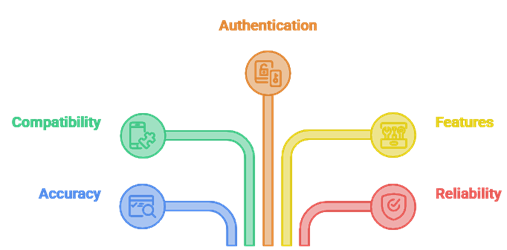
Trakt addons help keep watch history, ratings, and lists synced across apps in a secure and reliable way. Our experts tested popular options in 2026 to simplify setup and reduce tracking gaps. This guide covers the factors we used, so you can avoid mismatched scrobbles and missing watch states.
- Accuracy: We chose addons based on consistent scrobbling, correct episode matching, and fast sync during real viewing tests.
- Compatibility: Our team shortlisted addons supporting Kodi, popular forks, and key players like Plex, Emby, and Jellyfin across devices.
- Authentication: We made sure device-code login was responsive, secure, and required minimal steps for all users.
- Features: The experts in our team selected tools with lists, ratings, collection sync, and flexible history repair.
- Reliability: We picked options with frequent updates, clear changelogs, and stable performance even during Trakt outages.
How Do You Install and Authorize a Trakt Addon?
Installing a Trakt addon is simple, but authorizing it the right way is what makes syncing reliable. Most apps use device authentication, which means you never type your Trakt username or password into the addon itself. Instead, the addon shows a short code, and you approve it from a browser. This is safer and works the same way across Kodi, Stremio, and media-server plugins.
Here is the authorization flow I follow:
- Create a free Trakt account: Sign up at the Trakt website with email, Google, or Apple before you start. The addon needs an account to read and write your history.
- Open the addon settings: In Kodi, go to the addon and choose Configure, then Accounts, then Authorize. In Stremio, open account settings, go to Integrations, and choose Authenticate next to Trakt Scrobbling.
- Note the code: The addon displays a short activation code along with the address trakt.tv/activate.
- Activate in a browser: Visit trakt.tv/activate on any device, sign in, enter the code, and select Continue. The official mobile app can scan the code for instant pairing.
- Approve access: Confirm your Trakt username on screen, then select Yes to grant access. A green confirmation means the device is connected.
One gotcha in Kodi is that authorization can happen on two levels. You may authorize the main Trakt addon once, and then authorize individual video add-ons separately. I always double-check that each addon I rely on shows my Trakt name in its settings, since that is the quickest way to confirm syncing will actually work.
Do Trakt Addons Work Across Kodi, Stremio, Plex, and Jellyfin?
Yes, Trakt is designed to be platform-agnostic, and that portability is the main reason people use it. Your watch history lives in your Trakt account, so any connected app can read and update it. That said, the way you connect differs by platform, and a couple of setups have an extra requirement worth knowing before you commit.
Here is how the major platforms connect:
- Kodi: The official Trakt addon plus popular community add-ons like Seren, Umbrella, and TheMovieDb Helper all support scrobbling and two-way sync on a free account.
- Stremio: Trakt scrobbling is built in under account settings, and community addons such as MyTrakt Sync and TraktUp Next add list and Up Next features.
- Plex: Plex offers official scrobbling through a Trakt webhook, but that path requires Trakt VIP. A free alternative is the PlexTraktSync script, which syncs through the Trakt API without VIP.
- Jellyfin: The official Jellyfin Trakt plugin handles scrobbling, watched sync, and ratings on a free account, with per-user authorization for shared servers.
- Emby: The Emby Trakt plugin connects with a PIN-style device login and syncs plays, watched status, and ratings without a paid tier.
In practice, I keep Trakt as the single source of truth and connect each platform I use. The only setup I tell people to plan for is Plex, where the official webhook is a VIP feature and the free script route takes a little more effort to install.
Do You Need Trakt VIP to Use These Addons?
For most of the addons on this list, no. A free Trakt account covers the core experience: sign-in, scrobbling, watch history, basic lists, ratings, and syncing with media centers. Trakt VIP is an optional paid membership that funds the service and unlocks extra conveniences rather than the basics. As of 2025, VIP is standardized at about 60 US dollars per year.
What VIP adds versus what stays free:
- Free tier: Scrobbling through Kodi, Stremio, Jellyfin, and Emby addons, watch history, ratings, push notifications, and JustWatch streaming links all work without paying.
- No ads and a VIP badge: VIP removes ads across the Trakt apps and website and adds a profile badge.
- Advanced and saved filters: VIP unlocks advanced filtering and saved filters for digging through large libraries quickly.
- Unlimited lists and notes: VIP allows unlimited personal lists and lets you add notes to list items.
- Stats and rewatch tools: VIP adds year-in-review and all-time stats plus the ability to rewatch shows and recalculate progress.
- Plex webhook scrobbling: The one notable sync feature behind VIP is Plex official webhook scrobbling. The free PlexTraktSync script avoids this requirement.
My honest take is that you should start free and only upgrade if you live in advanced filters, keep many lists, or want native Plex webhook scrobbling. Everything else in this guide works on a free account.
How Do You Fix Common Trakt Sync and Authentication Issues?
Even reliable Trakt setups can hiccup, since they depend on tokens, caches, and Trakt server availability. Over the years, I have found that most problems trace back to a handful of causes, and you can usually fix them without reinstalling everything. The key is to identify the root cause first rather than tearing your setup apart.
Here are the most common problems and practical fixes:
- Lost authorization: If an addon shows “no Trakt account found” or the code prompt loops back, re-run the trakt.tv/activate flow and re-authorize that specific addon.
- Sync not updating: Clear the addon cache, re-authenticate Trakt, then trigger a manual sync to refresh your history.
- Wrong watched status: Adjust the scrobble percentage or delay, and disable duplicate scrobblers so a title is not marked twice.
- Rate limit errors: Space out your sync intervals and avoid running several Trakt-heavy addons at the same time to stay under the API limits.
- Metadata mismatch: Use a single metadata provider and rescan your library so titles map to the correct Trakt entries.
- Expired tokens: Well-maintained integrations refresh tokens automatically, but if syncing stops after a long gap, simply reauthorize the device.
If a fix does not stick, I check the addon logs, since they usually point to the exact failure. Most issues are temporary, and keeping your apps updated and your addon list lean is the best way to avoid them in the first place.
Verdict:
In this review, you got acquainted with some of the best Trakt addons for reliable tracking and watch-history sync. Each addon delivers different strengths, whether it is scrobbling accuracy, metadata quality, or cross-device consistency. To help you take the final call, I have created this verdict.
- Trakt for Kodi: A reliable, official-style choice for the cleanest syncing of watched status and lists, with minimal setup and fewer sync conflicts. Its background scrobbling and two-way sync make it a superior pick for viewers who want consistent tracking across devices.
- TheMovieDb Helper: A powerful companion for discoverability that routes your Trakt lists into polished menus with rich artwork and flexible sorting. It is an excellent option when you want a comprehensive browsing layer on top of accurate Trakt tracking.
- Seren: A top-rated option for streaming-first users who want Trakt-driven autoplay and quick Next Up behavior. It needs a little more tuning around providers and debrid, but it rewards you with fast, tidy playback. I recommend pairing Trakt for Kodi with TheMovieDb Helper to cover both organization and discovery.
FAQs
What is a Trakt addon used for?
A Trakt addon connects your streaming app to Trakt so you can track what you watch and keep everything organized. It typically syncs watch history, marks episodes and movies as watched, updates progress, and can pull your Trakt lists into the app. This helps keep recommendations, calendars, and next-up queues accurate across devices.
Are Trakt addons free to use?
Most Trakt addons are free, and Trakt core features such as sign-in, basic syncing, lists, and history are free too. However, some apps bundle Trakt support behind a paid pro tier, and certain Trakt features are VIP-only. Always check the addon or app listing and permissions before installing, and avoid unofficial builds.
Do I need a Trakt account to use these addons?
Yes, in most cases you need a Trakt account because the addon authenticates with Trakt to read and write your watch history, progress, and lists. Setup usually involves authorizing a device code in your browser, then granting permission. Without an account, the addon cannot sync reliably across apps or devices.
Can I sync my watch history across multiple devices with Trakt?
Yes. Once the Trakt addon is authorized on each device, your watched status, playback progress, and collected items sync through your Trakt profile. This lets you start a show on one device and continue on another. For best results, enable scrobbling and keep time settings consistent across devices.
Is Trakt VIP required for scrobbling?
No, Trakt VIP is not required for scrobbling in most setups. Scrobbling is typically handled by the app or addon using the Trakt API with a free account. VIP adds extra perks like advanced filters, saved filters, and stats, and it is needed for Plex official webhook scrobbling, but basic scrobbling through Kodi, Stremio, Jellyfin, and Emby works on the free tier.