
Key Takeaway: Crunchyroll is the best overall AniWatch replacement for current anime, Tubi is the strongest free licensed option, and HIDIVE covers valuable exclusives and English dubs. Build a portable watchlist first, then choose services by title availability instead of trusting a familiar comeback domain.
AniWatch is not simply experiencing another short outage. The service that previously operated as Zoro.to became AniWatch in 2023, rebranded to HiAnime in March 2024, and displayed a goodbye notice across HiAnime’s official domains on March 13, 2026. That history leaves displaced viewers with lost watchlists, misleading clone results, and no verified one-for-one successor.
I compared dedicated anime platforms, general streaming subscriptions, free ad-supported services, and official distributor channels using current shutdown reporting plus first-party pricing, catalog, device, and help pages. The list prioritizes stable legal access, Fire TV usability, clear limitations, and realistic costs. Because no licensed platform owns every anime, a tracker plus one paid service and free backups is usually the most resilient setup.
Best AniWatch Alternatives: Top Recommendations!
| Service | Best For | Access | Get Started |
|---|---|---|---|
| Crunchyroll | Current simulcasts | From $9.99 monthly | Visit Site |
| Tubi | Free licensed anime | Free with ads | Visit Site |
| HIDIVE | Exclusives and dubs | $7.99 monthly | Visit Site |
| Hulu | US anime plus television | From $11.99 monthly | Visit Site |
| Netflix | Anime originals and dubs | From $7.99 monthly | Visit Site |
1) Crunchyroll
Crunchyroll is the strongest all-round AniWatch alternative when current simulcasts, a deep dedicated catalog, reliable subtitles, and native Fire TV support matter most. I rank it first because the service documents more than 50,000 episodes across 2,000 series and films, while every current United States paid tier includes offline viewing and full-library access.
Features:
- Catalog Depth: Crunchyroll reports more than 50,000 episodes and 2,000 series and films, providing the broadest licensed starting point for dedicated anime viewers.
- Simulcast Speed: Many licensed episodes arrive shortly after their Japanese broadcast, supported by a release calendar that is easier to follow than changing mirror schedules.
- Language Options: Subtitles and dubbed audio are available across numerous languages, although the exact tracks, seasons, and release timing still depend on regional licenses.
- Fire TV App: The official application supports Fire OS 6 and newer, with QR activation, watchlist syncing, profiles, and remote-friendly living-room navigation.
- Verification Note: I checked the August 2026 United States prices against Crunchyroll’s official pricing announcement and current Premium comparison page before ranking it.
- Offline Viewing: Fan includes downloads on one device, while Mega Fan and Ultimate Fan expand simultaneous streaming, offline HD access, and additional membership benefits.
- Household Controls: Multiple profiles, teen profiles, PIN protection, skip controls, synchronized history, and recommendations make a shared subscription more practical for families.
| Pros | Cons |
|---|---|
| Largest dedicated anime catalog | Full catalog requires payment |
| Fast licensed simulcasts | Availability varies by country |
| Downloads on every paid tier | United States prices increased in 2026 |
| Excellent Fire TV support |
Pricing:
- US Fan Plan: $9.99 monthly
- US Mega Fan Plan: $13.99 monthly
- US Ultimate Fan Plan: $17.99 monthly
Link: https://www.crunchyroll.com/
2) Tubi
Tubi is the best free and legal AniWatch alternative for viewers willing to trade same-week simulcasts for advertising. I rank it above paid general streamers because basic viewing needs no subscription or credit card, the Fire TV application is official, and the anime category contains recognizable series, films, and older favorites without pop-ups, fake players, or rotating domains.
Features:
- No Subscription: Tubi charges no monthly fee, requests no payment card, and supports its licensed catalog through short commercial breaks during movies and episodes.
- Anime Selection: The catalog mixes recognizable television series, dubbed seasons, films, classics, and rotating discoveries, but it does not promise every current simulcast.
- Optional Account: Viewers can begin without registering, while a free account synchronizes watchlists, favorites, recommendations, and resume positions across compatible devices.
- Fire TV Ready: Official support covers Amazon Fire TV and Firestick alongside Roku, Apple TV, consoles, phones, browsers, and many major smart televisions.
- Verification Note: I confirmed Tubi still describes the service as completely free and legal and states that no paid ad-free option currently exists.
- Safer Playback: Studio partnerships and a documented advertising model avoid the notification traps, deceptive download buttons, redirect chains, and unknown operators common on clones.
- Regional Reality: Tubi operates across several countries, but supported devices, titles, audio tracks, and category depth change according to local distribution rights.
| Pros | Cons |
|---|---|
| Free without a payment card | Advertising cannot be removed |
| Licensed catalog | Few current simulcasts |
| Official Fire TV application | Catalog changes by country |
| No malicious redirects |
Pricing:
- Viewing: Free and supported by advertisements
- Profile: Optional and costs nothing
- Remove Ads: No subscription option was offered on August 20, 2026
Link: https://tubitv.com/category/tv/anime
3) HIDIVE
HIDIVE is the best companion or alternative for anime licenses that do not appear on Crunchyroll. I place it second for Sentai-backed exclusives, current simulcasts, fresh English dubs, classics, deep cuts, and selected uncensored versions where licensed. Its catalog is smaller, yet two concurrent streams and offline downloads make the current plan unusually complete for the price.
Features:
- Distinct Licenses: Sentai relationships give HIDIVE exclusives, simulcasts, classics, and dubbed releases that can fill meaningful gaps left by larger anime platforms.
- Current Pricing: The live HIDIVE subscription page lists $7.99 monthly or $79.99 annually in the United States, with a seven-day trial for eligible customers.
- Fresh Dubs: The service emphasizes new English dubs alongside subtitled broadcasts, helping viewers who previously used AniWatch to switch languages within one library.
- Offline Downloads: Subscribers can save up to 20 titles on supported mobile and Fire devices, then have 48 hours to finish once playback begins.
- Verification Note: I compared HIDIVE’s live membership page with its support center because one older help article still displays a lower, outdated price.
- Shared Viewing: Members can create up to three profiles and stream on two devices simultaneously, with separate subtitle, audio, avatar, and autoplay preferences.
- Device Coverage: Official apps include Fire TV, Android TV, Roku, Apple TV, Xbox, major smart televisions, phones, tablets, Chromecast, and web browsers.
| Pros | Cons |
|---|---|
| Valuable exclusive catalog | Smaller library than Crunchyroll |
| Strong English dub selection | Catalog differs by territory |
| Downloads included | Separate channel subscriptions do not transfer |
| Two concurrent streams |
Pricing:
- US Monthly Plan: $7.99
- US Annual Plan: $79.99
- New-Customer Trial: Seven days when eligibility requirements are met
Link: https://www.hidive.com/
4) Hulu
Hulu works best for United States households that want anime alongside current television, movies, originals, and Disney bundle options. I include it for popular franchises and dubbed seasons rather than specialist catalog depth. The app is dependable on Fire TV, but regional restriction, expiring licenses, and occasional incomplete seasons make it a supplement instead of a universal AniWatch replacement.
Features:
- Mixed Library: Anime sits beside current television, films, originals, family programming, and network shows, reducing the need for another single-purpose application.
- Recognizable Titles: Hulu regularly carries popular franchises and dubbed seasons, although exact titles, season completeness, and expiration dates can change during the year.
- Fire TV Access: The official Hulu application supports Amazon Fire TV devices, household profiles, watchlists, subtitle controls, recommendations, and two simultaneous base-plan streams.
- Annual Savings: The ad-supported annual plan costs $119.99, saving about two monthly payments for viewers comfortable committing to a complete year.
- Verification Note: I confirmed the current base, Premium, and annual prices on Hulu’s official plan pages rather than carrying forward older 2025 figures.
- Offline Option: Hulu Premium permits downloads for selected titles on supported mobile devices, but television playback still requires an active internet connection.
- US Limitation: Hulu serves United States residents and uses location information, so international readers should select a service officially offered in their country.
| Pros | Cons |
|---|---|
| Anime plus current television | United States only |
| Useful annual discount | Some seasons are incomplete |
| Official Fire TV application | Base plan includes ads |
| Disney bundle choices |
Pricing:
- Monthly With Ads: $11.99
- Monthly Premium: $18.99
- Annual With Ads: $119.99
Link: https://www.hulu.com/hub/anime
5) Netflix
Netflix is the strongest general-entertainment AniWatch alternative for polished anime originals, exclusive films, multilingual dubs, and dependable applications. I recommend checking the live anime genre page before subscribing because catalogs vary by country and month. It lacks the depth of a dedicated service, but a household already paying for Netflix may need no additional platform for casual viewing.
Features:
- Original Releases: Netflix funds and licenses anime series and films that may debut globally, sometimes as complete seasons rather than traditional weekly simulcast episodes.
- Dub Coverage: Major releases commonly include several audio and subtitle languages, helping multilingual households switch tracks without searching for separate episode pages.
- Fire TV Quality: Supported Fire TV devices can stream up to 4K Ultra HD with subtitles, alternate audio, surround sound, and Dolby Atmos where available.
- Profile System: Up to five profiles can maintain separate recommendations, watch history, maturity settings, languages, subtitles, and personal queues within one household account.
- Verification Note: I checked the current United States prices on Netflix’s official anime page and confirmed Fire TV capabilities through the Netflix Help Center.
- Download Support: Selected shows and films can be downloaded on compatible mobile and Fire tablets, though television sticks do not store offline episodes locally.
- Catalog Rotation: Licensing differs across more than 190 countries and changes over time, so confirm the exact title, season, audio, and subtitle tracks before subscribing.
| Pros | Cons |
|---|---|
| High-quality original anime | Smaller dedicated anime library |
| Strong multilingual audio | 4K requires Premium |
| Reliable Fire TV performance | Licenses rotate by region |
| Includes mainstream entertainment |
Pricing:
- US Standard With Ads: $7.99 each month
- US Standard: $17.99 each month
- US Premium: $24.99 each month
Link: https://www.netflix.com/us/browse/genre/7424
6) Prime Video
Prime Video is useful when a desired anime is included with Prime, available to rent or buy, or carried through a separate channel subscription. I treat it as a gap-filler because search results mix several payment types. The Fire TV integration is excellent, but 4K and ad-free core playback now require the additional Prime Video Ultra option.
Features:
- Mixed Access: Search results can combine titles included with Prime, free ad-supported programs, rentals, purchases, and independent channel subscriptions with different terms.
- Rent or Buy: Paying once for a particular film can cost less than keeping another monthly anime service when only one unavailable title matters.
- Channel Add-Ons: Optional anime subscriptions can appear inside Prime Video, but direct-app logins, catalogs, trials, features, prices, and cancellation paths may remain separate.
- Fire TV Integration: Prime Video is built around Fire TV search, Alexa, watchlists, profiles, X-Ray information, subtitles, alternate audio, and supported mobile downloads.
- Verification Note: I checked Amazon’s August 2026 Prime price and the March 2026 Ultra change, including its separate monthly fee and feature limits.
- Ultra Features: Prime Video Ultra adds ad-free core viewing, 4K UHD, Dolby Atmos, five concurrent streams, and up to 100 downloads on eligible content.
- Label Discipline: Always read the badge beside each result because an included season, paid sequel, rental film, and channel episode can share one search screen.
| Pros | Cons |
|---|---|
| Excellent Fire TV integration | Search mixes payment types |
| Rentals avoid extra subscriptions | Ultra costs extra |
| Useful channel marketplace | Anime catalog is not comprehensive |
| Strong playback features |
Pricing:
- Amazon Prime: $14.99 monthly or $139 annually in the United States
- Prime Video Ultra: $4.99 monthly as an additional subscription
- Rentals and Channels: Individually priced and billed separately
Link: https://www.amazon.com/gp/video/storefront/
7) RetroCrush
RetroCrush is the specialist AniWatch alternative for vintage series, cult films, OVAs, older dubs, and titles buried beneath seasonal releases elsewhere. I recommend it as a discovery service rather than a current-simulcast replacement. Free viewing lowers the barrier, while Premium unlocks more of the catalog; both access and individual titles can still vary by location.
Features:
- Classic Focus: RetroCrush prioritizes older television, movies, OVAs, cult favorites, and vintage English dubs instead of competing for every new seasonal broadcast.
- Free Viewing: A rotating selection streams without payment, supported by advertisements and local catalog rights that may differ between the website and applications.
- Premium Catalog: Subscribers unlock more movies, series, original programming, panels, and live events, although the official description still mentions a limited ad experience.
- Curated Discovery: Focused collections help viewers explore historical science fiction, action, romance, comedy, and experimental titles beyond the franchises dominating current charts.
- Verification Note: I confirmed the official support center lists free access plus Premium at $4.99 monthly or $49.99 annually without a long-term commitment.
- Simple Television Use: A maintained streaming application avoids browser pop-ups, redirected players, questionable downloads, and the remote-control friction associated with web-only mirror sites.
- Regional Limits: Catalog rights and Premium availability vary, so check the live service in your country before building a watchlist around a specific classic.
| Pros | Cons |
|---|---|
| Excellent classic-anime focus | Few current simulcasts |
| Free catalog available | Premium still has limited ads |
| Affordable annual option | Availability varies by region |
| Strong cult-film discovery |
Pricing:
- Free: Selected ad-supported catalog
- Monthly Premium: $4.99 in supported United States billing
- Annual Premium: $49.99 in supported United States billing
Link: https://www.retrocrush.tv/
8) Official YouTube Anime Channels
Official YouTube distributor channels are the most overlooked free AniWatch alternative, especially across South and Southeast Asia. I recommend Muse Asia, Ani-One Asia, and publisher channels only when their verified channel identity and local rights are clear. They can provide complete episodes and timed simulcasts, but geography, subtitle languages, expiration windows, and available series vary sharply.
Features:
- Licensed Uploads: Distributors and publishers can post complete episodes, films, premieres, and limited simulcasts through verified channels rather than anonymous re-upload accounts.
- Regional Strength: Muse Asia and Ani-One Asia focus heavily on supported Asian territories, while publisher channels may offer different titles in other regions.
- Free Playback: Many episodes stream with ordinary YouTube advertisements and no separate subscription, although selected memberships or Premium benefits may cost extra.
- Fire TV App: YouTube installs directly from the Amazon Appstore, supports television activation, watch history, playlists, captions, casting, voice search, and remote navigation.
- Verification Note: I checked the official Muse Asia, Ani-One Asia, and Gundam channel identities instead of relying on search results that mix licensed and copied uploads.
- Expiration Windows: A distributor may remove episodes after a campaign or licensing period, so save the series name in a tracker rather than assuming permanent availability.
- Subtitle Limits: English or local-language captions vary by channel and territory, and dubbed audio is less common than on paid specialist streaming platforms.
| Pros | Cons |
|---|---|
| Free licensed episodes | Strong geographic restrictions |
| Excellent Fire TV application | Episodes can expire |
| No unknown player domains | Dub selection is limited |
| Useful regional simulcasts |
Pricing:
- Standard Viewing: Free with advertising
- YouTube Premium: Optional and priced by country
- Channel Memberships: Optional where a distributor offers them
Link: https://www.youtube.com/@MuseAsia
9) Pluto TV
Pluto TV replaces AniWatch’s choose-any-episode model with free, cable-like channels and a smaller on-demand library. I recommend it for viewers who enjoy turning on an anime stream without deciding what to watch. The service is licensed, needs no payment, and installs directly on Fire TV, but schedules and anime availability differ substantially between countries and months.
Features:
- Live Channels: Scheduled partner channels create a relaxed television experience without episode searches, multiple server lists, manual quality selection, or browser navigation.
- On-Demand Access: Selected series and films also appear in the on-demand catalog, allowing exact-title viewing when local programming rights include those episodes.
- No Payment: Pluto TV charges no subscription fee and funds its live channels, movies, shows, news, sports, and anime through advertising.
- Optional Profile: Core playback is free, while a profile can synchronize favorite live channels, watchlists, and resume positions where those features are supported.
- Verification Note: I confirmed Pluto TV still describes the service as free, safe, and legal and explicitly supports the official Amazon Fire TV application.
- Wide Devices: Apps run across Fire TV, mobile hardware, smart televisions, streaming players, consoles, and browsers, making living-room viewing straightforward.
- Schedule Tradeoff: A linear channel does not guarantee the exact episode or series desired, and both schedules and on-demand rights rotate by region.
| Pros | Cons |
|---|---|
| Completely free core service | Advertising is unavoidable |
| Official Fire TV application | Limited episode control |
| Licensed live channels | Regional schedules vary |
| No account required for payment |
Pricing:
- Linear Channels: No charge; advertisements included
- On-Demand Titles: No charge where local rights permit
- Subscription: Not required for the core service
Link: https://pluto.tv/
Rebuild an AniWatch Watchlist Without Depending on Another Domain
AniWatch users once carried progress through the Zoro-to-AniWatch and AniWatch-to-HiAnime transitions, but a shutdown makes a site-bound queue fragile. Rebuild the list in a neutral tracker first, then connect services where supported. The tracker becomes the permanent record; streaming applications become replaceable sources whose catalogs can change without erasing episode history.
- Start From Memory: list currently airing shows, unfinished seasons, paused titles, planned series, favorite films, and anything watched recently before recalling older catalog items.
- Use a Tracker: MyAnimeList, AniList, Kitsu, or another established tracker can preserve status, scores, episode counts, notes, and planned viewing outside one streamer.
- Verify Episodes: compare remembered progress with episode summaries or official season listings, especially when specials, recap episodes, OVAs, and split cours affect numbering.
- Separate Title Names: record Japanese, romanized, and English titles when possible because different platforms may index the same show under different localized names.
- Maintain Ownership: update the neutral tracker after each session and treat platform watchlists as convenient mirrors rather than the only copy of viewing history.
How I Evaluated AniWatch Replacements After the HiAnime Shutdown
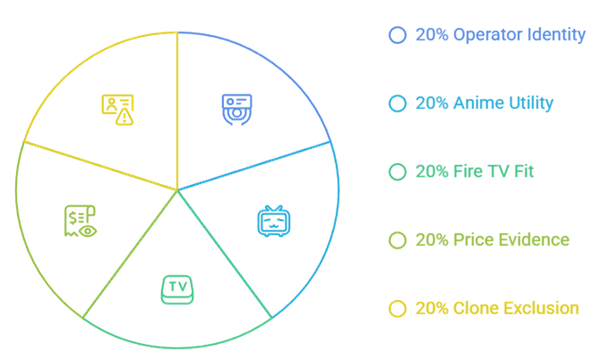
AniWatch became HiAnime in March 2024, and HiAnime displayed a goodbye message across its official domains on March 13, 2026. That history makes name recognition a poor safety signal. I ranked maintained licensed services by what displaced viewers actually lost: current episodes, searchable subs and dubs, watchlists, Fire TV usability, predictable pricing, and verifiable ownership.
- Operator Identity: every ranked service has an identifiable operator, official support route, published terms, and a licensing or distribution model that can be checked.
- Anime Utility: catalog depth, current-season access, dubs, subtitle control, classics, films, and realistic regional limits were compared instead of using library-size slogans alone.
- Fire TV Fit: native application support, remote navigation, activation, playback quality, household profiles, and account syncing mattered more than whether a browser page merely loaded.
- Price Evidence: current official plan, support, or company pages supplied every listed price; conflicting or unclear figures are disclosed rather than silently averaged.
- Clone Exclusion: no redirected mirror, copied AniWatch branding, unknown APK, scraped player, unverified comeback claim, or permission-abusing page qualified for the ranking.
Match AniWatch Features to the Service That Actually Replaces Them
AniWatch combined a huge catalog, subs, dubs, episode comments, watch history, and free access in one interface. Licensed replacements split those benefits across different products. Choose the capability used every week rather than chasing a service that claims to reproduce everything. A two-service setup is often cheaper, safer, and more reliable than another all-purpose clone.
- Weekly Simulcasts: use Crunchyroll as the main release calendar and add HIDIVE only during seasons when its exclusives justify a second paid subscription.
- English Dubs: search the exact series and season on Crunchyroll, HIDIVE, Netflix, or Hulu because a platform may license subtitles without matching dubbed audio.
- Free Catalog: combine Tubi, Pluto TV, RetroCrush, and official YouTube channels for legal viewing that accepts advertisements, rotations, and fewer same-week episodes.
- Classic Anime: start with RetroCrush, then search Tubi, Prime Video rentals, library services, and publisher channels when older films or OVAs are unavailable.
- Community Layer: keep reviews and discussion on established trackers or forums instead of granting a streaming clone account access solely to recover episode comments.
Install and Tune These AniWatch Alternatives on Firestick
The ranked applications install through the Amazon Appstore, avoiding Downloader codes and unknown APK permissions. Search each official name, confirm the publisher, install, and activate with a phone or browser when offered. If anime playback stutters, troubleshoot storage, updates, Wi-Fi, and video settings before assuming the streaming service is down.
- Confirm Publisher: open the Appstore listing and verify the service name, icon, publisher, ratings, permissions, and support details before selecting Download or Get.
- Use Activation: QR or short-code login keeps full passwords away from the television keyboard and reduces typing mistakes on Crunchyroll and similar applications.
- Protect Storage: remove abandoned browser downloads and unused APKs, then keep enough free space for Fire OS updates, application caches, artwork, and smoother navigation.
- Fix Playback: restart the Firestick and router, update the application, test another title, and switch Wi-Fi bands before clearing credentials or reinstalling everything.
- Compare Browsers: the best Gogoanime alternatives guide explains additional licensed choices if one application misses a title on your Fire TV.
Treat Every AniWatch or HiAnime Comeback Domain as Unverified
The original naming chain ended with HiAnime’s goodbye notice, so a familiar logo or copied interface cannot establish continuity. Lookalike pages benefit from search demand and may ask for notification access, extensions, APKs, reused passwords, or payment verification. Verify identity before interaction, and leave when a page cannot explain who operates it or holds distribution rights.
- Name Is Insufficient: AniWatch, Zoro, and HiAnime branding has been copied widely, while a matching color scheme, domain phrase, or interface proves no ownership connection.
- Reject Permissions: close pages requesting browser notifications, calendar access, unrelated extensions, device management, APK installation, or repeated redirect approval before playback begins.
- Protect Credentials: never reuse the old AniWatch password on a claimed successor, and change it anywhere else if that same credential was previously shared.
- Avoid Payment Traps: do not enter card details, cryptocurrency, identity documents, or a small verification charge into an unverified anime streaming or account-recovery page.
- Clean Accidents: remove suspicious downloads, revoke site notifications, review installed applications, clear unnecessary permissions, and scan the device after interacting with a deceptive clone.
Verdict
Crunchyroll is the closest dependable replacement for the largest part of AniWatch’s appeal, but no legal service recreates its entire catalog for free. Keep progress in an independent tracker, use HIDIVE only when its exclusives matter, and retain Tubi or official channels between paid rotations. That approach costs less and survives catalog changes without sending account details to another unverified domain.
- Crunchyroll: choose it for the broadest dedicated catalog, current simulcasts, dependable subtitles, native Fire TV support, and the simplest single-service AniWatch replacement.
- Tubi: use it when free licensed viewing, official Fire TV support, and a clean player matter more than receiving every new episode immediately.
- HIDIVE: add it for affordable exclusives, Sentai titles, English dubs, deep catalog discoveries, and series unavailable through the largest anime subscription.
FAQs
What is the best AniWatch alternative in 2026?
Crunchyroll is the best overall replacement for current simulcasts, a large dedicated catalog, subtitles, dubs, downloads, and Fire TV support. HIDIVE is the strongest companion for exclusives, while Tubi is the best free licensed choice.
What happened to the original AniWatch website?
The service previously known as Zoro.to became AniWatch in 2023 and rebranded to HiAnime in March 2024. HiAnime then displayed a goodbye notice across its official domains on March 13, 2026, leaving later comeback claims unverified.
Are there free and legal AniWatch alternatives?
Yes. Tubi offers free on-demand anime with ads, Pluto TV provides free live and selected on-demand programming, RetroCrush has free classics, and official YouTube distributor channels release licensed episodes in supported regions.
Which AniWatch alternative has English dubs?
Crunchyroll, HIDIVE, Netflix, Hulu, Tubi, and RetroCrush all carry dubbed anime. Audio licensing differs by title, season, and country, so check the exact series page or playback audio menu before subscribing.
Is a new AniWatch mirror safe to use on Firestick?
A copied name does not prove that a mirror is connected to the former service. Avoid notification requests, unknown APKs, fake players, reused passwords, and payment demands; compare the best 9Anime alternatives for more established options.