Key Takeaway: Choose Tubi for the strongest all-around free movie and television catalog, Plex for cross-service discovery and broad international reach, and Pluto TV for instant live channels plus on-demand viewing. Use a library service or occasional rental when those rotating free catalogs do not contain one specific title.
DopeBox appealed to viewers who wanted movies and complete television episodes behind one clean search box on any device, usually without registration or a monthly bill. That convenience becomes unreliable when similarly named domains move, players redirect, subtitles disappear, or nobody can identify the operator, content licenses, data practices, and files behind a download prompt.
I compared nine accountable replacements using current official product, support, library, storefront, and device documentation. This ranking covers broad free catalogs, cross-service discovery, live channels, current rentals, curated cinema, library borrowing, protected offline viewing, independent films, and multilingual programming. Each option solves a different DopeBox use case while stating the advertisements, regions, accounts, and catalog limits a mirror often hides.
Best DopeBox Alternatives for Movies and TV Shows
| Platform | Best For | Access Model | Get Started |
|---|---|---|---|
| Tubi | Best overall free replacement | Free with ads | Visit Site |
| Plex | Worldwide discovery and free viewing | Free with ads | Visit Site |
| Pluto TV | Live channels plus on-demand movies | Free with ads | Visit Site |
| The Roku Channel | Free originals and channel surfing | Free with ads | Visit Site |
| Fandango at Home | New releases without another subscription | Free, rent, or buy | Visit Site |
1) Tubi
Tubi is the best overall DopeBox alternative for people who want a large movie and television catalog without a subscription or payment card. Its licensed, advertising-supported library includes originals, live programming, and familiar studio titles inside an official Fire TV app. I rank it first because ordinary viewing stays simple while optional registration restores lists and progress across supported devices.
Features:
- Always Free: Movies, full television seasons, originals, and selected live programming stream through advertising without a monthly subscription, trial conversion, or payment-card requirement for ordinary viewing.
- Official Fire TV App: Amazon Fire TV and Fire Stick users install Tubi through the normal Appstore, avoiding copied players, notification requests, unknown APK packages, and Downloader entirely.
- Optional Profile: You can watch without paying, while a free verified account adds My List, continue-watching, recommendations, parental controls, and synchronized progress across compatible screens.
- Documented Rights Model: Advertising revenue pays participating studios and independent distributors, providing an identifiable licensing arrangement instead of unexplained embeds hosted behind several redirecting play buttons.
- Broad Discovery: Search, genres, collections, Spanish-language shelves, family programming, captions, audio-described titles, live channels, and Tubi Originals make the catalog useful for different household viewing habits.
- Source Check: I confirmed the no-card promise, legal model, current Fire TV installation route, account benefits, supported devices, and unavoidable advertising through Tubi’s maintained help pages.
- Main Limitation: Commercial breaks cannot be removed, titles rotate as agreements change, and available films, shows, channels, captions, or resolutions can differ significantly between supported countries.
| Pros | Cons |
| No subscription or card | No ad-free upgrade |
| Large mixed catalog | Titles rotate regularly |
| Official Fire TV application | Catalog varies by country |
| Account remains optional |
Pricing:
- Access: Free with advertising
- Paid Plan: No subscription tier for standard viewing
- Checked: Official Tubi help reviewed August 20, 2026
Link: https://tubitv.com/
2) Plex
Plex is a strong DopeBox replacement when one search box matters as much as free playback. Its service combines licensed movies, live channels, a universal Watchlist, provider discovery, and an optional personal-media system. I place it second because free content reaches users in almost every country, although individual titles rotate and distributor rules still make each regional catalog different.
Features:
- Wide Availability: Plex supplies free advertising-supported movies and television in almost every country, although licensing rules still decide which titles and live channels play in each location.
- Unified Discovery: Search and Watchlist can track where a title streams, rents, or sells across selected providers, replacing DopeBox bookmarks with a more portable discovery layer.
- Fire TV Support: The official Amazon Fire TV application supports Plex-provided movies, television, live channels, discovery, watchlists, and properly configured personal libraries on compatible network connections.
- Account Choice: Some Plex players allow immediate viewing, while a free profile adds synchronized progress, service preferences, favorites, managed users, recommendations, and cross-device Watchlist access.
- Personal Media Option: Plex Media Server can organize lawfully owned films, episodes, music, photos, and home videos separately from the company’s free partner-funded streaming catalog.
- Source Check: I verified geographic reach, free access, Fire TV compatibility, account benefits, advertising, catalog rotation, and download restrictions through current official Plex support documentation.
- Main Limitation: Free partner titles include commercials and cannot be downloaded for offline use; Plex Pass neither removes those advertisements nor unlocks a larger free streaming catalog.
| Pros | Cons |
| Near-global free availability | Free catalog contains ads |
| Cross-service search and Watchlist | No offline partner-title downloads |
| Official Fire TV support | Regional libraries differ |
| Optional personal library |
Pricing:
- Free Streaming: Advertising-supported with no required subscription
- Plex Pass: Optional; does not remove ads from free partner content
- Checked: Official Plex support reviewed August 20, 2026
Link: https://watch.plex.tv/
3) Pluto TV
Pluto TV replaces the part of DopeBox browsing that turns into endless scrolling. Hundreds of programmed channels start instantly, while separate on-demand shelves contain thousands of films and complete show seasons. I recommend it for cable-style viewing, themed movie channels, and no-payment access on Fire TV, but country-specific lineups and scheduled programming reduce control over exactly what plays next.
Features:
- Two Viewing Modes: A cable-like live guide and searchable on-demand shelves let households choose between immediate programmed entertainment and selecting a specific available movie or television episode.
- No Payment: Short commercial breaks fund every standard stream, so Pluto requires no subscription fee or credit card while still identifying its operator and distribution model.
- Fire TV Route: Pluto officially supports Amazon Fire TV beside browsers, phones, consoles, Roku, Apple TV, and major smart televisions, eliminating any reason to sideload its application.
- Genre Channels: Continuous feeds cover movies, comedy, reality, crime, classics, news, children’s programs, sports, and individual franchises, quickly reducing the effort required to choose something.
- Free Profile: Optional registration reliably synchronizes favorite channels, Watch List items, and resume progress across supported devices while ordinary free access remains funded through advertising.
- Source Check: I checked Pluto’s official service, device, and product pages for channel scale, on-demand programming, Fire TV access, account benefits, commercial funding, and legal positioning.
- Main Limitation: Advertisements are unavoidable, live schedules cannot be fully controlled, and each territory receives different channels, titles, languages, captions, sports rights, and personalization features.
| Pros | Cons |
| Hundreds of live channels | Commercial breaks are required |
| Thousands of on-demand titles | Regional lineups differ |
| No payment required | Live schedules limit control |
| Official Fire TV application |
Pricing:
- Live TV: Free with advertising
- On Demand: Free with advertising
- Checked: Official Pluto TV pages reviewed August 20, 2026
Link: https://pluto.tv/
4) The Roku Channel
The Roku Channel is a practical DopeBox alternative for US Fire TV households wanting movies, series, Roku Originals, and more than 500 live channels in one application. Compatible Amazon devices are officially supported. I include it because free playback begins quickly, while a Roku account adds continuity and optional premium subscriptions remain separate from the free catalog.
Features:
- Large Live Guide: More than 500 live channels join free films, television programs, children’s entertainment, news, and Roku Originals inside one continuously updated viewing destination.
- Fire TV Compatibility: Roku’s current support page explicitly covers compatible Amazon Fire TV streaming devices, Fire TV Edition televisions, and Fire TV Edition soundbars within the United States.
- Original Programming: Roku Originals are available online without download charges, subscriptions, logins, or a Roku player wherever The Roku Channel itself operates on supported platforms.
- Profile Benefits: A free Roku identity can synchronize resume progress across signed-in devices and also manages any optional premium channel subscriptions purchased through the platform.
- Mixed Access: Free advertising-supported rows sit beside separately labeled premium subscriptions, making it important to check each title’s access badge before creating an account or accepting a trial.
- Source Check: I confirmed current channel scale, Fire TV eligibility, free originals, device routes, account benefits, and territory restrictions through Roku’s maintained product and support pages.
- Main Limitation: Fire TV access is officially United States-only, free titles rotate, advertisements remain, and premium subscriptions can make the interface less straightforward than a purely free catalog.
| Pros | Cons |
| More than 500 live channels | Fire TV route is US-only |
| Exclusive free Roku Originals | Premium offers appear alongside free rows |
| Official Fire TV support | Catalog changes regularly |
| Free account adds continuity |
Pricing:
- Free Catalog: Advertising-supported movies, shows, originals, and channels
- Premium Add-ons: Optional subscriptions priced separately
- Checked: Official Roku support reviewed August 20, 2026
Link: https://therokuchannel.roku.com/
5) Fandango at Home
Fandango at Home solves the problem free DopeBox replacements cannot: a particular film still inside its rental or purchase window. The storefront also maintains a free advertising-supported section, but recent releases are priced individually. I recommend it for new-movie nights because there is no recurring plan to forget, and supported Fire TV hardware can play eligible 4K purchases or rentals.
Features:
- Current Releases: New theatrical and home-premiere films appear for rental or purchase when licensed, offering a documented path to specific titles that free catalogs have not received.
- Free Section: Separate Stream Free shelves provide advertising-supported movies and television, so creating an account does not automatically require purchasing a title or recurring membership.
- Pay Per Title: Rental and purchase prices appear on each detail page, avoiding a monthly subscription while letting households spend only when one exact release matters.
- Fire TV Playback: Compatible Amazon Fire TV devices support streaming through the official application, including eligible 4K UHD, HDR, Dolby Vision, or Dolby Atmos formats when hardware qualifies.
- Search Detail: Title, actor, director, genre, critic score, rating, release timing, deals, free status, and available picture quality provide more useful context before final checkout.
- Source Check: I reviewed Fandango’s active movie store, rental shelves, free catalog, device guidance, parental controls, and 4K requirements instead of quoting a temporary title price.
- Main Limitation: Most desirable new releases cost extra, accounts are required for transactions, prices vary by title and quality, and purchases remain licensed digital access rather than transferable files.
| Pros | Cons |
| Recent movies available legally | New releases cost per title |
| No recurring plan required | Account needed for transactions |
| Includes a free catalog | US availability is the main focus |
| Supports eligible 4K Fire TV playback |
Pricing:
- Free Shelf: Advertising-supported selected titles
- Rent or Buy: Per-title price displayed before checkout
- Checked: Official Fandango store reviewed August 20, 2026
Link: https://athome.fandango.com/
6) Kanopy
Kanopy is the strongest DopeBox alternative for viewers with access through a participating public library or university. Its collection favors documentaries, world cinema, classics, independent films, educational series, and Kanopy Kids rather than endless mainstream rows. I value the commercial-free playback and transparent ticket system, although the local institution controls eligibility, monthly allowances, and temporary access restrictions.
Features:
- Institution Access: A participating public library or university supplies eligibility, so users enter valid credentials and create a Kanopy profile instead of paying a direct consumer subscription.
- Ticket System: Public-library patrons receive a locally determined monthly ticket allowance; required tickets and the resulting viewing window appear clearly before each supported title starts.
- Curated Catalog: Documentaries, international cinema, independent productions, classics, educational programs, festival films, and thoughtful children’s content carefully complement the mainstream focus of larger advertising-supported platforms.
- Kanopy Kids: Eligible public-library accounts can watch available Kanopy Kids titles without spending monthly tickets, though the library’s participation and collection choices still determine availability.
- Fire TV App: The official Kanopy application provides living-room playback on compatible Fire TV hardware after activation, avoiding browsers, third-party download pages, and unknown media-player packages.
- Source Check: I verified current signup steps, ticket resets, library-controlled access, unlimited-title rules, Kids access, and device support through Kanopy’s recently maintained official help center.
- Main Limitation: Nonparticipating institutions provide no access, unused tickets do not roll over, local budgets can temporarily limit streaming, and popular mainstream releases may be absent.
| Pros | Cons |
| No commercials during films | Participating institution required |
| Strong curated and educational catalog | Monthly tickets vary locally |
| Official Fire TV application | Library budgets can restrict access |
| Kanopy Kids can be ticket-free |
Pricing:
- Patron Cost: No direct fee with eligible institutional access
- Monthly Tickets: Allowance and title cost depend on the library
- Checked: Kanopy help center reviewed August 20, 2026
Link: https://www.kanopy.com/
7) Hoopla
Hoopla turns a participating public-library card into an ad-free DopeBox replacement for movies, television, music, audiobooks, comics, and ebooks. Video loans are available instantly rather than through a hold queue, and eligible mobile apps support protected offline viewing. I recommend it for travel and families, but every library sets its own catalog, monthly borrow allowance, and daily budget controls.
Features:
- Library Funded: Eligible patrons borrow digital media without a separate subscription or credit card because their participating public library pays for access under locally chosen limits.
- Instant Borrowing: Available movies and episodes can be checked out immediately without waitlists, then expire automatically after the displayed lending period without late fees or manual returns.
- Commercial Free: Borrowed video plays without inserted advertisements, fake overlays, notification demands, or repeated redirects, making the viewing window easier to use for family movie nights.
- Offline Mobile: Supported phone and tablet applications can store protected eligible loans for travel, although downloads stay inside Hoopla and disappear when the lending period ends.
- Fire TV Pairing: The official Fire TV application displays a short activation code, allowing account connection through a trusted browser instead of typing library credentials with the remote.
- Source Check: I consulted Hoopla’s 2026 movie guide, current television setup instructions, and borrowing documentation to confirm library requirements, advertisements, downloads, pairing, and local limits.
- Main Limitation: A nonparticipating library offers nothing, and participating systems can independently restrict monthly borrows, daily spending, available formats, catalog depth, or temporary access during high demand.
| Pros | Cons |
| No ads or direct subscription | Library participation required |
| Instant available borrows | Borrow limits vary by system |
| Protected mobile downloads | Loans expire automatically |
| Official Fire TV application |
Pricing:
- Patron Cost: Free with an eligible participating library card
- Borrow Allowance: Set independently by each library system
- Checked: Official Hoopla resources reviewed August 20, 2026
Link: https://www.hoopladigital.com/
8) Filmzie
Filmzie is a useful DopeBox alternative when discovery matters more than finding the same studio blockbusters everywhere. Its free catalog highlights independent productions, festival selections, documentaries, shorts, international cinema, and overlooked series. I include it because the company documents legal advertising-supported access and a direct Fire TV installation route, while optional profiles add ratings, reviews, and community-focused discovery.
Features:
- Independent Focus: Festival films, documentaries, shorts, international productions, art-house discoveries, genre movies, and less exposed television series give curious viewers alternatives to repetitive mainstream recommendation rows.
- Legal Free Model: Advertising funds licensed playback and supports participating filmmakers, providing a documented exchange instead of an anonymous host promising every current release without explaining rights.
- Fire TV Instructions: Filmzie publishes direct steps for finding and installing its official Amazon Fire TV application, removing the need for Downloader, browser redirects, or unofficial APK repositories.
- Guest Viewing: Visitors can sample available films as guests, while a free profile supports community ratings, reviews, saved interests, and a more persistent discovery experience.
- Curated Context: Cast details, themes, festival associations, trailers, languages, subtitles, and editorial collections help viewers assess unfamiliar films before committing to a full feature or documentary.
- Source Check: I verified Filmzie’s free legal positioning, advertising model, worldwide ambitions, guest access, filmmaker support, current web catalog, and Fire TV route through first-party pages.
- Main Limitation: The library emphasizes independent and catalog entertainment over current studio hits, advertisements remain, and exact films, subtitle tracks, applications, or features differ by region.
| Pros | Cons |
| Distinct independent-film selection | Few major new releases |
| Free legal access | Catalog varies by territory |
| Official Fire TV route | Advertising supports streams |
| Guest viewing available |
Pricing:
- Guest Access: Free with advertising
- Registered Access: Free account; no monthly plan required
- Checked: Official Filmzie pages reviewed August 20, 2026
Link: https://filmzie.com/
9) DistroTV
DistroTV serves viewers wanting multilingual channels, international perspectives, independent movies, documentaries, and continuous programming without another account. Live feeds sit beside on-demand shelves inside an official Fire TV application. I rank it ninth because the movie catalog is less predictable, but its global and cultural breadth makes a valuable companion to mainstream free services.
Features:
- Global Mix: Channels and on-demand programs represent North American, British, Latin American, African, South Asian, Chinese, and other international audiences across entertainment, news, movies, and lifestyle.
- No Registration: Standard viewing begins without a login, subscription, payment card, or trial, preserving immediate access while advertisements support the service and participating content suppliers.
- Fire TV Availability: DistroTV distributes an official application for Amazon Fire TV alongside Roku, Apple TV, Google TV, mobile devices, browsers, and major smart television platforms.
- Movie Channels: Independent cinema, classics, horror, family films, documentaries, festival work, world movies, and culturally focused networks provide continuous alternatives to a poster-only on-demand catalog.
- Live and On Demand: Scheduled channels suit background viewing while selectable films and programs offer greater control when the platform has a specific available title that interests you.
- Source Check: I reviewed DistroTV’s active movie page and first-party platform announcements to confirm free access, no registration, Fire TV distribution, multilingual scope, and mixed viewing modes.
- Main Limitation: Channel availability changes, some markets receive different lineups, advertisements are required, and mainstream recent movies or complete television seasons are less dependable than specialist programming.
| Pros | Cons |
| No registration required | Movie catalog is less predictable |
| Strong multilingual selection | Lineups vary by market |
| Official Fire TV application | Ads fund all viewing |
| Live and on-demand options |
Pricing:
- Access: Free with advertising
- Account: No registration or subscription required
- Checked: Official DistroTV pages reviewed August 20, 2026
Link: https://www.distro.tv/
Recreate DopeBox’s One-Box Search Without Trusting a Mirror
No licensed catalog owns every film and television series. Replace the DopeBox search habit with a discovery-first routine: identify where the exact title is legitimately available, then open that provider’s official application. This prevents repeated visits to copycat domains:
- Start Broad: Search Plex discovery or a reputable availability guide for the exact title, year, season, and episode before opening several free applications and repeating the query.
- Check Free First: Review Tubi, Pluto TV, The Roku Channel, library services, and Fandango’s free shelf before paying, remembering that licensing availability changes by country.
- Confirm the Version: Match the release year, cast, runtime, language, cut, season, episode number, and picture format so similarly named listings do not produce the wrong program.
- Save Portably: Keep a neutral watchlist or personal note instead of relying on one streaming site, allowing saved titles to survive catalog rotation, app changes, or domain closures.
- Avoid Fake Results: A search result promising an unreleased movie, required codec, browser update, notification permission, or refundable card verification should be closed rather than investigated further.
How I Scored a DopeBox Replacement When “Free HD” Is the Hook
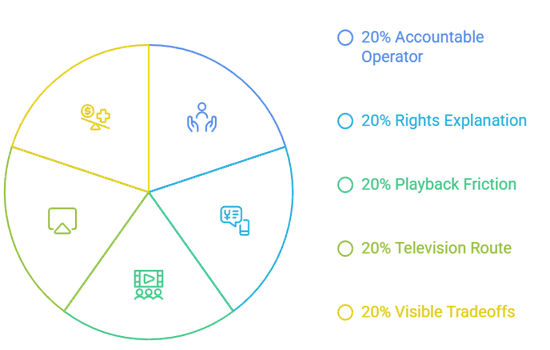
DopeBox attracted viewers with immediate playback, one search box, recent-looking posters, and no subscription. A worthwhile replacement must preserve useful convenience without hiding its operator, funding, device support, or catalog limits. These five checks determined the order:
- Accountable Operator: Every recommendation needed a named company, institutional partner, media distributor, or storefront with maintained support and privacy information instead of only a familiar movie grid.
- Rights Explanation: The service had to describe advertising, library funding, rentals, purchases, or another recognizable distribution model rather than claiming unexplained free access to every release.
- Playback Friction: No-card and no-login access ranked highly, while accounts remained acceptable when they added secure watchlists, borrowing, purchases, parental controls, downloads, or cross-device progress.
- Television Route: Official Amazon Fire TV availability or current first-party device guidance mattered more than mirror reviews, sideloading instructions, download buttons, and similarly named third-party applications.
- Visible Tradeoffs: I recorded advertisements, regions, title rotation, ticket limits, borrowing rules, offline restrictions, premium prompts, and per-title costs before assigning each service its use case.
Match the Movie’s Release Window Instead of Chasing “CAM HD” Labels
A new film normally moves from theaters to premium rental or purchase, then subscriptions, and later free or library-funded catalogs. DopeBox-style pages often blur those windows. Knowing the stage explains why a legitimate free search may return nothing:
- Theatrical Stage: If a movie remains cinema-only, an online player advertising a perfect free copy is not equivalent to an authorized home release, regardless of its resolution badge.
- Premium Stage: Fandango at Home can provide a documented rental or purchase when distributors open home access, with price, playback quality, and account terms shown beforehand.
- Subscription Stage: A studio may license the title to one paid service temporarily; compare the cost of a single month against rental and remember to cancel unwanted renewals.
- Free Stage: Tubi, Plex, Pluto, Roku, Filmzie, and DistroTV eventually receive selected titles through advertising agreements, while exact arrival dates and country availability remain unpredictable.
- Library Stage: Kanopy or Hoopla may offer an overlooked film through local institutional access, making a library-card search worthwhile before purchasing another service or following a mirror.
Put DopeBox Alternatives on Firestick Without Sideloading
Every recommendation has an official living-room route, and most provide a direct Fire TV application. Search the Amazon Appstore first, confirm the developer, then test ordinary playback before creating profiles, pairing a library card, or buying a movie:
- Appstore Search: Use Fire TV search for the exact service name, then inspect the developer, support address, screenshots, age rating, permissions, and reviews before selecting Get.
- Territory Check: An authentic application can still be missing where the service or catalog lacks distribution rights, so never replace it with a similarly named unofficial package.
- Safe Pairing: Plex, Kanopy, Hoopla, and other services may display a short code, allowing authentication through a trusted phone browser instead of typing passwords remotely.
- Playback Trial: Test captions, audio, seeking, pause, resume, and one advertisement break before relying on the app for accessibility, children, travel, or a planned movie night.
- Device Maintenance: Keep Fire OS and official applications current, remove abandoned clones, and use our best movie apps for Firestick guide to compare additional verified options.
Undo Risky Browser Changes After Visiting a DopeBox Copycat
Closing a suspicious tab is only the first step if the page gained notification permission, downloaded a file, installed an extension, or received a reused password. Clean the browser and account trail before returning to normal streaming:
- Remove Notifications: Open browser site settings, revoke unfamiliar notification permissions, clear stored data for the domain, and block future pop-ups or redirects from the same origin.
- Delete Unknown Files: Remove unrequested APKs, media players, codecs, cleaners, browser installers, and extension packages without opening them, then empty the recoverable download area normally.
- Review Extensions: Disable browser add-ons installed around the visit, check their requested permissions, and remove anything that can read page data, change searches, or inject advertisements.
- Protect Accounts: Change any password entered on an unverified page, replace reused credentials everywhere else, enable multifactor authentication, and review recent sessions for unfamiliar devices.
- Scan and Restart: Run the device’s maintained security scan, update the browser and operating system, restart normally, and investigate persistent redirects before entering payment or library credentials.
Verdict
Tubi is the best all-around DopeBox replacement for free movies and full television seasons, Plex is strongest for global discovery and portable watchlists, and Pluto TV excels at immediate channel surfing. None can legally guarantee every current release for no cost. Combine one broad free catalog with library access, then rent only the genuinely time-sensitive films missing from both.
- Tubi: Best overall for licensed no-cost movies, series, originals, official Fire TV support, optional account sync, and a transparent advertising model.
- Plex: Best for international reach, cross-service discovery, synchronized Watchlist items, free partner content, live channels, and an optional personal-media library.
- Pluto TV: Best for instant scheduled channels, thousands of on-demand choices, free profiles, major-device support, and households tired of scrolling through posters.
FAQs
What is the best free DopeBox alternative?
Tubi is the most balanced free starting point in supported regions because it combines a broad licensed catalog, official Fire TV application, optional account features, and ordinary playback without a subscription or card.
Which DopeBox alternative works without creating an account?
DistroTV explicitly supports no-registration viewing, while Tubi, Plex, Pluto TV, Roku Originals, and Filmzie can provide varying levels of guest access. Account requirements may differ for special events or purchases.
Can I watch brand-new theatrical movies free on these services?
Usually not during the earliest release window. Check Fandango at Home for legal rentals or purchases, then wait for subscription, advertising-supported, or library catalogs if immediate access is unnecessary.
Which alternative lets me download movies?
Hoopla supports protected offline viewing for eligible borrowed video inside supported mobile applications. Free partner catalogs generally stream only, while storefront downloads remain encrypted and governed by their own device rules.
Where can I compare another free movie-site replacement?
The LookMovie alternatives guide compares another service mix. Recheck title availability, country, advertisements, accounts, device support, and offline rules because every licensed catalog changes.