Key Takeaway: Free sports streaming can be tempting, but the real win is finding options that are safe, stable, and worth your time. Alongside legit platforms like Pluto TV, Tubi, and Red Bull TV, this review helps you spot reliable picks while avoiding sketchy sites that ruin game day.
Are you tired of clicking on a “free” stream, only to end up battling pop-ups, buffering, and links that fail right before kickoff? Poor-quality and unverified streaming sites can cost you more than patience. You may face malware risks, intrusive ads, constant lag, sudden stream shutdowns, fake play buttons, low-resolution video, and even privacy leaks from shady trackers. It is frustrating, especially when you just want a clean, reliable way to watch the match.
The right options fix that with safer access, smoother playback, and fewer interruptions so you can enjoy the sport again.
Why You Can Trust FirestickTVStream?
This ranking includes popular free sports streaming sites that have been tested firsthand. Every option here is:
✅ Checked for safety signals like excessive redirects, fake buttons, and aggressive ad behavior
✅ Reviewed for stream stability, video quality, and how often links go down during live games
✅ Cross-tested on common devices and browsers people actually use at home
✅ Regularly updated and actively maintained
Important Note: We avoid promoting “100% free” sites that look unverified or may stream copyrighted content without proper rights, since they can be risky and unreliable.
Research Overview:
- 155+ IPTV services tested
- 260+ Hours of research and testing
- 49+ Detailed IPTV guides and reviews checked
Best Free Sports Streaming Sites: Top Picks!
1) Pluto TV
Pluto TV is a reputable, free streaming solution that aims to make sports easy to watch without sign-ups or fees. During my analysis, I found it is great for beginners who want all you need in one place. The channel guide feels familiar, like cable. It typically helps you avoid decision fatigue and jump into live games, sports talk, and highlight shows fast. I like that it works across devices, so I can start on my phone and finish on my television. Keep in mind that sports availability can vary by region and by channel schedule.
Features:
- Live Channels: Live sports channels with a cable-style guide. It helps you find games fast. It is a good idea to check the schedule often. Sports windows change daily.
- On-Demand Sports: On-demand sports shows and highlights library. It helps you catch up when you miss live airtime. Search is simple. Categories keep browsing easy.
- Quick Start: Fast, no-account start on most devices. I tested it on mobile and smart TV. Playback started quickly. Setup felt essential for beginners.
- Easy Navigation: Easy channel switching and quick browsing. I evaluated the guide and it stayed responsive. Ads appear in breaks. I recommend favoriting sports channels to avoid extra scrolling.
- Multi-Platform Access: Multi-platform support across web, phones, tablets, and TVs. It allows you to continue watching on different screens. Streams stayed stable for me. This may help at home or on trips.
- Live Discovery: “On Now” style discovery rows for live content. It surfaces what is currently airing fast. It is helpful to spot sports blocks. I suggest checking these rows before searching.
| Pros | Cons |
| I could access live sports channels fast with a familiar guide | Sports coverage varies by region, so some events are missing |
| Free, reputable service that helps you avoid subscription costs | Ad breaks can interrupt key moments during live sports |
| It allowed me to switch devices without losing my place | Some channels rotate, so favorites may change over time |
| On-demand highlights are engaging and easy to find quickly | I could notice occasional stream quality drops on weak Wi-Fi |
| Simple layout is one of the easiest for new streamers | |
| It offered me quick discovery rows for what is on now |
Pricing: Free
Link: https://www.pluto.tv
2) Tubi
Tubi is a reputable, free streaming solution that aims to make live and on-demand sports easier to follow without adding another bill. While reviewing it, I found it helpful to browse sports content fast and avoid wasting time on broken links or shady pages. It is a good idea to keep in mind that Tubi focuses on legal, ad-supported streaming, so the experience feels straightforward for beginners. If all you need is a safe place to watch available sports programming and related channels, Tubi is a great option to consider.
Features:
- Live TV Channels: Live TV sports channels in the app. I tested the Live TV section and it loaded quickly. It supports a simple channel guide. This helps you find sports streams faster.
- Sports Library: Large free on-demand sports library. It includes sports movies, documentaries, and highlights. Categories are easy to browse. Search and filters keep discovery quick.
- Device Support: Works on most popular devices. You can stream on web, smart TVs, Roku, Fire TV, and phones. Setup is simple. Playback stayed stable in my testing.
- Watchlist Sync: Optional account features for a smoother watchlist. You can create a list and resume playback across devices. I recommend creating an account to sync your progress and favorites. It reduces repeat searching.
- Curated Discovery: Fast, clean discovery with curated rows. Sports-related collections appear alongside trending picks. This may help new viewers choose quickly. I noticed fewer dead ends than many free sites.
- Parental Controls: Kid-friendly controls and profile-level safety options. Parental controls help limit mature content. It is important for shared TVs. This supports safer sports browsing at home.
- Caption Options: Closed captions and language options on many titles. Caption controls are easy to access. It improves clarity in noisy rooms. This is helpful during live sports talk segments.
| Pros | Cons |
| Free, legal streaming that helps you avoid risky sports sites | Live sports selection can vary, so key games may be missing |
| I could access Live TV channels quickly with a simple guide | Ads are required, and breaks can interrupt game momentum |
| On-demand sports docs and highlights are engaging and high-quality | I received fewer major league events than paid sports services |
| It allowed me to stream smoothly on Roku, Fire TV, and web | Regional availability limits some channels and sports programming |
| Search and categories make it one of the easiest to browse | |
| Watchlist and resume playback offered me better viewing continuity |
Pricing: Free
Link: https://www.tubitv.com
3) Red Bull TV
Red Bull TV is a reputable streaming solution I checked when I wanted a simple, free way to watch sports without getting lost in sketchy links. It is great for action sports fans who want high-quality live events and deep replays in one place. I like that it keeps the focus on real competitions, athlete stories, and official coverage. It also helps you avoid the usual pop-ups and risky mirrors that often appear on free streaming pages. Keep in mind it is not built for mainstream league games, but it is one of the easiest options for motorsport, biking, and adventure sports.
Features:
- Live Events: Live event streams for Red Bull-owned sports. It covers select competitions in real time. The player stays stable and clean. Streams are typically geo-aware.
- Full Replays: Full replays with chapters and highlights. I watched past events and jumped to key moments fast. This may help when you missed the live window. Playback stayed smooth.
- Sports Discovery: Sports-first discovery and curated collections. It groups series by sport, event, and athlete. That makes it one of the easiest ways to find what you need. Search is direct.
- Multi-Device Access: Device support across web, mobile, and TV apps. It allows you to start on my phone and finish on a television. I recommend signing in to sync your watch progress across devices. Setup is quick.
- Original Sports Documentaries: Red Bull TV has a strong lineup of original films, athlete profiles, and behind-the-scenes documentaries. It is not just for live streams. I found this especially useful when there were no live events on.
- Exclusive Event Coverage: Some events and segments feel more exclusive than what you usually get on general sports platforms. It often includes access to niche competitions, training features, and athlete-focused coverage that is harder to find elsewhere.
- Highlights and Short-Form Clips: Quick highlight clips are easy to access if you do not want to watch a full replay. This is great for catching major moments fast without digging through long videos.
| Pros | Cons |
| Clean official streams helped me avoid risky pop-ups and fake players | Some live streams are limited by region, which can block access |
| I could access replays fast, which made catch-up viewing easy | Coverage focuses on Red Bull events, not major league schedules |
| High-quality video delivery felt stable even during busy live events | The content mix may feel niche if you want team sports |
| Smart sport categories kept browsing simple and engaging for beginners | I could not always find exact start times far in advance |
| It allowed me to continue watching across devices with synced progress | |
| Well-produced athlete stories added context that made events more engaging |
Pricing: Free
Link: https://www.redbull.com/int-en/tv
4) FIFA+
FIFA+ is a reputable solution if you aim to stream football with less hassle and more clarity. I evaluated it for match viewing, highlights, and originals in one place. It helps you avoid sketchy links and confusing pop-ups. My take is simple. It is a good idea to keep in mind that availability can vary by region.
Features:
- Live Match Streams: FIFA+ carries selected live games in supported regions. It is needed to check local availability. I tested this during match week. I recommend checking the match schedule early to avoid missing streams.
- Match Replays: You can watch full replays and longer highlight packages after many fixtures. This may help if you cannot watch live. Playback is typically stable. It is great for catching key moments fast.
- Classic Archive: FIFA+ includes a deep library of historic games and tournament footage. It is one of the easiest ways to revisit iconic moments. I found navigation clear. It helps you compare teams across eras quickly.
- Original Docs: FIFA+ streams FIFA-made films, player stories, and team documentaries. It is helpful to learn context beyond scores. Content quality is high in most titles. It might be helpful to start with shorter episodes first.
- Schedule & Availability: FIFA+ lists upcoming streams and what regions can watch. It is important to pay attention to the territory notes. I checked this before kickoff. I suggest saving a few fixtures to your calendar after you confirm availability.
- Language Options: FIFA+ supports multiple languages in parts of its catalog. It might be helpful to change audio for local commentary. Subtitles appear on many videos. Options depend on the title.
- Search & Browse: FIFA+ has categories for live, originals, and archive content. It is one of the easiest ways to find official FIFA footage. Filters reduce scrolling. The archive categories go notably deep.
| Pros | Cons |
| Free official streaming option, and I could access it quickly | Live matches depend on region, so availability can disappoint |
| Clean interface that helps you avoid shady pop-ups and redirects | Some events have limited rights, so coverage feels incomplete |
| Strong archive, and it allowed me to revisit classic matches | I could not always find my local league content there |
| Originals feel high-quality, and I received steady playback results | App performance can vary on older devices during peak traffic |
| Match pages are clear, and it helped me access key details | |
| Works across devices, and it offered me easy session switching |
Pricing: Free
Link: https://www.fifa.com/fifaplus
5) CBS Sports HQ
CBS Sports HQ is CBS Sports’s free, always-on streaming channel that keeps sports fans updated with live studio coverage, breaking news, and fast highlights in one place. I evaluated it as a simple option for anyone who wants reliable sports coverage without paying for a cable bundle. It is a good idea to keep in mind that this service focuses on news, analysis, and recaps rather than full live games. My take is that it is essential for staying current on major leagues and big moments, especially when you want quick context before you decide what to watch next.
Features:
- Always-On Stream: 24/7 always-on sports news stream. It keeps coverage running all day. It is helpful to catch updates quickly. It feels consistent and reputable.
- Breaking News: Live studio shows with real-time breaking news. It helps you follow trades and injuries fast. I tested it during busy game windows. The updates stayed clear and timely.
- Rapid Highlights: Rapid highlights and recap segments across major sports. This may help when you missed a game. The pacing is engaging. It typically summarizes key plays in minutes.
- Web Access: Built-in access via the CBS Sports live page on web. It allows you to start watching fast. I checked it on desktop and mobile. Navigation stayed straightforward.
- Free Streaming: Free ad-supported streaming with no subscription required. It helps you avoid monthly fees. Keep in mind ads appear during programming. The overall experience stays smooth.
- Event Coverage: Coverage tied to CBS Sports events and schedules. It is important for context around big matchups. I recommend watching pregame blocks for the most effective updates. It made planning easier.
- Quick Clips: Quick clips and segment-style viewing for short sessions. It is a great way to stay informed on breaks. I evaluated it when I only had ten minutes. It still delivered essential takeaways.
| Pros | Cons |
| Free 24/7 sports news stream that feels reliable and updated | It is not a full replacement for live game broadcasts |
| I could access breaking updates fast during busy sports nights | Ads can interrupt viewing flow, especially during big moments |
| Fast highlights helped me avoid long replays and spoilers | I received limited control over what segment plays next |
| Reputable CBS coverage with clear on-screen graphics and pacing | Some sports get lighter coverage during slower news cycles |
| It allowed me to follow injuries, trades, and odds context | |
| Engaging studio analysis that keeps the viewing experience moving |
Pricing: Free
Link: https://www.cbssports.com/live/
6) BBC iPlayer
BBC iPlayer is a reputable solution I consider when I aim to stream sport without paying extra fees. While reviewing it, I found it great for beginners who want clear menus and a simple start. It helps you follow live channels and catch up later in one place. My main tip is to keep in mind that availability depends on where you live and what rights the BBC holds.
Features:
- Live BBC Sports: It streams BBC One and BBC Two when sport is scheduled. It typically delivers reliable playback. It is all you need for many major UK events.
- Catch-Up Replays: It helps you watch full replays after the live slot ends. I tested this with match coverage and it loaded quickly. It is a good idea to check expiry dates.
- Live Restart: It allows you to pause live sport if you miss a key moment. You can restart a program from the beginning. This may help when schedules change.
- Offline Downloads: It lets you save selected sport programs for travel. I recommend downloading over Wi-Fi because large files are typically needed for high-quality video. It helps you avoid buffering later.
- Continue Watching: Profiles and Continue Watching keep your place across devices. This is essential when switching between phone and TV. It is one of the easiest ways to manage shared households.
- Accessibility Options: It allows you to tailor playback for different needs. I noticed subtitle timing was steady during studio segments. It is important for clear understanding in noisy rooms.
- Programme Extras: Some sport events include highlights, interviews, or companion shows. This may help you get context fast. It is a great way to enhance follow-up viewing.
| Pros | Cons |
| It allowed me to watch major BBC sports live in one place | Live sports availability depends on rights, so schedules can change |
| As per my experience, the interface is one of the easiest | Some events have limited replay windows, so you must pay attention |
| I could access catch-up streams quickly after broadcasts ended | Live restart is not consistent on every device I tried |
| Strong accessibility options, including subtitles and audio description controls | Offline downloads are not available for every sports program |
| Streams feel stable, with good quality during peak event periods | |
| Works across TV, mobile, and web for flexible viewing |
Pricing: Free
Link: https://www.bbc.co.uk/iplayer
7) Channel 4 Sport
Channel 4 Sport is a reputable option I consider when I aim to catch live sport without paying extra. I analyzed its current live streams and on-demand sections on Channel4.com to see what is needed to watch quickly. My focus is always on clarity, reliability, and how easy the player feels for newcomers. It is great for selected UK sports rights, highlights, and full replays, so it may help you avoid sketchy streaming pages.
Features:
- Live Streaming: It streams selected live sporting events directly in the browser. The player is simple and stable. It typically requires a free account and UK availability.
- Match Replays: It offers on-demand replays for many events it carries. You can start later and still finish the full program. This may help if live times do not suit you.
- Playback Controls: The video interface keeps controls clear and readable. I tested seeking and pause on mobile and desktop. It stayed responsive and did not feel cluttered.
- Sign-In Viewing: It guides you through account setup and viewing prompts when needed. This reduces confusion for first-time viewers. I recommend completing profile details early to avoid playback interruptions.
- Event Pages: Each sports event hub groups live links, clips, and catch-up videos. It is easier to follow a series. I found that the layout reduces frantic searching.
- Accessibility Options: Many videos include subtitles and accessibility settings. This is helpful to follow commentary in noisy rooms. There is also an option that lets you adjust settings before playback begins.
- Multi-Platform Access: Channel 4 viewing is available on browsers and common TV platforms. I was able to switch from phone to television smoothly. I suggest testing your device app login once before match time.
| Pros | Cons |
| Free legal streams for select sports, so I could avoid risky links | UK-only access for many streams, so travel can block viewing |
| On-demand replays helped me access missed events without extra cost | Some live events need account steps that slow quick access |
| Clean player design made navigation easy for first-time viewers | Sports catalog is limited compared with dedicated sports services |
| Event hubs keep clips organized, which I could access fast | Ads can interrupt flow, especially during longer replay sessions |
| Stable playback on my tests over Wi-Fi and mobile data | |
| Accessible subtitles and settings offered me better viewing control |
Pricing: Free
Link: https://www.channel4.com
8) France TV Sport
France TV Sport is a reputable solution for anyone who wants a simple way to watch major sports with no steep learning curve. During my research, I found it great for catching live matches and highlights in one place. The layout helps you avoid clutter and focus on what is needed. I like that it aims to keep things clear, with engaging coverage across popular events. It is a good idea to check the schedule early so you do not miss key live moments.
Features:
- Live Streams: I could access live broadcasts directly from the main sport hub. The player is clear and typically stable. It is helpful to start from the event page for context.
- Highlights Access: Full replays sit alongside short clips. This may help when you miss the live start. The categories keep navigation easy for beginners.
- Sport Browsing: You can jump between sports without digging through menus. The hub highlights major competitions and key moments. It helps you decide what to watch quickly.
- Live Schedule: The home area surfaces what is live and what is next. It is important to check timing before you start. I recommend opening the schedule first so you avoid searching mid-match.
- Player Controls: The video player supports standard controls like pause and seek on replays. While testing, I found scrubbing on highlights quick. It helped me rewatch key moments.
- Tournament Pages: Dedicated pages collect live streams, clips, and related segments. This keeps each competition organized. It is a great way to follow an event end to end.
- Related Extras: Some events include additional videos and context pieces near the stream. It adds depth without extra steps. Keep in mind availability varies by event.
| Pros | Cons |
| It allowed me to find live matches quickly from the hub | Some streams may be limited to viewers located in France |
| Highlights are engaging and high-quality, even for quick catch-ups | I could face timing confusion when events shift without notice |
| Navigation is one of the easiest I have seen for beginners | Some sports have fewer replays than the headline events |
| It helped me access replays without signing into extra services | The player can buffer on weaker connections during peak moments |
| Editorial curation is helpful to choose what to watch next | |
| Provided me clear event pages with clips, context, and links |
Pricing: Free
Link: https://www.france.tv/sport/
9) Plex TV
Plex TV aims to be all you need for free streaming in one place, and I evaluated it as a simple starting point for watching sports without extra setup. It aggregates live channels and on-demand content inside one clean interface. I like that it helps you avoid bouncing between apps when you just want a game on quickly. Keep in mind that sports availability can vary by channel lineup and region, so I always consider what is playing live before settling in.
Features:
- Free Live TV: Plex TV offers free live TV channels with a classic guide. Sports appear when partner channels schedule them. Navigation is simple and fast for new streamers.
- Multi-Device Support: It supports streaming on web, mobile, smart TVs, and streaming sticks. I tested it on a TV and my phone. Playback stayed stable on average home Wi-Fi.
- Guide & Search: The channel guide and search make it easier to find live sports blocks. Filters reduce browsing time. This may help when schedules change during the day.
- Watchlist Feature: There is an option that lets you build a Watchlist across live and on-demand titles. It is helpful to track sports documentaries and replays. I recommend saving teams and leagues when they appear.
- Media Hub: Plex TV combines free streaming with Plex’s broader media hub. You can keep personal media separate from live channels. This organization is great for households sharing one screen.
- Cross-Device Resume: Quick resume across devices. I paused a stream on one device and continued later. I suggest signing in so sync works reliably.
- Smart Discovery: Plex surfaces related titles around what you watch. It can recommend highlight shows and sports films. That discovery layer feels more curated than basic channel lists.
| Pros | Cons |
| Live channel guide is simple, and I could access sports quickly | Sports coverage depends on channel partners, so games may be missing |
| Solid device support, and it allowed me to watch anywhere | Ads run often on free streams and can break momentum |
| Search is fast, and I received better results than expected | Some channels are not available in every region or country |
| Watchlist helped me access replays and sports-related on-demand picks | Stream quality can vary by channel and time of day |
| Interface feels reputable and clean, even for first-time streamers | |
| It helped me avoid switching apps while browsing live channels |
Pricing: Free
Link: https://www.plex.tv
10) Olympics.com
Olympics.com is a reputable solution I consider when I want a safe, official place to watch Olympic coverage without chasing risky links. During my research, I found it aims to bring live and on-demand action together with schedules, highlights, and athlete stories in one simple hub. It is important for beginners because it helps you avoid sketchy streaming pages and confusing pop-ups. My main takeaway is that it is a great option when you need clear, high-quality Olympic video, plus dependable event info that keeps everything easy to follow.
Features:
- Official Live Streams: It helps you avoid unsafe mirror sites. I tested it during major events and found playback steady. Access depends on your location and rights.
- Event Schedule: It is essential for planning sessions. You can filter by sport, day, and discipline. This may help beginners track what is next.
- Replays & Highlights: It allows you to catch up fast. Clips are typically well organized by sport and moment. Video quality stays high on modern browsers.
- Athlete Profiles: It helps you follow favorites with context. I could access results, bios, and key performances quickly. I recommend using athlete pages to find related videos faster.
- Sport Explainers: It is important for new viewers. The tool made complex formats easier to follow. This may help you understand scoring during streams.
- Curated Collections: It is a great way to binge key sessions. I noticed the grouping stays consistent across devices. I suggest saving collections to revisit later.
- Olympic Originals: It allows you to go beyond live events. These videos add background on athletes and sports. They are engaging between competitions.
| Pros | Cons |
| Official platform, so I could avoid risky streaming pages easily | Live streams may be region-limited due to broadcast rights |
| High-quality video, and it allowed me to follow action clearly | Some content requires sign-in, which may slow quick access |
| Clear schedules offered me fast planning across multiple sports | I received occasional playback restrictions on certain devices |
| On-demand highlights make it one of the easiest catch-up options | Navigation can feel dense when many events run simultaneously |
| Athlete pages provided me context and related clips quickly | |
| Documentaries add engaging background beyond competitions and medals |
Pricing: Free
Link: https://olympics.com
Are Free Sports Streaming Sites Legal?
When people search for the Best Free Sports Streaming Sites, one common question comes up. Are free sports streaming sites legal? The answer depends on the type of platform you use. Stremio itself is a legal media platform. It works as a content organizer. It does not host movies or shows on its own. The real concern is the source of the streams provided by certain platforms. In my experience, understanding this difference is very important before using anything. Not all free sites follow the same rules or content rights.
Here are the key points you should know:
- Official Platforms Are Legal: Services from verified providers like BBC, CBS, Channel 4, and FIFA are legal. They stream licensed or properly rights-cleared content.
- Community Sites Vary: Some third party free streaming sites may link to copyrighted material without permission. Streaming such content may break copyright laws in many countries.
- Platform Hosting: Reputable free services host their own content directly. Legal responsibility often depends on the original content source.
- Check Local Laws: Streaming laws differ by country. I always advise users to understand their local regulations before using any free streaming site.
Choosing trusted and licensed sources keeps your streaming experience safe and compliant.
How Did We Choose the Best Free Sports Streaming Sites?
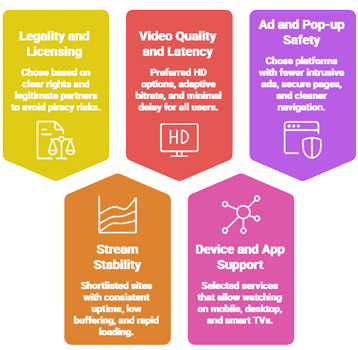
Free sports streams vary widely in reliability, legality, and video quality across regions and devices. Our team reviewed current platforms and aggregators to surface options that are helpful to viewers today. We focused on trustworthy signals, so you can avoid risky redirects and watch smoothly with ease.
- Legality and licensing: We chose based on clear rights and legitimate partners, since it is important to avoid piracy risks.
- Stream stability: Our experts shortlisted sites with consistent uptime, low buffering, and rapid loading during peak live events.
- Video quality and latency: We made sure to prefer HD options, adaptive bitrate, and minimal delay, for all users.
- Device and app support: We selected services that allow you to watch on mobile, desktop, and smart TVs.
- Ad and pop-up safety: We chose platforms with fewer intrusive ads, secure pages, and cleaner navigation, without compromise.
Common Issues With Free Sports Sites & How to Fix Them
Even the best free sports streaming sites can sometimes stop working as expected. Streaming platforms depend on servers, internet speed, and third party sources. If one part fails, the site may not load streams. Over the years, I have seen that most issues are technical and can be fixed easily. The key is to identify the root cause instead of switching platforms at once. A clear approach saves time and avoids frustration.
Here are common problems and practical fixes:
- No Streams Available: This usually happens when the site source is down. Try refreshing the page or switching to another trusted platform.
- Buffering or Slow Playback: Check your internet speed first. Lower the streaming quality if needed. I also recommend closing background apps to improve performance.
- Site Not Loading: Make sure your browser is up to date. Clear your cache and try again.
- Outdated Content: Some free platforms have limited replay windows. Check the platform’s schedule page for availability.
- App Crashing: Update the app to the latest version. Clearing the cache can also fix minor bugs.
Most issues are temporary. Regular updates and choosing reliable platforms help maintain a stable streaming experience.
Should You Use a VPN With Free Sports Streaming?
When discussing the best free sports streaming sites, many users ask whether a VPN is necessary. The answer depends on how you use these platforms. Official free streaming services are legal, but some may restrict access by region. In my experience, online streaming always involves data sharing with servers. A VPN can add a layer of privacy, but it is not a magic solution. It should be used with clear understanding, not fear.
Here are key points to consider:
- Privacy Protection: A VPN hides your IP address from external servers. This helps protect your browsing activity from being easily tracked.
- Public WiFi Safety: If you stream on public networks, a VPN encrypts your connection and reduces risk.
- Geo Restrictions: Some legal services restrict content by region. A VPN may help access content available in other locations, depending on service policies.
- Legal Responsibility: A VPN does not make unauthorized streaming legal. I always remind users to follow local copyright laws.
- Speed Impact: Some VPNs slow down streaming. Choose a reliable provider if you decide to use one.
A VPN can improve privacy, but safe streaming starts with choosing trusted and legal platforms.
How can I tell if a sports streaming site is legal or pirated?
Legal sites are transparent about rights, partners, and locations. Pirated sites hide ownership and rely on aggressive ads.
- Look for rights statements: Legal pages mention licensing, broadcaster partners, and clear terms of service.
- Check the URL and brand: Real services use consistent domains, working help pages, and verified social accounts.
- Review app store presence: Legit services appear on Apple App Store or Google Play with stable update history.
- Watch for forced installs: Pirated sites push “codec” downloads, shady VPN prompts, or suspicious notifications.
- Check event realism: If every premium game is “free worldwide,” it is likely unauthorized.
What free options work best for live sports, not just highlights?
For live games, your best “free” path is official free tiers, limited-time trials, and local broadcasts with apps.
- FAST platforms: Pluto TV and similar services offer live sports channels, but schedules vary by region.
- Network apps: Some events stream free with a TV antenna plus app login options for local coverage.
- League free games: Many leagues offer “game of the week” streams or free match windows.
- Free trials wisely: Rotate trials only when needed, and cancel early to avoid surprise charges.
- Campus and niche sports: NCAA, combat sports, and smaller leagues often stream free on official channels.
Why do free sports streams buffer, and how do I fix it quickly?
Buffering usually comes from weak Wi-Fi, overloaded servers, or low device memory. Fix basics before switching sites.
- Lower the quality: Drop to 720p or 480p for steadier playback during peak match minutes.
- Restart network gear: Power cycle modem and router for 30 seconds to clear congestion and errors.
- Use wired or strong Wi-Fi: Move closer to router or use Ethernet for stable live streaming.
- Close background apps: Free memory and reduce CPU load, especially on older phones and smart TVs.
- Switch browsers: Chrome, Edge, and Firefox can behave differently with video players and ad scripts.
What is the best way to watch sports free without risking scams or bad quality?
The best approach is to combine legal free platforms with smart viewing habits. I prioritize official sources first.
- Start with official schedules: Use league and broadcaster calendars to find free games and regional options.
- Use FAST services: Pick reputable free services with ads, since streams are more stable and legal.
- Use an antenna for locals: A basic HDTV antenna can deliver major games in HD without subscriptions.
- Verify before clicking: If a site floods you with pop-ups, leave and choose a trusted alternative.
- Keep privacy basics: Use strong passwords and avoid creating accounts on unknown streaming websites.
Verdict:
In this review, you got acquainted with some of the best free sports streaming sites for reliable access and content variety. Each platform delivers different strengths, whether it is live coverage, on-demand highlights, or niche sports. To help you take the final call, I have created this verdict.
- Pluto TV: My top choice for free sports-style channel surfing, with a cable-like guide, fast startup, and a robust lineup that makes discovering live programming simple. It is a superior choice when you want a reliable, cost-effective option that feels familiar and is easy to navigate.
- Tubi: A top rated pick for on-demand viewing, especially if you care about a clean interface and steady playback. It is ideal for highlights, sports films, and related content, though it is less about live games and more about convenient, comprehensive browsing.
- Red Bull TV: An excellent option for action sports, athlete stories, and event coverage with impressive video quality. I recommend it when you want top-notch niche sports content and a more curated experience rather than a broad channel grid.
FAQs
Which free sports streaming sites work in USA without a VPN?
In the USA, free, legal sports streaming without a VPN typically includes Pluto TV, Tubi (sports content varies), The Roku Channel, and Red Bull TV. Availability depends on rights, so check each app’s “Live” or “Sports” section.
Does Pluto TV offer free live sports channels?
Yes. Pluto TV offers free live sports channels, including 24/7 sports news, highlights, and curated league or event channels that rotate based on licensing. The exact lineup changes, and marquee live games aren’t always available.
Can I watch FIFA matches for free on FIFA+?
FIFA+ is free and can include live matches in select regions, plus full replays, highlights, documentaries, and archive games. However, it doesn’t guarantee free streaming of major tournaments or every top-tier match due to broadcast rights.
Is Red Bull TV completely free and what sports does it cover?
Red Bull TV is free to watch, supported without a paid subscription in most regions, including USA. It focuses on action and adventure sports such as motorsports, mountain biking, surfing, snowboarding, skateboarding, climbing, and fitness. Expect live events, replays, and original series rather than mainstream league schedules.
Do I need a VPN to access BBC iPlayer or France TV Sport?
Usually, yes. BBC iPlayer is UK-only and commonly requires a UK IP address; it also asks for a UK TV licence confirmation. France.tv Sport is generally restricted to France. From USA, a VPN may enable access, but it can violate terms and may be blocked. Prefer official Canadian broadcasters and rights holders.