Key Takeaway: This revised assessment of Kodi Addons for Live TV gives priority to official repositories, authorized media sources, responsible operators, documented compatibility, and region-specific availability checks. For free live TV on Kodi, the right addon turns your Firestick into a full channel guide. Top picks like Daddylive, The Crew, and the official PVR IPTV Simple Client stream news, entertainment, and sports channels worldwide, best paired with Real-Debrid or an IPTV playlist and a VPN.
Want a full grid of live channels on your Firestick without a cable bill? The right Kodi live-TV addon delivers news, entertainment, and sports channels from around the world, free.
I have tested the live-TV addons running on Kodi 21 Omega in 2026, and these eight are the most reliable. They range from instant scraper channels to the official, playlist-based PVR client, so there is a fit for every setup.
Important Note: Current access to Kodi Addons for Live TV depends on where you live, the device you use, the selected tier, and the provider’s agreements. Validate the company behind the service, its current fees, supported platforms, and catalog for your location. Operators relying on unidentified streams, replacement addresses, or unclear permissions are excluded from consideration.
Best Kodi Addons for Live TV: Top Recommendations!
| Addon Name | Best For | Real-Debrid | Get Started |
|---|---|---|---|
| Daddylive | Hundreds of live channels | Not needed | Visit Site |
| The Crew | Genre-grouped live TV | Supported | Visit Site |
| Asgard | Live TV + full library | Supported | Visit Site |
| The Magic Dragon | Reliable live TV & IPTV | Supported | Visit Site |
| PVR IPTV Simple Client | Official M3U playlists | Not needed | Visit Site |
1) Daddylive
Daddylive is my top Kodi live-TV pick because it delivers hundreds of live channels alongside live sports, all through the reliable Crew repository. Its Live TV section covers news, entertainment, and international channels, while Live Sports adds events. For a free, channel-packed experience on Firestick, it is hard to beat.
Features:
- Hundreds of Channels: The Live TV section streams news, entertainment, movies, and international channels in one organized list, giving you a full lineup with no subscription.
- Live Sports Too: A separate Live Sports area adds football, wrestling, and more, so you get event coverage alongside the general live-TV channels.
- No Debrid Required: Many channels play without a debrid service, keeping setup fast and simple so you can start watching live TV almost immediately.
- Global Coverage: Channels from the US, UK, and worldwide make it appealing for international viewers who want programming well beyond local networks.
- Crew Repo: It installs from the well-maintained team-crew repository, so it benefits from the same active support behind other popular Crew addons.
- Clean Two-Section Layout: Live TV and Live Sports are split into clear sections, making the addon easy to navigate on a Firestick remote without any confusion.
- Frequent Updates: Regular repository updates keep channels and links stable, so your live-TV lineup stays dependable rather than slowly filling with dead streams.
| Pros | Cons |
| Hundreds of live channels | Streams can buffer |
| Sports plus live TV | Occasional dead channels |
| Works without debrid | Ads on some sources |
| Reliable repo | Unofficial addon |
Pricing:
- Free
Link: https://team-crew.github.io/
2) The Crew
The Crew is an all-in-one Kodi addon with a strong live-TV section that groups channels by genre, including news, entertainment, weather, and sports. Menus load quickly even on entry-level Firesticks, and Real-Debrid improves quality. With movies and TV shows on top, it is a complete live-and-on-demand package.
Features:
- Genre-Grouped Channels: Live TV is organized by news, entertainment, weather, music, and more, so you can quickly find the type of channel you want.
- Fast Menus: Channel lists load quickly, even on low-end Fire TV hardware, so you spend less time waiting and more time watching live TV.
- Movies & TV Too: A huge on-demand library complements the live channels, meaning one addon covers both live viewing and your on-demand needs.
- Real-Debrid Ready: Debrid support improves stream quality on supported sources, giving live channels a smoother, higher-resolution picture with fewer drops.
- Active Repo: The team-crew repository is updated regularly for reliability, keeping the live-TV section running on Kodi 21 Omega when others break.
- International Channels: Alongside US networks, it carries UK and worldwide channels, making it a strong choice for viewers who follow international programming.
- Simple Navigation: A clean, well-labeled interface makes browsing the many live channels straightforward, even for viewers newer to Kodi and its addons.
| Pros | Cons |
| Well-organized live TV | Some channels buffer |
| On-demand library too | Best quality needs debrid |
| Fast, light menus | Setup takes steps |
| Actively maintained | Unofficial addon |
Pricing:
- Free
- Real-Debrid optional
Link: https://team-crew.github.io/
3) Asgard
Asgard, from Narcacist’s Wizard repository, bundles a dedicated Live TV section into a broad all-content addon. Its live channels span news, entertainment, and international content, sitting alongside movies, anime, and kids categories. For viewers who want live TV plus a full library in one place, Asgard is a flexible choice.
Features:
- Dedicated Live TV: A Live TV category streams news, entertainment, and international channels, giving you a solid general lineup inside a broad all-content addon.
- All-Content Addon: Movies, anime, kids, and documentaries round out the live offering, so a single install covers nearly all of your household viewing.
- Replays & Events: Extra sections cover replays and special events beyond live channels, adding flexibility for sports and one-off broadcasts.
- Debrid Support: Real-Debrid boosts link speed and quality where supported, delivering smoother, higher-resolution live channels than free sources alone.
- Established Repo: It comes from the recognized Narcacist’s Wizard repository, which has a long history of maintaining reliable, popular Kodi addons.
- Wide Channel Mix: The live-TV lineup spans many genres and regions, so there is usually a channel to suit whatever you feel like watching.
- Regular Updates: Ongoing repository maintenance keeps Asgard’s live channels usable on current Kodi builds, so it stays dependable over time.
| Pros | Cons |
| Live TV plus full library | Reliability can vary |
| Good international channels | Busy interface |
| Works with Real-Debrid | Best with debrid |
| Established repo | Unofficial addon |
Pricing:
- Free
- Real-Debrid optional
Link: https://narcacist.com/
4) The Magic Dragon
The Magic Dragon is a veteran Kodi addon with dependable Live TV and IPTV sections backed by years of updates. Its live channels cover news, sports, and entertainment, while a large movie and TV library adds on-demand depth. Its stability makes it a trusted pick for reliable free live TV.
Features:
- Live TV & IPTV: Live TV and IPTV sections deliver channels for news, sports, and entertainment, covering both scheduled programming and around-the-clock content.
- Big On-Demand Library: Thousands of movies and shows complement the live channels, so a single addon handles both live viewing and on-demand entertainment.
- Proven Stability: Years of consistent updates make it one of the more reliable addons, so its live channels keep stable when newer addons fail.
- Debrid Support: Real-Debrid improves stream speed and quality, giving supported live channels a smoother, higher-resolution picture with fewer interruptions.
- Simple Navigation: Clear menus make finding a live channel straightforward, so you spend less time hunting and more time actually watching.
- Broad Coverage: The channel lineup spans many genres and regions, making it a versatile choice for viewers who like variety in their live TV.
- Narcacist Repo: It installs from the established Narcacist’s repository, the same trusted source behind other long-running, well-maintained Kodi addons.
| Pros | Cons |
| Reliable live TV and IPTV | Dated interface |
| Huge on-demand library | Free links can buffer |
| Long-running and stable | Best with debrid |
| Works with Real-Debrid | Unofficial addon |
Pricing:
- Free
- Real-Debrid optional
Link: https://narcacist.com/
5) Ghost
Ghost is a lighter Crew-repository addon with a tidy Live TV section alongside movies and shows. Its channel list covers the essentials, news, entertainment, and sports, in a clean, remote-friendly interface. For viewers who find bigger addons cluttered, Ghost offers reliable live TV without the bloat.
Features:
- Clean Live TV: A focused Live TV section covers news, entertainment, and sports channels, giving you a tidy, no-clutter lineup that is easy to browse.
- Lightweight: A simple interface runs smoothly on entry-level Firestick hardware, so live channels load quickly without the lag heavier addons cause.
- Movies & TV: On-demand movies and shows round out the addon, so you can switch from live channels to a specific title whenever you like.
- Debrid Ready: Real-Debrid support improves quality on supported sources, giving live channels a smoother, higher-resolution picture with fewer drops.
- Crew Repo: It installs from the trusted team-crew repository, so it shares the active maintenance behind The Crew and Daddylive.
- Remote-Friendly: A clean, well-structured menu is easy to navigate with a Firestick remote, so finding a live channel never becomes a chore.
- Frequent Updates: Regular repository updates keep its live channels stable, so the addon stays dependable across the constantly changing streaming landscape.
| Pros | Cons |
| Clean, light live TV | Fewer channels than Daddylive |
| On-demand content too | Free links vary |
| Runs on low-end devices | Needs debrid for best quality |
| Reliable repo | Unofficial addon |
Pricing:
- Free
- Real-Debrid optional
Link: https://team-crew.github.io/
6) PVR IPTV Simple Client
PVR IPTV Simple Client is the official Kodi addon for live TV, and the safest option on this list. It turns any M3U playlist and EPG into a full live-TV guide inside Kodi. If you have a legal IPTV subscription or a free public playlist, it delivers a clean, native channel experience with program information.
Features:
- Official Addon: It ships with Kodi and is fully supported, so there is no third-party repository to trust and no unofficial source to worry about.
- M3U Playlist Support: Load any M3U or M3U8 playlist to populate live channels instantly, turning your own subscription or free list into a full guide.
- EPG Guide: Add an XMLTV EPG for a complete program guide with now-and-next information, recreating the familiar feel of a proper TV guide.
- Native Integration: Channels appear in Kodi’s built-in Live TV interface, so the experience feels clean, integrated, and consistent with the rest of Kodi.
- Catch-Up Support: Compatible playlists can enable catch-up and recording features, letting you rewind or save programs much like a traditional DVR.
- Lightweight and Stable: Because it simply plays your playlist rather than scraping, it is remarkably stable and light on even modest Firestick hardware.
- Fully Customizable: Detailed settings let you configure channel groups, logos, and guide behavior, so you can tune the live-TV experience exactly how you like.
| Pros | Cons |
| Official and safe | Requires your own playlist |
| Native live-TV guide | No built-in channels |
| Works with legal IPTV | Setup needs an M3U/EPG |
| EPG and catch-up support | Quality depends on source |
Pricing:
- Free (official)
Link: https://kodi.tv/
7) Nemesis AIO
Nemesis AIO packs a broad Live TV and IPTV section into a massive all-in-one Kodi addon. It scrapes many sources for live channels, sports, and events, and pairs well with Real-Debrid. For viewers who want the widest live-TV coverage from a single addon, Nemesis delivers, though it is heavier to run.
Features:
- Wide Live TV: Live TV and IPTV sections aggregate channels for news, sports, and entertainment, giving you an unusually broad lineup from a single addon.
- All-In-One: Movies, TV, and live content all live in one large addon, so it can cover almost everything you watch without extra installs.
- Real-Debrid Ready: Debrid integration greatly improves channel and link quality, turning free sources into fast, high-resolution live streams with fewer drops.
- Frequent Updates: Regular maintenance keeps live sources stable, which matters because free live-TV links tend to change and break frequently.
- Deep Catalog: It offers one of the largest all-round libraries available, so a single addon can serve as your main hub for live and on-demand.
- Wide Coverage: Because it aggregates many sources, it often finds a stable channel when narrower addons come up empty, improving your odds of a stream.
- Flexible Setup: Extensive settings let you tune sources, quality, and debrid options, so experienced users can optimize the live-TV experience to their liking.
| Pros | Cons |
| Wide live-TV coverage | Heavier interface |
| All-in-one library | Best quality needs debrid |
| Strong with Real-Debrid | Free links vary |
| Frequent updates | Unofficial addon |
Pricing:
- Free
- Real-Debrid optional
Link: https://forum.kodi.tv/
8) Rising Tides
Rising Tides rounds out the list with reliable live IPTV and sports channels on Kodi 21 Omega. While it is sports-first, its IPTV section carries general live channels too, with links that activate near broadcast time. For live-event viewers who also want some general channels, it is a dependable, lightweight addon.
Features:
- IPTV Channels: An IPTV section adds general live channels alongside its sports focus, so you get more than just event links from a single addon.
- Live-First: Links populate shortly before events, keeping the addon lean and current, which also benefits its live channel reliability.
- Lightweight: A simple layout runs smoothly on modest Firestick hardware, so live channels load quickly without the lag heavier addons introduce.
- Kodi 21 Ready: It is confirmed running on the latest Kodi 21 Omega, so you can add it to a fully up-to-date setup with confidence.
- Regular Updates: The Mullafabz repository maintains it consistently, keeping its live channels and links current across the changing streaming landscape.
- Simple Setup: Once the repository is added, installation is quick and approachable, even for viewers who are relatively new to Kodi addons.
- Good for Events: Because it is built around live broadcasts, it is especially handy for catching live channels tied to sports and one-off events.
| Pros | Cons |
| Reliable live channels | Sports-first focus |
| Lightweight and fast | Fewer general channels |
| Works on Kodi 21 Omega | Case-sensitive repo URL |
| Good for live events | Unofficial addon |
Pricing:
- Free
Link: https://mullafabz.github.io/
How to Set Up Live TV Addons on Kodi
Setting up a live-TV addon on Firestick takes only a few steps, and the official PVR client adds one extra stage for your playlist. You enable unknown sources, add the repository, install the addon, then load channels. Here is the full process from start to first channel.
- Enable Sources: In Kodi, open Settings, System, and turn on Unknown Sources.
- Add the Repo: Use File Manager, Add Source, and enter the repository URL.
- Install from Zip: Under Add-ons, choose Install from Zip File and select the repository.
- Add the Addon: Pick Install from Repository, open the repo, and choose the live-TV addon.
- Load Channels: For PVR IPTV Simple Client, add your M3U playlist and EPG in settings.
How These Live TV Addons Were Ranked
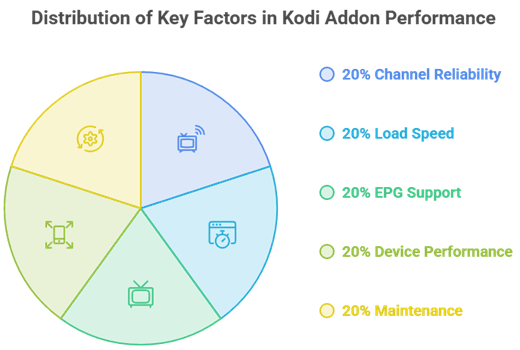
I tested each addon on Kodi 21 Omega, judging channel reliability, load speed, EPG support, and how well it ran across devices. Addons with stable channels and active repositories ranked highest, and the official PVR client earned extra credit for being the safest, most dependable route.
- Channel Reliability: How consistently live channels loaded and stayed online during testing.
- Load Speed: How quickly channels and menus responded, even on modest hardware.
- EPG Support: Whether the addon offers a proper program guide with channel information.
- Device Performance: How smoothly each addon ran across Firestick and Android TV.
- Maintenance: Confirmed updates keeping channels running on Kodi 21 Omega.
Free Addons vs IPTV Playlists for Live TV
There are two ways to get live TV on Kodi, and each suits a different user. Scraper addons give you instant channels with zero setup, while the official PVR client is more stable but needs your own playlist. Many people run both to get the best of each.
- Scraper Addons: Daddylive and The Crew deliver instant channels with no configuration required.
- Variable Quality: Free scraped channels can buffer or drop depending on the source.
- Official PVR Client: PVR IPTV Simple Client is stable but needs an M3U playlist to work.
- Legal Playlists: Use a playlist from a legal IPTV subscription or a free public list.
- Run Both: Combine a scraper for convenience with the PVR client for reliability.
Staying Safe With Kodi Live TV Addons
Kodi is legal and open-source, but third-party live-TV addons are unofficial and can pull unverified channels. Staying safe means watching only content you are entitled to, installing from official repositories, and adding a VPN for privacy. These simple habits keep your live-TV setup clean and secure.
- Kodi Is Legitimate: The core Kodi software is completely legal and open-source.
- Addons Are Unofficial: Third-party live-TV addons are not vetted or endorsed by Kodi.
- Watch Responsibly: Only stream channels and content you are legally allowed to access.
- Official Repos: Install addons from their correct repositories to reduce malware risk.
- Use a VPN: A no-logs VPN adds privacy and is recommended with any live-TV addon.
Best Devices for Kodi Live TV
Kodi live TV runs best on hardware with enough power to handle high-bitrate channels and EPG loading. The Fire TV Stick 4K and 4K Max are excellent value, while Android TV boxes and the Nvidia Shield offer more headroom for heavier addons. Lighter addons suit older devices.
- Fire TV Stick 4K: Handles high-bitrate live channels and guide loading smoothly at low cost.
- Fire TV Stick 4K Max: Extra power and memory keep heavier live-TV addons responsive.
- Nvidia Shield: The most powerful option, ideal for demanding all-in-one addons and 4K.
- Android TV Boxes: A flexible middle ground with solid performance for live TV.
- Older Firesticks: Stick to lighter addons like Ghost or the PVR client for smooth playback.
Verdict:
Each live-TV addon here suits a different setup, from instant scraper channels to a native, playlist-based guide. For a quick decision, these three give you the most reliable free live TV overall.
- Daddylive: The best all-round free live-TV addon, with hundreds of channels and live sports, no debrid required.
- The Crew: A top choice for organized, genre-grouped live channels plus a full on-demand library.
- PVR IPTV Simple Client: The safest, most reliable option, turning a legal M3U playlist into a native Kodi live-TV guide.
FAQs
What is the best Kodi addon for live TV in 2026?
Daddylive is the best all-round free option, with hundreds of live channels and sports. The Crew offers well-organized channels plus on-demand content, while the official PVR IPTV Simple Client is the safest, most reliable choice with your own playlist.
Are Kodi live TV addons free?
Yes, every addon here is free to install. Scraper addons need no subscription, while PVR IPTV Simple Client is free but requires an M3U playlist, which can come from a legal IPTV service or a free public list.
What is PVR IPTV Simple Client?
It is the official Kodi addon for live TV. Instead of scraping streams, it loads your own M3U playlist and EPG to create a native channel guide, making it the safest and most stable way to watch live TV on Kodi.
Why is my Kodi live TV unavailable?
Free channels can drop or buffer. Refresh the addon, update it from its repository, or switch to a more reliable source. For PVR IPTV Simple Client, check that your M3U playlist and EPG URLs are current and valid.
Do I need a VPN for Kodi live TV?
A reputable no-logs VPN is recommended with third-party live-TV addons. It adds privacy and can reduce ISP throttling on high-bandwidth channels. Connect before launching Kodi for consistent protection.