Key Takeaway: This revised assessment of Movie Apps for Firestick gives priority to licensed catalogs, official applications, responsible operators, documented compatibility, and region-specific availability checks. You do not need a stack of subscriptions to fill a Firestick with films. Tubi gives you the biggest free legal library, Pluto TV adds free live movie channels, and Plex combines free films with your own media. Netflix and Prime Video cover the paid side.
Your Firestick can stream thousands of movies for free, but the Amazon home screen buries the good apps behind paid rows. These eight put films back at your fingertips.
I have installed and used every app on this list on my own Fire TV Stick, judging library size, picture quality, ad load, and how well each one behaves with a remote. Below are the eight best movie apps, with honest pros, cons, pricing, and who each suits.
Important Note: Current access to Movie Apps for Firestick depends on where you live, the device you use, the selected tier, and the provider’s agreements. Consult official product and help pages for publisher details, plan charges, device requirements, and regional access. Operators relying on unidentified streams, replacement addresses, or unclear permissions are excluded from consideration.
Best Movie Apps for Firestick: Top Recommendations!
| App | Best For | Content Focus | Get Started |
|---|---|---|---|
| Tubi | Biggest free library | Free movies & TV | Visit Site |
| Pluto TV | Free live movie channels | Live + on-demand films | Visit Site |
| Plex | Free films + your own media | Free movies + media server | Visit Site |
| Crackle | Curated Sony films | Free movies | Visit Site |
| Kanopy | Arthouse & classics | Free films (library card) | Visit Site |
1) Tubi
Tubi is the app I install first on any new Firestick, because nothing else offers this many films for free. Owned by Fox, it holds a genuinely enormous catalog of movies spanning blockbusters, cult classics, and forgotten gems, funded by short ads. There is no subscription and no signup required at all.
Features:
- Enormous Free Catalog: Tubi carries tens of thousands of movies, easily the largest free legal film library on Firestick, spanning studio releases and hard-to-find older titles.
- Zero Cost, Zero Signup: You never pay or register, so a film is only a couple of clicks away from the moment you first open the app.
- Short, Honest Ads: Ads run as brief breaks inside a film rather than deceptive pop-ups, so the free experience stays watchable instead of feeling like a trap.
- Strong Curation: Themed collections and genre rows surface worthwhile films quickly, which is a relief given how vast the catalog actually is to browse.
- Official Fire TV App: A proper Amazon Appstore app means no sideloading, fast launches, and smooth navigation using nothing but the standard Firestick remote.
- Fresh Monthly Additions: Fox rotates new movies in every month, so the free selection keeps evolving and I usually find something new worth queuing up.
- Parental Controls: Built-in ratings and kids settings make it easy to keep younger viewers on appropriate films without installing any separate application.
| Pros | Cons |
| ✅ Largest free movie library | ❌ Ads cannot be removed |
| ✅ No signup or cost | ❌ Few brand-new releases |
| ✅ Non-intrusive ads | ❌ Catalog varies by country |
| ✅ Official Firestick app | |
| ✅ Updated monthly | |
| ✅ Parental controls |
Pricing:
- Price: Free (ad-supported)
Link: tubitv.com
2) Pluto TV
Pluto TV is what I put on when I want a film but cannot decide which one. Owned by Paramount, it runs dozens of always-on movie channels grouped by genre, plus a solid on-demand library. It is entirely free, needs no account, and feels pleasantly like flicking through old cable television.
Features:
- Themed Movie Channels: Dozens of 24/7 channels play films by genre, from action to horror, so you can simply pick a mood and let it run.
- On-Demand Library Too: Beyond the live channels, a full on-demand section lets you choose a specific movie whenever you want proper control over playback.
- Completely Free: Paramount funds everything through ads, so there is no subscription, no trial period, and no credit card requested at any stage.
- No Account Needed: You can launch straight into a channel within seconds of opening the app, with nothing to register or verify beforehand.
- Very Light App: Pluto runs smoothly even on older Firestick models, launching quickly where heavier streaming apps stutter or take an age to load.
- Constantly Rotating: Channel line-ups and on-demand films refresh regularly, keeping the free selection varied rather than looping the same handful of titles.
- Fully Licensed: Everything is properly licensed, meaning no malware, no legal grey area, and none of the pop-ups that plague unofficial movie apps.
| Pros | Cons |
| ✅ Free live movie channels | ❌ Ads throughout |
| ✅ On-demand section included | ❌ Limited control on live channels |
| ✅ No signup or fees | ❌ Smaller on-demand catalog |
| ✅ Runs on old Firesticks | |
| ✅ Regularly refreshed | |
| ✅ Fully licensed |
Pricing:
- Price: Free (ad-supported)
Link: pluto.tv
3) Plex
Plex is the most flexible app on this list, and the one I rely on most. It streams a growing library of free, ad-supported movies, adds free live channels, and doubles as a server for any films you already own. On a Firestick it quietly replaces two or three other apps at once.
Features:
- Free Movie Streaming: Plex offers a rotating catalog of free ad-supported films that is completely legal, requiring no subscription or payment to start watching.
- Your Own Library: The same app streams movies stored on a home computer, unifying free content and your personal collection under one tidy interface.
- Free Live Channels: Dozens of free ad-supported live channels add another layer of viewing, including several dedicated to films and classic cinema.
- Superb Organisation: Automatic artwork, metadata, and recommendations make browsing feel like a premium service, which I genuinely prefer to most paid apps.
- Runs Everywhere: Plex works on Firestick, phones, browsers, and consoles, syncing your watch progress so you can move between screens seamlessly.
- Multiple Profiles: Separate household profiles keep watch histories and recommendations personal, so everyone gets their own tailored film suggestions from one setup.
- Optional Plex Pass: A paid upgrade adds downloads and skip-intro, but the free tier already covers streaming and I rarely feel pushed to pay.
| Pros | Cons |
| ✅ Free legal movies | ❌ Free catalog is modest |
| ✅ Doubles as media server | ❌ Server setup for own files |
| ✅ Free live channels | ❌ Interface can overwhelm |
| ✅ Excellent organisation | |
| ✅ Cross-platform sync | |
| ✅ Optional paid extras |
Pricing:
- Price: Free (Plex Pass optional)
Link: plex.tv
4) Crackle
Crackle is a smaller, more curated free option backed by Sony, and I like it precisely because it does not overwhelm you. It offers a few hundred hand-picked films and series, including occasional exclusives, in a clean grid that loads instantly. Ads are short, and nothing is ever locked behind a paywall.
Features:
- Sony-Backed Catalog: Crackle draws on Sony’s film library, which means recognisable Hollywood titles rather than the obscure filler that pads out some free services.
- Genuinely Curated: Instead of an endless catalog, you get a tighter selection of films actually worth watching, which makes choosing something far quicker.
- Fast, Clean Interface: A tidy poster grid with genre tabs loads in seconds and stays uncluttered, making it pleasant to browse from the sofa.
- Short Ad Breaks: Advertising is limited to brief spots, keeping interruptions minimal and the free experience far smoother than most ad-supported film apps.
- No Signup Required: You can start a film without creating an account, so nothing stands between opening the app and pressing play except a short advert.
- Occasional Exclusives: Crackle carries some original and exclusive content you cannot stream free elsewhere, which adds a little genuine value to the lineup.
- Wide Device Support: Beyond Firestick it runs on Roku, smart TVs, phones, and consoles, fitting easily into whatever setup you already happen to own.
| Pros | Cons |
| ✅ Recognisable Sony films | ❌ Small catalog |
| ✅ Well curated | ❌ Titles rotate out |
| ✅ Very light ads | ❌ Mostly US-focused |
| ✅ Loads fast | |
| ✅ No signup | |
| ✅ Some exclusives |
Pricing:
- Price: Free (ad-supported)
Link: crackle.com
5) Kanopy
Kanopy is the hidden gem I recommend to anyone with a library card, because it is completely free and has no ads at all. It specialises in arthouse cinema, documentaries, and Criterion Collection classics, which is a world away from the usual free-app filler. Quality here easily beats quantity.
Features:
- Zero Ads: Kanopy is entirely ad-free, funded by public libraries and universities, which makes it the cleanest free viewing experience available on Firestick.
- Criterion and Arthouse: The catalog leans heavily on Criterion Collection titles, indie cinema, and world film, offering genuine quality rather than forgettable padding.
- Strong Documentaries: An excellent documentary section covers history, science, and social issues, making it valuable for viewers who want more than pure entertainment.
- Free With Library Card: All you need is a participating library or university card, and the entire service costs nothing beyond that membership you likely already hold.
- Kanopy Kids: A dedicated children’s section offers educational, ad-free viewing, which is genuinely reassuring compared with ad-supported free apps aimed at families.
- Official Fire TV App: The Firestick app installs directly from the Amazon Appstore, so setup is quick and there is no sideloading involved whatsoever.
- No Algorithm Pressure: Browsing feels curated rather than algorithmic, and I have discovered more genuinely good films here than on any other free service.
| Pros | Cons |
| ✅ Completely ad-free | ❌ Requires a library card |
| ✅ Criterion and arthouse films | ❌ Monthly ticket limits |
| ✅ Great documentaries | ❌ Few blockbusters |
| ✅ Free with library card | |
| ✅ Safe kids section | |
| ✅ Official Firestick app |
Pricing:
- Price: Free with a participating library card
Link: kanopy.com
6) Kodi
Kodi is not a movie app so much as a movie platform, and it is the most powerful option here. The software itself is free, legal, and open-source; you extend it with addons and repositories to stream or organise films. It takes real setup effort, but nothing else is this configurable.
Features:
- Free and Open-Source: Kodi is entirely free and legal software, giving you a trusted foundation with none of the malware risk attached to random streaming APKs.
- Addon Ecosystem: A huge library of addons and repositories extends Kodi to stream films from countless sources, letting you build exactly the setup you want.
- Organises Local Files: It catalogues movies you already own with artwork and metadata, turning a messy folder of files into a polished personal library.
- Deeply Customisable: Skins, builds, and settings let you reshape the whole interface, a level of control no closed streaming app comes close to offering.
- Real-Debrid Support: Many addons integrate Real-Debrid, unlocking fast, cached high-quality links that are far more reliable than free scraped sources alone.
- Runs on Everything: Kodi works on Firestick, Android, Windows, and Linux, so the library and setup you build follow you across every device you use.
- Active Community: A large community constantly publishes addons, builds, and guides, so help is always available whenever something inevitably needs fixing.
| Pros | Cons |
| ✅ Free and open-source | ❌ Steep learning curve |
| ✅ Endless addon options | ❌ Addons vary in legality |
| ✅ Organises local media | ❌ Needs regular maintenance |
| ✅ Highly customisable | |
| ✅ Real-Debrid support | |
| ✅ Huge community |
Pricing:
- Price: Free (open-source)
Link: kodi.tv
7) Netflix
Netflix remains the default paid movie app on a Firestick, and for good reason. It funds a steady stream of original films, licenses recent hits, and streams everything in polished 1080p or 4K. It is the one subscription I keep permanently, simply because it covers the whole household rather than only me.
Features:
- Exclusive Original Films: Netflix produces a constant supply of original movies you cannot stream anywhere else, often with big budgets and recognisable Hollywood names.
- 4K HDR Playback: On the premium plan films stream in 4K with HDR and strong audio, easily the best picture quality available on a Firestick.
- Rock-Solid Reliability: As a major platform it essentially never goes down, so there are no dead links or sudden outages midway through a film.
- Excellent Firestick App: The Fire TV app is fast and remote-friendly, with profiles and smart recommendations that genuinely surface films you are likely to enjoy.
- Offline Downloads: Every plan allows downloads to mobile devices, so I load up films before travelling and keep watching without any connection at all.
- Whole-Household Value: Beyond movies you get series, documentaries, and kids content, meaning one subscription keeps an entire household entertained rather than just you.
- Cheaper Ad Tier: The ad-supported plan brings the price down substantially while still offering 1080p and almost the entire catalog of films.
| Pros | Cons |
| ✅ Exclusive original films | ❌ Films rotate out |
| ✅ 4K HDR on premium | ❌ Pricier without ads |
| ✅ Never goes offline | ❌ No live content |
| ✅ Great Firestick app | |
| ✅ Offline downloads | |
| ✅ Affordable ad tier |
Pricing:
- Standard with Ads: $8.99/month
- Standard: $19.99/month
- Premium (4K): $26.99/month
Link: netflix.com
8) Amazon Prime Video
Prime Video is already installed on your Firestick, which alone makes it the most convenient paid option. It carries a large film catalog, exclusive originals, and a rental store for brand-new releases you cannot stream elsewhere. If you already pay for Prime, the movie side effectively costs you nothing extra.
Features:
- Preinstalled on Firestick: Prime Video comes built into every Fire TV device, so there is nothing to install and it launches instantly from the home screen.
- Included With Prime: If you already subscribe to Amazon Prime for delivery, the entire film catalog is bundled at no additional monthly cost whatsoever.
- Rental Store: You can rent or buy brand-new releases individually, which is ideal for films too recent to appear on any subscription service.
- Exclusive Originals: Amazon funds its own films and series, adding exclusives that cannot be streamed on Netflix or any other competing platform.
- 4K and X-Ray: Many films stream in 4K, and the X-Ray overlay shows cast and trivia live on screen, which is a genuinely useful touch.
- Add-On Channels: Optional channels bolt extra services directly onto your account, consolidating billing and playback inside one familiar interface.
- Offline Downloads: The app supports downloads on mobile devices, letting you save films for trips and watch them without relying on Wi-Fi.
| Pros | Cons |
| ✅ Already on your Firestick | ❌ Ads unless you upgrade |
| ✅ Bundled with Prime | ❌ Rentals cost extra |
| ✅ New-release rentals | ❌ Catalog rotates |
| ✅ Exclusive originals | |
| ✅ 4K and X-Ray | |
| ✅ Add-on channels |
Pricing:
- Prime Video standalone: $8.99/month
- Full Amazon Prime: $14.99/month or $139/year
- Ad-free add-on: +$4.99/month
Link: primevideo.com
How to Install Movie Apps on Your Firestick
Every app on this list except Kodi installs straight from the Amazon Appstore, which takes about thirty seconds each. Kodi and other third-party apps need sideloading through Downloader instead. Here is the routine I follow when setting up a Firestick from scratch so the film apps are ready in a few minutes.
- Search the Appstore: Press the Find button, type the app name such as Tubi or Plex, select it from the results, and choose Get to install.
- Sign In or Skip: Open the app and sign in for paid services, or start watching straight away on free ones like Tubi, Pluto TV, and Crackle.
- Sideload With Downloader: For Kodi, enable Apps from Unknown Sources in Developer Options, install Downloader, then enter the official URL to fetch the installer.
- Organise Your Home Screen: Long-press an app in Your Apps and move it to the front row, so your film apps sit ahead of Amazon’s promoted content.
How I Tested These Firestick Movie Apps
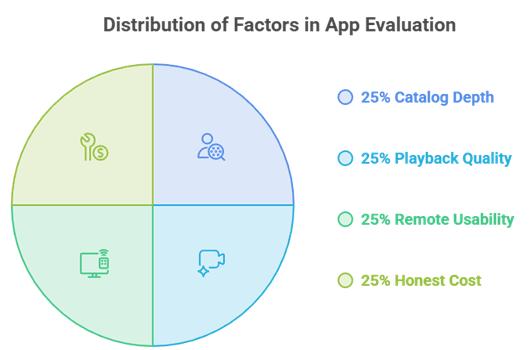
Plenty of round-ups just list whatever is popular, so I judged these apps by actually living with them on a Fire TV Stick for weeks. What matters on a television is not feature lists but whether films load quickly, look good, and are easy to find with a remote in your hand.
- Catalog Depth: An app needs a genuinely useful film library, because a beautiful interface counts for nothing when the movie you want simply is not there.
- Playback Quality: I checked resolution, buffering, and start times on a normal home connection, since stuttering playback ruins any film regardless of the catalog.
- Remote Usability: Apps that navigate cleanly with a d-pad scored higher, as plenty of otherwise good services are genuinely painful to use on a TV.
- Honest Cost: Free apps had to stay properly free without pushy upsells, and paid apps had to justify their price with catalog quality or exclusives.
Vega OS Firesticks: What You Can No Longer Sideload
This is the change catching people out in 2026. Amazon’s newest devices, the Fire TV Stick 4K Select and the Fire TV Stick HD, run Vega OS instead of Android, and Vega blocks sideloading entirely. If you rely on third-party apps, the hardware you buy now matters more than it used to.
- Vega Blocks Sideloading: Vega OS devices cannot install APKs at all, so Kodi and any third-party movie app are simply unavailable on that hardware.
- Affected Models: The Fire TV Stick 4K Select and the newer Fire TV Stick HD both ship with Vega OS, so check the model before you buy.
- Sideload-Friendly Models: The Fire TV Stick 4K Plus, 4K Max, and older Android-based Fire TV devices still allow Downloader and full sideloading as before.
- Appstore Apps Still Fine: Tubi, Pluto TV, Plex, Crackle, Kanopy, Netflix, and Prime Video all install normally on Vega, since they come from the official Appstore.
Free vs Paid Movie Apps: Which Should You Use?
Honestly, most people are best served by running both. The free apps cover an astonishing amount of ground at zero cost, while a single paid subscription fills the gap for brand-new releases and originals. Stacking four subscriptions is rarely worth it when Tubi and Pluto already cover so much. Our best APKs for Firestick guide covers the sideloaded side.
- Start With Free: Tubi, Pluto TV, Plex, and Crackle together cost nothing and cover thousands of films, which is more than most households watch anyway.
- Add One Subscription: Pick a single paid service, usually Netflix or Prime Video, for the originals and recent releases the free apps genuinely cannot offer.
- Rent, Do Not Subscribe: For one specific new film, renting through Prime Video is far cheaper than adding an entire monthly subscription you will barely use.
- Use Kanopy Free: If you hold a library card, Kanopy adds ad-free arthouse cinema and documentaries at no cost, which is remarkable value for nothing.
Do You Need a VPN for Firestick Movie Apps?
For the legal apps here a VPN is optional rather than essential, but it still earns its place. It unlocks regional film catalogs, protects your privacy on shared networks, and becomes genuinely important the moment you install third-party addons through Kodi. Our best free video players for Firestick guide pairs neatly with this setup.
- Unlock Regional Films: Streaming catalogs differ by country, so switching your VPN location reveals films missing from your local Netflix or Prime library.
- Privacy on Any Network: A VPN encrypts your traffic, keeping your viewing private from your provider and safe on shared or public Wi-Fi connections.
- Essential With Kodi: If you stream through third-party Kodi addons, a VPN stops becoming optional and turns into basic protection you should always run.
- Choose a Fast One: Pick a reputable paid VPN with quick servers, since free VPNs throttle speeds badly and cannot sustain smooth HD film playback.
Verdict:
After weeks of testing on a Fire TV Stick, the best movie app depends on whether you want to pay anything at all. For most viewers these three cover the vast majority of what you would actually watch, and every one of them is completely free.
- Tubi: The best free movie app overall, with the biggest legal library and no signup required.
- Pluto TV: The best lean-back option, running free themed movie channels plus a solid on-demand catalog.
- Plex: The most flexible, blending free legal films, live channels, and your own personal media library.
FAQs
What is the best free movie app for Firestick?
Tubi is the best free movie app for Firestick because it offers the largest legal film library at no cost and needs no account. Pluto TV and Plex are excellent free alternatives.
Are free movie apps on Firestick legal?
Every app in this guide is fully licensed and legal, including Tubi, Pluto TV, Plex, Crackle, and Kanopy. They are funded by ads or library membership rather than piracy.
Can I sideload movie apps on the new Firestick?
Not on Vega OS devices. The Fire TV Stick 4K Select and Fire TV Stick HD block sideloading entirely. Choose a Fire TV Stick 4K Plus or 4K Max if you need third-party apps.
Do I need a subscription to watch movies on Firestick?
No. Tubi, Pluto TV, Plex, and Crackle stream thousands of films completely free with ads, and Kanopy is free with a library card. A subscription only adds new releases and originals.
Which movie app has the best picture quality?
Netflix on the Premium plan offers the best quality with 4K HDR, and Prime Video also streams many films in 4K. Free apps generally top out at 1080p.