Key Takeaway: Tubi is the best free all-round NunFlix alternative, Plex is strongest for rebuilding a portable watchlist, and Pluto TV adds cable-style channels alongside on-demand viewing. The original NunFlix is gone, while numerous unrelated domains now claim its name, so use official app stores and licensed services instead of hunting for a supposed successor.
The NunFlix people remember was more than a page full of embedded videos. Users praised its clean Netflix-style layout, saved lists, resume points, playlists, genre browsing, and ability to move quickly between films and television. After the original destination disappeared, searches became crowded with unrelated domains calling themselves official. That makes choosing a replacement confusing: a familiar logo does not prove common ownership, safer advertising, or reliable access.
I compared nine licensed alternatives against the jobs NunFlix handled well: starting without a payment card, finding movies and complete series, keeping a queue, resuming episodes, using subtitles or dubs, browsing anime, and watching comfortably on Fire TV. The result is not one pretend clone. It is a practical set of broad free apps, live-channel services, library platforms, an independent-film option, and one paid anime specialist.
Content and Licensing Note: This Best NunFlix Alternatives for Movies & TV guide compares applications and viewing services for informational purposes. Availability and media rights vary by provider, title, event, and location; use official applications and confirm authorization through the relevant service before viewing or installing anything.
Best NunFlix Alternatives for Movies & TV in 2026: My Top Picks
| Service | Best For | Access Model | Get Started |
|---|---|---|---|
| Tubi | Broad free movies and series | Free with ads | Visit Site |
| Plex | Portable watchlists and discovery | Free with ads | Visit Site |
| Pluto TV | Cable-style channels and on-demand | Free with ads | Visit Site |
| Sling Freestream | Free DVR and live television | Free with ads | Visit Site |
| The Roku Channel | Roku Originals and free channels | Free with ads | Visit Site |
1) Tubi
Tubi is my top NunFlix alternative for viewers who want free movies and television without guessing which mirror is genuine. Its licensed, advertising-supported catalog opens through an official Fire TV app, and no payment card is required. Optional registration restores the practical comforts people miss most: a saved list, recommendations, viewing history, and resume playback across supported devices.
Features:
- Rights-Cleared Shelves: Fox-owned Tubi licenses programming from major studios and independent partners, giving its films, episodic series, originals, anime, documentaries, and family rows a documented commercial basis.
- Card-Free Entry: No credit or debit card is collected for ordinary viewing, because advertising shown during programs pays participating rights holders and keeps access at zero dollars.
- Native Television Install: On a Fire TV Stick, search Amazon Appstore for Tubi and install the named developer release; there is no reason to enable unknown application sources.
- Profile Benefits: A viewer may start without paying, then register freely to retain favorites, history, recommendations, and the exact playback position when moving to another supported screen.
- Caption Controls: Closed captions are available when supplied by content partners, and supported devices provide settings for text size, color, background, opacity, and preferred language.
- Documentation Review: I checked Tubi current support material for licensing, advertising, card requirements, television installation, account activation, accessibility controls, and compatible hardware before assigning first place.
- Know the Tradeoff: Advertisements are mandatory, distribution deals regularly add or remove programs, and a title, channel, language track, caption option, or application may be country-specific.
| Pros | Cons |
|---|---|
| No subscription or payment card | No ad-free upgrade |
| Large licensed movie and TV catalog | Titles rotate with licenses |
| Official Fire TV application | Catalog differs by country |
| Optional queue and progress syncing |
Pricing:
- Viewer Price: Free; supported by commercials
- Registration: Free and optional
- Commercial-Free Upgrade: None
Link: https://tubitv.com/
2) Plex
Plex is the NunFlix replacement I rank highest for rebuilding a watchlist that does not depend on one catalog. Its free movies and live channels sit beside Discover, a Universal Watchlist, and personal-media libraries. On Fire TV, Plex can show where a title is legally available, preserve saved choices, and combine free streaming with video files you lawfully own.
Features:
- Universal Watchlist: Save movies and series even when Plex does not stream them, then view participating services that currently offer each title in your selected region.
- Included Programming: Partner movies, episodic television, and linear channels play without a subscription inside compatible Plex clients; the precise selection follows current local distribution agreements.
- Living-Room Client: Plex has its own Amazon listing, letting Fire TV owners browse Discover, free programs, saved items, and home-server libraries with a standard remote.
- Personal Media: A home Plex Media Server organizes lawfully acquired video files separately from partner catalogs, helping households retain media that rotating service agreements cannot preserve.
- Cross-Service Discovery: Search results can identify availability across selected streaming providers, rentals, purchases, Plex programming, and personal libraries instead of sending viewers through duplicate mirror pages.
- Documentation Review: I reviewed Plex guidance covering Amazon compatibility, Universal Watchlist actions, partner programming, home libraries, remote access, downloads, and the separate purposes of paid passes.
- Main Limitation: Free catalog content includes commercials, cannot be downloaded, varies by region, and stays ad-supported even when the viewer buys a separate Plex Pass subscription.
| Pros | Cons |
|---|---|
| Portable Universal Watchlist | Free catalog remains ad-supported |
| Free movies and live channels | Regional catalogs vary |
| Supports personal media libraries | Setup is deeper than basic apps |
| Official Fire TV application |
Pricing:
- Partner Movies and Channels: Free with commercials
- Remote Watch Pass: US $2.99 monthly or $29.99 annually
- Plex Pass: US $6.99 monthly or $69.99 annually
Link: https://watch.plex.tv/
3) Pluto TV
Pluto TV is the NunFlix alternative I recommend when deciding what to watch is harder than finding a player. It combines hundreds of scheduled channels with thousands of on-demand movies and shows, all funded by commercials. The Fire TV app opens without payment, while a free profile can synchronize favorite channels, Watchlist entries, and resume progress across compatible devices.
Features:
- Live Channel Guide: Hundreds of linear channels cover movies, classic television, crime, comedy, reality, news, sports, children programming, and single-series marathons in a familiar guide.
- On-Demand Library: Thousands of films and bingeable shows remain selectable outside the live schedule, giving viewers both channel surfing and title-based streaming in one official application.
- No Payment Required: Pluto TV describes the service as completely free and funds its programming through short commercial breaks, without requiring a credit card or subscription.
- Fire TV Availability: The official app runs on Amazon Fire TV alongside Roku, Apple TV, mobile devices, consoles, smart televisions, Chromecast, and standard web browsers.
- Free Profile: Creating a profile synchronizes favorite live channels, a personal Watchlist, and continue-watching progress, directly replacing several conveniences users valued on the original NunFlix.
- Source Check: I confirmed the current free model, Fire TV support, live and on-demand split, profile benefits, and catalog scale through Pluto TV official pages.
- Main Limitation: Commercials interrupt programs, live channels follow fixed schedules, and particular movies, shows, channels, profile features, or apps may be unavailable in some countries.
| Pros | Cons |
|---|---|
| Strong live channel guide | Commercial breaks remain |
| Large on-demand selection | Live channels cannot be time-shifted |
| No payment card needed | Regional lineups differ |
| Official Fire TV app |
Pricing:
- Live TV: $0 with advertising
- On-Demand Catalog: $0 with advertising
- Profile: Optional and free
Link: https://pluto.tv/
4) Sling Freestream
Sling Freestream is the NunFlix substitute I favor for viewers who want scheduled television plus a usable free account. Sling currently advertises more than 600 channels and over 40,000 on-demand shows and movies. Anyone can start without logging in, while registration adds profiles, watchlists, parental controls, favorites, and ten hours of cloud DVR for eligible programming.
Features:
- Six Hundred Channels: Sling groups its free streams into film, drama, news, sports, comedy, children, international, lifestyle, documentary, anime, reality, and other clearly themed categories.
- Forty Thousand Titles: A separate library contains more than 40,000 selectable programs, so users can ignore the timetable and search directly for an available movie or episode.
- Watch as a Guest: Opening Stream Free starts eligible content without registration or billing details, retaining quick access while still providing a real company, help center, and applications.
- Personalization at No Cost: Signing up enables multiple profiles, favorites, saved programs, resume rows, ratings-based locks, rewards, and preferences without converting the account into Sling Orange or Blue.
- Recording Allowance: A logged-in Freestream viewer receives ten cloud-storage hours for recordable programs and can schedule individual airings, recurring episodes, movies, news, or supported sporting events.
- Documentation Review: I checked Sling product and help pages for lineup scale, searchable programs, anonymous access, account tools, recording storage, rentals, hardware installation, and current restrictions.
- Know the Tradeoff: Expect commercial interruptions, changing stations, blackout or recording exclusions, and geographic differences; a listing visible in one market may not appear on another account.
| Pros | Cons |
|---|---|
| More than 600 channels | Commercials are unavoidable |
| No login required to start | DVR excludes some content |
| Ten hours of free DVR | Best availability is region-dependent |
| Profiles and watchlists available |
Pricing:
- Base Viewing: Free and advertising-supported
- Profile Tools: Free; billing details are unnecessary
- Recording Storage: Ten hours for supported programs
Link: https://www.sling.com/freestream
5) The Roku Channel
The Roku Channel is a practical NunFlix alternative for free films, television, Roku Originals, and more than 500 live channels inside one polished interface. I place it fifth because it works on compatible Fire TV devices in the United States, not only Roku hardware. A free account can preserve progress, while premium subscriptions remain optional and platform-dependent.
Features:
- Roku-Owned Hub: One destination mixes studio movies, episodic television, exclusive Roku productions, children selections, and a linear guide containing over five hundred free streaming stations.
- Consistent Editions: Published originals and licensed acquisitions arrive with controlled artwork, episode numbers, ratings, and descriptions, avoiding duplicate files or mystery cuts on embedded-host indexes.
- Amazon Device Option: Roku officially permits installation on compatible US Fire TV sticks, television sets, and soundbars, despite the brand name suggesting Roku hardware is required.
- Continue on Another Screen: Signing into the complimentary account carries playback position between supported Roku products, web and mobile clients, Samsung televisions, and eligible Amazon living-room devices.
- Lean-Back Browsing: The guide organizes films, news, crime, reality, lifestyle, children programming, sports, and dedicated series streams for nights when nobody wants to search manually.
- Documentation Review: I used Roku support updated June 2026 to confirm the 500-plus figure, Amazon installation, service territories, resume behavior, Originals, and platform-specific premium limitations.
- Know the Tradeoff: Amazon compatibility centers on US customers, commercial breaks fund free viewing, and content, channels, accounts, paid add-ons, or device features are not identical worldwide.
| Pros | Cons |
|---|---|
| More than 500 live channels | Fire TV support is US-focused |
| Includes Roku Originals | Free programming includes ads |
| Compatible Fire TV application | Premium features vary by platform |
| Useful progress synchronization |
Pricing:
- Core Viewing: Free with commercials
- Member Profile: Free to create
- Optional Channel Add-Ons: Individually priced where the device supports them
Link: https://therokuchannel.roku.com/
6) Filmzie
Filmzie is the NunFlix alternative I suggest when smaller films matter more than opening-week blockbusters. The licensed service emphasizes independent features, festival discoveries, documentaries, shorts, international productions, and less familiar series. Thousands of titles stream free with advertisements, and Filmzie documents a direct Fire TV installation route, making it a useful second app beside a broader mainstream catalog.
Features:
- Independent Focus: Curated independent features, festival selections, documentaries, shorts, international productions, and unusual series surface filmmakers that large free services often bury below familiar studio titles.
- Declared AVOD Model: Filmzie terms define advertising-based video on demand, meaning eligible programs cost the viewer nothing while scheduled commercials finance access through disclosed partners.
- Fire TV App: Filmzie publishes direct installation steps for Amazon Fire TV Stick and also supports Android TV, Samsung, LG, Hisense, mobile apps, and Chromecast.
- Guest Viewing: Some programs play for adults without creating a profile; published guest terms identify the Slovak operating company, permitted uses, advertising data, and service boundaries clearly.
- Changing Discoveries: Regular catalog additions reward curious viewers with unfamiliar stories, although the operator makes no promise that a particular mainstream franchise or current cinema release will appear.
- Documentation Review: I examined Filmzie device instructions, corporate claims, registered and guest terms, AVOD definitions, platform listings, data disclosures, and catalog positioning before including the service.
- Main Limitation: The catalog favors independent and older titles, advertising remains, regional rights change selections, and anyone seeking a specific new blockbuster will usually need another provider.
| Pros | Cons |
|---|---|
| Strong independent-film focus | Few current blockbusters |
| Official Fire TV support | Advertising supports playback |
| Free licensed streaming | Selections vary by country |
| Guest viewing is available |
Pricing:
- AVOD Programs: Free with commercial breaks
- Unregistered Viewing: Permitted for selected programming
- Transactional Programs: Per-title charges apply where offered
Link: https://filmzie.com/
7) Hoopla
Hoopla is the NunFlix alternative I recommend first to anyone with a participating public-library card and no patience for advertisements. Movies and shows share one account with ebooks, comics, manga, audiobooks, music, and BingePass collections. The official Fire TV app synchronizes progress, but each library sets its own catalog, monthly allowance, and collective daily spending limits.
Features:
- Patron-Sponsored Viewing: Local libraries pay for qualified cardholders, eliminating consumer subscription bills, overdue penalties, trial traps, and mid-program advertising for borrowed video within the service.
- Borrow Now: When a movie or season is available, checkout begins immediately rather than joining a waitlist; the digital loan simply expires at the stated time.
- Television Pairing: Install Hoopla Digital from Amazon Appstore, open it to receive a four-digit code, and link that screen to the library account using another device.
- Resume Across Devices: Playback position follows the signed-in patron between supported television, mobile, and browser clients, offering a dependable substitute for the viewing history lost with NunFlix.
- More Than Video: The same borrowing relationship can unlock spoken books, music, electronic books, graphic novels, manga, SeasonPass collections, and BingePass access alongside screen entertainment.
- Documentation Review: I consulted Hoopla material updated August 2026 for eligibility, borrowing, supported televisions, device pairing, progress retention, included media, advertisements, and institution-controlled checkout allowances.
- Know the Tradeoff: Participation, available works, monthly borrows, and spending caps are determined locally; a library can pause daily checkout even while the personal allowance shows space.
| Pros | Cons |
|---|---|
| No ads or subscription fee | Participating library required |
| Official Fire TV application | Monthly limits vary locally |
| Progress follows supported devices | Daily budget can pause borrowing |
| Several media formats included |
Pricing:
- Cardholder Price: Free at participating libraries
- Recurring and Overdue Charges: None
- Checkout Allowance: Chosen by the local library
Link: https://www.hoopladigital.com/
8) Kanopy
Kanopy is the NunFlix replacement I choose for thoughtful cinema rather than sheer poster count. Participating libraries and universities provide documentaries, classics, independent films, world cinema, educational programs, and Kanopy Kids. Fire TV devices running FireOS 6 or later are supported, although every institution controls eligibility, available titles, monthly tickets, and temporary budget restrictions.
Features:
- Authenticate Through School or Library: Membership begins by finding an eligible institution and validating its card, PIN, or campus credentials; that organization finances and configures the available video service.
- Ticket Meter: Each public library grants its own monthly quantity, displays the ticket cost beside a program, resets balances on day one, and discards unused credits.
- Zero-Ticket Choices: Filter for unlimited viewing when the balance runs low; children titles inside Kanopy Kids also consume nothing wherever the library has enabled that collection.
- Operating-System Floor: Amazon streamers need FireOS 6 or later, with separate minimum versions documented for RokuOS, tvOS, Android or Google TV, Samsung Tizen, and mobile platforms.
- Editorial Character: Expect academic documentaries, international filmmaking, independent narratives, historical works, cinema classics, lectures, and considered children selections rather than an endless wall of commercial franchises.
- Documentation Review: I checked Kanopy guidance revised in July 2026 covering device floors, institution signup, ticket accounting, unlimited shelves, Kids mode, captions, playback, and download restrictions.
- Know the Tradeoff: Eligibility and selection depend on an institution, ticket costs can cover whole seasons, budgets occasionally limit access, and an internet connection remains necessary for viewing.
| Pros | Cons |
|---|---|
| Curated high-quality cinema | Eligible institution required |
| Many programs play without ads | Ticket allowances vary |
| Official Fire TV support | No offline movie downloads |
| Unlimited Kanopy Kids viewing |
Pricing:
- Eligible Viewer Price: Free through the institution
- Monthly Credits: Quantity chosen by the library
- Ticket-Free Areas: Unlimited shelves and Kanopy Kids
Link: https://www.kanopy.com/
9) Crunchyroll
Crunchyroll is the specialist NunFlix alternative I choose for anime queues, season order, simulcasts, subtitles, and dubbed releases. Unlike a free mirror, full library access requires Premium, but the service documents more than 50,000 episodes across 2,000 series and films. Its official Fire TV app supports FireOS 6 or newer and preserves progress under one stable account.
Features:
- Scale for Anime Fans: Official figures exceed fifty thousand episodes, twenty-five thousand viewing hours, and two thousand shows and movies, before counting music videos, concerts, manga, or games.
- Order You Can Trust: Controlled season metadata, queues, history, automatic next episodes, intro skipping, and resume rows prevent the duplicate entries and misplaced dubs common on indexes.
- Track-Level Languages: Audio and caption choices appear on program pages, but check every season because a regional contract may cover one dub or subtitle set differently.
- Amazon Requirements: The television client needs at least FireOS 6; Crunchyroll also maintains native options for leading smart TVs, streaming platforms, phones, game consoles, and browsers.
- Downloads and Household Streams: Every current US tier includes offline viewing, while upgrading raises concurrent playback from a single device to four with Mega or six with Ultimate.
- Documentation Review: I consulted the February pricing announcement and current help center for library size, compatible systems, simultaneous playback, downloads, profiles, captioning, and dubbed availability.
- Know the Tradeoff: Premium membership unlocks the complete library, a trial becomes paid unless cancelled, and programs, languages, taxes, or app-store prices can change across regions.
| Pros | Cons |
|---|---|
| Large dedicated anime catalog | Complete access requires Premium |
| Current simulcasts and organized seasons | Regional catalogs and languages vary |
| Official Fire TV application | Trials renew automatically |
| Downloads included on current tiers |
Pricing:
- Fan: US $9.99 each month
- Mega Fan: US $13.99 each month
- Ultimate Fan: US $17.99 each month
Link: https://www.crunchyroll.com/
Why the Original NunFlix Is Gone but “Official” Pages Keep Appearing
The present search landscape should not be mistaken for a relaunch. Community shutdown discussions describe the original NunFlix as permanently gone, while many unrelated domains now reuse its name. The MPA 2025 Notorious Markets submission also named Nunflix among sites using Vidsrc infrastructure, explaining why dependable licensing and ownership were always difficult to establish.
- Conflicting Claims: Several current domains simultaneously describe themselves as the official NunFlix, yet matching titles and templates cannot prove shared ownership, authorization, support, or account continuity.
- Mirror Economics: Embedded-player networks can supply streams to many front ends, so different branded pages may depend on the same upstream host and fail at the same time.
- Account Risk: A clone login cannot recover data held by the former service, and reusing an old password may expose unrelated accounts if credentials were shared elsewhere.
- Copyright Signals: Brand-new studio releases offered without licensing details, subscription charges, rental fees, or clear advertising agreements indicate distribution rights have not been demonstrated publicly.
- Better Verification: Prefer an official company domain, recognized app-store listing, published support documentation, transparent price or advertising model, and clear regional availability before creating any account.
How I Matched NunFlix Features to Safer Services
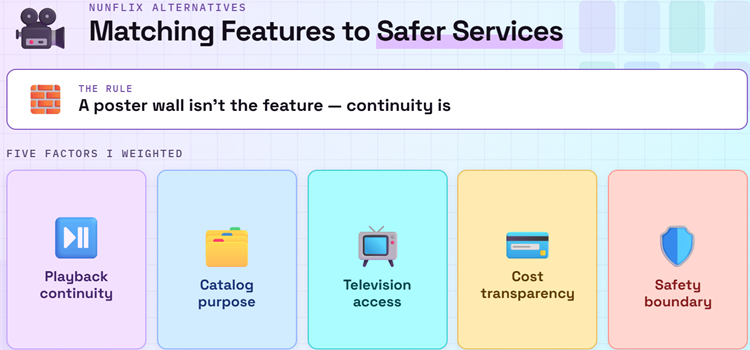
A huge poster wall is not enough to replace NunFlix. The useful parts were the quick start, polished television layout, saved lists, progress memory, episode order, subtitles, anime, and low signup friction. I weighted those functions alongside licensing clarity, Fire TV availability, regional limits, and honest costs, then rejected every supposed successor that could not establish accountable ownership.
- Playback Continuity: Watchlists, resume points, history, profiles, episode order, and synchronization received extra weight because the original NunFlix accounts no longer provide dependable continuity.
- Catalog Purpose: Each service needed a distinct role covering broad films, complete series, live channels, independent cinema, library collections, family viewing, documentaries, or current anime.
- Television Access: An official Fire TV application or documented big-screen route ranked above browser-only pages, sideloaded packages, copied players, notification prompts, and mystery activation tokens.
- Cost Transparency: Commercial breaks, free profiles, library eligibility, ticket allowances, paid plans, trials, and local restrictions were separated so readers understand the exchange before signing up.
- Safety Boundary: I excluded unlicensed mirrors, fake official domains, unknown APKs, forced extensions, payment funnels, and any service that hid its operator or distribution model.
Rebuild Your NunFlix Watchlist Before Choosing a New App
Switching services becomes easier when the list belongs to you rather than the next streaming catalog. Recreate only unfinished and genuinely planned titles, then keep the master list in Plex, Trakt, or a simple note. This avoids repeating the same loss whenever licensing removes a show, an app changes regions, or a favorite service eventually closes.
- Capture Essentials: Record the title, release year, current season, next episode, preferred language, and status such as Planned, Watching, Paused, or Finished for every priority item.
- Remove Dead Weight: Do not recreate hundreds of forgotten saves automatically; move current priorities first, then add older entries only when they still deserve viewing time.
- Choose a Master: Use Plex Universal Watchlist or an independent tracker as the primary record, while service-specific queues remain convenient copies rather than the only history.
- Confirm Availability: Search each exact title inside the chosen service because catalogs, seasons, subtitles, and dubs change by country and can differ even within one franchise.
- Protect Credentials: Change any password reused on NunFlix, refuse migration pages requesting the former login, and authorize television apps only through the provider documented activation address.
Build a $0 Movie and TV Stack Instead of Hunting for One Clone
No licensed platform can reproduce a near-universal catalog because streaming rights are split by studio, country, and release window. A small free stack covers more needs than one clone: use Tubi for broad on-demand viewing, Pluto or Sling for live channels, Plex for discovery, and a participating library service for ad-free films. Add Crunchyroll only when anime justifies Premium.
| What You Miss From NunFlix | Best Starting Point | Why It Fits |
|---|---|---|
| Broad free movies and series | Tubi | Large licensed catalog with optional progress syncing |
| One portable watchlist | Plex | Tracks titles across Plex and selected providers |
| Channel surfing | Pluto TV | Live guide plus an on-demand library |
| Recording scheduled programs | Sling Freestream | Ten hours of eligible free cloud DVR |
| Ad-free library viewing | Hoopla or Kanopy | Access depends on a participating local institution |
| Anime seasons, subtitles, and dubs | Crunchyroll | Organized licensed catalog with current simulcasts |
- Start Broad: Install Tubi first for general movies and series, then search its catalog before adding more applications or accepting another commercial-supported library on Fire TV.
- Add Live TV: Choose Pluto TV for effortless channel surfing or Sling Freestream when account features and eligible cloud DVR matter more than the simplest interface.
- Keep Discovery Separate: Let Plex hold a portable Watchlist and identify legal availability, preventing each new service from becoming another isolated list that may later disappear.
- Use Your Library: Check Hoopla and Kanopy eligibility before paying; participating institutions can unlock ad-free movies, documentaries, independent cinema, educational programs, and family collections.
- Pay for Gaps: Reserve subscriptions or rentals for specific unavailable titles, then cancel recurring plans that no longer provide enough unique viewing to justify their monthly cost.
Install NunFlix Replacements on Firestick Without Risky APKs
Every ranked service has an official big-screen route, so none requires a NunFlix-branded installer, codec, certificate, cleaner, browser extension, or mystery token. Search Amazon Appstore for the exact name, verify the developer and support destination, then test one free program. Sideloading knowledge is useful, but it cannot establish that an unrelated streaming package is licensed or safe.
- Search the Appstore: Use Fire TV Find or Alexa for the exact service name, then inspect the developer, icon, screenshots, age rating, permissions, reviews, and support link.
- Check Compatibility: Kanopy and Crunchyroll require FireOS 6 or newer, while The Roku Channel Fire TV application is officially limited to the United States.
- Pair on Official Pages: Enter television activation codes only at the address displayed in the provider support documentation, never through a sponsored result or unsolicited redirect.
- Test Core Features: Confirm remote navigation, seeking, subtitles, audio, advertisement behavior, autoplay, resume progress, and account syncing before relying on any application for a long series.
- Understand Sideloading: Our Downloader app for Firestick guide explains installation permissions, but Downloader never proves a third-party NunFlix APK is trustworthy.
Best NunFlix Alternatives Verdict
Tubi is the strongest free starting point for broad movies and series, Plex solves the harder problem of keeping a portable watchlist, and Pluto TV restores effortless channel surfing. The best replacement is therefore a small, transparent combination rather than a domain copying the NunFlix name. Add Hoopla, Kanopy, Filmzie, Sling Freestream, or Crunchyroll only for the specific gaps they fill.
- Tubi: Best all-round free choice for licensed movies, complete series, originals, anime, family shelves, Fire TV support, and optional progress synchronization without payment details.
- Plex: Best for a portable Universal Watchlist, legal availability discovery, free programming, live channels, Fire TV support, and organized lawfully owned personal media.
- Pluto TV: Best for hundreds of cable-style channels, thousands of on-demand movies and shows, optional profiles, synchronized favorites, and no payment requirement.
FAQs
What happened to the original NunFlix?
Community reports describe the original NunFlix as permanently gone after it stopped operating in 2025. Search results now show several unrelated domains using the same name and calling themselves official, but a copied design does not prove ownership, account continuity, licensing, or a genuine relaunch.
What is the best free NunFlix alternative?
Tubi is the most balanced free replacement for general movies and television because viewing remains legal, no payment card is required, and Fire TV has an official app. Plex is better when rebuilding a portable watchlist matters most, while Pluto TV is stronger for live channel browsing.
Is there a new official NunFlix website or app?
No independently verified successor is identified in this research. Multiple domains make conflicting official claims, so avoid treating any similar name, logo, or interface as proof. Do not enter an old password, install an unknown NunFlix APK, or pay for a supposed access token.
Which NunFlix alternative works best on Firestick?
Start with Tubi for broad on-demand movies and series, then add Pluto TV for live channels or Plex for discovery and watchlists. All three have official Fire TV routes. Availability still varies by country, device generation, operating-system version, and individual content rights.
How can I keep my movie and TV watchlist if another service closes?
Keep the master list outside one streaming catalog. Plex Universal Watchlist is simple, while our best Trakt addons guide covers integrations for tracking history and progress across compatible media apps. Maintain a small backup note containing unfinished seasons and next episode numbers.