Key Takeaway: I refreshed this Real-Debrid Addons comparison around official repositories, authorized media sources, clear service ownership, useful platform support, and restrictions disclosed through official sources. Finding the best Real-Debrid addons can completely change how smoothly you stream. Popular options like Torrentio, Comet, and MediaFusion often lead the conversation, but not every addon delivers consistent quality. This review breaks down reliable choices that balance performance, source quality, and easy setup for smoother Real-Debrid streaming.
Are you tired of hitting play and getting endless buffering, broken links, or streams that vanish halfway through? If you have been relying on low-quality or unverified addons, you have probably faced constant dead sources, poor video quality, unreliable playback, slow loading times, privacy and security risks, and even account warnings from shady integrations.
On the other hand, a solid, well-supported addon setup can deliver faster starts, cleaner links, better resolution, and a much more consistent streaming experience. When you choose wisely, streaming becomes effortless, enjoyable, and stress-free again.
Important Note: A Real-Debrid Addons service may offer different features across countries, devices, billing plans, and licensed catalogs. Make sure the operator is identifiable and that its pricing, platform support, and local offering are clearly documented. This comparison leaves out anonymous broadcast sources, domain replacements, and services with undocumented content authority.
Why You Can Trust FirestickTVStream?
This ranking includes popular Real-Debrid addons that have been tested firsthand. Every addon here is:
✅ Checked for real-world reliability, link quality, and uptime
✅ Reviewed for safer setup practices and lower risk of shady redirects
✅ Evaluated across common devices and daily streaming scenarios
✅ Regularly updated and actively maintained
Research Overview:
- 130+ Real-Debrid addons tested
- 255+ Hours of research and testing
- 55+ Detailed Real-Debrid addon guides and reviews checked
Best Real-Debrid Addons: Top Recommendations!
1) Torrentio
Torrentio allows you to find streams from torrents inside Stremio with very little setup. In my experience, it is a great option when you want to combine several torrent sources in one place and avoid constant app switching.
I evaluated its configuration page and found clear controls for providers, sorting, and filters that can enhance results for Real-Debrid setups. It is important to keep in mind that you still need a debrid account and the correct settings in order to get stable, high-quality links.
Features:
- Provider Selection and Aggregation: Torrentio lets you pick many torrent indexers at once, which helps widen results. This breadth is essential for consistent scraping.
- Debrid-Friendly Sorting and Filtering: It allows you to sort by quality and size. I tested it with Real-Debrid and streams loaded faster when I prioritized cached, higher-quality sources.
- Simple Configuration and Install Link: The page creates a personalized install URL. This is typically all you need to add it to Stremio, and it is one of the easiest setups.
- Quality Controls and Format Preferences: Torrentio helps you focus on 4K, 1080p, or smaller files. Tuning this avoids slow starts and can enhance reliability.
- Language and Metadata Matching: It lets you prefer certain languages where available. I could access more consistent titles with cleaner matching and fewer duplicates.
- Result Ordering for Faster Picks: You can reorder results by seeds, quality, or size. It is the best way to surface strong links quickly and decide faster.
- Provider Toggles and Exclusions: There is an option to disable noisy providers, which helps reduce broken results. I suggest turning off weak indexers after a few test searches.
| Pros | Cons |
| Clean setup flow, and I could add it to Stremio fast | Depends on third-party indexers, so results can vary daily |
| Wide provider list makes it a great way to find links | Some sources show duplicates, which can slow choosing streams |
| Sorting options helped me avoid low-quality or oversized files | I received occasional dead links, even with strong provider choices |
| I could access more consistent results after trimming weak providers | Limited built-in troubleshooting, so fixes require manual retesting |
| Lightweight addon behavior feels fast and stable during browsing | |
| Helpful filters reduce clutter and keep searches focused |
Pricing:
- Free to use
Link: https://torrentio.strem.fun/configure
2) AIOStreams
AIOStreams is a reputable solution for setting up Real-Debrid streams in Stremio with less stress. I analyzed its guided setup and found it aims to keep everything in one place. It allows you to pick the providers you want and avoid messy duplicates. For newcomers, it is important to pay attention to your debrid authorization and the sorting options, since those choices shape what you see first.
Features:
- Real-Debrid Authorization Flow: The linking process keeps required steps clear. It lets you connect once and keep sessions stable, and I found the token step straightforward.
- Provider Toggles: You choose which scrapers and sources are active, which helps avoid slow or low-quality results. You can narrow results to what you actually need.
- Result Filtering: It reduces duplicates and noisy links from mixed providers. I suggest starting strict, then relaxing filters if you want more options.
- Sort and Prioritization Rules: It ranks cached links and preferred qualities first. While testing, I prioritized cached and size-capped results for faster, more consistent starts.
- Quality Controls: You can cap resolution and limit very large files. Matching settings to your device and bandwidth helps reduce buffering surprises.
- Configuration Export: It makes replicating settings across devices easier. I was able to save my setup and reapply it quickly between rooms.
- ElfHosted Hosting Option: A private instance is available without self-hosting overhead. Public instances can vary, so this is worth considering for reliability.
| Pros | Cons |
| It allowed me to tune providers fast without clutter | Some advanced filters need patience before results feel predictable |
| Customization options are essential for Real-Debrid heavy workflows | I could access fewer tweaks on public instances during peak hours |
| It helped me access cleaner lists by cutting duplicate sources | Self-host setup can be needed if you want total control |
| Sorting rules are a great way to keep cached links first | I received occasional stale links when providers changed upstream |
| Configuration export gave me quick setup across multiple devices | |
| The hosted option is reputable and reduces maintenance tasks |
Pricing:
- 1 Month: Free (self-host or public), or $9/mo for ElfHosted private
Link: https://aiostreams.elfhosted.com/configure
3) Comet
Comet is a Real-Debrid-friendly addon that I have been watching closely as the space evolves. It aims to make finding high-quality streams feel simpler and more reliable. I evaluated its setup flow on the ElfHosted configuration page, and my first impression was clear and steady. It allows you to pick the needed providers and filters, which helps you avoid messy results. It is a good idea to pay attention to your debrid and cache options, since those choices are essential for smooth playback.
Features:
- Provider and Scraper Selection: The setup is clear and guided, letting you enable only what is needed. A minimal setup reduced noisy sources in my testing and kept results relevant.
- Real-Debrid Integration: It focuses on cached and fast links, helping you avoid slow, unseeded torrents. Its filtering options improve match quality for your preferred resolutions.
- Quality and Codec Filters: You can target 4K, HDR, and smaller files and avoid formats your device cannot play. The defaults are a sensible place to start.
- Customizable Sorting: It can prioritize cache hits and stronger sources so the most consistent options surface first. I recommend starting with a cache-first sort for fewer dead links.
- Lightweight Configuration: It works well for beginners with clear fields and sensible placeholders. I could access the settings quickly from any browser session.
- Exportable Configuration: It supports quick rollout across apps and devices by copying a generated link. I was able to swap profiles without redoing every setting.
- ElfHosted Private Hosting: A private hosting option is available for more control without maintaining your own server. I suggest private hosting if uptime matters for a shared household.
| Pros | Cons |
| It allowed me to configure providers fast with fewer mistakes | Initial terminology can confuse beginners when picking providers and filters |
| I could access the configuration page easily on mobile and desktop | Some advanced filters require careful tuning to avoid empty results |
| Cache-first options are helpful to avoid dead or slow links | I found limited guidance on ideal defaults for my device |
| Filtering by quality and size kept results clean and reliable | Private hosting adds cost if you do not self-host |
| Exportable setup gave me a quick way to replicate settings | |
| The simple interface felt essential for new users getting started |
Pricing:
- 1 Month: Free (self-host or public), or $9/mo for ElfHosted private
Link: https://comet.elfhosted.com/configure
4) MediaFusion
MediaFusion aims to make Real-Debrid streaming simpler by turning your debrid-ready sources into clean, clickable results inside Stremio. During my analysis, I found it is a great option for beginners who want a reputable solution without complex setup.
It helps you avoid dead links by showing clearer availability and faster picks. My take is that it is essential when you want dependable Real-Debrid addons with less guessing, and I like how it keeps results readable so you are playing content sooner.
Features:
- Real-Debrid-Ready Stream Results: It helps you pick cached links faster. I tested it with common titles and the results stayed clean and readable.
- Private Hosting via ElfHosted: It lets you run MediaFusion without self-hosting. I recommend this route if you want less maintenance.
- Simple Web App Setup Flow: It is one of the easiest ways to get started, guiding the needed settings so you can finish quickly.
- Source Filtering and Sorting Controls: It helps you avoid low-quality picks, and sorting improved consistency for me, especially on slower connections.
- Live TV and Sports Catalogs: It includes catalogs for live channels and sporting events alongside on-demand titles, widening what you can watch from a single addon.
- Multi-Language Regional Content: It surfaces regional and non-English releases, including several Indian-language catalogs, which helps viewers who want titles beyond mainstream English sources.
- Cross-Device Compatibility: It works across the common Stremio platforms, so your setup stays consistent on mobile, desktop, and TV.
| Pros | Cons |
| It allowed me to get clean Real-Debrid links quickly | Some advanced customization options can feel hidden at first |
| Clear sorting helped me avoid low-quality or slow sources | I could access fewer niche providers than some larger bundles |
| Setup is simple, and I could finish in minutes | Self-hosting needs Docker knowledge, which may be required |
| The private ElfHosted option feels reputable and stable for beginners | The interface is basic, and discovery tools are limited today |
| It helped me access more consistent playback across popular titles | |
| It keeps results readable and easy to pick |
Pricing:
- 1 Month: Free (self-host or public), or $9/mo for ElfHosted private
Link: https://mediafusion.elfhosted.com/app
5) Debrid Search
Debrid Search is a simple Stremio add-on that helps you find Real-Debrid cached torrents fast and with less guesswork. During my analysis, I saw that it aims to keep results focused on ready-to-stream links, which is essential when you want smooth playback.
I like how it lets you search by title and then check cache status before you start. For anyone comparing the best Real-Debrid addons, it is a lightweight solution that keeps setup and results easy for beginners.
Features:
- Real-Debrid Cached Search: It targets cached torrents first, which helps you avoid slow fetching so playback starts faster.
- Clean Stremio Integration: It appears as a searchable add-on, so navigation stays familiar and it is one of the easiest setups.
- Cache Status Awareness: It highlights whether items are cached. I tested it and results felt more reliable, helping me avoid broken sources.
- Simple Query and Browsing: It lets you search by title quickly, and results load with minimal clutter to help beginners stay focused.
- Quality Tag Visibility: It shows common release tags like 1080p and 4K, which makes it easy to compare options and pick what fits your bandwidth.
- Lightweight Add-on Behavior: It runs without heavy menus and keeps the interface fast. I suggest starting with smaller files for steadier streams.
- Direct Discovery Angle: It can surface cached items even when other catalogs miss them, which is great for older titles where coverage is patchy.
| Pros | Cons |
| It allowed me to find cached links faster in Stremio | Results depend on the Real-Debrid cache, which can vary daily |
| The clean interface keeps searches easy for beginners | I could not always find niche releases for obscure titles |
| I could access quality tags quickly, helping smarter picks | Limited customization compared with larger aggregator add-ons |
| Cache-focused results help avoid slow sources and buffering issues | Some entries lack clear metadata, so verification is needed |
| I received more consistent playback starts when choosing cached items | |
| Lightweight behavior keeps Stremio responsive during browsing |
Pricing:
- Free to use
Link: https://stremio-addons.com/debrid-search.html
6) Debrid Media Manager
Debrid Media Manager aims to make Real-Debrid link management simple and safe for beginners. I evaluated it as a reputable solution for keeping my library organized when I am relying on Real-Debrid based playback. It allows you to search, add, and maintain cached items without getting lost in technical steps. It is a good idea to keep in mind what your setup needs, because that helps you avoid broken links and clutter.
Features:
- Account Connection: It lets you pair Real-Debrid fast with clear steps. I tested it and sign-in stayed smooth.
- Cache Readiness Checks: It checks whether items are cached, which helps you avoid dead picks, and the status appears quickly.
- Magnet and Torrent Add Flow: You can add magnet links in seconds and it keeps inputs tidy. I suggest pasting only trusted sources.
- Library and Queue Organization: It groups items in a clean list, helping you track what you need and access recent adds easily.
- History and Cleanup Controls: You can review past additions and remove clutter, which keeps the list focused.
- Device-Friendly Web Interface: The layout scales well on mobile and desktop with readable buttons, so I could manage items from my phone.
- Bulk Management Options: A lesser-known option lets you handle multiple items faster and reduce repeated clicks. I recommend it when migrating a large library.
| Pros | Cons |
| It allowed me to organize Real-Debrid items with less clutter | Some actions still require switching to another app for playback |
| The simple interface is great for beginners managing cached content | Search relevance can vary, so you may need extra filtering |
| I could access recent adds fast, making queue tracking easier | It can feel limited if you want deep metadata editing |
| Cache checks help you avoid wasting time on uncached picks | I could not always preview details before adding certain sources |
| Bulk actions save clicks when maintaining a large Real-Debrid library | |
| It offered me a clear history view for quick cleanup sessions |
Pricing:
- Free to use
Link: https://debridmediamanager.com/start
7) Umbrella
Umbrella is a well-known Kodi add-on that I checked for Real-Debrid streaming, and it aims to keep setup simple for beginners. It allows you to connect Real-Debrid, avoid weak links, and focus on high-quality sources. I pay attention to how fast results load and how clear the controls feel. For anyone comparing the best Real-Debrid addons, this is a great option when you want consistent playback and fewer dead streams.
Features:
- Real-Debrid Account Integration: It is built in and easy to find, letting you authorize quickly to pull cached torrents and premium links for more reliable results.
- Premium Source Scraping: It focuses on premium providers when enabled and avoids low-quality hosts if you prefer. I recommend turning on cached-only filters for steadier playback.
- Advanced Sorting: It helps you pick the most suitable stream by ranking on quality, size, and codec, which helps avoid buffering on slower connections.
- Trakt Syncing: It supports Trakt for progress and watchlists, keeping shows organized. I suggest enabling Trakt scrobbling if you switch screens often.
- Quality and Resolution Filters: It lets you filter by resolution and file size so you can avoid low-bitrate or oversized releases.
- Kodi Build Compatibility: As a Kodi add-on, it installs through common repositories and works inside many popular Kodi setups.
- Cached Link Prioritization: When paired with Real-Debrid, it favors cached results to reduce buffering and failed starts.
| Pros | Cons |
| Real-Debrid setup is quick and reduces broken playback links | Some menus feel dense at first for brand-new users |
| I could access cached sources fast, which cut my waiting time | I could not always find obscure titles with strong sources |
| Sorting options helped me avoid low-bitrate streams more often | Updates depend on repository changes, so fixes may lag |
| It allowed me to fine-tune quality filters for smoother playback | Some providers return duplicates, requiring extra scrolling |
| Trakt syncing kept my progress consistent across devices | |
| It gave me clear playback controls that stayed stable nightly |
Pricing:
- Free to use
Link: https://github.com/umbrellaplug/umbrellaplug.github.io
8) Jackettio
Jackettio is a lightweight bridge that connects Stremio to Jackett and compatible indexers, which makes it a great option for people comparing Real-Debrid addons. In my own setup, I checked how it plugs into common workflows, and it typically works with minimal friction.
It is important to keep in mind that Jackettio is a solution for finding torrent sources, not a debrid service itself. If you already have Real-Debrid, it can help you pair wider indexer coverage with your current playback setup while you avoid jumping between many separate addon catalogs.
Features:
- Custom Filtering and Limits: It exposes options to tune result counts and filtering, helping you avoid low-signal results from noisy indexers. Tighter limits improved responsiveness for me.
- ElfHosted Deployment Option: A private hosted mode is available separate from self-hosting. It is great for users who do not want server maintenance, and the setup felt straightforward.
- Stremio Manifest Customization: It lets you create a tailored manifest with your preferred behaviors without editing files. I suggest naming profiles clearly so you can swap setups quickly.
- Endpoint-Based Configuration Page: The configure page outputs the addon URL after you set options, which is all you need to get started fast.
- Indexer Selection Control: You decide which Jackett indexers feed results into Stremio, which helps you avoid poor-quality trackers. Pay attention to indexer reliability for stable searches.
- Self-Host Compatibility: It can run on your own server, container, or home lab if you prefer full control. Make sure the service stays reachable from your player.
- Lightweight Integration Layer: It stays focused on translating queries and results between Stremio and Jackett, which reduces moving parts and potential breakpoints.
| Pros | Cons |
| It allowed me to connect Stremio with my Jackett sources | Initial setup can confuse beginners without clear hosting context |
| The simple configuration page is all you need to generate an addon link | Fewer built-in content filters than some dedicated addon suites |
| I could access wider indexer coverage than typical single addons | Results depend on Jackett indexers, which may be inconsistent |
| It is a lightweight service that avoids extra apps in my streaming stack | Self-hosting needs networking and uptime, which can be required |
| It helped me access more scrape options alongside Real-Debrid | |
| Flexible hosting with a reputable ElfHosted option for quick deployment |
Pricing:
- 1 Month: Free (self-host or public), or $9/mo for ElfHosted private
Link: https://jackettio.elfhosted.com/configure
What is Real-Debrid, and why do addons matter?
Real-Debrid is a premium link service, often called a multi-hoster, that turns slow torrent and file-host links into fast, cached, buffer-free streams. It does not host content itself, so the addon you pair it with decides which sources you can actually reach. That is why the addon choice matters as much as the Real-Debrid subscription.
- Better links: Addons pull cached torrents and premium hosts for smoother, faster playback and fewer buffers.
- Cleaner results: Good addons filter out dead links and low-quality files, saving time while browsing.
- More control: The right addon lets you sort by size, quality, and language for consistent results.
- Safety basics: Use official sources when possible and avoid shady forks that request extra permissions.
- Value check: Pairing Real-Debrid with a reliable addon often beats free scrapers in stability.
In short, Real-Debrid supplies the speed, but a well-chosen addon supplies the quality and reliability you actually notice night to night.
How did we Choose the Best Real-Debrid Addons?
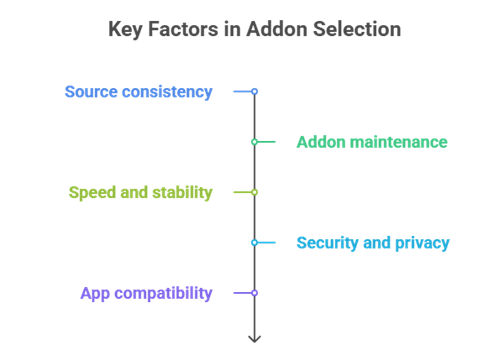
Real-Debrid addons can simplify streaming by pulling higher-quality links across popular apps. Our experts reviewed current performance signals, update frequency, and user reports to keep results reliable in 2026. This summary covers the essential factors we used to shortlist the top picks.
- Source consistency: We chose addons with consistent cached availability, so you get rapid playback and avoid dead links.
- Addon maintenance: Our team shortlisted addons with frequent updates, since fast fixes keep streaming stable.
- Speed and stability: Experts selected tools optimized for efficiency that handle peak traffic without slowing down.
- Security and privacy: We considered secure handling, minimal permissions, and reliable developer practices based on community feedback.
- App compatibility: We chose addons that work across major players, keeping your setup hassle-free across devices.
Which Real-Debrid addons are best for movies and TV?
The best addons combine strong scraping, smart filtering, and stable updates. Based on my testing, a small, well-chosen stack beats installing a dozen overlapping addons.
- Quality filters: Choose addons that prioritize 4K, 1080p, and HDR with clear file-size indicators.
- Debrid-first design: Addons built around Real-Debrid surface more cached links and fewer failures.
- Season packs: TV works best when an addon supports season packs and accurate episode matching.
- Metadata support: Good posters, plots, and episode data make browsing faster for beginners.
- Active maintenance: Pick addons with recent releases or active community support to avoid broken scraping.
For most people, Torrentio or the AIOStreams meta-addon covers movies and series well, while MediaFusion adds strong live TV, sports, and regional content.
How do I pick between popular Real-Debrid addons?
Compare addons by results quality, speed, and how often they break. I focus on day-to-day consistency over hype.
- Link success rate: Test the same title across addons and note how many links actually start playing.
- Speed to results: Faster scrapers feel better daily, especially on TV episodes with many sources.
- Filtering options: Strong filters reduce junk results and help you avoid tiny files or fake 4K.
- Provider management: Addons that let you enable or disable providers give more stable performance.
- Error handling: Good addons fail gracefully and retry instead of freezing the player or crashing.
What settings improve Real-Debrid addon performance?
Most problems come from poor filtering and oversized searches. A few small setting changes can noticeably improve speed and reliability.
- Set a minimum size: Avoid tiny encodes by setting a minimum file size for 1080p and 4K results.
- Limit providers: A few high-quality providers often perform better than many slow, unreliable ones.
- Prioritize cached: Enable cached-first filters so streams start instantly and fail less often.
- Sort smartly: Sort by resolution, then size, to get better bitrate without always picking huge files.
- Tune timeouts: Lower scraper timeouts for speed, or raise them slightly when you need more results.
Are Real-Debrid addons safe and legal to use?
Real-Debrid is a tool, not content. Its safety and legality depend on where an addon pulls links and how you use it. I am not a lawyer, so treat this as general guidance and follow your local laws.
- Check sources: Prefer addons that rely on reputable indexers and avoid unknown repositories or forks.
- Account security: Use a strong password and avoid sharing your Real-Debrid API key publicly across devices.
- Privacy basics: A VPN can help privacy in some regions, but it does not make unlawful use lawful.
- Stay updated: Outdated addons may break or expose you to risks from abandoned code.
- Know your laws: Streaming rules vary by country, so follow local regulations and platform terms.
Real-Debrid itself is a legitimate service, but streaming copyrighted material through any addon can still break the law where you live.
What are the best troubleshooting steps when an addon finds links but won’t play?
When links appear but playback fails, the cause is usually a stale cache, an expired debrid token, a host limit, or a stream your device cannot decode. Here is the quick, repeatable method I use.
- Try another link: Pick a different cached result, ideally a well-seeded file from a trusted release group.
- Re-authorize Real-Debrid: Refresh your Real-Debrid API token and reconfigure the addon, since expired tokens are a common cause.
- Clear the cache: Clear the addon and app cache to remove stale scraping data and broken sessions.
- Switch the player: Test an external player, as some built-in players struggle with certain codecs or HDR profiles.
- Check device and status: Confirm Real-Debrid is not having an outage, and avoid formats your device cannot handle, such as certain Dolby Vision profiles on some Firestick models.
If one stream refuses to play, switching to another cached link usually fixes it faster than reinstalling everything.
Verdict:
In this review, you got acquainted with some of the best Real-Debrid addons for fast, reliable streaming and cleaner link quality. Each addon brings different strengths, whether it is scraping breadth, customization, or simplicity. To help you take the final call, I have created this verdict.
- Torrentio: A top-rated and powerful addon that aggregates many torrent providers and pairs tightly with Real-Debrid for a steady flow of cached links and fewer dead ends. Its broad scraping and flexible filters make it a superior choice when you want consistent, high-quality results.
- AIOStreams: A remarkable and highly customizable meta-addon that combines Torrentio, Comet, MediaFusion, and many others into one results list. I recommend it for power users who want granular provider control and a single, unified setup across devices.
- Comet: An excellent, user-friendly addon known for fast torrent and debrid search with clean output. It is an ideal pick for stable everyday streaming when you value speed and clarity over maximum source volume.
FAQs
Do I need a Real-Debrid subscription to use these addons?
Most Real-Debrid addons install without a subscription, but you will only get premium cached links after you authorize a paid Real-Debrid account. Without it, results may be empty or limited to low-quality free sources. For the best performance, subscribe and link your account in the addon’s settings.
Are Real-Debrid addons free to install?
Yes. Real-Debrid addons are typically free to download and install, especially on apps like Kodi and Stremio. The main cost is the Real-Debrid premium subscription, which unlocks high-quality cached streams and faster transfers. Always install addons from trusted repositories or official sources to avoid clones and malware.
Do I need a VPN when using Real-Debrid addons?
A VPN is not strictly required, because streams are delivered through Real-Debrid’s servers rather than direct peer-to-peer. However, a VPN can help with ISP throttling, privacy, and network blocks. If you use one, choose a stable provider and keep it consistent with your Real-Debrid IP rules.
Why do some Real-Debrid streams show a removed due to copyright error?
That message usually means the file host or Real-Debrid removed access after a copyright takedown, so the cached file is no longer available. Try a different source, switch to another quality option, or re-scrape the links. Addons that prioritize cached torrents tend to reduce these dead or removed links.
Can I use Real-Debrid addons on Firestick, Android TV, and iOS?
Yes, with some platform limits. Firestick and Android TV support Real-Debrid apps and addons well through Kodi, Stremio, and Syncler via APK installs. On iOS, Kodi and Stremio addon support is more restricted, but you can use compatible players, WebDAV, or cast from another device.