Key Takeaway: YouTube TV Sports Plan is the closest broad US replacement, Fubo is strongest for regional teams and soccer, and Sling TV offers the cheapest short passes. No licensed service duplicates Streamed’s all-sports page, so choose by league rights rather than the longest channel list.
Streamed.su became popular by placing live football, basketball, baseball, hockey, motorsport, tennis, combat sports, and other event links on one schedule. The convenience hides the real tradeoff: the platform does not publish a reliable rights map, domains and players can change, pop-ups can create security risk, and a available link may disappear during the busiest match.
I compared nine licensed replacements using their current rights pages, standard prices, trial terms, blackout notices, DVR limits, household streams, and Fire TV support. This guide helps you rebuild only the sports you actually watch instead of paying for several overlapping bundles.
Content and Licensing Note: This Best Streamed Alternatives guide compares sports and streaming availability for informational purposes. Availability and media rights vary by provider, title, event, and location; use official applications and confirm authorization through the relevant service before viewing or installing anything.
9 Best Streamed Alternatives in 2026: Legal Options That Stay Up
| Service | Best For | Sports Coverage | Get Started |
|---|---|---|---|
| YouTube TV Sports Plan | Best overall US replacement | 30+ sports and local channels | Visit Site |
| Fubo | Regional teams and soccer | Broad sports bundle with RSNs | Visit Site |
| Sling TV | Budget and short-term access | ESPN, TNT, local options, extras | Visit Site |
| Hulu + Live TV | Sports plus Disney and Hulu | 100+ channels and ESPN bundle | Visit Site |
| ESPN Unlimited | All ESPN networks without cable | ESPN channels, ESPN+, professional football Network | Visit Site |
1) YouTube TV Sports Plan
YouTube TV’s Sports Plan is the closest legal Streamed alternative for a US household following several leagues. It combines national sports networks with available ABC, CBS, FOX, and NBC locals, unlimited DVR, and strong game-day tools. I rank it first because the sports-only lineup removes many entertainment channels, though professional football Sunday Ticket and league packages still cost extra.
Features:
- Sports-First Lineup: The dedicated plan carries more than thirty sports and local channels, reducing the entertainment padding that made the full base package unnecessarily expensive for some fans.
- Local Broadcasts: Available ABC, CBS, FOX, and NBC stations bring national games and many local broadcasts into one guide, although exact affiliates still depend on home ZIP code.
- Unlimited DVR: Recordings use unlimited cloud storage and remain available for nine months, giving late viewers a dependable alternative to hunting for unauthorized replays after a match.
- Multiview Tools: Select televisions, phones, and tablets can display up to four games, while Key Plays, live statistics, and fantasy integrations reduce the need for separate score apps.
- Household Access: One membership supports six household profiles and three simultaneous streams, with individualized libraries and recommendations rather than a single shared watch history for everyone.
- Official Check: I verified the active Sports Plan page, channel total, local-network statement, August offer terms, standard price, Fire TV support, account limit, and DVR policy.
- Main Limitation: professional football Sunday Ticket, Sports Plus, and other premium networks are separate add-ons, while regional blackouts and missing local stations can still affect a specific team.
| Pros | Cons |
|---|---|
| Purpose-built sports package | Premium league add-ons cost extra |
| Excellent DVR and multiview tools | US availability only |
| Local networks included where available | |
| Native Fire TV application |
Pricing:
- Standard Sports Plan: $64.99 per month
- New-Subscriber Offer: $54.99 monthly for twelve months through August 26, 2026
- Trial: Ten days for eligible new subscribers
Link: https://tv.youtube.com/learn/sportsplan/
2) Fubo
Fubo remains the strongest Streamed replacement for viewers who need regional sports networks, international soccer, and a cable-style live guide. Its US plans combine locals, national networks, team search, cloud DVR, and many home streams. I place it second because its sports depth is excellent, but regional fees, ZIP-specific lineups, and occasional carriage disputes make the checkout total important.
Features:
- Regional Coverage: Fubo carries regional sports networks in supported markets and lets users search by team, league, game, or channel before choosing a plan for their ZIP code.
- Soccer Depth: The current directory highlights the relevant football competition, Bundesliga, international clubs, and Spanish-language coverage alongside football, basketball, baseball, hockey, motorsport, golf, and college sports.
- Local Channels: US English base plans include available ABC, CBS, FOX, and other local stations, helping viewers cover nationally televised games without switching to a separate antenna.
- Flexible Screens: Most plans support numerous streams on a home network plus mobile viewing, which suits households following simultaneous fixtures across televisions, tablets, and phones.
- Selective 4K: Compatible 4K events require an eligible higher plan and supported device, with Fubo recommending a continuous twenty-five-megabit connection for stable ultra-high-definition playback.
- Official Check: I reviewed Fubo’s 2026 plan notice, active channel directory, team finder, local-station guide, Fire TV compatibility, streaming limits, free-trial language, and resolution requirements.
- Main Limitation: The advertised base price may exclude mandatory regional sports charges, taxes, and add-ons, while available networks and free trials change according to location and promotion.
| Pros | Cons |
|---|---|
| Strong regional sports coverage | Regional fees can raise the bill |
| Excellent international soccer range | Lineup varies substantially by ZIP code |
| Many household streams | |
| Team and league discovery tools |
Pricing:
- Essential or Pro: $73.99 per month before regional fees
- Elite: $83.99 per month before regional fees
- Price Check: Verified August 25, 2026; enter a ZIP code for the exact total
Link: https://www.fubo.tv/welcome
3) Sling TV
Sling TV is the most flexible paid Streamed alternative when you need ESPN, TNT, or short-term sports without a full cable replacement. Orange offers monthly access and one-, three-, or seven-day passes. I rank it third because modular pricing suits tournaments, although local networks, stream limits, and sports channels differ between Orange and Blue.
Features:
- Short Passes: Sling Orange can be purchased for one, three, or seven days, an unusually practical option when a desired competition fits inside a weekend or tournament window.
- Orange Sports: Orange includes ESPN, ESPN2, TNT, TBS, and other channels, while the optional Sports Extra expands college, professional, and specialist network coverage.
- Blue Alternative: Blue emphasizes FS1, professional football Network, USA, TNT, TBS, and selected FOX or NBC locals, giving different value depending on the event’s broadcaster.
- Free Channels: Freestream supplies more than six hundred ad-supported channels without a paid plan, useful for highlights, sports talk, and occasional events rather than premium game coverage.
- DVR Choices: Paid subscriptions include fifty hours of cloud DVR, while a five-dollar monthly upgrade expands storage to unlimited for matches that overlap or start overnight.
- Official Check: I checked Sling’s current Orange checkout, pass prices, channel lists, Fire TV support, simultaneous-stream rules, DVR policy, Sports Extra price, and local-channel limitations.
- Main Limitation: Orange permits one simultaneous stream, and obtaining ESPN plus FOX or NBC sports often requires combining plans, adding cost while local availability remains market dependent.
| Pros | Cons |
|---|---|
| Affordable single-day access | Plan structure is easy to misread |
| Useful ESPN and TNT lineup | Orange allows only one stream |
| Customizable sports extras | |
| Free channel tier available |
Pricing:
- Orange Monthly: $45.99
- Orange Passes: $4.99 one day, $9.99 three days, or $14.99 seven days
- Orange + Sports Extra: $56.99 per month
Link: https://www.sling.com/service/sling-orange
4) Hulu + Live TV
Hulu + Live TV suits a household wanting sports and a substantial entertainment bundle on one bill. The plan combines more than one hundred live channels, unlimited DVR, Hulu, Disney+, and ESPN access. I rank it fourth because the bundle is genuinely broad, but its high monthly price is wasteful when you need only one league or occasional event.
Features:
- Wide Network Mix: The live guide includes available ABC, CBS, FOX, NBC, ESPN networks, FS1, professional football Network, TNT, TBS, Golf Channel, college networks, and other national sports outlets.
- Bundled Libraries: A subscription also unlocks Hulu and Disney+ streaming libraries plus additional ESPN content, creating stronger household value than a sports-only package for mixed viewing.
- Unlimited DVR: Record live television without a storage cap, retain recordings for nine months, and fast-forward through recorded content instead of relying on unofficial postgame uploads.
- Add-On Options: A separate Sports Add-on adds professional football RedZone and specialist motorsport, horse-racing, outdoor, hunting, and fishing channels without forcing a higher entertainment tier.
- Device Coverage: Hulu officially supports Amazon Fire TV alongside Roku, Apple TV, Android TV, major smart televisions, mobile devices, consoles, Chromecast, and desktop browsers.
- Official Check: I verified Hulu’s live sports page, current August pricing, three-day trial, channel list, Sports Add-on, DVR retention, two-screen limit, Fire TV support, and blackout warning.
- Main Limitation: Base service allows two simultaneous screens, sports add-ons increase an already high price, and regional channels or individual events remain subject to location and blackout rules.
| Pros | Cons |
|---|---|
| Excellent all-household bundle | Expensive for sports-only viewers |
| One hundred-plus live channels | Only two base simultaneous streams |
| Unlimited nine-month DVR | |
| Strong national sports mix |
Pricing:
- With Ads Live Bundle: $89.99 per month
- Premium Live Bundle: $99.99 per month
- Sports Add-On: $9.99 per month
Link: https://www.hulu.com/live-sports
5) ESPN Unlimited
ESPN Unlimited is the cleanest Streamed alternative for viewers focused on ESPN rights. It combines the linear ESPN networks, ESPN+, ABC sports, college conference channels, and professional football Network in one app. I rank it fifth because the package costs less than a full live-TV bundle, though it cannot replace CBS, FOX, NBC, or every local broadcast.
Features:
- Complete ESPN Stack: Unlimited includes ESPN, ESPN2, ESPNU, ESPNEWS, ESPN Deportes, SEC Network, ACC Network, ESPN+, ESPN on ABC, SECN+, ACCNX, and professional football Network.
- Deep Event Volume: Coverage spans professional football, professional basketball, WNBA, professional hockey, college football and basketball, tennis, golf, soccer, wrestling, studio shows, documentaries, and thousands of ESPN+ events.
- Direct Subscription: Fans can buy access without a traditional television package, removing the provider-authentication barrier that historically kept the main ESPN channels behind cable credentials.
- Bundle Choices: Disney+ and Hulu can be combined with Unlimited, while eligible packages from Hulu Live, DIRECTV, Fubo, and certain television providers may already include entitlement.
- ESPN Application: The unified app organizes live networks, ESPN+ events, replays, originals, scores, alerts, and personalized favorites across Fire TV and other common connected platforms.
- Official Check: I reviewed ESPN’s current plan comparison, included-network list, bundle prices, event categories, household rule, provider activation guidance, cancellation language, and app positioning.
- Main Limitation: The service cannot supply events licensed exclusively to CBS, FOX, NBC, Amazon, Apple, regional sports networks, or league packages, so some schedules need another subscription.
| Pros | Cons |
|---|---|
| Every major ESPN network included | No CBS, FOX, or NBC coverage |
| Cheaper than full live-TV bundles | Blackouts still affect some events |
| Large college and ESPN+ catalog | |
| Direct signup without cable |
Pricing:
- ESPN Unlimited: $31.99 per month
- Disney+, Hulu, and Unlimited: $35.99 per month
- ESPN and professional football+ Premium Bundle: $41.99 per month where offered
Link: https://plus.espn.com/
6) DIRECTV Streaming
DIRECTV Streaming is the premium Streamed alternative for households wanting regional sports networks and a traditional lineup without a satellite dish. Choice and higher packages add many local-team networks, while every plan includes unlimited DVR and home streams. I rank it sixth because coverage can be exceptional, but the normal price and location-based fees demand careful checkout review.
Features:
- Regional Networks: Choice and higher packages include available regional sports networks, making DIRECTV one of the strongest legal options for local professional basketball, professional hockey, and professional baseball broadcasts.
- National Channels: Entertainment starts with ESPN Unlimited, FS1, local networks, and TNT, while higher tiers add specialty college, league, golf, hockey, baseball, and basketball networks.
- Unlimited DVR: Cloud recordings use unlimited storage, helping households capture overlapping games and keep dependable replays without configuring local hardware or trusting a temporary event link.
- Generous Streams: The service advertises unlimited simultaneous streams at home and three away from home, a meaningful advantage for larger sports households with competing team loyalties.
- Five-Day Trial: Eligible new streaming customers receive a short trial, enough time to verify picture quality, local affiliates, application behavior, and the exact regional lineup before renewal.
- Official Check: I checked current DIRECTV package pages, standard and promotional prices, channel totals, regional-network rules, Sports Pack rate, DVR, streams, trial, and Fire TV route.
- Main Limitation: Normal monthly pricing is high, RSNs require Choice or above, and taxes, regional charges, premium networks, promotional expirations, and equipment options complicate comparisons.
| Pros | Cons |
|---|---|
| Excellent regional sports access | High standard monthly price |
| Unlimited home streams | Regional fees and package rules apply |
| Unlimited cloud DVR | |
| Broad cable-style channel lineup |
Pricing:
- Entertainment Standard: $89.99 per month
- Choice Standard: $94.99 per month with available RSNs
- Sports Pack: $14.99 per month after any introductory offer
Link: https://www.directv.com/stream/stream-packages/
7) Peacock
Peacock is the economical Streamed alternative for sports controlled by NBCUniversal. It carries Premier League soccer, Sunday Night Football, professional basketball and WNBA coverage, Big Ten events, golf, motorsport, and selected baseball. I rank it seventh because its annual plan offers strong value, but Peacock covers only part of each league and live sports contain advertising on every tier.
Features:
- Premier League Hub: Peacock carries an extensive Premier League schedule with live matches, replays, highlights, studio programming, and dedicated navigation, although selected games remain on other NBC channels.
- US Sports Mix: The sports library lists professional football, professional basketball, WNBA, Big Ten football, golf, motorsport, rugby, cycling, horse racing, WWE programming, and selected professional baseball coverage.
- Annual Savings: Paying annually costs the equivalent of ten monthly payments, a useful discount when the desired sports span most of the calendar rather than one short season.
- Replay Value: Many events receive replays, highlights, clips, and studio coverage, offering legitimate catch-up paths that are easier to navigate than random recordings on mirror sites.
- Fire TV App: Peacock supports Amazon Fire TV devices together with Roku, Apple TV, Google TV, smart televisions, mobile platforms, web browsers, and current game consoles.
- Official Check: I reviewed Peacock’s live sports catalog, August plan page, new monthly and annual prices, supported devices, replay availability, ad exceptions, and sport-specific navigation.
- Main Limitation: Even Premium Plus retains commercials during live events, and rights are divided with NBC broadcast or cable channels, league services, and other national partners.
| Pros | Cons |
|---|---|
| Strong Premier League coverage | Live sports always include ads |
| Low price for NBC sports | Does not carry every league game |
| Annual discount available | |
| Large replay and highlight library |
Pricing:
- Premium: $12.99 monthly or $129.99 yearly
- Premium Plus: $19.99 monthly or $199.99 yearly
- Price Check: Verified August 25, 2026 on Peacock’s current plan page
Link: https://www.peacocktv.com/sports/view-all-sports
8) Paramount+
Paramount+ is the strongest low-cost Streamed alternative for UEFA club soccer, UFC, and professional football on CBS. It promotes every Champions League match, Serie A, English Football League coverage, UFC events, Fight Nights, and CBS sports. I rank it eighth because Essential is unusually capable, though Premium is required for the local CBS live station and additional events.
Features:
- European Soccer: Subscribers receive UEFA Champions League, Europa League, Conference League, Serie A, English Football League, and other CBS-controlled soccer competitions live and on demand.
- UFC Home: The platform advertises live numbered UFC events, Fight Nights, preliminaries, main cards, and replays, providing a straightforward official route for combat-sports followers.
- professional football on CBS: All subscribers can watch eligible professional football on CBS coverage, with pause, rewind, fast-forward, and restart controls that make joining a game late more practical.
- Premium Local CBS: The higher plan adds a live local CBS station where available, unlocking more golf, college sports, professional football, and other events that air on the affiliate.
- Three Streams: Up to three devices can stream simultaneously, while Premium adds downloads and selected 4K, Dolby Vision, or HDR10 playback for supported on-demand titles.
- Official Check: I checked Paramount+ plan pricing, live sports hub, Champions League and UFC positioning, professional football page, local CBS distinction, three-stream allowance, and Fire TV support.
- Main Limitation: CBS rights represent only part of US sports schedules, local-station availability varies, live programming contains commercials, and blackout or territorial restrictions still apply.
| Pros | Cons |
|---|---|
| Excellent UEFA soccer coverage | Local CBS requires Premium |
| All UFC live fights advertised | Coverage centered on CBS rights |
| Affordable Essential plan | |
| Three simultaneous streams |
Pricing:
- Essential: $8.99 per month
- Premium: $13.99 per month
- Annual Billing: Discounted options available at checkout
Link: https://www.paramountplus.com/?cbscidmt=sports
9) DAZN
DAZN is the specialist Streamed alternative for boxing, combat sports, international soccer, darts, snooker, women’s competitions, and regional rights. It combines subscriptions, selected free programming, and pay-per-view events in one app. I rank it ninth because the catalog can be excellent for a chosen sport, but US rights, premium-event costs, device limits, and pricing differ by market.
Features:
- Combat Sports Focus: DAZN schedules boxing, MMA, wrestling, fight-week programs, documentaries, press conferences, weigh-ins, and pay-per-view cards, making it more event-focused than general live-TV bundles.
- Global Catalog: Availability extends across more than two hundred territories with market-specific soccer, basketball, motorsport, darts, snooker, women’s sports, and other specialist competitions.
- Free Option: Creating a free account unlocks selected live events, highlights, documentaries, women’s competitions, and fight-week content without starting a recurring paid subscription.
- Replay Controls: Many broadcasts remain available on demand with highlights and supporting programs, giving subscribers a reliable archive after the live window rather than a disappearing embed.
- Device Reach: DAZN works through Fire TV and other connected televisions, mobile devices, computers, browsers, consoles, and streaming players, although concurrent-stream limits depend on plan.
- Official Check: I reviewed DAZN’s active US pricing help, free-offer explanation, global sports description, device policy, simultaneous-stream limits, annual commitment, cancellation rules, and premium-event restriction.
- Main Limitation: A standard subscription does not include every pay-per-view, the flexible plan allows one concurrent stream, and the event catalog varies widely between countries and seasons.
| Pros | Cons |
|---|---|
| Excellent boxing and fight coverage | Some major cards remain premium-event |
| Selected free events available | Rights vary heavily by country |
| Large international footprint | |
| Live and on-demand programming |
Pricing:
- Flexible Monthly: $34.99 per month in the US
- Annual Paid Monthly: $24.99 per month for twelve months
- Annual Upfront: $249.99 per year
Link: https://www.dazn.com/en-US/help/articles/16184063399709-dazn-plans-and-pricing
Build a Rights Map Instead of Buying Every Service
The least expensive replacement is rarely the service with the lowest headline price. Start with the competitions you cannot miss, identify their current US broadcaster, and separate local-team games from national exclusives. One broad bundle may cover most weekends, while a smaller app fills a Champions League, Premier League, boxing, or regional gap. This simple map prevents paying twice for ESPN, CBS, or NBC content already included elsewhere.
- List Competitions: Write the exact league, tournament, team, and season instead of “football” or “basketball,” because different rounds and national games can use different broadcasters.
- Find the Rights Holder: Use the league’s official schedule and the service’s event page together, then verify whether the listing says live, replay, highlights, or provider login required.
- Separate Local Games: Regional professional basketball, professional hockey, and professional baseball broadcasts often need Fubo or DIRECTV, while national exclusives can move to ESPN, Peacock, Amazon, Apple, or broadcast networks.
- Remove Duplicates: If a live-TV package already activates ESPN Unlimited or includes local CBS, avoid adding the standalone service unless its extra library solves a specific gap.
- Review Each Season: Rights change, so reassess before a new season and cancel off-season subscriptions rather than assuming last year’s package still owns the same competition.
How I Scored a Replacement for an All-Sports Schedule
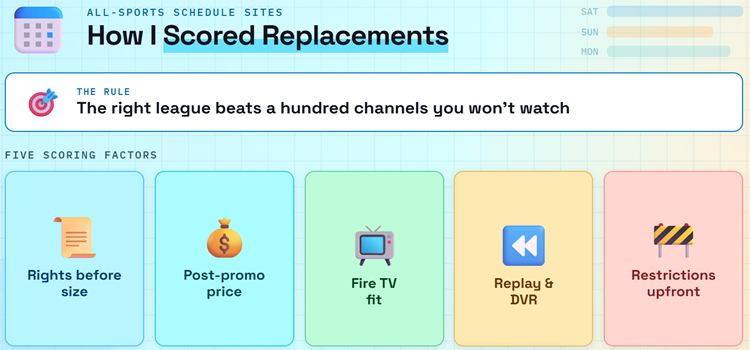
Streamed makes every event look interchangeable, but a stable replacement depends on rights, geography, and how you watch. I weighted official game access first, then compared standard rather than promotional prices, Fire TV support, replay and DVR tools, household limits, local stations, regional networks, and the ability to confirm an event before subscribing. Services lost ground when key conditions appeared only after checkout.
- Rights Before Size: A smaller service with the exact league right outranks a hundred-channel bundle that omits the one competition, local station, or regional network a reader needs.
- Normal Price: Temporary discounts were recorded but never treated as the lasting cost; rankings use the price that returns after an introductory offer or trial expires.
- Fire TV Fit: Native Fire TV support earned preference because remote navigation, account activation, adaptive playback, and updates are safer and easier than repeated Silk Browser redirects.
- Replay Utility: Unlimited DVR, full replays, restart controls, key-play views, and highlights add genuine value when fixtures overlap or begin outside a viewer’s local time zone.
- Restriction Clarity: Blackouts, home ZIP rules, travel limits, simultaneous streams, annual contracts, regional fees, and pay-per-view exclusions were considered decision points rather than fine print.
The Real Monthly Cost of Replacing Streamed
A legal replacement can cost less than expected when you subscribe around the calendar instead of keeping every app all year. Short Sling passes suit one event; Peacock or Paramount+ can cover an entire rights portfolio cheaply; a broad bundle earns its higher price only when several household members use its networks. Compare the annual total, not the first month, and include regional fees, sports add-ons, and pay-per-view cards.
- Use Standard Rates: Ignore countdown offers when comparing long-term value and write down the normal renewal price, billing date, annual commitment, tax, and any regional sports fee.
- Rotate by Season: Keep the broad service only during active league months, then switch to a cheaper specialist app when playoffs, soccer competitions, or combat events dominate the calendar.
- Exploit Short Passes: Sling’s one-, three-, and seven-day options can cost less than a month when a tournament or isolated broadcast appears entirely on ESPN or TNT.
- Budget for premium-event: DAZN and other combat-sports services may charge separately for major cards, so add the event purchase before calling a monthly subscription the complete price.
- Check Included Entitlements: Hulu Live, Fubo, DIRECTV, or an existing provider may already activate ESPN Unlimited, preventing a second charge for the same networks and ESPN+ catalog.
Make Fire TV Reliable Before the Opening Whistle
Licensed apps remove the pop-up problem, but they cannot repair a congested home network or overloaded Fire TV. Install applications from the Amazon Appstore, sign in before match day, update Fire OS, and test the exact channel. If playback stutters, measure the connection near the television and reduce competing downloads before changing services. For more device-specific choices, compare our best sports apps for Firestick.
- Install Official Apps: Use the Amazon Appstore listing from the provider’s documented device page, avoiding sideload packages that can impersonate a familiar sports service or request unnecessary permissions.
- Activate Early: Complete provider linking, location permission, profile setup, and any television code before kickoff so an authentication email or forgotten password does not consume the first quarter.
- Test the Channel: Open the same network or a replay one day earlier, confirming audio, resolution, remote controls, captions, and account entitlement on the actual Fire TV device.
- Protect Bandwidth: Pause large downloads, move the router closer, prefer Ethernet where available, and reserve roughly twenty-five megabits per second when attempting supported 4K sports.
- Keep One Backup: A free antenna, league radio call, or second licensed app is a better fallback than searching for a new mirror while a high-demand event is already underway.
Why Streamed Mirrors Are a Poor Match-Day Backup
A mirror can copy a logo and fixture list without inheriting the original operator, player, safety, or uptime. High-profile sports domains also face blocking and takedown pressure, while ad networks can send a click through several unrelated pages. A VPN may encrypt traffic to its server, but it cannot license a broadcast, verify a mirror, remove malicious scripts, or guarantee that an overloaded embed survives peak demand.
- No Stable Identity: A familiar layout does not prove common ownership, and a new domain can collect browser permissions, notifications, account details, or payment information under copied branding.
- Unclear Rights: An event appearing in a schedule does not show that the site obtained permission to redistribute it, creating legal uncertainty that differs by viewer location.
- Redirect Exposure: Fake play buttons, notification requests, download offers, and multiple ad hops enlarge the attack surface before a sports stream even begins loading.
- Peak-Time Failure: Unlicensed embeds have little incentive to publish capacity, backup, replay, or support commitments, so popular finals can fail precisely when traffic reaches its highest point.
- VPN Limits: Encryption can reduce local-network exposure, but it does not make an unsafe page trustworthy, grant media rights, bypass valid account terms, or repair unreliable source servers.
Best Streamed Alternatives Verdict
There is no legal one-page replacement for every event Streamed lists. The best choice is the service that owns your actual competitions in your home market. For most US households, begin with one broad plan, add a low-cost specialist only for a documented gap, and review the combination whenever rights or seasons change.
- YouTube TV Sports Plan: best overall for national sports, available local stations, unlimited DVR, multiview, and a sports-focused lineup without the full entertainment package.
- Fubo: best for supported regional teams, international soccer, many household streams, and viewers who will verify ZIP-specific channels and fees before checkout.
- Sling TV: best budget choice for ESPN or TNT events, especially when a one-, three-, or seven-day pass covers the entire viewing window.
FAQs
What is the best overall Streamed alternative?
YouTube TV’s Sports Plan is the closest broad US alternative because it combines more than thirty sports and available local channels with unlimited DVR, three streams, multiview, and Fire TV support. Fubo is stronger when a supported regional sports network or international soccer channel matters more. Always enter your home ZIP and confirm the exact team or competition before subscribing.
What is the cheapest legal Streamed alternative?
Sling Orange costs $4.99 for one day, $9.99 for three days, or $14.99 for seven days, making it useful for a short ESPN or TNT event. Paramount+ starts at $8.99 monthly for its CBS, UEFA, and UFC portfolio, while Peacock starts at $12.99. Free sports are also available through licensed services in our guide to the best free sports streaming sites.
Can I watch these Streamed alternatives on Firestick?
Yes. Every service in this list provides an official Fire TV route or documented connected-device support. Install from the Amazon Appstore, create the account on the provider’s official site, and sign in before the event. Avoid unofficial APKs that use a real service name, and remember that available games still depend on country, home market, plan, and blackout rules.
Will one service carry every sport that Streamed lists?
No licensed US service owns every league and event. National games are divided among broadcast networks, ESPN, league packages, Amazon, Apple, Peacock, Paramount+, and others, while local professional basketball, professional hockey, and professional baseball games may use regional networks. Build a rights map for your teams, start with one broad bundle, and add a specialist service only when it fills a verified gap.
Does a VPN make Streamed or its mirrors safe and legal?
No. A VPN encrypts the connection between your device and its server, but it does not inspect every script, prove who operates a mirror, create distribution rights, stop fake download offers, or guarantee a stream. Legality depends on jurisdiction and authorization. The safer approach is an official app whose operator, price, event rights, support, and privacy terms can be checked.
How do I avoid sports blackouts?
Check the league schedule, the service event page, and your ZIP-specific channel lineup before paying. A regional network usually covers local games, while nationally exclusive events can move elsewhere. Out-of-market packages may exclude your home team. Do not assume a VPN overrides a blackout; account location, billing ZIP, device location, and league rules can all determine access.