Key Takeaway: These 4 Stremio sports add-ons were retained after checking current listings, installation routes, update information, and publisher details. Confirm each source, setup requirement, and regional viewing right before using a community addon.
Finding a sports addon that still has a current listing when kickoff arrives is half the battle. Stremio’s community catalog changes quickly, and many roundup pages continue to recommend projects with outdated manifests or unclear setup requirements. I checked each retained listing, destination, update date, and configuration route before revising this guide.
Below are four sports and live-TV addons with current public listings. They are compared by event coverage, setup requirements, source transparency, and ease of use. A working community manifest does not prove that every upstream feed is authorized, so confirm the source and viewing rights in your location.
Content and Licensing Note: This Best Stremio Sports Addons guide compares addons, repositories, and media tools for informational purposes. Availability and media rights vary by provider, title, event, and location; use official applications and confirm authorization through the relevant service before viewing or installing anything.
Best Stremio Sports Addons in 2026: My Top Picks
| Addon | Best For | Type | Get Started |
|---|---|---|---|
| TvVoo | International sports channels | Community / Optional hosting | View Addon |
| StreamViX | Scheduled matches and live events | Community / Proxy options | View Addon |
| Flix Streams | Sports, live TV, and event catalogs | Free / Supporter tiers | View Addon |
| Pluto TV | Free Pluto channel discovery | Community addon | View Addon |
1) TvVoo
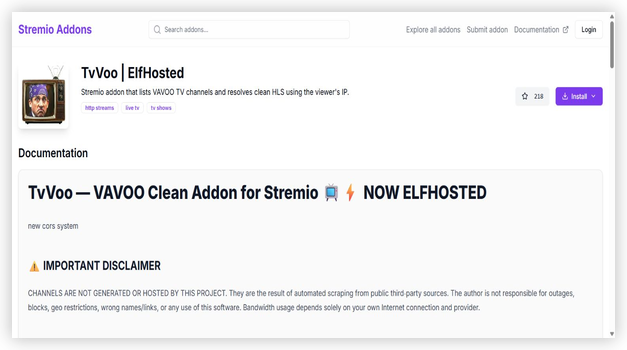
TvVoo is a community addon that lists VAVOO television channels and resolves HLS streams using the viewer’s connection. Its current listing supports several European and international country catalogs, making it relevant when a league or channel is missing from a domestic lineup. The developer warns that channels come from public third-party sources, so availability, authorization, names, and regional access can change without notice.
Features:
- VAVOO Channels: TvVoo surfaces the sizeable VAVOO channel list, including many European and international sports networks that US-focused addons simply do not carry at all.
- IP-Clean Resolving: It resolves clean HLS streams using the viewer’s own IP address, which tends to produce steadier playback than shared, overloaded public relay servers.
- International sports: Coverage stretches across multiple countries, so niche league games and foreign broadcasts are reachable when domestic addons have nothing scheduled that night.
- ElfHosted Option: You can use the free public instance or run it through an ElfHosted private instance, which improves reliability if a busy shared endpoint slows down.
- Frequent Updates: At version 5 and regularly patched, TvVoo keeps its channel list current, so the sports feeds you rely on rarely vanish for long after a change.
- Practical Check: Review the selected country list, manifest status, and source authorization before match time. Keep an accountable broadcaster available when a public channel fails.
- Broad Device Support: Because it is a standard Stremio addon, it works anywhere Stremio runs, from Firestick and Android to the web player in a browser.
| Pros | Cons |
| Large international channel pool | VAVOO feeds can shift |
| Clean IP-based resolving | Some channels geo-limited |
| Great for foreign leagues | Unlicensed content |
| Free or ElfHosted private | Occasional resolve delay |
| Actively maintained |
Pricing: Free public configuration available. Optional self-hosting or managed hosting may add costs, so verify the current host price before subscribing. No debrid account is required. (checked October 2026)
Link: stremio-addons.net/addons/tvvoo
2) StreamViX
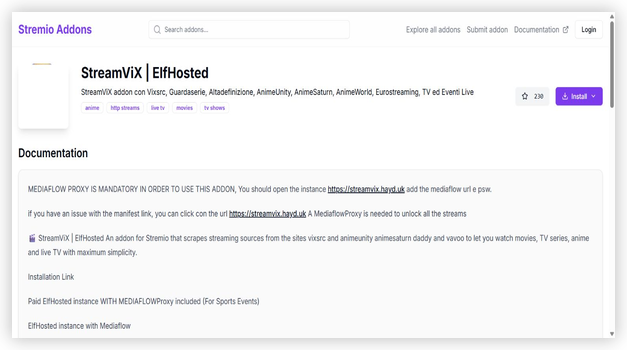
StreamViX is a community addon with live television and daily sports-event catalogs alongside movies, series, and anime. Its documentation emphasizes Italian sources while also including international events. Some streams can open directly or through an external player, while the complete provider set may require MediaFlow Proxy or a managed ElfHosted configuration.
Features:
- Live Events Section: A dedicated events area lists scheduled matches and one-off broadcasts, so you catch specific games rather than only browsing permanent 24/7 channels.
- Multiple Sources: StreamViX aggregates several providers at once, meaning a single match often carries a few backup links you can switch to if one fails.
- Italian and Global: It leans on strong Italian sports coverage while still surfacing international events, which suits fans of European football and continental competitions.
- ElfHosted Backing: Running on the ElfHosted platform gives it more dependable uptime than many hobby addons hosted on free tiers that sleep or rate-limit.
- Rapid Versioning: The addon updates constantly, sitting past version nine, so broken providers are swapped out quickly and the events list stays accurate week to week.
- Practical Check: Confirm whether a selected stream needs MediaFlow Proxy, an external player, or a direct URL. Requirements can differ between live providers.
- Flexible Hosting: You can point it at the shared instance or your own ElfHosted deployment, trading a little setup effort for noticeably steadier big-game performance.
| Pros | Cons |
| Strong live-events listings | Italian-first interface |
| Aggregates multiple sources | Setup favours advanced users |
| Reliable ElfHosted uptime | Unlicensed streams |
| Very frequent updates | Event names sometimes untranslated |
| Good European coverage |
Pricing: Free configuration supports selected direct streams. The full provider set may require MediaFlow Proxy, while a paid ElfHosted instance can include proxy access. Verify current plan pricing before subscribing. (checked October 2026)
Link: stremio-addons.net/addons/streamvix-elfhosted
3) Flix Streams
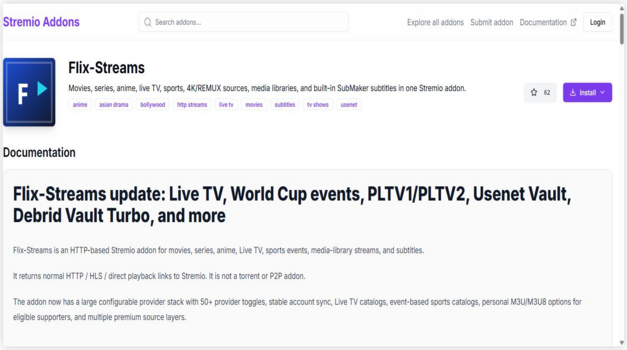
Flix Streams combines live television, sports-event catalogs, movies, series, anime, and subtitle sources in one configurable addon. Its current listing includes free providers plus supporter-only infrastructure, with event matching, quality filters, and personal playlist options on eligible tiers. This breadth reduces addon switching, but users should verify each provider and understand which features require supporter access.
Features:
- All-in-One Catalog: Flix Streams mixes live sports and TV channels with movies and shows, so you do not need a separate addon for match day and everything else.
- Debrid Support: It integrates Real-Debrid and similar services, which upgrades its on-demand and some live sources to faster, more stable cached links when you connect one.
- Playlist Friendly: The addon accepts M3U and Xtream input, letting you fold your own IPTV sports playlist into Stremio alongside its built-in feeds for extra coverage.
- Live sports Feeds: Its live section carries sports channels and event streams, so you get game coverage without leaving the addon you already use for films.
- Flexible Setup: Free out of the box, it scales up with debrid or a playlist, suiting both casual viewers and power users who want maximum control over sources.
- Access Check: Start with the free provider set and review which live-event, playlist, debrid, or library options require supporter access before configuring an account.
- One Install Covers More: Because it handles sports, live TV, and on-demand together, it keeps your Stremio setup tidy instead of juggling four narrow single-purpose addons.
| Pros | Cons |
| sports plus movies and TV | Best results need debrid |
| Optional debrid speed-up | Busier interface |
| Accepts M3U playlists | Mixed source legality |
| Flexible for all users | Setup takes longer |
| Tidies up your setup |
Pricing: A free tier provides basic access. Supporter tiers unlock additional providers and infrastructure-heavy live features, and a 24-hour trial is available through the addon’s Discord bot. Verify current tier pricing before subscribing. (checked October 2026)
Link: stremio-addons.net/addons/flix-streams
4) Pluto TV
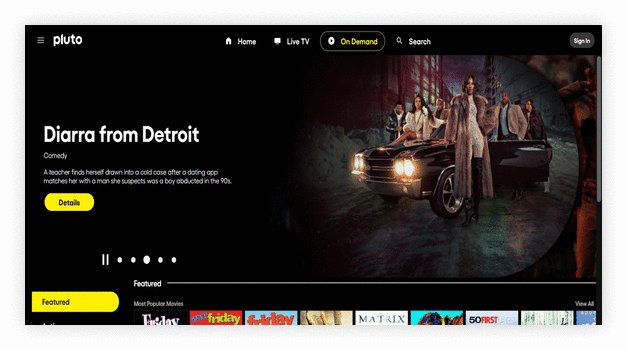
Pluto TV is a community-built Stremio addon that organizes live Pluto channels with catalog, search, and current-program metadata. It is maintained by an independent addon developer rather than Paramount, although its channel data comes from Pluto TV. The addon is useful for free channel discovery, highlights, and always-on sports programming, but the available catalog depends on Pluto’s regional service and can differ by country.
Features:
- Live Channel Catalog: It places available Pluto TV channels inside Stremio so users can browse the lineup without searching for individual stream URLs.
- Catalog Search: Search can find movies, shows, documentaries, and other programs currently airing across supported Pluto channels.
- Program Metadata: Channel pages show current-program information and artwork when matching metadata is available, making the catalog easier to understand.
- Popular Channels: A dedicated catalog surfaces frequently viewed Pluto channels, which shortens discovery when the regional lineup is large.
- Cache Management: The current build includes automatic cache cleanup intended to keep channel and program information fresher as schedules change.
- Regional Availability: The lineup follows Pluto TV’s supported countries and regional catalogs. A channel visible elsewhere may not appear in your location.
- Community Maintenance: The Stremio integration is an independent project. Check its listing and manifest status separately from the underlying Pluto TV service.
| Pros | Cons |
| Free channel catalog inside Stremio | Community addon is not published by Paramount |
| Search helps locate currently airing programs | Channel availability varies significantly by region |
| Program metadata improves channel discovery | Sports selection focuses more on channels and highlights |
| No debrid account is required | Manifest or schedule data can temporarily fall behind |
| Popular-channels catalog simplifies browsing |
Pricing: Free community addon. Pluto TV’s supported catalog is ad-funded, with availability varying by country. No debrid account is required. (checked October 2026)
Link: stremio-addons.net/addons/pluto-tv
Which Stremio Sports Addon Fits Each Use Case?
The strongest choice depends on the event, region, and configuration you are prepared to manage. Check the listing again before match time because community manifests and upstream sources can change quickly.
- International channel discovery: TvVoo covers several country catalogs but relies on public third-party sources.
- Scheduled matches and Italian sources: StreamViX includes daily events, with MediaFlow Proxy or external-player requirements for some providers.
- Broad event and live-TV configuration: Flix Streams combines sports catalogs with free and supporter-only provider options.
- Free Pluto channel browsing: The community Pluto TV addon adds search and metadata, while regional availability still follows the underlying service.
How to Install a Sports Addon on Stremio
Stremio addons install very differently from Kodi: there are no repositories or zip files. You add an addon straight from the community catalogue or a manifest link, and it appears instantly. Here is the flow I use.
- Open the Listing: On the community catalogue, open the sports addon’s page, such as TvVoo, where you will find its description, health data, and an Install button.
- Press Install: Click Install and your browser hands the addon’s manifest link to the Stremio app, which opens automatically to the addon’s details screen.
- Confirm in Stremio: Inside Stremio, press the Install button on the addon’s page, and it is added to your account and synced across every device you use.
- Find the sports: Open the Discover or Board tab, choose the addon’s catalog, and browse its live channels or fixture list to pick a game to watch.
- Add Backups: Install two or three sports addons so you always have a second feed ready, since one source will inevitably struggle during a hugely popular match.
How I Chose the Best Stremio Sports Addons
I ranked the retained options using their current public listings, documented configuration requirements, update information, sports catalogs, and source transparency. Because community manifests can change quickly, listing health is a point-in-time signal rather than a guarantee of match-day playback.
- Listing Currency: I checked whether each addon still had a public catalog page, identifiable maintainer, version record, and current installation route.
- Update Information: Recent version and update dates were reviewed alongside the documentation, while temporary manifest checks were not treated as guaranteed uptime.
- Setup Requirements: I compared direct playback, external-player, proxy, hosting, debrid, and supporter requirements so readers can identify extra steps before installing.
- Coverage Breadth: I checked whether each listing described scheduled events, international channels, replays, or always-on sports programming rather than assuming every league was covered.
- Source Transparency: I separated accountable services from community integrations and flagged listings that rely on public third-party sources with unclear event rights.
Community Sports Addons vs. Accountable Services
A community addon and the service supplying its underlying catalog are not always the same publisher. Evaluate the addon maintainer, the upstream source, and your regional viewing rights separately — for accountable subscription alternatives, compare the best IPTV for sports.
- Community Sources: TvVoo, StreamViX, and Flix Streams can surface third-party feeds whose event rights are not clearly documented and whose endpoints may change.
- Service vs. Addon: Pluto TV is an accountable ad-supported service, but the Stremio integration reviewed here is an independent community project.
- Reliability: Official broadcaster applications generally provide clearer support and rights information than public community manifests during major games.
- Regional Rules: Catalogs and event rights vary by country, so confirm that the broadcaster or service is authorized where you are watching.
- Safer Approach: Use the event organizer’s authorized broadcaster when a community source cannot identify the operator or distribution rights.
Do Stremio Sports Addons Need a VPN or Debrid?
Sports addons behave differently from movie addons, so debrid and VPN tools do not solve every live-playback issue. Separate privacy, source authorization, and performance before deciding what your setup needs.
- VPN Limits: A VPN can encrypt network traffic, but it cannot authorize an unlicensed feed, verify an addon publisher, or guarantee better match-day performance.
- Debrid Is Optional: Most live sports feeds are direct HLS streams that debrid cannot cache, so a debrid service helps on-demand content far more than live games.
- When Debrid Helps: All-in-one addons like Flix Streams do use debrid for their on-demand and some replay sources, so it is worth having if you watch highlights later.
- Connection Quality: Stable Wi-Fi or Ethernet helps, but overloaded or unavailable upstream servers can still buffer regardless of your local speed.
- Getting Started: New to the app? Our Stremio on Firestick guide walks through the base setup before you add any sports addons.
Why Sports Addons Break During Big Games and How to Fix It
Every sports streamer hits this: the addon that worked all week collapses during the cup final. It is usually predictable, and a few habits keep you watching when everyone else is stuck buffering.
- Server Overload: Free sports feeds share limited servers, so a marquee match floods them with viewers, which is the single most common cause of kickoff-time buffering.
- Switch Feeds Fast: Do not wait out a stalling stream; back out and pick another source or addon immediately, since popular games always carry several alternative feeds.
- Lower the Quality: If a feed keeps dropping, choosing a lower-resolution source trades a little sharpness for a stable picture that survives the busiest moments of the game.
- Restart the Addon: A quick reload of Stremio or the addon often clears a stuck manifest and pulls a fresh set of available links right before the action.
- Have a Backup Ready: Keeping Pluto TV or a second sports addon installed means you always have somewhere to land when your first choice buckles under big-game demand.
Verdict: The Best Stremio Sports Addons
Among the retained options, TvVoo, StreamViX, and Flix Streams cover different community sports use cases. The Pluto TV integration is also community-maintained, but it draws from an identifiable ad-supported service catalog whose availability varies by region.
- TvVoo: Best for broad international sports channel discovery through the existing community listing.
- StreamViX: Best for live match events through its current ElfHosted listing.
- Flix Streams: Best for configurable event catalogs with free and supporter-only provider options.
- Pluto TV: Best for browsing the underlying service’s free regional channels through an independent community addon.
FAQs
Which Stremio add-on provides the clearest rights information?
The community Pluto TV addon points to the clearest identifiable service catalog in this list, but the addon itself is independently maintained. Technical installation still does not verify every program or event right.
Are any event add-ons free to install?
Several community manifests are free to install, although that says nothing about their upstream rights. The Pluto TV integration uses an identified, ad-supported service catalog, but it remains a community addon — see our list of free sports streaming sites.
Does privacy software make an add-on authorized?
No. Privacy software can protect a connection on shared networks, but it cannot create distribution permission or replace the event organizer’s territorial rules.
Is the Pluto TV Stremio addon published by Paramount?
No. The Stremio addon is maintained by an independent community developer, while the underlying Pluto TV service is operated by Paramount. Recheck the addon listing and regional channel availability separately — for pay-per-view events, compare IPTV for PPV events.
Why can community event feeds fail at busy times?
Unverified endpoints can disappear, become overloaded, or change operators without notice. Do not chase replacement mirrors; move to the organizer’s authorized broadcaster or another accountable service.
Can these Stremio add-ons install on Fire TV?
Most manifests can install on Stremio for Fire TV, Android, desktop, and web. Device compatibility does not confirm content rights, so evaluate the publisher and source separately — see our top sports apps for Firestick.