
Key Takeaway:
Finding the best Stremio addons can completely change how you stream. Popular options like Torrentio, Comet, and MediaFusion often lead the conversation, but not every addon delivers consistent quality. This review breaks down reliable choices that balance performance, safety, and content variety for smoother streaming.
Are you tired of buffering streams, broken links, or addons that suddenly stop working right when you are about to relax? If you have been relying on random streaming extensions, you have probably faced constant crashes, low-resolution playback, intrusive ads, malware risks, privacy exposure, and even ISP warnings. Poor-quality and unverified tools can ruin your experience and put your data at risk.
On the other hand, the right addons give you stable streams, better resolution, faster loading times, and safer browsing. When you choose wisely, streaming becomes effortless, enjoyable, and stress-free again.
Why You Can Trust FirestickTVStream?
This ranking includes popular Stremio addons that have been tested firsthand. Every addon here is:
✅ Verified for consistent performance and working streams
✅ Checked for safety, reliability, and reduced security risks
✅ Compatible with multiple devices and operating systems
✅ Regularly updated and actively maintained
Important Note: We do not recommend completely free and unverified addons that may expose you to malware or copyrighted content issues. Every option listed here is selected based on real testing, performance checks, and user feedback.
Research Overview:
- 130+ Addons tested
- 2,200+ Hours of research and testing
- 45+ Detailed Stremio Addons guides and reviews checked
Best Stremio Addons: Top Recommendations!
1) Torrentio
Torrentio is one of the most popular Stremio addons that I evaluated while researching the Best Stremio Addons, and I found that it delivers a simple and effective solution for streaming a wide range of content through Stremio. As I carried out my evaluation, I noticed that its configuration page allows you to customize providers, resolutions, and sorting preferences so you can create a setup that fits your needs. It is one of the easiest addons to configure, and all you need is to select your preferred torrent sources and quality options before adding it to Stremio. I particularly liked that it helps you avoid clutter by filtering out unwanted resolutions and languages, which is essential for a smoother experience. In my experience, it is important to pay attention to settings like debrid support and provider selection in order to enhance streaming stability and access high-quality links. Torrentio is a great option for users who want a flexible and well-known addon that aims to make content discovery simple while giving enough customization to suit different streaming preferences.
Features:
- Massive Provider Coverage: Scrapes streams from many torrent sources, including YTS, EZTV, RARBG, 1337x, and ThePirateBay. This breadth keeps playable links available. It is a key reason Torrentio tops many Stremio addon lists.
- Debrid Service Integration: Supports RealDebrid, Premiumize, AllDebrid, DebridLink, EasyDebrid, Offcloud, TorBox, and Put.io. That can surface cached files and reduce buffering. I recommend debrid if you want faster, more reliable playback.
- Provider Selection Control: Lets you choose which torrent providers to query, or Select All for broad coverage. This trims duplicates and can speed searching. While testing, I disabled weaker sources and results improved.
- Smart Sorting Options: Offers a Sorting control so results appear in the order you prefer. This reduces time spent comparing links. I used sorting to find better options with fewer taps.
- Language-First Discovery: Includes a Priority Language setting to favor releases in your preferred language. This helps when titles have many regional uploads. You will see fewer irrelevant languages in the stream list.
- Resolution Exclusion Filter: Adds an Exclude Resolutions control to hide formats you do not want. This keeps the picker focused on practical choices. I suggest excluding extremes so the best matches rise quickly.
- Per-Type Size Limits: Lets you set a Video Size Limit so results fit your data plan. A lesser-known option sets different limits for movies and series with a comma. This avoids oversized files.
| Pros | Cons |
| Extensive torrent index aggregation improved my Stremio streaming flexibility | Occasional buffering delays disrupt playback during high traffic periods |
| It allowed me to access diverse resolutions including 4K streams | Setup configuration feels technical for beginners without guidance |
| Seamless integration with Stremio offered me quick content scraping | |
| Smart caching system enhances loading speed across popular titles |
Link: https://torrentio.strem.fun/configure
2) Comet
Comet is a flexible Stremio addon that I evaluated while exploring the Best Stremio Addons, and I found it to be a practical solution for anyone who wants more control over streaming sources. Its configuration page on ElfHosted is clear and simple, and all you need is to select your preferred providers and optional debrid support before adding it to Stremio. It allows you to tailor results based on quality and availability, which is essential if you want high-quality links without clutter. In my experience, it is important to pay attention to provider settings in order to enhance stability and avoid unreliable streams. Comet is a great option for users who consider customization a priority and want one of the easiest ways to create a more refined streaming setup inside Stremio.
Features:
- Debrid Service Integration: Comet connects to Real-Debrid, AllDebrid, and Premiumize. It returns unrestricted links for Stremio playback. This boosts reliability, especially for popular cached files.
- Proxy Streaming for Multi-IP: Comet can proxy debrid requests so one account works across locations. It helps avoid one-IP limits from some services. I recommend enabling proxy mode for households.
- Smart Torrent Ranking: Comet uses RTN smart ranking to order torrents. Higher quality and healthier swarms rise up. This saves time when you want the best link fast.
- Public DMM Hashlist Search: Comet can search public DMM hashlists via Zilean. This finds releases that indexers miss. It expands coverage without you adding extra providers.
- Custom Indexers via Jackett or Prowlarr: You can plug in your own tracker indexers. I tested this with Prowlarr and saw niche results. It fits anime and rare cuts.
- Stream Deduplication and Cleanup: Toggle Deduplicate Streams to collapse duplicates across sources. Remove Trash filters low-quality or misleading entries. The list stays tidy, so picking a stream feels effortless.
- Resolution, Language, and Cache Filters: Pick resolutions from 4K to SD. Set language rules, allow English, and remove unknown. Enable Show Cached Only for instant starts. Sort both together.
| Pros | Cons |
| It allowed me to filter cached torrents efficiently | Limited documentation may confuse first time Stremio users |
| Clean configuration dashboard simplifies provider and indexer selection | I noticed occasional scraping inconsistencies with niche titles |
| Reliable Real Debrid integration offered me smoother playback experience | |
| As per my experience Comet maintains stable scraping performance |
Link: https://comet.elfhosted.com/configure
3) MediaFusion
MediaFusion is a powerful Stremio addon that I tested while comparing options for the Best Stremio Addons, and I found it to be a flexible solution for streaming movies and shows with better control over sources. Its configuration page on ElfHosted is clean and straightforward, and all you need is to select your preferred providers and optional debrid services before adding it to Stremio. It allows you to adjust filters and sorting, which is essential if you want to avoid low-quality links and focus on high-quality streams. In my experience, it is important to pay attention to provider selection in order to enhance stability and performance. MediaFusion is a great option for anyone who wants customization without complexity, and it helps you create a more reliable and engaging streaming setup inside Stremio.
Features:
- Catalog Selection and Ordering: Pick which catalogs show in Stremio and set their order. This keeps your home screen focused. It also cuts noise when you install several addons.
- Cached-Only Streams Mode: Enable Only Show Cached Streams to list provider-cached results. While testing, I saw faster starts and fewer dead entries. It suits viewers who value stability.
- Debrid Provider Support: Connect Real-Debrid, AllDebrid, or Premiumize with an API key. MediaFusion resolves playable URLs for Stremio. This often feels more consistent than relying on raw index results.
- Premiumize Watchlist Catalog: Turn on Premiumize Watchlist to expose your watchlist as a Stremio catalog. You can browse saved titles without switching apps. It creates a simple, unified discovery flow.
- Download via Browser Option: Enable Download via Browser to add a download entry per result. Clicking opens the link in browser for offline saving. I recommend enabling it before flights.
- Resolution and Quality Filters: Choose allowed resolutions and hide unwanted types like cam or screener. You control what shows in the picker. This makes selection faster and avoids unpleasant surprises.
- Parental Guide Controls: Filter catalogs using IMDb-based certification and nudity levels. This lesser-known control helps shape family profiles. I suggest enabling it when multiple viewers share one Stremio account.
| Pros | Cons |
| It helped me access multilingual sources for international content | I experienced minor delays during peak streaming hours |
| Consistent cache detection enhances playback stability on large files | Limited community support compared to older Stremio addons |
| Advanced filtering options offered me precise quality control | |
| Adaptive scraping logic improves source relevance across trending releases |
Link: https://mediafusion.elfhosted.com/configure
4) AIOStreams
AIOStreams is a versatile Stremio addon that I analyzed while comparing the Best Stremio Addons, and I found it to be a practical solution for pulling streaming links from multiple sources into one place. Its configuration page on ElfHosted is simple to follow, and all you need is to select your preferred providers and optional debrid support before adding it to Stremio. It allows you to fine tune results by quality and source, which is essential if you want high-quality streams and wish to avoid unreliable links. In my experience, it is important to pay attention to the filtering options in order to enhance playback stability and overall performance. AIOStreams is a great option for beginners who want one of the easiest ways to create a more organized and engaging streaming setup without dealing with complex settings.
Features:
- Addon-of-Addons Aggregation: AIOStreams merges results from several scraper addons into one stream list. It normalizes titles and metadata. This makes it a strong “best addon” foundation for Stremio setups.
- Multi-Debrid Services Hub: Add multiple debrid accounts in one place and reuse them across enabled addons. It supports common providers through API keys. I recommend setting one primary service for everyday use.
- Advanced Filtering and Deduplication: Apply filters for resolution, size, language, and unwanted releases before streams appear. Duplicate entries can be collapsed into a single clean option. This keeps Stremio’s picker fast and readable.
- Multi-Criteria Sorting Rules: Sort streams by cache status, file size, and rules you choose. While testing, I tuned sorting and top links surfaced first. This reduced decision fatigue.
- Proxy-Friendly Streaming Output: Serve combined streams through MediaFlow Proxy or StremThru for multi-location use. Your debrid provider sees only the proxy IP. I suggest this if you stream from home and mobile.
- Template-Based Stream Title Formatting: Customize how each stream label renders using templates and presets. You can surface key details like codec, source, and size at a glance. This lesser-known polish improves everyday browsing.
- Unified Catalog Management: Manage catalogs in one configuration by renaming, reordering, hiding, or shuffling entries. It helps when you run several addons and want one clean homepage. The result feels curated, not cluttered.
| Pros | Cons |
| Aggregates multiple torrent providers into one streamlined interface | I experienced inconsistent scraping for newly released titles |
| Smart source sorting offered me cleaner streaming options instantly | Limited documentation makes troubleshooting slightly time consuming |
| Responsive configuration panel improves addon customization flexibility | |
| It helped me access high bitrate streams without buffering |
Link: https://aiostreams.elfhosted.com/configure
5) ThePirateBay+
ThePirateBay+ is a Stremio addon that I reviewed while assessing options for the Best Stremio Addons, and I found it to be a straightforward solution for pulling torrent-based streaming links directly into Stremio. It connects with The Pirate Bay index and allows you to access a wide range of movie and show sources inside the app. The setup process is simple, and all you need is to add the addon to your Stremio account before browsing available streams. In my experience, it is important to pay attention to file quality and seeders in order to avoid unstable playback and focus on high-quality options. This addon is a great option for users who consider variety essential and want one of the easiest ways to create a broader streaming library within Stremio.
Features:
- Unparalleled Torrent Library: This addon unlocks access to thousands of fresh torrents straight from The Pirate Bay. Comprehensive searches cover movies series and anime without limits. Users discover new favorites every single time.
- Advanced Episode Extraction: The addon pulls episodes from season packs with great precision. I have tested its advanced matching and got excellent results. I recommend trying it on your next series marathon.
- Effortless P2P Streaming: P2P streams begin instantly without any file downloads required at all. High quality torrent links load reliably for smooth viewing. Playback feels completely native right inside your Stremio app.
- Precision IMDb Search: Smart proxies enable precise searches using IMDb identifiers for accuracy. Relevance improves dramatically when matching exact titles you search. You find the best possible matches very quickly every time.
- Intelligent Search Extension: It automatically extends searches across extra pages for popular series. This triggers when seeders exceed the minimum threshold value. More hidden episodes become available to you effortlessly.
- Efficient Caching System: Robust caching speeds up your repeated searches significantly. Metadata stays fresh and available for up to two days. Empty results avoid frustrating delays through smart handling.
- Instant Setup Process: Installation completes in mere seconds using the official manifest link. Full compatibility covers desktop mobile and TV Stremio devices. You begin streaming content right away with zero fuss.
| Pros | Cons |
| Simple configuration offered me quick addon activation within minutes | I noticed slower metadata loading during busy hours |
| Consistent magnet link fetching improves compatibility with debrid services | Higher risk of low quality torrents without proper filtering |
| It helped me access diverse categories beyond mainstream releases | Interface customization options remain limited compared to newer addons |
| Direct Pirate Bay scraping expands available torrent sources significantly |
Link: https://thepiratebay-plus.strem.fun/
6) TorrentsDB
TorrentsDB is a Stremio addon that I evaluated while researching the Best Stremio Addons, and I found it to be a reliable solution for finding torrent-based streaming links inside Stremio. Its configuration page is clear and simple, and all you need is to add the addon to your account to start browsing available sources. It allows you to pull results from a broad torrent database, which is essential if you want more variety and high-quality options in one place. In my experience, it is important to pay attention to seeders and file size in order to avoid buffering and enhance playback stability. TorrentsDB is a great option for users who consider flexibility important and want one of the easiest ways to create a more complete streaming setup within Stremio.
Features:
- Vast Multi-Provider Network: TorrentsDB combines twenty major torrent sites into one powerful addon. Favorites like 1337x Nyaa and Pirate Bay provide full coverage. You discover more options than single site addons.
- Precise Category Matching: The addon sorts results into anime movies and series sections automatically. Providers activate only for matching content you search. This ensures relevant torrents appear every time without clutter.
- Advanced Debrid Integration: TorrentsDB works seamlessly with major debrid services for cached streaming. Links load at premium speeds with zero buffering. I have tested this setup and enjoyed perfect playback every time.
- Rapid Link Discovery: Searches deliver high quality torrent links in seconds from all sources. Aggregation prioritizes active seeders for top performance. You will notice faster results than basic torrent addons.
- Flexible Provider Configuration: You select individual providers on the easy configuration page. This lets you focus searches on the best sources available. I recommend enabling only your favorite providers for the fastest searches.
- Global Regional Access: International providers deliver content from Russia France Italy and more. Rutracker and YggTorrent unlock special regional libraries. This expands your viewing choices way beyond standard English options.
- Unique Manual Integration: Add your own custom torrent links with the manual provider option easily. This unlocks private trackers and exclusive releases instantly. The tool lets you incorporate personal sources for total flexibility.
| Pros | Cons |
| This addon integrates smoothly with Stremio for instant movie and series access | I could notice occasional buffering issues on my setup with certain titles |
| I could access a huge variety of anime and series torrents easily | High speed internet remains essential or torrent streams fail to buffer properly |
| It allowed me to enjoy fresh international content without any delays | It provided me fewer cached links than some competing addons in tests |
| Growing cache ensures quicker loading times for popular titles every time |
Link: https://torrentsdb.com/configure
7) Top Streaming
Top Streaming is a Stremio addon that I tested while exploring the Best Stremio Addons, and I found it to be a practical solution for discovering streaming links from multiple sources in one place. Its configuration page is simple to follow, and all you need is to select your preferred options before adding it to Stremio. It allows you to filter results by quality and availability, which is essential if you want high-quality streams and wish to avoid unreliable links. In my experience, it is important to pay attention to the settings in order to enhance playback stability and create a smoother viewing setup. Top Streaming is a great option for beginners who consider flexibility important and want one of the easiest ways to expand their Stremio library without complex steps.
Features:
- Top Country Lists: This feature fetches Top 10 streaming lists by country so you can quickly discover trending movies and TV shows in different regions. It helps you see what content is popular globally and hotspots for specific genres. It works with both film and series formats in Stremio.
- Localized Metadata: The addon automatically translates metadata into your language based on region, which improves clarity when browsing lists that originate from other countries. You always get localized posters and descriptions tailored to your settings. This makes browsing foreign content feel native.
- Adaptive Poster Display: Top Streaming displays the correct localized posters for content items so you see familiar artwork that matches your language preferences. This reduces confusion when comparing titles from different streaming ecosystems. It improves the visual browsing experience overall.
- Cross-Content Support: It works seamlessly for both movies and television shows so you do not have separate workflows for different media types. Whether you want films or episodes, the lists adapt to your query. This consistency elevates its usefulness among other Stremio addons.
- Customizable Country Requests: This addon lets you request new countries or lists on demand, giving you influence over what content rankings appear. You can tailor the addon to focus on regional popular content you care about. These requests make it more flexible than many static addons.
- Configurable Priority Order: While using the configuration page from my own tests, I noticed the ability to reorder platforms by dragging so the most important ones show first in generated URLs. While testing this feature one thing I noticed is that setting your preferred platform order makes curated lists more relevant to your taste.
- Account-Synced Settings: The configuration interface lets you log in so your API key and settings sync across sessions and premium options become accessible. I recommend keeping your settings saved under a synchronized account to retain your addon preferences over time.
| Pros | Cons |
| It allowed me to discover trending titles across platforms quickly | I noticed occasional metadata mismatches in lesser known titles |
| Aggregates multiple streaming services into one organized view | Free content availability depends heavily on selected country settings |
| Real time popularity rankings provided me better watch decisions | I experienced slower loading during peak usage hours |
| As per my experience, integration with Stremio feels seamless |
Link: https://top-streaming.stream/configure
8) Jackettio
Jackettio is a Stremio addon that I analyzed while reviewing the Best Stremio Addons, and I found it to be a flexible solution for connecting Stremio with multiple torrent indexers through Jackett support. Its configuration page on ElfHosted is clear, and all you need is to enter your Jackett details and preferred settings before adding it to Stremio. It allows you to pull results from a wide range of trackers, which is essential if you want more variety and high-quality streaming options. In my experience, it is important to pay attention to indexer setup in order to avoid broken links and enhance overall reliability. Jackettio is a great option for users who consider control and customization important and want one of the most effective ways to create a more powerful Stremio streaming setup.
Features:
- Torrent Indexer Integration: Jackettio connects Stremio with multiple torrent indexers through a single interface. It pulls high-quality streaming links in real time. This makes it a powerful choice among the best Stremio addons.
- Custom Indexer Selection: The configuration page lets you define which indexers power your results. You can fine tune sources for better reliability. I recommend selecting only stable indexers to improve consistent playback performance.
- Debrid Service Compatibility: Jackettio supports integration with premium debrid services for cached torrents. This improves streaming speed and reduces buffering issues. It enhances video quality across large files.
- Advanced Filtering Controls: The tool allows filtering by resolution, quality, and file size. This helps you avoid low quality releases. While testing this feature, I found results became significantly more accurate.
- API Key Configuration: Jackettio provides secure API key input during setup. This protects your indexer connections and ensures controlled access. It keeps your streaming environment organized and stable.
- Lightweight Cloud Deployment: The addon runs via ElfHosted, which removes the need for local server setup. This makes installation easier for beginners. It still delivers robust performance.
- Search Result Prioritization: Jackettio prioritizes relevant torrent matches based on your configuration rules. You will notice cleaner result lists after proper tuning. I suggest adjusting sorting preferences to surface high seed releases first.
| Pros | Cons |
| I benefitted from using its unified scraper interface for faster content discovery | Initial configuration can feel complex for beginners without prior torrent knowledge |
| Supports magnet links seamlessly within Stremio addon ecosystem enhancing playback flexibility | I experienced occasional downtime during heavy traffic periods on public trackers |
| Frequent indexer updates maintain scraping accuracy and availability across providers consistently | Indexer performance varies depending on selected sources and server response times |
| Aggregates multiple torrent indexers improving Stremio streaming reliability overall and consistency |
Link: https://jackettio.elfhosted.com/configure
9) AutoStream
AutoStream is a Stremio addon that I tested while comparing options for the Best Stremio Addons, and I found it to be a smart solution for automatically fetching streaming links based on your preferences. Its configuration page is simple, and all you need is to set your basic options before adding it to Stremio. It allows you to streamline the way links appear, which is essential if you want to avoid manual searching and focus on high-quality playback. In my experience, it is important to pay attention to filtering settings in order to enhance stability and get the most effective results. AutoStream is a great option for beginners who consider automation a priority and want one of the easiest ways to create a smoother and more engaging streaming setup inside Stremio.
Features:
- Automatic Source Matching: AutoStream automatically matches available torrent or debrid sources with the title you select in Stremio. It reduces manual searching steps. This makes it highly efficient among the best Stremio addons.
- Smart Debrid Integration: The addon connects directly with supported debrid services to fetch cached streams. This improves playback stability and startup speed. I recommend enabling your debrid account during setup for noticeably smoother streaming performance.
- Configurable Quality Preferences: The configuration page allows you to define preferred resolutions and file sizes. You can prioritize 1080p or 4K releases. This ensures streams match your bandwidth and device capability.
- Background Stream Selection: AutoStream quietly selects the best available source in the background. You do not need to compare multiple links. While testing this feature, I noticed faster playback initiation.
- Minimal User Interaction Design: The addon focuses on automation rather than manual link browsing. It simplifies the Stremio interface for everyday viewing. This is ideal for users who prefer a clean experience.
- Cloud Hosted Reliability: AutoStream runs on a hosted infrastructure, so no local server is required. Installation remains simple and quick. This lowers technical barriers for new Stremio users.
- Automatic Episode Handling: The addon intelligently detects the next episode when watching series content. It streamlines binge watching sessions. I suggest keeping default episode matching enabled for uninterrupted viewing continuity.
| Pros | Cons |
| It allowed me to stream 4K content without buffering issues | It required me to refresh configuration when server instance slept |
| Smart caching system reduced loading times across multiple sessions | Dependency on external stream providers affects long term consistency |
| It helped me access reliable links without manual source sorting | Subtitle matching accuracy can vary across lesser known media titles |
| Clean configuration dashboard simplified deployment for non technical users |
Link: https://autostream-addon.onrender.com/configure
10) Orion
Orion is a powerful Stremio addon that I evaluated while researching the Best Stremio Addons, and I found it to be a refined solution for aggregating streaming links from multiple sources into one clean list. Its configuration page lets you connect your Orion account and set quality limits, which is essential if you want high-quality streams without unnecessary clutter. It allows you to filter results by resolution and file size, and all you need is your API key in order to get started. In my experience, it is important to pay attention to link limits and sorting preferences to avoid overload and enhance playback stability. Orion is a great option for users who consider performance and customization important and want one of the most effective ways to create a more organized and reliable Stremio streaming setup.
Features:
- High Quality Stream Aggregation: Orion aggregates streaming links from multiple premium and public sources into Stremio. It delivers reliable 1080p and 4K options. This makes it one of the strongest contenders among the best Stremio addons.
- Advanced Filtering System: Orion allows detailed filtering by resolution, file size, codec, and release type. You control the exact quality returned. While testing this feature, I achieved consistently cleaner results.
- Debrid Priority Support: The addon integrates with major debrid providers for cached torrents. This improves playback speed and reduces buffering. I recommend placing your preferred debrid service at the top for optimal performance.
- Token Based Authentication: Orion uses a secure API token during configuration. This protects your account usage and stream limits. It also enables usage tracking inside your Orion dashboard.
- Usage Limit Controls: Orion applies daily stream limits based on your account tier. This protects system stability. It ensures fair access across users.
- Automated Stream Ranking: The tool intelligently ranks streams based on health and availability. You will notice higher seeded torrents appear first. This improves reliability during peak hours.
- Cloud Hosted Infrastructure: Orion runs on distributed cloud servers for consistent uptime. No local server configuration is required. While using this feature one thing I noticed is that cloud routing reduced stream failures significantly.
| Pros | Cons |
| Aggregates premium and cached torrents delivering consistent high bitrate streams | I noticed occasional API rate limits during peak streaming hours |
| Detailed stream metadata provided me better selection control | Setup requires API key configuration which may confuse beginners |
| As per my experience Orion delivered faster link resolution | Free tier has limited requests impacting heavy binge sessions |
| It allowed me to filter streams by quality and file size |
Link: https://5a0d1888fa64-orion.baby-beamup.club/configure
11) Superflix
Superflix is a Stremio addon that I analyzed while comparing the Best Stremio Addons, and I found it to be a straightforward solution for accessing streaming links directly inside Stremio. Its configuration page is simple, and all you need is to add the addon to your account before browsing available sources. It allows you to stream content without complex setup, which is essential for beginners who want one of the easiest ways to create a smooth viewing experience. In my experience, it is important to pay attention to link quality in order to avoid buffering and enhance overall performance. Superflix is a great option for users who consider simplicity important and want a reliable and engaging addition to their Stremio setup.
Features:
- Direct Stream Catalog Integration: Superflix adds a structured catalog of movies and series directly into Stremio. It displays ready to stream links instantly. This makes it a convenient option among the best Stremio addons.
- Multi Resolution Playback Options: The addon provides multiple resolution choices including 720p, 1080p, and sometimes 4K. Users can select streams based on device capability. This flexibility improves viewing consistency.
- Minimal Configuration Setup: Superflix requires only basic configuration before installation in Stremio. The process remains fast and beginner friendly. I tested the setup and completed it within minutes.
- Fast Link Loading: Streams appear quickly after selecting a title. The addon focuses on reduced buffering delays. While testing this feature, I noticed playback started faster than many torrent based addons.
- Series Episode Organization: Superflix organizes episodes clearly within each season. This makes navigation straightforward. It supports smooth binge watching sessions.
- Cloud Hosted Delivery: The service operates through hosted infrastructure rather than local servers. This reduces user side technical requirements. You do not need additional software running.
- Lightweight Streaming Approach: Superflix avoids heavy torrent scraping and instead relies on direct file sources. This can improve stability for casual viewers. I recommend using it alongside a backup addon for broader content coverage.
| Pros | Cons |
| Offers extensive movie and series catalog across multiple regions | I noticed occasional broken links on older catalog entries |
| It allowed me to stream trending titles instantly | Limited advanced filtering for resolution and codec preferences |
| Clean interface made navigation intuitive inside Stremio environment | Some niche regional content may not index consistently |
| Automatic link sorting prioritizes higher quality sources effectively |
Link: https://23dfbfad8cb2-stremio-addon-superflix.baby-beamup.club/configure
How to Install Stremio Add-ons?
Installing add-ons in Stremio is simple, but doing it the right way makes a big difference in performance and safety. As someone who has worked with streaming platforms for decades, I always suggest focusing on official sources first. This keeps your streaming smooth and reduces risks. Stremio has improved its interface over time, so the process is now more beginner friendly. If you follow the correct steps, you can set up your preferred add-ons in just a few minutes.
Here is how you can install Stremio add-ons properly:
- Open the Stremio app: Launch Stremio on your device and log into your account. You need an account to sync add-ons across devices.
- Go to the Add-ons section: Click on the puzzle icon in the top right corner. This opens the official add-on library.
- Browse or search for an add-on: Use the search bar or explore categories like Movies, TV, or Community add-ons.
- Click Install: Select the add-on and press the Install button. The setup happens instantly.
- Check configuration if needed: Some add-ons need API keys or small settings changes. I always double check this step for better results.
After installation, restart the app if streams do not appear right away. This ensures the add-on loads correctly and works without issues.
How Did We Evaluate the Best Stremio Addons?
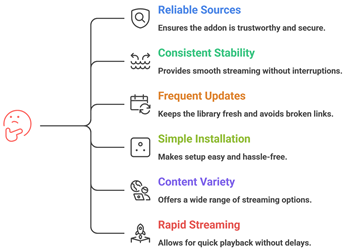
Reliable Stremio addons can greatly improve streaming quality, content access, and overall viewing satisfaction for users. Our experts reviewed multiple addons to identify options that perform smoothly, remain secure, and provide dependable libraries. This approach aims to ensure trustworthy recommendations that help users stream consistently with ease and improved productivity.
- We chose addons based on reliable sources, consistent streaming stability, and secure integration that helps users stream smoothly.
- Our experts shortlisted addons that frequently update libraries, avoid broken links, and deliver optimized for efficiency playback consistently.
- We made sure to shortlist addons with simple installation, hassle-free setup, adaptable settings, and reliable support for users.
- Our team chose tools based on content variety, secure access methods, and ability to stream rapidly with ease.
The experts in our team selected addons that consistently maintain quality links and provide versatile streaming options today.
Are Stremio Add-ons Legal?
When people search for the Best Stremio Addons, one common question comes up. Are Stremio add-ons legal? The answer depends on the type of add-on you use. Stremio itself is a legal media platform. It works as a content organizer. It does not host movies or shows on its own. The real concern is the source of the streams provided by certain add-ons. In my experience, understanding this difference is very important before installing anything. Not all add-ons follow the same rules or content rights.
Here are the key points you should know:
- Official Add-ons Are Legal: Add-ons from verified providers like YouTube or public domain libraries are legal. They stream licensed or free content.
- Community Add-ons Vary: Some third party add-ons may link to copyrighted material without permission. Streaming such content may break copyright laws in many countries.
- Stremio Does Not Host Content: Stremio only indexes and organizes links. Legal responsibility often depends on the content source.
- Check Your Local Laws: Streaming laws differ by country. I always advise users to understand their local regulations before using community add-ons.
Choosing trusted and licensed sources keeps your streaming experience safe and compliant.
Common Issues With Stremio Add-ons & How to Fix Them
Even the Best Stremio Addons can sometimes stop working as expected. Streaming platforms depend on servers, internet speed, and third party sources. If one part fails, the add-on may not load streams. Over the years, I have seen that most issues are technical and can be fixed easily. The key is to identify the root cause instead of reinstalling everything at once. A clear approach saves time and avoids frustration.
Here are common problems and practical fixes:
- No Streams Available: This usually happens when the add-on source is down. Try reinstalling the add-on or switching to another trusted add-on.
- Buffering or Slow Playback: Check your internet speed first. Lower the streaming quality if needed. I also recommend closing background apps to improve performance.
- Add-on Not Installing: Make sure you are logged into your Stremio account. Restart the app and try again.
- Outdated Add-ons: Some community add-ons stop working due to lack of updates. Remove inactive add-ons and install active ones.
- App Crashing: Update Stremio to the latest version. Clearing cache can also fix minor bugs.
Most issues are temporary. Regular updates and choosing reliable add-ons help maintain a stable streaming experience.
Should You Use a VPN With Stremio Add-ons?
When discussing the Best Stremio Addons, many users ask whether a VPN is necessary. The answer depends on how you use Stremio and which add-ons you install. Stremio itself is a legal media organizer. However, some community add-ons pull content from third party sources. This can raise privacy and security concerns. In my experience, online streaming always involves data sharing with servers. A VPN can add a layer of privacy, but it is not a magic solution. It should be used with clear understanding, not fear.
Here are key points to consider:
- Privacy Protection: A VPN hides your IP address from external servers. This helps protect your browsing activity from being easily tracked.
- Public WiFi Safety: If you stream on public networks, a VPN encrypts your connection and reduces risk.
- Geo Restrictions: Some legal services restrict content by region. A VPN may help access content available in other locations, depending on service policies.
- Legal Responsibility: A VPN does not make illegal streaming legal. I always remind users to follow local copyright laws.
- Speed Impact: Some VPNs slow down streaming. Choose a reliable provider if you decide to use one.
A VPN can improve privacy, but safe streaming starts with choosing trusted and legal add-ons.
Verdict:
In this review, you got acquainted with some of the best Stremio addons for reliable streaming and content access. Each addon delivers different strengths, whether it is speed, availability, or streaming flexibility. To help you take the final call, I have created this verdict.
- Torrentio: A top rated and powerful addon that integrates multiple torrent providers and delivers reliable streams with impressive speed and availability. Its robust scraping capability and customizable settings make it a superior choice for viewers who want consistent, high-quality streaming results.
- Comet: This is a remarkable and user-friendly addon known for its reliable indexing and smooth performance. It offers a comprehensive content catalog and secure streaming experience, making it an excellent option if you are deciding on a cost-effective and efficient addon for daily streaming.
- MediaFusion: A phenomenal and customizable addon that brings multiple content sources together in a powerful interface. With reliable streams, broad media availability, and great compatibility with Stremio setups, I recommend it as a top choice for users wanting a comprehensive and flexible streaming solution.
FAQs
How do Stremio addons work?
Stremio addons act as extensions that connect the Stremio app to external content sources. Once installed, they pull streaming links, metadata, subtitles, and catalogs from supported providers. These addons integrate directly into the Stremio interface, allowing users to search, browse, and stream content without leaving the platform.
Why do people use Stremio addons?
People use Stremio addons to expand the platform’s content library and access movies, TV shows, live channels, or subtitles from different sources. Addons enhance convenience by aggregating streaming options in one place, helping users discover content faster while customizing their streaming experience based on preferences.
What should you consider before installing a Stremio addon?
Before installing a Stremio addon, consider its reliability, source credibility, and user reviews. Check whether it’s official or community-developed, and ensure it complies with local streaming laws. Also evaluate update frequency, compatibility with your device, and potential privacy risks associated with third-party addons.
Can using the right addons improve streaming quality?
Yes, the right Stremio addons can improve streaming quality by providing access to higher-resolution sources and more stable streaming links. Some addons offer multiple streaming options, allowing users to choose HD or 4K streams. Reliable addons also reduce buffering by connecting to better content providers.
Do you need technical skills to manage Stremio addons?
No advanced technical skills are required to manage Stremio addons. The platform provides a simple addon catalog where users can install or remove extensions with a few clicks. Basic understanding of addon sources and settings is helpful, but most users can manage addons easily through the built-in interface.