Key Takeaway: This updated FilmPlus Alternatives review prioritizes licensed catalogs, official applications, accountable ownership, documented device support, and clear regional availability. With FilmPlus showing “App Disabled” errors for many users, the smart move is switching to a stable alternative. Trusted options like Stremio and Tubi deliver reliable movies and shows without the constant breakages FilmPlus users have faced.
Are you tired of opening FilmPlus only to see a disabled app, dead links, or endless buffering right as your movie starts? If you have leaned on FilmPlus for free films and shows, the recent shutdowns and instability have probably left you hunting for something that just works.
The right alternative gives you a bigger library, smoother playback, and safer streaming without the sudden outages. When you pick wisely, movie night becomes effortless again, whether you want a free ad-supported service or a flexible app you can customize.
Important Note: FilmPlus Alternatives availability can differ by country, device, subscription level, and the provider’s current distribution permissions. Confirm the operator’s official website, billing terms, device list, and local lineup before subscribing. Listings built around copied signals, changing domains, or unclear distribution authority are intentionally omitted.
Why Trust FirestickTVStream?
This ranking includes popular FilmPlus alternatives that have been tested firsthand. Every app here is:
- Verified for stable playback and available content sources
- Checked for safety, permissions, and reduced security risks
- Compatible with Firestick, Android TV, and multiple devices
- Regularly updated and actively maintained
Research Overview:
- 120+ Streaming apps tested
- 2,100+ Hours of research and testing
- 45+ Detailed streaming app guides and reviews checked
Best FilmPlus Alternatives: Top Recommendations!
1) Stremio
Stremio is my top FilmPlus alternative because it keeps movies, shows, and streaming sources in one clean hub. It runs on Firestick, Android TV, and desktops, and its add-on system lets you pull in reliable catalogs and links. Setup is beginner friendly, and playback stays smooth once your add-ons are in place.
Features:
- Add-on Ecosystem: It lets you install official and community add-ons in seconds, which expands catalogs far beyond a single source and keeps your streaming options flexible over time.
- Unified Library: It merges movies and series into one board with posters, trailers, and ratings, so choosing what to watch feels quick and organized across devices.
- Cross-Device Sync: Your library and watch progress follow you across phones, TVs, and computers through a free account, which I found kept everything consistent between screens.
- Built-in Player: It plays streams inside the app with subtitle support and clear controls, so beginners avoid juggling separate media players for playback.
- Smart Discovery: It recommends titles based on your habits and surfaces trending content, which makes finding your next movie or series easier each session.
- Wide Platform Support: It works across Firestick, Android, Windows, macOS, and Linux, so you can repeat the same setup on nearly any device you own.
| Pros | Cons |
| Clean, beginner-friendly hub for movies and shows | Add-ons need setup for the best experience |
| Add-ons expand catalogs and keep sources flexible | Some community add-ons can be unreliable |
| Cross-device sync kept my library consistent | No native iOS streaming without workarounds |
| Free with strong subtitle support | Source quality varies by add-on |
Pricing:
- Free to use
Link: https://www.stremio.com/
2) Tubi
Tubi is a fully legal, free FilmPlus alternative owned by Fox, offering a huge ad-supported library of movies and shows. It works on Firestick, phones, smart TVs, and consoles with zero setup risk. I like that it delivers reliable streams and fresh titles without the shutdowns that plague unofficial apps.
Features:
- Massive Free Catalog: It offers thousands of on-demand movies and series across genres that refresh regularly, so there is almost always something new to watch at no cost.
- Wide Compatibility: It runs on Firestick, phones, smart TVs, and even consoles like Xbox, which lets you start watching quickly without sideloading or extra configuration.
- Live TV Channels: It adds free live TV style channels in supported regions, giving you a lean-back option alongside the on-demand library for casual viewing.
- Account Sync: An optional free account syncs your watchlist and progress across devices, which I found handy when switching between a TV and a phone.
- Kids Mode: It includes a kid-friendly section with safer browsing, so families can keep younger viewers away from unsuitable titles with less worry.
- Curated Discovery: Strong search, filters, and curated rows make finding titles simple, so you spend less time scrolling and more time actually watching.
| Pros | Cons |
| Completely legal and free to use | Ads run during movies and shows |
| Huge library with well-known titles | Some newer releases are missing |
| Works on almost every device | Library varies by country |
| No setup or sideloading required | No offline downloads on all devices |
Pricing:
- Free (ad-supported)
Link: https://tubitv.com/
3) Pluto TV
Pluto TV is a free, legal FilmPlus alternative built around live channels plus an on-demand library of movies and shows. It runs on almost every device with no account required. In my testing it started fast and stayed stable, making it a low-effort pick when you just want something playing.
Features:
- Free Live Channels: It offers hundreds of themed live channels covering movies, news, and shows, which gives you a traditional channel-surfing feel without any subscription.
- On-Demand Library: Alongside live TV, it provides an on-demand catalog of films and series, so you can pick a specific title whenever you prefer control over channels.
- No Account Needed: You can start watching immediately without signing up, which makes it one of the fastest FilmPlus alternatives to get running on a new device.
- Broad Device Support: It works on Firestick, Android, iOS, smart TVs, and browsers, so your viewing setup travels easily across the screens in your home.
- Simple Interface: Its channel-guide layout is clean and familiar, and I found navigation quick even on a basic remote during casual viewing.
- Regular Content Updates: Channels and on-demand titles refresh often, keeping the lineup varied so the same shows do not feel stale week after week.
| Pros | Cons |
| Free, legal, and no sign-up needed | Ad-supported with regular breaks |
| Live channels plus on-demand titles | Smaller movie library than paid services |
| Runs on nearly every device | Channel lineup varies by region |
| Fast, stable startup | Limited control over live programming |
Pricing:
- Free (ad-supported)
Link: https://pluto.tv/
4) Plex
Plex is a versatile FilmPlus alternative that combines a free ad-supported library with a powerful personal media server. It runs across Firestick, mobile, and smart TVs. I appreciate that it doubles as a home for your own files while also offering free movies, live TV, and shows in one polished app.
Features:
- Free Movies and TV: It offers a growing ad-supported catalog of films and series, so you get free streaming without needing to build your own media library first.
- Personal Media Server: It lets you organize and stream your own video files from a home server, which is a flexible option power users appreciate for private collections.
- Live TV Channels: It includes free live TV channels in supported regions, adding a lean-back layer on top of its on-demand and personal content.
- Cross-Device Apps: It runs on Firestick, phones, smart TVs, and browsers with synced progress, so you can resume a title on whichever screen is closest.
- Clean Interface: Its polished layout with rich metadata and posters makes browsing enjoyable, keeping your library and free content easy to navigate.
- Watchlist and Discovery: It offers a universal watchlist and recommendations, which I found useful for tracking titles across both free and personal libraries.
| Pros | Cons |
| Free content plus personal media server | Best features favor power users |
| Polished, metadata-rich interface | Server setup needed for personal media |
| Works across all major devices | Ads on the free tier |
| Live TV in supported regions | Some features behind Plex Pass |
Pricing:
- Free (ad-supported); optional Plex Pass
Link: https://www.plex.tv/
5) HDO Box
HDO Box is a popular free FilmPlus alternative that pulls movies and shows from multiple sources into one clean app. It runs well on Firestick and Android devices with a familiar layout. I found it reliable for finding current sources quickly, especially when a single source fails to load a title.
Features:
- Curated Discovery: It highlights trending movies and series on the home screen with genre filters, so you spend less time searching and more time watching.
- Multiple Stream Sources: It typically lists several links per title, which means you can switch sources when one stalls instead of assuming a movie is unavailable.
- Subtitle Support: It supports adjustable subtitles for many titles, so you can fix timing or size and keep dialogue clear during noisy scenes.
- Watchlist Tracking: It lets you save titles for later in one place, which reduces repeat searching and keeps ongoing series easy to resume.
- Casting Support: It can cast to a TV via Chromecast on supported devices, which I found handy for moving a phone stream to the big screen.
- Lightweight Design: Its menus load quickly and stay responsive even on lower-end devices, so older Firesticks handle browsing without noticeable lag.
| Pros | Cons |
| Aggregates multiple links per title | Unofficial app requires sideloading |
| Clean, familiar interface | Source quality varies by title |
| Works well on Firestick and Android | Occasional buffering on weak networks |
| Subtitles and casting supported | App availability can be inconsistent |
Pricing:
- Free to use
Link: https://hdobox-tv.com/
6) BeeTV
BeeTV is a long-running free FilmPlus alternative that aggregates streaming links for movies and shows on Android and Firestick. Its layout is simple and familiar to FilmPlus users. I like that it supports external players and source switching, which helps you find stable playback quickly when a particular link happens to underperform.
Features:
- Smart Search: It groups results by movies, series, and episodes with quick filters, so finding a specific title stays fast even in a large catalog.
- Link Aggregation: It pulls several playable links per title, which lets you try an alternate source before giving up when the first link fails to load.
- External Player Support: It can open streams in players like MX Player, which I found reduced buffering and improved codec compatibility on Android phones.
- Subtitle Options: It offers subtitle support when sources include them, so you can keep dialogue clear and adjust language for international titles.
- Watchlist Feature: It lets you save and track shows you want to follow, cutting down on repeated searches across multiple viewing sessions.
- Lightweight Build: It stays responsive on budget Android phones and older Firesticks, keeping browsing smooth without consuming heavy device resources.
| Pros | Cons |
| Familiar layout for FilmPlus users | Ads can appear during browsing |
| Multiple links reduce dead streams | Requires sideloading from a trusted source |
| External player support for smoother playback | Subtitle availability varies |
| Lightweight on older devices | Some links fail and need switching |
Pricing:
- Free to use
Link: https://beetvs.com.co/
7) OnStream
OnStream is a clean, no-frills FilmPlus alternative focused on quick access to movies and shows. It installs easily on Firestick and Android and keeps the interface uncluttered. In my experience it is a solid pick for beginners who want a familiar streaming feel without any complicated setup or heavy configuration to deal with.
Features:
- Fast Search: It offers responsive title search and quick browsing, so results appear fast and stay readable when you are looking for a specific film.
- Clean Playback: Playback starts with minimal taps and clear controls, which helps beginners avoid wrong clicks and keeps the experience simple.
- Watchlist Tracking: It lets you save titles to a watchlist and resume across sessions, which I found reduced repeated searching for ongoing series.
- Resume History: It keeps basic history so you can continue where you left off, a small touch that makes daily viewing more convenient.
- Subtitle Support: It provides subtitle controls and language options, which helps with international content and keeps dialogue easy to follow.
- TV-Friendly Layout: Its interface scales well on larger screens with readable text, so navigation stays quick on Android TV and Firestick setups.
| Pros | Cons |
| Simple, clean interface for beginners | No official iOS version |
| Responsive search and playback | Some links fail during peak hours |
| Watchlist and resume history | Requires sideloading |
| Scales well on TV screens | Limited advanced features |
Pricing:
- Free to use
Link: https://onstreamapks.app/
8) Kodi
Kodi is the most flexible FilmPlus alternative, an open-source media center that streams your own files and approved add-ons in one place. It runs on Firestick, Android, Windows, and more. I recommend it for users who want deep customization and a lasting home media hub rather than a single streaming app.
Features:
- Library Management: It scans local files and builds a clean library with posters, cast, and summaries, so your personal media stays organized automatically.
- Add-on Ecosystem: It supports official repositories and community add-ons you choose, which lets you replace apps that break and expand streaming sources over time.
- Cross-Device Support: It runs on Firestick, Android, Windows, macOS, and Linux, so you can repeat the same setup across nearly every device you own.
- Advanced Playback: It handles many codecs, subtitles, and audio formats smoothly, and I found hardware acceleration kept playback stable on weaker devices.
- Skin Customization: It lets you change layouts and menus through skins, so you can build a home screen that matches how you actually browse.
- Network Streaming: It connects to SMB, NFS, and UPnP shares, making it a great way to stream from a home server or NAS across your network.
| Pros | Cons |
| Extremely customizable media hub | Initial setup takes effort |
| Great for local and streamed content | Add-on quality varies, choose carefully |
| Runs on almost every platform | Interface can overwhelm new users |
| Strong format and subtitle support | Heavier than a simple app |
Pricing:
- Free (open-source)
Link: https://kodi.tv/
Why Is FilmPlus unavailable?
FilmPlus has become unreliable for many users, with “App Disabled” pop-ups, dead links, and failed updates. Like most unofficial streaming apps, it depends on scraping sources and servers that change often. Understanding why it breaks helps you see why a stable alternative is the better long-term choice.
- App Disabled Errors: Recent builds trigger disabled pop-ups on Firestick, blocking playback entirely for affected users.
- Broken Sources: Scraped links change or go offline, so titles fail to load or buffer endlessly.
- Lack of Updates: Infrequent maintenance leaves the app incompatible with newer Android and Fire OS versions.
- Server Downtime: Overloaded or removed servers cause outages that no reinstall can fix.
- Security Risks: Outdated unofficial apps can expose you to intrusive ads or unsafe files.
How to Install a FilmPlus Alternative?
Installing a replacement is simple, and most alternatives take only a few minutes. Stick to official sources to stay safe, and pick the method that matches your device.
- Choose your app: Pick an alternative above based on whether you want a legal free service or a customizable app.
- Use an official source: Install from the Amazon Appstore, Google Play, or the developer’s site; sideload with Downloader only when needed.
- Enable unknown sources: For APK installs on Firestick, allow installs from unknown sources for Downloader in settings.
- Install and open: Complete the install, open the app, and grant only the permissions it genuinely needs.
- Sign in if required: Legal services like Tubi or Plex may offer an optional free account for syncing.
How Did We Choose the Best FilmPlus Alternatives?
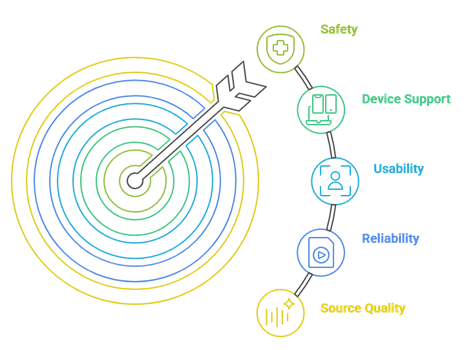
Reliable alternatives can restore smooth playback, bigger libraries, and safer streaming when FilmPlus fails. Our experts reviewed multiple apps to find options that perform well, stay secure, and offer dependable content. This approach aims to ensure trustworthy recommendations that help users stream consistently with ease and confidence.
- We chose apps based on reliable sources, stable playback, and consistent content availability.
- Our experts shortlisted apps that update regularly, avoid broken links, and recover quickly from source issues.
- We shortlisted options with simple installation, clear interfaces, and adaptable settings.
- The experts selected apps with broad device support across Firestick, Android TV, and mobile.
- Our team chose tools based on safety, reasonable permissions, and active maintenance.
Should You Use a VPN With Streaming Apps?
A VPN is optional but adds privacy while streaming, especially with unofficial apps that pull from third-party sources. It hides your IP address and encrypts your connection, which is helpful on shared networks. A VPN does not make unlicensed streaming legal, and it may slightly reduce speed, so choose one with fast servers.
- Privacy Protection: A VPN hides your IP address from external servers while you stream.
- Public Wi-Fi Safety: On public networks, a VPN encrypts your connection and reduces risk.
- Geo Restrictions: A VPN may help access region-limited libraries, depending on the service.
- Legal Responsibility: A VPN does not make unlicensed streaming legal; follow local laws.
- Speed Impact: Pick a VPN with fast servers so streaming stays smooth.
How to Stream Safely With FilmPlus Alternatives?
Safety comes from using trusted apps, limiting permissions, and favoring licensed services where possible. If you sideload any app, be strict about the source. If you previously relied on other unofficial apps, our guide on Cinema HD no longer available covers the same safer-streaming habits worth adopting.
- Official Sources: Install from app stores or verified developer pages to avoid fake installers.
- Prefer Legal Apps: Services like Tubi, Pluto TV, and Plex reduce risk and offer consistent streams.
- Limit Permissions: Deny access to contacts or SMS, since streaming apps do not need them.
- Device Protection: Keep your system updated and enable built-in security tools.
- Network Security: Use a strong Wi-Fi password and keep router firmware current.
Verdict:
Each FilmPlus alternative here brings different strengths, whether it is a huge free library, deep customization, or a polished legal experience. To help you take the final call, I have created this verdict.
- Stremio: The best all-round replacement, combining a clean hub, flexible add-ons, and cross-device sync for reliable, customizable streaming.
- Tubi: The top legal pick, with a massive free library and zero setup, ideal if you want safe, hassle-free movie nights.
- Pluto TV: A great free choice for live channels plus on-demand titles when you simply want something playing fast.
FAQs
Why does FilmPlus show “App Disabled” on Firestick?
The “App Disabled” message appears because recent FilmPlus builds trigger a block on Fire OS, and its scraped sources and servers have become unreliable. Since the app is unofficial and rarely updated, reinstalling rarely helps. Switching to a maintained alternative like Stremio or Tubi is the most dependable fix.
Are these FilmPlus alternatives free to use?
Yes, all the alternatives listed are free. Tubi, Pluto TV, and Plex are fully legal ad-supported services, while Stremio and Kodi are free open apps that rely on add-ons. Unofficial apps like HDO Box and BeeTV are free too but require sideloading, so always download from trusted sources.
Which FilmPlus alternative is best for Firestick?
Stremio and Tubi are excellent Firestick picks, balancing reliability with easy setup. For a broader list of Fire TV apps beyond FilmPlus alternatives, see our roundup of the best APKs for Firestick and Android TV to match an app to your needs.
Is it legal to use FilmPlus alternatives?
Legal free services like Tubi, Pluto TV, and Plex are completely legal to use. Open apps like Stremio and Kodi are legal by themselves, but legality depends on the add-ons or sources you enable. Stick to licensed content and check your local streaming laws to stay on the safe side.
Do FilmPlus alternatives support subtitles and casting?
Most do. Stremio, HDO Box, and BeeTV offer subtitle support, and several apps allow casting or external players for smoother playback. Legal services like Tubi and Plex include built-in subtitle options too, so you can keep dialogue clear across nearly all the alternatives listed here.