Key Takeaway: In reassessing Kodi Repositories, I emphasized official repositories, authorized media sources, official product information, realistic compatibility, and terms that viewers can confirm independently. A Kodi repository is the source you add before any addon will install, and picking a live one saves hours. The Crew Repository is the best all-rounder, Umbrella Repository is unbeatable with debrid, and Nixgates hosts Seren. Always pair Kodi with a VPN.
Half the Kodi repository URLs floating around online are dead, which is why your addon install keeps failing. These eight repos are live, maintained, and tested on Firestick right now.
I have added every repository on this list to a clean Kodi 21 Omega install on my Fire TV Stick, checking that the source resolves, the zip downloads, and the addons inside actually stream. Below are the eight that worked, with honest pros, cons, and their current URLs.
Important Note: Coverage and compatibility for Kodi Repositories depend on the viewer’s territory, hardware, chosen plan, and current provider agreements. Consult official product and help pages for publisher details, plan charges, device requirements, and regional access. Unverified feeds, substitute web addresses, and operators without transparent distribution permission are outside this guide.
Best Kodi Repositories: Top Recommendations!
| Repository | Best For | Content Focus | Get Started |
|---|---|---|---|
| The Crew Repository | All-in-one addons | Movies, TV, live, sports | Visit Site |
| Umbrella Repository | Debrid streaming | Movies & TV | Visit Site |
| Nixgates Repository | Seren & power users | Movies & TV | Visit Site |
| Tikipeter Repository | Lightweight addons | Movies & TV | Visit Site |
| Kodi Official Repository | Safe, legal addons | Legal apps & tools | Visit Site |
1) The Crew Repository
The Crew Repository is the first source I add to any fresh Kodi build, because it hosts one of the few genuinely all-in-one addons left. Inside you get The Crew itself, covering movies, shows, live TV, and sports, plus a handful of useful tools. It is actively maintained and the URL still resolves cleanly.
Features:
- Actively Maintained: The team behind The Crew still pushes regular updates, so the repository stays online and its addons keep stable after each new Kodi release.
- All-in-One Addon: The headline addon covers movies, TV shows, live channels, and sports in a single place, meaning fewer separate installs cluttering up your Kodi setup.
- Debrid Ready: The Crew integrates cleanly with Real-Debrid and Premiumize, unlocking faster, higher-quality links instead of relying on slow free scraped sources.
- Simple URL: The source address is short and easy to type with a Fire TV remote, which cuts down the typos that cause most failed repository installs.
- Extra Tools Included: Alongside the main addon, the repo carries maintenance and helper tools that clear cache and fix common playback problems without extra downloads.
- Large User Base: Because so many people use it, fixes and stable configurations appear quickly whenever something breaks, which I have found genuinely useful.
- Lightweight Install: The repository zip is small and installs in seconds, even on an older Firestick where heavier builds tend to stall or time out.
| Pros | Cons |
| ✅ Actively maintained | ❌ Grey-area content |
| ✅ True all-in-one addon | ❌ Needs debrid for best links |
| ✅ Real-Debrid support | ❌ Occasional server strain |
| ✅ Short, easy URL | |
| ✅ Includes helper tools | |
| ✅ Huge community |
Link: team-crew.github.io
2) Umbrella Repository
Umbrella Repository is where I go when I want the cleanest debrid experience on Kodi. It hosts the Umbrella addon, which is built almost entirely around Real-Debrid and Premiumize rather than free links. The result is fast, reliable 4K playback and one of the most polished interfaces available today.
Features:
- Debrid-First Design: Umbrella is built around Real-Debrid and Premiumize, so links resolve fast in high quality instead of buffering through unreliable free sources.
- Frequent Updates: The developer ships regular releases, with expanded provider support added through 2026, keeping the addon stable when rivals quietly break down.
- Clean Interface: The layout is modern and uncluttered, making browsing movies and shows on a television genuinely pleasant rather than a menu-diving exercise.
- Trakt Integration: Built-in Trakt support syncs your watchlist and progress across devices, so you always resume exactly where you stopped watching last time.
- 4K and HDR Links: With a debrid account attached, Umbrella surfaces 4K and HDR sources reliably, which is a noticeable step up from most free Kodi addons.
- Reliable Repo URL: The GitHub-hosted source has stayed stable for years, so you are far less likely to hit the dreaded could not connect error.
- Easy Setup Wizard: A guided first-run setup walks you through linking debrid and Trakt, which I appreciated because it removes most of the usual configuration guesswork.
| Pros | Cons |
| ✅ Best debrid performance | ❌ Debrid account basically required |
| ✅ Very actively updated | ❌ Few free links |
| ✅ Polished interface | ❌ Not ideal for live TV |
| ✅ Trakt sync built in | |
| ✅ Reliable 4K links | |
| ✅ Stable repo URL |
Link: umbrellaplug.github.io
3) Nixgates Repository
Nixgates Repository is the home of Seren, and it is the source I recommend to Kodi users who already own a debrid subscription. Seren pulls no free links at all, which sounds limiting until you see how fast and clean the debrid results are. It is the enthusiast pick on this list.
Features:
- Home of Seren: This repository hosts Seren, widely regarded as the most powerful debrid-only Kodi addon, favoured by experienced users for its speed and accuracy.
- Debrid Exclusive: Seren deliberately skips free scraped links, so every result comes from Real-Debrid or Premiumize, which means far fewer dead or broken streams.
- Deeply Configurable: Advanced settings let you tune providers, filters, and quality preferences precisely, giving power users control that simpler addons never really offer.
- Fast Scraping: Because it queries only debrid caches, results appear almost instantly, and I rarely wait more than a couple of seconds for sources.
- Trakt and Premiumize: Native Trakt and Premiumize integration keeps your library synced and your links premium, making it a genuinely complete streaming solution.
- Regular Releases: The repository stays current with steady updates, so Seren continues stable across Kodi versions rather than breaking after each major upgrade.
- Clean Presentation: Artwork, metadata, and season layouts are handled well, so browsing feels closer to a paid streaming service than a scraper addon.
| Pros | Cons |
| ✅ Hosts the acclaimed Seren | ❌ Useless without debrid |
| ✅ Extremely fast debrid results | ❌ Steeper learning curve |
| ✅ Highly configurable | ❌ No live TV |
| ✅ Trakt integration | |
| ✅ Few dead links | |
| ✅ Well maintained |
Link: nixgates.github.io
4) Tikipeter Repository
Tikipeter Repository is a quiet workhorse that hosts several of the most dependable lightweight addons, including Fen Light, Homelander, and Nightwing. I keep it installed because these addons run smoothly even on an ageing Firestick, where heavier options stutter. It is the best repo for lower-powered devices.
Features:
- Multiple Top Addons: One install gives you Fen Light, Homelander, and Nightwing, three well-regarded addons that between them cover almost every streaming need.
- Very Lightweight: These addons are coded to run lean, so they stay responsive on older Firestick models where bulkier addons crawl or freeze entirely.
- Fen Light Included: Fen Light is one of the most popular Kodi addons available, combining free and debrid sources with a fast, uncluttered browsing experience.
- Debrid and Free: Unlike debrid-only options, these addons still surface free links, so you can stream without a paid account when you need to.
- Consistent Updates: The developer maintains the repository steadily, pushing fixes that keep the addons compatible with each new Kodi build over time.
- Low Cache Usage: Because they are so light, these addons put less strain on Firestick storage and memory, which noticeably reduces buffering and crashes.
- Simple Navigation: Menus are logical and quick to move through with a remote, and I find them the easiest addons here for a beginner to pick up.
| Pros | Cons |
| ✅ Three strong addons in one repo | ❌ Less polished visuals |
| ✅ Runs on old Firesticks | ❌ Fewer 4K sources |
| ✅ Free and debrid links | ❌ Limited live TV |
| ✅ Low resource usage | |
| ✅ Regularly updated | |
| ✅ Beginner friendly |
Link: tikipeter.github.io
5) Kodi Official Repository
The Kodi Official Repository ships with Kodi itself, and it is the only source on this list that carries zero legal or malware risk. It hosts vetted, legal addons like Plex, Tubi, YouTube, and Twitch, plus subtitle and maintenance tools. If safety matters more than pirated content, start here.
Features:
- Built Into Kodi: No source URL is needed at all, because this repository is bundled with every Kodi install and is ready to browse immediately.
- Completely Legal: Every addon here is vetted and officially approved, so there is no copyright grey area and no risk of hidden malicious code.
- Legal Streaming Apps: You get official addons for Plex, Tubi, YouTube, Twitch, and more, letting you build a genuinely legitimate Kodi media centre.
- Subtitle Providers: Trusted subtitle addons like OpenSubtitles install straight from here, which is essential for foreign films and hearing accessibility.
- Maintenance Tools: Official tools help manage cache, backups, and skins, keeping your Kodi setup healthy without downloading anything from unknown third parties.
- Always Online: Because the Kodi Foundation hosts it, the repository never disappears, unlike third-party repos that vanish without warning after takedowns.
- Skin Library: A wide range of official skins lets you completely change how Kodi looks and feels, and I always grab one from here first.
| Pros | Cons |
| ✅ Zero legal or malware risk | ❌ No third-party streaming addons |
| ✅ Bundled with Kodi | ❌ Smaller content choice |
| ✅ Never goes offline | ❌ Less exciting for cord-cutters |
| ✅ Legal streaming addons | |
| ✅ Official subtitle tools | |
| ✅ Great skin selection |
Link: kodi.tv/addons
6) Doomzday Repository
Doomzday Repository is a handy catch-all that bundles many of the most popular third-party addons under a single source. Instead of adding four or five separate repos, I add this one and pick what I need. It is a real time-saver when setting up a brand new Kodi installation from scratch.
Features:
- Many Addons In One: A single source gives access to a broad selection of well-known third-party addons, saving you from typing several repository URLs by hand.
- Time-Saving Setup: Building a fresh Kodi install becomes much quicker, since one repository install unlocks most of the addons you would otherwise chase individually.
- Regularly Refreshed: The team updates its addon bundle as versions change, so what you install tends to be current rather than an abandoned old build.
- Covers Every Category: Movies, TV, sports, live channels, and tools are all represented, meaning most viewing habits are covered from this one convenient source.
- Beginner Friendly: For newcomers who do not know which repo hosts which addon, this bundle removes the guesswork and makes the first setup far less daunting.
- Works With Debrid: Most bundled addons support Real-Debrid and Premiumize, so you can plug in your account and immediately improve link quality across the board.
- Small Download: The repository zip itself is compact, installing quickly even over a slow connection on a Fire TV Stick without timing out.
| Pros | Cons |
| ✅ Bundles many addons | ❌ Quality varies by addon |
| ✅ Fast fresh-install setup | ❌ Some bundled addons age |
| ✅ Covers all categories | ❌ Grey-area content |
| ✅ Beginner friendly | |
| ✅ Debrid compatible | |
| ✅ Quick to install |
Link: doomzdayteam.github.io
7) Elementum Repository
Elementum Repository takes a different approach entirely, streaming directly from torrents rather than scraping hosted links. It is the source for the Elementum addon, which effectively turns Kodi into a torrent client with a media library front end. For users without a debrid account, it is the strongest option here.
Features:
- Torrent-Based Streaming: Elementum streams straight from torrents, so you are not dependent on hosted links that die, which keeps older and rarer titles playable.
- No Debrid Needed: Unlike Seren or Umbrella, it works perfectly without any paid debrid subscription, making it the best free option on this entire list.
- All-in-One Zip: The official site provides a single zip that installs the addon, its repository, and the Burst provider together, simplifying an otherwise fiddly setup.
- Actively Developed: Elementum received updates through 2026, so it remains one of the few genuinely maintained torrent addons still stable reliably on Kodi.
- Library Integration: You can add movies and shows to a proper Kodi library with artwork and metadata, giving a tidy, Netflix-style browsing experience.
- Quality Filtering: Settings let you filter torrents by resolution, size, and seeders, so I can avoid slow files and go straight to well-seeded 1080p sources.
- Cross-Platform: It runs on Firestick, Android, Windows, and Linux builds of Kodi, so the same setup carries across whichever device you happen to use.
| Pros | Cons |
| ✅ Works without debrid | ❌ Needs strong internet |
| ✅ Streams from torrents | ❌ VPN strongly advised |
| ✅ Actively maintained | ❌ Slower start than debrid |
| ✅ Easy all-in-one zip | |
| ✅ Kodi library integration | |
| ✅ Good quality filters |
Link: elementumorg.github.io
8) Kodi Bae Repository
Kodi Bae Repository is the long-running home of Exodus Redux and several other classic addons that many users still swear by. It is not the flashiest source, but it has survived while countless repos disappeared. I keep it as a dependable fallback when a newer addon suddenly stops resolving links.
Features:
- Home of Exodus Redux: This repository hosts Exodus Redux, one of the longest-serving Kodi addons, which still pulls current sources for movies and television shows.
- Proven Longevity: Kodi Bae has stayed online for years while many rival repositories vanished, making it one of the more dependable sources you can add.
- Classic Addon Selection: Alongside Exodus Redux you get several familiar older addons, which is useful when a modern addon breaks and you need a stable fallback.
- Free Link Scraping: These addons still surface free hosted links, so a debrid account is helpful but genuinely not required to stream something tonight.
- Debrid Compatible: If you do own Real-Debrid, the addons integrate with it happily, immediately upgrading the quality and reliability of the links you receive.
- Lightweight Addons: The classic addons are simple and undemanding, running comfortably on older Firestick hardware that struggles with more modern, heavier alternatives.
- Simple to Install: The source URL is straightforward and the zip is small, so adding it takes under a minute even using a Fire TV remote.
| Pros | Cons |
| ✅ Hosts Exodus Redux | ❌ Dated interfaces |
| ✅ Long, proven uptime | ❌ More dead links than newer addons |
| ✅ Works without debrid | ❌ Slower scraping |
| ✅ Useful fallback repo | |
| ✅ Light on resources | |
| ✅ Quick to install |
Link: kodibae.github.io
How to Install a Kodi Repository on Firestick
Adding a repository is a two-stage job: you first save the source URL, then install the zip from it. It takes about two minutes once you know the sequence, and it is identical for every repo on this list. Here is the exact process I use on a Fire TV Stick running Kodi 21 Omega.
- Enable Unknown Sources: Open Kodi Settings, then System, then Add-ons, and switch on Unknown Sources so Kodi will allow third-party repositories to install at all.
- Add the Source: Go to Settings, File Manager, Add Source, enter the repository URL exactly as written, give it a short name, and press OK.
- Install From Zip: Return to Add-ons, choose Install from zip file, select the source name you just created, and pick the repository zip inside it.
- Install the Addon: Once the repo installs, choose Install from repository, open your new repo, and pick the addon you want from the video add-ons list.
How I Chose These Kodi Repositories
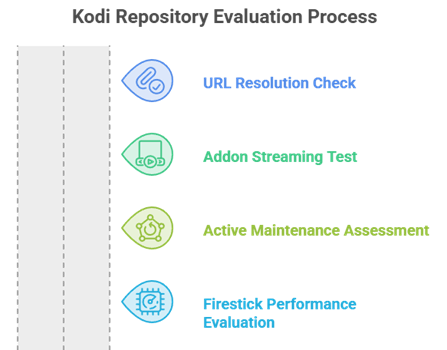
Most repository lists online are copied from each other and half the URLs are long dead. I built this list the slow way, adding each source to a clean Kodi install and confirming it actually resolved. Only repositories that installed cleanly and produced stable streams made the final cut here.
- The URL Resolves: Every source on this list was typed into a fresh Kodi install and confirmed to connect, because a dead URL makes everything else irrelevant.
- Addons Actually Stream: I installed the headline addon from each repo and played real content, discarding any repository whose addons returned only broken links.
- Active Maintenance: Repositories with recent updates ranked higher, since abandoned repos stop stable the moment Kodi ships its next major version.
- Firestick Performance: Each addon had to run acceptably on a Fire TV Stick, not just a powerful desktop, because that is where most readers actually use Kodi.
Why Kodi Repositories Stop stable
If your install fails with a could not connect error, the repository itself is usually not to blame. In my experience nearly every failure comes down to one of a handful of simple causes, and most are fixable in under a minute once you know what to look for. For addon picks afterwards, see our best Kodi addons.
- Typos in the URL: A single missing character or a wrong slash breaks the source, and this is by far the most common cause of a failed repository install.
- Cached Old Source: An outdated saved source can override the new one, so delete the old entry in File Manager before adding a corrected URL.
- Unknown Sources Off: If Kodi has not been told to allow third-party addons, installs silently fail, so confirm the Unknown Sources toggle is switched on.
- Repo Genuinely Dead: Repositories do get taken down, so if the URL is correct and still fails, the source has likely closed and needs replacing.
Are Kodi Repositories Legal and Safe?
Kodi itself is completely legal open-source software, and so is the official repository. The grey area comes from third-party repos hosting addons that stream copyrighted content without a licence. Understanding that distinction lets you decide what you are comfortable installing, and how much protection you want running alongside it.
- Kodi Is Legal: The Kodi application and its official repository are entirely legal, and nothing about installing Kodi itself puts you at any risk.
- Third-Party Grey Area: Repos hosting addons that stream copyrighted films sit in a legal grey area, and the rules genuinely differ from country to country.
- Malware Is the Real Risk: The bigger practical danger is unofficial zips carrying malicious code, so only add repository URLs from sources you actually trust.
- Use Protection: A reputable VPN keeps your streaming private and is sensible whenever you install third-party repositories on a Firestick or Android device.
Do You Need Real-Debrid With These Repos?
Real-Debrid is not mandatory, but it transforms the Kodi experience so completely that most regular users end up subscribing. It turns unreliable free links into fast, cached, high-quality sources. Some addons here demand it, others work fine without, so your choice of repository should reflect whether you plan to use one. Our best Kodi builds guide pairs well with this.
- Debrid-Only Addons: Seren and Umbrella pull almost nothing without a debrid account, so pick a different repository if you do not intend to subscribe.
- Free-Friendly Options: Elementum, Fen Light, and Exodus Redux all still surface free links, making them the better choice when you want zero ongoing cost.
- Quality Difference: With debrid attached, 4K and HDR sources resolve almost instantly, whereas free links buffer more often and break down during peak hours.
- Always Add a VPN: Regardless of debrid, run a VPN when streaming through third-party addons to keep your activity private from your internet provider.
Verdict:
After adding all eight to a clean Kodi install, the best repository really depends on whether you own a debrid account. For most people wanting available add-ons without a long setup, these three deliver the most reliable streams with the least hassle.
- The Crew Repository: The best all-rounder, hosting a single addon that covers movies, shows, live TV, and sports.
- Umbrella Repository: The top choice with debrid, offering fast 4K links and the most polished interface available.
- Nixgates Repository: Home of Seren, the fastest debrid-only addon and a firm favourite among Kodi power users.
FAQs
What is the best Kodi repository in 2026?
The Crew Repository is the best overall because it hosts a genuine all-in-one addon covering movies, TV, live channels, and sports. Umbrella and Nixgates are stronger if you own a Real-Debrid account.
Why does my Kodi repository URL not work?
Nearly always it is a typo in the source URL or an old cached source. Delete the old entry in File Manager, re-enter the address carefully, and make sure Unknown Sources is enabled.
Are Kodi repositories safe to install?
The official Kodi repository is completely safe. Third-party repos are riskier, so only add URLs from trusted guides and run a VPN whenever you stream through third-party addons.
Do Kodi repositories work on Firestick?
Yes. Every repository here installs on Kodi running on a Fire TV Stick. Just enable Unknown Sources in Kodi settings first, then add the source and install from zip.
Do I need Real-Debrid for these repositories?
Not for all of them. Seren and Umbrella effectively require debrid, but Elementum, Fen Light, and Exodus Redux still find free links, so you can stream without paying anything.