
Key Takeaway: This Plex Plugins update ranks options by official repositories, authorized media sources, operator accountability, supported hardware, and plainly stated regional or account restrictions. Plex killed its old plugin framework, so the best Plex plugins in 2026 are companion apps that talk to your server through its API. Tautulli, Kometa, and Seerr handle analytics, artwork, and requests. Everything on this list is free and open-source.
Searching for Plex plugins and finding nothing but dead links? There is a good reason for that, and a much better answer waiting for you.
Plex discontinued its plugin directory back in 2018 and has now committed to stripping the last legacy pieces out during 2026. I run all ten tools below on my own server, and every one of them still works, because none of them install inside Plex at all.
Important Note: Every Plex Plugins option should be checked for regional access, supported devices, account conditions, and published distribution authority. Make sure the operator is identifiable and that its pricing, platform support, and local offering are clearly documented. No recommendation is intended to promote copied broadcasts, replacement domains, or operators without accountable rights information.
Best Plex Plugins: Top Recommendations!
| Plugin | Best For | Type | Get Started |
|---|---|---|---|
| Tautulli | Monitoring & stats | Analytics | Visit Site |
| Kometa | Collections & overlays | Metadata | Visit Site |
| Seerr | User requests | Requests | Visit Site |
| Bazarr | Automatic subtitles | Subtitles | Visit Site |
| Maintainerr | Library cleanup | Maintenance | Visit Site |
1) Tautulli
Tautulli is the first thing I install on any Plex server. It watches your activity stream and builds a complete history of who watched what, when, on which device, and whether the file transcoded. Plex itself pointed to standalone utilities like this one when it retired plugins, and nothing has replaced it since.
Features:
- Live Dashboard: Shows every active stream in real time with full transcode detail, and I keep it open whenever my server CPU spikes unexpectedly.
- Full Watch History: Logs every single play by user, library, device, and date, giving you a permanent record that Plex itself simply does not keep for you.
- Rich Graphs: Charts plays by day, platform, user, and stream type over any period, which makes it obvious who your heaviest users actually are.
- Notification Agents: Sends alerts to Discord, Telegram, Pushover, ntfy, email, or any webhook whenever media is added, a stream starts, or playback fails.
- Custom Scripts: Triggers your own Python or shell scripts on any server event, which is how most people automate stream kills, cleanups, and scheduled reports.
- Newsletters: Emails your users an automatic recently-added digest on a schedule, so they actually notice the new content quietly sitting on your server.
- Export Tools: Dumps entire libraries and user data to CSV or JSON, and exposes an API that several other tools on this list read from directly.
| Pros | Cons |
| Best Plex analytics available | Read-only, cannot fix anything |
| Completely free and open-source | Needs its own always-on container |
| Huge notification and automation surface | Dashboard design feels dated |
| Feeds data to other tools | Older versions had security flaws |
| Mature and very stable | |
| Excellent documentation |
Pricing:
- Free and open-source (GPL-3.0)
- No Plex Pass required
- Update to 2.17.x or newer for security patches
Link: https://tautulli.com/
2) Kometa
Kometa, previously known as Plex Meta Manager, is what makes a home server look like Netflix. It builds collections automatically, stamps overlays onto your posters, and bulk-edits metadata from a YAML config. I use it to badge every 4K and Dolby Vision title so my users stop asking which version is which.
Features:
- Auto Collections: Builds collections from TMDb, Trakt, IMDb, MDBList, and Letterboxd charts, then keeps them updated on a schedule without you ever touching them again.
- Poster Overlays: Stamps 4K, HDR, and Dolby Vision badges onto artwork, and I use this so my users stop asking which version is which.
- Defaults Library: Ships ready-made configs for awards, franchises, decades, seasonal themes, and streaming services, all of which work with almost no setup on your part.
- Mass Metadata Edits: Rewrites ratings, posters, backgrounds, content ratings, and added dates across an entire library in a single run, which is impossible to do by hand.
- Playlist Sync: Creates and maintains identical playlists across multiple Plex users at once, keeping every household account in step without any manual duplication.
- Radarr and Sonarr Hooks: Automatically requests any title missing from a list you follow, so your collections quietly fill themselves in over the following weeks.
- Scheduling: Runs on a cron schedule so overlays and collections refresh nightly in the background, without a single manual click from you ever again.
| Pros | Cons |
| Nothing else does overlays this well | YAML only, no graphical interface |
| Massive community config library | Genuinely steep learning curve |
| Free and actively developed | Overlays bloat the metadata folder |
| Transforms how the library looks | Long runs on very large libraries |
| Works with almost any list source | |
| Runs unattended once configured |
Pricing:
- Free and open-source (MIT)
- No Plex Pass required
- Free TMDb and Trakt API keys needed
Link: https://kometa.wiki/
3) Seerr
Seerr is the request front end you hand to your users so they stop texting you film titles. In February 2026 Overseerr and Jellyseerr merged into this single project, so it is now the one tool to use. Users browse, click request, and the film lands in Radarr or Sonarr automatically.
Features:
- Plex Login: Uses Plex OAuth and imports your existing Plex users, so nobody has to create yet another account just to request a film from you.
- Radarr and Sonarr: Sends approved requests straight into your download stack, including separate 4K instances with their own permissions and quality profiles attached.
- Override Rules: Changes request settings conditionally by user or tag, so power users and casual viewers automatically get different quality profiles without any manual intervention.
- Request Quotas: Caps how many titles each person can request weekly, which I set immediately after one user filled two terabytes in a single weekend.
- Blocklists: Blocks specific titles, tags, or whole collections, and filters by region and language, which keeps the request catalogue relevant to your household.
- TheTVDB Metadata: Matches season numbering to Sonarr exactly, which quietly fixes a large proportion of the TV requests that would otherwise silently fail.
- Notifications: Pushes updates to Discord, Slack, Gotify, ntfy, or a webhook when a request is approved and again when the file becomes available.
| Pros | Cons |
| The maintained successor to both tools | Rebrand is recent, guides lag behind |
| Full Plex support built in | Only one media server at a time |
| Slick modern interface | Needs Radarr or Sonarr to shine |
| Automatic migration from Overseerr | Another service to keep running |
| Free and MIT licensed | |
| Very active development |
Pricing:
- Free and open-source (MIT)
- No Plex Pass required
- Overseerr users should migrate for security patches
Link: https://docs.seerr.dev/
4) Bazarr
Bazarr is the officially blessed replacement for Sub-Zero, the old subtitle plugin everyone remembers. It sits alongside Sonarr and Radarr, finds subtitles for everything in your library, syncs them to the audio, and quietly upgrades them when better versions appear. I have not manually downloaded a subtitle since installing it.
Features:
- Fifty Providers: Queries OpenSubtitles, Addic7ed, Gestdown, Subdl, and dozens more at once, so even obscure foreign films still turn up a usable subtitle file.
- Language Profiles: Sets different subtitle languages per show or film, with proper separate handling of forced, foreign-only, and hearing-impaired subtitle tracks.
- Whisper AI: Generates subtitles from the audio itself when no existing file exists anywhere online, which is a genuine differentiator no old plugin ever offered.
- Auto Sync: Uses ffsubsync to realign out-of-sync subtitles against the audio track, and I have not manually fixed a subtitle timing issue since installing it.
- Upgrade Engine: Swaps in higher-scoring subtitle files automatically as better releases appear online, quietly improving your library without you ever looking at it.
- AI Translation: Batch translates subtitles into languages that have no existing file at all, using Gemini, which rescues rare and regional foreign releases.
- Plex Webhook: Refreshes the Plex library the moment a subtitle lands on disk, so the new track appears without you triggering a manual scan.
| Pros | Cons |
| Completely immune to the plugin purge | Needs Sonarr or Radarr to see media |
| The official Sub-Zero replacement | Awkward for manual libraries |
| Whisper generation is genuinely useful | Provider APIs rate-limit you |
| Free and heavily developed | Language profiles are fiddly |
| Deep Sonarr and Radarr integration | |
| 184 languages supported |
Pricing:
- Free and open-source (GPL-3.0)
- No Plex Pass required
- Free provider accounts recommended
Link: https://www.bazarr.media/
5) Maintainerr
Maintainerr is the tool that stops your server growing forever. You build rules across Plex, Radarr, Sonarr, and Tautulli data, and anything matching gets collected, pinned to your home screen as a leaving-soon shelf, then deleted after a grace period. It is the only thing here that touches storage.
Features:
- Rule Builder: Combines conditions across Plex, Tautulli, Radarr, Sonarr, and Seerr data with full AND and OR logic inside a visual editor you can actually follow.
- Leaving Soon Shelf: Pins doomed media to your Plex home screen for a grace period, so users get a fair warning long before anything is deleted.
- Handle Actions: Deletes files from disk, unmonitors items in Radarr or Sonarr, and clears the matching request in Seerr, all automatically in one pass.
- Download Cleanup: Cleans stale entries out of qBittorrent as well, so removing a film also removes the torrent that is still quietly seeding it.
- Countdown Overlays: Adds a poster overlay showing exactly how many days remain before an item disappears, which is a surprisingly effective nudge for users.
- Notifications: Warns you on Discord or email before anything is deleted, which is the safety net I insisted on before letting it touch my disks.
- Rule Sharing: Imports and exports YAML rules, with a community library of proven cleanup rules you can adapt rather than writing your own from scratch.
| Pros | Cons |
| Solves a real storage problem | It genuinely deletes your files |
| Leaving-soon shelf is user friendly | Misconfigured rules are destructive |
| Very actively maintained | Rule builder takes time to learn |
| Free and MIT licensed | Best rules need the full stack |
| Integrates with your whole stack | |
| Rules can be tested safely first |
Pricing:
- Free and open-source (MIT)
- No Plex Pass required
- Test rules in dry-run before enabling deletion
Link: https://maintainerr.info/
6) Posterizarr
Posterizarr is the strongest newcomer on this list. It pulls textless artwork from Fanart.tv, TMDB, and TVDB, adds your own title text and overlays, then applies posters, season art, and episode title cards across the whole library. The web interface makes it far friendlier than Kometa.
Features:
- Textless Artwork: Prefers clean posters with no burned-in text, then adds your own title styling on top, so the whole library looks consistent rather than mismatched.
- Web Interface: Offers a browser UI with live preview, and I found it removed the YAML barrier that had put me off Kometa for months.
- Blueprints: Ships presets such as Minimalist, Clearlogo, and Resolution Overlays, plus a builder for creating your own house style and reusing it everywhere.
- Episode Title Cards: Generates per-episode cards with titles and stills, so browsing a series looks like a streaming service rather than a plain file list.
- Season Posters: Creates distinct artwork for every individual season instead of repeating the same show poster over and over down the entire page.
- Kometa Compatible: Writes into the same asset folder structure that Kometa uses, so the two tools cooperate on your library rather than fighting each other.
- Triggered Runs: Fires automatically from Tautulli, Sonarr, or Radarr whenever new media lands, so fresh additions get proper artwork within minutes of arriving.
| Pros | Cons |
| Best looking automated artwork | PowerShell is an odd dependency |
| Web UI is beginner friendly | Can clash with Kometa overlays |
| Works alongside Kometa | Heavy first run on big libraries |
| Active release cadence | Uploads inflate metadata storage |
| Free and open-source | |
| Textless approach looks professional |
Pricing:
- Free and open-source (GPL-3.0)
- No Plex Pass required
- Free Fanart.tv and TMDB keys needed
Link: https://github.com/fscorrupt/Posterizarr
7) PlexTraktSync
PlexTraktSync keeps your Plex library and your Trakt.tv profile in step, syncing collection, watch history, ratings, and watchlists in both directions. Its real selling point is that it needs neither Plex Pass nor Trakt VIP, unlike the official scrobbler, which quietly makes it the cheapest option here.
Features:
- Collection Sync: Pushes everything in your Plex library up to your Trakt collection, so your public profile actually reflects the media you genuinely own.
- Two-Way Watch Status: Syncs watched flags in both directions, so finishing a film on your phone marks it watched on the Plex server as well.
- Ratings Sync: Keeps ratings aligned between the two platforms, which matters a great deal if you use Trakt data to build collections in Kometa.
- Watchlist Sync: Mirrors your Trakt watchlist into Plex and back again, giving you one single queue to manage instead of two competing ones.
- Liked Lists: Downloads Trakt liked lists and rebuilds them as real Plex playlists or collections that you and your users can actually browse.
- Watch Daemon: Runs continuously to scrobble plays in near real time, and I leave it running so my history never drifts between devices.
- Debug Commands: Includes unmatched and inspect commands that show you exactly why an oddly named file failed to match anything on Trakt.
| Pros | Cons |
| No Plex Pass or Trakt VIP needed | Command line and YAML only |
| Actively maintained releases | Watched dates do not sync back |
| Runs one-shot or as a daemon | Odd filenames need manual matching |
| Free and MIT licensed | Big first sync hits rate limits |
| Multi-server and per-library control | |
| Fixes the fragmented history problem |
Pricing:
- Free and open-source (MIT)
- No Plex Pass required
- Free Trakt account is enough
Link: https://github.com/Taxel/PlexTraktSync
8) Ombi
Ombi is the original Plex request platform and it is still actively developed. It is the alternative to Seerr, and it holds two cards Seerr does not: proper native mobile apps, and music requests through Lidarr. If your users live on their phones, this is worth a serious look.
Features:
- Native Mobile Apps: Ships real iOS and Android apps, and I found my less technical users actually made requests once they had one installed.
- Music Requests: Integrates with Lidarr, making it the only tool on this entire list that handles album requests alongside films and television shows.
- Approval Workflow: Puts every request through an admin queue with per-user limits, which stops casual users from quietly flooding your server with requests.
- Multi-Server Support: Works with Plex, Emby, and Jellyfin, so it survives intact if you ever decide to migrate away from Plex entirely.
- Issue Reporting: Lets users flag broken files or bad audio directly in the app, instead of messaging you about it at midnight on a Sunday.
- Newsletters: Sends automated digests of newly added content, which keeps your library visible to the people who otherwise forget it exists at all.
- Discover Page: Surfaces trending and popular titles inside the app, so users request things you would actually be happy to have on the server.
| Pros | Cons |
| Only option with native mobile apps | Interface feels dated next to Seerr |
| Handles music requests too | Heavier .NET stack to host |
| Battle tested over many years | Smaller community momentum now |
| Mature approval and limit system | Confusing release channel numbering |
| Free and open-source | |
| Works with Emby and Jellyfin |
Pricing:
- Free and open-source (GPL-2.0)
- No Plex Pass required
- Lidarr needed for music requests
Link: https://ombi.io/
9) WebTools-NG
WebTools-NG is the desktop successor to the old WebTools plugin, and it does the bulk jobs Plex simply refuses to. Exporting a library to a spreadsheet, finding which episodes you are missing, and copying watch state between users are all one-click here. It runs on your PC, not your server.
Features:
- Export Tools: Dumps any library to CSV with dozens of fields including HDR type, IMDb and TMDb IDs, codecs, file sizes, and view counts.
- Find Missing Episodes: Cross-checks your shows against TheTVDB and TMDB, then lists exactly which episodes are absent from your server right now.
- Viewstate Copy: Moves watched status and ratings between users, which I relied on when a family member had to change their Plex account.
- Playlist Export: Saves playlists out to a file so they survive a server rebuild, instead of vanishing forever along with the old database.
- Find Media: Locates the real file path behind any Plex item, which makes debugging path mapping problems dramatically faster than guessing at them.
- Artwork Export: Pulls posters and background art out in bulk, which is genuinely useful before a migration or a risky metadata experiment.
- Server Tools: Displays server settings and kickstarts Butler maintenance tasks without you digging through several layers of the Plex web interface.
| Pros | Cons |
| Does bulk exports nothing else does | No release since December 2022 |
| Desktop app, no server needed | xlsx and photo export disabled |
| Uses the modern Plex API | Open issues are not being fixed |
| Survives the legacy plugin purge | Effectively unmaintained now |
| Free and open-source | |
| Genuinely useful before migrations |
Pricing:
- Free and open-source (MPL-2.0)
- No Plex Pass required
- Treat as functional but unmaintained
Link: https://github.com/WebTools-NG/WebTools-NG
10) Plexamp
Plexamp is not a plugin and I want to be honest about that, but it is the best thing you can add to a Plex music library. Built by Plex themselves, it is a dedicated player with sonic analysis, timed lyrics, and a headless mode that turns a Raspberry Pi into a streamer.
Features:
- Sonic Analysis: Builds mood radios from the actual audio content, and I keep rediscovering albums I had genuinely forgotten were sitting in my library.
- Timed Lyrics: Pulls synced lyrics automatically through LyricFind, so albums scroll along with the music instead of showing one static block of text.
- Loudness Levelling: Evens out volume between tracks and albums, which fixes the single biggest annoyance in any large and inconsistently mastered personal library.
- Sweet Fades: Crossfades between tracks intelligently rather than cutting hard, which makes long listening sessions feel continuous instead of stitched together.
- Headless Mode: Runs on a Raspberry Pi with no screen attached, turning very cheap hardware into a dedicated network music streamer for any room.
- Bit-Perfect Output: Matches sample rates exactly for external DACs, which genuinely matters if you have invested in real hi-fi audio hardware.
- Offline Downloads: Caches whole albums to your phone, so your commute never depends on your home broadband upload speed holding up.
| Pros | Cons |
| Best music playback for Plex | Not a plugin, a separate app |
| The app itself is now free | Best features need Plex Pass |
| Runs on almost any device | Closed source and music only |
| Headless Pi mode is excellent | Requires a tagged music library |
| First party, so it never breaks | |
| Sonic analysis surfaces old music |
Pricing:
- App is free for everyone
- Premium music features need Plex Pass
- Plex Pass: $6.99/month, $69.99/year, $749.99 lifetime (checked July 2026)
Link: https://plexamp.com/
What Happened to Plex Plugins?
Plex announced the end of its plugin system in September 2018, saying fewer than two percent of users touched it. The plugin directory vanished from the web app that October, and in December 2025 Plex confirmed it plans to remove the legacy agent system entirely during 2026. A few old bundles still load if you enable Show Legacy Agent, but they are on borrowed time.
- 2018: Plex discontinues the plugin directory and kills plugin user interfaces inside the server.
- 2020: Support docs confirm playback through plugins is removed and the framework will be phased out.
- 2025: Plex announces Custom Metadata Providers, a modern HTTP API replacement for legacy agents.
- 2026: Legacy agents are hidden by default and slated for full removal, so old bundles should not be relied on.
How I Picked These Plex Plugins
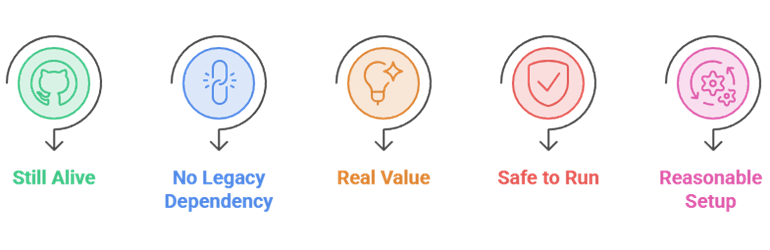
I ignored anything that needs the dead plugin framework, which immediately removed Sub-Zero, Kitana, and most of what still ranks on search. Then I ran every remaining tool against a live server for a fortnight and checked its GitHub for real, recent commits rather than a stale README promising a rewrite.
- Still Alive: Confirmed recent releases on GitHub, not just an open pull request from two years ago.
- No Legacy Dependency: Rejected anything requiring the legacy agent framework Plex is removing this year.
- Real Value: Each tool had to solve a problem Plex itself does not, rather than duplicating an existing feature.
- Safe to Run: Checked for known vulnerabilities and excluded projects with unpatched security issues.
- Reasonable Setup: Ruled out tools that demand more configuration effort than the benefit they return.
How to Install Plex Plugins in 2026
None of these tools install inside Plex. They run as separate services that talk to your server over its API, which is exactly why they survived the purge. Docker is the cleanest route, and most of these ship an official image. Point each one at your Plex URL and token, and you are done in minutes.
- Install Docker: Use Docker or Docker Compose on the same machine as your server, or on any always-on box on your network.
- Pull the image: Grab the official container for each tool and map a persistent volume so its config survives updates.
- Find your token: Grab your Plex authentication token from any XML view in the web app, which every tool asks for.
- Connect and test: Point each tool at your server address and token, then run a small library first before turning it loose.
- Desktop exceptions: WebTools-NG and Plexamp install straight onto your computer or phone and need no container at all.
Do You Need Plex Pass for These Plugins?
Nine of the ten tools here need no Plex Pass at all, which surprises people. Only Plexamp gates its best features behind a subscription. That said, Plex changed the rules in April 2025 and remote streaming of your own media now requires a paid plan, so most serious server owners end up buying one anyway. If you are weighing that up, our guide to the best Plex alternatives is worth reading first.
- Monthly: $6.99 per month, which is the easiest way to try the paid features without commitment.
- Annual: $69.99 per year, functional out cheaper than five months of the monthly plan.
- Lifetime: $749.99 after a large increase on 1 July 2026, up from the long-standing $249.99 price.
- Remote Watch Pass: $2.99 per month for viewers whose server owner has no Plex Pass, verified July 2026.
Are These Plex Tools Safe to Run?
They are, with one caveat worth taking seriously. Because these run as network services with full access to your library, an outdated container is a real risk. Tautulli patched several serious vulnerabilities across 2025 and 2026, and Seerr fixed a high-severity flaw specifically affecting Plex-configured instances in February 2026. Keep them updated and do not expose them to the open internet.
- Update regularly: Pull new container images monthly, since most of these projects ship security fixes quietly.
- Do not expose ports: Keep admin interfaces on your local network or behind a reverse proxy with authentication.
- Migrate off Overseerr: The archived project no longer receives patches, including for a known high-severity issue.
- Use strong tokens: Rotate your Plex token if you ever share a config file or paste one into a support forum.
- Back up first: Snapshot your Plex database before running any tool that rewrites metadata in bulk.
Why a VPN Still Matters With Plex
A VPN will not make your server faster, but it does two useful things. It stops your internet provider profiling your traffic when you stream your own library remotely, and it protects the admin interfaces of everything listed above if you ever access them away from home. If you are setting one up on a streaming device, our best VPNs for Firestick guide covers the process.
- Privacy: Hides what you are streaming from your internet provider when you connect to your server remotely.
- Public Wi-Fi: Encrypts your session when you open Tautulli or Seerr from a hotel or coffee shop connection.
- Throttling: Prevents some providers slowing sustained high-bitrate streams they have identified as video.
- Split tunnelling: Lets you route only the Plex app through the VPN so local devices keep talking directly.
- Server caution: Do not run the VPN on the server itself unless you understand what it does to remote access.
Verdict:
The plugin era is over, and that is fine, because the tools that replaced it are better than anything Plex ever shipped in the old directory. If you install nothing else, install these three. They cover monitoring, presentation, and requests, and together they change how a Plex server feels to run.
- Tautulli: The first thing to install, giving you complete visibility into who is watching what and what is transcoding.
- Kometa: Turns a plain library into something that looks curated, with automatic collections and quality overlays.
- Seerr: Hands requests to your users properly and feeds them straight into Radarr and Sonarr without you lifting a finger.
FAQs
Do Plex plugins still work in 2026?
The old plugin framework is effectively dead. Plex retired the plugin directory in 2018 and has publicly committed to removing the last legacy pieces during 2026. A few old bundles still load if you enable the Show Legacy Agent option, but nobody maintains them. Everything on this list runs as a separate companion app instead, which is why it all still works.
What replaced Sub-Zero for Plex subtitles?
Bazarr replaced it, and this is not a matter of opinion. The Sub-Zero repository was archived by its own author and its README now simply says to use Bazarr instead. Bazarr queries around fifty subtitle providers, syncs subtitles to the audio automatically, and can even generate them with Whisper AI when no file exists anywhere.
Is Overseerr or Seerr the right choice now?
Seerr. Overseerr was archived in February 2026 and Jellyseerr merged into the same project, so Seerr is now the single maintained successor to both. It also carries a security fix for a high-severity flaw that affected Plex-configured Overseerr instances, so staying on the old version is a genuine risk rather than just a missed feature.
Are these Plex plugins free?
All ten are free, and nine are fully open-source. The only cost you might run into is Plex Pass, which unlocks Plexamp premium music features and is now required for remote streaming of your own media. Some tools also ask for free API keys from services like TMDb, Trakt, or Fanart.tv, but those cost nothing.
Do I need Docker to run Plex plugins?
For most of them, yes, and it is the easiest path anyway. Tautulli, Kometa, Seerr, Bazarr, Maintainerr, and Ombi all ship official Docker images that take minutes to deploy. WebTools-NG and Plexamp are the exceptions, since they install directly on your computer or phone and need no container at all.