Key Takeaway: The revised Kodi Plugins evaluation focuses on official repositories, authorized media sources, identifiable operators, current platform guidance, and limitations explained before signup. The best Kodi plugins in 2026 are the utility add-ons that fix what Kodi does badly out of the box. PVR IPTV Simple Client, TMDb Helper, and Trakt add live TV, proper discovery, and cross-device sync. Seven of the ten sit in the official repository.
Kodi is powerful and, straight out of the box, genuinely awkward. The right plugins fix that in an afternoon.
I have installed every add-on below on a Firestick 4K Max running Kodi 21.3 Omega, and I have deliberately weighted this list towards utility rather than yet another stack of streaming sources. These are the plugins that make Kodi worth using every day, not just once.
Important Note: The services discussed for Kodi Plugins may change by region, device generation, plan, and authorized catalog. Consult official product and help pages for publisher details, plan charges, device requirements, and regional access. The recommendations avoid unknown feeds, mirror-domain chains, and platforms unable to identify their distribution basis.
Best Kodi Plugins: Top Recommendations!
| Plugin | Best For | Source | Get Started |
|---|---|---|---|
| PVR IPTV Simple Client | Live TV and IPTV | Official repo | Visit Site |
| TMDb Helper | Discovery and widgets | Official repo | Visit Site |
| Trakt | Cross-device sync | Official repo | Visit Site |
| YouTube | Free video streaming | Official repo | Visit Site |
| IPTV Merge | Combining playlists | Third-party | Visit Site |
1) PVR IPTV Simple Client
This is the plugin that turns Kodi into a live TV box, and it is the only realistic way to do it without running a backend server. It takes an M3U playlist and an XMLTV guide, then builds a proper channel grid with an EPG. Kodi own wiki calls it the one option for this job.
Features:
- M3U Playlists: Loads any local file or remote URL as your live channel source, which means it works with virtually every IPTV provider in existence.
- XMLTV Guide: Pulls a full electronic programme guide so channels show what is on now and next, exactly like a proper set-top box would.
- Catchup Support: Jumps back into your provider archive window, and I use it constantly to watch matches that kicked off while I was still current.
- Timeshift: Pauses and rewinds live television through the ffmpegdirect integration, which is genuinely useful when you are watching sport and miss something.
- Channel Groups: Reads the group-title tags from your playlist and organises hundreds of channels into browsable categories automatically, with no manual sorting needed.
- Channel Logos: Displays provider logos from tvg-logo tags, which turns an unreadable wall of text into a guide you can actually scan quickly.
- Catchup Correction: Shifts the archive window by up to fourteen hours to fix providers whose timestamps do not match your own local timezone.
| Pros | Cons |
| Official repository, completely safe | Setup is fiddly for beginners |
| Works with any IPTV provider | EPG breaks if tvg-id tags mismatch |
| Catchup and timeshift now solid | Only one playlist per instance |
| Free with no restrictions | Needs a playlist you supply yourself |
| Actively developed for Kodi 22 | |
| Enormous community for support |
Pricing:
- Free and open-source (GPL-2.0)
- You supply your own M3U playlist
- A paid IPTV subscription is the usual source
Link: https://kodi.wiki/view/Add-on:PVR_IPTV_Simple_Client
2) TMDb Helper
TMDb Helper is the sleeper pick on this list and the one most guides miss entirely. It turns Kodi home screen into a proper discovery interface with rich metadata, cast browsing, and Trakt-powered recommendations, then hands playback off to whichever player add-on you actually use.
Features:
- Discovery Browsing: Explores movies and shows straight from TheMovieDB inside Kodi, with artwork, cast, ratings, and full metadata attached to every single entry.
- Trakt Integration: Surfaces your watchlist, next episode to watch, and personalised recommendations without you ever leaving the Kodi interface on your television.
- Home Screen Widgets: Builds custom rows for any skin, and I use these to fill my home screen with things I actually want to watch.
- Player Integration: Passes a chosen title to whatever player add-on you have installed, keeping discovery and playback cleanly separated from one another.
- Rich Metadata: Displays cast, crew, ratings, trailers, and related titles, turning a bare file list into a catalogue you would actually enjoy browsing.
- List Support: Reads Trakt, TMDb, and Letterboxd-style lists, so curated collections appear as home screen rows you can click straight into.
- Skin Agnostic: Works with Estuary and every major third-party skin, so you do not have to change your entire look just to use it.
| Pros | Cons |
| Official repository and free | Genuinely steep learning curve |
| Best discovery experience on Kodi | Needs a free TMDb API key |
| Pairs perfectly with Trakt | Provides no video sources itself |
| Actively maintained by a trusted dev | Heavy first-run configuration |
| Content neutral, adds no sources | |
| Widgets work with any skin |
Pricing:
- Free and open-source (GPL-3.0)
- Free TMDb API key required
- Optional free Trakt account
Link: https://github.com/jurialmunkey/plugin.video.themoviedb.helper
3) Trakt
Trakt is the plugin that makes a multi-device setup feel like one coherent system. It scrobbles what you watch in Kodi, syncs watched status and progress to your Trakt profile, and every other app you own reads the same data. Stop an episode on the Firestick, resume it on your phone.
Features:
- Auto Scrobbling: Marks episodes and films as watched automatically as you play them, with no manual ticking of boxes anywhere in the interface.
- Progress Sync: Remembers exactly where you stopped, and I regularly start an episode on the Firestick and finish it on my phone without losing my place.
- Collection Sync: Mirrors your Kodi library into your Trakt collection, giving you a searchable online record of everything you actually have stored.
- Rating From Kodi: Lets you rate titles the moment you finish them, which is realistically the only time anyone ever bothers to do it.
- Watchlist Sync: Pulls your Trakt watchlist into Kodi, so the films you meant to watch actually appear in front of you rather than being forgotten.
- Add-on Support: Works with the Kodi library and many video add-ons, not just local files, which most competing sync tools cannot manage at all.
- Cross-App Ecosystem: Talks to Plex, Jellyfin, Infuse, and mobile apps, so your viewing history follows you well beyond Kodi itself.
| Pros | Cons |
| Official repository and safe | Needs a free Trakt account |
| Core scrobbling is completely free | Best features sit behind VIP |
| Works across your whole ecosystem | Scrobbling from add-ons can be flaky |
| Actively maintained project | API outages break sync briefly |
| Makes multi-device viewing coherent | |
| Excellent with TMDb Helper |
Pricing:
- Plugin is free and open-source
- Core scrobbling needs only a free account
- Trakt VIP is $30 per year (checked July 2026)
Link: https://trakt.tv/
4) YouTube
The YouTube plugin is the most legitimate streaming source you can put on Kodi, and it is far better than the official YouTube app on most cheap streaming boxes. You get proper search, your subscriptions, playlists, and 4K playback in an interface designed for a remote control.
Features:
- Account Sign-In: Connects your Google account so subscriptions, history, and watch later lists appear in Kodi exactly as they do on the web.
- 4K and HDR: Plays high resolution VP9 and AV1 streams, which many built-in television YouTube apps quietly refuse to do at all.
- Full Search: Searches the whole of YouTube from a remote-friendly interface, rather than a cramped mobile-style keyboard designed for a phone screen.
- Playlist Support: Browses and plays your saved playlists, which makes it genuinely usable as a background music or workout video source.
- Segment Skipping: Skips sponsor segments in supported videos, saving you the familiar ritual of hammering the fast-forward button every few minutes.
- Up Next Integration: Chains videos together automatically, which turns YouTube into something you can leave running rather than constantly babysitting.
- Personal API Keys: Lets you supply your own Google credentials, and adding mine cleared up the bot-detection errors I had been hitting for weeks.
| Pros | Cons |
| Official repository and legitimate | Bot detection errors keep appearing |
| Free with no subscription needed | Increasingly needs your own API keys |
| Better than most built-in TV apps | Breaks occasionally after YouTube changes |
| Actively maintained | Setup of API keys is fiddly |
| Handles 4K and HDR properly | |
| Great on a Firestick remote |
Pricing:
- Free and open-source
- No subscription required
- YouTube Premium removes ads but is optional
Link: https://github.com/anxdpanic/plugin.video.youtube
5) Up Next
Up Next adds the one feature that makes binge-watching bearable: a Netflix-style pop-up that rolls straight into the next episode. It is a tiny plugin that does one thing, needs almost no configuration, and is supported out of the box by a surprising number of other add-ons.
Features:
- Next Episode Popup: Appears near the end of an episode with a countdown, letting you continue or cancel with a single press of the remote.
- Configurable Timing: Sets how many seconds before the end the prompt appears, so it does not cut across the closing scene of an episode.
- Auto-Play Mode: Continues to the next episode automatically by default, which is exactly what you want when you are already half asleep.
- Still Watching Prompt: Asks whether you are still there after a few episodes, which I have been caught out by more often than I would admit.
- Two UI Modes: Offers a simple or a fancy notification style, depending on whether you want artwork or something small and unobtrusive.
- Wide Support: Integrates with Jellyfin, Emby, and many video add-ons without any per-add-on configuration required from you at all, which is exactly what you want on a streaming box.
- Tiny Footprint: Uses almost no resources, which genuinely matters on a Firestick where every last megabyte of memory counts against you.
| Pros | Cons |
| Official repository and free | Upstream last released in 2023 |
| Transforms binge-watching on a TV | Needs proper episode metadata |
| Near-zero configuration needed | Can conflict with external players |
| Supported by many other add-ons | Only useful for episodic content |
| Very light on resources | |
| Works with local and streamed content |
Pricing:
- Free and open-source
- No account required
- Works with any properly tagged library
Link: https://github.com/im85288/service.upnext
6) OpenSubtitles.com
The OpenSubtitles.com plugin was merged back into the official Kodi repository in March 2026, which matters because most old guides still point at the dead .org version. It searches the largest subtitle database in existence from inside the player and matches files by hash, so subtitles actually line up.
Features:
- Hash Matching: Identifies your exact file by checksum, and in my testing this is what stops subtitles drifting a second or two out of sync.
- Sixty Languages: Covers the vast majority of world languages, including several that no other subtitle source bothers to index in any depth.
- Auto Search: Kicks off a subtitle search the moment playback starts, so you are not fumbling through menus halfway through a film.
- Manual Search: Lets you search by title when the automatic match fails, which happens regularly with badly named or unusual files.
- Language Priority: Orders results by your preferred languages, so the subtitle you actually want is the first thing on the list.
- Hearing Impaired Filter: Includes or excludes SDH subtitles depending on whether you want sound descriptions written into the on-screen text.
- Player Integration: Works with local library playback and add-on streams alike, so it applies to absolutely everything you watch in Kodi.
| Pros | Cons |
| Official repository, recently re-added | Free accounts hit daily limits |
| Largest subtitle database available | Requires registering an account |
| Hash matching means perfect sync | Old guides point to the dead .org add-on |
| Free tier is usable | VIP needed for heavy use |
| Actively maintained | |
| Works across all Kodi playback |
Pricing:
- Plugin is free and open-source
- Free account with daily download caps
- Paid VIP tier lifts the limits
Link: https://www.opensubtitles.com/
7) Aeon Nox: SiLVO
Skins are add-ons too, and Aeon Nox is the one worth installing. It is the most recognised name in Kodi skinning, it lives in the official repository, and it turns Kodi from a functional file browser into something you would happily show someone. Pair it with TMDb Helper widgets.
Features:
- Home Screen Control: Rebuilds the menu, widgets, and backgrounds from scratch, so the home screen finally shows what you actually watch.
- Widget Support: Displays rows from TMDb Helper or Trakt, and I pair the two so my home screen shows recommendations rather than empty shelves.
- Per-Type Layouts: Configures different views for films, shows, and music, instead of forcing one identical layout onto everything you own.
- Metadata Toggles: Chooses exactly which information fields appear on screen, letting you strip out clutter or add detail exactly as you prefer.
- Multiple Views: Offers poster walls, wide lists, and banner layouts, so each library in your setup can look the way it should.
- Colour Theming: Adjusts accent colours and fonts to taste, which is the cheapest and fastest way to make a setup feel like yours.
- Piers Ready: Already has a beta build for Kodi 22, so it will not strand you when the next major Kodi release finally lands.
| Pros | Cons |
| Official repository and free | Heavier than the default Estuary |
| Most recognised Kodi skin | Can feel sluggish on a basic Stick |
| Massively customisable | Setup takes real time |
| Actively maintained across versions | Options are overwhelming at first |
| Excellent with TMDb Helper widgets | |
| Designed for TV remote navigation |
Pricing:
- Free and open-source
- No account required
- Works on Kodi 21 Omega and 22 Piers beta
Link: https://github.com/MikeSiLVO/skin.aeon.nox.silvo
8) Jellyfin for Kodi
If you run your own media server, Jellyfin for Kodi is the best front end you can put on a Firestick. It syncs your server library into Kodi native database, so browsing is instant rather than crawling over the network, and it pushes watched status back to the server automatically.
Features:
- Native Database Sync: Copies your server library into Kodi own database, and I found browsing became instant rather than crawling over the network.
- Direct Play: Streams the original file untouched wherever possible, falling back to transcoding only when your device genuinely cannot handle the codec.
- Watched Sync: Pushes watched flags and resume points back to the server, so every client in the house stays perfectly in step.
- Multi-User: Supports separate user profiles with their own libraries and watch history on the same Kodi installation and the same device.
- Quick Connect: Signs in with a short code instead of typing a password on a remote, which is a small mercy on any Firestick.
- Music Library: Syncs music alongside video, which most competing server plugins treat as an afterthought or ignore completely, which is exactly what you want on a streaming box.
- Up Next Support: Hooks into Up Next, so binge-watching your own library behaves exactly like a commercial streaming service does.
| Pros | Cons |
| Completely free, no paid tier at all | Requires running a Jellyfin server |
| Extremely actively maintained | Initial sync is slow on big libraries |
| Native database speed | Needs a third-party repository |
| Excellent Firestick performance | Server upgrades occasionally break it |
| Full open-source project | |
| Watched status syncs everywhere |
Pricing:
- Free and open-source
- No subscription of any kind
- Requires your own Jellyfin server
Link: https://jellyfin.org/
9) IPTV Merge
IPTV Merge fixes the single biggest limitation of PVR IPTV Simple Client: it only accepts one playlist. Merge combines several M3U files and several XMLTV guides into one, refreshes them on a schedule, and feeds the result straight into Simple Client. If you use more than one source, you need this.
Features:
- Playlist Merging: Combines multiple M3U playlists into one, which I needed the moment I wanted a provider list and a free channel list together.
- EPG Merging: Joins several XMLTV guide files together, so every channel in the merged list ends up with proper programme data attached.
- Scheduled Refresh: Re-downloads playlists and guides automatically on a timer, so your channel list and guide do not silently go stale.
- Channel Filtering: Removes channels you never watch before they ever reach Simple Client, which keeps the guide navigable rather than overwhelming.
- Duplicate Removal: Strips repeated channels that appear in more than one source, which would otherwise clutter the entire electronic programme guide.
- Add-on Sources: Pulls playlists directly from supported add-ons rather than only static URLs, which automates a surprising amount of ongoing maintenance.
- Direct Output: Writes the merged playlist straight into Simple Client, with no manual file shuffling or copying required from you at all.
| Pros | Cons |
| Solves Simple Client biggest limitation | Needs a third-party repository |
| Free and actively maintained | Known bug losing data on Kodi 22 |
| Automates EPG refreshing | Requires understanding Simple Client first |
| Essential for multiple IPTV sources | Another moving part to break |
| Well documented | |
| Not on Kodi banned list |
Pricing:
- Free and open-source
- No account required
- Works with any M3U or XMLTV source
Link: https://github.com/matthuisman/slyguy.addons
10) ResolveURL
ResolveURL is a dependency module rather than something you browse, and I am including it with an honest label. It resolves file-host links into playable streams, and it is where you enter your debrid credentials once so every compatible add-on can use them. Many third-party add-ons simply will not work without it.
Features:
- Debrid Integration: Stores your debrid token in one place, and I enter mine here once rather than pasting it into every add-on separately.
- Host Resolving: Converts links from dozens of file hosts into playable streams, which is precisely why so many add-ons depend on it.
- Priority Ordering: Sets which resolvers are tried first, letting you push your fastest debrid provider straight to the top of the queue.
- Universal Fallbacks: Falls back to generic resolvers when a specific host is unsupported, which recovers streams that would otherwise simply fail outright.
- Per-Host Toggles: Disables individual hosts that are consistently slow or dead, cleaning up your results without touching anything else in the setup.
- Auto-Updating Lists: Refreshes its supported host list automatically, so it keeps current as file hosts appear and disappear over time.
- Frequent Updates: Receives commits within days rather than months, which is genuinely unusual for a dependency module of this particular kind.
| Pros | Cons |
| Free and open-source | Not in the official Kodi repository |
| Extremely actively maintained | Useless on its own as a dependency |
| Configure debrid once for everything | Serves mostly third-party add-ons |
| Improves stream reliability sharply | Real value needs a paid debrid plan |
| Not on Kodi banned add-on list | |
| Small and lightweight |
Pricing:
- Free and open-source (GPL-2.0)
- No account needed for the module itself
- A debrid subscription is what unlocks its value
Link: https://github.com/Gujal00/ResolveURL
How to Install Kodi Plugins on a Firestick
Seven of the ten plugins here live in the official Kodi repository, which means you install them without adding anything or typing a single URL. The three third-party ones need a repository added first. If Kodi itself is not on your device yet, our guide on how to install Kodi on Firestick walks through it.
- Official repo route: Open Add-ons, choose Install from repository, pick Kodi Add-on repository, then browse to the plugin you want.
- Enable unknown sources: Only needed for third-party plugins, found under Settings, System, then Add-ons.
- Add a file source: Enter the repository URL under Settings, File manager, Add source, and give it a name.
- Install from zip: Choose Install from zip file, select your named source, then install the repository archive.
- Then install the plugin: Go back to Install from repository, pick your new repo, and choose the add-on.
How I Tested These Kodi Plugins
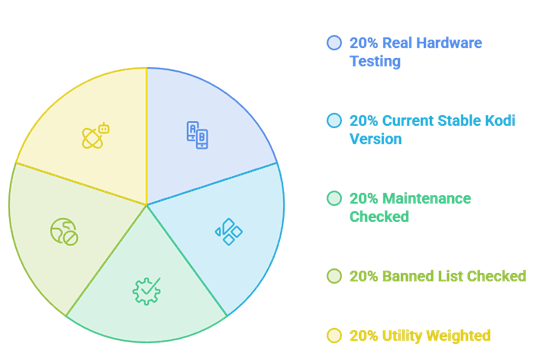
Every plugin here went onto a Firestick 4K Max running Kodi 21.3 Omega, which is the current stable release despite what several sites claim. Kodi 22 Piers is still in beta. I ran each add-on for a fortnight, checked its GitHub for genuine recent activity, and cross-referenced Kodi own banned list before including anything.
- Real hardware: Tested on a Firestick 4K Max, not a powerful desktop that hides performance problems.
- Current stable Kodi: Everything runs on 21.3 Omega, with Kodi 22 Piers compatibility noted where I could confirm it.
- Maintenance checked: Confirmed recent commits on GitHub rather than trusting a version number in a repository.
- Banned list checked: Cross-referenced Kodi official blacklist and excluded everything named on it.
- Utility weighted: Prioritised plugins that add function over plugins that simply add another list of streams.
Official Repository vs Third-Party Plugins
This distinction matters more than most guides admit. Anything in the official Kodi repository has been checked against Kodi own rules, which is why seven of my ten picks come from there. Kodi also publishes a banned add-on list, and several add-ons that dominate search results are on it, including Elementum, Umbrella, The Crew, Fen, and Seren.
- Official repo: Vetted by the Kodi team, safe to discuss on official forums, and unlikely to vanish overnight.
- Third-party but legitimate: Jellyfin, IPTV Merge, and ResolveURL are open projects with real maintainers and no piracy focus.
- Banned add-ons: Kodi refuses support for several popular streaming add-ons, which tells you how it views them.
- Support consequences: Kodi forums will not help you debug a banned add-on, so problems become your problem alone.
- Update risk: Third-party repos disappear regularly, taking their add-ons and your setup with them.
Turning Kodi Into a Proper IPTV Player
This is the combination most people are actually looking for. PVR IPTV Simple Client gives you the channel grid and the guide, and IPTV Merge lets you feed it more than one playlist at once. Together they turn Kodi into a live TV box that rivals a dedicated player. You still need a playlist, and our roundup of the best IPTV for Kodi covers where those come from.
- Enable the PVR client: Install Simple Client from the official repo, then enter your M3U URL in its settings.
- Add your EPG: Point it at an XMLTV URL so the guide fills in with programme names and times.
- Check your tvg-id tags: The guide only maps correctly when playlist IDs match the XMLTV channel IDs exactly.
- Add IPTV Merge: Install it if you have more than one playlist, then let it build a single combined list.
- Turn on catchup: Enable it if your provider offers an archive window, which makes missed programmes recoverable.
Do Kodi Plugins Need Real-Debrid?
Not for anything in my top seven. The official repository plugins here are utilities, not scrapers, so they have nothing to resolve. ResolveURL is the exception, and its entire value proposition assumes you have a debrid subscription. If you are unsure what that even means, our explainer on what is Real-Debrid covers the basics.
- Not needed: Simple Client, TMDb Helper, Trakt, YouTube, Up Next, OpenSubtitles, and Aeon Nox all work without it.
- Needed for value: ResolveURL exists to hold debrid credentials, so without one it does very little.
- What it does: A debrid service converts links into fast, cached, high-quality direct streams from its own servers.
- Typical cost: Most debrid services sit in the low single digits per month, though prices change so check directly.
- Not a source: Debrid provides no content itself, it only resolves what an add-on already found.
Why You Need a VPN for Kodi
Kodi itself is entirely legal, and so is every plugin in my top seven. The reason a VPN still belongs on any Kodi box is that internet providers routinely throttle sustained video traffic, and third-party add-ons expose your IP address to whatever they connect to. A VPN removes both problems for a few pounds a month.
- Stops throttling: Prevents your provider slowing streams once it identifies sustained high-bitrate video traffic.
- Hides your IP: Keeps your address invisible to third-party sources, which matters most with peer-to-peer add-ons.
- Unblocks geo-restrictions: Lets legitimate services and IPTV playlists resolve properly when travelling abroad.
- Firestick native apps: Every major VPN now ships a proper Fire TV app, so no sideloading gymnastics are needed.
- Choose speed: Pick a provider with fast servers near you, since a slow VPN will ruin 4K playback entirely.
Verdict:
Kodi rewards a small amount of setup effort more than almost any app I use. Install the three below and you get live television, a discovery interface worth browsing, and a watch history that follows you onto every other device you own. Everything else on the list is a bonus.
- PVR IPTV Simple Client: The only realistic way to get live TV and a proper programme guide into Kodi, and it is official.
- TMDb Helper: Turns a bare home screen into a genuine discovery interface, with widgets any skin can display.
- Trakt: Keeps your watch history and resume points in sync across Kodi, your phone, and every other app you use.
FAQs
What is the difference between a Kodi plugin and an add-on?
Nothing, in practice. Kodi official terminology is add-on, and everything you install through the add-on browser is one, including skins, subtitle services, PVR clients, and video sources. Most people search for plugins because that is what other media apps call them, so the two words get used interchangeably. If a guide talks about Kodi plugins, it means add-ons.
Which Kodi version should I be running in 2026?
Kodi 21.3 Omega is the current stable release, and it is what I tested everything on. Kodi 22 Piers is in beta and moves to Python 3.14, which is likely to break a wave of older add-ons when it lands. Unless you enjoy troubleshooting, stay on Omega until your must-have plugins confirm Piers support.
Are Kodi plugins legal?
Kodi itself is completely legal open-source software, and every plugin in my top seven comes from the official repository, which vets what it hosts. The legal grey area sits with third-party streaming add-ons that index copyrighted films, several of which Kodi has explicitly banned from its own forums. What you install and what you stream determines where you stand.
Why did my Kodi plugin stop current?
Usually because it was abandoned. Add-ons break when the source they scrape changes, when Kodi updates its Python version, or when a third-party repository goes offline. Check the project GitHub for recent activity first. If the last commit is a year old, no fix is coming and you should replace it rather than trying to repair it.
Do I need a VPN to use Kodi plugins?
Not legally, if you are only running official repository add-ons. Practically, a VPN is still worth having because internet providers commonly throttle sustained video streams and because third-party add-ons expose your IP address to whatever server they connect to. It costs very little and removes both issues without affecting how Kodi behaves.