
Quick Answer: Real-Debrid is a paid multi-host service (€3–€17 depending on plan length) that converts the bad, slow, dead links your Kodi add-ons usually scrape into fast, cached, high-quality streams. To set it up: sign up at
real-debrid.com, buy a plan, then in your Kodi add-on go to Settings → Accounts → Real-Debrid → Authorize, visitreal-debrid.com/devicein a browser, enter the code shown in Kodi, and you’re done. Modern add-ons (Umbrella, Fen Light AM, Seren, The Crew) handle this directly; older ones use Kodi’s ResolveURL dependency. The whole process takes about 4 minutes.
Why You Can Trust FirestickTVStream?
This guide is written for users who want a clear, technically accurate, and honest explanation of what Real-Debrid is and how to actually wire it into Kodi — not a promotional rewrite of the same five-step list every other site has been republishing for years. Every claim below has been cross-referenced against:
- Real-Debrid’s official documentation, pricing page, and privacy policy at
real-debrid.com - Real-Debrid’s public statements, including the November 2024 FNEF anti-piracy notice posted to their official Twitter/X account
- The current Kodi Add-on documentation for ResolveURL (maintained by Gujal on GitHub) and the URLResolver fork history
- Add-on developer documentation for Umbrella, Fen Light AM, Seren, and The Crew — the four add-ons that actually integrate Real-Debrid in 2026
- Live community reports from the Kodi forums and TROYPOINT Insider on what’s currently working and broken
Where competing guides quietly inflate the upside, dodge the privacy issues, or recommend the same VPN their parent company sells — this one doesn’t. If a step has a real caveat, it’s flagged. If a piece of advice is outdated, it’s marked as outdated.
What is Real-Debrid?
Real-Debrid is a French multi-host service that has been running since 2009. It’s a paid intermediary between you and the file-hosting servers that store streaming media on the internet.
Here’s the practical version: when a Kodi add-on like The Crew or Umbrella searches for a movie, it scrapes the web and returns a list of links. Most of those links point to free file hosts (1fichier, Rapidgator, Uploaded, etc.) or to torrent sources. Free file hosts deliberately throttle download speeds, force waiting times, and impose daily caps. Torrents require P2P traffic from your home IP. The result, without Real-Debrid: half the links don’t work at all, the ones that do buffer constantly, and you spend more time scrolling through dead links than watching anything.
Real-Debrid solves this by maintaining premium accounts on roughly 80+ file hosts and operating a large cached-torrent infrastructure. When you authorize Real-Debrid in your Kodi add-on, the add-on hands every link it finds to Real-Debrid’s servers. Real-Debrid then:
- Pulls the file from the original host or its torrent cache using its premium account
- Streams it to you over HTTPS at full bandwidth (no throttling, no waiting, no captchas)
- Returns a direct, playable URL to Kodi within a second or two
The result is what most people describe as a “Netflix-like” Kodi experience. Streams in 1080p and 4K start instantly, almost never buffer, and the dead-link problem largely disappears.
Important: Real-Debrid does not host content itself, does not provide an add-on, and does not stream live TV or IPTV. It is purely a link-resolution and file-fetching service that other add-ons plug into.
How Real-Debrid Actually Works Under the Hood
Most guides skip this section, but understanding it changes how you troubleshoot when things break.
There are two completely separate Real-Debrid pipelines, and they behave differently:
| Pipeline | What it handles | Speed | Failure mode |
|---|---|---|---|
| Premium hosters | Direct links to files on services like 1fichier, Rapidgator, Uploaded, Mediafire, etc. | Fast, near-instant | Fails if the host is down or the file was removed |
| Cached torrents | Magnet/torrent links where Real-Debrid already has the file in its cache | Instant (HTTPS stream) | Fails if the torrent isn’t cached, or RD has DMCA-blocked it |
When your add-on labels a link as “RD” or “Real-Debrid” in the source list, it’s because the add-on already verified — via Real-Debrid’s API — that the file is either on a supported premium host or already cached. Non-RD links are free links the add-on found on its own.
This is why two Real-Debrid users with the same add-on, watching the same movie, can see different results. The cache changes constantly. A torrent that was cached an hour ago may have been removed (DMCA), and a torrent that wasn’t cached this morning may be cached now because someone else requested it.
It’s also why “Real-Debrid is broken” claims spread quickly online and are usually wrong. What’s actually broken is one specific add-on’s API call to Real-Debrid, or a specific torrent has been delisted under their anti-piracy compliance. The service itself is rarely down.
Real-Debrid Pricing in 2026
Real-Debrid sells access in fixed durations rather than auto-renewing subscriptions. There’s no free trial of the premium tier, but there is a very limited free account that’s effectively a demo.
| Plan | Price (EUR) | Approx. USD | Cost per day | Fidelity Points |
|---|---|---|---|---|
| 15 days | €3.00 | ~$3.20 | ~€0.20 | 150 |
| 30 days | €4.00 | ~$4.30 | ~€0.13 | 200 |
| 90 days | €9.00 | ~$9.70 | ~€0.10 | 450 |
| 180 days | €16.00 | ~$17.30 | ~€0.09 | 800 |
Prices are billed in euros and may vary slightly with exchange rates. The longer the plan, the lower the per-day cost — the 180-day plan is roughly 55% cheaper per day than the 30-day plan, which is why most regular users buy it.
Fidelity Points are Real-Debrid’s loyalty system. Every plan you buy adds points to your account, and 1,000 points converts into a free 30-day extension. If you stick to the 180-day plan, you’ll earn enough points across two purchases to get a third 30 days free. There’s also a referral bonus — points are awarded when someone signs up using your referral link.
Accepted payment methods (2026):
- Credit/debit card (Visa, Mastercard) — the most common, but card payments are sometimes blocked by US banks because Real-Debrid is a French merchant
- Amazon Pay — usually the smoothest option for US/UK users
- Cryptocurrency (Bitcoin, Litecoin, Ethereum, and others)
- Prepaid vouchers from authorized resellers (24instant, utop.me)
PayPal is not supported. Real-Debrid removed PayPal years ago after recurring chargeback disputes.
Will Real-Debrid Work With Your Kodi Setup?
Real-Debrid works with most popular Kodi video add-ons in May 2026, but not all. Here’s the practical compatibility list.
Add-ons That Have Strong Real-Debrid Support
| Add-on | Repository | Real-Debrid integration |
|---|---|---|
| Umbrella | Umbrella Repo | Native — built-in Account Manager |
| Fen Light AM | FenlightAnonyMouse Repo | Native (requires CocoScrapers) |
| Seren | Nixgates / various | Premium-only add-on, designed around RD |
| The Crew | The Crew Repo | Native — Account Manager |
| POV | The Crew Repo | Native (Fen fork) |
| Twilight | Kodi + Real Debrid Israel Repo | Premium-only, no free links |
| Coalition | The Crew Repo | Premium-only |
| Homelander | The Crew Repo | Free + RD links |
| Jokers Absolution | The Crew Repo | RD-focused |
What You Need on Your Device
- Kodi 21 “Omega” or later. Older versions (19 “Matrix” and earlier) increasingly fail to authorize because of TLS/certificate changes. If you’re on an old Kodi, update it first before continuing.
- One Real-Debrid-compatible add-on installed. ResolveURL (Kodi’s link-resolving dependency) is installed automatically as a sub-dependency when you install any modern add-on that uses it. You don’t need to install ResolveURL manually.
- An active Real-Debrid premium account. The free RD tier doesn’t return premium links — the add-on will silently authorize but you’ll see no improvement.
- A stable internet connection of at least 15 Mbps for 1080p and 35 Mbps for 4K. Real-Debrid removes the buffering caused by hoster throttling, but it can’t fix a slow home connection.
Before You Set Up: 4-Minute Pre-Flight Checklist
Skipping this section is the most common reason setup fails. Five minutes here saves an hour of “why isn’t this working?”
✅ Step 1: Confirm your Real-Debrid account is active
Log in at real-debrid.com/account. Look at the Premium until field at the top. If it shows a date in the future, you’re good. If it shows “Free user,” you either haven’t paid yet or your plan has expired — and free RD accounts return zero premium links to Kodi add-ons.
✅ Step 2: Update Kodi to 21 Omega or later
Real-Debrid authorization sometimes fails on Kodi 19 because of changes to how the device-pairing API handles TLS. If you’re not on Kodi 21+ yet, update before continuing. The full Firestick update process is in our Update Kodi on Firestick guide.
✅ Step 3: Make sure you’re not behind a blocked VPN server
Real-Debrid actively blocks IP ranges associated with abusive accounts and certain free/cheap VPN providers. If you’re on a VPN, check real-debrid.com/vpn — they publish a status page for their VPN-blocking system. Surfshark, NordVPN, ExpressVPN, and CyberGhost are generally cooperative providers and work fine. Free VPNs and lesser-known providers are frequently blocked.
If you sign up for Real-Debrid while on a blocked VPN, your account itself can get flagged at registration, which is much harder to undo than a temporary block. Either disconnect the VPN to register, or register from a known-clean VPN.
✅ Step 4: Have a phone or computer browser ready
Real-Debrid authorization in Kodi uses a device pairing flow: Kodi shows a 5-character code, and you have to enter that code at real-debrid.com/device in a regular browser within a few minutes. Don’t try to do this on the Firestick’s Silk browser unless you have a Bluetooth keyboard — typing on a TV remote is painful, and the codes expire if you take too long.
Method 1: Set Up Real-Debrid Inside Your Kodi Add-on (Recommended)
This is the modern method. Every actively maintained Kodi add-on in 2026 — Umbrella, Fen Light AM, Seren, The Crew, POV, Coalition, Homelander, Twilight, Jokers Absolution — has its own internal Real-Debrid authorization, and that’s the one you should use.
The reason this method is preferred over the old ResolveURL method (covered below) is simple: when you authorize through the add-on, the add-on talks to Real-Debrid’s API directly using its own pre-registered API key. When you authorize through ResolveURL, you’re routing every request through a generic resolver that has fallen out of active maintenance. Direct authorization is faster, more reliable, and survives Real-Debrid’s API changes far better.
Steps (using Umbrella as an example — process is nearly identical for all listed add-ons):
- Open Kodi and launch your add-on (e.g., Umbrella).
- From the add-on’s main menu, navigate to Tools → Settings → Accounts. (In Fen Light AM and Seren the path is Settings → Accounts; in The Crew, Tools → Authorize Real-Debrid.)
- Find the Real-Debrid row and click Authorize.
- A pop-up appears with a 5-character code and a URL:
real-debrid.com/device. - On your phone or computer, open
real-debrid.com/devicein a browser. - Make sure you’re logged into your Real-Debrid account on that browser. If not, log in first.
- Enter the 5-character code from Kodi. Click Continue.
- Real-Debrid will ask you to name this device — type something useful like “Firestick Living Room Umbrella” so you can identify it later in your account. Click Allow.
- Within 2–5 seconds, the Kodi pop-up will close itself and show “Real-Debrid authorized successfully.”
That’s it. The add-on now talks to your Real-Debrid account on every link it scrapes.
Verify it worked:
- Stay in Settings → Accounts and confirm the Real-Debrid row now shows your username and remaining premium days.
- Pick a movie or episode in the add-on and play it. In the source list, look for sources tagged “RD” or “Real-Debrid” — they should appear at the top, in 1080p and 4K, with stream sizes typically between 2 GB and 30 GB.
- If you only see free links and zero RD-tagged links, jump to the troubleshooting section below.
Method 2: Set Up Real-Debrid via ResolveURL (Universal/Legacy Method)
This is the older method, and it’s still useful for two scenarios: you’re using an add-on that doesn’t have its own Real-Debrid account section (rare in 2026 but possible with older add-ons), or you want to authorize once and have it apply to multiple add-ons that fall back to ResolveURL.
A note before starting: ResolveURL and URLResolver are two different but related dependencies. URLResolver is the original, abandoned in 2018; ResolveURL is the actively maintained fork (currently maintained by Gujal). Modern add-ons use ResolveURL. If a guide tells you to authorize through “URLResolver” today, it’s outdated — use ResolveURL.
Steps:
- From Kodi’s home screen, click the gear icon (Settings).
- Click System.
- Look at the bottom-left corner. If it says “Standard” or “Basic,” click it until it cycles to “Expert.” ResolveURL settings only appear in Expert mode.
- In the left panel, click Add-ons.
- In the right panel, scroll down and click Manage dependencies.
- Scroll the dependency list to find ResolveURL and click it.
If you don’t see ResolveURL: you don’t have any installed add-on that depends on it. Install at least one modern Real-Debrid add-on first (Umbrella, Fen Light AM, etc.), and ResolveURL will appear automatically.
- Click Configure.
- In the configuration window, look for the Universal Resolvers tab on the left.
- Scroll the right panel until you find the Real-Debrid section (there’s a long list of services — be sure you’re in the Real-Debrid block, not Premiumize or AllDebrid).
- Set Priority to a low number —
90or below. Lower numbers mean higher priority. If you set it above 100, free links will resolve first and you’ll wonder why your premium links aren’t being used. - Toggle Real-Debrid to Enabled.
- Click (Re)Authorize My Account.
- A pop-up appears with a code and the URL
real-debrid.com/device— same flow as Method 1. Enter the code in your browser, name the device, click Allow. - Click OK to close the configuration windows.
ResolveURL is now authorized. Any add-on that uses it will automatically benefit. Add-ons that have their own Real-Debrid authorization will still prefer their own — that’s expected and correct, because the direct authorization is more reliable.
How to Verify Real-Debrid is Actually Working
Don’t assume “no errors” means “working.” Real-Debrid can be authorized and still not be returning premium links because of cache issues, priority misconfiguration, or a broken add-on integration.
Run this 60-second check after any setup or change:
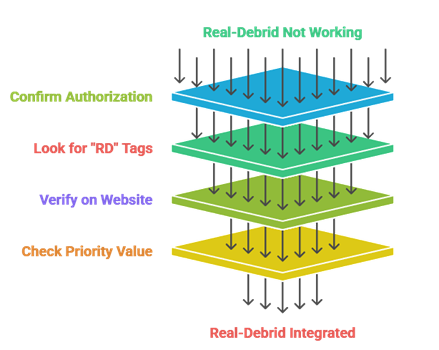
- Confirm authorization in the add-on. Open the add-on’s settings, go to Accounts, and check that your Real-Debrid username is shown along with remaining days. If the row still says “Authorize” rather than your username, authorization didn’t complete.
- Look for “RD” tags in the source list. Pick a popular movie released in the last 2–3 years (popularity matters here — obscure titles have less torrent caching). Click play and watch the source list populate. You should see most sources tagged “RD” with sizes from 2 GB to 30 GB, and resolution labels like 1080p, 4K, or HDR. If every source is tagged “Free” or has no tag, RD isn’t being applied.
- Verify on Real-Debrid’s website. Log into
real-debrid.comin a browser and click My Account → Downloads (or My Downloads). After streaming something for even 30 seconds in Kodi, the file should appear in this list with the current timestamp. If it’s not there, the add-on isn’t actually calling Real-Debrid even though it says authorized. - Check the priority value. If you used Method 2 (ResolveURL), confirm Real-Debrid’s priority is set to 90 or below. A common misconfiguration is leaving it at the default of 100, which makes free resolvers run first.
If all four checks pass, you’re set. If any fail, jump to troubleshooting.
The Privacy Reality: What Real-Debrid Actually Logs
Most setup guides either skip this section entirely or use it as a sales pitch for whatever VPN the publisher has an affiliate deal with. Here are the actual facts from Real-Debrid’s published privacy policy.
- Real-Debrid logs your IP address. Every device you authorize is recorded along with the IP it was used from. You can see this in your account: My Account → Devices. They use this for fraud prevention and account security — multiple simultaneous IPs can trigger an account block.
- Real-Debrid logs every download/stream request for 1 year. Their privacy policy explicitly states: “Files links that Users download are stored in a database for legal concerns and our internal use… all requests made on our site are stored for 1 year, the legal retention period.” That retention is mandated under French law (Real-Debrid is based in France), not a choice the company makes voluntarily.
- Real-Debrid will share user data with judicial authorities when presented with a valid legal request. This is not unusual — every legitimate company in every Western jurisdiction has the same obligation. But it’s worth understanding before you assume Real-Debrid is “private.”
- Deleting your download history from your account does not delete it from Real-Debrid’s servers. The legal retention is on backend logs you don’t have access to. Wiping the visible My Downloads list is cosmetic.
What this means in practice
Real-Debrid is a streaming-quality service, not a privacy service. The two are completely separate concerns:
- A VPN changes the IP address that’s seen by Real-Debrid (and your ISP). It doesn’t make Real-Debrid stop logging — it just makes the logged IP a VPN server’s IP rather than your home IP.
- Real-Debrid does not bypass your ISP’s visibility. Your ISP can see that you’re connecting to Real-Debrid’s servers. Whether they care depends on your country and your ISP’s traffic policies. Some ISPs throttle high-bandwidth video traffic on streaming devices, in which case a VPN can fix the throttling regardless of any privacy concern.
- The legality question is about the source, not Real-Debrid. Using Real-Debrid is legal everywhere. Using it to stream content you don’t have rights to is the same legal question as using any other tool to do the same thing.
We don’t recommend a specific VPN here because every recommendation in this niche is colored by affiliate revenue. If you want a VPN, look up independent reviews from sources without commercial relationships, then choose. Surfshark, NordVPN, ExpressVPN, and CyberGhost are all on Real-Debrid’s cooperative list, meaning their server IPs are unlikely to be blocked.
The November 2024 FNEF Notice: What Changed
In late November 2024, Real-Debrid posted a notice on their official Twitter/X account: they had received a formal notice from FNEF (Fédération Nationale des Éditeurs de Films), the French film distributors’ federation, and were strengthening their anti-piracy compliance.
What actually changed:
- Real-Debrid blocks a much larger set of torrent hashes than before — content flagged under DMCA or French copyright takedowns is removed from the cache and won’t resolve.
- Some popular torrent sites’ content stopped being cacheable through Real-Debrid for a few weeks in late 2024 and early 2025.
- Some Kodi add-ons (notably older versions of Umbrella and Fen Light) needed updates to work around the new blocking behavior — most were patched within 30–60 days.
What didn’t change:
- The service continues to operate normally for the vast majority of content.
- File-host pipeline (1fichier, Rapidgator, etc.) was not affected.
- Pricing didn’t change. Account terms didn’t change.
As of May 2026: Real-Debrid is fully functional with all the major Real-Debrid add-ons listed in this guide. The anti-piracy filtering is now baked in and most users won’t notice it day-to-day. The lesson is just that Real-Debrid responds to legal requests, which goes back to the privacy section above.
Real-Debrid vs Alternatives
Real-Debrid is the most widely supported debrid service, but it’s not the only one. Add-ons that support multiple debrid services let you pick. Quick honest comparison:
| Service | Price (cheapest plan) | Strengths | Weaknesses |
|---|---|---|---|
| Real-Debrid | €3 / 15 days | Most add-on support, large hoster list, biggest cached-torrent pool | Logs IP for 1 year, French legal compliance |
| AllDebrid | €3 / 15 days | Cleaner UI, slightly fewer hosters but very stable, also French | Smaller cache than RD, fewer integrations |
| Premiumize | $9.99 / month | Bundles Usenet access + cloud storage, very privacy-friendly | More expensive, fewer Kodi add-ons explicitly support it |
| TorBox | $3 / month | Modern UI, good for Stremio, growing fast | Very young — fewer cached torrents than RD |
| Debrid-Link | €3 / 30 days | EU-based with strong privacy practices | Smallest hoster list of the major options |
| LinkSnappy | $7.99 / month | Broad hoster support, file conversion tools | Less Kodi-focused, geared toward direct downloads |
Honest recommendation: Real-Debrid is still the right default for Kodi specifically because the add-on ecosystem is built around it. AllDebrid is the strongest alternative if you object to RD’s logging policy and accept slightly fewer cached torrents. Premiumize is overkill for streaming alone but worth it if you also use Usenet. TorBox is interesting but young — the cache is still building.
If you want to use multiple services, Umbrella, Fen Light AM, and Seren all let you authorize Real-Debrid and AllDebrid simultaneously, then return links from both.
Troubleshooting: 8 Common Real-Debrid Problems Solved
Problem 1: I authorized Real-Debrid but I see no RD links
Cause: Three possibilities. First, the priority in ResolveURL is set above 100, so free resolvers run first. Second, you authorized through ResolveURL but your add-on uses its own internal authorization that you didn’t complete. Third, you’re using a free Real-Debrid account, which doesn’t return premium links.
Fix: Confirm your account is premium at real-debrid.com/account. Then re-authorize through the add-on’s own settings (Method 1) — that bypasses ResolveURL entirely. If you’re still seeing only free links, lower the ResolveURL priority for Real-Debrid to 90 or below.
Problem 2: Authorization fails — code not accepted
Cause: The pairing code expires in roughly 5 minutes. If you took too long to enter it on the website, it’s already invalid. Also: not being logged into Real-Debrid in the same browser is a common silent failure.
Fix: Click (Re)Authorize My Account in Kodi to generate a fresh code. Make sure you’re logged in at real-debrid.com first, then go straight to real-debrid.com/device and enter the new code within 1–2 minutes.
Problem 3: “Not authorized” or “Real-Debrid disabled” errors mid-streaming
Cause: Either your Real-Debrid plan expired (check real-debrid.com/account), or your IP changed in a way Real-Debrid flagged (e.g., toggling a VPN on/off frequently), or your account hit the multi-IP limit.
Fix: Confirm plan is active. If using a VPN, stick to one server — don’t rotate. Check My Account → Devices for your authorized devices. Real-Debrid allows usage on multiple devices on the same IP address (a household), but throws errors if you simultaneously stream from multiple unrelated IPs.
Problem 4: RD links appear but won’t play / “playback failed”
Cause: This is almost always a player issue, not a Real-Debrid issue. Common causes: hardware decoding can’t handle the codec (e.g., AV1 on a Firestick that doesn’t support it), the file is HEVC 10-bit on a device that only handles 8-bit, or your network briefly dropped during the playback handshake.
Fix: Try a different RD link from the same source list — pick one labeled H.264 or AVC if available, since those have the broadest hardware support. If multiple links fail, go to Settings → Player → Videos in Kodi and toggle Allow hardware acceleration off for one test playback. If it works with software decoding, the problem is the codec, not Real-Debrid.
Problem 5: “Reset Function Cache” — should I click this?
Cause: ResolveURL caches resolution results so the same link doesn’t re-resolve repeatedly. When this cache gets stale, links that should work return errors.
Fix: Yes, occasionally. Go to System → Add-ons → Manage dependencies → ResolveURL → Configure → ResolveURL tab → Reset Function Cache. This is a safe, non-destructive reset and a good first thing to try if previously working links suddenly don’t.
Problem 6: My RD account got blocked
Cause: Two common reasons. First, you violated the multi-IP rule (using your account from too many distinct IPs in a short time, common when sharing accounts). Second, you registered or used the account from an IP range Real-Debrid has flagged as abusive — usually free VPNs or proxy services.
Fix: Email Real-Debrid support (support@real-debrid.com) from the email associated with your account. Be honest. If it’s a multi-IP issue, they’ll often unblock once. If it’s an abusive-IP-range issue, they’ll explain which IP needs to change. If you bought from a reseller and the account was already flagged, you’ll likely need to dispute with the reseller, not Real-Debrid.
Problem 7: Specific torrents/files won’t resolve while others do
Cause: Likely DMCA-blocked or anti-piracy-blocked content per the FNEF compliance. Real-Debrid won’t tell you that’s the reason — it’ll just fail silently.
Fix: There’s nothing to fix on your end. Pick a different source from the list. Newer popular movies are most likely to have multiple cached alternatives.
Problem 8: The 5-character code window keeps disappearing before I can use it
Cause: Some Kodi skins (notably Aeon and certain build skins) auto-close info dialogs after a fixed timeout. If you’re slow to switch to your phone, the dialog vanishes.
Fix: Switch to the default Estuary skin temporarily for the authorization (Settings → Interface → Skin → Estuary), authorize Real-Debrid, then switch back to your preferred skin.
FAQs
Is Real-Debrid free?
There’s a free tier, but it’s effectively useless for Kodi — it doesn’t return premium links, has heavy speed caps, and limits which file hosts work. The premium tier starts at €3 for 15 days. There is no free trial of premium.
Is Real-Debrid legal?
Yes. The service itself is legal in every country. Real-Debrid runs paid commercial accounts on file hosts and resells access — that’s a legal business model. The legality of what you stream through Real-Debrid depends on the source content, exactly as it would with any other tool.
Can I share my Real-Debrid account?
Technically yes, but only on devices that share an IP address — i.e., a single household. Real-Debrid detects multiple unrelated IPs hitting the same account and will block it. Five Firesticks in the same house: fine. One Firestick at home and another at a friend’s apartment: account block.
Do I need to re-authorize Real-Debrid every time my plan renews?
No. Authorization is tied to your account, not your plan. As long as the account stays active, your Kodi authorization persists across plan renewals. You only re-authorize if you log out, change devices, or revoke the device from My Account → Devices.
Will Real-Debrid speed up live TV / IPTV / sports streams?
No. Real-Debrid only handles VOD content from supported file hosts and torrent caches. Live IPTV streams aren’t on file hosts, so RD has nothing to optimize. Buffering on IPTV is a streaming-server or network problem, not something a debrid service addresses.
Can I use Real-Debrid without Kodi?
Yes. RD works with Stremio (via the Torrentio addon), Syncler, Weyd, CloudStream on Android, and many other apps. The setup is conceptually identical: authorize in the app’s settings using real-debrid.com/device. RD also has its own web interface at real-debrid.com for direct file downloads from supported hosts.
How many devices can I authorize?
Real-Debrid doesn’t publish a hard cap. In practice, users have authorized 10+ devices without issues, as long as they’re on the same household IP. Each device shows up in My Account → Devices with its name and last-used IP. You can revoke any of them at any time.
My ISP threw a “streaming notice” letter at me — was it Real-Debrid?
Almost certainly not directly. ISPs send notices when they detect torrenting from your IP. Real-Debrid downloads happen on its servers, not yours — the ISP only sees you connecting to Real-Debrid’s IPs over HTTPS. Notices come from add-ons that use direct torrenting (Elementum, Quasar) or from your home torrent client, not from Real-Debrid streaming.
I see “URLResolver” mentioned in old guides — should I use that?
No. URLResolver was abandoned in 2018. Its replacement, ResolveURL (note the word order), is the actively maintained dependency. Modern add-ons all depend on ResolveURL. If a guide is telling you to authorize Real-Debrid through “URLResolver,” it’s old and was never updated.
What’s the difference between Real-Debrid and a VPN?
They solve totally different problems. Real-Debrid gives you fast, working streaming links. A VPN hides your IP from your ISP and changes which IP Real-Debrid sees. They’re complementary, not substitutes — many people use both, and many use only one. Don’t let any guide tell you that Real-Debrid is a privacy tool. It isn’t.
Conclusion
Real-Debrid is the single biggest upgrade you can make to a Kodi setup, and the setup itself is genuinely a 4-minute job once you understand the moving parts. Sign up, buy a plan, open your add-on, authorize, verify. Done.
The places where this trips people up are predictable: trying to authorize on Kodi 19 when the modern API doesn’t like the old TLS stack, signing up on a flagged free VPN and getting the account blocked at registration, leaving the ResolveURL priority at the default and wondering why free links keep playing first, or assuming “Real-Debrid is private” — it isn’t, and pretending otherwise is how people get surprised. This guide has covered each of those.
Beyond setup, the realistic mental model is: Real-Debrid is a streaming-quality service that costs you about €3 a month if you buy long plans, returns 80%+ working HD links instead of 20%, and silently logs your activity for a year as required by French law. If that trade-off makes sense for you, it’s a great service. If it doesn’t, AllDebrid and Premiumize are real alternatives — Method 2 above works for them too, just with their respective device-pairing URLs.
Set it up once, verify it actually works, and you’ll mostly forget it’s there. Which is exactly the point.