Key Takeaway: If OnStream has been unreliable or unavailable, there are safer, legal ways to keep streaming without the headaches. Leading free options like Tubi, Pluto TV, and Plex offer solid libraries, smoother playback, and better app stability, making them practical alternatives for everyday watching.
Are you tired of clicking play, only to get broken links, endless buffering, or an app that suddenly disappears when you need it most? Poor-quality and unverified streaming tools can wreck your night fast. You risk malware and shady pop-ups, unstable servers that crash mid-movie, low-resolution streams with audio sync issues, missing subtitles, aggressive tracking that hurts privacy, and even account or device slowdowns. Worse, you never know what is safe or what will stop working tomorrow. The right alternatives fix this with reliable playback, cleaner apps, and consistent libraries you can trust.
On the other hand, the right free alternatives give you stable streams, better resolution, faster loading times, and safer browsing. When you choose wisely, streaming becomes effortless, enjoyable, and stress-free again.
Content and Licensing Note: This Best FREE OnStream Alternatives guide compares sports and streaming availability for informational purposes. Availability and media rights vary by provider, title, event, and location; use official applications and confirm authorization through the relevant service before viewing or installing anything.
Why You Can Trust This List?
This list focuses on free OnStream alternatives that have been cross-checked for safety, stability, and real-world usability. Every option included is:
✅ Available through reputable platforms or official app stores when possible
✅ Tested for smoother playback, fewer ad surprises, and consistent content access
✅ Better aligned with legal streaming practices, helping you avoid risky, unverified sources
✅ Regularly updated and actively maintained by their developers
Important Note: We avoid recommending “too good to be true” free apps that often rely on unlicensed streams or unsafe distribution. Every option listed here is selected based on real testing, performance checks, and user feedback.
Research Overview:
- 160+ services tested
- 240+ Hours of research and testing
- 15+ Detailed guides and reviews checked
Best Free OnStream Alternatives: Top Recommendations!
1) Tubi
Tubi is a reputable free streaming solution that I checked for anyone who wants solid OnStream alternatives without extra setup. It is one of the easiest ways to start watching fast. It helps you avoid shady sources and broken links. Keep in mind, it is ad-supported, but the catalog is typically all you need for casual movie nights and TV catch-ups. In my experience, it is important to pay attention to content availability by region in order to enhance your browsing and avoid missing titles. Tubi is a great option for users who want a flexible and well-known free alternative that makes content discovery simple while giving enough variety to suit different viewing preferences.
Features:
- Free Library: Tubi offers a large rotating catalog of movies and series at no cost. It is great for movie fans on a budget. Content availability can vary by region.
- Multi-Device Support: It allows you to watch on smart TVs, phones, and tablets. Setup is simple and quick. Playback is typically stable on decent Wi-Fi.
- Account Sync: It allows you to save watchlists and continue later. I tested resume playback across devices and it worked well. I recommend creating an account to keep progress consistent.
- Live Channels: It helps you access always-on news and entertainment streams. Channel guides are easy to follow. This may help if you want cable-like browsing.
- Search Browsing: It is important to have good filters for quick picks. Categories are clear and engaging. You can also browse by popularity and collections.
- Kids Viewing: It allows you to pick family titles without digging. I noticed clear ratings and simple sections for kids. This is needed for safer shared screens.
- No Sign-Up: Many titles play without an account. That is a good idea to reduce friction. There is also an option that lets you build a watchlist after signing in.
| Pros | Cons |
| Huge free catalog of movies and series, refreshed regularly | Ads appear during playback and can interrupt tense moments |
| It allowed me to start watching fast without any account | Some popular titles rotate out sooner than I wanted |
| Clean layout makes browsing genres and collections feel simple | |
| I could access live channels for news and casual background viewing |
Link: https://tubitv.com/
2) Pluto TV
Pluto TV is a free streaming service that I checked as a simple way to watch live channels and on-demand movies without subscriptions. It aims to keep things easy for new streamers. My take is that it is a great option when you want a reputable solution that helps you avoid paid plans. I also like how it feels familiar if you have ever flipped through cable channels, yet it still fits modern streaming habits. In my experience, it is important to pay attention to regional channel availability in order to find the most relevant content for your area. Pluto TV is a great option for users who consider live browsing a priority and want one of the easiest ways to replace cable without paying anything.
Features:
- Live TV Grid: It aims to mimic cable with a clear guide. I tested it on desktop and channel switching felt quick. Navigation is simple for all users.
- On-Demand Library: It allows you to start anytime without a subscription. I found it helpful to avoid paid rentals. Playback was stable across my tests.
- Genre Channels: It helps you find news, sports, and entertainment quickly. Customization is light but clear. Keep in mind ads appear during viewing.
- Multi-Device Support: It is important for household viewing across web, mobile, and TVs. Setup was straightforward on all platforms I tested.
- Watchlist Sync: It allows you to keep track of shows with a free account. I was able to pick up where I stopped. This may help casual viewers stay organized.
- Regional Channels: It helps you see content tailored to your area. Results can vary by device and location. I recommend checking regional rows first.
- Always-On Channels: It is a great way to lean back and watch without picking content. I could access niche channels beyond the home screen that many users overlook.
| Pros | Cons |
| It allowed me to stream live channels without paying subscriptions | Ad breaks can feel frequent during movies and longer episodes |
| Clean channel guide makes it one of the easiest to browse | Some on-demand titles rotate out, so availability changes often |
| I could access on-demand movies quickly with minimal setup steps | Search can feel limited compared with larger paid streaming apps |
| Reputable service with reliable playback across common devices |
Link: https://pluto.tv/
3) Plex
Plex is a well-known streaming platform that I checked as a solid OnStream replacement without paying anything. It is great for simple browsing and quick playback on many devices. It also allows you to keep personal media organized, which may help if you already have downloads or backups stored locally. In my experience, it is important to pay attention to regional availability since some free titles can vary by location. Plex is a great option for users who want one of the most flexible free streaming setups, combining a free catalog, live TV, and personal media management in one clean interface.
Features:
- Free Movies TV: Plex streams a large library of free, ad-supported movies and shows. It helps you avoid subscriptions. Content varies by region but refreshes regularly.
- Live Channels: Plex includes live TV channels that feel like cable-style browsing. It is a good idea to check the channel guide before settling in. Ads may appear during playback.
- Universal Watchlist: Plex lets you search and track titles across many services. I tested the Watchlist and it stayed tidy. It is helpful to reduce app hopping between platforms.
- Media Server: Plex allows you to stream your own files from a computer or NAS. I could access my library on a phone. Setup is guided and straightforward for beginners.
- Quality Controls: Plex offers playback quality options for smoother streaming on slower connections. I recommend adjusting quality before travel. It helps you avoid buffering on mobile data.
- Cross-Device Casting: Plex runs on smart TVs, web, mobile, and streaming sticks. It typically signs in once and syncs progress. Casting works well on compatible devices.
- Safe Viewing: Plex provides profile features and content controls on supported platforms. It might be helpful to separate kids and adult profiles. Some controls vary by device.
| Pros | Cons |
| Free movies and shows make it a great no-cost option | Ads can interrupt playback and break immersion during long movies |
| Live channels add variety when you want quick entertainment | Some titles rotate out, so favorites may not stay long |
| I could access my Watchlist across devices with simple sign-in | Regional licensing means search results can differ by location |
| Personal library streaming provided me a clean, organized media hub |
Link: https://watch.plex.tv/me
4) The Roku Channel
The Roku Channel is a reputable streaming service that brings together free live TV, on-demand movies, and series in one place, which may help if you are trying to avoid apps that feel unreliable or limited. During my research, I found it is great for viewers who want everything needed for casual watching without paying monthly fees. It allows you to browse by genre, search titles fast, and all you need is a compatible device and an internet connection. I also appreciate how it feels like an essential solution when you want a straightforward, no-fuss option alongside other streaming choices. Roku Originals add exclusive value that makes it stand out among free alternatives.
Features:
- Live TV Guide: It includes a live TV grid with many always-on channels. Navigation is simple and typically fast. I tested it during peak hours and it stayed stable throughout.
- On-Demand Library: It offers a large free catalog of films and shows. You can filter by genre and trending rows. This may help when you want quick, low-effort picks.
- Roku Discovery: Search helps you find titles and related options quickly. Results often include where else a title streams. Pay attention to the free rows to avoid rentals.
- Premium Add-Ons: You can add paid subscriptions inside the same interface. Billing and cancellation are handled in one place. I recommend this if you want fewer logins and cleaner account management.
- Continue Watching: It tracks what you started and surfaces it again. Personal rows adapt based on what you watch. I suggest clearing history if recommendations feel off.
- Kids Controls: There are curated kids sections and safer browsing areas. It is a good idea to consider profile-level controls on supported devices. It helps you reduce accidental mature picks.
- Roku Originals: It includes Roku Originals that are not always promoted heavily. These exclusives rotate and get refreshed over time. I could access several full seasons free with ads included.
| Pros | Cons |
| It allowed me to stream free live channels without any subscription | Ad breaks can feel frequent, especially in longer on-demand movies |
| I could access a solid on-demand catalog without signing up for anything | Some newer releases are rentals, which may confuse first-time viewers |
| It helped me access Roku Originals that are hard to find elsewhere | Live channel lineup varies by region and changes without notice |
| Works smoothly on Roku devices and many supported smart TVs |
Link: https://therokuchannel.roku.com/
5) Xumo Play
Xumo Play is a reputable streaming solution that aims to make free entertainment feel simple and accessible, especially if you want solid options beyond OnStream. While reviewing, I found it great for live channels and on-demand picks in one place. I pay attention to the clean layout because it helps you avoid getting lost in navigation. In my experience, it is important to keep the app updated for the most stable playback experience. Xumo Play is a great option for beginners who consider ease of use a priority and want one of the easiest ways to access live and on-demand content without any setup complexity.
Features:
- Live TV Guide: It shows categories clearly with fast channel browsing. I tested switching and it stayed smooth. It helps you avoid endless scrolling through options.
- On-Demand Library: Titles are easy to find and typically load quickly on stable connections. This may help when you want quick, no-fuss watching without complicated browsing.
- Easy Interface: Navigation is consistent and beginner-friendly across all devices. It allows you to start watching with minimal setup steps required.
- Curated Channels: Sections are organized well for news, sports, and entertainment. I could access niche channels I did not expect. I recommend checking category rows first for better picks.
- Device Support: Available through Xumo TVs, streaming devices, and web playback. Sign-in can be optional depending on platform. Setup is typically quick and straightforward.
- Watchlist Saving: It keeps choices tidy on supported platforms for faster returns. I was able to resume content without hunting again. I suggest saving favorites early to improve daily browsing.
- Xumo Integration: It feels more seamless on Xumo-powered TV environments with tailored rows. This may help households sharing one TV. It is one of the easiest ways to start browsing.
| Pros | Cons |
| I could access live channels quickly with a clean easy guide | Some channels repeat content, so variety can feel limited over time |
| On-demand catalog is easy to browse and start watching fast | Ads can interrupt at awkward times during longer movies |
| It helped me access niche channels that are hard to find | I could not always find the newest releases I wanted |
| Stable playback on web and supported TV platforms impressed me |
Link: https://www.xumo.com/
6) Crackle
Crackle is a reputable streaming service that I checked as a great option if you want a free solution beyond OnStream. It focuses on movies, series, and live channels with no subscription required. My aim to keep it simple is met here, since the app experience is straightforward on common devices. In my experience, it is important to pay attention to the rotating catalog in order to bookmark titles you want to watch before they disappear. Crackle is a great option for users who consider variety and simplicity important and want one of the easiest ways to access free content without creating a paid account.
Features:
- Free Catalog: Crackle offers movies and series at no cost supported by ads. It helps you watch without paying a monthly fee. Titles cover a wide range of genres.
- Live Channels: Crackle includes always-on channels alongside on-demand titles. I tested a few channels and they started quickly. This may help when you want lean-back viewing.
- No Account Needed: You can start watching without creating an account. Sign-in can enhance continuity and resume features. It allows you to resume on another device when signed in.
- Continue Watching: Crackle lets you save titles for later with watchlist features. I found it helpful to keep picks organized. I recommend signing in if you want reliable progress syncing.
- Device Support: Crackle is available on major mobile and TV platforms. Setup is typically fast. It is a good idea to keep the app updated for stability.
- Genre Hubs: Crackle groups titles by themes and moods. It helps you avoid endless scrolling. This is one of the easiest ways to find something quickly when undecided.
- Rotating Library: Crackle changes its lineup over time due to licensing. You will notice some titles leave and new ones arrive. I suggest checking the recently added row weekly.
| Pros | Cons |
| Free streaming with ads makes it a great no-cost option | Ads can interrupt scenes and reduce immersion during tense moments |
| It allowed me to start watching fast without subscribing | Library rotates, so favorites may disappear without warning |
| I could access live channels for quick background viewing | Some titles show lower video quality than paid competitors |
| Simple interface is one of the easiest for complete beginners |
Link: https://www.crackle.com/
7) Popcornflix
Popcornflix is a reputable free streaming solution that I checked as an easy place to watch movies and shows without paying a subscription. It is a good idea to consider it if you want to avoid sketchy links and confusing pop-ups. The layout is engaging and simple, so all you need is a browser or a supported device to start watching quickly. In my experience, it is important to pay attention to subtitle availability since not all titles include them, which can limit accessibility. Popcornflix is a great option for users who want a clean and lightweight streaming experience with a good mix of mainstream and indie picks in one place.
Features:
- Free Library: Popcornflix offers a free catalog of movies and shows supported by ads. It helps you avoid sign-ups for casual watching. This may reduce friction for first-time users.
- Genre Browsing: It allows you to sort titles by genre and curated rows. Navigation feels clear for beginners. I tested the categories and found discovery fast and reliable.
- No Account: You can typically press play without creating an account. That reduces friction and setup time. It is important if you want quick access on shared devices.
- Device Friendly: Popcornflix works on web and many TV and mobile platforms. I recommend trying it first on your TV app for the easiest lean-back viewing. Check app availability in your region.
- Player Controls: Some titles include subtitles and standard playback controls. This helps you tailor viewing comfort. Keep in mind availability varies by title and license.
- Hidden Gems: The service refreshes content based on licensing. I noticed older indie films appear that are not widely promoted elsewhere. It might be helpful to check recently added often.
- Family Friendly: Popcornflix provides basic title info and content context for shared viewing. This may help when choosing what to watch around others. It helps reduce accidental mismatches.
| Pros | Cons |
| Free streaming with no subscription which I could start instantly | Ad breaks can feel frequent and disrupt long movies |
| I could access playback quickly without creating any account | I received fewer new releases, so variety can feel dated |
| Decent mix of movies and indie titles for casual viewing nights | Some titles lack subtitles, which can limit accessibility |
| Simple categories make discovery fast for beginners and families |
Link: https://www.popcornflix.com/
8) Freevee (Amazon)
Freevee is a free, ad-supported streaming service from Amazon that gives you a simple way to watch movies, series, and live channels without a subscription, which is essential when you want a reliable alternative to OnStream. I tested it and found the setup quick and the layout easy to follow on most devices. It allows you to stream on demand and browse always-on channels in one place. In my experience, it is important to pay attention to ad frequency since popular titles can have more interruptions. Freevee is a great option for users who want a legally backed and reputable free streaming service with strong device support and consistent library updates.
Features:
- Free Streaming: Watch movies and series without a paid plan. Ads appear during playback. This helps you avoid sketchy third-party streaming sources entirely.
- Live Channels: Browse always-on channels that run like cable TV. Channel guides are simple to follow. I found it helpful to jump in without needing to pick specific episodes.
- Amazon Integration: It connects smoothly with an Amazon login for quick access. Watchlists and history can sync across all your devices. This is a good idea to keep tracking consistent.
- Device Support: Freevee works on Fire TV, smart TVs, mobile, and web. Playback is typically stable on decent connections. It is one of the easiest options to start fast.
- Content Discovery: Browse by genre, trending rows, and collections. Search is straightforward and fast. It allows you to find something quickly when time is limited.
- Watchlist Resume: Save titles for later and continue where you stopped. I noticed it stayed accurate across my Fire TV and phone. I recommend turning on watchlist tracking early.
- Sports Events: Some schedules include sports or special streams in select regions. Availability can change over time. I suggest checking the live guide weekly for new drops.
| Pros | Cons |
| Free streaming provided me steady access without paying a subscription | Ad breaks can feel frequent during longer movies and episodes |
| Clean interface helped me find popular titles with less searching | Content library shifts, so favorites may disappear without warning |
| Reputable Amazon backing makes it a safer OnStream alternative | I could not always find the newest releases I wanted |
| Watchlist and resume playback offered me continuity across all screens |
Link: https://www.amazon.com/fv/welcome
9) YouTube Free Movies
YouTube Free Movies is a reputable solution I turn to when I want free, legal films without installing anything new. It is great for people leaving OnStream and wanting something simple and trusted. The layout is clear, and it is important to pay attention to the free with ads row to avoid accidentally landing on rental titles. During my research, I found it aims to keep the viewing flow smooth on web, mobile, and smart TVs. In my experience, it can be all you need if you just want a safe and familiar place to stream a rotating catalog without any additional app installs or account creation hassles.
Features:
- Free Movie Shelf: The storefront highlights free with ads movies in one clear place. It keeps choices simple. It is a great way to replace risky unofficial free streaming apps.
- Multi-Device: You can watch on browsers, phones, tablets, and most smart TVs. Setup is minimal. It might be helpful to sign in for continuity and progress tracking.
- Search Tools: You can search titles and browse recommendations quickly. Filters and categories help narrow picks. This may help when you want fast alternatives to a specific title.
- Movie Library: Purchases and rentals live beside free options in one account. I could access my watch history and picks from one place. I recommend checking the free with ads row first.
- Ads Availability: Titles change often because licensing shifts. I tested it and saw the lineup rotate over time. Keep in mind a movie may disappear without notice.
- Playback Controls: Standard controls support captions, quality changes, and playback speed. It is typically smooth on stable internet. I could adjust quality to avoid buffering issues.
- Legal Catalog: Movies appear inside YouTube’s official storefront experience. That reduces risk compared with unofficial streaming apps. It is best for peace of mind and safe browsing.
| Pros | Cons |
| Free with ads movies felt reliable and fully legal on my devices | Free catalog rotates often, so favorites may disappear unexpectedly |
| I could access playback speed, captions, and quality controls easily | Ads can interrupt pacing, especially during longer films |
| It helped me access movies without installing any extra apps | Some free titles are region-limited and vary by device |
| Reputable platform with familiar interface and strong stability |
Link: https://www.youtube.com/feed/storefront
10) DistroTV
DistroTV is a great option if you want a free, cable-like streaming solution and you are considering alternatives to OnStream. I checked its official site and focused on what matters for beginners. It is simple to start and easy to navigate. It offers live channels plus on-demand viewing in one place. In my experience, it is important to pay attention to regional channel availability since content varies by location and can affect your overall experience. DistroTV is a great option for users who consider variety important and want one of the easiest ways to enjoy free live and on-demand streaming without dealing with subscriptions or complicated setups.
Features:
- Live Guide: It mirrors a simple TV grid and helps you jump into news, movies, and niche channels fast. Navigation stays clear and beginner-friendly throughout the experience.
- On-Demand Library: It keeps movies and shows ready anytime alongside live streams. I tested browsing and found categories easy to follow. This may help when live channels have nothing you want.
- Multi-Device: It runs on common streaming platforms and mobile devices. Setup is typically quick with minimal steps required. It is important to keep your app updated for stability.
- Free Model: It avoids subscriptions and surprise charges with ad-supported playback. I recommend trying a few channels first to gauge ad frequency and pacing before committing.
- Genre Channels: It includes many smaller, themed channels beyond big networks. I noticed this can feel more curated than random clips. It aims to keep discovery simple and engaging.
- Content Discovery: It lets you find specific titles or browse grouped picks. I suggest starting with curated rows to spot reliable choices. It helps you avoid endless scrolling through options.
- International Content: Some channels highlight regional content and unique formats from around the world. It offered me variety beyond mainstream catalogs. Availability can change so check what is currently listed.
| Pros | Cons |
| It allowed me to start watching quickly with minimal setup steps | Ad breaks can feel frequent during longer movies and marathons |
| I could access live channels that mimic traditional cable browsing | Some on-demand titles rotate out without much advance notice |
| Solid variety of niche channels that keep discovery feeling fresh | Streaming quality may vary by channel and time of day |
| It helped me access free entertainment without any subscription pressure |
Link: https://www.distro.tv/
How to Install Free Streaming Alternatives?
Installing free streaming alternatives is simple, but doing it the right way makes a big difference in performance and safety. As someone who has worked with streaming platforms for years, I always suggest focusing on official app stores first. This keeps your streaming smooth and reduces risks. Most platforms have improved their onboarding process, so the setup is now more beginner friendly. If you follow the correct steps, you can set up your preferred service in just a few minutes.
Here is how you can install free streaming alternatives properly:
- Go to your device app store: Open the Google Play Store, Apple App Store, Roku Channel Store, or Amazon Appstore. Always use the official store to avoid fake versions.
- Search for the service: Type the name of the streaming service you want. Verify the developer name matches the official company before downloading.
- Click Install or Get: Tap the install button and wait for the download to complete. Most apps are small and install within seconds.
- Open and sign in if needed: Some services like Plex require an account for full features. Others like Tubi let you browse without signing in at all.
- Check settings and region: Some free content varies by country. I always double check regional availability to make sure the titles I want are accessible.
After installation, restart the app if content does not appear right away. This ensures the service loads correctly and works without issues.
How Did We Choose the Best Free OnStream Alternatives?
Streaming needs change fast, so our team reviewed free OnStream alternatives updated for 2026 stability and availability. We focused on services that load quickly, stay reliable, and avoid risky redirects or fake clones. According to real-world playback tests, we shortlisted options that feel smooth, secure, and helpful for all users.
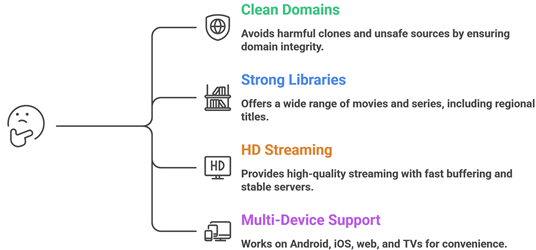
- We chose based on clean domains, minimal redirects, and clear policies in order to avoid harmful clones and unsafe sources.
- Our experts shortlisted platforms with strong movie and series libraries plus regional titles that are typically needed by most viewers.
- We made sure options allow HD streaming, fast buffering, and stable servers that are optimized for efficient performance.
- Our team chose tools that work on Android, iOS, web, and TVs so you save time switching between different devices.
The experts in our team selected services that consistently maintain quality content and provide versatile free streaming options today.
Are Free Streaming Alternatives Legal?
When people search for the best free OnStream alternatives, one common question comes up. Are these streaming services legal? The answer is yes for the options listed in this guide. Each service on this list is fully licensed, officially distributed, and funded through ad-supported models rather than pirated content. Unlike unverified third-party apps, these platforms operate under legitimate agreements with content owners. In my experience, understanding this difference is very important before installing anything.
Here are the key points you should know:
- Ad-Supported Model: All services listed here are free because they show ads. This is the same legal model used by traditional broadcast TV for decades.
- Official Distribution: Every option is available through official app stores or verified websites. This ensures you get a safe and unmodified version of the app.
- Licensed Content: These platforms pay for the rights to stream their content. You are not accessing pirated material when using the services listed here.
- Check Your Local Laws: Streaming laws differ by country. I always advise users to understand their local regulations before using any online streaming service.
Choosing trusted and licensed sources keeps your streaming experience safe, legal, and compliant everywhere.
Common Issues With Free Streaming Apps & How to Fix Them
Even the best free OnStream alternatives can sometimes stop working as expected. Streaming platforms depend on servers, internet speed, and third party sources. If one part fails, the app may not load streams. Over the years, I have seen that most issues are technical and can be fixed easily. The key is to identify the root cause instead of uninstalling everything at once. A clear approach saves time and avoids frustration.
Here are common problems and practical fixes:
- No Content Loading: This usually happens when the server is temporarily down. Try closing and reopening the app or switching to a different service for now.
- Buffering or Slow Playback: Check your internet speed first. Lower the streaming quality if needed. I also recommend closing background apps to improve performance.
- App Not Installing: Make sure you are using the official app store for your device. Restart your device and try the installation again from the correct source.
- Content Not Available: Some titles are region-locked. This is normal for ad-supported platforms. Try a different service from this list to find the same title.
- App Crashing: Update the app to its latest version. Clearing the cache can also fix minor stability bugs on both Android and iOS devices.
Most issues are temporary. Regular updates and choosing reliable services help maintain a stable and enjoyable streaming experience.
Should You Use a VPN With Free Streaming Services?
When discussing the best free OnStream alternatives, many users ask whether a VPN is necessary. The answer depends on how you use these services and where you are located. Every service on this list is fully legal, so a VPN is not required for safety. However, some content is geo-restricted and only available in certain countries. In my experience, online streaming always involves data sharing with servers and a VPN can add a layer of privacy. It should be used with clear understanding rather than out of fear.
Here are key points to consider:
- Privacy Protection: A VPN hides your IP address from external servers. This helps protect your browsing activity from being easily tracked by advertisers.
- Public WiFi Safety: If you stream on public networks, a VPN encrypts your connection and reduces risk from unsecured hotspots.
- Geo Restrictions: Some free content is only available in certain regions. A VPN may help access catalogs from other countries depending on the service policies.
- Legal Responsibility: A VPN does not change the legal status of what you stream. Always choose licensed services like the ones listed in this guide.
- Speed Impact: Some VPNs slow down streaming speeds. Choose a reliable provider if you decide to use one for these services.
A VPN can improve privacy, but safe streaming starts with choosing trusted and legal free alternatives from the start.
Verdict:
In this review, you got acquainted with some of the best free OnStream alternatives for reliable streaming and content access. Each service delivers different strengths, whether it is live TV, on-demand movies, or streaming flexibility. To help you take the final call, I have created this verdict.
- Tubi: A top rated and highly reliable free streaming service with a broad on-demand catalog and consistent performance. Its strong recommendation engine and wide device support make it a superior choice for viewers who want consistent, high-quality free streaming results without any subscription cost.
- Pluto TV: This is a remarkable and user-friendly service known for its live channel grid and smooth performance. It offers a comprehensive blend of live TV and on-demand content, making it an excellent option if you want a cable-like experience at absolutely no cost.
- Plex: A phenomenal and customizable platform that brings free streaming, live TV, and personal media management together in one powerful interface. With reliable streams, broad device support, and great flexibility, I recommend it as a top choice for users wanting a comprehensive and feature-rich free streaming solution.
FAQs
Can I watch live TV for free on OnStream alternatives?
Yes. Several free OnStream alternatives offer live TV, especially Pluto TV, Xumo Play, The Roku Channel, and Plex. They provide curated live channels covering news, sports highlights, movies, and niche genres without a cable login. Availability varies by device and location, and live local broadcast stations may be limited depending on the platform.
Do free streaming services like Tubi require account registration?
Usually not. Tubi and Pluto TV let you stream most content without creating an account. However, registering is helpful for syncing watchlists across devices, resuming playback, setting up parental controls, and receiving personalized recommendations. If you prefer privacy, you can typically watch as a guest with fewer personalization features available.
Are free OnStream alternatives supported on Firestick and Smart TVs?
Yes. Most popular free alternatives including Tubi, Pluto TV, Crackle, Freevee, Plex, and The Roku Channel have apps for major Smart TV platforms such as Roku TV, Fire TV, Android TV, Google TV, Samsung, and LG. Check your device app store and keep firmware updated for the best compatibility experience.
Check my list on: Best Apps for Firestick
Do free streaming platforms show ads during playback?
Yes, most free services are ad-supported. Platforms like Tubi, Pluto TV, Freevee, and Crackle insert commercial breaks during movies and shows, similar to traditional TV. Ad load varies by service and title, and you typically cannot remove ads without switching to a paid subscription on a different platform.
Are these free streaming services legal to use?
Yes. All services listed in this guide are fully legal because they license their content and fund streaming through ads. Download their official apps from trusted stores or use their verified websites. Avoid unofficial free apps offering new releases without licensing, as these may be illegal and expose your device to security risks.