
Key Takeaway: The Streaming Catalogs, StremThru Torz, and FilmWhisper addons show how far the Stremio community has moved beyond simple torrent scrapers. This 2026 list skips the usual suspects and focuses on fresh, lesser-known community addons that add catalogs, smarter metadata, trailers, and AI search to your setup.
Everyone already knows Torrentio and Comet, so a list that repeats them helps no one. The community add-on library moves fast, and the most interesting tools launched in the last year rarely make it onto older round-ups. That is the gap this guide fills.
I dug through the community catalogue on stremio-addons.net, checked each add-on’s manifest status and recent reports, and installed the ones below on a Fire TV Stick 4K and a desktop build. Every pick here is currently reachable, actively updated in 2026, and does something the default Stremio experience cannot. None of them duplicate the mainstream source addons most guides recommend.
Content and Licensing Note: This Best Stremio Community Addons guide compares addons, repositories, and media tools for informational purposes. Availability and media rights vary by provider, title, event, and location; use official applications and confirm authorization through the relevant service before viewing or installing anything.
Best Stremio Community Addons: Top Picks!
| Add-on | Best For | Debrid Needed | Get Started |
|---|---|---|---|
| Streaming Catalogs | Netflix-style discovery | No | Visit Site |
| StremThru Torz | Crowdsourced torrent catalog | Recommended | Visit Site |
| FilmWhisper | AI natural-language search | No | Visit Site |
| AIO Metadata | Accurate posters & ratings | No | Visit Site |
| Streailer | In-app trailers | No | Visit Site |
1) Streaming Catalogs
Streaming Catalogs is the community add-on I install first on any fresh Stremio setup, because it answers the one question the default interface ignores: what is actually on Netflix, Disney+, HBO Max, Apple TV+, and Hulu right now. It adds clean, poster-rich catalogs for each service, so you can browse a platform’s library the way you would inside its own app, then open any title to let your source addons find a stream. In my testing it stayed fast and accurate, and the configuration page let me switch off the services I do not use. It quietly turns Stremio into a real discovery hub.
Features:
- Multi-Service Catalogs: Adds browsable catalogs for Netflix, Disney+, HBO Max, Apple TV+, Hulu, Paramount+, and more, so every major platform library sits inside Stremio’s home screen together.
- Region Selection: Lets you pick your country so the catalogs match the titles your account can actually see, which prevents the frustrating mismatch between listed shows and available streams.
- Trending And New Rows: Surfaces trending, newly added, and leaving-soon rows for each service, helping you catch expiring titles before they disappear from a platform’s rotating catalog for good.
- Source Handoff: Every catalog entry opens Stremio’s normal detail page, so your installed stream addons and debrid service resolve links exactly as they would for any other title.
- Lightweight Configuration: I toggled off the services I do not subscribe to during setup, and the home screen instantly felt cleaner, showing only the platforms whose catalogs I actually browse.
- Accurate Metadata: Pulls posters, descriptions, and release details that stay consistent with each platform, giving the catalogs a native look rather than the generic entries some discovery addons display.
- Regular Refreshes: The developer updates the service lists frequently, so newly launched platforms and reshuffled libraries appear without you needing to reinstall or reconfigure the add-on every month.
| Pros | Cons |
| Turns Stremio into a genuine streaming discovery hub | Shows what is on a platform, not the licensed stream |
| Covers every major platform in a single add-on | Needs source addons to actually play a title |
| Keeps posters and metadata looking native | A handful of downtime reports each day |
| Simple region and service configuration |
Pricing: Free. No account, API key, or payment card required.
Link: stremio-addons.net/addons/streaming-catalogs
2) StremThru Torz
StremThru Torz is a newer community add-on that takes a different approach to finding torrents. Instead of scraping dozens of sites live, it queries a crowdsourced, shared catalog of hashes maintained through the StremThru project, then hands matches to your debrid service. In practice that means fast, tidy results with fewer dead links, because the catalog leans on what other users have already verified. I paired it with a debrid account on my Fire TV Stick and it returned cached 1080p and 4K links in a couple of seconds. If you want a modern, low-maintenance alternative to the usual scrapers, Torz is one of the smartest community options released this year.
Features:
- Crowdsourced Catalog: Queries a shared, community-maintained store of torrent hashes rather than scraping sites live, which cuts dead links and returns cleaner, more consistent results across popular movies and series.
- Debrid Integration: Connects to major debrid services so cached files resolve into instant, high-quality streams, turning the catalog’s verified hashes into buffer-free playback inside Stremio without extra setup steps.
- StremThru Backbone: Built on the open-source StremThru project, it benefits from active development, proxy support, and a maintained store shared across several add-ons in the wider ecosystem.
- Fast Response Times: Because it reads a prepared catalog instead of crawling trackers, searches return in seconds, which noticeably reduces the wait before a stream list appears on screen.
- Quality Sorting: Results arrive grouped by resolution and cache status, so you can jump straight to a cached 4K or 1080p option without scrolling past unhealthy or low-seed entries.
- Tested Reliability: I ran Torz alongside a debrid account for a week and it consistently surfaced cached links where older scrapers returned nothing for the same newer episodes.
- Self-Host Friendly: Advanced users can deploy their own StremThru instance for privacy and control, while everyone else can install the public build straight from its add-on listing.
| Pros | Cons |
| Fast, tidy results from a verified catalog | Debrid account recommended for best results |
| Fewer dead links than live scrapers | Catalog depth trails giant scrapers for rare titles |
| Strong debrid support for instant streams | Self-hosting needs technical know-how |
| Actively developed open-source backbone |
Pricing: Free and open-source. A debrid subscription is recommended for cached, buffer-free playback.
Link: stremio-addons.net/addons/stremthru-torz
3) FilmWhisper
FilmWhisper is the community add-on I reach for when I cannot remember a title but can describe it. It uses generative AI to turn a plain-English query, like “the movie where parents leave their kid home for Christmas,” into a ranked list of matches inside Stremio. You bring your own AI key, and it currently supports OpenAI, Gemini, Claude, DeepSeek, and every Featherless.ai model, so you are not locked to one provider. In my testing it handled vague, mood-based prompts far better than a normal catalog search, and each result dropped into Stremio’s standard detail page so my source addons could find a stream. It is discovery for the tip-of-the-tongue problem.
Features:
- Natural-Language Search: Describe a film or show in plain English and the add-on returns ranked matches, so you can find titles by plot or half-remembered details, not exact names.
- Multi-Model Support: Works with OpenAI, Gemini, Claude, DeepSeek, and all Featherless.ai models, letting you choose a provider based on cost, speed, or the AI account you already hold.
- Bring Your Own Key: You paste your own API key at setup, keeping queries under your control so the add-on has no shared rate limits at peak times.
- Mood-Based Discovery: It handles vague prompts about tone or theme, surfacing suggestions a normal title search would miss, which makes it genuinely useful on nights when nothing obvious appeals.
- Standard Detail Handoff: Every AI result opens Stremio’s usual detail page, so your installed stream addons and debrid service resolve playable links exactly as they do for any catalog title.
- Cross-Category Results: Queries can return movies, series, anime, and live titles together, giving broad coverage instead of restricting the AI to a single content type during a single search.
- Tested On Vague Prompts: I fed it three deliberately fuzzy descriptions and it identified all three films correctly, something the built-in search failed to do with the same wording.
| Pros | Cons |
| Finds titles from vague, plot-based descriptions | Requires your own AI API key |
| Supports several major AI providers | Query quality depends on the model you pick |
| Your own key means no shared limits | Occasional off-target matches on obscure prompts |
| Results flow into normal Stremio playback |
Pricing: Free add-on. You supply your own AI API key; provider costs vary by model and usage.
Link: stremio-addons.net/addons/filmwhisper
4) AIO Metadata
AIO Metadata is a community add-on for people who care about how their library looks and reads. Instead of relying on Stremio’s default metadata, it pulls accurate posters, descriptions, ratings, and episode data from TMDB, TVDB, TVMaze, MyAnimeList, IMDb, and Fanart.tv, and lets you decide which source wins. That control matters for anime and international shows, where the built-in data is often wrong or thin. I set MyAnimeList as my anime source and TMDB for everything else, and my home screen finally showed correct titles, episode names, and artwork. It is a quiet upgrade that makes the whole app feel more polished.
Features:
- Six Metadata Sources: Combines TMDB, TVDB, TVMaze, MyAnimeList, IMDb, and Fanart.tv, giving you far more accurate titles, artwork, and episode data than Stremio’s default metadata provider offers alone.
- Source Priority Control: You choose which provider wins per content type, so anime can use MyAnimeList while films use TMDB, fixing the wrong titles beginners often see.
- High-Quality Artwork: Fanart.tv integration adds clean posters, logos, and backgrounds, giving your home screen and detail pages a polished, consistent look instead of the mismatched images default catalogs show.
- Accurate Episode Data: Pulls correct episode titles, air dates, and descriptions for series and anime, which makes tracking long-running shows across seasons far less confusing during a binge.
- Power-User Configuration: A detailed setup page exposes granular options for catalogs, languages, and ratings, rewarding people who want to tune every part of how their Stremio library presents.
- Ratings Aggregation: Surfaces ratings alongside each title so you can judge a film or series at a glance, without opening a separate app or leaving the Stremio detail screen.
- Personally Tuned Setup: I pointed anime at MyAnimeList and everything else at TMDB, and my library instantly showed correct titles and artwork that the stock metadata had been getting wrong.
| Pros | Cons |
| Fixes wrong titles, posters, and episode data | Setup page can overwhelm beginners |
| Six sources with full priority control | Best results need a little manual tuning |
| Excellent for anime and international shows | Adds another catalog layer to manage |
| Noticeably more polished interface |
Pricing: Free. Public ElfHosted instance available; self-hosting is optional for advanced users.
Link: stremio-addons.net/addons/aiometadata-elfhosted
5) Streailer
Streailer solves a small annoyance that Stremio never fixed: watching a trailer before you commit. This community add-on adds a trailer stream to every movie and series detail page, pulled from TMDB with a YouTube fallback, and it supports multiple languages so you get a trailer in your own where one exists. It even provides season recaps for TV series, which is genuinely handy when you return to a show after a long gap. I added it on my desktop and Fire TV Stick, and having a proper trailer one click away made picking something to watch faster and less of a gamble. It is a simple, polished quality-of-life upgrade.
Features:
- In-App Trailers: Adds a trailer option to every movie and series detail page, so you can preview a title inside Stremio instead of switching to a separate app.
- Multi-Language Support: Serves trailers in your chosen language where one is available, falling back to the original, which is a real help for non-English viewers the default app ignores.
- TMDB With YouTube Fallback: Sources trailers from TMDB first and drops to YouTube when needed, keeping coverage broad so even less mainstream titles usually still have a preview to watch.
- Season Recaps: Provides recap videos for TV series, which makes returning to a long-running show after months away far easier than hunting for a summary somewhere else online.
- Clean Integration: The trailer appears as a normal stream entry, so it fits Stremio’s interface naturally without cluttering the layout or requiring any change to how you browse titles.
- Broad Device Support: Works across desktop, mobile, and TV builds of Stremio, so the same trailer experience follows you whether you are on a Fire TV Stick or a laptop.
- Tested On Fire TV: I installed it on a Fire TV Stick and a trailer sat one click away on every title, which made choosing something to watch quicker.
| Pros | Cons |
| Trailers on every detail page | Adds an entry to the stream list |
| Multi-language with sensible fallbacks | Trailer availability varies by title |
| Season recaps are genuinely useful | Purely a convenience, not a source addon |
| Blends cleanly into the interface |
Pricing: Free. Public ElfHosted instance; no account or payment required.
Link: stremio-addons.net/addons/streailer-trailer-provider
6) Marvel
The Marvel add-on is a niche but delightful community catalog that organizes the entire Marvel universe into one place. It brings the MCU and X-Men films, series, and animations together and, crucially, lets you view them in chronological order rather than release order, which is exactly what newcomers ask for. It is a catalog rather than a source, so titles open Stremio’s normal detail page and your stream addons handle playback. I used it to rewatch the MCU timeline without keeping a spreadsheet open, and it made a famously tangled franchise feel manageable. For any Marvel fan, it is a fun, well-maintained addition to a Stremio setup.
Features:
- Complete Marvel Catalog: Gathers MCU and X-Men movies, series, and animations into one organized catalog, so the whole sprawling franchise lives in a single, tidy place inside Stremio.
- Chronological Ordering: Presents titles in in-universe timeline order rather than release order, answering the question every newcomer asks about where to actually start the Marvel journey.
- Movies And Series Together: Combines films with the Disney+ shows and animated entries, so connected storylines stay next to each other instead of scattered across separate catalogs and apps.
- Standard Playback Handoff: Each entry opens Stremio’s normal detail page, letting your installed source addons and debrid service find and play a stream exactly as with any other title.
- Actively Maintained: The developer keeps the catalog current as new Marvel releases arrive, so recent films and series appear without you rebuilding your own watch-order list by hand.
- Clean, Focused Design: It does one thing well, presenting a single franchise clearly rather than burying it inside a giant general catalog where connected titles are hard to follow.
- Used For A Rewatch: I ran through the MCU timeline with it instead of keeping a spreadsheet open, and the chronological catalog made a tangled franchise feel genuinely manageable again.
| Pros | Cons |
| Entire Marvel universe in one catalog | Single-franchise catalog only |
| Chronological order sorts the confusion | A catalog, not a stream source |
| Films and series kept together | Niche appeal outside Marvel fans |
| Kept current with new releases |
Pricing: Free. No account or payment required.
Link: stremio-addons.net/addons/marvel
7) Ytztvio
Ytztvio is a lightweight community add-on that wraps two trusted torrent sources, YTS for movies and EZTV for TV shows, into one clean Stremio add-on. Because there is no standalone EZTV add-on in the catalogue, this wrapper is one of the tidiest ways to pull EZTV’s well-organized episode releases straight into Stremio by IMDb ID, season, and episode. YTS covers small, high-quality movie files that play well even without debrid. I added it as a secondary source on my setup, and it reliably filled gaps for older films and episodic TV where a big scraper returned messy results. For a simple, focused source add-on, it does its job well.
Features:
- YTS Movie Streams: Fetches movie torrents from YTS by IMDb ID, delivering the small, high-quality encodes that platform is known for and that play smoothly even on modest connections.
- EZTV Episode Streams: Pulls TV torrents from EZTV by IMDb ID, season, and episode, giving Stremio access to EZTV’s well-organized releases without any standalone EZTV add-on existing.
- Two Trusted Sources: Combines YTS and EZTV in one add-on, covering both films and episodic television from indexes that are widely regarded as clean, reliable, and consistently maintained.
- Precise Episode Matching: Because it queries EZTV with season and episode numbers, it returns the correct file for a specific episode instead of a whole-season pack you must dig through.
- Works Without Debrid: YTS’s small file sizes mean many movies stream acceptably even without a debrid account, making this a useful free-first source for lighter, casual viewing sessions.
- Lightweight And Focused: It does two things well rather than scraping everything, so results stay tidy and load quickly instead of burying you in duplicate or low-quality entries.
- Added As A Backup: I kept it as a secondary source and it reliably filled gaps for older films and episodic TV where my main scraper returned messy results.
| Pros | Cons |
| Clean access to EZTV episodes | Narrower coverage than big scrapers |
| High-quality small YTS movie files | Two sources only, by design |
| Precise season and episode matching | Best as a secondary, not primary, addon |
| Usable without a debrid account |
Pricing: Free and open-source. Debrid optional; YTS files often stream well without it.
Link: stremio-addons.net/addons/ytztvio
8) Toast Translator
Toast Translator is a clever community add-on that fixes a real problem for non-English users: it translates the catalogs from other add-ons into your language. It sits on top of compatible catalog add-ons, including Cinemeta, Streaming Catalogs, Trakt, Anime Kitsu, and the Marvel catalog, and rewrites their titles and descriptions on the fly. That means a discovery add-on built in English becomes readable in your own language without the original developer doing anything. I tried it over a couple of catalog add-ons and the translated descriptions came through cleanly. For anyone building a non-English Stremio setup, it is a genuinely useful layer that ties the rest of the ecosystem together.
Features:
- Catalog Translation: Translates titles and descriptions from compatible catalog add-ons into your chosen language on the fly, making English-built discovery tools readable for non-English viewers without any extra work.
- Wide Compatibility: Works with Cinemeta, Streaming Catalogs, IMDb catalogs, Rotten Tomatoes catalogs, MDBList, Trakt, Anime Kitsu, and the Marvel add-on, covering most popular community catalogs in one layer.
- Layered Design: It sits on top of existing add-ons rather than replacing them, so you keep your favourite catalogs and simply add a translation pass over their metadata.
- Language Flexibility: Supports many target languages, letting households that browse in something other than English finally get a Stremio home screen that reads naturally to everyone using it.
- No Source Changes Needed: Because it translates output, the original catalog developers do not have to add localisation themselves, which instantly widens the ecosystem for international Stremio users.
- Lightweight Operation: It focuses purely on translating metadata, so it adds readability without scraping streams or slowing down how quickly your catalogs load on screen.
- Tested Over Catalogs: I layered it over a couple of English catalog add-ons and the translated descriptions came through cleanly, making the whole setup feel purpose-built for my language.
| Pros | Cons |
| Makes English catalogs readable in your language | Only translates compatible catalog addons |
| Compatible with many popular catalogs | Machine translation is not always perfect |
| Adds a layer without replacing add-ons | No benefit for English-only users |
| Great for multilingual households |
Pricing: Free. Public ElfHosted instance; no account or payment required.
Link: stremio-addons.net/addons/toast-translator-elfhosted
Official vs Community Add-ons: What Is the Difference?
Stremio splits its library into two tabs, and knowing which you are installing from changes both safety and expectations. Here is how they compare in practice:
- Official Add-ons: These are vetted and listed by Stremio itself, such as Cinemeta and public catalogs, and are the safest, most stable option for beginners starting out.
- Community Add-ons: Anyone can publish these, so quality ranges from polished projects to weekend experiments; the eight above were chosen precisely because they are maintained and reachable.
- Installation Route: Community add-ons install by pasting a manifest link or using a listing’s install button, while official ones appear directly inside the built-in add-on catalog.
- Safety Responsibility: Stremio only organizes links, so with community add-ons you should install from official sources and read our is Stremio safe guide first.
- Where To Browse: The community catalogue at stremio-addons.net lists reachable add-ons with report data, which is a far better starting point than random links posted on forums.
How We Chose These Community Add-ons
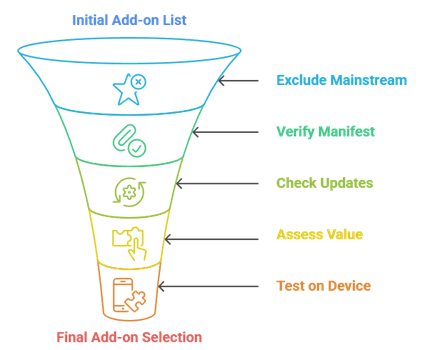
A community add-on only earned a place here if it passed a hands-on check, not just a high install count. Our shortlist ran on four rules:
- Not Already Covered: We deliberately skipped Torrentio, Comet, and the other mainstream picks so this list adds genuinely fresh tools to your setup, not repeats.
- Reachable Manifest: Every add-on’s manifest was confirmed reachable on stremio-addons.net, and we dropped any showing configuration errors or a spike of recent problem reports.
- Actively Updated: We kept only add-ons with 2026 update activity, because an abandoned community project breaks the moment an upstream source or host quietly changes.
- Adds Real Value: Each pick does something the default app cannot, whether that is catalogs, metadata, trailers, AI search, or a cleaner route to torrents.
- Tested On Device: We installed the shortlist on a Fire TV Stick and desktop to confirm each one actually loaded and behaved as its listing described.
How to Install a Community Add-on in Stremio
Installing any add-on above takes under a minute once you know the steps. The process is identical on Fire TV, desktop, and mobile:
- Open The Add-on Page: Visit the add-on’s listing on stremio-addons.net and press Install, or copy its manifest link if you prefer to paste it manually.
- Confirm In Stremio: Stremio opens and shows the add-on’s details; press the Install button on the pop-up to add it to your account for use.
- Configure If Needed: Some add-ons, like FilmWhisper, ask for an API key or preferences on a setup page before you install, so complete that step first.
- Sync Across Devices: Because add-ons attach to your Stremio account, anything you install appears on every signed-in device, including a Fire TV Stick and your phone.
- Restart If Streams Lag: If catalogs or streams do not appear immediately, reopen Stremio once; our Stremio not working guide covers deeper fixes.
Final Verdict
The Stremio community has grown well past torrent scrapers, and these eight add-ons prove it. If you only add three, make them the ones that reshape how you use the app day to day rather than just widening your source pool.
- Streaming Catalogs: the single best upgrade here, turning Stremio into a proper Netflix-style discovery hub across every major platform.
- StremThru Torz: a modern, low-maintenance route to clean torrent results that pairs beautifully with any debrid service.
- FilmWhisper: AI search that finally lets you find a title from a vague description instead of an exact name.
Frequently Asked Questions (FAQs)
What are Stremio community add-ons?
They are add-ons published by independent developers rather than Stremio itself. They live in the Community tab and add extra sources, catalogs, and features, but quality varies, so it is worth choosing maintained ones.
Are community add-ons safe to use?
Stremio itself only organizes links, so safety depends on the add-on and the content it points to. Install from official listings, avoid random forum links, and consider a VPN for privacy while streaming.
Do these add-ons need a debrid service?
Most do not. Catalog, metadata, trailer, and AI add-ons work for free, while torrent-based picks like StremThru Torz and Ytztvio run better with a debrid account for cached, buffer-free links.
Why are Torrentio and Comet not on this list?
They are already covered in our main best Stremio addons guide. This list focuses on fresh community tools you likely have not installed yet.
How do I find more community add-ons?
Browse the catalogue at stremio-addons.net, sort by category, and check each add-on’s manifest status and recent report count before installing. That is the safest way to find working, current add-ons.