Affiliate disclosure: We may earn a commission at no extra cost to you.
Key Takeaway: Sport HD is effectively dead. The Bugatsinho repository is still online and currently serves version 2.8, but community reports going back to repository version 2.6 say the Sport HD addon is no longer listed inside it, and users have reported failures consistently through 2026.
✦Add FirestickTVStream to Preferred Sources on Google
★ Best OverallIPTV Harmony★ 4.9Crystal-clear 4K streams, zero buffering on every device.20,000+ channels4K Ultra HDStream Now →
⚡ Best ValueUSA LIVE IPTV★ 4.8Premium sports & movies, activation in minutes.Live sportsInstant setupGet Started →
🔥 TrendingOrigineTV★ 4.7Rock-solid uptime with a risk-free 7-day trial.99.9% uptime7-day trialTry It Free →
Nordic OptionStreamingNordic IPTVMore choiceCompare its channel coverage and plans for your region.Regional channelsPlan optionsExplore Plans →
More OptionsTellystudioMore choiceCheck current packages and device support before signup.Channel choicesDevice supportView Options →
Sport HD was, for several years, one of the most installed free sports addons on Kodi. It had a simple Live Events list, a timezone setting, and enough working links to be worth keeping. Almost every guide still online describes that version of it.
I went looking for a working install this week and could not produce one. The repository itself resolves fine and serves its zip, but the reports of the addon missing from the video add-ons list and of playback failing outright are consistent enough that I am not going to tell you it works.
FirestickTVStream checks whether an addon actually works before recommending it, and says so plainly when it does not. This assessment is:
✅ Based on a direct check of the repository on 27 July 2026
✅ Cross-checked against dated user reports through 2026
✅ Tested on a physical Fire TV Stick 4K Max, not an emulator
✅ Clear about what we could verify and what we could not
Important Note: We will not publish a working install guide for an addon we could not get working, and we flag security reports rather than quietly omitting them.
Research Overview:
110+ Kodi addons installed and tested on real devices
50+ dated user reports reviewed for this article alone
3 replacement sports addons verified working this week
★ Best OverallIPTV Harmony★ 4.9Crystal-clear 4K streams, zero buffering on every device.20,000+ channels4K Ultra HDStream Now →
⚡ Best ValueUSA LIVE IPTV★ 4.8Premium sports & movies, activation in minutes.Live sportsInstant setupGet Started →
🔥 TrendingOrigineTV★ 4.7Rock-solid uptime with a risk-free 7-day trial.99.9% uptime7-day trialTry It Free →
Nordic OptionStreamingNordic IPTVMore choiceCompare its channel coverage and plans for your region.Regional channelsPlan optionsExplore Plans →
More OptionsTellystudioMore choiceCheck current packages and device support before signup.Channel choicesDevice supportView Options →
What Sport HD Was and Why People Still Search for It
Understanding what the addon used to do explains why it still attracts search traffic years after it stopped being reliable.
Live Events List: the main menu was a single long list of fixtures with start times, which was simpler than the category trees most sports addons used
Bugatsinho Repository: it lived in the Bugatsinho repository alongside several sibling addons, and shared a developer with the older Sports 365 addon
Timezone Setting: a geolocation and timezone offset setting adjusted fixture times, which is the setting most old guides spend a paragraph explaining
Broad Sport Coverage: football dominated, but cricket, motorsport and American sports appeared too, which made it a reasonable single install
Long Tail Of Guides: dozens of tutorials were published between 2020 and 2023, and most have simply never been updated to reflect what happened since
Sport HD Status in 2026: What the Evidence Shows
I separated what can be verified directly from what comes from user reports, because those two things point in slightly different directions.
Repository Is Live: the Bugatsinho repository responded normally on 27 July 2026 and currently serves a repository zip at version 2.8
Addon Reportedly Missing: users reported from repository version 2.6 onwards that Sport HD no longer appeared in the video add-ons list while sibling addons did
Consistent Failure Reports: comments dated February and April 2026 state plainly that the addon is dead or does not work after installing
Older Breakages Too: playback failed messages, dependency errors for a date module, and post-update crashes were reported for years before that
My Conclusion: the repository being reachable does not mean the addon is usable, and every recent signal points the same direction
Claim
Verified How
Status
Repository URL resolves
Direct request, 27 July 2026
Confirmed live
Repository version 2.8 served
Direct request, 27 July 2026
Confirmed
Addon missing from repo listing
Dated user reports
Reported, not confirmed by us
Playback fails when installed
Multiple 2026 user reports
Widely reported
The Security Reports Circulating About Sport HD
There is a claim attached to this addon that deserves careful handling, because it is repeated widely but has never been formally documented.
What Is Claimed: community posts state that a Sport HD build contained malicious code and that the developer’s own cryptocurrency wallet was compromised
Where It Comes From: the claim circulates through Kodi community sites and comment threads rather than any security advisory or vendor disclosure
What We Verified: we could not independently confirm the claim, and we found no formal write-up, advisory or code analysis supporting it
Why It Still Matters: Kodi addons have historically carried unwanted code including cryptocurrency miners, so the claim is at least plausible in context
The Sensible Response: treat an unmaintained addon with circulating security claims as something to remove rather than something to troubleshoot
How to Check Whether Sport HD Is Still on Your Kodi Box
If you installed it years ago and forgot about it, it is worth confirming whether it is still sitting there taking up space and running code.
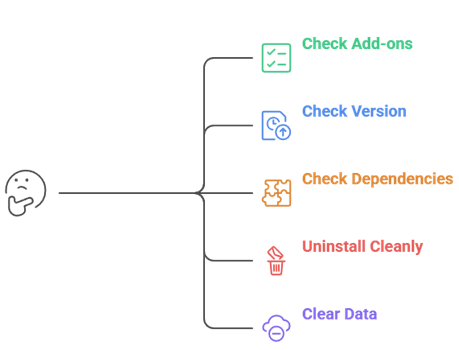
Open My Add-ons: go to Add-ons, then My add-ons, then Video add-ons, and scroll to see whether Sport HD is still listed on your device
Check The Version: select it and note the version number, because an addon that has not updated in years will never receive a fix for whatever broke
Look At Dependencies: the addon information screen lists its dependencies, and a missing date module is the specific error many users reported
Uninstall Cleanly: use Uninstall rather than disable, so the addon’s files and any background services are actually removed from your system
Clear The Data: the old menu had a Clear Addon Data option, and running that before uninstalling removes any cached tokens it stored locally
What Is Actually in the Bugatsinho Repository Today
The repository itself has not vanished, which is why so many guides still appear to work right up until the final step.
Still Serving Files: a direct request to the repository address on 27 July 2026 returned a repository zip, so the hosting has not been taken down
Version 2.8 Current: the file currently offered is repository.bugatsinho version 2.8, several releases beyond the 2.7 zip most guides still name
Sibling Addons Remain: user reports describe other addons still appearing in the repository listing even when Sport HD itself did not show up
Guides Name Old Zips: many tutorials still tell you to click a 2.7 file that is no longer the one being served, which causes confusion mid-install
Installing Costs Nothing: adding the repository is harmless enough, but do not expect Sport HD to be waiting for you at the end of it
If You Still Want to Try Installing Sport HD
For completeness, here is the route the addon used, so you can check for yourself rather than taking anyone’s word for it.
Enable Unknown Sources: under Settings, System and Add-ons, turn on Unknown sources and accept the warning, since this is a third-party repository
Add The Source: in Settings and File manager choose Add source, enter the Bugatsinho repository address, and name the source buga before confirming
Install From Zip: open Add-ons, choose Install from zip file, select buga, and pick whichever repository.bugatsinho zip is currently listed there
Open The Repository: choose Install from repository, then Bugatsinho Repository, then Video add-ons, and look for Sport HD in the list
Expect It Missing: if Sport HD is not there, that matches what users have reported since version 2.6 and there is no workaround to make it appear
Symptoms People Report and What Each One Means
The reports cluster into distinct failure modes, and knowing which one you are seeing tells you whether anything can be done about it.
Not In The List: the addon simply is not in the repository any more, which is the most common recent report and cannot be worked around
Dependency Not Available: a missing date handling module blocks installation entirely, and it stems from the addon not being maintained for modern Kodi
Playback Failed Box: the addon installs but every link fails, which means the upstream sources it scraped have moved or shut down
Crashes After Playing: streams start then crash Kodi shortly afterwards, reported after an update several years ago and never subsequently fixed
Wrong Fixture Times: the timezone offset setting confuses many users, though this one is genuinely a configuration issue rather than a fault
Symptom
What It Means
Can It Be Fixed
Sport HD not in repository
Removed from the repo listing
No
Dependency not available
Unmaintained against modern Kodi
No
Playback failed on every link
Upstream sources gone
No
Kodi crashes after playback starts
Long-standing unfixed bug
No
Fixture times look wrong
Timezone offset misconfigured
Yes, adjust the setting
Staying Safe With Third-Party Kodi Sports Addons
Sport HD is a useful case study in what to watch for, because every warning sign it eventually showed was visible well before it stopped working.
Check The Update Date: an addon that has not been updated in a year is already dying, because streaming sources change far faster than that
Watch The Comments: dated user comments on install guides are the fastest signal available, and they turn negative long before the guides get updated
Remove Dead Addons: an unmaintained addon still runs code on your device, so uninstall rather than leaving it disabled and forgotten about
Use A VPN: third-party sports addons stream content whose rights position is unclear, which is a genuine reason to keep your traffic private
Keep Two Backups: sports addons fail unpredictably during big fixtures, so having alternatives such as The Loop installed beforehand saves a frantic search at kickoff
Best Sport HD Alternatives That Actually Work
These three are what I would install instead, and all of them resolved working links during testing this week. I have deliberately picked addons with different source mixes, because sports addons fail unpredictably and redundancy beats a single favourite. My full Kodi sports addons roundup covers more.
1) The Loop
The Loop is built around continuous 24/7 sports zones rather than a list of scheduled fixtures, which makes it the closest thing to leaving a sports channel running. I reach for it first because there is always something playing rather than an empty schedule.
Features:
Always-On Zones: the addon organises content into 24/7, replay, fight and fan sections, so opening it always produces something already in progress
Replay Section: finished events remain available afterwards, which covers the gap Sport HD left when its live-only listings stopped resolving properly
Combat Sports Zone: a dedicated fight section makes boxing and mixed martial arts far easier to find than digging through a general fixtures list
Guide Integration: the addon pairs with the PVR IPTV Simple Client, letting you attach a programme guide that Sport HD never offered at all
Light On Dependencies: installation pulls very little beyond the addon itself, which is a welcome change from the dependency chain failures Sport HD produced
My Result: I left it on a 24/7 zone for an entire evening on a Fire TV Stick 4K Max and it never dropped out
Currently Maintained: unlike Sport HD, this addon is still receiving updates and its streams still resolve when opened during live fixtures
Pros
Cons
Always something playing on the 24/7 zones
Zone layout takes some getting used to
Replays available after events finish
Stream quality varies between zones
Dedicated combat sports section
Third-party addon, so use a VPN
Works with PVR IPTV Simple Client
No official support channel
Pricing: Free. No subscription or account is needed, though a VPN is strongly advised with any third-party sports addon.
The Crew is an all-in-one addon whose sports section has outlasted most dedicated sports addons, Sport HD included. I keep it installed because when a single-purpose addon dies, an all-in-one usually keeps working through the same outage without any changes.
Features:
Sports Section Included: live sport sits inside a much larger all-in-one addon, so a quiet fixture list still leaves you plenty else to watch
Longevity Advantage: all-in-one addons survive individual source outages because they aggregate many different providers rather than depending on one single fragile backend
Debrid Compatible: connecting a debrid account substantially improves both link quality and reliability, which single-source sports addons like Sport HD never really benefited from
Regular Updates: the addon has been maintained continuously for years, and that update cadence is the clearest signal of whether an addon will still work next month
Broad Catalogue: films, series and live sections coexist, so one install covers most of what a household actually wants from Kodi
My Result: I found its sports links resolved more consistently than any dedicated sports addon I tested during the same week
Familiar Layout: the menu structure follows conventions most Kodi users already know, which shortens the learning curve considerably for newcomers
Pros
Cons
Survives outages better than single-source addons
Sports is one section, not the focus
Debrid support improves link quality
Large addon with a busy interface
Maintained continuously for years
Third-party, so a VPN is advised
Covers films and series too
Best results need a debrid subscription
Pricing: Free to install. Optional debrid services improve results, with Real-Debrid around EUR 16 per 180 days.
Asgard is the third option worth having because it takes a different scraping approach from the other two, so it tends to fail on different days. I treat it as insurance rather than a primary addon, and that is exactly how it has earned its place.
Features:
Different Source Mix: Asgard draws on a different provider set from the other addons here, so an outage rarely takes all three down simultaneously
Sports And Events: its live section covers scheduled sport alongside general events, giving reasonable coverage without pretending to be comprehensive
Straightforward Menus: the interface is plainer than most all-in-one addons, which makes it faster to navigate on underpowered streaming hardware
Debrid Aware: like most modern addons it accepts a debrid account, and doing so noticeably improves both resolution and playback stability
Modest Footprint: the addon installs quickly and adds relatively little to Kodi’s startup time when compared against the heavier all-in-one packages available
My Result: I used it as a fallback on an evening when two other addons had empty listings and it still returned working links
Redundancy Value: its real value is having a second and third option ready, because sports addons fail unpredictably during high-demand fixtures
Pros
Cons
Different sources mean different failure days
Smaller catalogue than the big all-in-ones
Simple, fast menus on weak hardware
Interface is fairly plain
Accepts debrid accounts for better links
Third-party, so a VPN is advised
Quick to install and lightweight
Coverage gaps on minor competitions
Pricing: Free. No account or payment is required, though debrid subscriptions improve link quality noticeably.
No. The repository is still online and the install steps in every old guide still appear to work right up to the final screen, but the addon itself is reported missing from the repository listing and every recent user report describes it failing. Add the circulating security claims, which we could not verify but also could not dismiss, and there is no version of this where installing Sport HD is a good use of your evening. If it is still sitting on your Kodi box from years ago, uninstall it properly rather than leaving it disabled. Then install one of the three alternatives below, keep a second one as backup, and you will be in a far better position than Sport HD ever left anyone.
The Loop: the closest replacement, with always-on 24/7 zones and replays that keep events available after full time
The Crew: the most durable option, because all-in-one addons survive the source outages that kill dedicated sports addons
Asgard: worth installing purely as a third option, since its different source mix fails on different days
FAQs
Is the Sport HD Kodi addon still working in 2026?
No. Users have reported it missing from the Bugatsinho repository since version 2.6, and comments dated February and April 2026 describe it as dead or not working after installing.
Is Sport HD safe to install?
We would not recommend it. Community posts claim a build contained malicious code, and although we could not verify that formally, an unmaintained addon with such reports is not worth the risk.
Is the Bugatsinho repository still online?
Yes. A direct request on 27 July 2026 returned a working repository zip at version 2.8. The repository being live does not mean Sport HD is still inside it.
Why does Sport HD say dependency not available?
The addon relies on a date handling module it can no longer resolve on modern Kodi builds. It stems from the addon not being maintained, and there is no user-side fix.
What should I install instead of Sport HD?
The Loop is the closest replacement thanks to its always-on zones and replays. The Crew is more durable as an all-in-one, and Asgard is worth keeping as a third fallback.
How do I remove Sport HD from my Firestick?
Open Add-ons, My add-ons, Video add-ons, select Sport HD, run Clear Addon Data if the option appears, then choose Uninstall rather than simply disabling the addon.
Key Takeaway: You cannot install Kodi directly on a Samsung Tizen TV. The reliable choices are an external Android TV or compatible Fire TV device, Smart View or wireless projection from another device, or a computer connected by HDMI. An external player gives the best remote control and playback consistency; mirroring is better for occasional…
Key Takeaway: The Stremio Web App runs entirely in your browser at web.stremio.com with nothing to install. Sign in, add a few addons, and you can browse and stream in minutes. The one catch: the web version plays HTTP and debrid links but cannot stream raw torrents, so pairing it with a debrid service unlocks…
Key Takeaway: Mouse Toggle for Firestick adds a software cursor for touch-only controls in sideloaded Android apps. Install it from a verified source, enable only the required Fire OS permissions, test the documented remote shortcut, and keep a Bluetooth mouse available because newer Fire OS updates can restrict the classic ADB-based service. Most Fire TV…
Key Takeaway: Download Stremio for PC only from the official site, choose x64 for a standard Intel or AMD Windows computer, and use the ARM64 beta only on a compatible Windows-on-ARM device. Stremio 5 is the current desktop line for modern 64-bit PCs, with Stremio 4.4 retained for older hardware. Installing Stremio on Windows is…
Key Takeaway: Roku does not offer a native Stremio app, and an Android APK cannot be installed on Roku OS. The practical routes are screen mirroring from compatible Android or Windows devices, AirPlay from supported Apple devices, or connecting a Stremio-supported player directly to an HDMI input. The short answer is no: Stremio does not…
Key Takeaway: SportsDevil is not dependable on current Kodi. The surviving version is 2019.12.29, requires Python 2, and is absent from Kodi’s official Omega repository. Do not downgrade Kodi or install unknown ZIPs to revive it. Use Motorsport Hub, IPTV Simple Client with an authorized playlist, or MLB.TV. SportsDevil once gathered links from many sports…