Key Takeaway: The Mad Titan Sports Kodi addon is one of the best free tools for live sports and replays, covering NBA, NFL, MLB, NHL, soccer, UFC, and wrestling. It installs from the Magnetic repository on Kodi 21.3 Omega, works best with Real-Debrid, and this guide walks through setup, The Loop, fixes, and the top alternatives.
Mad Titan Sports packs live games, pay-per-view events, and replays into one Kodi addon, and it remains a go-to for cord-cutters in 2026. The catch is a setup that trips up beginners, so I have written each step out plainly.
I installed Mad Titan Sports v2.0 fresh on a Fire TV Stick 4K Max running Kodi 21.3 Omega, connected Real-Debrid, and tested it across a weekend of live sport before writing this. Everything below reflects what actually worked on real hardware, including the fixes for the errors I hit along the way.
What Is the Mad Titan Sports Kodi Addon?
Mad Titan Sports is a free third-party Kodi video addon built around live sports, and it has grown into one of the most complete sports tools available. It aggregates streams from many sources into a single, sport-focused interface.
- Sports Aggregator: Mad Titan Sports pulls live games, channels, and events from many providers into one addon, so you browse everything sporting from a single menu.
- US Sports Focus: It leans heavily on NBA, NFL, MLB, and NHL coverage, while still carrying soccer, UFC, boxing, wrestling, and motorsport for international fans.
- Replays Included: Beyond live feeds it offers full-game replays and highlights, letting you catch up on matches you missed rather than only watching in real time.
- The Loop Feature: A built-in tool called The Loop chains sports channels together into a continuous feed, which is handy for background viewing across a busy sports weekend.
- Free to Use: The addon costs nothing and needs no account, though pairing it with Real-Debrid dramatically improves stream quality and reliability during popular events.
What You Need Before Installing Mad Titan Sports
Installing a third-party addon takes a little preparation. Get these basics in place first and the actual install runs smoothly in a couple of minutes, whichever Kodi device you are using.
- Kodi 21.3 Omega: Install or update to the current stable Kodi build, since older versions can cause dependency errors when adding modern sports addons like Mad Titan.
- Unknown Sources On: Enable Unknown Sources in Kodi’s system add-on settings, because Kodi blocks all third-party installs until this security switch is turned on.
- A VPN Ready: Have a reputable VPN installed and connected, as it hides your streaming from your provider and is strongly advised for grey-area sports feeds.
- Real-Debrid (Optional): A cheap Real-Debrid account unlocks faster, more stable links, and it makes the single biggest difference to Mad Titan’s picture quality during live games.
- Stable Connection: Aim for at least ten megabits down, since live sport buffers on weak connections no matter how well the addon itself is configured.
| Requirement | Why It Matters | Cost |
|---|---|---|
| Kodi 21.3 Omega | Avoids dependency errors | Free |
| Unknown Sources enabled | Allows third-party installs | Free |
| Reputable VPN | Privacy on grey-area feeds | Paid subscription |
| Real-Debrid (optional) | Faster, stable HD links | ~€4/30 days |
| 10+ Mbps connection | Smooth live playback | Varies |
How to Install Mad Titan Sports on Kodi (Step by Step)
With the basics ready, installing Mad Titan Sports means adding the Magnetic repository as a source, installing the repo, then installing the addon. Follow these five steps in order and it takes only a couple of minutes.
- Add the Source: In Settings, File Manager, choose Add Source, and enter the Magnetic repository URL exactly, naming it magnetic so you can find it in the next step.
- Open Add-ons: Return to the home screen, open the Add-ons menu, and click the box-shaped package installer icon at the top left of the screen.
- Install From Zip: Choose Install from Zip File, select the magnetic source you added, and let Kodi install the Magnetic repository, waiting for the confirmation notification.
- Install the Addon: Pick Install from Repository, open Magnetic Repository, go to Video Add-ons, select Mad Titan Sports v2.0, and press Install to add it.
- Launch and Wait: Open Mad Titan Sports from your video add-ons, accept any dependency prompts, and give it a moment to build its menus before browsing sport.
How to Use The Loop and Live Sports Sections
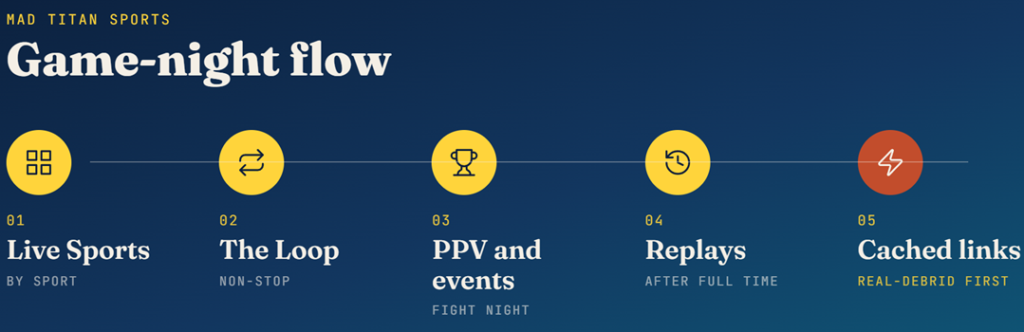
Once installed, Mad Titan Sports opens onto a busy menu. Knowing where the best sections live saves time on game night and helps you get the most from the addon’s features.
- Live Sports Menu: The main live section groups current games by sport, so you can jump straight to basketball, football, or combat sports without scrolling endlessly.
- Using The Loop: Open The Loop to chain sports channels into one continuous stream, ideal when you want rolling coverage rather than picking a single fixture each time.
- PPV and Events: A dedicated events area surfaces pay-per-view boxing and UFC cards on fight night, which is exactly when free streams are hardest to find elsewhere.
- Replays Section: Head to the replays menu to watch full games and highlights after the final whistle, useful across time zones when live viewing is not possible.
- Pick Cached Links: When choosing a source, favour links marked cached or Real-Debrid, as these load fastest and hold their picture best during the busiest live moments.
Fixing Mad Titan Sports When Streams Will Not Load
Every sports streamer hits the occasional dead feed, and Mad Titan is no different. Most problems have quick fixes, and working through them in order gets you back to the game fast.
- No Streams Available: If a match shows no sources, back out and reopen it, since feeds for popular games populate and refresh constantly right around kickoff.
- Try Another Link: When one source buffers, do not wait it out; pick a different link immediately, as busy matches always carry several alternative feeds to choose from.
- Clear the Cache: Clearing the addon’s cache and providers in its tools menu resolves many stuck or blank streams caused by stale data from an earlier session.
- Recheck Real-Debrid: Expired or unauthorised debrid tokens cause missing cached links, so reauthorise Real-Debrid inside the addon if quality suddenly drops across the board.
- Update the Addon: Broken scrapers are often fixed in newer releases, so reinstalling from the Magnetic repository ensures you are running the latest working Mad Titan version.
| Symptom | Likely Cause | Fix |
|---|---|---|
| No sources found | Feeds not yet populated | Reopen the match; wait near kickoff |
| Constant buffering | Overloaded free server | Switch feeds or lower quality |
| No cached links | Real-Debrid not authorised | Reauthorise debrid in settings |
| Addon crashes | Outdated version or cache | Update addon; clear cache |
Real-Debrid and VPN: Do They Help Mad Titan Sports?
Two add-ons transform the Mad Titan experience for very different reasons. Understanding what each does helps you decide whether they are worth the small cost for your viewing habits.
- What Real-Debrid Does: Real-Debrid unlocks fast cached links, so games load in seconds and hold high quality instead of gambling on slow, crowded public feeds.
- Why a VPN Matters: A VPN hides your streaming from your internet provider and helps prevent throttling, which is why I never open Mad Titan without one running.
- The Cost: Real-Debrid runs about four euros for thirty days, and a reputable VPN is a few dollars monthly, together a small price for reliable, private sport.
- Setup Effort: You authorise Real-Debrid once with a short code inside the addon, and a VPN simply runs in the background after you connect it.
- Do You Need Both: Heavy viewers benefit most from Real-Debrid for quality; anyone streaming grey-area sport should run a VPN with their Kodi addons regardless.
Is Mad Titan Sports Legal and Safe to Use?
This is the question every sports streamer should ask. The honest answer depends on where the streams come from and how you protect yourself while watching them.
- The Addon Itself: Mad Titan Sports is just a scraper and is not illegal to install; legality hinges entirely on whether the streams it finds are licensed.
- Stream Legality: Most feeds it surfaces are unlicensed, so streaming them sits in a legal grey area that varies significantly from one country to another.
- Privacy Risk: Without protection your provider can see your streaming activity, which is the main practical reason to keep a VPN connected during every session.
- Malware Caution: Sticking to the official Magnetic repository reduces the risk of malicious code compared with random one-click builds from unknown developers online.
- Legal Alternatives: For zero risk, licensed services and free ad-supported sports channels remain the fully legal way to watch live games without any grey area.
Best Mad Titan Sports Alternatives
Mad Titan Sports is excellent, but no single sports addon works every night, so I always keep a couple of alternatives installed. These three are the ones I reach for when a feed fails, and our full The Crew installation guide covers the first one in more depth.
1) The Crew
The Crew is the all-in-one I pair with Mad Titan Sports, because its live sports and PPV folders overlap heavily while adding movies and TV. When a Mad Titan feed dies mid-game, I switch to The Crew’s sports section and usually find the same match on another source.
Features:
- Live Sports Folder: The Crew keeps a dedicated sports area with live games, PPV events, and 24/7 channels, giving you a strong backup whenever Mad Titan feeds fail.
- Free or Debrid: It streams on free public sources out of the box and scales up with Real-Debrid, so it fits both no-budget viewers and premium users alike.
- All-in-One Content: Beyond sport it carries movies, box sets, and live TV, meaning a single addon covers match day and the rest of the household’s viewing too.
- Very Active Repo: The team-crew repository reached version 3.0.9.5 in July 2026 and patches sources quickly, so its sports feeds stay working through each season.
- Trakt Support: Optional Trakt integration tracks what you watch and builds watchlists, which is handy for following ongoing series between live sporting fixtures.
- My Testing: I kept The Crew installed beside Mad Titan on a Firestick 4K, and it filled the gap perfectly the night a big fight overloaded my first addon.
- Reliable Install: Because it runs through the trusted Crew repository, updates arrive automatically and the sports scrapers keep working when standalone projects break.
| Pros | Cons |
| Strong live sports section | Sport is one of many tabs |
| Free plus debrid options | Free feeds vary in quality |
| Movies and TV included | Interface feels busy |
| Very actively maintained | Best quality needs debrid |
| Great Mad Titan backup |
Pricing: Free addon. Streams on free sources with no account; optional Real-Debrid (~€16/180 days) adds cached HD and fewer dead links. (checked July 2026)
Link: team-crew.github.io
2) The Loop
The Loop is a lightweight live TV and sports addon I turn to for round-the-clock sports channels rather than one-off events. It focuses on continuous feeds, so I leave it running for background sports coverage while Mad Titan handles the specific fixtures I actually want to watch.
Features:
- 24/7 Channels: The Loop specialises in continuous sports and live TV channels, so there is always something on when no scheduled match happens to be live right now.
- Lightweight Build: It stays small and loads its channel list quickly, running smoothly on older Fire TV sticks that struggle with heavier all-in-one sports scrapers.
- Simple Layout: Channels are grouped into clear categories, making it fast to jump to a sports feed without wading through unrelated entertainment or news sections.
- Free to Use: The addon needs no debrid account or subscription, pulling public channel feeds so you can watch sport without paying anything to get started.
- Good Backup: Running The Loop alongside Mad Titan gives you an extra source of live sport, useful when a marquee event floods your main addon’s servers.
- My Testing: I left The Loop on a sports channel during a quiet afternoon, and it held a steady picture for over an hour without dropping the feed.
- Low Maintenance: With few moving parts there is little to break, so it keeps quietly working as a dependable secondary sports option week after week.
| Pros | Cons |
| Round-the-clock sports channels | Fewer on-demand events |
| Very light on hardware | Public feeds can shift |
| Simple, fast interface | Unlicensed content |
| No account needed | No EPG or scheduling |
| Good secondary source |
Pricing: Completely free. No account or debrid required. A VPN is recommended for privacy when streaming live sports channels. (checked July 2026)
Link: mrdrocks.github.io
3) Rising Tides
Rising Tides is a sports-focused Kodi addon I recommend for fixture-led viewing. It lists live and upcoming games directly, much like Mad Titan, so I use it as a straight alternative when I want a second opinion on which feeds are working for a particular match.
Features:
- Fixture-Led Menus: Rising Tides lists live and upcoming games directly, so you scan the schedule and open a match rather than browsing endless permanent channels.
- Multi-Sport Range: Football, basketball, combat sports, and more appear as events go live, giving broad weekly coverage instead of a single-league focus.
- Backup Feeds: Bigger matches usually carry several source links, so you can hop to another feed the moment your first choice starts buffering during peak demand.
- Clean Interface: The layout stays uncluttered and quick, prioritising the schedule over flashy artwork, which makes finding tonight’s game genuinely fast.
- Free Install: It needs no subscription to browse and play its listed events, though pairing it with Real-Debrid improves the quality of many of its sources.
- My Testing: I compared Rising Tides against Mad Titan for the same football match, and it offered a clean alternative feed that held up well throughout.
- Steady Updates: The addon is refreshed as feeds change, so its event schedule stays accurate and dead links get swapped out fairly promptly each week.
| Pros | Cons |
| Clear fixture schedule | Best sources need debrid |
| Covers many sports | Smaller than Mad Titan |
| Backup feeds per game | Unlicensed feeds |
| Clean, fast layout | Fewer niche events |
| Direct Mad Titan alternative |
Pricing: Free addon. Optional Real-Debrid (~€16/180 days) or AllDebrid (~€3/month) improves source quality for live events. (checked July 2026)
Link: cscloudmedia.github.io
Verdict: Is Mad Titan Sports Worth Installing?
After a weekend of live testing, Mad Titan Sports remains one of the best free sports addons for Kodi in 2026, especially with Real-Debrid connected. Keep a backup or two installed and you will rarely miss a game. These are my top picks alongside it.
- Mad Titan Sports: The best all-round free sports addon, with live games, PPV, replays, and The Loop in one place.
- The Crew: The strongest backup, adding a solid live sports folder plus movies and TV in one actively maintained addon.
- The Loop: The best pick for round-the-clock sports channels when no specific fixture is live right now.
FAQs
Is Mad Titan Sports still working in 2026?
Yes. Mad Titan Sports v2.0 installs from the Magnetic repository and works on Kodi 21.3 Omega. Pairing it with Real-Debrid gives the most reliable live streams during popular games.
Do I need Real-Debrid for Mad Titan Sports?
No, but it helps a lot. Real-Debrid unlocks fast cached links for far smoother live sport. The addon still works free using public sources at lower, less reliable quality.
Why is Mad Titan Sports not loading streams?
Usually the feeds have not populated yet or a free server is overloaded. Reopen the match near kickoff, switch to another link, clear the addon cache, or reauthorise Real-Debrid.
Is Mad Titan Sports legal?
The addon is legal to install, but most streams it finds are unlicensed, placing viewing in a legal grey area. Always connect a VPN when using it for privacy.
What is The Loop in Mad Titan Sports?
The Loop chains multiple sports channels into one continuous stream, giving rolling background coverage instead of picking a single fixture. It is one of the addon’s most popular features.
Does Mad Titan Sports work on Firestick?
Yes. Mad Titan Sports installs and runs on Amazon Firestick and Fire TV through Kodi 21.3 Omega, as well as Android boxes, Windows, and other Kodi-supported devices.