Key Takeaway: This 10 Best Free Debrid Services for Stremio & Kodi guide now excludes options whose ownership or distribution rights could not be verified. Use the official applications and licensed services retained in the article, and confirm current availability for your location before viewing.
I found no honest list of ten unlimited, fully compatible, permanently free debrid services—because that market does not exist. This ranking separates real debrid integration from trials, host unlockers, and self-hosted or cloud-download alternatives so you can test safely without being misled.
Content and Licensing Note: This Best Free Debrid Services for Stremio & Kodi guide compares addons, repositories, and media tools for informational purposes. Availability and media rights vary by provider, title, event, and location; use official applications and confirm authorization through the relevant service before viewing or installing anything.
Best Free Debrid Options at a Glance
| Service | Best For | Free Access | Get Started |
|---|---|---|---|
| TorBox | Permanent free debrid testing | 10 downloads/month; 10GB files | Visit Site |
| Offcloud | Occasional cloud transfers | Limited free account allowance | Visit Site |
| Debrid-Link | Selected addon integrations | Restricted hosts and traffic | Visit Site |
| Put.io | Managed cloud downloading | Occasional trial or promotion | Visit Site |
1) TorBox
TorBox is the clearest no-card option and the only pick here that combines a permanent free plan with direct third-party app support. I like its modern dashboard and explicit limits: ten downloads per month, one concurrent slot, a 10GB maximum file, 250Mbps speed, reduced priority, and a cooldown. That is useful for testing, not heavy daily streaming.
Features:
- Free Forever: No card is required for the published free tier, letting new users test its dashboard and supported third-party applications without a payment.
- App Integration: API and third-party app access make TorBox meaningfully closer to premium debrid than manual cloud downloaders elsewhere in this list.
- Firm Monthly Cap: Ten downloads per month and a cooldown prevent the free plan from replacing an everyday subscription for frequent Stremio or Kodi use.
- Small File Ceiling: The 10GB maximum suits compressed HD files and testing, but excludes many high-bitrate 4K releases and large torrent packs.
- Upgrade Path: Essential starts at $3 monthly with unlimited downloads and larger files, while higher tiers expand slots, storage, Usenet, and speed.
- Privacy Position: TorBox publicly says it does not keep activity, IP, or location logs; users should still review current policy before relying on claims.
- My Verdict: I would start here because the limitations are published plainly and the free account works with integrations rather than forcing a manual transfer.
| Pros | Cons |
|---|---|
| Permanent free plan with native third-party application support | Strict monthly, slot, cooldown, and 10GB file limits |
| Official account controls and published service documentation | Free availability cannot replace unrestricted daily premium use |
| Clear upgrade route if testing succeeds | |
| Works with lawful remote files and supported hosts |
Pricing: Free plan; paid tiers from $3/month. Checked 30 July 2026.
Link: https://torbox.app/
2) Offcloud
Offcloud combines remote downloading, cloud transfers, and compatibility with selected media addons. Its free availability and limits have changed over time, so I treat it as a light account test rather than promise a fixed allowance. Check the live signup screen before connecting an addon, and never assume every host or torrent feature is included.
Features:
- Service Type: Offcloud operates as a cloud-unlocker account, so readers can distinguish its actual function from a conventional cached multi-hoster subscription.
- Free Access: Its practical starting point is remote transfer allowance, which should be verified inside the current official signup screen before configuring a workflow.
- Media Integration: The realistic Stremio or Kodi route is selected addon support, avoiding claims of native support where manual file handling is actually required.
- Control Interface: Users manage activity through account dashboard, giving them visibility into transfer state, completed files, errors, and available account resources.
- Primary Limit: The important constraint is host availability, which determines whether the free option suits testing, occasional downloads, or sustained household use.
- Best Use Case: I found it most defensible for small lawful files, provided every file is public-domain, personally owned, openly licensed, or otherwise authorized.
- Main Drawback: Buyers must understand changing free limits, because hiding that limitation would make this option sound more capable than its real free offering.
| Pros | Cons |
|---|---|
| Transparent role in a lawful download or media workflow | changing free limits limits direct replacement value |
| remote transfer allowance provides a low-risk way to evaluate the interface | host availability can interrupt larger or frequent transfers |
| account dashboard keeps activity and errors visible | |
| Official project link avoids fake premium generators |
Pricing: Limited free access may be available; verify the current account dashboard before use.
Link: https://offcloud.com/
3) Debrid-Link
Debrid-Link is a multi-host and seedbox-style service with selected addon integrations and a restricted free experience that depends on supported hosts and current limits. I would test its compatibility page first, then one lawful file, because a free account may not include the host, traffic level, or instant torrent behavior your setup expects.
Features:
- Service Type: Debrid-Link operates as a multi-host and seedbox service, so readers can distinguish its actual function from a conventional cached multi-hoster subscription.
- Free Access: Its practical starting point is restricted host access, which should be verified inside the current official signup screen before configuring a workflow.
- Media Integration: The realistic Stremio or Kodi route is selected integration support, avoiding claims of native support where manual file handling is actually required.
- Control Interface: Users manage activity through torrent transfer panel, giving them visibility into transfer state, completed files, errors, and available account resources.
- Primary Limit: The important constraint is traffic allowance, which determines whether the free option suits testing, occasional downloads, or sustained household use.
- Best Use Case: I found it most defensible for supported-host testing, provided every file is public-domain, personally owned, openly licensed, or otherwise authorized.
- Main Drawback: Buyers must understand free-tier restrictions, because hiding that limitation would make this option sound more capable than its real free offering.
| Pros | Cons |
|---|---|
| Transparent role in a lawful download or media workflow | free-tier restrictions limits direct replacement value |
| restricted host access provides a low-risk way to evaluate the interface | traffic allowance can interrupt larger or frequent transfers |
| torrent transfer panel keeps activity and errors visible | |
| Official project link avoids fake premium generators |
Pricing: Restricted free access; paid plans optional. Verify current limits at signup.
Link: https://debrid-link.com/
4) Put.io
Put.io is a polished paid cloud-transfer service supported by some Stremio addon configurations, but it is not a dependable permanently free debrid. I include it only for occasional official trials or promotions. Its value is the clean cloud, apps, and remote downloads; confirm the checkout terms rather than trusting an old trial code.
Features:
- Service Type: Put.io operates as a polished cloud-transfer platform, so readers can distinguish its actual function from a conventional cached multi-hoster subscription.
- Free Access: Its practical starting point is official trial availability, which should be verified inside the current official signup screen before configuring a workflow.
- Media Integration: The realistic Stremio or Kodi route is selected addon support, avoiding claims of native support where manual file handling is actually required.
- Control Interface: Users manage activity through personal cloud interface, giving them visibility into transfer state, completed files, errors, and available account resources.
- Primary Limit: The important constraint is storage allowance, which determines whether the free option suits testing, occasional downloads, or sustained household use.
- Best Use Case: I found it most defensible for remote media workflow, provided every file is public-domain, personally owned, openly licensed, or otherwise authorized.
- Main Drawback: Buyers must understand paid-first pricing, because hiding that limitation would make this option sound more capable than its real free offering.
| Pros | Cons |
|---|---|
| Transparent role in a lawful download or media workflow | paid-first pricing limits direct replacement value |
| official trial availability provides a low-risk way to evaluate the interface | storage allowance can interrupt larger or frequent transfers |
| personal cloud interface keeps activity and errors visible | |
| Official project link avoids fake premium generators |
Pricing: Paid service; free trial or promotion only when displayed officially.
Link: https://put.io/
5) Seedr
Seedr downloads a torrent to cloud storage and lets you retrieve or play the completed file. It is debrid-adjacent rather than a native resolver, so Stremio and Kodi users usually need a manual or library workflow. I find it useful for small legal downloads, but the free storage ceiling makes large video collections impractical.
Features:
- Service Type: Seedr operates as a browser-to-cloud torrent tool, so readers can distinguish its actual function from a conventional cached multi-hoster subscription.
- Free Access: Its practical starting point is small free storage, which should be verified inside the current official signup screen before configuring a workflow.
- Media Integration: The realistic Stremio or Kodi route is manual Kodi workflow, avoiding claims of native support where manual file handling is actually required.
- Control Interface: Users manage activity through simple web dashboard, giving them visibility into transfer state, completed files, errors, and available account resources.
- Primary Limit: The important constraint is storage ceiling, which determines whether the free option suits testing, occasional downloads, or sustained household use.
- Best Use Case: I found it most defensible for legal small downloads, provided every file is public-domain, personally owned, openly licensed, or otherwise authorized.
- Main Drawback: Buyers must understand no native debrid resolver, because hiding that limitation would make this option sound more capable than its real free offering.
| Pros | Cons |
|---|---|
| Transparent role in a lawful download or media workflow | no native debrid resolver limits direct replacement value |
| small free storage provides a low-risk way to evaluate the interface | storage ceiling can interrupt larger or frequent transfers |
| simple web dashboard keeps activity and errors visible | |
| Official project link avoids fake premium generators |
Pricing: Small free cloud tier; paid storage upgrades available.
Link: https://www.seedr.cc/
6) Webtor
Webtor can stream or download a public torrent through a browser without functioning as a premium multi-hoster. It is convenient for legal, well-seeded files and quick compatibility checks. I would not call it a Stremio or Kodi debrid replacement: there is no equivalent cached catalog, premium-host access, or broad native authorization.
Features:
- Service Type: Webtor operates as a browser torrent player, so readers can distinguish its actual function from a conventional cached multi-hoster subscription.
- Free Access: Its practical starting point is no-account access, which should be verified inside the current official signup screen before configuring a workflow.
- Media Integration: The realistic Stremio or Kodi route is browser-only playback, avoiding claims of native support where manual file handling is actually required.
- Control Interface: Users manage activity through minimal web interface, giving them visibility into transfer state, completed files, errors, and available account resources.
- Primary Limit: The important constraint is peer availability, which determines whether the free option suits testing, occasional downloads, or sustained household use.
- Best Use Case: I found it most defensible for quick public-domain tests, provided every file is public-domain, personally owned, openly licensed, or otherwise authorized.
- Main Drawback: Buyers must understand no premium host access, because hiding that limitation would make this option sound more capable than its real free offering.
| Pros | Cons |
|---|---|
| Transparent role in a lawful download or media workflow | no premium host access limits direct replacement value |
| no-account access provides a low-risk way to evaluate the interface | peer availability can interrupt larger or frequent transfers |
| minimal web interface keeps activity and errors visible | |
| Official project link avoids fake premium generators |
Pricing: Free browser service; optional products may differ.
Link: https://webtor.io/
7) JDownloader 2
JDownloader 2 automates downloads from many hosts but does not give free premium access to those hosts. Add your own legitimate accounts or use ordinary free-host limits, then import completed media into Kodi. I include it because it solves link queues and extraction safely on a computer, not because it magically unlocks paid bandwidth.
Features:
- Service Type: JDownloader 2 operates as a desktop download manager, so readers can distinguish its actual function from a conventional cached multi-hoster subscription.
- Free Access: Its practical starting point is free software access, which should be verified inside the current official signup screen before configuring a workflow.
- Media Integration: The realistic Stremio or Kodi route is manual Kodi library use, avoiding claims of native support where manual file handling is actually required.
- Control Interface: Users manage activity through powerful queue controls, giving them visibility into transfer state, completed files, errors, and available account resources.
- Primary Limit: The important constraint is host free-mode limits, which determines whether the free option suits testing, occasional downloads, or sustained household use.
- Best Use Case: I found it most defensible for large lawful queues, provided every file is public-domain, personally owned, openly licensed, or otherwise authorized.
- Main Drawback: Buyers must understand requires a computer, because hiding that limitation would make this option sound more capable than its real free offering.
| Pros | Cons |
|---|---|
| Transparent role in a lawful download or media workflow | requires a computer limits direct replacement value |
| free software access provides a low-risk way to evaluate the interface | host free-mode limits can interrupt larger or frequent transfers |
| powerful queue controls keeps activity and errors visible | |
| Official project link avoids fake premium generators |
Pricing: Free software; host subscriptions remain separate.
Link: https://jdownloader.org/
8) aria2
aria2 is a lightweight open-source downloader for HTTP, FTP, SFTP, BitTorrent, and Metalink. Advanced users can automate lawful transfers and feed completed files into Kodi libraries. I rank it below graphical tools because configuration is technical and it supplies no hosted cache, premium accounts, anonymity, or native Stremio stream results.
Features:
- Service Type: aria2 operates as a open-source command-line downloader, so readers can distinguish its actual function from a conventional cached multi-hoster subscription.
- Free Access: Its practical starting point is free local operation, which should be verified inside the current official signup screen before configuring a workflow.
- Media Integration: The realistic Stremio or Kodi route is automation scripts, avoiding claims of native support where manual file handling is actually required.
- Control Interface: Users manage activity through lightweight terminal controls, giving them visibility into transfer state, completed files, errors, and available account resources.
- Primary Limit: The important constraint is your own bandwidth, which determines whether the free option suits testing, occasional downloads, or sustained household use.
- Best Use Case: I found it most defensible for technical self-hosting, provided every file is public-domain, personally owned, openly licensed, or otherwise authorized.
- Main Drawback: Buyers must understand no hosted cache, because hiding that limitation would make this option sound more capable than its real free offering.
| Pros | Cons |
|---|---|
| Transparent role in a lawful download or media workflow | no hosted cache limits direct replacement value |
| free local operation provides a low-risk way to evaluate the interface | your own bandwidth can interrupt larger or frequent transfers |
| lightweight terminal controls keeps activity and errors visible | |
| Official project link avoids fake premium generators |
Pricing: Free and open source.
Link: https://aria2.github.io/
Free Debrid Scams to Avoid
Unlimited bandwidth costs money, so a page promising every premium host for free should trigger skepticism. Protect your main email, host credentials, and debrid tokens from fake generators.
- Password Requests: Never give a file-host or debrid password to an unrelated generator; legitimate integrations use documented authorization or service-issued API credentials.
- Human Verification Loops: Surveys, endless app installs, notification prompts, and “complete two offers” screens monetize visitors without producing the promised unlocked link.
- Copied Branding: Check spelling, HTTPS, company pages, and official documentation because cloned login pages imitate familiar providers to capture credentials.
- Unlimited Claims: A permanent free plan should publish traffic, file, speed, concurrency, and retention limits; secrecy around every limit is a warning.
- Token Exposure: If a token was pasted into a suspicious page, revoke it immediately, change reused passwords, and rebuild every legitimate addon configuration.
How We Evaluated These Free Debrid Options
I ranked transparency and practical compatibility above marketing language. A service lost points whenever “free” meant an unknown coupon, a fake generator, or a workflow that silently required payment. If you are new to debrid accounts, read my Real-Debrid setup guide before connecting any service to Kodi or Stremio.
- Offer Verification: Free allowances, trials, size caps, and renewal terms were checked on official service or documentation pages on 30 July 2026.
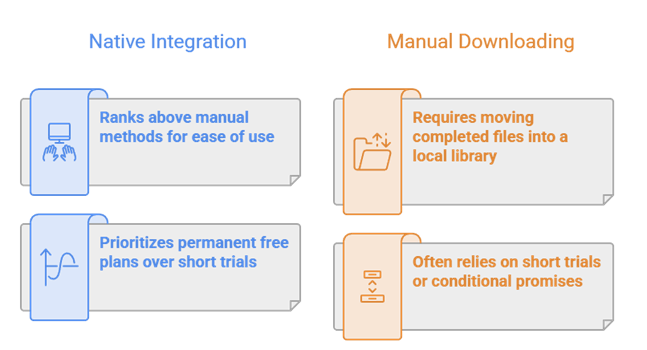
- Integration Reality: Native Stremio or Kodi support ranks above manual downloading, browser playback, or moving completed files into a local media library.
- Limit Clarity: Permanent free plans rank above short trials, while products without a current public free promise are described as conditional.
- Credential Safety: Services requiring a premium-host password on an unrelated “generator” site were excluded because account theft outweighs any claimed benefit.
- Legal Utility: Every option can handle lawful files, open media, Linux distributions, or personal cloud transfers; availability never grants copyright permission.
What Counts as a Free Debrid Service?
A genuine debrid service remotely fetches supported host or torrent files and supplies a direct link through its own infrastructure. Free trials, permanent capped plans, cloud torrent tools, and local download managers solve different parts of that workflow, so this roundup labels each category rather than pretending all ten products are interchangeable.
- True Free Plan: A persistent no-cost account with published limits ranks highest because users can return after testing without an automatic charge.
- Time-Limited Trial: A trial demonstrates premium integrations properly but must state duration, traffic cap, verification, eligibility, and renewal behavior clearly.
- Cloud Downloader: These tools fetch files remotely yet may lack premium hosts, shared caches, or direct authorization inside the user’s chosen addon.
- Local Manager: Free software can automate lawful downloads and feed Kodi libraries, but the user supplies hardware, storage, bandwidth, and security.
- Excluded Generators: Sites promising unlimited premium links through surveys, extensions, passwords, or copied branding were excluded regardless of search popularity.
Free vs Paid Debrid: Practical Limits
Free infrastructure must control cost through traffic, file size, speed, slots, storage, retention, host support, or waiting periods. Those limits are acceptable when disclosed and matched to occasional use, but they prevent most free accounts from delivering an unrestricted daily streaming experience.
- Traffic Caps: Monthly downloads or gigabyte allowances run out quickly with 4K files, making compressed HD a more realistic way to evaluate performance.
- File Ceilings: Maximum sizes can exclude remuxes, season packs, disc images, and large archives even when total monthly traffic remains available.
- Queue Restrictions: One active slot and a cooldown reduce infrastructure abuse but make binge downloading or several simultaneous household devices impractical.
- Reduced Priority: Paid accounts may receive faster processing during congestion, so a free test does not always represent the service’s best possible performance.
- Host Restrictions: Trials may exclude expensive or frequently abused hosts, requiring users to test the exact lawful services important to their workflow.
How to Connect a Supported Debrid Account Safely
Use the integration’s documented device code, OAuth-style authorization, or provider-issued API token. Never submit a main account password to an unrelated addon page, copied manifest, premium-link generator, or tutorial form.
- Verify Compatibility: Confirm the exact addon or resolver currently lists the chosen provider, because forks and public instances support different account services.
- Open the Official Dashboard: Create the account directly on the provider’s HTTPS domain and read current free limits before entering any personal information.
- Authorize Once: Complete the documented code or token workflow on a stable network, keeping credentials private and avoiding rapid VPN server changes.
- Choose Cached Results: Select clearly marked cached links where available, preventing an unfinished remote download from appearing to be a buffering failure.
- Revoke After Testing: Remove unused device authorizations and addon tokens when the trial ends, reducing security exposure and keeping the account dashboard understandable.
Which Free Option Fits Your Device?
Stremio users benefit most from native API support, while Kodi can also import completed local or network files. Browser tools suit occasional desktop playback, and command-line or Web UI products are intended for people maintaining their own server.
- Stremio Users: Start with TorBox or Debrid-Link only when the selected stream addon explicitly supports that provider and account method.
- Kodi Addon Users: Native debrid authorization is simplest, while Seedr or download managers require completed files to enter a local or network library.
- Firestick Owners: Prefer account-synced integrations because local storage is limited and heavy browser, terminal, or background download workflows fit poorly on Fire TV.
- Desktop Viewers: Webtor, JDownloader, aria2, and qBittorrent offer more practical control where storage, keyboard input, and background processing are readily available.
- Home-Server Users: JDownloader 2 and aria2 provide maximum ownership, but require patching, access controls, backups, lawful source selection, and storage management.
Legal and Privacy Checks Before Using Debrid
Debrid and download tools have legitimate uses, but they do not grant rights to copyrighted files or make activity anonymous. Evaluate the source, provider terms, account records, network exposure, and local law before every workflow.
- Content Permission: Use public-domain, Creative Commons, personal backups, Linux distributions, or files supplied by a host account you are authorized to access.
- Provider Records: Read the current privacy policy rather than assuming remote downloading means no logs, no account history, or anonymous payment and usage.
- Peer Exposure: Direct torrent tools can reveal public IP addresses to swarm participants, while cached server delivery follows a different network path.
- Credential Security: Use unique passwords, protected email, official domains, and revocable tokens; never expose API credentials in screenshots or copied configuration links.
- Account Sharing: Follow simultaneous-IP, household, and personalized-link rules because free access does not authorize distributing credentials to unrelated people or locations.
Verdict:
Free debrid access is useful for testing, but the correct option depends on whether you need genuine addon integration, a short premium trial, or occasional cloud transfers. These are the three strongest starting points:
- TorBox: best genuine free plan for Stremio-compatible testing, with transparent monthly, file-size, speed, slot, and cooldown restrictions.
- Debrid-Link: best for a limited free daily allowance with documented app and browser workflows.
- Offcloud: best occasional cloud-unlocker alternative when current free access covers the required lawful host, traffic allowance, and transfer workflow.
FAQs
Is there a completely free debrid service?
TorBox publishes a permanent free plan, but strict monthly, size, slot, speed, and cooldown limits apply. Unlimited full-service debrid is not realistically free.
What is the best free debrid for Stremio?
TorBox is the strongest genuine free option because it includes third-party app support. Confirm that your chosen addon supports TorBox before configuring it.
Does Real-Debrid offer a free trial?
Do not rely on old trial claims. Real-Debrid’s public premium page was access-restricted during our check, so verify offers only inside its official account page.
Are free premium link generators safe?
Usually not worth the risk. Avoid any generator requesting passwords, tokens, surveys, extensions, notification access, or unrelated application installations.
Can Kodi work without debrid?
Yes. Kodi can play local, network, official, and lawful free sources without debrid. Third-party addon availability and quality vary independently; my Kodi vs Stremio comparison explains how each platform handles addons and debrid support.