Key Takeaway: HiMovies-like mirrors trade free access for unstable domains, intrusive overlays, and unclear rights. Tubi is the best all-round replacement, The Roku Channel is strongest for free originals and live channels, and Prime Video Watch for Free fits Firestick owners who want Freevee’s catalog inside a familiar app.
HiMovies promises a giant movie-and-TV library with no subscription, yet its shifting domains and third-party players create the same four problems repeatedly: dead links, buffering, invisible click overlays, and no reliable explanation of who operates the copy you opened. A safer replacement should preserve easy discovery without asking you to trust an unknown mirror.
I researched nine legitimate alternatives that approach official free-to-view programminging from different directions: studio-funded advertising, library access, rentals, independent-film support, and public-domain preservation. The result is not a list of cloned websites. It is a practical mix that installs cleanly on Firestick, explains its limits, and gives you a reliable next step when a title is missing.
Content and Licensing Note: This Best HiMovies Alternatives guide compares applications and viewing services for informational purposes. Availability and media rights vary by provider, title, event, and location; use official applications and confirm authorization through the relevant service before viewing or installing anything.
Best HiMovies Alternatives: Top Legal Picks
| Platform | Best For | Free Access | Get Started |
|---|---|---|---|
| Tubi | Broadest no-signup library | Free with ads | Visit Site |
| The Roku Channel | Free originals and live channels | Free with ads | Visit Site |
| Prime Video Watch for Free | Freevee replacement on Firestick | Free with ads | Visit Site |
| Plex | Free movies plus personal media | Free with ads | Visit Site |
| Fandango at Home | Free shelf plus new-release rentals | Free titles with ads | Visit Site |
1) Tubi
Tubi is the strongest all-purpose HiMovies alternative because it combines a deep licensed catalog with instant, no-card playback. Its movie and television rows cover mainstream studio titles, originals, documentaries, anime, and family viewing. I rank it first for the polished Fire TV app and unusually simple start. The tradeoff is scheduled advertising and a library that rotates by country.
Features:
- Licensed Catalog: Thousands of studio movies and television episodes stream legally, replacing anonymous embedded players with an accountable service backed by recognizable distribution partners.
- No Subscription: Viewing costs nothing and requires no credit card, while an optional free account adds watchlists, recommendations, and cross-device resume features.
- Fire TV App: The official Amazon Appstore version installs normally, responds cleanly to the remote, and avoids browser pop-ups or sideloaded player packages.
- Genre Depth: Action, horror, comedy, documentaries, anime, family programming, crime, and international shelves provide more variety than most single-purpose official free-to-view programminging apps.
- Account Choice: Guests can begin watching immediately, but registration synchronizes a queue and viewing progress without turning the free catalog into a paid subscription.
- Editorial Pick: I would start here when replacing HiMovies because the balance of catalog size, Firestick support, and low signup friction is difficult to beat.
- Main Limitation: Advertisements cannot be removed, and specific films can disappear when licensing agreements end or regional distribution rights change between countries.
| Pros | Cons |
|---|---|
| No subscription or payment card | Advertising cannot be removed |
| Large licensed movie catalog | Catalog differs by country |
| Excellent Fire TV application | Newest releases are uncommon |
| Optional cross-device account |
Pricing:
- Viewer Access: $0 with advertising
- Ad-Free Tier: Not offered
- Price Check: Official Tubi pages reviewed August 7, 2026
Link: https://tubitv.com/
2) The Roku Channel
The Roku Channel replaces HiMovies with free on-demand films, complete television seasons, Roku Originals, kids programming, and more than 500 live channels. It works on compatible Fire TV devices in the United States, not only Roku hardware. I place it second for its strong free catalog and familiar guide, though geographic availability remains narrower than Tubi or Plex.
Features:
- Free Library: Thousands of movies, classic shows, current television selections, children’s programs, and Roku Originals sit inside one clearly labeled, advertising-supported destination.
- Live Guide: More than 500 live channels provide scheduled news, movies, entertainment, and genre programming when choosing an exact title feels unnecessary.
- Fire TV Support: Roku documents an official app for compatible Amazon Fire TV devices and televisions in the United States, with no sideloading required.
- Roku Originals: Exclusive series and films give the service a distinct identity instead of merely duplicating the same syndicated titles found on competing platforms.
- Resume Viewing: A free Roku account can preserve playback progress across signed-in devices, useful when moving between a television and mobile screen.
- My Use Case: I would choose this platform for households wanting on-demand movies and cable-style browsing without managing separate applications for each viewing mode.
- Regional Constraint: Fire TV access is officially documented for the United States, while supported devices, channels, and catalog rights can vary elsewhere.
| Pros | Cons |
|---|---|
| Strong free on-demand catalog | Fire TV access is region-limited |
| More than 500 live channels | Advertisements interrupt playback |
| Official Fire TV support | Free account helps with syncing |
| Exclusive Roku Originals |
Pricing:
- On-Demand Access: $0 with advertising
- Live Channels: $0 with advertising
- Price Check: Official Roku support reviewed August 7, 2026
Link: https://therokuchannel.roku.com/
3) Prime Video Watch for Free
Prime Video now houses the free, advertising-supported catalog that previously used the Freevee brand. Amazon says non-Prime customers can still watch free movies, television, and FAST channels inside the same app. I recommend it for Firestick owners because Prime Video is already integrated, but free, subscription, rental, and channel titles require careful label checking.
Features:
- Freevee Successor: Amazon moved Freevee’s movies, shows, and FAST channels into Prime Video while keeping qualifying content free for non-Prime viewers with advertising.
- Firestick Integration: Prime Video is deeply integrated into Fire TV search and navigation, reducing installation friction and making voice discovery especially convenient.
- Large Channel Set: Amazon reports more than 750 long-form FAST channels across over 150 publishing partners, alongside free on-demand movies and television.
- Clear Badges: Free titles display a use the official free catalog label, which helps separate them from Prime membership, channel trials, rentals, and purchases.
- Trusted Checkout: Paid options remain inside an established Amazon account, avoiding the card-verification pages and unknown processors associated with HiMovies lookalikes.
- My Recommendation: I would browse only the use the official free catalog rows first, because the mixed storefront can otherwise make a zero-cost search unnecessarily confusing.
- Important Catch: An Amazon sign-in is generally required, and neighboring titles may need Prime, another channel subscription, a rental, or a purchase.
| Pros | Cons |
|---|---|
| Freevee catalog remains available | Amazon account required |
| Excellent Firestick integration | Free and paid titles mix together |
| Hundreds of free channels | Advertising appears on free content |
| Strong voice-search support |
Pricing:
- use the official free catalog: $0 with advertising
- Prime Membership: Not required for labeled free titles
- Price Check: Official Amazon pages reviewed August 7, 2026
Link: https://www.primevideo.com/
4) Plex
Plex is the most versatile HiMovies alternative because it combines licensed free movies and shows, live channels, a universal watchlist, and optional personal-media streaming. No account is needed for basic free viewing, although registration adds useful personalization. I favor it for viewers who want one search layer across services, but Plex Pass does not remove advertisements from Plex-provided content.
Features:
- Legal official free-to-view programminging: Partner-supported movies and television play without subscription costs, while advertising funds the licensed catalog instead of suspicious redirect networks or mirrors.
- Global Reach: Plex says its free service operates in almost every country, although the exact films, channels, and rights still vary regionally.
- Broad Device Support: Official apps cover Amazon Fire TV, Android TV, Apple TV, Roku, smart televisions, mobile devices, game consoles, and browsers.
- Universal Watchlist: A free account can track titles across Plex and other selected streaming services, reducing the time spent opening separate apps to search.
- Personal Media: Plex Media Server can organize legally owned video files and stream them around the home alongside the company’s free catalog.
- My Best Fit: I would choose Plex for a mixed household that wants free discovery today and may later organize a personal movie collection.
- Pass Limitation: Plex Pass adds personal-media features, but the company states it does not remove advertisements or unlock extra free-service movies.
| Pros | Cons |
|---|---|
| Free licensed movies and shows | Catalog browsing can feel busy |
| Works in most countries | Plex Pass does not remove ads |
| Powerful universal watchlist | Free titles rotate over time |
| Optional personal media server |
Pricing:
- official free-to-view programminging: $0 with advertising
- Account: Optional for basic viewing
- Price Check: Official Plex pages reviewed August 7, 2026
Link: https://watch.plex.tv/
5) Fandango at Home
Fandango at Home, formerly Vudu, suits viewers who want a legitimate free shelf and a legal route to newer releases in one application. The Stream Free area is advertising-supported, while rentals and purchases remain clearly priced by title. I include it because HiMovies users often want recent films, but the storefront demands attention to free versus paid labels.
Features:
- Dedicated Free Shelf: A Stream Free section separates advertising-supported movies and television from rentals, purchases, premium releases, and promotional bundle offers.
- Recent Rentals: Newer studio releases can be rented legally when they are unavailable on free platforms, avoiding unknown servers and mislabeled cam recordings.
- No Base Subscription: Creating an account does not trigger a monthly service fee, although individual rentals and purchases carry clearly displayed prices.
- Quality Options: Selected paid titles support higher-resolution video and premium audio formats, offering a predictable alternative when picture quality matters more than zero cost.
- Library Ownership: Purchased and redeemed digital titles collect inside one account, making the service useful beyond its rotating free, advertising-supported catalog.
- My Navigation Tip: I would activate the free-movies filter before browsing, preventing paid thumbnails from turning a no-cost movie search into a storefront tour.
- Primary Drawback: Free, rental, and purchase titles share the same interface, so readers must inspect each badge before selecting a movie.
| Pros | Cons |
|---|---|
| Large dedicated free section | Free and paid titles coexist |
| New-release rentals available | Account needed for transactions |
| No monthly base subscription | Free catalog changes frequently |
| Strong digital library features |
Pricing:
- Stream Free: $0 with advertising
- Rentals and Purchases: Individually priced by title
- Price Check: Official Fandango pages reviewed August 7, 2026
Link: https://athome.fandango.com/
6) Kanopy
Kanopy is the best HiMovies alternative for independent cinema, documentaries, foreign films, classics, and thoughtful family viewing. Access comes through participating public libraries or universities rather than advertising. I recommend it to film fans who value curation over sheer volume. Your institution controls the catalog and monthly ticket allowance, while Kanopy Kids and some shelves offer unlimited viewing.
Features:
- Library Access: A participating library card or university credential unlocks legal streaming without a consumer subscription, payment card, or ordinary commercial breaks.
- Curated Cinema: Independent films, international releases, documentaries, classics, educational titles, and festival favorites receive more attention than on broad FAST platforms.
- Ticket System: Libraries assign monthly tickets, and each title displays its ticket cost and access period before playback, preventing unexpected charges.
- Unlimited Shelves: Zero-ticket collections can be watched repeatedly, while all Kanopy Kids videos receive unlimited viewing under current public-library rules.
- Current Fire TV Support: Kanopy officially supports Fire TV devices running FireOS 6 or newer, alongside Roku, Apple TV, Google TV, and browsers.
- My Ideal Viewer: I would prioritize Kanopy for documentaries and international cinema, where its library-backed curation often beats much larger advertising-supported catalogs.
- Institutional Limits: Availability, ticket quantities, and individual titles differ by library, and temporary access limits can appear when institutional budgets are reached.
| Pros | Cons |
|---|---|
| Usually ad-free viewing | Participating library required |
| Excellent documentaries and cinema | Monthly tickets may limit viewing |
| Official Fire TV application | Catalog differs by institution |
| Unlimited Kanopy Kids collection |
Pricing:
- Public Library Access: $0 with participating membership
- Monthly Tickets: Allowance set by the library
- Price Check: Official Kanopy help reviewed August 7, 2026
Link: https://www.kanopy.com/
7) Hoopla
Hoopla turns a participating library card into ad-free access to movies, television, audiobooks, ebooks, comics, and music. Unlike physical borrowing, supported video titles are available instantly without ordinary waitlists, and many mobile downloads work offline. I choose it for travel and mixed-media households, although each library sets its own monthly borrow limit and available collection.
Features:
- Instant Borrowing: Eligible movies and television titles become available immediately through a participating library, without the mirror hunting or broken server selection HiMovies required.
- Ad-Free Playback: Library-funded video streams avoid commercial interruptions, creating a calmer experience than FAST services while remaining legal and free for patrons.
- Offline Downloads: Most supported titles can be saved on mobile devices for travel, poor connections, or viewing away from home Wi-Fi.
- Fire TV Application: Hoopla lists Amazon Fire TV among its living-room platforms, alongside Roku, Apple TV, Samsung televisions, Chromecast, and mobile devices.
- Broader Library: One account also borrows audiobooks, ebooks, comics, manga, and music, giving a library card value beyond movies and television.
- My Preferred Scenario: I would use Hoopla when reliable offline access and zero advertising matter more than browsing the largest possible movie catalog.
- Borrow Limits: The participating library controls monthly allowances and content availability, so access can differ substantially between two users in neighboring areas.
| Pros | Cons |
|---|---|
| Ad-free library streaming | Participating library required |
| Many mobile downloads | Monthly borrow limits vary |
| No ordinary video waitlists | Mainstream selection can be narrow |
| Movies and other media together |
Pricing:
- Viewer Access: $0 with participating library card
- Monthly Borrows: Limit set by the library
- Price Check: Official Hoopla pages reviewed August 7, 2026
Link: https://www.hoopladigital.com/
8) Filmzie
Filmzie is a smaller HiMovies alternative built around legal independent films, shorts, documentaries, and lesser-known television rather than blockbuster breadth. Its advertising-supported model shares revenue with rights holders and filmmakers, and basic viewing remains free. I add it for discovery: the catalog feels curated and unusual, although viewers seeking every current studio release will find obvious gaps.
Features:
- Independent Focus: Filmzie emphasizes independent features, shorts, documentaries, and international discoveries that are easily buried inside the largest mainstream streaming catalogs.
- Legal Funding: Advertising supports free viewing and compensates participating filmmakers or rights holders, providing a clearer value exchange than anonymous mirror operators.
- No Hidden Fees: Filmzie states that ordinary streaming has no subscription charge, signup fee, or hidden cost, although advertisements support the platform.
- Device Options: The service offers browser and mobile access plus television applications, with official materials listing Amazon Fire TV among supported destinations.
- Fresh Discovery: The smaller catalog encourages deliberate browsing through genres and collections instead of copying the same trending grid found on every large service.
- My Reason to Add: I would install Filmzie after Tubi, using it specifically for indie discoveries rather than expecting a direct catalog duplicate.
- Catalog Tradeoff: Mainstream blockbusters and brand-new studio television are limited, making Filmzie a complementary service rather than a complete one-app replacement.
| Pros | Cons |
|---|---|
| Completely free basic access | Small mainstream catalog |
| Strong independent-film identity | Advertisements support playback |
| Legal advertising-supported model | Availability varies by territory |
| Fire TV viewing available |
Pricing:
- Streaming Access: $0 with advertising
- Subscription Fee: None for ordinary viewing
- Price Check: Official Filmzie help reviewed August 7, 2026
Link: https://filmzie.com/
9) Internet Archive Movies
Internet Archive Movies is the specialist HiMovies alternative for public-domain features, silent cinema, vintage television, documentaries, newsreels, and preservation uploads. It is not a source for current blockbusters, but it surfaces rare material commercial services ignore. I include it for film history and downloads, with the important reminder that item rights statements should be checked individually before reuse.
Features:
- Preservation Library: Feature films, silent works, documentaries, newsreels, and historical television sit within a nonprofit archive designed for long-term cultural access.
- No Subscription: Browsing and streaming require no monthly plan, payment card, or advertising-supported account, making access unusually direct and low friction.
- Download Formats: Many items provide several file formats for lawful offline use, study, or preservation when the item page permits downloading.
- Rare Material: Public-domain classics, educational films, community archives, and obscure historical recordings fill gaps that modern studio catalogs rarely prioritize.
- Browser Access: The collection works through a web browser, so Firestick users can open it without installing an unknown APK or media extension.
- My Best Use: I would search Internet Archive for a specific classic, director, or historical subject instead of expecting a polished recommendation engine.
- Rights Caution: Upload quality and rights information vary by item, so verify the individual page before downloading, sharing, or reusing any recording.
| Pros | Cons |
|---|---|
| No subscription or advertisements | No current commercial releases |
| Unique historical film catalog | Interface feels dated |
| Many downloadable formats | Video quality varies widely |
| Nonprofit preservation mission |
Pricing:
- Streaming Access: $0
- Downloads: $0 where item permissions allow
- Price Check: Official Internet Archive collection reviewed August 7, 2026
Link: https://archive.org/details/feature_films
How to Install HiMovies Alternatives on Firestick
Every recommendation has either an official Fire TV application or a straightforward browser route. Start with the Amazon Appstore whenever possible, verify the publisher, and avoid APK pages that imitate a familiar service name.
- Use Search: From the Fire TV home screen, select Find, open Search, and enter the exact platform name using the remote or Alexa.
- Verify Publisher: Check the developer, logo, description, reviews, and official support link before downloading, because copied names can disguise unrelated applications.
- Install Normally: Choose Get or Download from the Amazon Appstore, wait for installation, then open the application without enabling unknown-source permissions.
- Sign In Carefully: Use the displayed activation address on another device, confirming the domain before entering an Amazon, Roku, library, Plex, or Fandango account.
- Browser Route: For Internet Archive, open the official collection in Amazon Silk and bookmark it; never accept a prompt claiming another video player is required.
How I Evaluated These HiMovies Alternatives
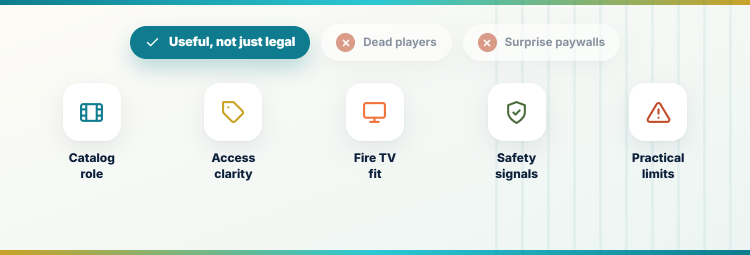
A legal label alone does not make an app useful. I compared each platform against the frustrations that drive people away from HiMovies: dead players, unclear access, poor television navigation, and difficulty finding a worthwhile title.
- Catalog Role: Each service needed a clear strength, including mainstream films, free originals, library cinema, recent rentals, independent discoveries, or historical preservation.
- Access Clarity: Advertising, account rules, library tickets, rentals, and subscription requirements had to be visible before playback instead of appearing as surprises later.
- Fire TV Fit: Official Firestick support, a trusted browser route, remote-friendly navigation, and installation simplicity influenced the order more than raw catalog claims.
- Safety Signals: Identifiable operators, official applications, documented support, and transparent funding outranked unknown domains offering suspicious downloads or card-verification screens.
- Practical Limits: Regional catalogs, advertisements, rotating rights, monthly library borrows, and mixed free-paid storefronts are stated openly instead of hidden behind praise.
Pick the Right Free-Streaming Model
HiMovies made every poster appear equally free, but legitimate services use several access models. Choosing the model first is faster than installing nine apps and discovering that their catalogs, advertisements, or borrowing rules overlap.
- FAST Platforms: Tubi, Roku, Prime Video, and Plex exchange advertising time for free movies, shows, and channels without a traditional paid subscription.
- Library Streaming: Kanopy and Hoopla use participating institutions, usually removing ads while applying local ticket allowances, borrowing limits, or catalog restrictions.
- Transactional Viewing: Fandango at Home combines an advertising-supported free section with individually priced rentals and purchases for newer or harder-to-find releases.
- Independent Catalog: Filmzie favors lesser-known filmmakers and festival-style discoveries, making it valuable beside a mainstream service rather than as a complete replacement.
- Public-Domain Access: Internet Archive suits classics and historical material, but item-level rights and quality need more attention than on a studio-backed application.
What You Trade for Safer HiMovies Alternatives
Moving to official platforms fixes anonymous mirrors and fake controls, but it does not create one universal catalog. The real compromise is combining two or three focused services while accepting ads, rotation, or library limits.
- New Releases: Brand-new theatrical movies rarely appear free immediately; expect to rent them or wait until licensed advertising-supported windows begin later.
- Catalog Rotation: Saved titles can leave when a distribution agreement expires, so watchlists track intent but never guarantee permanent streaming availability.
- Commercial Breaks: FAST apps insert advertisements during playback, while library services exchange those interruptions for eligibility rules and monthly borrowing allowances.
- Regional Rights: A platform may work in several countries while offering different movies, channels, languages, and Fire TV applications in each territory.
- Multiple Apps: One broad service plus one specialist source usually covers more needs than forcing a single application to replace every HiMovies category.
Avoid Fake HiMovies Domains and Player Traps
A copied logo and familiar poster grid prove nothing about ownership. If you previously installed unverified software, review our Firestick safety and sideloading guide, then remove anything whose publisher or source cannot be verified.
- Reject Downloads: Leave any movie page demanding a codec, certificate, browser extension, APK, security update, or disabled device protection before playback begins.
- Block Notifications: Deny push permissions from streaming pages, because approval can produce persistent scam advertisements even after the original browser tab closes.
- Skip Card Checks: A supposedly free mirror has no valid reason to request refundable activation payments, cryptocurrency, identity documents, or banking information.
- Use Official Stores: Install television applications through Amazon, Google, Apple, or Roku stores and compare the listed publisher with the service’s official website.
- Respond Quickly: After a suspicious download, disconnect if necessary, remove the file, scan the device, change reused passwords, and monitor affected accounts.
Best HiMovies Alternatives Verdict
Tubi is the easiest complete replacement, The Roku Channel is the better choice for originals and channel surfing, and Prime Video use the official free catalog fits naturally on Firestick. Add Kanopy or Hoopla when your library participates, then use Fandango only when a newer title justifies a rental. This mix is more predictable than chasing another HiMovies domain and still costs nothing for routine viewing.
- Tubi: Best overall for a large legal catalog, instant guest viewing, straightforward Fire TV installation, and no payment card requirement.
- The Roku Channel: Best for Roku Originals, more than 500 live channels, and a strong mix of free movies and television.
- Prime Video Watch for Free: Best for Firestick integration and accessing the former Freevee catalog without paying for Prime membership.
FAQs
What is the best HiMovies alternative in 2026?
Tubi is the best overall HiMovies alternative for most viewers because it is legal, free, requires no payment card, and has an official Fire TV app. The Roku Channel is stronger for originals and live channels, while Kanopy is best for ad-free library-supported cinema.
Are there free HiMovies alternatives that do not require signup?
Yes. Tubi allows guest viewing, Plex supports basic viewing without an account, and Internet Archive collections open directly in a browser. Other platforms may require a free account for syncing, library verification, rentals, or access on particular devices.
Can I watch brand-new movies free on these services?
Usually not immediately. Licensed free platforms focus on rotating catalog films rather than current theatrical releases. Fandango at Home offers newer titles as paid rentals, while free availability may arrive later when distribution agreements permit advertising-supported streaming.
Do I need a VPN for legal HiMovies alternatives?
A VPN is not required for the legal services listed here. It can improve privacy on public Wi-Fi, but using one to bypass a platform’s regional terms may affect access. Official apps, current software, and careful account security matter more.
Where can I compare more free movie streaming options?
Our 123Movies alternatives guide compares another set of free and legal movie platforms. Check both guides against current country availability because catalogs, channels, and supported television devices change as licensing agreements move.