Key Takeaway: The strongest BFlix replacements are Tubi for a broad legal catalog without a subscription, The Roku Channel for movies plus more than 500 live channels, and Plex for worldwide viewing and discovery. None promises every new release free, but all three use official apps, transparent funding, and accountable support.
BFlix became popular by placing movies and television episodes behind one fast search box, often with no account or subscription. That convenience now comes with a larger problem: multiple unrelated domains use the same name, playback links vanish, premium-HD prompts appear, and visitors cannot reliably verify the operator, licensing, data practices, or safety of files offered by a mirror.
I researched nine legitimate replacements through their current official product, help, device, and access pages. The ranking prioritizes free catalogs and Fire TV support, then distinguishes live-channel services, international options, library-funded downloads, curated cinema, and legal new-release rentals. The goal is not to imitate every BFlix claim; it is to replace the useful parts without inheriting domain churn, fake players, or unknown downloads.
Content and Licensing Note: This Best BFlix Alternatives guide compares applications and viewing services for informational purposes. Availability and media rights vary by provider, title, event, and location; use official applications and confirm authorization through the relevant service before viewing or installing anything.
Best BFlix Alternatives for Free Movies, Shows, and Firestick
| Platform | Best For | Free Access | Get Started |
|---|---|---|---|
| Tubi | Best overall free replacement | Free with ads | Visit Site |
| The Roku Channel | Movies plus 500+ live channels | Free with ads | Visit Site |
| Plex | Worldwide viewing and discovery | Free with ads | Visit Site |
| Pluto TV | Channel surfing and on-demand movies | Free with ads | Visit Site |
| Sling Freestream | Free DVR and no-login television | Free; account optional | Visit Site |
1) Tubi
Tubi is the best overall BFlix alternative for viewers who want licensed movies and complete television seasons without a subscription or payment card. Its official Fire TV app, large studio-backed catalog, originals, and optional account sync cover most everyday needs. I rank it first because the service replaces instant browser playback with accountable support and a clearly disclosed advertising model.
Features:
- Legal Free Catalog: Thousands of licensed movies and television episodes stream without subscription fees, using advertisements to compensate participating studios and distributors instead of unexplained third-party video hosts.
- Fire TV Support: The official Amazon Appstore version installs directly on Fire TV devices, removing the unknown APK files, browser redirects, and sideloading steps associated with BFlix mirrors.
- No Card Needed: Ordinary viewing starts without a payment card, and registration remains optional unless a particular live event or personalized feature specifically requires a free account.
- Account Sync: A free profile adds saved titles, recommendations, viewing history, and continue-watching across supported devices while preserving immediate access for people who prefer not to register.
- Catalog Breadth: Studio films, full television seasons, Tubi Originals, documentaries, anime, family programming, creator series, and selected live channels cover more moods than a movie-only service.
- Research Check: I confirmed the no-subscription model, no-card access, legal catalog statement, account benefits, and current Fire TV availability through Tubi’s official welcome and device pages.
- Main Limitation: Advertisements cannot currently be removed, title availability rotates with licensing agreements, and the exact catalog, live channels, captions, and picture quality vary by region.
| Pros | Cons |
|---|---|
| No subscription or card | No ad-free upgrade |
| Large licensed movie catalog | Titles rotate regularly |
| Official Fire TV app | Catalog differs by country |
| Optional cross-device sync |
Pricing:
- Access: Free with advertising
- Subscription: No paid plan required for ordinary streaming
- Checked: Official Tubi pages reviewed August 13, 2026
Link: https://tubitv.com/
2) The Roku Channel
The Roku Channel is a strong BFlix replacement for United States viewers who want free movies, series, Roku Originals, children’s programming, and more than 500 live channels in one app. A Roku device is not required because compatible Fire TV hardware has an official version. I place it second for its simple free library, polished guide, and recognizable operator.
Features:
- Free Entertainment: Movies, television shows, Roku Originals, kids programming, and hundreds of live channels use an advertising-supported model, with no mandatory monthly entertainment package for the core library.
- Fire TV Route: Compatible Fire TV streaming devices, Fire TV Edition televisions, and supported soundbars in the United States can install The Roku Channel directly without sideloading.
- Live Guide: More than 500 live channels sit beside on-demand films and episodes, making the service useful for both deliberate title searches and relaxed channel surfing.
- Optional Account: Immediate free viewing is available, while a free Roku account helps resume programs on other signed-in devices and manages watch history and premium add-ons.
- Original Programming: Roku Originals, acquired series, movies, news, lifestyle channels, and children’s collections create a broader catalog identity today than an anonymous index embedding external players.
- Research Check: I verified the current channel count, free movies, Fire TV installation path, compatible hardware, and United States restriction using Roku’s official support page updated in June 2026.
- Main Limitation: The Fire TV application is limited to the United States, premium subscriptions are separate purchases, and free titles and channel lineups change as distribution agreements expire.
| Pros | Cons |
|---|---|
| Large free mixed catalog | Fire TV access is US-only |
| More than 500 live channels | Premium add-ons cost extra |
| Official Fire TV app | Free titles rotate |
| Roku hardware not required |
Pricing:
- Core Access: Free with advertising
- Premium Add-ons: Optional and billed separately
- Checked: Official Roku support reviewed August 13, 2026
Link: https://therokuchannel.roku.com/
3) Plex
Plex is the most flexible BFlix alternative for international viewers because its licensed free movies, shows, and live channels reach almost every country. It also combines universal discovery with a personal-media option for files you legally own. I rank Plex third because its Fire TV app can search streaming services, maintain a watchlist, resume viewing, and play its own catalog.
Features:
- Worldwide Reach: Plex makes its free advertising-supported service available in almost every country, although distributor restrictions still change which individual movies, shows, and channels play locally.
- No Account Start: Viewers can access the free catalog without creating a profile, while free registration unlocks a universal watchlist, personalized services, favorites, and cross-device resume history.
- Fire TV App: Amazon Fire TV is an officially supported Plex player for free on-demand movies and television, live channels, personal libraries, and eligible rentals in supported markets.
- Discovery Layer: Universal search and Watchlist help locate a title across selected subscription, rental, and free services, replacing BFlix’s single search box without promising unauthorized playback.
- Personal Media: A separate Plex Media Server can organize lawfully owned movies, home videos, music, and photos, keeping personal files distinct from the company’s partner-funded catalog.
- Research Check: I verified free access, account choices, near-global availability, Fire TV playback, catalog rotation, advertising, and download restrictions through Plex’s current product and support documentation.
- Main Limitation: Plex-provided free titles include ads and cannot be downloaded for offline viewing; some countries lack on-demand access, while catalogs and rentals vary by territory.
| Pros | Cons |
|---|---|
| Broad international reach | Ads cannot be removed |
| Account not required to start | Free catalog has no downloads |
| Universal discovery tools | Some countries are excluded |
| Handles personal media |
Pricing:
- official free-to-view programminging: No subscription or card required; supported by ads
- Personal Server: Core local personal-media functions are free
- Checked: Official Plex resources reviewed August 13, 2026
Link: https://watch.plex.tv/
4) Pluto TV
Pluto TV is the best BFlix alternative for viewers who enjoy dropping into a scheduled movie channel instead of choosing every title manually. Hundreds of live linear channels sit beside thousands of on-demand films and full seasons. I include it for its official Fire TV support, simple no-cost model, genre channels, favorites, and mix of programs and themed background viewing.
Features:
- Two Viewing Modes: A traditional channel guide and a searchable on-demand library let you switch between scheduled programming and individual movies or episodes without installing separate applications.
- Always Free: Advertising funds ordinary access, so live channels and on-demand viewing require no cable bundle, recurring monthly entertainment fee, or payment card before playback begins.
- Fire TV App: Pluto TV documents direct Amazon Fire TV availability alongside mobile, browser, streaming-device, console, and smart-television routes for supported countries and fully compatible household hardware.
- Themed Channels: Dedicated streams group movie genres, franchises, performers, reality series, news, live-event programming, comedy, and classic television into recognizable daily channel schedules that reduce browsing fatigue.
- Optional Personalization: A free sign-in can provide favorites and a more personalized viewing experience, while core viewing remains accessible without a paid subscription or premium upgrade.
- Research Check: I verified Pluto TV’s hundreds of channels, thousands of on-demand titles, free model, favorites, captions, and current Fire TV route through official service pages.
- Main Limitation: Commercial breaks are unavoidable, schedules reduce playback control, and the available channels, movies, languages, captions, and account features differ significantly between fully supported regions.
| Pros | Cons |
|---|---|
| Hundreds of live channels | Frequent commercial breaks |
| Thousands of on-demand titles | Regional lineups vary |
| Official Fire TV app | Scheduled channels limit control |
| No subscription required |
Pricing:
- Live TV: Free with advertising
- On Demand: Free with advertising
- Checked: Official Pluto TV pages reviewed August 13, 2026
Link: https://pluto.tv/
5) Sling Freestream
Sling Freestream is a practical BFlix replacement when free television matters as much as movies. Its catalog offers more than 600 live channels and over 40,000 on-demand shows and films without requiring an account online. I recommend it for Fire TV users who want an official app, profiles, parental controls, favorites, watchlists, and ten hours of free DVR storage.
Features:
- Large Free Lineup: More than 600 live channels and over 40,000 on-demand movies and shows span news, drama, reality, classics, anime, family, international, Latino, and lifestyle categories.
- No Login Web: Browser viewing can begin without an account or credit card, separating the permanent Freestream service from a limited trial of Sling’s paid channel packages.
- Fire TV Access: The regular Sling TV application installs directly on compatible Amazon Fire TV devices and exposes Freestream content without an expiring promotional window or sideloaded APK.
- Free DVR: Creating a free profile unlocks ten hours of cloud DVR storage, allowing selected live programs to be saved when a scheduled channel conflicts with your plans.
- Viewer Controls: Optional profiles add favorites, watchlists, parental locks, rewards, and personalization, while viewers who simply want immediate free playback can avoid registration on the website.
- Research Check: I confirmed the current channel and on-demand counts, no-login promise, account benefits, Fire TV installation, and free DVR allowance through Sling’s official support pages.
- Main Limitation: Freestream is United States-focused, its catalog changes continually, rentals are not currently offered, and the paid Sling interface can make free and subscription channels look similar.
| Pros | Cons |
|---|---|
| More than 600 free channels | Primarily for US viewers |
| Large on-demand selection | Paid plans share the interface |
| Ten free DVR hours | No movie rentals currently |
| Official Fire TV application |
Pricing:
- Freestream: Free with advertising; no credit card required
- Optional Account: Free, including ten DVR hours
- Checked: Official Sling pages reviewed August 13, 2026
Link: https://home.sling.com/freestream
6) Xumo Play
Xumo Play is a clean BFlix alternative for households that want free channels and movies without creating another account. The service promotes more than 350 channels and 15,000 on-demand titles, including genre movie hubs and Xumo Originals. I include it because the official Fire TV app supports immediate playback, although direct availability remains restricted to a small group of countries.
Features:
- No Login Needed: Core playback requires neither a subscription nor an account, preserving BFlix’s low-friction appeal while using a named operator, official applications, and documented support routes.
- Mixed Catalog: More than 350 channels and 15,000 on-demand titles combine movies, television, news, children’s programs, documentaries, lifestyle shows, themed genre streams, original productions, and exclusives.
- Movie Collections: Dedicated curated shelves cover action, horror, science fiction, comedy, Black cinema, Asian films, Spanish-language movies, Bollywood, documentaries, classics, broad family viewing, and LGBTQ+ stories.
- Fire TV Route: Amazon Fire TV and Fire Stick devices can install Xumo Play from their normal application search, with no Downloader utility or unknown installation package involved.
- Multi-Device Use: The service permits simultaneous enjoyment across supported devices, and an identifiable client ID helps the support team troubleshoot playback problems on connected televisions and mobile apps.
- Research Check: I verified Xumo’s no-login model, current catalog figures, Fire TV support, simultaneous use, movie categories, and territory limits through official product and support pages.
- Main Limitation: Direct Xumo Play access is mainly United States-only; Canada and the United Kingdom use selected partner hardware, while users in other territories currently face blocking.
| Pros | Cons |
|---|---|
| No account needed | Direct access is region-limited |
| Hundreds of free channels | Advertising supports playback |
| Large on-demand catalog | Catalog changes by partner |
| Official Fire TV support |
Pricing:
- Access: Free with advertising
- Account: No login or subscription required
- Checked: Official Xumo pages reviewed August 13, 2026
Link: https://play.xumo.com/
7) Fandango at Home
Fandango at Home is the BFlix alternative to use when a free catalog does not carry a recent release. Its Stream Free section sits beside rentals and purchases, so one account covers advertising-supported movies and legitimate premium windows. I include it for United States Fire TV users who value 4K-capable playback, parental controls, transparent per-title prices, and an organized library.
Features:
- Free Section: A dedicated Stream Free area and free-only filters clearly separate advertising-supported movies and television from rentals, purchases, premium releases, bundles, and weekly sale shelves.
- Recent Releases: When a current film has not reached free services, the store offers a lawful rental or purchase path with the exact price and available resolution shown first.
- Fire TV Playback: Amazon Fire TV is an officially supported streaming platform and can play selected titles in 4K when the device, display, connection, and licensed version qualify.
- Family Controls: A secret parental-control passcode, age ratings, content labels, and family search options help prevent accidental playback of unsuitable titles on shared household living-room hardware.
- Personal Library: Purchased and redeemed titles remain organized under one account, while Movies Anywhere compatibility on eligible films can connect separate libraries across participating digital retailers.
- Research Check: I verified the active free shelves, rental store, United States restriction, Fire TV support, 4K route, and parental tools on Fandango’s official 2026 pages.
- Main Limitation: Streaming is United States-only, free titles contain advertising and rotate, an account is needed for transactions, and rental or purchase prices change by film and quality.
| Pros | Cons |
|---|---|
| Free and paid choices together | United States only |
| Access to recent rentals | Recent movies cost extra |
| 4K-capable Fire TV app | Free titles include ads |
| Useful parental controls |
Pricing:
- Stream Free: No charge with advertising on eligible titles
- Rent or Buy: Price displayed per title and resolution
- Checked: Official Fandango pages reviewed August 13, 2026
Link: https://athome.fandango.com/
8) Hoopla
Hoopla is the best BFlix alternative for legitimate downloads and advertisement-free viewing. A card from a participating public library unlocks instant movie and television borrows, and supported mobile apps can store titles offline during the loan. I recommend it for travelers and families because Fire TV has an official application, though each library decides availability and monthly borrowing limits.
Features:
- Library Funded: Participating public libraries pay for eligible access, so patrons use a valid card instead of a personal streaming subscription, payment card, or suspicious verification form.
- Offline Viewing: Supported mobile applications can download borrowed movies and episodes for travel, keeping protected playback inside Hoopla until the lending period ends rather than providing unrestricted files.
- No Ordinary Ads: Movies and television play without commercial breaks or subscription charges, making Hoopla unusually valuable for families whose local library already participates in the platform.
- Fire TV App: A dedicated Fire TV version installs from the Amazon Appstore and pairs through a four-digit code, avoiding password entry and any requirement to enable unknown sources.
- Instant Borrows: Many items become available immediately without a waitlist, while BingePass and SeasonPass collections can stretch one borrow across several related programs or multiple episodes.
- Research Check: I confirmed library-card access, no-ad viewing, offline downloads, instant borrowing, Fire TV setup, and account pairing directly through Hoopla’s current official online patron guides.
- Main Limitation: Your library must subscribe, title selection and monthly allowances differ locally, temporary budget controls may restrict access, and protected downloads do not work on television devices.
| Pros | Cons |
|---|---|
| Legitimate offline downloads | Participating library required |
| No ordinary commercials | Borrow limits vary locally |
| Official Fire TV app | Catalog depends on library |
| No personal subscription fee |
Pricing:
- Viewer Access: Free with a participating public library card
- Borrow Allowance: Set independently by each library
- Checked: Official Hoopla resources reviewed August 13, 2026
Link: https://www.hoopladigital.com/
9) Kanopy
Kanopy is the most valuable BFlix alternative for independent cinema, documentaries, classics, world film, and thoughtful educational viewing. Public libraries and universities fund access, so eligible members watch without fees or commercials. I rank it ninth because participation and monthly tickets vary, not because of quality; its official Fire TV app and curated catalog are excellent for serious movie discovery.
Features:
- Curated Film Focus: Independent releases, documentaries, international cinema, classics, educational video, and partner collections emphasize thoughtful film discovery instead of trying to imitate every new commercial blockbuster.
- No Commercials: Kanopy partners with libraries and universities to provide eligible viewers uninterrupted films without personal subscription fees, mid-roll advertisements, disruptive popups, or anonymous video hosts.
- Fire TV Requirements: The current Kanopy television app supports Fire TV hardware running FireOS 6 or newer, alongside Roku, Apple TV, Android TV, Google TV, and Samsung.
- Ticket System: Public-library members receive a monthly ticket allowance set by their institution; tickets reset monthly, unused tickets do not roll over, and Kanopy Kids uses none.
- Search Filters: Viewers can filter by genre, audio language, caption language, ticket requirement, and institutional availability, making specialist films easier to locate than on broad free indexes.
- Research Check: I verified commercial-free viewing, library and university eligibility, current ticket rules, Fire TV requirements, collection variation, and access limitations through Kanopy’s updated official help pages.
- Main Limitation: A participating institution is mandatory, catalogs and ticket allowances vary, unused tickets expire monthly, streaming can be budget-limited, and an internet connection is required for films.
| Pros | Cons |
|---|---|
| No commercial interruptions | Institution access required |
| Outstanding curated cinema | Monthly tickets may be limited |
| Official Fire TV application | No offline movie downloads |
| Kanopy Kids uses no tickets |
Pricing:
- Viewer Access: Free through a participating library or university
- Tickets: Monthly allowance determined by the institution
- Checked: Official Kanopy pages reviewed August 13, 2026
Link: https://www.kanopy.com/
Rebuild BFlix’s One-Search Convenience Without Chasing Domains
BFlix appealed because one search box appeared to answer every movie question. Licensed catalogs are fragmented, but you can recreate most of that convenience with a discovery-first routine. Search once, check free services before paid stores, verify the exact season or cut, and save the result in an official watchlist instead of bookmarking a domain that may disappear tomorrow.
- Start with Discovery: Use Plex search, Fire TV search, or another neutral guide to identify which licensed service currently carries the exact film, season, episode, or language.
- Check Free First: Open Tubi, The Roku Channel, Plex, Pluto TV, Sling Freestream, and Xumo before renting because licensed titles rotate into free catalogs regularly.
- Match the Edition: Confirm release year, episode number, runtime, language, subtitle track, theatrical cut, and audio format before assuming two similarly named results are identical.
- Save Officially: Use watchlists and continue-watching inside free accounts rather than browser bookmarks to mirrors, gaining device sync, history, recommendations, and better expiry awareness.
- Keep a Rental Exit: When a specific recent title is absent everywhere free, compare the displayed Fandango, Plex, Amazon, Apple, or YouTube rental price instead of opening clones.
How I Separated Useful BFlix Replacements from Another Mirror List
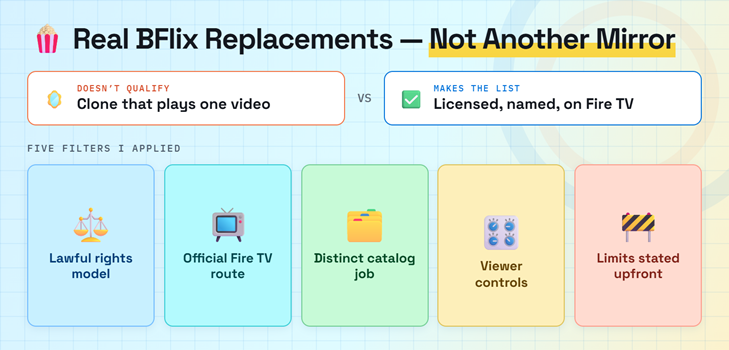
A site did not qualify merely because it copied BFlix’s search page or loaded one test video. Each recommendation needed a lawful funding route, an identifiable operator, current official access, and a practical television experience. The ranking also separates always-free catalogs from library borrowing and paid new-release rentals, so the real compromise is visible before you choose.
- Rights Model: Advertising, public-library funding, rentals, purchases, or institutional licensing had to explain how viewers receive the catalog without relying on an anonymous embedded host.
- Fire TV Route: An official Amazon Appstore application or clearly documented Fire TV path ranked above browser casting, Downloader codes, unknown APK packages, and cloned storefront listings.
- Catalog Purpose: Every pick needed a distinct job, including broad free movies, live channels, international access, free DVR, offline borrowing, curated cinema, or recent rentals.
- Viewer Controls: Search, captions, watchlists, resume, profiles, parental controls, downloads, guide data, and account-free viewing were credited only when current documentation supported them.
- Limit Honesty: Advertisements, regions, rotating licenses, tickets, accounts, device versions, and offline restrictions remain prominent because those tradeoffs determine whether a service fits your household.
Choose the Access Model That Matches Your Actual Movie Nights
The best BFlix alternative changes with the title and the way you watch. A family seeking casual free television has different needs from a traveler wanting offline movies or a film student looking for independent cinema. Instead of demanding one impossible universal catalog, combine two complementary services and keep a legitimate rental store for the occasional new release.
- Broad Free Viewing: Choose Tubi first when you want a large on-demand catalog, official Fire TV support, optional account sync, and no payment card for normal playback.
- Live Channel Habit: Use The Roku Channel, Pluto TV, Sling Freestream, or Xumo when scheduled channels, news, genre streams, and background viewing matter more than exact-title control.
- International Reach: Start with Plex outside the United States because it operates across far more countries, then check local licensing before assuming a particular film is available.
- Offline Travel: Use Hoopla mobile downloads when your participating library carries the film; free advertising-supported catalogs generally license streaming rather than protected offline viewing.
- Curated Cinema: Choose Kanopy for documentaries, classics, world cinema, educational video, and independent films, accepting that library participation and monthly tickets determine practical access.
| Viewing need | Best starting point | Main compromise |
|---|---|---|
| Broad free movies | Tubi | Advertisements and rotation |
| Live channels plus films | The Roku Channel | Fire TV access is US-only |
| Worldwide discovery | Plex | Regional catalogs differ |
| Offline borrowing | Hoopla | Library participation required |
| Recent release | Fandango at Home | Per-title payment |
Install and Test a BFlix Alternative on Firestick Safely
Every service here has a documented Fire TV route, but availability still depends on country, hardware generation, and operating-system version. Install from the Amazon Appstore, verify the developer, and test one free title before creating accounts or buying anything. This process takes longer than opening a mirror once, yet it prevents fake APKs, notification abuse, and misleading premium unlock screens.
- Search the Appstore: Use Fire TV Find or Alexa, open the official listing, and compare the developer, logo, screenshots, support page, ratings, and privacy details before downloading.
- Check Compatibility: Kanopy currently requires FireOS 6 or newer, while other services may restrict older models, unsupported territories, television editions, premium features, or playback resolutions.
- Pair Securely: When a television code appears, enter it only on the service’s verified website or mobile app instead of typing your library card or account password onscreen.
- Run a Playback Test: Play one free movie, enable captions, seek, pause, resume, and reopen the app to confirm stable behavior before planning a family viewing session.
- Maintain Storage: Remove abandoned clone apps, update Fire OS, and keep enough free space for application updates, artwork, temporary playback data, captions, and system maintenance.
If you need the device settings explained first, our Firestick jailbreaking guide distinguishes legitimate sideload controls from unsafe download shortcuts.
Treat BFlix Mirrors, Fake Players, and “Premium HD” Prompts as Warnings
The BFlix name now appears on multiple unrelated domains, and their claims conflict: some advertise no accounts, others promise downloads, AI recommendations, support, or premium quality. A copied logo cannot prove continuity, licensing, or safety. Close pages that demand extensions, codecs, notification access, card verification, or an unknown desktop app, then clean up permissions if you already interacted.
- Domain Churn: Extra words, altered spellings, new subdomains, and changing top-level domains can copy a familiar interface without demonstrating any relationship to the earlier operator.
- Player Downloads: A normal web stream does not require a special codec, browser extension, certificate, cleaner, VPN application, desktop program, or Fire TV APK before playback.
- Notification Abuse: Reject browser notification requests because permission can continue delivering fake malware alerts, gambling offers, misleading updates, and subscription traps after the tab closes.
- Card Verification: Never enter payment information for free age checks, temporary activation, human verification, premium-HD unlocking, refundable charges, or prize claims from an anonymous streaming page.
- Recovery Steps: Delete suspicious downloads, revoke site permissions, scan the device, remove unknown applications, change reused passwords, enable multifactor authentication, and monitor exposed payment accounts.
Best BFlix Alternatives Verdict
Tubi is the strongest all-around replacement for free licensed movies, The Roku Channel is best for combining films with a huge live guide, and Plex is the most practical international choice. No legitimate platform duplicates BFlix’s promise of every new release at no cost. Combine one broad free service, one specialist option, and occasional rentals instead of chasing unstable mirrors.
- Tubi: Best overall for a large free catalog, official Fire TV support, optional account continuity, clear advertising, and no payment-card requirement.
- The Roku Channel: Best for United States households wanting free movies, Roku Originals, children’s content, and more than 500 live channels in one Fire TV app.
- Plex: Best for near-global reach, account-optional viewing, universal discovery, free licensed content, live channels, and personal media inside one supported application.
FAQs
What is the best free BFlix alternative?
Tubi is the best overall free replacement where available because it combines licensed movies and shows, an official Fire TV application, optional account sync, and no subscription or payment card for ordinary viewing.
Which BFlix alternative works without an account?
Tubi, Plex, Sling Freestream, and Xumo Play allow some immediate viewing without registration. Regional and event-specific rules can differ, while a free account adds watchlists, parental controls, favorites, DVR, or resume features.
Can I legally download movies from a BFlix alternative?
Hoopla supports protected offline downloads inside eligible mobile applications for participating library patrons. Some rental or purchase stores also permit app-based mobile downloads, but free services rarely provide unrestricted video files.
Do these BFlix alternatives work on Firestick?
Yes. Every recommendation has an official or documented Fire TV route, subject to country and device requirements. Install from the Amazon Appstore and avoid lookalike APK files offered by streaming mirrors.
Where can I compare another replacement for a free movie site?
Our Flixtor alternatives guide covers another streaming-site replacement set. Verify each service’s current region, exact title, advertising model, device support, and account requirements before choosing.