Key Takeaway: The best Divicast alternatives are Tubi for straightforward free movies and series, Plex for worldwide discovery and cross-device watchlists, and The Roku Channel for free television, originals, and live channels. They cannot offer every cinema release at no cost, but each has an identifiable operator, official apps, transparent access rules, and dependable account recovery.
Divicast promises an unusually convenient combination: new movies, complete television seasons, account requirements vary, no payment, and browser playback. The compromise appears when a player stops loading or the familiar domain disappears. Search results then fill with sites borrowing the same name, and there is no reliable way to know whether a mirror preserved the original operator, watch history, or security practices.
I researched nine licensed replacements against current product pages, help documentation, device lists, account rules, and regional restrictions. The ranking favors platforms that work through an official Fire TV app or supported browser, explain how free viewing is funded, and disclose what they cannot provide. It also separates on-demand catalogs, live channel services, library borrowing, and paid new-release rentals.
Content and Licensing Note: This Best Divicast Alternatives guide compares applications and viewing services for informational purposes. Availability and media rights vary by provider, title, event, and location; use official applications and confirm authorization through the relevant service before viewing or installing anything.
Best Divicast Alternatives for Reliable Movies and TV
| Platform | Best For | Access Model | Get Started |
|---|---|---|---|
| Tubi | Best overall free catalog | Free with ads | Visit Site |
| Plex | Worldwide discovery and watchlists | Free with ads | Visit Site |
| The Roku Channel | Free shows and Roku Originals | Free with ads | Visit Site |
| Pluto TV | Channel surfing plus on demand | Free with ads | Visit Site |
| Sling Freestream | Large free live-TV guide | Free; account optional | Visit Site |
1) Tubi
Tubi is the strongest Divicast alternative when the priority is opening a legitimate app and watching without a subscription or credit card. Its free catalog covers movies, television, originals, and live programming across mainstream devices. I rank it first because Fire TV support is official, registration is optional for basic viewing, and a free account restores lists and resume history.
Features:
- Free Access: Tubi requires no subscription fee or credit card for ordinary viewing, using advertising to fund its licensed movie, series, original, and channel catalog.
- Official Fire TV: Amazon Fire TV, Roku, Apple TV, game consoles, mobile devices, browsers, and many smart televisions receive supported apps without sideloading worldwide today.
- Optional Account: Basic playback can begin without registration, while a free account adds My List, viewing history, recommendations, and cross-device continue-watching features for repeat viewing.
- Catalog Breadth: Studio movies, complete television seasons, documentaries, anime, family programming, Tubi Originals, and selected live channels cover more viewing moods than niche services daily.
- Useful Controls: Search, captions, ratings, parental tools, collections, and resume data make longer series easier to manage securely than sessions stored only in browser cookies.
- Research Check: I verified the no-card policy, free model, account benefits, and Fire TV availability through Tubi’s current welcome and device-support pages before ranking it.
- Main Limitation: Advertisements cannot currently be removed, while specific movies, shows, live channels, and supported features change according to country and licensing windows over time.
| Pros | Cons |
|---|---|
| No subscription or payment card | No ad-free upgrade |
| Official Fire TV application | Catalog rotates |
| Broad movies and television mix | Availability varies by country |
| Optional account sync |
Pricing:
- Access: Free with advertising
- Account: Optional and free
- Checked: Official Tubi pages reviewed August 13, 2026
Link: https://tubitv.com/
2) Plex
Plex is the best Divicast replacement for viewers who search across several services or move between countries and devices. Its licensed movies, shows, and live channels are free with advertisements, while Discover tracks where other titles are available. I placed it second because one free account can preserve a universal watchlist, resume playback, and also organize a personal media library.
Features:
- Free Library: Plex supplies licensed on-demand movies, television shows, and live channels without a subscription or credit card, with advertisements supporting partner content worldwide today.
- Worldwide Reach: The free service operates in almost every country today, although individual catalogs, rental options, languages, and advertising inventory vary by local distribution rights.
- Universal Watchlist: A free account saves titles from Plex and outside services, centralizing discovery even when the desired movie is not inside Plex’s current catalog.
- Device Coverage: Amazon Fire TV, Android TV, Apple TV, Roku, smart televisions, phones, browsers, and game consoles receive official Plex applications or support worldwide today.
- Personal Media: Plex can securely organize owned video files through a separate Media Server, combining personal libraries with legal streaming discovery in one television interface.
- Research Check: I confirmed that no account is required for basic viewing, while registration adds watchlists, personalization, and cross-device continue-watching on supported apps worldwide today.
- Main Limitation: Plex Pass does not currently remove advertisements or unlock additional official free-to-view programminging titles, and free partner movies cannot be downloaded for offline viewing.
| Pros | Cons |
|---|---|
| Available in almost every country | Free movies include ads |
| Universal cross-service watchlist | No offline free-catalog downloads |
| Official Fire TV application | Catalog differs by region |
| Optional personal media server |
Pricing:
- Streaming: Free with advertising
- Plex Pass: Optional; not required for the free catalog
- Checked: Official Plex pages reviewed August 13, 2026
Link: https://watch.plex.tv/
3) The Roku Channel
The Roku Channel is a Divicast alternative for American viewers who want free episodic television, movies, Roku Originals, and a traditional live-channel guide. A Roku device is not required because compatible Amazon Fire TV hardware and browsers are supported. I rank it above other domestic FAST services for its recognizable originals, broad channel lineup, and account-based resume across supported screens.
Features:
- Free Mix: The service combines advertising-supported movies, television programs, Roku Originals, and more than five hundred live channels inside one searchable destination for everyday viewers.
- Fire TV Support: Compatible Amazon Fire TV streaming devices, televisions, and soundbars can install the official application directly, without owning separate Roku hardware or accessories.
- Browser Viewing: Supported users can stream through TheRokuChannel.com or mobile apps, providing an official fallback whenever the television application is temporarily unavailable or inconvenient.
- Account Continuity: Signing into a free Roku account allows supported devices to resume programs started elsewhere and retain preferences more reliably than temporary mirror cookies.
- Channel Guide: Hundreds of scheduled channels offer news, movies, reality, crime, children’s programming, and niche marathons for viewers who prefer relaxed browsing over searching online.
- Research Check: I verified the 500-plus channel claim and compatible Fire TV installation route through Roku’s official online support article, last updated June 23, 2026.
- Main Limitation: Direct Fire TV availability is officially documented for the United States, and specific channels, movies, premium subscriptions, and features change regularly by market.
| Pros | Cons |
|---|---|
| Movies, originals, and live channels | Fire TV route is US-focused |
| No Roku device required | Advertising interrupts free viewing |
| Official Amazon Fire TV app | Catalog changes by market |
| Free account resume |
Pricing:
- Core Access: Free with advertising
- Premium Add-ons: Optional and separately billed
- Checked: Official Roku support reviewed August 13, 2026
Link: https://therokuchannel.roku.com/
4) Pluto TV
Pluto TV fits former Divicast users who spend as much time browsing as searching. It pairs scheduled channels with an on-demand library, so a movie marathon, sitcom channel, news stream, or individual title can begin from the same app. I placed it fourth because the experience is immediate and television-friendly, although live channels provide less playback control than on-demand episodes.
Features:
- Two Formats: Pluto TV combines linear channels with an on-demand catalog, letting viewers alternate easily between scheduled programming and deliberately selected movies or individual episodes.
- Fire TV App: Amazon Fire TV receives an official Pluto TV application with free movies, shows, news, live-event programming, comedy, and convenient live channel playback options.
- Fast Start: Viewers can open the service and begin watching free programming quickly, avoiding subscriptions, unknown download packages, deceptive redirects, and risky mirror-domain registration forms.
- Lean-Back Guide: Genre marathons and branded channels reduce search fatigue when the household wants background viewing, familiar series, or a continuous themed lineup throughout the day.
- Broad Devices: Supported routes include Fire TV, Apple TV, smart televisions, mobile devices, and browsers, allowing everyday viewing to move safely beyond one fragile website.
- Research Check: I confirmed current Fire TV support and the mix of live channels plus on-demand movies through Pluto TV’s official online device information page.
- Main Limitation: Scheduled channels usually cannot provide the same seeking, episode selection, or pause flexibility as on-demand playback, and regional channel lineups remain meaningfully different.
| Pros | Cons |
|---|---|
| Live and on-demand viewing | Live channels limit playback control |
| Official Fire TV application | Frequent advertising |
| Easy no-cost channel surfing | Lineup varies by country |
| Many genre marathons |
Pricing:
- Live TV: Free with advertising
- On Demand: Free with advertising
- Checked: Official Pluto TV pages reviewed August 13, 2026
Link: https://pluto.tv/
5) Sling Freestream
Sling Freestream is the strongest Divicast replacement for viewers wanting a free television guide rather than only a movie grid. It advertises more than 600 live channels and over 40,000 on-demand programs and films, with no account required for basic access. I favor it for optional features including watchlists, profiles, parental controls, favorites, and ten hours of free DVR.
Features:
- Large Lineup: Sling currently promotes more than six hundred free live channels and forty thousand on-demand shows and movies across entertainment, news, live-event programming, and movies.
- No Login Needed: Basic Freestream viewing works without an account or credit card, preserving much of Divicast’s immediate-start convenience through a licensed, supported television platform.
- Account Extras: Free registration adds favorites, watchlists, profiles, parental controls, rewards, and other useful personalization features without ever converting Freestream into a paid subscription trial.
- Free DVR: Signed-in users receive up to ten hours of cloud recording, a rare feature among free television services and especially useful for scheduled programs.
- Device Route: Viewers can use watch.sling.com or open the official Sling application on a supported streaming device and select the Stream Free area directly.
- Research Check: I verified current channel, on-demand, account, DVR, watchlist, and parental-control claims through Sling’s official Freestream product page and detailed online help pages today.
- Main Limitation: Freestream’s scheduled channels emphasize lean-back television, while particular movies, network brands, live-event programming feeds, and device capabilities rotate regularly or remain geographically limited today.
| Pros | Cons |
|---|---|
| More than 600 free channels | Live guide outweighs movie depth |
| No account required | Advertising remains |
| Optional ten-hour DVR | Some content is region-limited |
| Watchlists and parental controls |
Pricing:
- Freestream: Free with advertising
- Account: Optional and free; no credit card required
- Checked: Official Sling pages reviewed August 13, 2026
Link: https://www.sling.com/freestream
6) Xumo Play
Xumo Play works well when Divicast visitors want a free mix of scheduled channels and categorized movies without chasing changing domains. Its movie area includes originals, exclusives, recent additions, and genre shelves, while the application supports Fire TV and other mainstream devices. I rank it sixth because regional availability is narrower than Plex or Tubi, especially outside the United States.
Features:
- Free Movies: Xumo Play organizes on-demand films into originals, exclusives, recent additions, leaving-soon shelves, editor picks, and numerous genre-specific collections for easier everyday television browsing.
- Live Channels: The service also supplies scheduled entertainment, news, movie, lifestyle, and specialty streams, allowing simple continuous television viewing without selecting every individual program manually.
- Fire TV Support: Amazon Fire TV and Fire Stick devices appear on Xumo’s official compatibility list and can install the application directly from their store.
- Multiple Screens: Android TV, Google TV, Roku, mobile apps, browsers, smart televisions, and several cable platforms offer additional fully supported Xumo Play viewing routes worldwide.
- Regional Disclosure: Xumo clearly limits direct availability to the United States, selected Canadian cable devices, and United Kingdom Sky hardware instead of hiding geographic blocks.
- Research Check: I confirmed compatible Fire TV hardware, territory restrictions, current support identification, and the free movie catalog directly through current official Xumo support pages.
- Main Limitation: Users outside supported territories may be blocked, and scheduled streams, on-demand titles, device availability, and recommendation behavior can differ substantially by location and device.
| Pros | Cons |
|---|---|
| Free movies and live channels | Narrow direct regional access |
| Official Fire TV application | Advertising supports viewing |
| Strong genre browsing | Catalog varies by territory |
| No unknown APK required |
Pricing:
- Access: Free with advertising
- Subscription: None required for Xumo Play
- Checked: Official Xumo pages reviewed August 13, 2026
Link: https://play.xumo.com/
7) Fandango at Home
Fandango at Home is useful when the title attracting you to Divicast is too new for a legitimate free catalog. The former Vudu storefront combines ad-supported free viewing with individual rentals and purchases, including premium releases and 4K playback on supported Fire TV hardware. I recommend it as a paid fallback, not as another monthly subscription to maintain.
Features:
- Free Shelf: A dedicated Stream Free area lists advertising-supported movies and television programs, so an account can provide convenient viewing without every title requiring payment.
- Current Rentals: New-to-rent and premium-release sections provide a lawful route when recent films have not yet entered legitimate free, library, subscription, or broadcast distribution windows.
- Purchase Library: Bought movies and television seasons remain connected to the user’s account, creating a stable digital collection instead of relying on expiring mirror bookmarks.
- Fire TV Playback: Amazon Fire TV appears among supported streaming devices, with compatible hardware capable of playback up to 4K when the selected title qualifies.
- Search Controls: Title, actor, director, genre, release, critic score, and rating filters provide a more accountable catalog search than unnamed third-party video hosts found online.
- Research Check: I confirmed the current free catalog, rental storefront, account library, and Amazon Fire TV support through Fandango at Home’s official online product pages.
- Main Limitation: Rental and purchase prices vary by title, resolution, promotion, and country, while the service’s strongest access and storefront features remain heavily market-dependent today.
| Pros | Cons |
|---|---|
| Free movies plus new rentals | Per-title charges vary |
| No monthly plan required | Account needed for library |
| Supported Fire TV playback | Primarily US-focused |
| Purchase collection persists |
Pricing:
- Stream Free: No charge with advertising on eligible titles
- Rent or Buy: Current price displayed per title and quality
- Checked: Official Fandango pages reviewed August 13, 2026
Link: https://athome.fandango.com/
8) Kanopy
Kanopy is a better Divicast alternative for cinema than for unlimited mainstream bingeing. Participating public libraries and universities fund access to documentaries, independent films, classics, world cinema, and selected series. I include it because the current ticket system is explained before playback, Fire TV supports Fire OS 6 or newer, and Kanopy Kids plus designated shelves can require zero tickets.
Features:
- Library Access: Eligible public-library cards or university credentials fund viewing, replacing an ordinary consumer subscription with access rules determined directly by each participating local institution.
- Curated Catalog: Independent cinema, documentaries, classics, educational films, international titles, and selected series offer valuable programming depth that broad mainstream advertising-supported streaming services often overlook.
- Ticket Clarity: Public-library users see the number of tickets and viewing period before playback, while monthly allocations reset and unused tickets do not roll forward.
- Unlimited Shelves: Zero-ticket collections and every Kanopy Kids video can be watched freely without reducing the monthly ticket allocation currently provided by a participating library.
- Fire TV Requirements: Kanopy’s current support page lists Fire TV with Fire OS 6 or newer alongside Roku, Apple TV, Android TV, and supported browsers.
- Research Check: I verified device versions, ticket resets, series access windows, library linking, search filters, and unlimited collections through Kanopy’s recently updated online help center.
- Main Limitation: An internet connection is required for playback, participating libraries may restrict availability, and monthly ticket quantities differ rather than offering unlimited universal access.
| Pros | Cons |
|---|---|
| Strong independent film catalog | Participating library required |
| No advertising during films | Monthly ticket limits vary |
| Official Fire TV application | No offline playback |
| Unlimited Kanopy Kids |
Pricing:
- Patron Cost: Free through a participating library or institution
- Allowance: Monthly tickets and access periods set by the library
- Checked: Official Kanopy help reviewed August 13, 2026
Link: https://www.kanopy.com/
9) Hoopla
Hoopla is the best Divicast replacement for legal offline viewing through a participating public library. It covers movies, television, audiobooks, ebooks, comics, and music, with three-day video loans and mobile downloads kept inside the app. I rank it ninth only because local libraries control monthly and collective borrowing limits; eligible users gain ad-free access and an official Fire TV application.
Features:
- Library Funding: A card from a participating public library unlocks movies and television without subscription charges, hidden payment requests, or advertising during legally borrowed programs.
- Offline Viewing: Supported mobile apps can download borrowed movies for playback during the loan period, providing a lawful offline alternative to Divicast’s risky download links.
- Fire TV App: Hoopla documents direct installation on Amazon Fire TV, followed by secure pairing through a four-digit code and the user’s verified library account.
- Video Loans: Movies and television programs are generally available for three days after borrowing, while BingePass and SeasonPass options can bundle additional extended viewing periods.
- Immediate Titles: Many Instant items begin without a waiting list, although Flex titles can behave more like physical library copies and allow advance digital holds.
- Research Check: I confirmed Fire TV pairing, mobile downloads, three-day video loans, monthly resets, and collective daily limits through Hoopla’s current official online support resources.
- Main Limitation: Participating libraries choose personal monthly allowances and shared daily budgets, so a title can become temporarily unavailable even when the user has remaining borrows.
| Pros | Cons |
|---|---|
| Legal mobile offline downloads | Library card required |
| No ads or subscription fees | Borrow limits vary |
| Official Fire TV application | Daily budget can be reached |
| Movies and complete seasons |
Pricing:
- Patron Cost: Free with a participating library card
- Borrow Limits: Monthly and daily allowances set by the library
- Checked: Official Hoopla resources reviewed August 13, 2026
Link: https://www.hoopladigital.com/
Replace Divicast with a Two-Service Stack, Not Another Clone
No licensed platform can reproduce Divicast’s entire promise because current theatrical films, deep television archives, free access, and unrestricted downloads sit under different rights. A better replacement is a small stack: one broad free catalog for ordinary nights, one discovery or rental service for missing titles, and a library option when offline viewing or specialist cinema matters.
- Start Broad: Search Tubi or Plex first for free on-demand viewing, then check The Roku Channel, Pluto TV, Sling Freestream, or Xumo for alternate licensed windows.
- Find Availability: Use Plex’s universal discovery and watchlist tools to locate the exact season or movie quickly across services instead of testing random embedded servers.
- Handle New Films: Rent or buy through Fandango at Home when a release remains inside its premium window and has not reached legitimate free catalogs.
- Add a Library: Connect Kanopy for curated cinema and Hoopla for mobile offline borrowing when your local library participates in either locally available digital program.
- Keep It Small: Two or three purposeful applications are easier to search, update, secure, and remember than a crowded Firestick full of overlapping free services.
| Divicast Need | Best Starting Point | Real Tradeoff |
|---|---|---|
| Free on-demand movies | Tubi | Advertisements and rotation |
| Cross-service search | Plex | Account needed for sync |
| Live channel browsing | Sling Freestream | Scheduled programming |
| New release | Fandango at Home | Per-title payment |
| Offline borrowing | Hoopla | Library limits |
How I Judged a Divicast Replacement Beyond “It Loads”
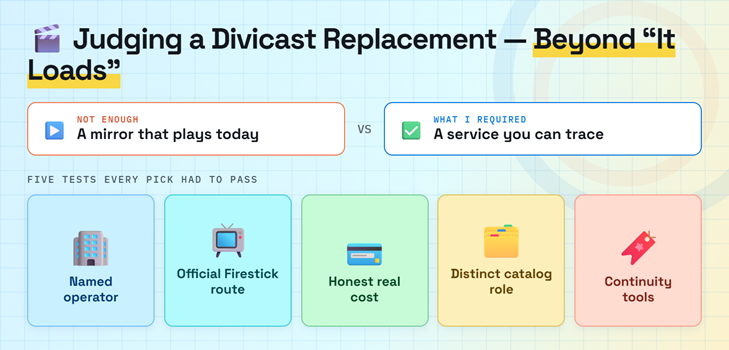
A temporary working player was not enough. Each platform needed a traceable operator, an official viewing route, honest funding, and a useful role that Divicast visitors actually need. I also treated catalog gaps as a decision factor rather than hiding them behind vague claims about thousands of titles.
- Operator Clarity: The service needed a named company, library relationship, or established storefront rather than an anonymous domain claiming that embedded files belong elsewhere today.
- Firestick Route: An official Fire TV application or clearly supported browser path ranked above casting workarounds, cloned app listings, and unknown sideload packages from websites.
- Real Cost: Advertising, library funding, rentals, purchases, subscriptions, account requirements, and borrowing limits remain visible so “free” never disguises the actual exchange from viewers anywhere.
- Catalog Purpose: Every pick earns a distinct position through broad on-demand viewing, live channels, episode depth, offline borrowing, specialist films, or current rentals for viewers.
- Continuity Tools: Search, watchlists, resume history, captions, parental controls, device pairing, and downloads mattered because losing progress is a recurring long-term cost of disposable mirrors.
Move Your Watchlist Before the Next Domain Change
A mirror-based watchlist is usually a browser record tied to one domain, not a portable library. If Divicast changes address or storage is cleared, saved titles and episode progress may disappear together. Rebuild the list inside an accountable account or a neutral discovery tool, then record the exact season, episode, edition, and subtitle needs before searching for availability.
- Capture Titles: Photograph or manually copy the current watchlist before clearing browser data, removing permissions, or permanently abandoning a suspicious Divicast lookalike domain for good.
- Use Neutral Discovery: Save missing titles in Plex’s universal watchlist so one catalog departure does not erase the reminder or force repeated manual searches later.
- Record Progress: Note season and episode numbers separately when migrating long series because different services can group specials, double episodes, and regional cuts very differently.
- Verify Editions: Match release year, runtime, language, subtitles, rating, and theatrical or extended cut before assuming two similarly named online search results are completely identical.
- Expect Rotation: Licensed catalogs change as agreements expire, so keep a watchlist independent from one provider and confirm current availability shortly before any planned viewing.
Set Up These Divicast Alternatives on Firestick Safely
Every recommended service has a documented route that avoids an unknown movie-site APK. On Fire TV, search the exact name, inspect the developer and support details, and install the official listing. Open one free title before creating an account or paying. If an app is unavailable, confirm the country and Fire OS requirement instead of downloading a similarly named package.
- Search Exactly: Use Fire TV’s Find menu or voice search, then compare the logo, developer, screenshots, and support page carefully before selecting Download or Get.
- Check Compatibility: Kanopy currently requires Fire OS 6 or newer, while other applications can still vary by Fire TV generation, country, device, and store account.
- Pair Securely: When a television displays an activation code, enter it only on the official service website while securely signed into the intended user account.
- Test Playback: Play a free movie, enable captions, pause, seek, resume, and reopen the application before relying on it for an important family viewing session.
- Protect Storage: Remove abandoned clone applications and browser downloads, retain enough update space, and follow our safe Firestick installation guide before changing any sideload settings.
Recognize a Fake Divicast Mirror Before Pressing Play
Search results now contain several unrelated pages presenting themselves as Divicast, sometimes listing multiple “official” addresses at once. A copied brand, current poster grid, or functional player proves nothing about the operator behind the page. When a site asks for unusual permissions, software, or payment verification, close it and use an official service rather than troubleshooting the trap.
- Conflicting Domains: Treat pages claiming several official addresses, rapidly changing extensions, or unrelated guide content as unverified until operator ownership can be independently and credibly established.
- Notification Requests: Reject browser notification permission because a site can continue sending fake virus warnings, gambling advertisements, and deceptive update messages long after your departure.
- Player Downloads: A normal browser stream does not require an unknown codec, certificate, cleaner, extension, APK, or dangerous security-setting change before ordinary video playback starts.
- Card Checks: Never enter payment details for free age verification, human confirmation, refundable activation, or a trial presented by any anonymous online movie streaming mirror.
- Recovery Steps: Revoke permissions, delete suspicious downloads, scan affected devices, change reused passwords, enable multifactor authentication, and carefully monitor any exposed payment details already submitted.
Best Divicast Alternatives Verdict
Tubi replaces the simplest free on-demand use case, Plex rebuilds discovery and watchlist continuity, and The Roku Channel adds dependable free television and originals on supported Fire TV devices. Add Fandango at Home only when a recent release requires payment, or Hoopla when offline library borrowing matters. This stack is more reliable than migrating from one anonymous mirror to another.
- Tubi: Best overall for a broad free catalog, official Fire TV support, no payment card, and useful optional cross-device account features.
- Plex: Best for worldwide free viewing, universal discovery, personal watchlists, reliable resume history, and combining multiple streaming choices with owned media.
- The Roku Channel: Best for free episodic television, Roku Originals, hundreds of live channels, and supported Amazon Fire TV viewing in the United States.
FAQs
What is the best free Divicast alternative?
Tubi is the best general free replacement where available because it has an official Fire TV app, needs no subscription or payment card, and offers movies, television, originals, and live programming.
Is Divicast legal and safe to use?
Divicast says it links to media hosted by third parties, but that disclaimer does not establish distribution rights or make unrelated mirrors trustworthy. Local law varies, so licensed services are the safer choice.
Which Divicast alternative has the newest movies?
Fandango at Home is the clearest option for recent legal releases because it rents and sells titles individually. New films rarely enter legitimate free catalogs during their premium distribution window.
Can I download movies from these Divicast alternatives?
Hoopla allows eligible library users to download borrowed videos inside supported mobile apps for the loan period. Plex’s official free-to-view programminging catalog does not permit offline downloads, and other rules vary.
Where can I compare another unstable movie-site replacement?
Our HDToday alternatives guide compares another set of lawful movie and television options. Always recheck the exact title, country, device support, advertising model, and account requirements before installing.