Key Takeaway: YouTube Live is the best overall Twitch alternative, Kick is the closest creator-focused replacement, and Facebook Live works best for established groups and local communities. Choose by audience location, replay value, monetization access, and television support—not a headline revenue percentage alone.
Twitch remains the default name in game streaming, but it is not the best home for every broadcaster or viewer. New creators can struggle to surface below established channels, subscription economics differ by program, ads interrupt some streams, and television availability varies. The right replacement depends on whether you need public discovery, mobile reach, private community access, durable replays, or control over the entire server.
I compared nine active platforms using current official livestreaming, monetization, replay, eligibility, device, and support documentation. This ranking separates direct Twitch competitors from social livestreaming, private screen sharing, self-hosting, and casual game broadcasting. It also excludes DLive, which closed in April 2026, and avoids presenting a large claimed revenue split as useful when the platform lacks the audience or eligibility needed to earn it.
Content and Licensing Note: This Best Twitch Alternatives guide compares applications and viewing services for informational purposes. Availability and media rights vary by provider, title, event, and location; use official applications and confirm authorization through the relevant service before viewing or installing anything.
Best Twitch Alternatives: Top Recommendations!
| Platform | Best For | Access Model | Get Started |
|---|---|---|---|
| YouTube Live | Best overall Twitch alternative | Free; optional memberships | Visit Site |
| Kick | Closest Twitch-style experience | $5 channel subscriptions | Visit Site |
| Facebook Live | Existing groups and local communities | Free; Stars and subscriptions | Visit Site |
| TikTok LIVE | Fast mobile discovery | Free; Gifts and subscriptions | Visit Site |
| Rumble | Talk shows and multistream production | Free; $5 channel support | Visit Site |
1) YouTube Live
YouTube Live is the strongest all-around Twitch alternative because one channel can combine livestreams, searchable replays, edited videos, Shorts, memberships, and television viewing. I rank it first for creators who want each broadcast to keep attracting viewers after it ends. Its disadvantages are crowded discovery, stricter copyright automation, and monetization thresholds before fan-funding or advertising becomes available.
Features:
- Flexible Broadcasting: Creators can go live by webcam, mobile device, game console, or encoder software, supporting everything from quick conversations to advanced multi-camera productions.
- Quality Range: YouTube documents ingestion through RTMPS or HLS, automatic transcoding for different connections, frame rates up to 60fps, and resolutions reaching 4K when configured correctly.
- Replay Value: Completed streams can remain searchable beside ordinary uploads, while chapters, clips, playlists, thumbnails, captions, and edited highlights extend discovery beyond the live audience.
- Viewer Controls: DVR can let viewers pause and rewind, while normal, low, and ultra-low latency modes balance picture stability against real-time chat responsiveness.
- Creator Revenue: Eligible partners can combine watch-page advertising, channel memberships, Super Chat, Super Stickers, Super Thanks, shopping, and YouTube Premium revenue under separate modules.
- Research Check: I verified current encoder routes, latency modes, DVR, fan-funding shares, television playback, and stream-quality guidance through Google’s official YouTube Help documentation.
- Main Limitation: Competition is intense, music or game footage can trigger automated rights claims, and new channels must meet eligibility rules before unlocking meaningful platform monetization.
| Pros | Cons |
|---|---|
| Excellent long-term discovery | Crowded creator competition |
| Native Fire TV application | Automated copyright claims |
| Strong replay and editing tools | Monetization requires eligibility |
| Several revenue sources |
Pricing:
- Viewer Access: Free with advertising
- Creator Broadcasting: Free for eligible verified channels
- Optional Support: Memberships and Supers vary by creator and country
Link: https://www.youtube.com/live
2) Kick
Kick is the closest direct Twitch alternative in layout, categories, chat, subscriptions, clips, and livestreaming. I place it second because $5 subscriptions pay creators 95 percent after the stated processing share, while its partner program supports multistreaming. Tradeoffs are a smaller audience, short replay retention, and no official Fire TV application documented in current viewer guides.
Features:
- Twitch-Like Format: Game directories, Just Chatting, follows, live chat, emotes, clips, VODs, channel subscriptions, gifts, and creator dashboards reduce the learning curve for switchers.
- Subscription Split: Kick states that creators retain 95 percent of each flat $5 subscription and KICKs or Gifts value, with five percent treated as processing.
- Partner Earnings: The Partner Program can add stream-based compensation for qualified verified channels, while its published requirements and payment calculations remain subject to ongoing changes.
- Multistream Option: Partners may broadcast to competing platforms using Kick’s multistreaming toggle, although the platform says this reduces eligible Partner income during simultaneous streams.
- Mobile Tools: Separate viewer and Go Live applications support HD watching, chat, VODs, mobile gameplay, screen sharing, dual cameras, and direct phone broadcasting.
- Research Check: I confirmed the June and July 2026 partner rules, May 2026 revenue explanation, mobile workflow, and replay limits through Kick’s current help center.
- Replay Limit: Non-verified channels retain replays for seven days and verified channels for 30 days, so creators should download important broadcasts before automatic removal.
| Pros | Cons |
|---|---|
| Familiar Twitch-style interface | Smaller total audience |
| Creator-friendly subscription split | Short VOD retention |
| Multistreaming is supported | No documented Fire TV app |
| Mobile streaming application |
Pricing:
- Viewer Access: Free
- Channel Subscription: $5 monthly
- Creator Share: 95 percent of subscriptions and eligible gifts; checked August 2026
Link: https://kick.com/
3) Facebook Live
Facebook Live works best when the audience already follows a profile, Page, group, event, or local organization. I recommend it for community-led streams needing invitations and sharing more than a gaming-first directory. Public discovery is weaker than Twitch, account requirements apply, and important broadcasts need saving because ordinary live-video replay storage now lasts 30 days.
Features:
- Built-In Audience: Going live from a profile, Page, group, or event can reach an existing social community without asking every viewer to create another account.
- Broadcasting Software: Creators can use a webcam or external streaming software, schedule events, preview the feed, manage a stream key, and publish public Page broadcasts.
- Technical Limits: Facebook currently documents an eight-hour standard maximum, 1080p at 30fps guidance, H.264 video, AAC audio, and longer access for selected partners.
- Viewer Support: Eligible creators can receive Stars and monthly subscriptions, while availability, qualifications, pricing, payment thresholds, and benefits differ across products and countries.
- Replay Window: New live videos remain available for replay, download, deletion, or conversion for 30 days, making an external archive essential for long-term preservation.
- Research Check: I verified the 60-day account age, 100-follower requirement, connected-TV viewing statement, stream duration, storage change, Stars, and subscriptions through Meta’s help center.
- Main Limitation: Facebook is no longer centered on a standalone gaming destination, so channel discovery depends heavily on existing followers, groups, sharing, and recommendation systems.
| Pros | Cons |
|---|---|
| Strong existing social graph | Weak gaming-first discovery |
| Profiles, Pages, groups, and events | Replays expire after 30 days |
| Stars and subscriptions available | Account and follower requirements |
| Viewers can use connected TVs |
Pricing:
- Viewer Access: Free with a Facebook account
- Creator Broadcasting: Free after eligibility requirements
- Optional Support: Stars and subscriptions vary by creator and country
Link: https://www.facebook.com/live/
4) TikTok LIVE
TikTok LIVE is the best Twitch alternative for creators who already make vertical short-form videos and want algorithmic discovery beyond existing followers. I place it fourth for cooking, music, art, commentary, shopping, and mobile gaming rather than long desktop broadcasts. Going live generally requires adulthood and 1,000 followers, regional access varies, and television viewing is not its strongest experience.
Features:
- Discovery Feed: Live sessions can surface in the LIVE tab, For You feed, Following feed, inbox, search results, and creator profiles instead of one directory.
- Mobile Production: The application supports effects, real-time chat, moderation tools, multi-guest hosting, filters, screen-oriented interaction, and quick broadcasting without a complete desk setup.
- Entry Rules: TikTok says creators must be at least 18 and generally have 1,000 followers to broadcast, although the threshold can differ by region.
- Audience Support: Eligible creators can offer Subscription communities and receive virtual Gifts purchased with Coins, while both products remain unavailable in some territories or accounts.
- Short-to-Live Funnel: Regular clips can introduce a creator before the broadcast, making concise vertical content an important acquisition channel rather than a separate publishing obligation.
- Research Check: I confirmed current age, follower, discovery, guest, moderation, Gift, regional, and Subscription information from TikTok Support and the company’s official newsroom.
- Main Limitation: TikTok prioritizes mobile vertical behavior, offers less durable replay discovery than YouTube, and gives creators limited transparency around Gifts, conversion value, and eligibility changes.
| Pros | Cons |
|---|---|
| Powerful mobile discovery | Follower threshold applies |
| Short videos feed livestream growth | Features vary by region |
| Multi-guest and moderation tools | Weak living-room experience |
| Gifts and subscriptions |
Pricing:
- Viewer Access: Free
- Creator Broadcasting: Free after local LIVE eligibility
- Optional Support: Coins, Gifts, and subscriptions vary by region
Link: https://www.tiktok.com/live
5) Rumble
Rumble is a useful Twitch alternative for talk shows, news commentary, podcasts, interviews, politics, and creators who want browser-based production plus connected-TV distribution. I rank it fifth because Rumble Studio can send streams to several destinations and channel supporters contribute $5 monthly. Its audience is less gaming-centered, and the 2026 Creator Program includes substantial monthly activity requirements and limited-country eligibility.
Features:
- Rumble Studio: The browser studio supports scheduled streams, guests, layouts, chat integrations, uploaded video, screen sharing, and selected destinations without requiring a separate hardware encoder.
- Multistream Destinations: Creators can connect YouTube, Facebook, Locals, or custom RTMP outputs, although one Rumble channel or account is supported per Studio session.
- Channel Support: Rumble states that a $5 monthly channel contribution belongs entirely to the creator, while platform-wide Premium is a separate viewer subscription.
- Creator Program: The 2026 program rewards qualified participants using watch time, new signups, and Premium subscriptions, but demands hours, chatters, clips, raids, and regional eligibility.
- Television Viewing: Rumble promotes connected-TV applications and a dedicated TV app, giving viewers a clearer living-room route than most mobile-first alternatives in this ranking.
- Research Check: I verified the June 2026 Creator Program, February Studio FAQ, livestream workflow, channel-support terms, current Premium pricing, and TV application on official Rumble pages.
- Main Limitation: Gaming categories are not its defining strength, creator-program workload is high, and editorial tone or audience expectations may not suit every brand or community.
| Pros | Cons |
|---|---|
| Useful browser production studio | Less gaming-focused audience |
| Custom RTMP multistreaming | Demanding creator-program rules |
| Connected-TV applications | Program eligibility is regional |
| Direct $5 channel support |
Pricing:
- Viewer Access: Free with advertising
- Channel Support: $5 monthly contribution
- Rumble Premium: $9.99 monthly or $99 annually at regular US pricing
Link: https://rumble.com/
6) Instagram Live
Instagram Live suits creators whose community follows their Reels, Stories, posts, channels, or direct messages. I recommend it for Q&As, launches, tutorials, interviews, beauty, fitness, music, and behind-the-scenes sessions rather than desktop gaming. Public accounts need at least 1,000 followers to start a Live, and broadcasting begins through the mobile app instead of a full creator studio.
Features:
- Follower Network: Live video sits beside Reels, Stories, posts, direct messages, and broadcast channels, helping creators announce sessions where their existing audience already interacts.
- Mobile Interaction: Hosts can invite guests, read comments, pin responses, use questions, schedule broadcasts, and manage a visually focused conversation directly through Android or iPhone.
- Current Eligibility: Instagram’s help center says broadcasting requires a public account with at least 1,000 followers, creating a higher starting barrier than several competitors.
- Replay Choices: After ending, a host can share the replay to the profile and Feed, download the video, retain it in Live archive, or delete it.
- Badge Support: Eligible professional accounts in supported countries can receive Live badges, and Meta currently states its own revenue share is zero before mobile-store fees.
- Research Check: I confirmed the current follower requirement, mobile-only start, replay workflow, professional insights, badge eligibility, geographic limits, and fee statement through Instagram Help.
- Main Limitation: There is no Twitch-style game directory or strong Fire TV workflow, and Live eligibility, badges, archives, desktop tools, and regional features can change.
| Pros | Cons |
|---|---|
| Excellent existing-follower reach | Requires 1,000 followers |
| Strong guest and Q&A tools | Mobile-first production |
| Replays can be shared or downloaded | No strong Fire TV route |
| Badge support for eligible creators |
Pricing:
- Viewer Access: Free
- Creator Broadcasting: Free after eligibility
- Optional Badges: Viewer-priced support; availability and mobile-store fees vary
Link: https://www.instagram.com/
7) Discord Go Live
Discord Go Live replaces Twitch when the goal is sharing a game, lesson, or screen with a known community instead of attracting strangers. I rank it seventh for private servers, clubs, study groups, coaching, and supporter rooms. Free streams reach 720p at 30fps, higher quality needs Nitro, and each session supports only 50 concurrent viewers plus the broadcaster.
Features:
- Server Access: Streams happen inside a voice channel, direct message, or community server, allowing roles and permissions to control who can enter and watch.
- Viewer Capacity: Discord’s current help article sets Go Live at 50 concurrent viewers plus the broadcaster, making it suitable for groups rather than public events.
- Free Quality: Every user can stream up to 720p at 30fps, while Nitro and Nitro Classic accounts can unlock quality reaching 4K at 60fps.
- Simple Sharing: A creator selects one application window or the entire screen, starts Go Live, and keeps voice conversation beside the video without encoder keys.
- Community Context: Persistent channels, roles, moderation, events, bots, forums, and voice rooms can keep discussion organized before and after a small private broadcast.
- Research Check: I verified the June 2026 viewer cap, free and Nitro quality ceilings, screen-selection process, audio restrictions, permissions, and viewing modes through Discord Support.
- Main Limitation: Go Live provides no public discovery, native channel subscriptions, advertising program, durable VOD library, or convenient large-screen Fire TV application for viewers.
| Pros | Cons |
|---|---|
| Excellent private community control | Maximum 50 viewers |
| Voice chat sits beside video | No public discovery |
| No encoder is required | No native creator monetization |
| Useful free tier |
Pricing:
- Go Live: Free up to 720p at 30fps
- Higher Quality: Optional Nitro or Nitro Classic
- Viewer Access: Free invitation or server membership
Link: https://discord.com/
8) Owncast
Owncast is the best Twitch alternative for technical creators wanting their own address, player, chat, moderation, interface, and audience relationship. I include it eighth because the open-source server accepts standard RTMP tools such as OBS and publishes widely compatible HLS video. There is no built-in audience, while hosting, bandwidth, security, backups, and scaling become the creator’s responsibility.
Features:
- Self-Hosted Control: Creators operate the server and choose the domain, branding, rules, moderation, analytics, storage, integrations, and infrastructure instead of renting a platform channel.
- Encoder Compatibility: Owncast accepts standard RTMP output from OBS, Streamlabs, Restream, and similar broadcasting software, reducing the need to redesign an existing production workflow.
- Web and HLS: The included website provides live video and chat, while its HLS output can play through browsers, VLC, mpv, QuickTime, or custom applications.
- Fediverse Reach: Optional social features let compatible Fediverse users follow the server, receive live notifications, view posts, reply, and share activity across independent services.
- Active Development: The project’s public repository lists version 0.2.5 from April 2026, open source under MIT, with installation packages, Docker, APIs, and documentation.
- Research Check: I verified current release activity, RTMP compatibility, HLS playback, social following, configuration, privacy positioning, and installation options through Owncast’s official documentation and repository.
- Main Limitation: A creator must attract every viewer, budget bandwidth, maintain Linux infrastructure, configure HTTPS, moderate independently, monitor uptime, and plan capacity for sudden traffic.
| Pros | Cons |
|---|---|
| Complete platform control | No built-in audience |
| Open-source MIT software | Hosting knowledge is required |
| Works with common encoders | Bandwidth costs can grow quickly |
| No mandatory platform advertising |
Pricing:
- Owncast Software: Free and open source
- Self-Hosting: Hardware, bandwidth, storage, and domain costs vary
- Managed Hosting: Optional third-party pricing varies by provider
Link: https://owncast.online/
9) Steam Broadcasting
Steam Broadcasting is a lightweight Twitch alternative for PC players who want friends or a game community to watch without opening OBS. I rank it ninth because a broadcast can start automatically when someone requests access and public streams can appear in a game hub. It lacks subscriptions, polished creator analytics, reliable VOD archives, and broad television viewing.
Features:
- Automatic Start: When an allowed viewer selects Watch Game, Steam can begin broadcasting the running title automatically and stop after the player exits the game.
- Privacy Controls: The broadcaster can limit viewing to invited friends, friends who request access, all friends, or anyone visiting the relevant Steam game hub.
- Game Discovery: Public broadcasts can appear in game hubs, giving viewers a title-specific route that suits demonstrations, troubleshooting, speedruns, and casual community play.
- Steam Integration: Friends lists, profiles, game status, community pages, and the desktop client already surround the feature, reducing setup for active Steam households.
- No Extra Subscription: Broadcasting is included with Steam and does not require a separate viewer plan, platform channel fee, creator membership, or paid encoder product.
- Research Check: I confirmed the current public Broadcasting page, viewer request flow, privacy choices, automatic start and stop behavior, browsers, and game-hub discovery through Steam.
- Main Limitation: Steam Broadcasting offers no native creator payout system, persistent multi-format channel, strong mobile workflow, dependable replay library, or purpose-built Fire TV viewing application.
| Pros | Cons |
|---|---|
| Very little setup for PC games | No creator monetization |
| Useful privacy controls | Limited channel-building tools |
| Game-hub discovery | No durable VOD workflow |
| No extra subscription |
Pricing:
- Broadcasting: Included with a free Steam account
- Viewer Access: Free where privacy permits
- Games: Purchased separately when required
Link: https://steamcommunity.com/?subsection=broadcasts
Match the Platform to Your Streaming Goal, Not Its Headline Split
The best Twitch replacement changes with the desired audience. A gamer seeking strangers needs a public directory, a local club needs its existing social graph, a coach may prefer a private room, and a technical creator may value server ownership above discovery. Start with the one result the stream must achieve, then compare reach, workflow, and cost around that result.
- Broadest Reach: Choose YouTube Live when searchable replays, edited videos, Shorts, television apps, Google discovery, and several creator revenue modules should reinforce one channel.
- Closest Substitute: Choose Kick when Twitch-like categories, chat, clips, subscriptions, creator dashboards, and a familiar gaming culture matter more than the largest possible audience.
- Existing Community: Use Facebook or Instagram when followers, groups, events, Reels, Pages, Stories, direct messages, or local relationships already provide the invitation and trust layer.
- Private Sessions: Use Discord Go Live for coaching, supporter rooms, classroom demonstrations, game nights, and small communities that value access control above public discovery.
- Full Ownership: Run Owncast when branding, moderation, data, integration, and domain control justify managing infrastructure, bandwidth, uptime, security, and audience acquisition yourself.
How I Compared Twitch Replacements for Streamers and Viewers
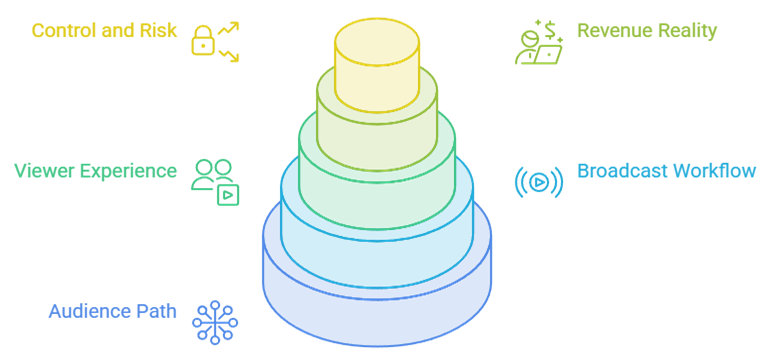
A fair Twitch comparison cannot rank every service by subscription share. Creators need reachable viewers before a generous percentage matters, while viewers need reliable apps, chat, replays, and discovery. I scored each platform by the job it can actually perform, then separated direct public competitors from social, private, self-hosted, and game-client options with narrower but legitimate uses.
- Audience Path: I checked whether discovery comes from live categories, search, recommendations, existing followers, private invitations, game hubs, or an audience the creator must bring independently.
- Broadcast Workflow: Encoder support, mobile streaming, guests, screen sharing, stream keys, multistreaming, scheduling, latency choices, quality limits, moderation, and analytics were evaluated together.
- Viewer Experience: Chat, follows, notifications, clips, replays, seeking, captions, television applications, account friction, regional limits, and advertising shape whether an audience returns.
- Revenue Reality: Subscriptions, gifts, advertising, eligibility, platform shares, app-store fees, required activity, payout access, and audience size matter more than one promotional percentage.
- Control and Risk: Content ownership, VOD retention, export options, moderation obligations, copyright systems, infrastructure burden, regional programs, and platform dependence expose different long-term risks.
Move a Twitch Audience Without Losing Chat, Replays, or Revenue
A sudden one-platform switch usually loses more viewers than it gains. Build a measured migration that proves the replacement during real broadcasts, teaches viewers where to follow, preserves important VODs, and tests income before changing the main schedule. Multistreaming can supply comparison data, but each platform’s current rules and partner terms must be reviewed before sending the same feed elsewhere.
- Export First: Download important Twitch broadcasts, clips, schedules, subscriber records you are allowed to retain, emote assets, moderation notes, panels, and channel descriptions before changing routines.
- Claim Identity: Reserve the same recognizable name, avatar, banner, biography, links, and security settings on the replacement before publicly announcing a permanent or trial move.
- Run Trials: Schedule several comparable broadcasts, tracking unique viewers, returning chatters, average watch time, follows, replay views, moderation load, technical failures, and actual revenue.
- Teach Viewers: Post a clear schedule and direct destination across Twitch panels, YouTube, Discord, social profiles, email, and community spaces without promising unavailable platform features.
- Keep an Exit: Maintain independent contact routes and local archives so another policy change, account lock, storage limit, or platform closure does not erase the community again.
Watch Twitch Alternatives on Firestick Without Risky APKs
Large-screen support is uneven. YouTube has the clearest native Fire TV route, Rumble promotes a television app, and Facebook says viewers can use connected TVs. Kick’s current official viewer guide documents iOS, Android, and web—not a Fire TV application—while TikTok, Instagram, Discord, Owncast, and Steam are primarily mobile, desktop, browser, or custom-player experiences. Treat unsupported APKs cautiously.
- Appstore First: Search the Fire TV Appstore for the exact service, confirm its publisher and support details, and avoid similarly named APK files from download pages.
- Browser Limits: A website may open in Silk yet still have awkward remote navigation, login challenges, autoplay restrictions, unsupported chat, high memory use, or unreliable fullscreen playback.
- Casting Check: Use an officially documented casting or connected-TV route when available, understanding that mirroring can add delay, drain a phone battery, and hide interactive chat.
- Quality Test: Try one live session before depending on a platform, checking video quality, audio synchronization, buffering, chat readability, remote controls, captions, and account persistence.
- Broader Viewing: Our best live TV apps for Firestick guide covers native channel services when living-room reliability matters more than creator chat and gaming discovery.
Understand Monetization Before Signing Exclusivity or Buying Gear
Revenue percentages are incomplete without eligibility, paying audience size, refunds, taxes, mobile-store charges, payout minimums, advertising demand, program geography, and required activity. A platform paying 95 percent of subscriptions may earn less than a mature channel receiving 70 percent elsewhere. Model conservative monthly results and confirm ownership, exclusivity, and multistreaming terms before committing equipment or abandoning existing income.
- Use Net Revenue: Calculate money received after platform shares, payment processing, store fees, taxes, refunds, currency conversion, chargebacks, agency costs, and required software or hosting.
- Price Eligibility: Account age, followers, watch time, subscriptions, stream hours, chatters, regional availability, rule adherence, and application review can delay or block advertised programs.
- Value Replays: YouTube’s durable discovery can monetize later views, while Kick and Facebook retention limits make downloads, highlights, and separate archives more important to long-term earnings.
- Read Restrictions: Partner agreements may alter simultaneous-stream payouts, permitted destinations, advertising behavior, sponsorship disclosures, exclusivity, copyrighted content, cancellation, and use of clips or likeness.
- Diversify Carefully: Combine platform revenue with direct sponsorships, memberships, merchandise, events, courses, or an owned community only when every promotion remains transparent and useful to viewers.
Best Twitch Alternative: Final Verdict
YouTube Live is the best overall replacement because broadcasts can become searchable long-term assets, Kick provides the most familiar direct migration, and Facebook Live remains effective for established communities. Keep Twitch during a measured test when possible, compare actual returning viewers and net revenue, then archive every important stream. Private groups should consider Discord, while creators prioritizing independence should study Owncast.
- YouTube Live: Best overall for public reach, searchable replays, television viewing, flexible production, clips, Shorts, memberships, Supers, advertising, and an audience that can grow between broadcasts.
- Kick: Best direct Twitch substitute for familiar categories, chat, subscriptions, clips, mobile broadcasting, multistreaming, and a creator-friendly 95/5 split on eligible subscription and gift revenue.
- Facebook Live: Best for businesses, clubs, groups, events, local communities, and creators whose audience already follows a Page or professional profile rather than a gaming directory.
FAQs
What is the best alternative to Twitch in 2026?
YouTube Live is the best overall choice for most creators because it combines livestreams, searchable replays, Shorts, television applications, several production routes, and multiple monetization tools. Kick is the closest Twitch-like option, while the correct niche choice depends on where the audience already spends time.
Which Twitch alternative pays streamers the most?
Kick advertises one of the largest subscription shares at 95 percent, but that does not guarantee the highest earnings. Audience size, eligible subscriptions, gifts, advertising, required activity, refunds, fees, regional access, and program approval determine net income. Compare real trial results instead of assuming the largest percentage wins.
Can I stream on Twitch and another platform at the same time?
Several alternatives support multistreaming, and Kick explicitly documents it for Partners with adjusted Partner income. However, every current Twitch, Kick, YouTube, Facebook, sponsorship, or agency agreement can impose different conditions. Review the contracts applying to your account before sending one broadcast to multiple destinations.
Which Twitch alternative works best on Firestick?
YouTube Live offers the clearest official Fire TV experience and Rumble promotes a television app. Other services may rely on connected TVs, casting, Silk, mobile, desktop, or custom players. Never assume an Android phone APK is remote-friendly or safe merely because Fire OS shares Android foundations.
Is YouTube Live better than Twitch for small streamers?
YouTube offers stronger search, replay discovery, Shorts, and television reach, while Twitch remains more culturally focused on live gaming and chat. Test both with the same schedule and compare returning viewers, not raw impressions; our best YouTube alternatives also covers platforms suited to broader video publishing.