Key Takeaway: Tubi is the best overall free CouchTuner alternative, Pluto TV is strongest for cable-style channel surfing, and The Roku Channel adds originals and a large free guide. I found no verified continuation of the original CouchTuner, so these active licensed services are safer than clone hunting.
CouchTuner solved one simple problem: finding television episodes without juggling several subscriptions. Its shifting domains created a second problem—nobody could reliably tell which page was original, who operated a clone, whether a player was safe, or whether a favorite series would still exist tomorrow. Today, free legal streaming is much stronger, but no single catalog contains every show CouchTuner once linked.
I compared nine current services by the jobs a CouchTuner user actually needs: free entry, television depth, search quality, account requirements, Fire TV support, resume playback, ad load, library-card rules, and a clear way to find one missing episode. The right replacement is usually a two-app combination, not another anonymous site wearing the old name.
9 Best CouchTuner Alternatives in 2026: Free and Legal Picks
| Service | Best For | Access Model | Get Started |
|---|---|---|---|
| Tubi | Largest all-round free catalog | Free with ads | Visit Site |
| Pluto TV | Cable-style channel surfing | Free with ads | Visit Site |
| The Roku Channel | Free originals and live channels | Free with ads | Visit Site |
| Plex | One watchlist across services | Free with ads | Visit Site |
| Sling Freestream | Free DVR and scheduled TV | Free with ads | Visit Site |
1) Tubi
Tubi is the CouchTuner alternative I would install first for a broad mix of licensed movies, complete television seasons, originals, children’s programming, and live channels. It asks for no subscription or payment card, provides an official Fire TV app, and lets optional account holders synchronize a list and viewing progress instead of trusting a temporary browser cookie.
Features:
- Licensed Free Catalog: Tubi says its thousands of films and shows come from studio partners including Paramount, Lionsgate, and MGM, with advertising funding ordinary viewing instead of subscriptions.
- Start Without Paying: A credit card is unnecessary, and registration is optional for basic playback; creating a free profile adds saved titles, history, recommendations, and cross-device continuation.
- Fire TV Ready: The official application installs from Amazon Appstore and also supports Roku, Apple TV, mobile devices, consoles, smart televisions, Xfinity equipment, and standard web browsers.
- Useful TV Discovery: Genre rows, search, live channels, Tubi Originals, children’s areas, and changing editorial collections make browsing more dependable than chasing episode links across copied CouchTuner pages.
- Account Portability: A free sign-in carries My List and playback position between supported screens, so abandoning one device does not erase the episode or timestamp already reached.
- Source Review: I confirmed the current legal claim, no-card model, account benefits, studio examples, catalog scale, Fire TV availability, and device list through Tubi’s own welcome page.
- Real Limitation: Commercials cannot be removed, titles rotate when licenses change, offline downloads are unavailable for the free catalog, and local selections differ because rights remain territorial.
| Pros | Cons |
|---|---|
| No subscription or payment card | No ad-free option |
| Broad movies and complete-series catalog | Catalog rotates by license |
| Official Amazon Fire TV application | Availability differs by country |
| Optional progress synchronization |
Pricing:
- Movies and TV: Free with commercial breaks
- Account: Free and optional
- Ad-Free Tier: Not offered
Link: https://tubitv.com/welcome
2) Pluto TV
Pluto TV is the CouchTuner replacement I recommend when you prefer choosing a channel over searching for an exact title. It combines hundreds of free linear channels with thousands of on-demand films and series. The official Fire TV app works without a card, while an optional profile can synchronize favorites, Watchlist entries, and continue-watching progress.
Features:
- Two Ways to Watch: A live guide supplies scheduled channels, while the on-demand side lets viewers choose eligible movies or shows immediately rather than waiting for the next airing.
- No Subscription Bill: Pluto describes itself as completely free and legal; short commercial breaks finance the service, and ordinary viewing requires neither a credit card nor paid membership.
- Wide Device Coverage: Native applications support Fire TV, Roku, Apple TV, Android TV, smart televisions, mobile platforms, PlayStation, Xbox, Chromecast, and browsers such as Chrome or Safari.
- Free Profile Benefits: Registration can synchronize favorite channels, a personal Watchlist, and resume points across compatible devices without converting the account into a paid streaming subscription.
- Lean-Back Categories: Dedicated feeds cover movies, crime, reality, news, sports, comedy, classics, documentaries, and individual franchises, creating a familiar television experience without cable service.
- Source Review: I checked Pluto’s current homepage and company description for cost, legal status, commercial funding, channel scale, on-demand availability, profile functions, and supported hardware.
- Real Limitation: Live feeds follow fixed schedules, commercials are mandatory, recording is unavailable, and particular channels, films, series, languages, or profile tools can disappear outside supported markets.
| Pros | Cons |
|---|---|
| Live guide plus on-demand titles | Commercials interrupt playback |
| No payment card required | No cloud recording |
| Official Fire TV support | Lineup varies geographically |
| Optional favorites and Watchlist |
Pricing:
- Live Channels: Free with advertising
- On-Demand Library: Free with advertising
- Profile: Free and optional
Link: https://pluto.tv/
3) The Roku Channel
The Roku Channel is the CouchTuner substitute I choose for polished free television, Roku Originals, films, and a large live guide. A Roku device is not mandatory: Roku documents support on the web, mobile apps, Samsung televisions, and compatible US Fire TV hardware. Free programming carries ads, while separately billed premium channels remain optional.
Features:
- Five Hundred Channels: Roku support now advertises more than five hundred free live channels alongside movies, television shows, children’s entertainment, and exclusive Roku Originals in one destination.
- No Roku Box Needed: Viewers can use TheRokuChannel.com, mobile applications, compatible Samsung or Google televisions, and supported Amazon Fire TV devices without buying a Roku streaming player.
- Fire TV Installation: In the United States, search Amazon Fire TV Apps under Movies and TV for The Roku Channel, then install the verified application directly from the store.
- Free Originals: Roku Originals include exclusive comedies, dramas, reality programs, and short-form series that play wherever the core channel is supported, without a separate original-content subscription.
- Account Convenience: A free Roku sign-in can preserve progress and saved choices across supported screens, while free titles remain separate from optional premium channel purchases.
- Source Review: I used Roku support updated June 2026 to verify live-channel scale, Fire TV eligibility, web and mobile routes, sign-in benefits, territories, and free status.
- Real Limitation: Fire TV access centers on the United States, advertisements remain, premium subscriptions create separate charges, and Roku’s free catalog and device features vary by country.
| Pros | Cons |
|---|---|
| More than 500 live channels | Fire TV access is US-focused |
| Includes exclusive Roku Originals | Free programs contain ads |
| Works on supported Fire TV devices | Premium add-ons cost extra |
| No Roku player is required |
Pricing:
- Core Channel: Always free with advertising
- Roku Account: Free to create
- Premium Channels: Separately priced and optional
Link: https://therokuchannel.roku.com/
4) Plex
Plex is the CouchTuner alternative I value most for finding and organizing shows across several legal services. Its own ad-supported movies and live channels sit beside Discover, a universal Watchlist, and personal-media playback. The Fire TV client can preserve progress under a free account, although a Plex Pass does not remove commercials from Plex-provided programming.
Features:
- Universal Watchlist: Save a film or series once and let Plex display participating services that currently offer it, even when the title is not inside Plex’s free catalog.
- Free Partner Content: Plex supplies ad-supported on-demand movies, episodic television, and live channels from licensing partners, with the available selection changing according to the viewer’s region.
- Amazon Living-Room App: The supported Fire TV client includes free programming, Discover, search, Watchlist, personal-media libraries, and account features through an interface designed for television remotes.
- Personal Media Option: A free Plex Media Server can organize lawfully owned files on a computer or NAS, keeping home video collections separate from rotating commercial catalogs.
- Cross-Device Continuity: Creating a complimentary profile adds watch progress, favorite channels, saved items, and personalized search choices that follow the viewer between compatible applications.
- Source Review: I verified Plex’s current free model, Fire TV compatibility, account benefits, global availability, live service, Watchlist behavior, personal-media role, and advertising policy.
- Real Limitation: Plex-provided shows keep their ads even for Plex Pass subscribers, content differs by country, and Discover may direct viewers to a separate paid provider.
| Pros | Cons |
|---|---|
| Universal cross-service Watchlist | Plex Pass does not remove ads |
| Free movies and live channels | Discovery can lead to paid services |
| Supports personal media libraries | Catalog varies regionally |
| Official Fire TV application |
Pricing:
- Free Movies and TV: $0 with advertising
- Free Live TV: $0 with advertising
- Plex Pass: Optional; does not unlock or de-ad partner content
Link: https://watch.plex.tv/
5) Sling Freestream
Sling Freestream is the CouchTuner replacement I pick for viewers who want scheduled channels and a small cloud DVR without paying for Sling Orange or Blue. Sling advertises more than 600 free channels and over 40,000 on-demand shows and movies. Guest playback needs no account, while registration adds profiles, favorites, watchlists, controls, and recording.
Features:
- Large Free Guide: More than six hundred advertised channels span films, drama, news, sports, international programming, reality, children’s shows, comedy, documentaries, anime, music, travel, and lifestyle.
- On-Demand Shelf: Over forty thousand listed movies and shows can be selected independently of the guide, giving users an immediate episode-based option alongside continuous linear streams.
- Guest Access: Sling lets visitors begin eligible Freestream programs without login, subscription, or credit card, preserving the quick-start convenience people sought from CouchTuner.
- Free Account Tools: Registering adds user profiles, favorite channels, watchlists, parental controls, rewards, and other personalization without automatically enrolling the household in paid Sling television.
- Cloud DVR Allowance: Signed-in Freestream users can record up to ten hours of supported programming, although networks may block recordings and storage does not apply to every title.
- Source Review: I checked current Sling product and help pages for channel scale, on-demand volume, guest entry, device routes, account benefits, recording storage, and free status.
- Real Limitation: Advertising is unavoidable, rights and channels rotate, account tools need registration, DVR excludes some programs, and the strongest Freestream selection remains country-dependent.
| Pros | Cons |
|---|---|
| More than 600 free channels | Some titles cannot be recorded |
| No account needed to start | Commercials remain |
| Ten hours of cloud DVR | Availability varies by region |
| Profiles and parental controls |
Pricing:
- Guest Viewing: Free with advertisements
- Member Features: Free; no credit card required
- Cloud DVR: Ten hours for eligible programs
Link: https://www.sling.com/freestream
6) Xumo Play
Xumo Play is the CouchTuner alternative I suggest when you want an instant live guide and on-demand films without creating any account. Xumo describes more than 300 channels and tens of thousands of movie and television titles. Its official app supports Fire TV and Fire Stick devices, while advertising keeps every supported screen free to use.
Features:
- Live and On Demand: Xumo combines more than three hundred advertised channels with tens of thousands of selectable titles across movies, television, news, sports, comedy, music, and lifestyle.
- No Account Barrier: The service requires no subscription, login, credit card, or trial enrollment, making the first play faster than platforms that force registration before browsing.
- Fire TV Support: Xumo’s published device list includes Amazon Fire TV and Fire Stick hardware alongside Roku, Android TV, Chromecast, Samsung, Sony, Hisense, mobile, and desktop.
- Free Movie Categories: Action, crime, classics, documentaries, horror, comedy, international cinema, children’s films, and leaving-soon collections make the on-demand area easier to inspect deliberately.
- Favorites Without Fees: Supported experiences can mark channels as favorites for quicker access, while the platform remains free instead of using personalization as a paid feature.
- Source Review: I confirmed Xumo’s current free model, no-account requirement, channel and title claims, Fire TV availability, advertising policy, categories, and simultaneous-device statement.
- Real Limitation: There is no commercial-free tier, parental controls are currently unavailable, catalogs change, and a program visible on Xumo in one location may be absent elsewhere.
| Pros | Cons |
|---|---|
| No account or payment card | No ad-free upgrade |
| Live channels and on-demand movies | Parental controls unavailable |
| Official Fire TV application | Catalog changes by territory |
| Broad genre navigation |
Pricing:
- Live Channels: Free with advertisements
- On-Demand Titles: Free with advertisements
- Account or Subscription: Neither is required
Link: https://play.xumo.com/
7) Fandango at Home
Fandango at Home is the CouchTuner alternative I use when a free ad-supported shelf is helpful but renting one missing episode or movie is better than adding another monthly plan. The service clearly separates “Free to Watch” titles from rentals and purchases. Its strength is transactional flexibility; the tradeoff is needing an account and paying per unavailable title.
Features:
- Dedicated Free Row: The Browse All Free Titles page labels eligible movies and television as Free to Watch, separating ad-supported viewing from rental and ownership prices.
- No Monthly Plan Needed: A user can open a free account, watch advertising-supported selections, and pay only when choosing a specific rental or purchase outside that rotating catalog.
- Transactional Backup: Renting one difficult-to-find movie or episode can cost less than keeping a full subscription solely for a single franchise or short viewing project.
- Clear Purchase Labels: Store pages distinguish free, rental, and purchase options before checkout, reducing the ambiguity common on pages that place fake play buttons beside unrelated downloads.
- Library Ownership: Purchased titles collect inside the account library for repeat access under service terms, while rentals retain explicit viewing windows rather than disappearing without notice.
- Source Review: I inspected the current Fandango at Home store and free-title browser for labels, rotating free availability, account entry, rentals, purchases, collections, and platform positioning.
- Real Limitation: Free programs include ads, an account is necessary for full use, prices vary by title and quality, and digital purchases remain licensed access rather than downloaded ownership.
| Pros | Cons |
|---|---|
| Clearly labeled free catalog | Account needed for full use |
| Rent only the missing title | New releases usually cost money |
| No recurring plan required | Free catalog contains ads |
| Purchase library available |
Pricing:
- Free to Watch: $0 with advertising
- Rentals: Per-title price shown before checkout
- Purchases: Per-title price based on edition and quality
Link: https://athome.fandango.com/content/browse/uxrow/Browse-All-Free-Titles/2764
8) Hoopla
Hoopla is the CouchTuner alternative I recommend to library cardholders who want ad-free movies and television without another subscription. Participating public libraries cover the cost, and Hoopla also includes ebooks, audiobooks, comics, manga, and music. The official Fire TV app pairs through a four-digit code, but each library sets catalog access and borrowing limits.
Features:
- Library-Funded Access: A valid card from a participating library unlocks eligible movies and shows without subscription fees, commercial breaks, overdue penalties, or a promotional trial ending unexpectedly.
- Instant Borrowing: Available titles begin immediately rather than entering a waiting list, and the digital loan returns automatically when its published borrowing period expires.
- Fire TV Pairing: Install Hoopla from Amazon Appstore, open the application to receive a four-digit code, then link the television through the signed-in website on another device.
- Offline Mobile Viewing: Supported phones and tablets can download borrowed video for temporary offline playback, a convenience most advertising-funded CouchTuner replacements do not provide.
- More Media Included: One library relationship may include films, seasons, music, audiobooks, electronic books, graphic novels, manga, SeasonPass collections, and BingePass access.
- Source Review: I checked Hoopla’s 2025–2026 patron guides for ads, fees, library eligibility, Fire TV installation, pairing, borrowing behavior, downloads, included formats, and waiting lists.
- Real Limitation: Local libraries choose participation, title availability, monthly borrowing allowances, and daily spending caps, so a friend in another city may see a different catalog.
| Pros | Cons |
|---|---|
| No advertisements or subscription fee | Participating library required |
| Official Fire TV application | Borrow limits vary locally |
| Instant digital loans | Catalog differs by library |
| Mobile downloads available |
Pricing:
- Eligible Cardholder: Free through the library
- Advertisements: None during borrowed programs
- Monthly Allowance: Set by the participating institution
Link: https://www.hoopladigital.com/
9) Kanopy
Kanopy is the CouchTuner substitute I choose for documentaries, classics, international cinema, independent films, educational programs, and Kanopy Kids. Access comes through a participating library or university rather than advertising. The Fire TV app provides a proper big-screen route, although each institution controls eligibility, monthly tickets, available titles, and occasional budget-related streaming limits.
Features:
- Institutional Membership: Viewers locate a participating public library or university, validate a card and PIN or campus credentials, then stream under rules and funding chosen locally.
- Curated Film Focus: Kanopy emphasizes documentaries, world cinema, educational works, independent releases, classics, lectures, and thoughtful children’s programming instead of chasing every recent studio blockbuster.
- Ticket System: Public libraries may assign monthly tickets and different costs by title or series, while unused balances reset and institutional policies determine the actual allowance.
- Ticket-Free Areas: Many libraries offer an unlimited viewing shelf, and Kanopy Kids programs do not consume tickets where that collection has been enabled for members.
- Fire TV Route: Kanopy supports compatible Amazon Fire TV hardware along with Roku, Apple TV, Android or Google TV, smart televisions, mobile apps, and browsers.
- Source Review: I reviewed Kanopy help updated through July 2026 for card validation, additional libraries, ticket behavior, budget limits, television support, Kids access, and institutional differences.
- Real Limitation: A library can limit streaming to manage costs, catalogs and tickets vary, some universities restrict titles, and viewers without an eligible institution cannot register independently.
| Pros | Cons |
|---|---|
| Ad-free curated cinema | Eligible institution required |
| Strong documentaries and world films | Ticket rules vary |
| Official Fire TV support | Temporary limits can occur |
| Kanopy Kids can be unlimited |
Pricing:
- Eligible Member: Free through the institution
- Monthly Tickets: Determined locally
- Unlimited Areas: Available where enabled
Link: https://www.kanopy.com/
Why No “Official CouchTuner” Claim Is Enough
The CouchTuner name now behaves like a costume rather than a verified identity. A page can copy the logo, colors, episode list, or old layout without inheriting the original operator, server security, licensing, privacy practices, or support. Treat every current claim as unverified until ownership and distribution rights can be independently checked.
- Domain Changes: Repeated address changes break bookmarks and make it difficult to distinguish continuity from an unrelated operator launching a new site under a familiar name.
- Copied Interfaces: Matching artwork and menus prove only that files were copied; they do not establish common ownership, authorized streams, secure code, or honest advertising partners.
- Fake Play Buttons: Aggressive pages may route a click through notification requests, software offers, betting pages, or credential forms before any actual episode player appears.
- Password Reuse: Never enter credentials used elsewhere, because an unofficial clone has no reason to need an old CouchTuner password and may retain whatever information you submit.
- VPN Boundaries: Encryption protects traffic to a VPN server, but it cannot inspect a clone, license copyrighted video, prevent deceptive redirects, or guarantee the stream remains online.
How We Evaluated CouchTuner Alternatives
A CouchTuner replacement should do more than open a video. I ranked services by whether a real operator supplies licensed programming, whether the true cost is visible before playback, whether Fire TV has an official route, and whether search, resume, and catalog tools solve the episode-finding problem that sends people toward clones.
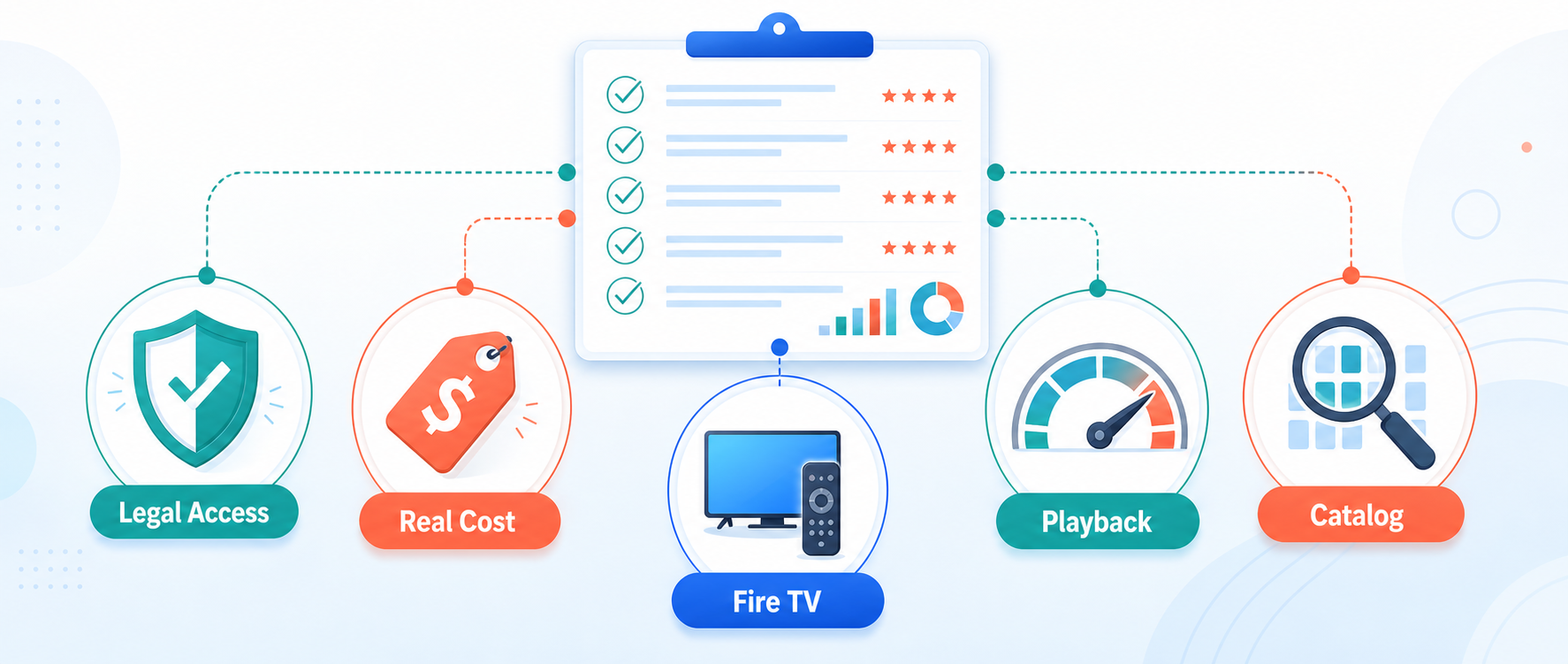
- Legal Access: Each recommendation needed an official operator, stated funding model, support path, and documented application or browser destination rather than an anonymous mirror using copied branding.
- Real Cost: Free meant no subscription payment, while advertisements, accounts, library cards, tickets, rentals, optional upgrades, and regional fees were recorded as separate practical costs.
- Fire TV: Native Amazon availability received preference because store installation, updates, remote navigation, permissions, and developer identity are safer than sideloading an unverified CouchTuner APK.
- Playback Utility: Watchlists, resume points, profiles, captions, downloads, DVR, live guides, and cross-device history mattered when they reduced friction during ordinary television viewing.
- Catalog Fit: Broad free libraries ranked highly, but specialist strengths also earned credit when they solved documentaries, library access, rentals, complete seasons, or scheduled comfort television.
Find One Missing Episode Without Checking Nine Catalogs
Legal catalogs rotate, so the best service on Monday may not have the episode you need on Friday. Start with a title finder, confirm the season and episode number, and then compare free, library, rental, and subscription routes. This takes less time than opening every app and avoids confusing a trailer, clip, live channel, or similarly named remake with the complete program.
| Your Missing Content | First Place to Check | Best Next Move |
|---|---|---|
| Older complete TV series | Tubi or The Roku Channel | Search both official catalogs before paying |
| Scheduled comfort television | Pluto TV or Sling Freestream | Browse the live guide and favorites |
| One specific movie | Plex Discover | Compare free, rental, and subscription sources |
| Ad-free documentaries | Kanopy or Hoopla | Verify local library participation |
| A title unavailable free | Fandango at Home | Compare one rental with a monthly plan |
- Confirm the Edition: Record the exact year, season, episode, country, and special title because remakes, holiday episodes, bonus clips, and international versions often share nearly identical names.
- Use Discovery First: Plex Discover can show participating providers for a saved title, helping separate free playback, subscription access, rentals, purchases, and unavailable regional results.
- Check Library Access: Search Hoopla and Kanopy after general free services; a participating institution may provide the exact documentary, classic, or season without ads or payment.
- Compare One-Off Cost: When only one title is missing, a Fandango rental can be cheaper than starting a monthly service and easier to cancel than a trial.
- Verify Before Signup: Open the actual program page and confirm play rights, season availability, language, location, and plan requirement before entering billing details or starting a trial.
Build a Free TV Stack Around Your Viewing Habit
Trying to replace every CouchTuner link with one service creates disappointment. Build a small stack around how you watch: one broad on-demand app, one live-channel guide, and one discovery or library tool. That combination stays free for many viewers, gives you a backup when rights rotate, and keeps every installation tied to an identifiable provider.
- Broad Base: Start with Tubi for general movies and complete television seasons, then keep registration optional until cross-device progress or a saved list becomes useful.
- Live Layer: Add Pluto TV, The Roku Channel, Sling Freestream, or Xumo when you prefer scheduled channels, background viewing, news, themed marathons, and less searching.
- Search Layer: Use Plex Discover to remember titles and check providers, reducing duplicated searches whenever a show leaves one free catalog and appears somewhere else.
- Library Layer: A supported card can add Hoopla or Kanopy for ad-free documentaries, cinema, children’s programs, and older television without another consumer subscription.
- Keep It Small: Two or three official apps are easier to update, search, and secure than a home screen crowded with overlapping services and abandoned unofficial packages.
Install CouchTuner Replacements on Fire TV Safely
Every alternative here has an official Fire TV route or documented television access. Search Amazon Appstore for the exact service, verify the developer and support destination, and install there. Do not enable unknown sources for a CouchTuner-branded APK. If you want a wider comparison of legitimate free options, review our free FMovies alternatives after finishing this list.
- Search by Exact Name: Use Fire TV Find or Alexa for the complete service name, then compare the icon, developer, screenshots, age rating, permissions, and support details.
- Prefer Store Updates: Amazon Appstore installations receive signed updates through the normal device workflow, while sideloaded clones can silently age, disappear, or request unrelated permissions.
- Activate on Another Screen: When a television shows a code, type it only into the service’s official domain on a phone or computer instead of entering a long password remotely.
- Test Before Movie Night: Open a free title, verify captions and remote controls, check Wi-Fi near the television, and confirm the account resumes correctly before relying on an app.
- Remove Abandoned APKs: Uninstall unofficial CouchTuner packages, clear leftover downloads, review notification permissions, and preserve storage for Fire OS updates and maintained applications from known providers.
Best CouchTuner Alternatives Verdict
No legal service reproduces every link CouchTuner once displayed, and that is precisely why one verified “new CouchTuner” should not be the goal. Start with a broad free catalog, add a channel guide if you enjoy scheduled television, and use discovery or library access for gaps. This approach is safer, more stable, and usually costs nothing beyond advertisements.
- Tubi: best overall free choice for licensed movies, television seasons, optional account syncing, broad device support, and a native Fire TV application.
- Pluto TV: best for a familiar live guide with hundreds of scheduled channels plus on-demand films and series without any subscription payment.
- The Roku Channel: best for Roku Originals, a large free channel guide, web access, and supported US Fire TV devices without buying Roku hardware.
FAQs
What is the best free CouchTuner alternative?
Tubi is the best overall free CouchTuner alternative because it combines a broad licensed catalog, complete television seasons, official Fire TV support, no card requirement, and optional progress syncing. Pluto TV is better when you prefer scheduled channels. Since rights rotate, pair one broad app with Plex Discover or a library service instead of expecting one catalog to contain everything forever.
Does the original CouchTuner still exist?
I found no current domain that can be independently verified as the original CouchTuner operation. Many addresses reuse the name, artwork, or layout, but copied branding does not prove shared ownership. Treat present-day CouchTuner sites as unrelated unless their operator, history, licensing, privacy terms, and official applications can be verified through reliable sources.
Are these CouchTuner alternatives legal?
The nine services in this guide use licensed, advertising-supported, library-funded, rental, or purchase models. Availability still varies by country, institution, and title, but their official operators and access rules are identifiable. Legality can depend on jurisdiction and content rights; an anonymous mirror linking newly released subscription shows is not equivalent to a licensed free catalog.
Which CouchTuner alternative works best on Firestick?
Tubi is the easiest all-round Firestick choice, while Pluto TV and The Roku Channel provide stronger live-channel browsing. Plex helps track titles across services, and Sling Freestream adds free DVR for eligible programs. Install from Amazon Appstore, verify the developer listing, and avoid unofficial CouchTuner APKs. Our NunFlix alternatives guide covers another closely related free-streaming use case.
Can I watch without creating an account?
Yes. Tubi, Pluto TV, Sling Freestream, and Xumo Play allow substantial free viewing without a paid subscription, and several permit guest playback. The Roku Channel also offers free programming, though location and feature rules vary. Accounts become useful for Watchlists, progress, profiles, parental controls, or DVR, while Hoopla and Kanopy require credentials from a participating institution.
Do I need a VPN for legal CouchTuner alternatives?
No. A VPN is not required for ordinary use of licensed services in a supported country. It encrypts traffic between your device and the VPN server, but it does not create regional streaming rights, remove account rules, inspect every advertisement, or make an unauthorized mirror legal. Confirm each service’s territory and terms instead of treating location switching as guaranteed access.