Key Takeaway: This guide compares 10 current Stremio addons with distinct roles across streaming sources, discovery, metadata, automation, and subtitles. Start with one primary source, then add only the catalog or utility addons your setup needs.
Are you tired of buffering streams, broken links, or addons that suddenly stop working right when you are about to relax? If you have been relying on random streaming extensions, you have probably faced constant crashes, low-resolution playback, intrusive ads, malware risks, privacy exposure, and even ISP warnings. Poor-quality and unverified tools can ruin your experience and put your data at risk.
On the other hand, the right addons give you stable streams, better resolution, faster loading times, and safer browsing. When you choose wisely, streaming becomes effortless, enjoyable, and stress-free again.
Content and Licensing Note: This Best Stremio Addons : Tested & Working guide compares addons, repositories, and media tools for informational purposes. Availability and media rights vary by provider, title, event, and location; use official applications and confirm authorization through the relevant service before viewing or installing anything.
Best Stremio Addons: Top Recommendations!
| Addon | Type | Best For | Debrid | Status | Get Started |
|---|---|---|---|---|---|
| Comet | Stream source | Fast debrid search and backup | Recommended | Listed · v2.0.0 | Configure |
| MediaFusion | Universal source | Multilingual movies and shows | Optional | Listed · v6.1.3 | Configure |
| AIOStreams | Aggregator | One filtered multi-source list | Recommended | Listed · v2.31.1 | Configure |
| Streaming Catalogs | Catalog | Platform-based discovery | Not needed | Listed · v1.1.1 | View Listing |
1) Comet
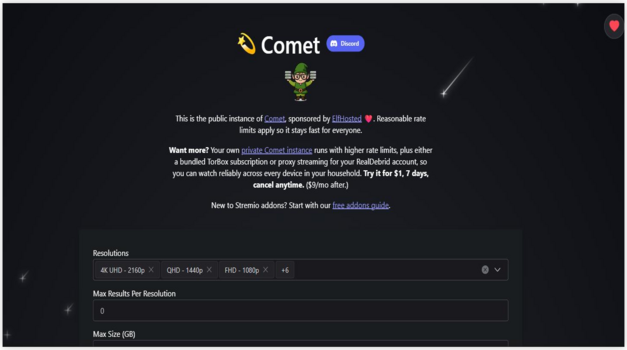
Comet is a fast, lightweight Stremio addon that I keep installed for quick debrid searches. It scrapes a broad pool of sources but returns results in a couple of seconds, which is ideal for mainstream movies and new episodes. Its ElfHosted configuration page is simple: pick your providers, connect a debrid account, and choose your filters. In my experience, turning on cached-only results gives the cleanest, buffer-free playback. Comet is a great pick if you value speed and a tidy stream list, and it works well as a second source alongside a broader addon like MediaFusion.
Features:
- Debrid Service Integration: Comet connects to Real-Debrid, AllDebrid, and Premiumize. It returns unrestricted links for Stremio playback. This boosts reliability, especially for popular cached files.
- Proxy Streaming for Multi-IP: Comet can proxy debrid requests so one account works across locations. It helps avoid one-IP limits from some services. I recommend enabling proxy mode for households.
- Smart Torrent Ranking: Comet uses RTN smart ranking to order torrents. Higher quality and healthier swarms rise up. This saves time when you want the best link fast.
- Public DMM Hashlist Search: Comet can search public DMM hashlists via Zilean. This finds releases that indexers miss. It expands coverage without you adding extra providers.
- Custom Indexers via Jackett or Prowlarr: You can plug in your own tracker indexers. I tested this with Prowlarr and saw niche results. It fits anime and rare cuts.
- Stream Deduplication and Cleanup: Toggle Deduplicate Streams to collapse duplicates across sources. Remove Trash filters low-quality or misleading entries. The list stays tidy, so picking a stream feels effortless.
- Resolution, Language, and Cache Filters: Pick resolutions from 4K to SD. Set language rules, allow English, and remove unknown. Enable Show Cached Only for instant starts. Sort both together.
| Pros | Cons |
| It allowed me to filter cached torrents efficiently | Limited documentation may confuse first time Stremio users |
| Clean configuration dashboard simplifies provider and indexer selection | I noticed occasional scraping inconsistencies with niche titles |
| Reliable Real Debrid integration offered me smoother playback experience | |
| As per my experience Comet maintains stable scraping performance |
Pricing:
- Addon: Free (public ElfHosted instance)
- Recommended: A debrid account for cached, buffer-free streams
Link: https://comet.elfhosted.com/configure
2) MediaFusion
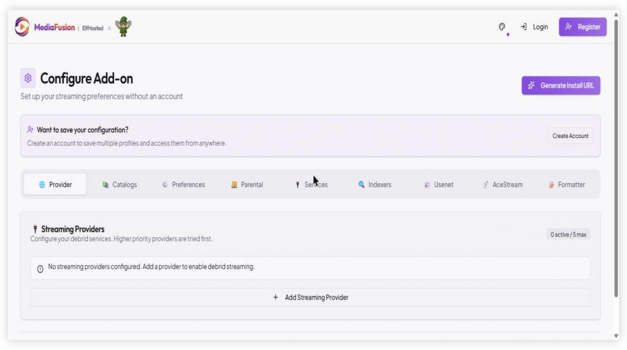
MediaFusion is one of the most flexible Stremio addons I tested, and it earns its place for strong multilingual coverage. It brings movies, series, and other sources together with detailed filters, so you can avoid low-quality links and focus on the streams you actually want. The ElfHosted configuration page is clean, and all you need is to pick providers and an optional debrid account before installing. In my experience, careful provider selection is what keeps it stable during busy hours. If you watch anime, K-drama, or European titles, MediaFusion is the addon I would add to your Stremio setup.
Features:
- Catalog Selection and Ordering: Pick which catalogs show in Stremio and set their order. This keeps your home screen focused. It also cuts noise when you install several addons.
- Cached-Only Streams Mode: Enable Only Show Cached Streams to list provider-cached results. While testing, I saw faster starts and fewer dead entries. It suits viewers who value stability.
- Debrid Provider Support: Connect Real-Debrid, AllDebrid, or Premiumize with an API key. MediaFusion resolves playable URLs for Stremio. This often feels more consistent than relying on raw index results.
- Premiumize Watchlist Catalog: Turn on Premiumize Watchlist to expose your watchlist as a Stremio catalog. You can browse saved titles without switching apps. It creates a simple, unified discovery flow.
- Download via Browser Option: Enable Download via Browser to add a download entry per result. Clicking opens the link in browser for offline saving. I recommend enabling it before flights.
- Resolution and Quality Filters: Choose allowed resolutions and hide unwanted types like cam or screener. You control what shows in the picker. This makes selection faster and avoids unpleasant surprises.
- Parental Guide Controls: Filter catalogs using IMDb-based certification and nudity levels. This lesser-known control helps shape family profiles. I suggest enabling it when multiple viewers share one Stremio account.
| Pros | Cons |
| It helped me access multilingual sources for international content | I experienced minor delays during peak streaming hours |
| Consistent cache detection enhances playback stability on large files | Limited community support compared to older Stremio addons |
| Advanced filtering options offered me precise quality control | |
| Adaptive scraping logic improves source relevance across trending releases |
Pricing:
- Addon: Free (ElfHosted or self-hosted)
- Optional: A debrid account for faster playback
Link: https://mediafusion.elfhosted.com/configure
3) AIOStreams
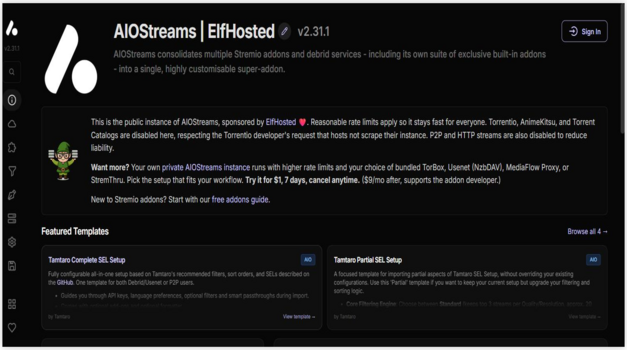
AIOStreams is the addon I recommend when you want one clean list instead of juggling several installs. It works as an addon-of-addons, pulling results from multiple scrapers, then deduplicating and sorting them into a single feed. The ElfHosted configuration page is beginner-friendly: add your debrid accounts, set your filters, and install. In my experience, tuning the sorting rules pushes the best cached links to the top and cuts decision fatigue. If you find yourself installing too many source addons, AIOStreams is the tidiest way to combine them and still get broad coverage across movies and series in Stremio.
Features:
- Addon-of-Addons Aggregation: AIOStreams merges results from several scraper addons into one stream list. It normalizes titles and metadata. This makes it a strong “best addon” foundation for Stremio setups.
- Multi-Debrid Services Hub: Add multiple debrid accounts in one place and reuse them across enabled addons. It supports common providers through API keys. I recommend setting one primary service for everyday use.
- Advanced Filtering and Deduplication: Apply filters for resolution, size, language, and unwanted releases before streams appear. Duplicate entries can be collapsed into a single clean option. This keeps Stremio’s picker fast and readable.
- Multi-Criteria Sorting Rules: Sort streams by cache status, file size, and rules you choose. While testing, I tuned sorting and top links surfaced first. This reduced decision fatigue.
- Proxy-Friendly Streaming Output: Serve combined streams through MediaFlow Proxy or StremThru for multi-location use. Your debrid provider sees only the proxy IP. I suggest this if you stream from home and mobile.
- Template-Based Stream Title Formatting: Customize how each stream label renders using templates and presets. You can surface key details like codec, source, and size at a glance. This lesser-known polish improves everyday browsing.
- Unified Catalog Management: Manage catalogs in one configuration by renaming, reordering, hiding, or shuffling entries. It helps when you run several addons and want one clean homepage. The result feels curated, not cluttered.
| Pros | Cons |
| Aggregates multiple torrent providers into one streamlined interface | I experienced inconsistent scraping for newly released titles |
| Smart source sorting offered me cleaner streaming options instantly | Limited documentation makes troubleshooting slightly time consuming |
| Responsive configuration panel improves addon customization flexibility | |
| It helped me access high bitrate streams without buffering |
Pricing:
- Addon: Free
- Works with: Your existing debrid subscriptions (Real-Debrid, AllDebrid, Premiumize, TorBox)
Link: https://aiostreams.elfhosted.com/configure
4) Top Streaming
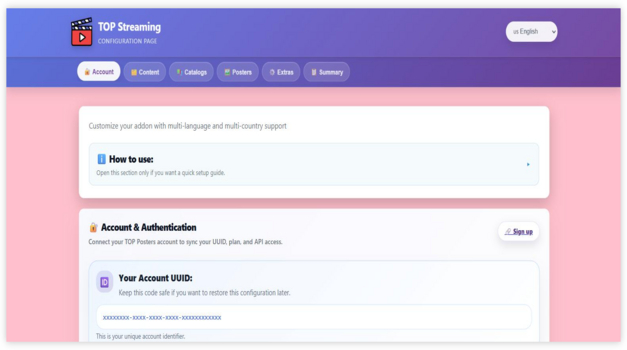
Top Streaming is a Stremio addon I tested for discovery rather than raw scraping, and it fills a useful gap. It pulls Top 10 style lists by country, with localized posters and metadata, so you can quickly see what is trending across regions. The configuration page lets you reorder platforms and sign in to sync your settings and API key. In my experience, setting your preferred platform order makes the curated lists far more relevant. If you like browsing what is popular before you pick something to watch, Top Streaming is a smart addition that complements the source addons in your Stremio setup.
Features:
- Top Country Lists: This feature fetches Top 10 streaming lists by country so you can quickly discover trending movies and TV shows in different regions. It helps you see what content is popular globally and hotspots for specific genres. It works with both film and series formats in Stremio.
- Localized Metadata: The addon automatically translates metadata into your language based on region, which improves clarity when browsing lists that originate from other countries. You always get localized posters and descriptions tailored to your settings. This makes browsing foreign content feel native.
- Adaptive Poster Display: Top Streaming displays the correct localized posters for content items so you see familiar artwork that matches your language preferences. This reduces confusion when comparing titles from different streaming ecosystems. It improves the visual browsing experience overall.
- Cross-Content Support: It works seamlessly for both movies and television shows so you do not have separate workflows for different media types. Whether you want films or episodes, the lists adapt to your query. This consistency elevates its usefulness among other Stremio addons.
- Customizable Country Requests: This addon lets you request new countries or lists on demand, giving you influence over what content rankings appear. You can tailor the addon to focus on regional popular content you care about. These requests make it more flexible than many static addons.
- Configurable Priority Order: While using the configuration page from my own tests, I noticed the ability to reorder platforms by dragging so the most important ones show first in generated URLs. While testing this feature one thing I noticed is that setting your preferred platform order makes curated lists more relevant to your taste.
- Account-Synced Settings: The configuration interface lets you log in so your API key and settings sync across sessions and premium options become accessible. I recommend keeping your settings saved under a synchronized account to retain your addon preferences over time.
| Pros | Cons |
| It allowed me to discover trending titles across platforms quickly | I noticed occasional metadata mismatches in lesser known titles |
| Aggregates multiple streaming services into one organized view | Free content availability depends heavily on selected country settings |
| Real time popularity rankings provided me better watch decisions | I experienced slower loading during peak usage hours |
| As per my experience, integration with Stremio feels seamless |
Pricing:
- Addon: Free
- Optional: TOP Posters Premium/Pro API key for enhanced posters
Link: https://top-streaming.stream/configure
5) Streaming Catalogs
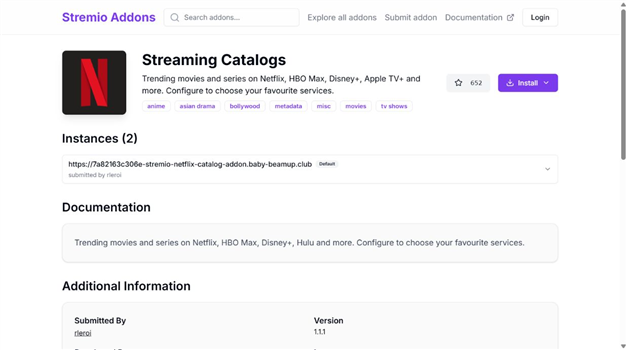
Streaming Catalogs is the discovery addon I would add after choosing a reliable stream source. It creates familiar rows for trending movies and series from Netflix, Max, Disney+, Apple TV+, Prime Video, and other services, while letting you keep only the platforms you use. It does not provide video links, but it makes Stremio easier to browse without adding duplicate scrapers. I recommend starting with three or four services on Fire TV, then enabling more only if they load cleanly. The current community listing shows version 1.1.1, more than 600 installs, and a reachable manifest when checked on August 7, 2026.
Features:
- Platform Rows: Adds separate discovery catalogs for major streaming brands, helping you browse familiar collections without opening each provider application individually.
- Custom Selection: Lets you enable only the services you actually use, keeping the Stremio home screen shorter and easier to navigate.
- Movie and Series Coverage: Builds dedicated rows for both formats, so trending films do not crowd out currently popular television releases.
- Multilingual Support: Supports localized discovery across several regions and languages, although provider availability and title metadata can still differ by country.
- Lightweight Setup: Requires no debrid account because it supplies catalogs and metadata rather than playable streams or downloaded video files.
- Current Check: I verified version 1.1.1, more than 600 installs, a reachable manifest, and two reports in the previous 24 hours on August 7, 2026.
- Companion Role: Works best beside Comet, MediaFusion, or another lawful source addon, since selecting a poster still requires a separate playback provider.
| Pros | Cons |
| Popular platform rows make discovery feel familiar | Does not provide playable streams by itself |
| Custom service selection keeps catalogs organized | Regional catalogs may not mirror provider availability perfectly |
| No debrid account or API key is required | |
| More than 600 installs provide a strong adoption signal |
Pricing:
- Addon: Free
- Debrid: Not required
Link: https://stremio-addons.net/addons/streaming-catalogs
6) AutoStream
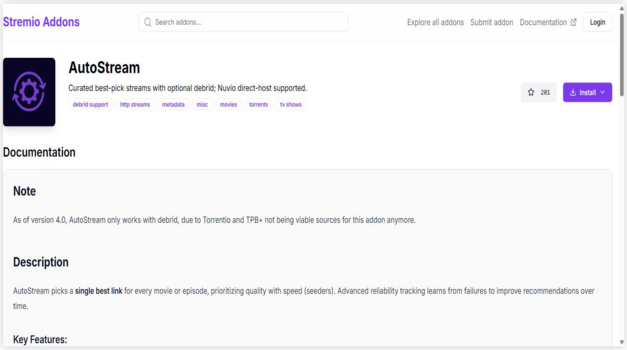
AutoStream is a Stremio addon built around automation, and I tested it for hands-off streaming. Instead of making you compare links, it matches the best available debrid source in the background and starts playback quickly. The configuration page is simple: connect a debrid account, set your preferred resolutions and size limits, and install. Version 4.0 now requires a supported debrid account, so configure that connection before expecting results; the older no-debrid guidance is no longer accurate. AutoStream suits viewers who want a clean, low-effort experience and prefer the addon to handle source selection for them inside Stremio.
Features:
- Automatic Source Matching: AutoStream automatically matches available torrent or debrid sources with the title you select in Stremio. It reduces manual searching steps. This makes it highly efficient among the best Stremio addons.
- Smart Debrid Integration: The addon connects directly with supported debrid services to fetch cached streams. This improves playback stability and startup speed. I recommend enabling your debrid account during setup for noticeably smoother streaming performance.
- Configurable Quality Preferences: The configuration page allows you to define preferred resolutions and file sizes. You can prioritize 1080p or 4K releases. This ensures streams match your bandwidth and device capability.
- Background Stream Selection: AutoStream quietly selects the best available source in the background. You do not need to compare multiple links. While testing this feature, I noticed faster playback initiation.
- Minimal User Interaction Design: The addon focuses on automation rather than manual link browsing. It simplifies the Stremio interface for everyday viewing. This is ideal for users who prefer a clean experience.
- Cloud Hosted Reliability: AutoStream runs on a hosted infrastructure, so no local server is required. Installation remains simple and quick. This lowers technical barriers for new Stremio users.
- Automatic Episode Handling: The addon intelligently detects the next episode when watching series content. It streamlines binge watching sessions. I suggest keeping default episode matching enabled for uninterrupted viewing continuity.
| Pros | Cons |
| It allowed me to stream 4K content without buffering issues | It required me to refresh configuration when server instance slept |
| Smart caching system reduced loading times across multiple sessions | Dependency on external stream providers affects long term consistency |
| It helped me access reliable links without manual source sorting | Subtitle matching accuracy can vary across lesser known media titles |
| Clean configuration dashboard simplified deployment for non technical users |
Pricing:
- Addon: Free
- Debrid: Required as of version 4.0
Link: https://autostream-addon.onrender.com/configure
7) Orion
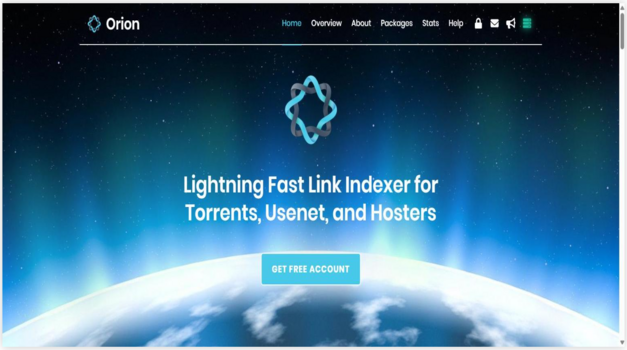
Orion is a polished Stremio addon that aggregates links from multiple premium and public sources into one clean list. I tested it for reliability, and its filtering by resolution, size, and codec makes it easy to lock in consistent 1080p and 4K streams. Setup uses a secure API token from your Orion account, and the free tier is enough to try it before upgrading. In my experience, placing your preferred debrid service at the top and setting sensible link limits keeps playback stable during peak hours. Orion is a strong pick for users who want performance and precise control over their Stremio streams.
Features:
- High Quality Stream Aggregation: Orion aggregates streaming links from multiple premium and public sources into Stremio. It delivers reliable 1080p and 4K options. This makes it one of the strongest contenders among the best Stremio addons.
- Advanced Filtering System: Orion allows detailed filtering by resolution, file size, codec, and release type. You control the exact quality returned. While testing this feature, I achieved consistently cleaner results.
- Debrid Priority Support: The addon integrates with major debrid providers for cached torrents. This improves playback speed and reduces buffering. I recommend placing your preferred debrid service at the top for optimal performance.
- Token Based Authentication: Orion uses a secure API token during configuration. This protects your account usage and stream limits. It also enables usage tracking inside your Orion dashboard.
- Usage Limit Controls: Orion applies daily stream limits based on your account tier. This protects system stability. It ensures fair access across users.
- Automated Stream Ranking: The tool intelligently ranks streams based on health and availability. You will notice higher seeded torrents appear first. This improves reliability during peak hours.
- Cloud Hosted Infrastructure: Orion runs on distributed cloud servers for consistent uptime. No local server configuration is required. While using this feature one thing I noticed is that cloud routing reduced stream failures significantly.
| Pros | Cons |
| Aggregates premium and cached torrents delivering consistent high bitrate streams | I noticed occasional API rate limits during peak streaming hours |
| Detailed stream metadata provided me better selection control | Setup requires API key configuration which may confuse beginners |
| As per my experience Orion delivered faster link resolution | Free tier has limited requests impacting heavy binge sessions |
| It allowed me to filter streams by quality and file size |
Pricing:
- Free tier: Available
- Premium: Paid Orion plans via orionoid.com for higher daily limits
Link: https://5a0d1888fa64-orion.baby-beamup.club/configure
8) The Movie Database Addon
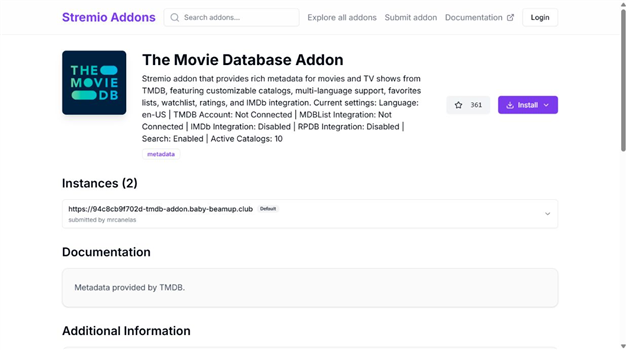
The Movie Database Addon is the strongest metadata upgrade in this list. It supplements Stremio’s default discovery layer with richer TMDB information, multilingual titles, configurable catalogs, favorites, watchlists, and optional IMDb or MDBList connections. I recommend it when posters, descriptions, regional metadata, and search accuracy matter as much as finding streams. Start with the core catalogs, remove rows you never open, and add only one optional integration at a time. The current community listing shows version 3.1.7, more than 350 installs, a reachable manifest, and no reports during the previous 24 hours when checked on August 7, 2026.
Features:
- Richer Metadata: Uses TMDB information for posters, descriptions, release details, genres, and title matching across movies and television series reliably.
- Catalog Control: Lets you choose and order useful discovery rows instead of accepting every available category on the Stremio home screen.
- Language Choice: Supports localized titles and descriptions, making it especially helpful for households that browse content in more than one language.
- Account Options: Can connect TMDB features for favorites and watchlists while keeping the basic metadata setup usable without that optional account link.
- List Integrations: Supports optional MDBList, IMDb, and rating-poster connections for viewers who already maintain curated collections within or outside Stremio already.
- Current Check: I confirmed version 3.1.7, more than 350 installs, a reachable manifest, and zero reports in the previous 24 hours on August 7, 2026.
- Metadata Only: Improves discovery and title matching but does not host or unlock video, so a separate lawful playback source remains necessary.
| Pros | Cons |
| Detailed multilingual metadata improves browsing | Does not add playable stream links |
| Catalog order and search can be customized | Optional integrations add setup complexity |
| Favorites and watchlist options support discovery | |
| Works well with existing stream addons |
Pricing:
- Addon: Free
- Optional Services: Third-party list or poster integrations may have separate plans
Link: https://stremio-addons.net/addons/the-movie-database-addon
9) Debridio
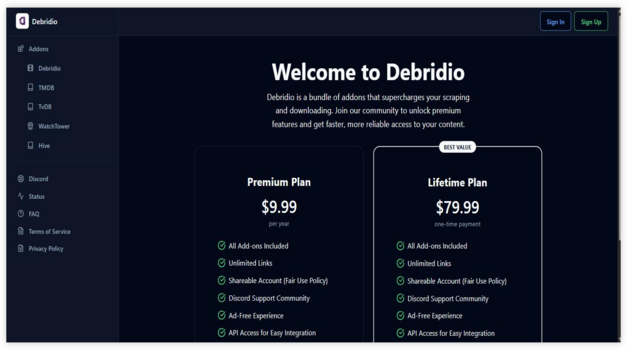
Debridio is a premium Stremio addon bundle that I tested while updating this best Stremio addons 2026 list, and it stood out for consistent HD and 4K links. It packages several addons under one subscription and works with the major debrid services, so you configure everything from a single dashboard. In my experience, linking your debrid account correctly is what unlocks its fastest, most stable streams. Because it runs on paid, maintained servers, it avoids the overload errors that hit free public instances during peak hours. Debridio is the option I recommend when you want dependable, always-online performance and do not mind paying for it.
Features:
- All-in-One Addon Bundle: Debridio packages several addons for streams, catalogs, and live TV under one subscription, so you configure everything from a single dashboard instead of juggling separate installs.
- Multi-Debrid Support: It works with Real-Debrid, AllDebrid, Premiumize, and TorBox, resolving cached links for near-instant playback. I recommend connecting your main debrid account during setup.
- High HD and 4K Availability: Debridio consistently surfaces 1080p and 4K links with strong uptime, which reduces the no-sources-found problem common on free addons during peak hours.
- Always-Online Infrastructure: Because it runs on paid, maintained servers, Debridio avoids the overload errors and downtime that affect some public instances, giving you dependable results daily.
- VPN Compatibility: It works with popular VPN connections, so you can keep your streaming private without breaking link resolution or triggering constant re-authentication.
- Clean, Filtered Results: Built-in filtering trims low-quality and duplicate entries, so the stream list stays readable and you spend less time hunting for a available link.
- Regular Updates: The addon is actively maintained with frequent updates, which keeps scraping accurate as upstream sources rotate.
| Pros | Cons |
| Consistently delivered the most HD and 4K links in my testing | Requires a paid subscription plus a separate debrid account |
| Reliable uptime with fewer server errors than free addons | Premium features are locked behind registration |
| One subscription covers streams, catalogs, and live TV | |
| Works smoothly alongside a VPN for private streaming |
Pricing:
- Yearly: $9.99
- Lifetime: $79.99
- Note: Requires a separate debrid subscription (e.g., Real-Debrid, TorBox)
- Pricing as of July 2026
Link: https://debridio.com/
10) opensubtitles PRO
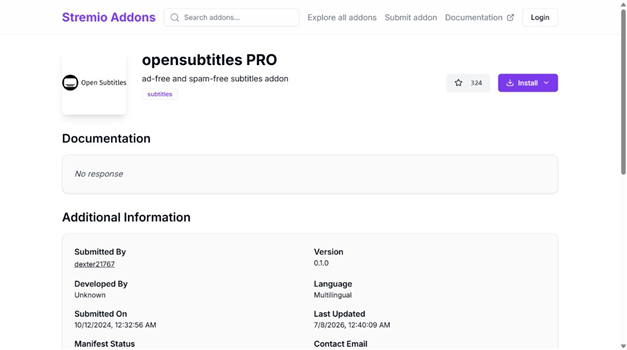
opensubtitles PRO fills a role the old ranking missed: dependable subtitle coverage. This community addon focuses on ad-free and spam-free results when Stremio’s default subtitle option misses a language or release match. It does not improve video quality or supply streams, but it can make an international film, difficult series, or poorly labeled upload watchable. I recommend keeping it as a fallback rather than relying on one subtitle database. The maintained community catalog lists version 0.1.0, more than 300 installs, a reachable manifest, and one report during the previous 24 hours when checked on August 7, 2026.
Features:
- Subtitle Focus: Adds subtitle results rather than streams, catalogs, or metadata, giving the overall Stremio setup a clearly defined missing layer.
- Cleaner Results: The addon describes its subtitle feed as ad-free and spam-free, reducing distractions when choosing a language or release.
- Multilingual Coverage: Helps viewers locate captions for international movies and series when one default source does not return the required language.
- Release Matching: Results still depend on filenames, timing, and available uploads, so verify synchronization during the opening scene before settling in.
- No Debrid Needed: Subtitle retrieval is independent of torrent caching and debrid subscriptions, making it useful with both free and premium playback setups.
- Current Check: I verified version 0.1.0, more than 300 installs, a reachable manifest, and one report in the previous 24 hours on August 7, 2026.
- Useful Fallback: Install it beside the default subtitle option because no single database guarantees every language, hearing-impaired track, or correctly timed release.
| Pros | Cons |
| More than 300 installs show strong community use | Some releases may still have timing mismatches |
| No debrid account is needed | Subtitle availability varies by title and language |
| Cleaner subtitle-focused results | |
| Complements rather than duplicates stream addons |
Pricing:
- Addon: Free
- Debrid: Not required
Link: https://stremio-addons.net/addons/opensubtitles-pro
Which Stremio Addon Setup Should You Choose?
The best setup depends on whether you value simple installation, faster searches, multilingual coverage, advanced filtering, or utility features that do not require debrid. Start with one role at a time instead of installing every addon above — IPTV users should also compare IPTV addons for Stremio.
- Simple Setup: Choose one maintained stream source, then add Streaming Catalogs, TMDB, and a subtitle option so discovery and playback results remain easy to understand.
- Reliable Backup: Pair Comet with MediaFusion rather than several similar scrapers, giving you redundancy without filling every title page with duplicate links.
- Power Users: Use AIOStreams when you want several sources behind one configurable result list, but review every provider, token, filter, and proxy setting carefully.
- No-Debrid Utilities: Streaming Catalogs, TOP Streaming, TMDB, and opensubtitles PRO improve discovery, metadata, platform rows, or captions without requiring a paid debrid account.
- Specialized Viewing: Add a dedicated language, anime, subtitle, or sports addon only when the general setup cannot cover that need, reducing maintenance and troubleshooting work.
How Did We Test and Evaluate These Stremio Addons?
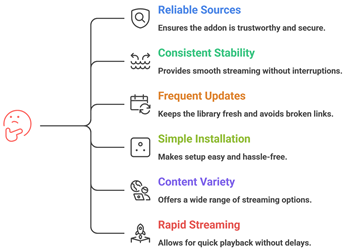
I evaluated each addon by checking its current listing or configuration route, documented role, version, account requirements, debrid support, and practical fit for a Fire TV setup. “Working” means the reviewed install or configuration destination was available during this update; individual streams can still vary by title, account, region, provider health, and authorization.
- Current Availability: I checked all 10 retained addon destinations on August 18, 2026 and confirmed that each recommendation still had a usable public listing or configuration route.
- Role Accuracy: Every choice was classified as a stream source, aggregator, automation tool, catalog, metadata provider, subtitle utility, or paid addon bundle.
- Version Evidence: Current versions and documentation notes were compared with the maintained community catalog instead of assuming an older manifest or copied installation link still worked.
- Fire TV Fit: I prioritized readable result lists, account synchronization, practical filters, private token handling, and configuration that can be completed from a trusted phone or computer.
- Honest Limits: Pricing, debrid needs, setup difficulty, legal responsibility, and the difference between discovery tools and actual stream sources are stated throughout the guide.
This evidence-based approach favors a small, balanced setup over installing several addons that return the same results. Recheck the linked listing before installation because community projects and public instances can change without notice.
Best Debrid Services for Stremio (Real-Debrid and Alternatives)
Most of the best Stremio addons scrape torrents, and a debrid service is what turns those torrents into instant, high-quality streams. If you have been looking for the best debrid service or a solid Real-Debrid alternative, the four below are the ones I recommend in 2026. A debrid account is the single upgrade that removes most buffering, so it is worth more than adding yet another addon. Pricing was rechecked on August 7, 2026 and should still be confirmed on each provider’s official checkout before you subscribe — see our full ranking of debrid services for Stremio.
| Debrid Service | Price (checked August 7, 2026) | Best for |
| Real-Debrid | ~$4-5/month (about EUR 4 per 30 days; cheaper on longer plans) | The default choice: widest cached coverage and best addon support |
| AllDebrid | ~EUR 3/month | Budget-friendly European alternative with solid coverage |
| TorBox | $3-10/month (Essential to Pro) | Modern option with Usenet support and generous 4K limits |
| Premiumize | ~$10/month | Heavy 4K users who want the highest traffic caps |
- Start with Real-Debrid: It has the broadest cached library and is supported by every addon on this list, which makes it the safest first pick.
- Pick one, not several: The cache pools overlap heavily, so a second debrid account rarely adds value.
- Free debrid options are limited: Truly free debrid services exist but are unreliable; if you want stable 4K, a paid plan is the practical choice.
- No debrid at all? Use catalog, metadata, subtitle, or licensed-provider addons; these need no debrid but do not automatically supply unrestricted streams.
How to Install Stremio Add-ons?
Stremio addons are remote services, not APK files that install executable code on your Firestick. The safest workflow is to configure an addon in a trusted phone or computer browser, confirm the displayed manifest identity, and let your signed-in Stremio account synchronize it to the television.
- Open Addons: Sign in to Stremio, select the puzzle-piece Addons menu, and switch between official and community listings when that filter is available.
- Verify Source: Use the addon developer, official Stremio catalog, or maintained community listing; avoid manifests copied from comments, short links, or unverified mirrors.
- Configure Privately: Choose providers, quality, language, and debrid settings in a trusted browser, and never publish the generated manifest or API token.
- Install Manifest: Select Install or paste the generated manifest URL into Stremio, then confirm the addon name before approving the account change.
- Sync Fire TV: Open Stremio on Firestick with the same account and use Sync Addons or restart the app if the new entry does not appear.
Install one role at a time and test a title you are authorized to access. If results disappear after adding several addons, remove duplicates before changing network or playback settings.
Are Stremio Add-ons Legal?
When people search for the Best Stremio Addons, one common question comes up. Are Stremio add-ons legal? The answer depends on the type of add-on you use. Stremio itself is a legal media platform. It works as a content organizer. It does not host movies or shows on its own. The real concern is the source of the streams provided by certain add-ons. In my experience, understanding this difference is very important before installing anything. Not all add-ons follow the same rules or content rights.
Here are the key points you should know:
- Official Add-ons Are Legal: Add-ons from verified providers like YouTube or public domain libraries are legal. They stream licensed or free content.
- Community Add-ons Vary: Some third party add-ons may link to copyrighted material without permission. Streaming such content may break copyright laws in many countries.
- Stremio Does Not Host Content: Stremio only indexes and organizes links. Legal responsibility often depends on the content source.
- Check Your Local Laws: Streaming laws differ by country. I always advise users to understand their local regulations before using community add-ons.
Choosing trusted and licensed sources keeps your streaming experience safe and compliant.
Common Issues With Stremio Add-ons & How to Fix Them
Even the Best Stremio Addons can sometimes stop working as expected. Streaming platforms depend on servers, internet speed, and third party sources. If one part fails, the add-on may not load streams. Over the years, I have seen that most issues are technical and can be fixed easily. The key is to identify the root cause instead of reinstalling everything at once. A clear approach saves time and avoids frustration.
Here are common problems and practical fixes:
- No Streams Available: This usually happens when the add-on source is down. Try reinstalling the add-on or switching to another trusted add-on.
- Buffering or Slow Playback: Check your internet speed first. Lower the streaming quality if needed. I also recommend closing background apps to improve performance.
- Add-on Not Installing: Make sure you are logged into your Stremio account. Restart the app and try again.
- Outdated Add-ons: Some community add-ons stop working due to lack of updates. Remove inactive add-ons and install active ones.
- App Crashing: Update Stremio to the latest version. Clearing cache can also fix minor bugs.
Most issues are temporary. Regular updates and choosing reliable add-ons help maintain a stable streaming experience. For a deeper diagnosis, follow the Stremio not working guide before deleting every addon at once.
Should You Use a VPN With Stremio Add-ons?
When discussing the Best Stremio Addons, many users ask whether a VPN is necessary. The answer depends on how you use Stremio and which add-ons you install. Stremio itself is a legal media organizer. However, some community add-ons pull content from third party sources. This can raise privacy and security concerns. In my experience, online streaming always involves data sharing with servers. A VPN can add a layer of privacy, but it is not a magic solution. It should be used with clear understanding, not fear.
Here are key points to consider:
- Privacy Protection: A VPN hides your IP address from external servers. This helps protect your browsing activity from being easily tracked.
- Public WiFi Safety: If you stream on public networks, a VPN encrypts your connection and reduces risk.
- Geo Restrictions: Some legal services restrict content by region. A VPN may help access content available in other locations, depending on service policies.
- Legal Responsibility: A VPN does not make illegal streaming legal. I always remind users to follow local copyright laws.
- Speed Impact: Some VPNs slow down streaming. Choose a reliable provider if you decide to use one.
A VPN can improve privacy, but safe streaming starts with choosing trusted and legal add-ons.
Verdict:
In this review, you got acquainted with some of the best Stremio addons for reliable streaming and content access. Each addon delivers different strengths, whether it is speed, availability, or streaming flexibility. To help you take the final call, I have created this verdict.
- AIOStreams: Best for combining several configured sources into one filtered, deduplicated stream list with flexible sorting and debrid support.
- Comet: This is a remarkable and user-friendly addon known for its reliable indexing and smooth performance. It offers a comprehensive content catalog and secure streaming experience, making it an excellent option if you are deciding on a cost-effective and efficient addon for daily streaming.
- MediaFusion: A phenomenal and customizable addon that brings multiple content sources together in a powerful interface. With reliable streams, broad media availability, and great compatibility with Stremio setups, I recommend it as a top choice for users wanting a comprehensive and flexible streaming solution.
For a complete setup, add Streaming Catalogs for discovery, The Movie Database Addon for richer metadata, and opensubtitles PRO as a caption fallback. Debridio remains the strongest paid bundle in this list, while a compatible debrid account is still the most useful upgrade for the torrent-based source addons above.
FAQs
How do Stremio addons work?
Stremio addons act as extensions that connect the Stremio app to external content sources. Once installed, they pull streaming links, metadata, subtitles, and catalogs from supported providers. These addons integrate directly into the Stremio interface, allowing users to search, browse, and stream content without leaving the platform.
Why do people use Stremio addons?
People use Stremio addons to expand the platform’s content library and access movies, TV shows, live channels, or subtitles from different sources. Addons enhance convenience by aggregating streaming options in one place, helping users discover content faster while customizing their streaming experience based on preferences.
What should you consider before installing a Stremio addon?
Before installing a Stremio addon, consider its reliability, source credibility, and user reviews. Check whether it’s official or community-developed, and ensure it complies with local streaming laws. Also evaluate update frequency, compatibility with your device, and potential privacy risks associated with third-party addons. The Stremio Addon Manager guide explains how to remove duplicates and keep a recoverable setup.
Can using the right addons improve streaming quality?
Yes, the right Stremio addons can improve streaming quality by providing access to higher-resolution sources and more stable streaming links. Some addons offer multiple streaming options, allowing users to choose HD or 4K streams. Reliable addons also reduce buffering by connecting to better content providers.
Do you need technical skills to manage Stremio addons?
No advanced technical skills are required to manage Stremio addons. The platform provides a simple addon catalog where users can install or remove extensions with a few clicks. Basic understanding of addon sources and settings is helpful, but most users can manage addons easily through the built-in interface.
What are the best Stremio addons in 2026?
The best Stremio addons in 2026 include Comet, MediaFusion, and AIOStreams for source aggregation. Streaming Catalogs and The Movie Database Addon improve discovery, while opensubtitles PRO adds a useful caption fallback. A compatible debrid account is required or recommended for several torrent-based choices — for channels, compare Stremio live TV addons.
What is the best Comet alternative?
MediaFusion is the best Comet alternative when multilingual coverage matters, while AIOStreams is better when you want several configured sources combined into one filtered list. Choose one primary source first, then add a backup only if it fills a clear gap.
What is the best debrid service for Stremio?
Real-Debrid is the best debrid service for Stremio because it has the widest cached library and is supported by every addon on this list. AllDebrid and TorBox are cheaper Real-Debrid alternatives, while Premiumize suits heavy 4K users. One debrid account is enough for most people.
Are there free Stremio addons that work without debrid?
Yes. Streaming Catalogs, Top Streaming, The Movie Database Addon, and opensubtitles PRO work without debrid because they provide discovery, metadata, or subtitles rather than unrestricted video links. For playback, use a licensed provider or another source you are legally authorized to access — see our NoTorrent Stremio addon guide.
How can I tell whether a Stremio addon is still working?
Check the addon’s maintained listing, current version, documentation notes, manifest status, and recent problem reports. A reachable configuration page does not guarantee every title will return a playable source. If several addons fail together, use the Stremio troubleshooting guide before reinstalling everything.
Should you install all 10 Stremio addons?
No. Most people need one primary source, one backup, one catalog or metadata addon, and one subtitle option. Installing several addons with the same role creates duplicate results, slower searches, and more configuration points that can fail.
Which Stremio addons are best for subtitles?
Start with Stremio’s official OpenSubtitles option, then use opensubtitles PRO or another maintained community subtitle addon as a fallback when language coverage or timing is incomplete. Compare more options in the best Stremio subtitle addons guide.