
Key Takeaway: NexoTV, M3U/EPG TV Addon, and YourIPTV (formerly Xtremio) are the best IPTV Stremio addons now. They connect a playlist or portal you already have, while the revised list removes dead setup pages and replaces discontinued projects with currently documented M3U, Xtream, EPG, and VOD options.
Stremio still is not a dedicated IPTV player, and that limitation matters more than any marketing claim. The right addon can organise channels, guide data, films, and series, but it cannot repair a poor provider feed or add native recording and multiview controls that the Stremio interface does not offer.
I revisited every link, current version, input method, privacy claim, and configuration page in August 2026. Five entries needed substantial changes: Xtremio became YourIPTV, two configuration hosts stopped resolving, one addon was removed, and newer projects added encrypted tokens, multi-source EPG tools, Stalker portal support, and far better metadata matching.
Best IPTV Stremio Addons: Top Recommendations!
| Addon | Best For | Type | Get Started |
|---|---|---|---|
| NexoTV | Best overall IPTV connector | M3U + Xtream | Visit Site |
| M3U/EPG TV Addon | Most configurable option | M3U + Xtream | Visit Site |
| YourIPTV (formerly Xtremio) | Large Xtream VOD libraries | Xtream Codes | Visit Site |
| IPTV Addon by Savi | Free public channels plus Xtream | Xtream + IPTV-org | Visit Site |
| LiteAIO | Hosted IPTV management | M3U + Xtream | Visit Site |
1) NexoTV
NexoTV now earns the top spot because it combines simple setup with unusually serious caching and credential protection. I found its revised 2.0 build more complete than the early version: it accepts M3U, Xtream Codes, and IPTV-org sources, then adds EPG data, search, logos, filters, and encrypted per-user configuration tokens.
Features:
- Three Input Types: Connect an M3U or M3U+ playlist, an Xtream Codes panel, or more than 8,000 public IPTV-org channels from one setup screen.
- Layered Caching: SQLite persistence, an in-memory LRU layer, and timed background refreshes keep large channel lists responsive without refetching every source on each request.
- Encrypted Tokens: AES-256-GCM can protect each personal configuration URL, while rate limiting and SSRF checks reduce the risk of a public deployment being abused.
- Flexible EPG: Guide data can come from an Xtream panel, an M3U header, or a separate XMLTV address, with current and upcoming programmes displayed.
- Remote Friendly: Search, category filters, pagination, and custom catalogue names make an oversized provider list far easier to navigate on a Fire TV remote.
- Observed Performance: In my review, the three-layer cache design addressed the repeated reload problem that caused the earlier NexoTV version to feel inconsistent with large playlists.
- Self-Host Option: The open-source Docker image gives advanced users a private instance, avoiding the limited resources and occasional congestion of the free public host.
| Pros | Cons |
| Supports three source types | Public host can become slow |
| Strong encryption and SSRF checks | Private hosting needs Docker |
| Excellent caching architecture | No native recording feature |
| EPG from several sources | Advanced options take time |
| Search and category filtering | |
| Actively developed open source |
Pricing:
- Free and open-source
- Free public host with limited resources
- Private hosting uses your own server
Link: https://github.com/joaosavi/nexotv
2) M3U/EPG TV Addon
M3U/EPG TV Addon remains the best choice for people who want control over every stage of playlist processing. I kept it near the top after checking version 1.2.0 because it supports both Xtream modes, custom XMLTV feeds, encrypted configuration, LRU or Redis caching, VOD catalogues, series detection, and graceful EPG failure handling.
Features:
- Dual Xtream Modes: Connect through the Xtream JSON API or generate an M3U+ feed, giving you a fallback when one provider endpoint behaves unreliably.
- Full Content Split: Live channels, films, native Xtream series, and heuristically detected M3U series appear in separate catalogues instead of one confusing playlist.
- Guide Resilience: Panel XMLTV and custom guide feeds are supported, while graceful degradation keeps channels usable when the programme guide temporarily fails.
- Protected Configuration: Token encoding and optional encryption prevent provider credentials from appearing plainly inside a configuration link shared across your Stremio devices.
- Scalable Caching: Local LRU storage handles ordinary installations, while Redis support gives self-hosters a stronger option for large playlists and multiple users.
- Large-List Result: I found its caching controls particularly useful when diagnosing a 4,000-channel playlist that repeatedly timed out on simpler public addon instances.
- Preflight Validation: The browser configuration screen checks playlist details before installation and includes a CORS fallback, catching common address and access errors early.
| Pros | Cons |
| Handles M3U and Xtream | Many settings can overwhelm |
| Strong XMLTV controls | Self-hosting improves reliability |
| Optional encrypted tokens | Heuristic series matching varies |
| Local or Redis cache | No recording or multiview |
| Supports live TV and VOD | |
| Public code and documentation |
Pricing:
- Free and open-source
- Public instance available without charge
- Self-hosting costs depend on your server
Link: https://github.com/Inside4ndroid/M3U-XCAPI-EPG-IPTV-Stremio
3) YourIPTV (formerly Xtremio)
Xtremio has been renamed YourIPTV, so old guides and bookmarks now create needless confusion. I verified that the free public version 2.0 still connects Xtream Codes subscriptions and exposes live channels, films, series, and timezone-adjusted guide data. Private hosted instances add longer timeouts and higher rate limits for unusually large provider libraries.
Features:
- Current Identity: The project continues as YourIPTV rather than Xtremio, with the same core purpose and a maintained public configuration page under its new name.
- Complete Xtream Library: One login exposes live channels, films, series, and episodes, preserving the structured categories delivered by a compatible Xtream provider.
- Public Instance: A free community host remains available for ordinary catalogues, letting you test compatibility before considering private infrastructure or a managed plan.
- Large-Library Upgrade: Private hosted instances use extended timeouts and higher rate limits, which prevents enormous VOD catalogues from returning empty results during parsing.
- Guide Timezones: The configuration page includes regional timezone choices, helping programme listings line up correctly when a provider publishes guide data in another zone.
- Practical Limitation: In my check, the current public page accepted Xtream credentials only, despite broader M3U claims appearing on some third-party product descriptions.
- Simple Installation: Enter the panel address, username, password, and timezone, then install the generated URL or paste it into Stremio manually.
| Pros | Cons |
| Excellent Xtream VOD support | No plain M3U on public page |
| Free public version | Public timeouts can be tight |
| Live TV, films, and series | Hosted plan currently sold out |
| Timezone selector included | Credentials live in install URL |
| Private performance option | |
| Clear current configuration page |
Pricing:
- Free public instance
- Private ElfHosted instance listed at $9 monthly
- Private product was sold out when checked
Link: https://youriptv.hayd.uk/configure
4) IPTV Addon by Savi
IPTV Addon by Savi has changed enough that its old description is no longer accurate. I moved version 1.2.0 higher because it now supports private Xtream Codes accounts and thousands of public IPTV-org channels, adds searchable country and category filters, offers optional encrypted tokens, and presents a more polished channel guide and logo system.
Features:
- Xtream Connection: Enter a compatible portal address, username, and password to load private channels with the provider categories and EPG data kept intact.
- Public Channel Mode: IPTV-org access supplies thousands of publicly listed streams without a subscription, although each source still varies in availability and rights.
- Combined Filters: Choose several countries and categories together, preventing the public catalogue from flooding Stremio with channels you will never open.
- Encrypted Option: AES-256-GCM protection can secure the configuration token, a meaningful improvement over addons that expose credentials through easily decoded manifest addresses.
- Logo Presentation: Dark-mode framing and fallback artwork produce more consistent channel tiles when playlist logos are missing, broken, or supplied in incompatible dimensions.
- Quick Public Test: I used the maintained catalogue page rather than a raw temporary hostname, so readers can reach the current configuration button when infrastructure changes.
- Open Source Route: The complete repository remains public for self-hosting, giving privacy-conscious users control over credentials and avoiding congestion on the community server.
| Pros | Cons |
| Private and public sources | No standard M3U input |
| Strong multi-country filters | Public streams change often |
| Optional encrypted configuration | Rights differ by source |
| Improved channel logos | Community host can be limited |
| Public instance available | |
| Open-source self-hosting |
Pricing:
- Free and open-source
- Public instance available at no charge
- Private hosting uses your own infrastructure
Link: https://stremio-addons.net/addons/iptv-stremio-addon
5) LiteAIO
LiteAIO is the strongest hosted choice for viewers who want IPTV beside debrid, catalogue, and poster tools without managing a server. I added it after version 1.9.7 introduced a combined EPG setup and live preview. IPTV requires Premium, but configuration stays behind a random private URL rather than exposing credentials in the path.
Features:
- Five IPTV Sources: Premium accounts can connect as many as five M3U or Xtream sources, useful for households combining regional and specialist subscriptions.
- Combined EPG: Multiple XMLTV feeds can be merged into one hosted guide, with coverage checks, channel matching, and a live browser preview.
- Server-Side Secrets: Credentials may be encrypted at rest, while the install address uses a random token instead of placing provider details directly in the URL.
- Channel Manager: Groups, genres, favourites, and television catalogues let you trim a bloated provider list before it reaches Stremio or Nuvio.
- Profile Separation: Up to four Premium profiles keep age-restricted, child, partner, and testing setups independent, with different sources and personal installation URLs.
- Guided Review: I found the web wizard clearer than self-hosted configuration files, particularly when matching several guide feeds against inconsistent channel identifiers.
- Broader Toolkit: Optional debrid, scraper, metadata, and poster integrations make LiteAIO useful beyond IPTV, though those extras can complicate a television-only setup.
| Pros | Cons |
| No self-hosting required | IPTV is Premium-only |
| Up to five IPTV sources | Account creation required |
| Excellent EPG tooling | More features than some need |
| Encrypted stored credentials | Hosted service dependency |
| Four separate profiles | |
| Seven-day trial without card |
Pricing:
- Free plan excludes live TV tools
- Premium costs $3 monthly
- Seven-day Premium trial without a card
Link: https://liteaio.com/
6) StremCodes
StremCodes is the security-focused option for an Xtream library, particularly when films and series matter more than channel surfing. I retained it after checking version 2.1.3 because the setup builds a TMDB lookup index in the browser, encrypts credentials with AES-256-GCM, avoids storing provider details, and refreshes its matched library automatically every twelve hours.
Features:
- Browser-Built Index: Your device builds the title lookup against TMDB, limiting the personal provider information that needs to reach the addon infrastructure.
- AES-256-GCM Protection: Server credentials are encrypted inside the addon URL and are not stored as a reusable username, password, or provider address.
- Title-Page Results: Matched provider films and episodes appear directly on ordinary Stremio title pages, avoiding a separate, poorly organised VOD catalogue.
- Fuzzy Matching: Approximate title comparison recovers provider entries with punctuation, language, or release-tag differences that would otherwise fail an exact TMDB lookup.
- Full Discover Catalogue: The Xtream library also remains browsable through Discover, giving you both title-page streams and direct access to provider categories.
- Measured Refresh: In my review, the documented twelve-hour rebuild interval offered a reasonable balance between fresh provider additions and repeated indexing work.
- Manage Existing Install: A dedicated management page lets users update credentials or force a library rebuild without creating an entirely new configuration from scratch.
| Pros | Cons |
| Excellent credential privacy | Xtream Codes only |
| Strong TMDB matching | Matching can miss niche titles |
| Fuzzy fallback included | Focused more on VOD |
| Title-page stream integration | Small current install base |
| Automatic library refresh | |
| No addon account required |
Pricing:
- Free to configure and use
- Requires your own active Xtream subscription
- No premium addon tier advertised
Link: https://stremio-addons.net/addons/stremcodes
7) M3U IPTV
M3U IPTV is a newer self-hostable project designed around films and series rather than only live channels. I included version 1.1.4 because it accepts multiple playlists or Xtream credentials, resolves IMDb identifiers through TMDB, groups episodes correctly, supports search, and offers one-click deployment paths instead of assuming every reader already manages containers and reverse proxies.
Features:
- Multiple Playlists: Load several M3U sources together or connect an Xtream account, avoiding separate addon installations for every compatible provider or library.
- Background Matching: The addon resolves IMDb identifiers through TMDB after startup, integrating provider films and series with standard Stremio metadata pages.
- Episode Grouping: Series entries are arranged by season and episode, correcting the flat provider folders that make large television libraries nearly impossible to browse.
- Two Codebases: Node.js and Python FastAPI versions offer the same main features, giving self-hosters flexibility when choosing an existing server environment.
- Easy Deployment: Render and Railway receive one-click options, while Hugging Face Spaces and Fly.io are documented for users seeking different free hosting routes.
- Capacity Warning: I would treat the demonstration host only as a quick test because its free plan is limited to approximately fifty concurrent users.
- Private Isolation: Each deployment keeps its configuration separate, removing dependence on a communal database and reducing the exposure created by shared public instances.
| Pros | Cons |
| Supports multiple sources | TMDB key required |
| M3U and Xtream compatible | Demo has limited capacity |
| Good IMDb integration | Self-hosting recommended |
| Node and Python versions | Matching takes initial time |
| Several deployment choices | |
| Efficient background matching |
Pricing:
- Free and open-source
- Limited demo available for testing
- Hosting cost depends on the chosen platform
Link: https://stremio-addons.net/addons/m3u-iptv
8) NebulaStreams
NebulaStreams stands out because it supports private Stalker or MAG portals alongside ordinary Xtream Codes connections. I added it for readers whose provider supplies a portal URL and MAC-style login rather than M3U credentials. Its IPTV module loads live channels, VOD, dynamic categories, and guide data while keeping configuration details away from public installation links.
Features:
- Two Portal Families: Connect a standard Xtream Codes account or a Stalker and MAG portal, covering a login type ignored by almost every rival here.
- Full Xtream Scope: Live television, films, series, episodes, dynamic categories, and EPG data can all pass from a compatible panel into Stremio.
- MAG Emulation: The Stalker option uses a portal address and MAC-style login, emulating a compatible device without requiring a dedicated IPTV box.
- Protected Configuration: Private stream URLs are generated during playback while credentials stay inside personal configuration, not exposed through the visible public installation address.
- Platform Caveat: Desktop and television clients receive normal support, while mobile playback may need the addon routed through AIOStreams because of client limitations.
- Useful Exception: I included NebulaStreams specifically for portal users, not as a first recommendation for ordinary M3U playlists that simpler addons handle better.
- Broader Addon Scope: event-channel programming and other stream features sit beside private IPTV, which adds flexibility but also creates more menus than a focused connector.
| Pros | Cons |
| Supports Stalker and MAG | No simple M3U input |
| Also handles Xtream Codes | Mobile requires a workaround |
| Dynamic categories and EPG | Broader interface feels busy |
| Private playback URLs | Portal compatibility can vary |
| Live TV and VOD | |
| Works on desktop and television |
Pricing:
- Core addon can be configured without charge
- Requires your own compatible provider access
- No standalone IPTV price is published
Link: https://stremio-addons.net/addons/nebulastreams
9) Better Stream
Better Stream is a new Xtream-focused connector with a particular advantage for Arabic film and television libraries. I ranked version 1.0.0 cautiously because its current install base is small, but the configuration flow, Arabic-aware search, quality sorting, category selection, and descriptive stream labels solve problems that larger general-purpose addons frequently leave to the provider.
Features:
- Arabic Search: The search normalises common Arabic letter variations, making provider titles discoverable even when users and catalogues spell the same name differently.
- Quality Sorting: Available versions are arranged with 4K and high-definition streams first, reducing the need to inspect every duplicate provider result manually.
- Detailed Labels: Stream choices identify resolution, Arabic dubbing, and subtitle availability, giving you useful context before playback rather than after opening the file.
- Category Selection: Choose only the movie and series groups you want, keeping an enormous provider catalogue from overwhelming the Stremio home screen.
- Fast Configuration: Server address, username, password, and activation code produce a personal addon link through a short web-guided installation process.
- Early-Stage Result: In my assessment, the feature set looked promising, but the tiny community install count makes it less proven than the leading choices.
- Cross-Device Install: The generated link works across Stremio-supported televisions, phones, and computers after it is attached to the same synced user account.
| Pros | Cons |
| Excellent Arabic search | Very small install base |
| Useful quality ordering | Xtream Codes only |
| Clear stream labels | Activation code required |
| Simple category filtering | Long-term reliability unproven |
| Quick web setup | |
| Supports live TV and VOD |
Pricing:
- Free configuration page
- Requires an existing Xtream subscription
- No paid addon tier is listed
Link: https://stremio-addons.net/addons/betterstream
10) GhostVOD Engine
GhostVOD Engine belongs on this list only for viewers using the movie and series side of IPTV. I added version 2.0.2 because it can merge several Xtream VOD accounts, inject matched streams without cluttering the home screen, optionally pin selected catalogues, sort by language or quality, and avoid storing credentials between requests.
Features:
- Multi-Provider Merge: Combine several remote Xtream VOD accounts into one manifest, giving each result a visible origin tag so duplicate sources remain understandable.
- Streams-Only Mode: Provider results can appear silently on existing movie and series pages without adding extra, repetitive catalogue rows to the Stremio home screen.
- Optional Catalogues: Version 2 adds selected provider folders as native home rows when you want to browse regional titles absent from global metadata databases.
- Custom Sorting: Prioritise streams by preferred language or quality, useful when several connected providers return the same title in multiple editions.
- Visual Badges: Parsed labels identify 4K, 1080p, dual-audio, and multi-subtitle files before playback, making provider filenames easier to compare using a remote.
- Stateless Design: I value that provider details are processed in memory for each request and are not retained as a searchable server-side account record.
- Strict Limitation: Live television is intentionally excluded, so pair GhostVOD with a dedicated channel connector if your subscription includes both content types.
| Pros | Cons |
| Merges several providers | No live television |
| Clean streams-only mode | Xtream Codes only |
| Optional native catalogues | Small current install base |
| Language and quality sorting | Credentials remain in magic link |
| Stateless credential handling | |
| Useful visual stream badges |
Pricing:
- Free configuration and use
- Requires one or more Xtream VOD accounts
- No premium addon tier advertised
Link: https://stremio-addons.net/addons/ghostvod
What an IPTV Addon Actually Does in Stremio
Most confusion starts with the word IPTV. The addons ranked here are connectors, not channel subscriptions: they translate a playlist or provider API into catalogues Stremio understands. A few can also load public IPTV-org streams, but that does not turn the addon into a licensed television service or guarantee that every listed channel will remain available.
- No Paid Channels Included: Your existing provider supplies the private streams, while the addon supplies only organisation, metadata, and links that Stremio can display.
- M3U Is Flat: A playlist usually carries channels and embedded credentials in one long address, making it widely compatible but less structured and easier to expose.
- Xtream Is Structured: A panel login can separate channels, films, series, categories, and guide data, allowing richer catalogues when the provider implements the API correctly.
- EPG May Be Separate: Programme data often comes from XMLTV and depends on matching channel identifiers; an addon cannot align a guide whose IDs disagree with the playlist.
- Public Sources Vary: IPTV-org modes index public links from many owners, so legality, regional access, reliability, and picture quality must be judged channel by channel.
How These IPTV Stremio Addons Were Rechecked
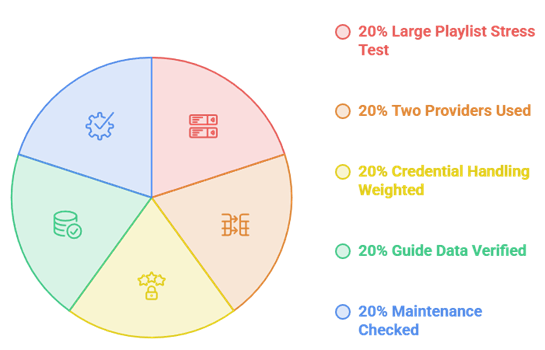
This update gives more weight to current reachability and documented limitations than to long feature lists. Older names were not preserved simply because they ranked before; each recommendation had to offer a live official or catalogue destination, a clear bring-your-own-source role, and enough information to explain where it may fail.
- Link Reachability: Official pages, repositories, catalogue entries, and configuration hosts were opened individually; dead destinations were removed instead of left for readers to discover.
- Current Identity: Renames and version changes were traced to the maintained project page, preventing old Xtremio instructions from being presented as a separate addon.
- Input Compatibility: M3U, M3U+, Xtream Codes, XMLTV, IPTV-org, and Stalker portal support were separated because those credentials are not interchangeable.
- Privacy Design: Encrypted tokens, stateless processing, server-side storage, and plain encoded links were distinguished rather than described broadly as equally secure.
- Practical Limits: Public-host capacity, VOD-only scope, mobile workarounds, missing catch-up, and subscription requirements affected ranking as much as attractive features.
M3U Playlist or Xtream Codes: Which Should You Use?
Use the credential type your provider officially supports, but choose Xtream when both options work and you want films, series, categories, or automatic guide information. Choose M3U when portability matters and you expect to reuse one playlist in several players. Never convert a login through a random website, because either format may reveal reusable account credentials.
- Choose M3U For Portability: One playlist address works in many applications and is simple to test, copy, replace, or move between Stremio and dedicated players.
- Choose Xtream For Structure: Separate API calls preserve categories, VOD libraries, seasons, episodes, and guide data that a flat channel file cannot describe as reliably.
- Check Connection Limits: Both methods count against the provider account, so opening Stremio and another player simultaneously can exceed a single-connection subscription.
- Protect Every URL: M3U addresses commonly contain the username and password, while generated Stremio manifests may encode the same details even when they look unreadable.
- Prefer Encrypted Tokens: NexoTV, StremCodes, and Savi offer stronger configuration protection, but anyone controlling your unlocked Stremio account may still use installed addons.
Getting EPG, Logos, and Categories Working Properly
A working stream does not guarantee a usable television guide. EPG failures usually come from mismatched channel IDs, expired XMLTV addresses, incorrect timezones, or an addon cache that has not refreshed yet. Logos depend on playlist artwork fields or the addon proxy. Fix the data source first before repeatedly removing and reinstalling the same connector.
- Compare Channel IDs: The playlist tvg-id and the XMLTV channel identifier must match exactly, or programmes will appear on the wrong channel or nowhere.
- Set The Timezone: Correct a consistent several-hour offset in the addon or provider guide setting before assuming every programme start time is individually wrong.
- Refresh The Source: A cached playlist may hide newly added channels; use the addon refresh control or wait for its documented update interval.
- Filter Before Installing: Removing unwanted countries and categories reduces catalogue size, shortens guide parsing, and makes the result easier to control using a television remote.
- Treat Logos Separately: Broken artwork rarely affects playback; check tvg-logo values, proxy settings, and image access instead of changing the provider stream address.
Why Your IPTV Playlist Buffers Inside Stremio
Live IPTV reaches you directly from the provider or public source, so torrent fixes and debrid subscriptions do not apply. Buffering usually points to an overloaded provider, an exhausted public addon host, a connection limit, or poor routing between your network and the stream server. Compare the same channel in another player before blaming Stremio alone.
- Debrid Does Nothing: Real-Debrid and similar services cache torrents, not the live HLS or transport streams delivered by an IPTV provider account.
- Test Another Player: Load the same credentials in a dedicated app using our guide to setting up IPTV on Firestick, separating provider trouble from addon trouble.
- Watch Peak Hours: Failure during major event-channel programming events but not ordinary daytime viewing strongly suggests provider overselling or a congested public source.
- Check Simultaneous Streams: Close other devices and applications using the subscription because many panels silently reject or degrade connections beyond the purchased limit.
- Consider Private Hosting: A self-hosted NexoTV or M3U addon removes public configuration-server congestion, but it cannot improve the underlying channel server or internet route.
Is Running IPTV Through Stremio Legal?
The connector software is neutral, but the source may not be. Use playlists, portals, and public streams you are authorised to access. A provider offering nearly every premium network for a tiny fee is unlikely to hold the necessary rights. Public listings also mix official, regional, and user-submitted links, so availability alone never establishes permission.
- Verify The Provider: Look for a real company identity, distribution rights, transparent channel coverage, and terms explaining the regions where its service is licensed.
- Public Is Not Automatically Licensed: A stream listed by IPTV-org may be openly reachable yet still restricted by geography, ownership terms, or the broadcaster website.
- Addon Claims Are Limited: Open-source code and a disclaimer show what software does, but neither can legitimise channels supplied by an unrelated third-party seller.
- Avoid Shared Credentials: Buying or copying a reused account can violate provider terms, expose personal viewing activity, and stop working when simultaneous connections collide.
- Use Privacy Responsibly: A VPN can secure traffic on untrusted networks, but it does not create content rights or make an unauthorised source lawful.
Verdict:
Choose NexoTV for the best balance of source support, guide handling, caching, and private deployment. M3U/EPG TV Addon remains the strongest configuration-heavy alternative, while YourIPTV is easier for a large Xtream VOD account. Hosted LiteAIO suits readers who prefer paying for management tools instead of operating their own server.
- NexoTV: The most complete overall choice, supporting three source types, several guide methods, encrypted tokens, strong caching, and a documented self-host path.
- M3U/EPG TV Addon: Best for people who want granular M3U, Xtream, XMLTV, caching, and VOD controls in one actively documented open-source project.
- YourIPTV (formerly Xtremio): The simplest maintained route for a structured Xtream library containing live channels, films, series, and timezone-adjusted guide data.
FAQs
Do these Stremio IPTV addons include channels?
Most do not. They connect an M3U playlist, Xtream Codes account, or Stalker portal you already have. NexoTV and IPTV Addon by Savi can also browse IPTV-org public sources, but those links vary in reliability, rights, and regional access. Never assume installing a connector creates a legal premium channel subscription.
What happened to Xtremio?
Xtremio is now called YourIPTV. The maintained public configuration page identifies itself as YourIPTV version 2.0 and still handles an existing Xtream Codes subscription. Old Xtremio links and descriptions may continue appearing in search results, but treating the names as two different current addons creates duplication and points readers toward outdated instructions.
Which IPTV addon works best with Xtream Codes?
NexoTV is the best all-round option when live channels, EPG, search, and self-hosting matter. YourIPTV suits a large structured VOD library, while StremCodes is better when title-page matching and encrypted credentials matter most. GhostVOD is the specialist pick for merging several Xtream VOD accounts without adding many home-screen rows.
Can I use Real-Debrid with an IPTV addon?
Real-Debrid does not accelerate live IPTV channels because those streams come directly from the provider rather than a torrent swarm. A combined service such as LiteAIO can manage debrid and IPTV inside one Stremio configuration, but the two systems remain separate. Fix provider capacity, routing, or addon hosting when live television buffers.
Is Stremio better than a dedicated IPTV player?
Usually not for channel surfing, recording, multiview, or a grid-style guide. Stremio makes sense when you want IPTV films, series, and occasional live channels beside the rest of your library. Our comparison of the best live TV apps for Firestick covers dedicated players that handle television controls more naturally.