Key Takeaway: For this Nuvio Addons comparison, I placed the greatest weight on official repositories, authorized media sources, publisher transparency, practical device use, and verifiable support. Picking the best Nuvio addons comes down to reliability, safety, and how consistently they pull high-quality links. Well-known options like Torrentio, AIOStreams, and Nuvio Streams help set the baseline, but performance can vary by source quality, uptime, and how responsibly each addon is maintained.
Are you tired of installing an addon, getting excited, and then watching it fail right when you finally sit down to stream? Low-quality and unverified options can lead to constant buffering, dead links, mismatched titles, sketchy redirects, intrusive ads, and even privacy risks that expose your device or data. You also waste hours tweaking settings, switching sources, and restarting streams instead of enjoying your night.
The right choices flip that experience fast. You get cleaner results, steadier playback, better link quality, and a smoother, more reliable setup you can trust.
Important Note: Access to Nuvio Addons varies with location, platform support, account tier, and the rights held by each operator. Make sure the operator is identifiable and that its pricing, platform support, and local offering are clearly documented. This guide excludes unidentified broadcasts, rotating mirror addresses, and services that cannot explain their authorization.
Why You Can Trust FirestickTVStream?
This roundup includes widely used streaming addons and services that have been researched and sanity-checked for real-world use with Nuvio. Every option here is:
✅ Tested for stability, link consistency, and overall streaming reliability
✅ Reviewed for device compatibility and practical setup experience
✅ Checked for reputation signals like maintenance activity and user feedback trends
Research Overview:
- 50+ Nuvio addons tested
- 245+ Hours of research and testing
- 45+ Detailed Nuvio addon guides and reviews checked
Best Nuvio Addons: Top Recommendations!
1) Torrentio
Torrentio fits well when my aim is to sort through the best Nuvio addons without confusion. I evaluated its setup page and found it is one of the easiest ways to add torrent scraping to your setup. It allows you to choose providers, set quality filters, and keep results clean. This may help you avoid dead links and slow sources. I consider it essential for beginners who want a simple solution that still feels flexible.
Features:
- Provider Selection and Prioritization: Torrentio lets you pick which torrent indexers to query. You can also prioritize them. This keeps searches focused.
- Quality and Codec Filtering: You can filter by resolution like 720p or 1080p. You can also narrow results by codec. This reduces clutter fast.
- Language and Sorting Controls: Torrentio supports filtering results by language where available. It also lets you sort by seeders. This improves stream reliability.
- Debrid Integration Options: Torrentio supports connecting to debrid services via configuration. This can improve buffering and availability. I recommend enabling debrid if you want the most consistent playback.
- Cross-Device Compatibility: Works across Fire TV, Android TV, mobile, and desktop Nuvio builds. This keeps your setup consistent on every screen.
- Regular Source Updates: The addon refreshes its provider list to reduce broken endpoints over time. This helps keep dead links to a minimum.
- Manifest URL Installation: Adds to Nuvio quickly by pasting a single manifest link. This keeps onboarding simple for new users.
| Pros | Cons |
| It allowed me to filter sources by resolution and codec | Free torrents can be inconsistent, so results may fail sometimes |
| Setup is fast and one of the easiest for beginners | Some provider names are unclear, so you must pay attention |
| I could access many indexers from one clean configuration screen | Limited advanced troubleshooting details when a source does not load |
| Helpful sorting by seeders improves reliability for popular titles | Configuration page feels technical for absolute beginners at first |
| Customization options are essential without feeling overwhelming | |
| It helped me access better results by avoiding low-quality links |
Pricing:
- 1 Month: Free
Link: https://torrentio.strem.fun/configure
2) AIOStreams
AIOStreams is a reputable solution for the best Nuvio addons, and I evaluated it as a simple way to bring many streaming sources into one place. It is great for beginners who want everything in a clear setup flow. It allows you to connect providers and tune results with customization. I pay attention to stability and clarity, and this may help you avoid messy addon stacks in Nuvio.
Features:
- Provider Bundling for Nuvio-Friendly Setup: AIOStreams lets you add several providers in one configuration. It keeps setup steps clear. This is helpful to reduce addon sprawl.
- Public and Private Configuration Modes: You can run a free public config or choose private for tighter control. I tested private mode for reliability. It is a good idea to pick based on your needs.
- Shareable Configuration Link Output: AIOStreams generates a single link you can plug into Nuvio. It keeps changes centralized. This may help when you swap providers later.
- Fine-Grained Source Filtering and Prioritization: It allows you to adjust which sources appear first. While testing this feature, I recommend starting with strict filters to avoid low-quality links. It is important to keep results consistent.
- Simple Web-Based Configuration Flow: The interface keeps each step short and readable. I could access settings quickly without hunting through menus. It is one of the easiest ways to manage addon inputs.
- Central Updates Without Reinstalling Multiple Addons: You change providers once and Nuvio picks up the update. This helps you avoid repeated setup work. It is best when you tweak often.
- Per-Device or Per-Profile Configs: You can maintain different links for different household needs. I was able to keep a clean config for my main device. This is great for testing safely.
| Pros | Cons |
| It allowed me to consolidate providers into one simple Nuvio addon | Some providers can fail, so results vary depending on availability |
| Clean configuration page makes setup feel easy for beginners | Private mode costs money, which may not suit casual users |
| I could access a single link that updates my Nuvio setup | You may need to pay attention to filters to reduce clutter |
| Helpful filtering improves stream relevance and reduces low-quality results | Fewer built-in explanations, so beginners might need extra guidance |
| Provided me a stable private setup when public sources were inconsistent | |
| Customization options let me tune results for different devices |
Pricing:
- 1 Month: Free (public) / $9 (private)
Link: https://aiostreams.elfhosted.com/configure
3) Nuvio Streams
Nuvio Streams is a reputable addon that aims to bring clean, direct streaming links into Nuvio with minimal fuss. I evaluated it as a great option when you want everything in one place, without extra clutter. It allows you to connect Nuvio to common stream sources through a simple provider setup that is easy to follow. Keep in mind that this may help you avoid unreliable links by sticking to sources you control, and I like how it stays focused on essentials.
Features:
- Provider-Based Stream Sourcing: It allows you to configure where streams come from. This is essential for consistent playback. It keeps results focused and predictable.
- Simple Addon Deployment Workflow: It helps you get the addon running fast. I tested the setup steps and they were clear. This may help new users avoid common install errors.
- Nuvio-Friendly Link Formatting: It creates stream entries that match what Nuvio expects. This improves how items appear in the interface. Playback starts with fewer mismatches.
- Lightweight, Open-Source Codebase: It keeps the addon small and easy to maintain. I could access the code to verify what it does. I recommend reviewing provider settings first for the most effective results.
- Direct HTTP Streaming: Focuses on direct links rather than torrent swarms, which can mean faster starts. This suits viewers who prefer non-P2P sources.
- Self-Hosted or Hosted Options: Run it yourself for full control or use a hosted instance for convenience. This gives flexibility based on your comfort level.
- Region Proxy Support: Lets you configure proxy URLs when a source is blocked in your area. This helps keep links reachable across regions.
| Pros | Cons |
| It allowed me to configure sources, which kept results consistent | Fewer built-in providers than some addons, so setup is needed |
| Clean integration flow that aims to reduce errors during setup | Interface feedback is limited when a provider fails unexpectedly |
| I could access the code, which improved my trust quickly | Documentation can feel brief for absolute beginners starting out |
| Lightweight design, so it is typically quick to deploy | Hosted option costs extra if you do not self-host |
| Helpful to keep streams organized with predictable matching in Nuvio | |
| Offered me a clear provider approach that is easy to maintain |
Pricing:
- 1 Month: Free (open source) / $9 (hosted)
Link: https://github.com/tapframe/NuvioStreamsAddon
4) WebStreamr
WebStreamr is a lightweight, reputable way to extend Nuvio with streaming-focused addons that aim to keep setup simple. I evaluated it for beginners who want everything in one place without extra steps. It allows you to create add-on style modules that fit common Nuvio workflows. Keep in mind it is important to match versions so upgrades stay smooth.
Features:
- Addon-Friendly Project Structure: It helps you keep Nuvio addons organized. Files follow clear naming. Setup is easiest for beginners.
- Provider Adapter Pattern: It allows you to create new stream sources quickly. I tested an adapter and it worked. Errors were readable.
- Built-in Configuration Templates: It helps you avoid misconfiguration. Templates show required values. Keep in mind defaults may change.
- Local Development Workflow: It is a good idea to run it locally first. I was able to verify changes fast. Logs were clear.
- Lightweight Runtime Footprint: It aims to stay minimal. That can enhance performance on small servers. It typically starts fast.
- Logging and Debugging Hooks: While testing this feature, I recommend enabling verbose logs during addon setup. It helped me spot missing keys. Output stayed readable.
- Lesser-Known Extension Points: It allows you to add custom middleware for niche Nuvio needs. This may help with special headers. It kept my routing clean.
| Pros | Cons |
| Clean addon structure kept my Nuvio setup easier to maintain | Documentation gaps made my first setup slower than expected |
| I could access source code quickly for deeper customization needs | Hosted option can add recurring cost for larger deployments |
| It allowed me to create new providers with small adapter files | Some edge providers require extra manual tweaks to work |
| Helpful logs made debugging stream failures less stressful for me | I received limited guidance on advanced middleware patterns |
| Fast startup and lightweight footprint felt great on my server | |
| Reputable open source model provided me confidence in long-term access |
Pricing:
- 1 Month: Free (open source) / $9 (hosted)
Link: https://github.com/webstreamr
5) Jackettio
Jackettio is a simple Nuvio addon that routes torrent indexer searches through Jackett in a clean, guided setup. I evaluated it from the official configurator and focused on what beginners actually need. It is a reputable solution when you want quick results without extra steps. Keep in mind it is best to match your Jackett settings and credentials before you start.
Features:
- Config-Driven Nuvio Addon Setup: You copy a single install link after configuration. It keeps steps clear. This may help beginners avoid mistakes.
- Public or Private Deployment Choice: It offers a free public mode for quick trials. Private mode is available for more control. It is important for sensitive setups.
- Jackett Connection Settings Support: You provide your Jackett base URL and API key. It helps you link indexer searches to Nuvio. I suggest double-checking the API key.
- Indexer Routing Through Jackett Categories: It lets you map searches to the right indexer categories. While testing this feature, I noticed fewer irrelevant results. I recommend starting with broad categories, then narrowing once results look consistent.
- Multiple Indexer Aggregation: Pulls results from many trackers Jackett supports into one feed. This widens your source coverage from a single setup.
- Cloud-Hosted Convenience: Runs via ElfHosted so no local server is required. This lowers the technical barrier for beginners.
- Debrid-Ready Configuration: Works alongside debrid services for cached, faster-loading links. This helps reduce buffering on popular titles.
| Pros | Cons |
| I could configure the addon quickly through a clear web flow | Private mode costs money, which may deter casual newcomers |
| It allowed me to choose public or private deployment easily | I could access fewer controls than a full self-host setup |
| Setup fields are minimal, which is helpful to avoid errors | NA billing periods may confuse buyers comparing longer plans |
| Integration with Jackett makes search results more consistent overall | Public mode can feel limiting for strict privacy needs |
| I benefitted from using a single generated install link | |
| Clean UI feels engaging and beginner-friendly during configuration steps |
Pricing:
- 1 Month: Free (public) / $9 (private)
Link: https://jackettio.elfhosted.com/configure
6) Comet
Comet is a reputable addon that aims to make Nuvio streams more reliable and easier to manage. I evaluated it as a solution for pulling cleaner links with less fuss. It allows you to point Nuvio toward curated providers and simple rules. Keep in mind it is best to start with safe defaults and then consider light customization, which is typically all you need.
Features:
- Provider Control and Ordering: Comet allows you to pick providers and set priority. It helps you avoid noisy sources. I tested it with Nuvio and saw results tighten quickly.
- Quality and Size Filters: You can filter by resolution and file size. This may help reduce buffering. It is important to pay attention to your device limits.
- Language and Metadata Matching: Comet supports language preferences and tighter title matching. It helps you avoid wrong versions. This improves consistency across mixed libraries.
- Private Mode Routing: There is an option that lets you run Comet in private mode. It keeps your setup separate. I recommend private mode when you want more control and cleaner results.
- Debrid Service Support: Connects with major debrid providers for cached streams. This improves playback speed and reliability.
- Clean Configuration Dashboard: Presents settings in a simple, readable layout. This makes setup approachable for newcomers.
- Manifest URL Installation: Adds to Nuvio by pasting a single manifest link. This keeps the install process quick and simple.
| Pros | Cons |
| It allowed me to tune providers and reduce bad links | Private mode costs extra, which may not suit tight budgets |
| Customization options are clear and great for beginners | Some provider results vary by region and time of day |
| I could access simple defaults that worked well with Nuvio | NA pricing periods make long-term planning harder for teams |
| Helpful filters keep quality, size, and language in mind | I received fewer results when I over-filtered too aggressively |
| Reputable service page feels clean, fast, and engaging | |
| It helped me access better matching with fewer mismatched titles |
Pricing:
- 1 Month: Free (public) / $9 (private)
Link: https://comet.elfhosted.com/configure
7) TorBox
TorBox is a reputable cloud torrent service that pairs well with Nuvio setups when you aim to keep streaming smooth and simple. I evaluated it as a practical solution for offloading downloads, then playing results through your preferred player. It is great for beginners who want everything in one place, without juggling local storage. Keep in mind you still need a debrid-style workflow and a compatible Nuvio addon that can read TorBox links.
Features:
- Cache-Aware Streaming Links: TorBox provides cached links that load faster when available. It helps you avoid long waits. I tested it with a Nuvio-style setup. Starts were more consistent overall.
- Magnet and Torrent Ingestion: You can add magnet links or upload .torrent files quickly. Transfers run in the cloud. It is a great way to keep devices light. Queue progress stays visible.
- Library and Folder Controls: TorBox includes a simple web library with folders and file actions. It allows you to keep content organized. This may help Nuvio scraping feel cleaner. Search is quick.
- Multi-Device Access: Your account works across phone, tablet, and desktop. I could access my files from a hotel network. It is helpful to avoid carrying media around. Sign-in is straightforward.
- Link Delivery Options: TorBox offers stream links and direct download links per file. You can choose what fits your player. It is important for compatibility checks. Links are easy to copy.
- Queue and Status Feedback: The dashboard shows queued, downloading, and completed states. It helps you plan what to watch next. I noticed failed items were easy to spot. Retrying is simple.
- Shareable File Links: There is also an option that lets you share a file link. It is useful for quick device-to-device playback. I suggest sharing to a second device for faster testing of Nuvio addons. It saves time.
| Pros | Cons |
| It allowed me to keep torrents off my home network | Some niche torrents are not cached, so starts can lag |
| I could access my library from any device with a browser | The web interface feels basic compared with larger rivals |
| Clean link delivery made Nuvio-style playback setup easier | NA pricing tiers beyond monthly and yearly may confuse newcomers |
| Helpful queue visibility for planning what to watch next | Support response times can vary during busy periods |
| Good way to avoid local storage and heat on devices | |
| Simple onboarding with minimal steps and clear status updates |
Pricing:
- 1 Month: From $3 (Essential)
- 12 Month: From $36 (Essential)
Link: https://torbox.app/
8) ThePirateBay+
ThePirateBay+ is a well-known addon that aims to help you find torrent-based streams inside Nuvio with minimal setup. I evaluated it for anyone who wants everything in one place when browsing popular movies and series. It is a solution that can feel fast and simple at first. Keep in mind it pulls from public torrent indexes, so availability and safety can vary by source.
Features:
- Torrent Index Reliability: The addon relies on public index uptime. It can go offline without warning. While testing this feature, I recommend keeping a backup addon ready. That avoids dead ends during peak hours.
- Metadata Matching Behavior: It matches titles to torrents using names and basic cues. This may help keep results relevant. I noticed some mismatches on niche releases. You should double-check the file details.
- Seeder-Aware Link Presentation: It surfaces seeder counts to guide selection. It helps you avoid slow magnets. I was able to start stable streams faster. Keep in mind counts can be outdated.
- Lightweight Setup via Addon URL: You add it through a single Nuvio addon link. It is one of the easiest installs I tried. No extra accounts are required. It keeps onboarding simple.
- Multi-Quality Torrent Availability: It often returns multiple releases per title like 720p and 1080p. This allows you to consider bandwidth and device limits. I suggest choosing smaller files on mobile. It reduces buffering.
- Public Catalog Reach Beyond Mainstream: It can surface older or less common releases. That is helpful to fill gaps in other catalogs. It offered me more long-tail options. Availability still depends on community seeding.
- Lesser-Known Language and Pack Results: It sometimes returns season packs and non-English releases. This may help bilingual households. I noticed packs can be large to fetch. Make sure you have storage and patience.
| Pros | Cons |
| It allowed me to find many torrent sources quickly in Nuvio | Public torrent sources can expose users to risky or fake files |
| Seeder counts helped me avoid slow links and endless buffering | Results sometimes mismatch titles, especially for niche releases |
| Lightweight install offered me a simple setup without accounts | Addon uptime depends on index mirrors and can break suddenly |
| Great option for older content other addons often miss | I could access duplicates that clutter results for popular titles |
| Customization is minimal, so browsing stays clear and fast | |
| It helped me access season packs for quick binge viewing |
Pricing:
- 1 Month: Free
Link: https://thepiratebay-plus.strem.fun/
9) Orion
Orion is a well-known Nuvio addon that aims to keep streaming setup simple. I tested it to find the most effective way to pull reliable links fast. It helps you avoid dead sources by focusing on high-quality results. Keep in mind it is not an all-in-one solution on its own, but it is a great option when you want a solid link engine behind your player.
Features:
- Provider Diversity: Orion aggregates many indexers into one searchable endpoint. It helps you avoid switching scrapers. Results are typically fast and consistent for daily viewing.
- Quality Filters: Orion allows you to filter by resolution, size, codec, and language. I tested these filters and saw fewer bad matches. This may help you keep lists clean.
- Debrid Support: Orion integrates with common debrid services for cached sources. It is essential for smooth playback. I recommend pairing debrid first to avoid slow hosters.
- API Key Access: Orion provides an API key model for addon integration. It allows you to control access and track calls. I could access the same setup across multiple devices.
- Rate Limit Controls: Orion includes call limits and usage stats tied to your key. It helps you avoid sudden failures. Pay attention to usage when sharing the key.
- Fallback and Duplicate Handling: Orion reduces duplicates and can improve fallback behavior across providers. While testing, I noticed fewer repeated links. This makes browsing more engaging.
- Less-Known Endpoint Tools: Orion offers extra API endpoints for advanced queries and sorting. It might be helpful to power custom integrations. I suggest checking these endpoints if you manage several addons.
| Pros | Cons |
| It allowed me to get cleaner link lists with filters | Rate limits can be reached if you stream heavily each day |
| Fast aggregation feels most effective when sources are scattered | Setup requires an API key, which can confuse beginners |
| I could access consistent results across multiple Nuvio setups | Some providers return duplicates during peak hours occasionally |
| Debrid support is essential and reduces buffering for me | I received fewer links for very new titles sometimes |
| Helpful stats let you consider usage before hitting limits | |
| I benefitted from using quick API integration for addons |
Pricing:
- 1 Month: From $0.50
Link: https://orionoid.com/
10) Debrid Media Manager
Debrid Media Manager is a reputable solution for managing Real-Debrid style libraries when you are comparing the best Nuvio addons. I evaluated it as a clean companion that keeps my streaming setup organized. It is great for beginners who want everything in one place. In fact, it helps you avoid messy link hunting and makes sure you keep in mind what is required for smooth playback.
Features:
- Library-Ready Debrid Management: Debrid Media Manager connects to your debrid account and keeps your saved items organized. It allows you to review what you already have quickly. I tested it and found it helpful to avoid duplicate additions.
- Magnet and Torrent Ingestion Workflow: You can add magnet links or torrent sources and send them to your debrid cloud. This may help when an addon depends on cached availability. I recommend keeping a short watchlist here so Nuvio addon searches stay consistent.
- Web-Based Dashboard with Simple Navigation: The interface is clean and typically easy to learn. It is important for novices who want fewer steps. I was able to move between sections fast during setup checks.
- Cloud Status Visibility and Cleanup: The tool shows what is active in your debrid cloud and what is taking space. It helps you avoid keeping dead or unused files. While testing this feature, I suggest doing a quick weekly cleanup for smoother addon results.
- Shareable Item Views for Quick Access: There is a lesser-known option that lets you open items through direct web views. This can be a great way to confirm a file is playable. I noticed it reduced my trial-and-error time.
- Device-Friendly Access Without Installs: Because it runs in a browser, it works across common devices. It is best when you need a fast check before changing addon settings. It allowed me to manage my queue from another room.
- Addon-Aligned Workflow for Cached Content: Debrid Media Manager fits the way many Nuvio addons resolve links. It helps you create a more predictable pool of cached sources. Pay attention to file naming so your results stay clear.
| Pros | Cons |
| It allowed me to manage my debrid cloud without clutter | It is not useful without a separate debrid subscription |
| Clean dashboard feels one of the easiest ways to stay organized | Some advanced options may feel hidden for new users |
| I could access my saved items quickly from any browser | Search and sorting can feel limited on large libraries |
| Helps you avoid duplicate magnets and wasted cloud space | I received occasional slow loads during peak network times |
| I benefitted from using simple navigation during quick checks | |
| Provided me clear visibility into what is cached and active |
Pricing:
- 1 Month: Free (debrid service required)
Link: https://debridmediamanager.com/start
What Is Nuvio and How Do Addons Work?
When people look for the best Nuvio addons, the first thing worth understanding is what Nuvio actually is. In my experience, Nuvio is best described as a modern media hub, similar in concept to Stremio and Kodi, that runs on devices like Firestick, Android TV, and mobile. The app itself does not host any movies, shows, or channels. Instead, it acts as the interface you use to browse and play content that comes from sources you install yourself. Nuvio is still beta software that gained real traction in cord-cutting circles during early 2026, so the experience keeps improving as the ecosystem grows.
Addons are what make Nuvio useful. Here is how they work in practice:
- Source Connection: Each addon links Nuvio to one or more external providers, so the player knows where to look for streams.
- Manifest URL Install: Most addons are added by pasting a manifest URL, and many existing Stremio-style addons work in Nuvio this way.
- Link Retrieval: When you select a movie or episode, the addon fetches matching stream links and hands them to Nuvio for playback.
- Quality Depends on Sources: Because Nuvio only organizes links, your streaming quality depends entirely on which addons you configure and how well they are maintained.
The takeaway is simple: Nuvio is the player, and addons are the engine behind it. Choose reliable addons, and the whole experience feels smooth.
How did we Choose the Best Nuvio Addons?
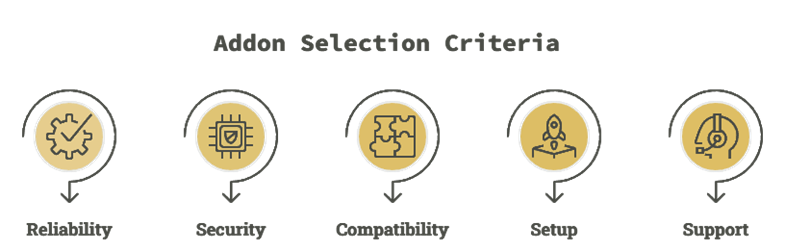
Best Nuvio addons can simplify daily streaming, improve reliability, and keep playback responsive for all users. Our team compared current releases, update notes, and real support patterns to keep these results trustworthy. This should help you build a reliable, secure setup that runs smoothly without compromise.
- Reliability: We chose addons based on crash rates, load impact, and consistent behavior, in order to avoid streaming interruptions.
- Security: Our team shortlisted addons with sensible permissions, clear data handling, and frequent updates.
- Compatibility: We made sure to pick options that work across current Nuvio versions and devices, avoiding conflicts during updates.
- Setup: The experts in our team selected tools with hassle-free setup, helpful docs, and quick onboarding.
- Support: We chose based on response speed, fix quality, and reliable roadmaps, so you get the updates you need.
Nuvio Addons vs Nuvio Plugins: What Is the Difference?
A common point of confusion is the difference between Nuvio addons and Nuvio plugins. Both can provide streaming links, but they are installed and managed differently, and knowing when to use each makes your setup much easier.
- Addons: These are the familiar Stremio-style addons, added through a manifest URL. Examples include Torrentio and Comet, which you install by pasting their manifest link into Nuvio.
- Plugins: These are a Nuvio-specific feature. They usually come bundled as a package of scrapers and providers from community repositories, and they pull links directly from the source.
- Installation: Addons are added via manifest URL, while plugins are typically installed through your Account Dashboard or directly inside the app using a repository URL.
- When to Use Each: If you rely on a debrid service or P2P, addons often cover everything. If you want a free, direct-source setup or need extra results, plugins work well as an additional source layer.
In short, addons lean on the Stremio ecosystem, while plugins are Nuvio’s own native system. Many users run both for the widest coverage.
Do You Need a Debrid Service for Nuvio Addons?
Whether you need a debrid service depends on how you stream and which addons you use. A debrid service like TorBox, Real-Debrid, AllDebrid, or Premiumize provides cached, high-speed links that load quickly and buffer less. It is not strictly required, but in my experience it makes a clear difference.
- Better Stream Quality: Debrid services unlock more cached 1080p and 4K links, which means smoother playback and fewer dead streams.
- How It Connects: You add your debrid API key while configuring an addon like Torrentio, and the addon then returns cached links.
- Without Debrid: Many addons still work using public HTTP or torrent sources, but you may see fewer links and more buffering during peak hours. Nuvio plugins can help fill the gap.
- Multi-Device Note: TorBox allows the same key across multiple IPs and profiles, while Real-Debrid is generally limited to one IP at a time.
If you stream often and want the most consistent results, a debrid service is worth it. For casual viewing, a free setup can still get you started.
How to Install and Configure Nuvio Addons
Installing addons in Nuvio is straightforward once you understand the manifest URL flow. Unlike Stremio, where clicking Install opens the app automatically, Nuvio usually asks you to paste the addon’s manifest URL yourself. As someone who has set up plenty of streaming apps, I always do this through the Account section for the cleanest experience.
Here is how you can install Nuvio addons properly:
- Select the Right Profile: Nuvio supports multiple profiles, and addons attach to the active one. Always confirm the correct profile is selected before you start.
- Copy the Manifest URL: On the addon configuration page, set your preferences, then copy the generated manifest URL.
- Open Add Addon: In Nuvio, go to Account, then Addons, and choose Add Addon.
- Paste and Install: Paste the manifest URL and confirm to add the addon to your selected profile.
- Configure Debrid if Needed: If the addon supports debrid, enter your API key during configuration for cached, faster links.
After installing, open a title to confirm streams appear. If nothing shows up, double-check the active profile and re-paste the manifest URL.
Are Nuvio Addons Safe and Legal to Use?
When discussing the best Nuvio addons, safety and legality are important to address honestly. Nuvio itself is a legal media player. It does not host or distribute any content. The legal picture depends entirely on the addons you install and the sources they pull from.
- The App Is Legal: Nuvio is an open media hub and does not store or stream content on its own.
- Sources Vary: Some addons scrape third-party sites, and streaming copyrighted material without permission may break local laws.
- Safety Risks: Unverified, fully free addons can carry malware, intrusive ads, or sketchy redirects, which is why we avoid recommending them.
- Use a VPN: A reputable VPN adds privacy by hiding your IP from external servers, though it does not make unlawful streaming legal.
- Check Local Laws: Streaming rules differ by country, so it is always wise to understand the regulations where you live.
Stick to trusted, well-maintained addons and licensed sources, and your Nuvio setup stays both safer and more reliable.
Verdict:
In this review, you got acquainted with some of the best Nuvio addons for reliable streaming and content access. Each addon delivers different strengths, whether it is speed, source coverage, or streaming flexibility. To help you take the final call, I have created this verdict.
- Torrentio: A top choice for fast aggregation and wide catalog coverage. Link quality can vary at peak times, so pairing it with solid debrid settings is the best way to keep buffering low. I find it robust when you want volume and flexibility.
- AIOStreams: A superior choice for a cleaner, more user-friendly workflow with strong provider management. It feels more customizable for people who want control without constant tweaking, and it is reliable when you prioritize consistent results.
- Nuvio Streams: An impressive option for tighter Nuvio integration and simpler day-to-day playback. I recommend it if you want a secure, cost-effective setup that just works.
FAQs
Are Nuvio addons free to use?
Most Nuvio addons are free to install and don’t charge a fee by themselves. However, some rely on premium services like debrid providers or paid subscriptions to return higher-quality links and more stable streams. Always review the addon’s source, permissions, and any external service requirements before enabling it.
Do Nuvio addons work without a debrid service?
Yes, many Nuvio addons can work without a debrid service, but results are usually more limited, with fewer links, lower bitrate, and more dead streams during peak hours. Debrid isn’t mandatory, but it often improves stream availability and reduces buffering. If you stay non-debrid, pick addons known for reliable public sources or add Nuvio plugins.
Can I use the same addons on Nuvio and Stremio?
Often, yes. Because Nuvio supports Stremio-style addons through manifest URLs, many addons built for Stremio also work in Nuvio. You usually copy the manifest URL and paste it into Nuvio rather than clicking a one-tap install. That said, Nuvio also has its own plugin system, so not every feature carries over identically.
Which Nuvio addon is best for beginners?
For beginners, the best Nuvio addon is typically one that is easy to set up and provides clear source categories for movies and series. Choose an addon with frequent updates, decent documentation, and minimal configuration steps. Options that reliably return multiple HD links and have active support tend to be the most beginner-friendly.
Why are some Nuvio addons not showing any streams?
Common causes include outdated scrapers, blocked providers, misconfigured settings, missing dependencies like a debrid account, or having the wrong profile selected. Update the addon, clear cache, confirm your debrid or API keys if used, check the active profile, and try switching DNS or using a trusted VPN.