Key Takeaway: Tubi is the best all-around free choice, Sling Freestream supplies the largest combined live and on-demand lineup here, and Plex is strongest for rebuilding search and watchlists. Each has an accountable operator and official applications rather than an unverifiable FlixHQ-branded mirror.
FlixHQ attracted viewers with one searchable catalog, recent movie and episode listings, server choices, subtitles, filters, and minimal signup friction. The problem is no longer finding a page that uses the name. It is determining who operates that page, whether its player is safe, why one domain fails while another appears, and whether any advertised download actually belongs to the program.
I compared nine services using current official product, device, catalog, account, and pricing information. The ranking separates immediate free viewing, persistent watchlists, recent rentals, live channels, curated cinema, and library borrowing. No legal option promises every new release at no cost, but each recommendation replaces a specific FlixHQ convenience without asking you to trust an unexplained mirror, codec, or notification request.
Best FlixHQ Alternatives: Top Recommendations!
| Service | FlixHQ Feature Replaced | Viewer Cost | Get Started |
|---|---|---|---|
| Tubi | Best overall free alternative | Free with ads | Visit Site |
| Sling Freestream | Large free on-demand and live lineup | Free with ads | Visit Site |
| Plex | Discovery, watchlists, and personal media | Free with ads | Visit Site |
| The Roku Channel | Free originals and live channels | Free with ads | Visit Site |
| Fandango at Home | Recent releases and permanent purchases | Free, rent, or buy | Visit Site |
1) Tubi
People drawn to FlixHQ for zero-cost viewing should begin with Tubi. The licensed service offers films, complete series, originals, family shelves, and selected channels without requesting payment information. I put it first because its Fire TV software comes from Amazon’s store, playback starts without membership, and optional registration preserves favorites, history, recommendations, and resume points between screens.
Features:
- Clear Licensing: Advertising agreements fund movies and series from named partners, giving viewers an accountable operator, customer-help system, privacy policy, and lawful distribution route.
- Immediate Viewing: A card is unnecessary and membership remains optional for ordinary playback, retaining much of FlixHQ’s low-friction appeal without sending visitors through unknown hosts.
- Saved Activity: Creating a free profile adds favorites, history, recommendations, and resume positions that follow supported televisions, phones, tablets, consoles, and web browsers.
- Television Install: Fire TV users obtain Tubi directly through Amazon’s store, receiving publisher-signed updates instead of downloading repackaged installers or accepting deceptive player buttons.
- Catalog Breadth: The rotating library spans studio features, complete shows, documentaries, anime, Spanish programming, children’s entertainment, original productions, and selected scheduled channels.
- Accessibility Review: I confirmed Fire TV compatibility for captions and audio descriptions, plus current platform coverage, in Tubi’s device, setup, and accessibility documentation.
- Known Tradeoff: Unavoidable commercials finance viewing, licenses expire, and country differences affect available programs, channels, applications, caption tracks, audio descriptions, and profile functions.
| Pros | Cons |
|---|---|
| Starts without payment details | Advertisements cannot be removed |
| Amazon Appstore installation | Licenses change over time |
| Movies, series, and channels | Availability is country-specific |
| Free syncing profile available |
Pricing:
- Viewer Charge: $0; advertising funds playback
- Profile Charge: $0; registration is optional
- Evidence Date: Tubi documentation checked August 20, 2026
Link: https://tubitv.com/
2) Sling Freestream
Sling Freestream is a useful FlixHQ alternative for households wanting substantial on-demand choice plus scheduled television. Sling currently advertises more than 600 free live channels and over 40,000 movies and shows, with no account required for basic access. I rank it fourth because a free profile also adds watchlists, favorites, parental controls, profiles, and limited cloud DVR.
Features:
- Large Lineup: More than 600 live channels and over 40,000 on-demand movies and shows cover entertainment, news, reality, international programming, sports, family, and genre interests.
- No Login: Basic Freestream playback needs no account or credit card, letting viewers begin through the website or Sling application without committing to a paid package.
- Free Profile: Optional registration unlocks favorites, personalized recommendations, watchlists, multiple profiles, parental controls, rewards, and a limited cloud DVR without requiring a base subscription.
- Fire TV Access: The standard Sling TV application is officially available on supported streaming devices, including Amazon Fire TV, and exposes Freestream through its free viewing route.
- Live and VOD: Scheduled channels suit passive browsing, while selectable films and programs address viewers who know what they want and do not wish to wait.
- Research Check: I verified current lineup claims, no-account viewing, profile tools, application access, and Freestream’s permanently free model through Sling’s official product and help pages.
- Main Limitation: Commercials fund the service, many channels follow fixed schedules, catalog rights rotate, and Sling’s strongest free lineup and account features remain market-dependent.
| Pros | Cons |
|---|---|
| More than 600 free channels | Commercial breaks are mandatory |
| Large on-demand catalog | Many programs are scheduled |
| No account required | Availability varies by market |
| Free profile adds DVR tools |
Pricing:
- Freestream Access: $0 with advertising
- Free Account: Optional; no credit card required
- Paid Sling Plans: Separate and unnecessary for Freestream
Link: https://www.sling.com/freestream
3) Plex
Plex is the strongest FlixHQ replacement when losing a search page and watchlist matters as much as losing playback. Its free catalog, universal Watchlist, Discover results, rentals, live channels, and personal-media tools share one Fire TV app. I place Plex second because it labels where content comes from instead of implying that every search result is instantly free.
Features:
- Free Streaming: Partner-supplied movies, television, and live channels stream with advertisements, while licensing agreements determine the specific catalog offered to each supported country and device.
- Universal Watchlist: A free account can save titles and show where they stream, rent, or sell across selected services, creating a durable replacement for browser bookmarks.
- Fire TV Support: The official Amazon Fire TV application combines free playback, search, service discovery, watchlists, rentals, and eligible personal libraries without an unknown APK installer.
- Personal Library: Plex Media Server organizes lawfully owned videos separately from the partner catalog, preserving home collections without confusing personal files with advertising-supported streaming rights.
- Account Choice: Visitors can watch much of the free catalog without registration, while signing in adds synchronized progress, preferences, favorites, recommendations, and cross-device watchlist management.
- Research Check: I checked Plex’s current free-versus-paid guidance, Fire TV support, account behavior, ad policy, Watchlist functions, and personal-media boundaries before ranking it here.
- Main Limitation: Plex Pass does not remove ads or add premium free-streaming titles, and partner movies cannot be downloaded for offline viewing through the free service.
| Pros | Cons |
|---|---|
| Combines discovery and playback | Free catalog contains ads |
| Available across many countries | No free-title downloads |
| Supports personal media libraries | Results include other services |
| Official Fire TV application |
Pricing:
- Free Catalog: $0 with advertising
- Plex Pass: $6.99 monthly or $69.99 annually
- Lifetime Plex Pass: $749.99; does not remove partner-content ads
Link: https://watch.plex.tv/
4) The Roku Channel
The Roku Channel replaces FlixHQ’s broad home page with an accountable mix of free films, series, Roku Originals, children’s entertainment, and more than 500 live channels. Compatible Fire TV devices can use the official app in supported regions. I rank it third because its free library is easy to browse, although territory and premium-subscription features vary by platform.
Features:
- Free Library: An always-changing selection of movies, complete shows, originals, children’s programs, news, and live channels plays through an advertising-supported catalog with visible ownership.
- Fire TV Route: Compatible Amazon Fire TV devices can install The Roku Channel officially, so owning Roku hardware is unnecessary where the application is offered.
- Roku Originals: Exclusive scripted, unscripted, documentary, and feature programming gives the service recognizable titles that copied FlixHQ mirrors cannot reliably preserve or support long-term.
- Live Guide: More than 500 free channels provide news, entertainment, lifestyle, sports, family, and themed programming when viewers prefer channel surfing over title-by-title searching.
- Account Benefits: A free Roku account can synchronize supported activity and preferences, reducing the chance that an expired domain erases unfinished episodes and saved programs.
- Research Check: I confirmed current channel counts, Fire TV availability, browser access, free programming, original content, and regional limitations through Roku’s updated official support pages.
- Main Limitation: Fire TV access and premium options are not identical in every country, while advertisements, rotating licenses, and device-specific features make the experience region-dependent.
| Pros | Cons |
|---|---|
| More than 500 live channels | Regional access varies |
| Includes Roku Originals | Free catalog includes ads |
| Works on compatible Fire TV | Premium features vary by device |
| Free movies and television |
Pricing:
- Free Catalog: $0 with advertising
- Roku Account: Free where needed for personalization
- Premium Channels: Optional and separately priced where supported
Link: https://therokuchannel.roku.com/
5) Fandango at Home
Fandango at Home is the FlixHQ alternative to use when a recent film has not reached any free catalog. Its storefront separates Free with Ads titles, rentals, purchases, sales, and 4K editions inside one account. I place it fifth because the transaction page identifies the exact version and price instead of hiding a low-quality copy behind an “HD” badge.
Features:
- Three Access Modes: Free with Ads programming sits beside clearly labeled rentals and purchases, preventing viewers from assuming that every search result belongs to one unlimited catalog.
- Recent Releases: Transactional windows often receive new films before subscription and advertising-supported services, offering a lawful route when immediate access matters more than paying nothing.
- Fire TV Playback: Supported Amazon Fire TV hardware can use the official application, with 4K, HDR, or Dolby features depending on the title and compatible equipment.
- Exact Editions: Store pages identify resolution, rental or ownership status, eligible bonus features, and the current checkout price before a viewer completes any transaction.
- Free Shelf: Thousands of selected movies and television programs can stream with limited commercials, giving visitors a no-subscription option alongside the paid new-release storefront.
- Research Check: I reviewed Fandango’s current free catalog, transaction pages, Fire TV device guidance, 4K requirements, and account terms rather than quoting a guessed standard rental.
- Main Limitation: Rental and purchase prices vary by title, premium releases cost more, free programs contain advertisements, and the service or specific editions may be region-limited.
| Pros | Cons |
|---|---|
| Early access to recent films | New releases cost extra |
| Free with Ads catalog | Prices vary by title |
| Official Fire TV support | Free catalog contains ads |
| Rental and purchase choices |
Pricing:
- Free with Ads: $0 for eligible titles
- Rentals: Variable price displayed before checkout
- Purchases: Variable price and quality displayed before checkout
Link: https://athome.fandango.com/
6) Kanopy
Kanopy is a focused FlixHQ replacement for viewers who value critically regarded cinema, documentaries, international films, educational programs, and thoughtful children’s content. Participating libraries and universities fund access instead of advertising. I rank it seventh because the current Fire TV app is well documented, while each institution controls availability, monthly tickets, and the catalog visible to its members.
Features:
- Library Access: A participating public library or university authenticates eligible viewers, replacing individual subscription billing with institution-funded access tied to a valid account or card.
- Curated Catalog: World cinema, independent films, classics, documentaries, academic programs, and Kanopy Kids provide a more deliberate collection than many broad advertising-supported home screens.
- Fire TV Support: Kanopy officially supports Fire TV running FireOS 6 or newer, alongside current Roku, Apple TV, Android TV, Google TV, and Samsung applications.
- Ticket Rules: Many public libraries allocate monthly tickets for selected titles, while ticket cost, viewing period, allowance, and unlimited collections can vary by participating institution.
- Family Option: Kanopy Kids offers developmentally appropriate films and series, often through unlimited viewing where supported, without mixing mature recommendations into a child’s browsing area.
- Research Check: I verified registration, institutional access, current FireOS requirements, ticket behavior, and library-dependent limits through Kanopy’s recently updated official help documentation.
- Main Limitation: Not every library participates, tickets differ locally, catalogs vary by institution, and viewers seeking mainstream new releases may find fewer suitable choices.
| Pros | Cons |
|---|---|
| High-quality curated catalog | Participating institution required |
| Many titles play without ads | Monthly tickets may apply |
| Official Fire TV application | Catalog varies by library |
| Strong documentary selection |
Pricing:
- Viewer Cost: $0 through a participating institution
- Tickets: Monthly allowance determined by the library
- Unlimited Sections: Availability determined by the institution
Link: https://www.kanopy.com/
7) Pluto TV
Pluto TV works best as a FlixHQ alternative when you prefer browsing channels instead of choosing one exact title. Its official Fire TV application combines hundreds of scheduled streams with thousands of on-demand movies and episodes. I rank it sixth because startup is simple and genre channels are plentiful, though fixed schedules and advertisements make targeted viewing less predictable.
Features:
- Live Channels: Hundreds of streams cover films, classic television, news, comedy, reality, true crime, sports, children’s programs, and single-series marathons without a cable subscription.
- On-Demand Shelf: Thousands of selectable movies and television episodes complement the guide, allowing title-led viewing when the desired program is available outside a scheduled channel.
- Fire TV App: Amazon Fire TV supports Pluto TV officially, avoiding browser pop-ups, sideloaded packages, codec messages, and the confusing alternate servers common on clone sites.
- Quick Access: Visitors can begin watching without a paid plan, while an optional free account may add personalization, saved channels, favorites, and household-friendly features.
- Curated Discovery: Themed channels reduce decision fatigue and suit casual viewing, especially when a household wants continuous programming rather than searching several catalogs for one film.
- Research Check: I verified free Fire TV access, current device support, advertising, live channels, and on-demand viewing through Pluto TV’s official product and platform pages.
- Main Limitation: Advertisements interrupt programs, live streams follow schedules, content rotates, and exact channels, on-demand titles, sign-in behavior, or features can differ by region.
| Pros | Cons |
|---|---|
| Hundreds of live channels | Frequent commercial breaks |
| On-demand movies included | Many titles are scheduled |
| Official Fire TV application | Regional lineups differ |
| No paid subscription required |
Pricing:
- Live Channels: $0 with advertising
- On-Demand Catalog: $0 with advertising
- Subscription: No paid plan required
Link: https://pluto.tv/
8) Xumo Play
Xumo Play is a low-friction FlixHQ alternative for viewers who do not want another account. Xumo currently advertises more than 350 free channels and 15,000 on-demand titles, with no login, subscription, or card required. I rank it ninth because the official Fire TV app starts quickly, but direct availability and long-term profile features are more limited than higher-ranked services.
Features:
- No Account: Movies and channels play without registration, a subscription, or payment details, preserving fast access while still providing an identifiable company and official support route.
- Free Catalog: More than 350 channels and 15,000 on-demand titles span movies, television, news, lifestyle, sports, family programming, and specialized themed networks at no charge.
- Fire TV Support: Amazon Fire TV and Fire Stick devices receive the official Xumo Play application alongside web, Roku, Google TV, mobile, and selected smart televisions.
- Multiple Screens: Xumo allows simultaneous viewing on supported devices, making the free service useful when different household members want separate programs in different rooms.
- Clear Funding: Advertising finances the catalog, so viewers understand the tradeoff before playback instead of encountering disguised buttons, notification traps, or refundable verification demands.
- Research Check: I confirmed current catalog claims, no-account viewing, Fire TV availability, simultaneous use, territory restrictions, and advertising through Xumo’s official homepage and help center.
- Main Limitation: Direct access centers on supported markets, commercials cannot be removed, parental controls remain limited, and no account means fewer persistent watchlist or progress tools.
| Pros | Cons |
|---|---|
| No login or payment card | Territory access is limited |
| Official Fire TV application | No ad-free option |
| Live and on-demand content | Few persistent profile tools |
| Supports simultaneous viewing |
Pricing:
- Access: $0 with advertising
- Account: No login or credit card required
- Ad-Free Tier: Not offered
Link: https://play.xumo.com/
9) Hoopla
Hoopla replaces FlixHQ with instant, ad-free digital borrowing through participating public libraries. Movies and television share one account with music, audiobooks, ebooks, comics, BingePasses, and other collections. I rank it eighth because Fire TV setup is official and borrowed videos return automatically, although monthly allowances, available titles, and library-wide borrowing budgets differ by institution.
Features:
- Library Funded: Participating public libraries cover patron access, allowing eligible viewers to stream without a personal subscription charge, payment card, advertising interruption, or overdue fee.
- Instant Borrowing: Many available titles can be borrowed immediately without a conventional hold queue, although personal allowances and library-wide daily budgets can temporarily stop new checkouts.
- Fire TV Setup: Hoopla offers an official Amazon Fire TV application and a four-digit linking process, avoiding browser workarounds or installation from unknown download sites.
- Automatic Returns: Digital loans expire and return automatically after their lending period, so viewers avoid late fees while libraries retain predictable control over licensed access.
- Beyond Video: The same account includes eligible ebooks, comics, manga, audiobooks, music, BingePass, and SeasonPass content, expanding household value beyond movies and television alone.
- Research Check: I confirmed the free library-card model, Fire TV route, immediate borrowing, cross-device access, monthly allowances, and automatic returns through Hoopla’s official resources.
- Main Limitation: A participating library card is mandatory, catalog and limits vary locally, and a library’s daily budget may block another borrow until its reset.
| Pros | Cons |
|---|---|
| No subscription or advertising | Library card is required |
| Official Fire TV application | Monthly limits vary |
| Instant digital borrowing | Daily budget may pause borrowing |
| Movies plus other media |
Pricing:
- Patron Access: $0 with participating library card
- Subscription and Late Fees: None
- Borrow Limits: Determined by each library
Link: https://www.hoopladigital.com/
Move Your FlixHQ Watchlist and Episode Progress Somewhere Portable
A browser bookmark to a show page is not a durable watchlist. When a FlixHQ domain changes, that bookmark may open a clone, a parked page, or nothing, and local progress can disappear with it. Rebuild the list in an account you control, then separate tracking from playback so a licensing change does not erase what you planned to watch.
- Capture Titles: Write down each film, series, season, and last completed episode before clearing browser data, focusing first on unfinished programs and hard-to-remember names.
- Use Watchlists: Plex, Tubi, Roku, Sling, and other supported profiles can synchronize saved titles or progress, but their behavior and available catalog differ by service.
- Track Separately: A dedicated tracker such as Trakt or Letterboxd can preserve viewing intent independently, although neither service supplies the movie stream or guarantees availability.
- Search Variants: Record original-language titles, release years, and season numbers because translations, remakes, regional names, and specials often produce confusingly similar search results.
- Protect Accounts: Use unique passwords and two-factor authentication where offered; never recycle credentials previously entered into an unverified FlixHQ mirror or copied login page.
How I Evaluated Services Against FlixHQ’s Real Strengths
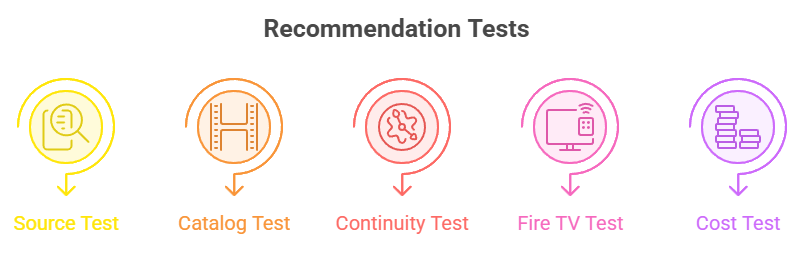
A replacement deserves a high position only if it solves a reason people used FlixHQ in the first place. That includes broad discovery, quick playback, recent-title options, episode continuity, subtitle visibility, television support, and limited signup friction. I scored those functions against verifiable ownership and licensing instead of rewarding whichever clone currently loads fastest in a browser.
- Source Test: Every recommendation needed an identifiable operator, official support route, documented access model, and direct application or website that could be verified independently.
- Catalog Test: Movies and television both mattered, but a smaller service could rank when it solved recent releases, world cinema, library access, or live viewing exceptionally well.
- Continuity Test: Watchlists, resume progress, profiles, episode navigation, favorites, and service discovery received extra weight because a vanished domain should not erase viewing history.
- Fire TV Test: Official Amazon application support counted more than browser workarounds, Downloader codes, unknown APK files, pop-up players, or instructions requiring relaxed security settings.
- Cost Test: Free advertising, optional accounts, rentals, purchases, institutional funding, ticket limits, and borrow allowances were separated so each recommendation’s real exchange is visible.
Pick the Right Service for the Movie’s Release Window
A film normally moves through theatrical, premium purchase, rental, subscription, library, and advertising-supported windows under separate agreements. That sequence explains why a title can appear on Fandango at Home but not Tubi, or reach Hoopla while remaining absent from Pluto. Following the legal window is more reliable than opening alternate players labeled Server 1, Server 2, or HD.
- Newest Movies: Check a documented rental storefront when speed matters, confirming the edition, rental period, playback resolution, compatible device, and final price before paying.
- Free Movies: Search Tubi, Plex, Roku, Sling, Pluto, and Xumo after premium windows because advertising-supported rights commonly arrive later and rotate between services.
- Library Movies: Try Kanopy and Hoopla with eligible cards; documentaries, independent films, children’s titles, and catalog cinema may appear outside mainstream free applications.
- Availability Search: Use Plex Discover or another reputable catalog guide to locate legal providers, then open the named service directly instead of following an unknown player link.
- Quality Labels: Confirm whether the listing is SD, HD, 4K, HDR, dubbed, subtitled, extended, or television-edited because a poster alone cannot identify the available version.
Install FlixHQ Alternatives on Firestick Without Downloader Codes
Every recommendation in this guide has an official website, and each television-capable option documents supported platforms. On Fire TV, search Amazon’s Appstore by the exact service name before considering any browser method. Store installation provides signed updates, clearer permissions, normal removal, and an identifiable publisher—benefits that a random Downloader code or repackaged FlixHQ APK cannot offer.
- Search Precisely: Open Find, choose Search, enter the complete service name, and inspect the developer, description, icon, ratings, and permissions before selecting Download.
- Check Region: If an app is missing, verify country and FireOS support on the service’s help page instead of changing security settings or installing another market’s package.
- Link Safely: When the television shows an activation code, enter it only on the exact domain displayed by the official application after checking spelling and HTTPS.
- Update Normally: Keep FireOS and installed applications current through their normal stores; unofficial APK files can miss security fixes, dependencies, compatibility changes, and publisher signatures.
- Compare Platforms: If you want more official movie options, our BFlix alternatives guide compares another set of accountable streaming routes and limitations.
Clean Up After a FlixHQ Clone, Fake Player, or Notification Request
Simply closing a suspicious tab may not reverse notification permission, a saved download, reused credentials, or an unwanted browser extension. Treat the problem according to what you actually allowed. A failed video is usually harmless; granting permissions, running software, entering a password, or providing card information deserves a more careful response on every affected device and account.
- Notifications: Remove unfamiliar sites from browser notification permissions, block future requests, and dismiss operating-system alerts without opening promotional links, cleaners, or security warnings.
- Downloads: Delete unrequested APK, EXE, DMG, ZIP, extension, or media-player files without launching them, then run the device’s current reputable security scan.
- Passwords: Change any reused password from a trusted device, enable multi-factor authentication, review active sessions, and sign out unfamiliar devices or applications immediately.
- Payment Details: Contact the card issuer when details were submitted, review pending transactions, replace the card if advised, and distrust claims that verification charges are refundable.
- Fire TV Reset: Uninstall unknown applications, revoke unnecessary permissions, remove unused Downloader files, restart Fire TV, and consider a factory reset after confirmed malicious installation.
Verdict
No licensed platform duplicates FlixHQ’s promise that nearly every new film and episode is free in one place. The better replacement is a dependable combination: one broad free service, one discovery account that keeps your list portable, and one option for originals or live channels. Use rentals or library access only when the desired title is missing.
- Tubi: best overall for free movies, full television seasons, official Fire TV support, optional watchlists, and simple access without payment details.
- Sling Freestream: best for a huge free mix of scheduled channels, on-demand movies, television programs, optional profiles, watchlists, and limited cloud DVR.
- Plex: best for universal discovery, portable watchlists, free partner content, live channels, rentals, and separately managed personal media libraries.
FAQs
What is the best free FlixHQ alternative?
Tubi is the best free all-around option because it combines movies, complete series, originals, official Fire TV support, and optional synchronized watchlists without requesting payment details. Plex is better when cross-service discovery and personal media matter more than catalog size alone.
Is FlixHQ legal and safe to use?
A FlixHQ-branded page does not establish licensing, common ownership, or safe software. Several similarly named domains have changed or faced blocking, and copies can present misleading buttons. Use services that identify their operator, distribution model, support route, and official application.
Can I install FlixHQ on a Firestick?
Do not install an unverified FlixHQ APK or enter a random Downloader code. Search Amazon’s Appstore for Tubi, Plex, Pluto TV, Sling, Xumo, Kanopy, Hoopla, Fandango at Home, or The Roku Channel where supported, then install the official publisher’s application.
Which FlixHQ alternative works without an account?
Xumo Play requires no account, login, subscription, or credit card in supported markets. Sling Freestream also permits basic viewing without registration, while Tubi and Plex allow substantial free access and make accounts optional for stronger personalization or synchronization features.
How can I find a movie missing from every free service?
Check Plex Discover for licensed providers, then examine Fandango at Home for a rental or purchase and Kanopy or Hoopla for library access. Our Movies2Watch alternatives guide offers additional legal catalog choices without recommending clone domains.