Key Takeaway: Tubi is the best free all-round replacement, Plex is strongest for discovery and personal media, and The Roku Channel excels at originals and live channels. All three use licensed catalogs and official Fire TV routes, avoiding the broken players, copied domains, and forced redirects surrounding Movies2Watch.
Movies2Watch became popular because it placed recent movies, television episodes, search, filters, and several video servers behind one uncomplicated page. That convenience is now difficult to separate from the risk: the familiar name appears across many unrelated domains, uptime reports conflict, players fail mid-film, and visitors cannot verify who controls a mirror, licenses its catalog, or supplies its downloads.
I compared nine accountable replacements using current official product, device, catalog, pricing, and help information. The ranking favors legal services with a real Fire TV route, then separates no-login apps, saved watchlists, live channels, recent rentals, curated cinema, and library borrowing. No selection pretends to provide every theatrical release free, but each offers a dependable answer to a specific Movies2Watch use case.
Best Movies2Watch Alternatives for Free Movies and Firestick
| Platform | Best For | Access Model | Get Started |
|---|---|---|---|
| Tubi | Best overall free replacement | Free with ads | Visit Site |
| Plex | Global discovery and personal media | Free with ads | Visit Site |
| The Roku Channel | Free originals and live channels | Free with ads | Visit Site |
| Pluto TV | Live channel surfing | Free with ads | Visit Site |
| Fandango at Home | New releases and free films | Free, rent, or buy | Visit Site |
1) Tubi
Tubi is the strongest all-around Movies2Watch alternative for viewers who want legal movies without a subscription or payment card. Its official Fire TV app combines studio films, complete series, originals, family shelves, and live channels. I rank it first because access is simple, the advertising model is explicit, and optional registration restores watchlists and cross-device progress.
Features:
- Licensed Access: Studio movies and television episodes stream legally through advertising, replacing anonymous embedded hosts with a service that identifies its content partners and funding model.
- Fire TV App: Amazon Fire TV and Fire Stick receive an official Appstore application, avoiding browser redirects, unknown APK packages, notification prompts, and fake codec downloads entirely.
- No Payment Card: Ordinary viewing costs nothing and Tubi says it never requests card details, while a free profile remains optional for basic movie playback.
- Account Benefits: Optional registration adds saved titles, viewing history, recommendations, and continue-watching across supported televisions, phones, consoles, tablets, and browsers without creating a paid tier.
- Catalog Variety: Movies, full television seasons, documentaries, anime, family programming, Tubi Originals, Spanish-language shelves, and selected live channels provide useful range for mixed households today.
- Research Check: I confirmed the free legal model, no-card policy, advertising, official Fire TV route, and regional device availability directly on Tubi’s current support pages.
- Main Limitation: Commercial breaks cannot be removed, titles rotate as licenses expire, and the exact catalog, channels, captions, or applications available can differ by country.
| Pros | Cons |
|---|---|
| No subscription or card | No ad-free upgrade |
| Official Fire TV application | Titles rotate regularly |
| Broad movies and television catalog | Catalog differs by country |
| Optional cross-device profile |
Pricing:
- Free Catalog: $0 with advertising
- Account: Optional and free
- Checked: Official Tubi resources reviewed August 20, 2026
Link: https://tubitv.com/
2) Plex
Plex is a versatile Movies2Watch replacement for people who need discovery tools as much as playback. Its free catalog reaches most countries, while Watchlist tracks titles across services and the same Fire TV app can organize personal media. I place Plex second because it separates free streaming, rentals, and owned files clearly instead of presenting every result as instantly free.
Features:
- Free Movies: Partner-funded movies, documentaries, and television programs stream without a paid membership, although commercials remain and distributor agreements determine each country’s exact catalog today.
- Universal Watchlist: Search and Watchlist can show where a title streams, rents, or sells across selected providers, making missing movies easier to locate legally and reliably.
- Fire TV Support: Amazon Fire TV is an official Plex player for free movies, live channels, discovery, personal libraries, and eligible rental playback in supported territories.
- Personal Library: Plex Media Server separately organizes lawfully owned videos, music, photos, and home recordings, so your files remain distinct from the advertising-supported catalog today.
- Account Choice: Visitors can sample free content with limited friction, while a profile securely enables service preferences, synchronized watchlists, resume progress, recommendations, and personal-library access.
- Research Check: I verified advertising, Fire TV support, catalog rotation, Watchlist behavior, free access, rentals, and offline restrictions directly through Plex’s updated official product documentation.
- Main Limitation: Plex Pass does not remove advertisements from partner movies, free titles cannot be downloaded, and content availability varies substantially across distributors and countries.
| Pros | Cons |
|---|---|
| Available in many countries | Free movies include ads |
| Combines discovery and playback | No offline free-title downloads |
| Supports personal media libraries | Catalog changes by region |
| Official Fire TV application |
Pricing:
- Free Streaming: $0 with advertising
- Rentals and Purchases: Priced per title where offered
- Plex Pass: Optional; does not remove free-catalog ads
Link: https://watch.plex.tv/
3) The Roku Channel
The Roku Channel is a practical Movies2Watch alternative for viewers who want films, television, Roku Originals, and scheduled channels in one place. Roku documents more than 500 live channels plus browser, mobile, Roku, Samsung, and compatible Fire TV access. I rank it third because the free library is substantial, though territory and premium-subscription support vary by device.
Features:
- Free Library: Movies, television series, Roku Originals, and more than 500 live channels sit inside one advertising-supported service, with programming changing as distribution agreements rotate.
- Fire TV Route: Compatible Amazon Fire TV streaming devices, televisions, and soundbars can install the official application in the United States directly through normal app search.
- Original Programs: Roku Originals add exclusive films, unscripted programs, documentaries, and series that anonymous movie mirrors cannot reliably label, preserve, or support across devices today.
- Resume Viewing: A free Roku account can synchronize viewing progress on supported devices, reducing the chance that a disappearing browser domain erases every unfinished title.
- Country Limits: Roku documents broader access on Roku hardware in the United States, Canada, Britain, and Mexico, while Fire TV availability is specifically United States-based.
- Research Check: I confirmed the 500-plus channel claim, supported countries, Fire TV installation path, account benefits, and premium restrictions in Roku’s latest updated help documentation.
- Main Limitation: Premium subscriptions are United States-only and unavailable through Amazon Fire TV, while free-title selection, advertisements, device features, and regional access can change today.
| Pros | Cons |
|---|---|
| More than 500 live channels | Fire TV access is US-only |
| Roku Originals included | Premium options vary by device |
| Compatible Fire TV application | Free catalog contains ads |
| Useful cross-device resume |
Pricing:
- Free Catalog: $0 with advertising
- Roku Account: Free for syncing supported activity
- Premium Channels: Optional and separately priced where supported
Link: https://therokuchannel.roku.com/
4) Pluto TV
Pluto TV is the closest alternative here to turning on a television and browsing until something looks good. It combines hundreds of channels with thousands of on-demand movies and full seasons across major devices. I place it fourth for immediate Fire TV viewing and strong genre channels, but scheduled programming and commercial breaks make it less precise than title-first search.
Features:
- Live Channels: Hundreds of scheduled channels cover movies, classic television, news, comedy, reality, crime, sports, children’s programming, and single-series marathons without a cable subscription today.
- On-Demand Shelf: Thousands of movies and television episodes remain selectable on demand, balancing the channel guide with searchable options when viewers already know their preferred title.
- Fire TV App: Amazon Fire TV receives an official Pluto TV application supporting live streams and on-demand viewing without browser pop-ups, sideloading, or unknown media players.
- Optional Profile: Watching can begin without paying, while a free account adds a personalized experience, saved channels, favorite programs, and a dedicated kid-friendly viewing space.
- Curated Discovery: Genre channels and themed marathons suit relaxed browsing, especially when a household prefers continuous programming rather than comparing several mirrors for one movie.
- Research Check: I reviewed Pluto TV’s current official welcome, about, catalog, and device pages to confirm free access, Fire TV support, channels, and on-demand availability.
- Main Limitation: Advertisements interrupt programs, live channels follow fixed schedules, title availability changes, and exact libraries or features vary by region and supported device today.
| Pros | Cons |
|---|---|
| Hundreds of live channels | Commercial breaks are required |
| Thousands of on-demand titles | Many programs are scheduled |
| Official Fire TV application | Regional libraries differ |
| Account is optional |
Pricing:
- Live TV: $0 with advertising
- On-Demand Movies: $0 with advertising
- Account: Optional and free
Link: https://pluto.tv/
5) Fandango at Home
Fandango at Home solves the hardest Movies2Watch problem: finding a recent film legally before it reaches subscription or free catalogs. Its storefront mixes Free with Ads titles, rentals, and purchases, with supported Fire TV playback up to 4K on eligible movies and hardware. I include it fifth because every transaction shows the version, quality, and current checkout price.
Features:
- Three Access Modes: One storefront separates Free with Ads movies from rentals and purchases, preventing viewers from assuming that every searchable title belongs to one no-cost catalog.
- Recent Releases: Transactional windows often receive movies before subscription or free services, offering a lawful route when a newly released title matters more than spending nothing.
- Fire TV Playback: Supported Amazon Fire TV hardware can stream eligible films through the official application, with 4K availability depending on the title, device, and purchased quality.
- Search Controls: Title, actor, director, genre, rating, year, and curated collections provide accountable discovery without opening alternate servers or guessing which embedded player is genuine.
- Family Settings: Parental controls and ratings help restrict purchases and mature playback on supported devices, providing clearer household safeguards than an anonymous browser-based movie index.
- Research Check: I confirmed free advertising-supported rows, variable transactions, Fire TV support, 4K routes, parental controls, and current United States availability through Fandango’s official pages.
- Main Limitation: Streaming is United States-only, free movies contain advertisements, rental and purchase prices vary, and web playback quality can be lower on unsupported browser combinations.
| Pros | Cons |
|---|---|
| Includes recent rental releases | United States-only streaming |
| Free with Ads section | New titles cost extra |
| Official Fire TV support | Free films include ads |
| Purchase and rental choices |
Pricing:
- Free with Ads: $0 for eligible titles
- Rentals: Variable price shown per title
- Purchases: Variable price and quality shown before checkout
Link: https://athome.fandango.com/
6) Xumo Play
Xumo Play is useful when replacing Movies2Watch should not mean creating another account. Its channels and on-demand programs play without a subscription, login, or credit card on supported devices, including Fire TV. I rank it sixth because setup friction is unusually low, while direct service availability remains limited mainly to the United States and selected Canadian or British partner hardware.
Features:
- No Account: Movies and channels play without a login, subscription, or credit card, preserving quick access while still providing an identifiable operator and customer-support route.
- Fire TV Support: Amazon Fire TV and Fire Stick devices receive the official Xumo Play application alongside web, mobile, Roku, Google TV, and selected smart televisions.
- Simultaneous Viewing: Xumo permits viewing on multiple supported devices, making the service practical for households that want free programming in different rooms without paid connection limits.
- Live and On-Demand: Movie channels, general entertainment, news, lifestyle, family, crime, and specialist streams sit beside selectable programs, supporting both scheduled browsing and title-led viewing.
- Straightforward Funding: Commercials finance the free catalog, so viewers can understand the tradeoff before playback instead of encountering disguised buttons, forced notifications, or surprise payment screens.
- Research Check: I verified the no-login promise, supported devices, simultaneous use, service territories, current application routes, and advertising model through Xumo’s current official help center.
- Main Limitation: Direct Xumo Play access centers on the United States, while Canada and Britain rely on selected provider hardware and other territories may be blocked.
| Pros | Cons |
|---|---|
| No login or credit card | Direct access is region-limited |
| Official Fire TV application | Commercials fund playback |
| Multiple supported screens | Few persistent profile tools |
| Live and on-demand mix |
Pricing:
- Access: $0 with advertising
- Subscription: None required
- Account: No login or credit card required
Link: https://play.xumo.com/
7) Fawesome
Fawesome is a lightweight Movies2Watch alternative for viewers who enjoy genre shelves, independent productions, documentaries, shorts, and international programming. The service requires no registration or subscription and publishes apps across more than 15 platforms, including Fire TV. I place it seventh because its catalog invites browsing, although commercial breaks and fewer premium new releases are unavoidable tradeoffs.
Features:
- Instant Start: No registration or subscription is required before viewing, reducing the signup friction that can make a quick movie choice feel like unnecessary account administration.
- Broad Device Reach: Fawesome documents availability across more than 15 platforms, including Fire TV, Roku, Samsung, LG, iOS, Android, web browsers, and other connected televisions.
- Genre Discovery: Action, horror, comedy, family, documentary, thriller, romance, international, and independent collections provide focused shelves for viewers who browse by mood rather than title.
- Creator Catalog: The service distributes studio, independent, documentary, short-form, animation, and creator-owned programming under nonexclusive agreements, adding more varied titles outside typical blockbuster recommendation loops.
- Legal AVOD Model: Advertising revenue funds viewing and compensates rights holders through documented distribution relationships, replacing mystery hosts with an operator that explains how content reaches audiences.
- Research Check: I confirmed the free no-registration model, catalog types, distribution approach, Fire TV presence, and platform count through Fawesome’s official audience and partner pages.
- Main Limitation: Advertising interrupts films, discovery leans toward catalog and independent programming, subtitle availability varies, and brand-new premium releases rarely arrive during their earliest window.
| Pros | Cons |
|---|---|
| No registration required | Advertising interrupts movies |
| Strong genre organization | Few premium new releases |
| More than 15 platforms | Subtitle coverage varies |
| Indie and international choices |
Pricing:
- Viewer Access: $0 with advertising
- Registration: Not required
- Checked: Official Fawesome pages reviewed August 20, 2026
Link: https://fawesome.tv/
8) Kanopy
Kanopy is a better Movies2Watch alternative when film quality matters more than raw catalog size. Participating public libraries and universities provide access to curated cinema, documentaries, world films, educational titles, and Kanopy Kids. I rank it eighth because the Fire TV app is well documented and many titles are ad-free, but library participation and monthly ticket allowances vary by institution.
Features:
- Library Access: A participating public library or university supplies eligible viewing, so users authenticate through an institution instead of paying Kanopy an individual monthly subscription.
- Ticket System: Public-library patrons receive a local monthly ticket allowance that resets on the first day, while unused tickets do not carry into the following month.
- Unlimited Titles: Zero-ticket collections can be watched without consuming the monthly allowance, and every Kanopy Kids video remains available under unlimited viewing where offered today.
- Fire TV Requirements: Kanopy officially supports Fire TV running FireOS 6 or newer, alongside current Roku, Apple TV, Android TV, Google TV, and Samsung platforms.
- Curated Films: World cinema, documentaries, classics, independent productions, academic material, and children’s programming make Kanopy especially useful when mainstream free catalogs feel repetitive and predictable.
- Research Check: I carefully verified current ticket rules, unlimited viewing, Kanopy Kids access, FireOS requirements, and library-dependent allowances through Kanopy’s current official help documentation today.
- Main Limitation: Institutional participation is mandatory, monthly tickets differ, unused allowances expire, some titles cost multiple tickets, and the catalog reflects each library’s selected program.
| Pros | Cons |
|---|---|
| Curated high-quality catalog | Library participation required |
| Many ad-free titles | Monthly tickets vary |
| Official Fire TV application | Catalog differs by institution |
| Unlimited Kanopy Kids viewing |
Pricing:
- Patron Cost: $0 with participating library or university access
- Tickets: Monthly allowance set by the institution
- Unlimited Viewing: Selected zero-ticket titles and Kanopy Kids
Link: https://www.kanopy.com/
9) Hoopla
Hoopla is the strongest Movies2Watch replacement for ad-free borrowing through a public library. Its catalog includes movies and television alongside ebooks, comics, audiobooks, music, and BingePass collections, with official Fire TV support. I place it ninth because no subscription or late fees apply, although each library controls catalog participation, monthly allowances, and a collective daily borrowing budget.
Features:
- Library Funded: Participating public libraries pay for patron access, allowing eligible users to watch without a personal subscription charge, payment card, advertising break, or late fee.
- Instant Borrowing: Available titles can be borrowed immediately without a traditional hold queue, although personal monthly limits and a library-wide daily budget can temporarily restrict checkout.
- Fire TV Support: Hoopla lists Fire TV Stick among supported television routes today, alongside Roku, Apple TV, Samsung, LG, mobile devices, and modern desktop browsers.
- More Than Video: Movies and television share one account with ebooks, comics, manga, audiobooks, music, BingePasses, and SeasonPasses, extending household value beyond screen entertainment for families.
- Automatic Returns: Digital loans return automatically when their period ends, eliminating overdue charges while keeping licensed files inside supported applications instead of offering unrestricted downloads.
- Research Check: I confirmed the no-cost patron model, device list, instant borrowing, monthly allowances, daily library limits, and no-ad promise through Hoopla’s current official resources.
- Main Limitation: A participating library card is required, selection and limits differ locally, and the collective daily cap can block borrowing until the next midnight reset.
| Pros | Cons |
|---|---|
| No subscription or advertising | Library card is required |
| Official Fire TV support | Monthly limits vary locally |
| Instant digital borrowing | Daily budget can pause borrows |
| Movies plus books and music |
Pricing:
- Patron Access: $0 with participating library card
- Subscription and Late Fees: None
- Borrow Limits: Set by each library
Link: https://www.hoopladigital.com/
Replace the Latest-Release Promise with Legal Window Tracking
The biggest gap between Movies2Watch and licensed services is release timing. New films normally move from cinemas to premium rental or purchase, then subscription platforms, and only later to advertising-supported or library catalogs. Tracking that sequence is more reliable than searching clone domains that label cam recordings, broken embeds, or unrelated files as a current release.
- Premium Window: Use Fandango at Home or another documented storefront when immediacy matters, checking the exact edition, resolution, playback period, and current price before checkout.
- Free Window: Search Tubi, Plex, Roku, Pluto, Xumo, and Fawesome later, because advertising-supported rights often arrive after theatrical, transactional, and subscription agreements finish.
- Library Window: Check Kanopy and Hoopla through your participating institution; curated or independent movies sometimes appear there even when mass-market free applications lack them.
- Version Check: Confirm whether a listing is theatrical, extended, dubbed, subtitled, standard definition, HD, 4K, or television-edited before planning a purchase or group viewing.
- Warning Sign: Close any page demanding a codec, browser extension, media-player download, notification permission, or refundable card verification merely to unlock a supposedly free new film.
How I Evaluated Movies2Watch Replacements When Domains Keep Changing
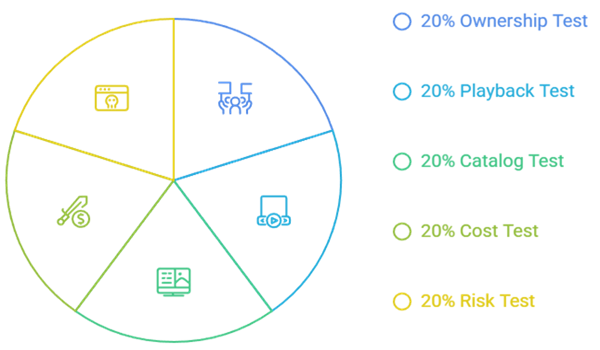
Movies2Watch users usually want three things at once: an extensive catalog, immediate playback, and no monthly fee. A credible replacement also needs an accountable operator, an official application, and limitations stated before viewing. I evaluated those practical functions rather than ranking whichever clone currently copies the brand or happens to answer a browser request.
- Ownership Test: Each recommendation needed an identifiable company, library partner, support center, or official storefront explaining how its programming reaches viewers and who handles problems.
- Playback Test: Fire TV support, television compatibility, seeking, captions, profiles, and stable application distribution mattered more than claims about unlimited servers or unsupported resolution badges.
- Catalog Test: Broad films, complete series, originals, channels, world cinema, documentaries, recent rentals, or curated library access had to solve a clear viewing need.
- Cost Test: Free advertising, optional accounts, individual transactions, institutional funding, tickets, and borrow limits were separated so readers can compare the real exchange for access.
- Risk Test: I excluded copied Movies2Watch domains, forced notification prompts, mysterious APK packages, fake player updates, and services whose ownership or official destination could not be established.
Choose Instant No-Login Viewing or Persistent Watchlists
Movies2Watch felt convenient partly because visitors could search before creating an account. Legal services divide that convenience into two useful models. Xumo, Fawesome, Pluto, and portions of Tubi emphasize quick playback, while Plex, Roku, Kanopy, and Hoopla use profiles for saved progress, discovery, library authentication, or borrowing. Choose based on what you need to preserve.
- Fast Start: Prefer Xumo Play or Fawesome when a shared television needs immediate free entertainment without entering an email address, password, subscription, or payment details.
- Saved Progress: Create a free profile when watchlists, resume points, personalized recommendations, parental settings, ticket balances, purchases, or borrowing history provide clear household value.
- Portable List: Keep an independent record of planned movies so a rotating license, closed service, expired library loan, or abandoned account cannot erase every discovery.
- Minimal Data: Provide only information required for the selected benefit, use a unique password, enable multifactor authentication when offered, and avoid profiles on unverified mirror sites.
- Guest Television: Sign out after travel or hotel use, remove the device from account settings, and avoid storing payment methods where other viewers control the screen.
Install Official Alternatives on Firestick Without Unknown APKs
Every recommendation has a documented television route, and all nine identify Fire TV support. Search the Amazon Appstore first, verify the developer and support destination, then play one free title before adding an account or spending money. A normal movie service should never require an unknown codec, certificate, cleaner, or separate player package to open its catalog.
- Appstore First: Search the exact service name, inspect the developer, screenshots, age rating, permissions, update history, and support address before choosing Get on Fire TV.
- Country Check: An authentic application can still be unavailable where distribution rights differ, so do not replace it with a similarly named package from an unknown website.
- Pairing Codes: Plex, Hoopla, and other services may show a short television code, allowing trusted phone or computer authentication without typing full passwords through the remote.
- Playback Trial: Test captions, seeking, audio, resume, one advertisement break, and remote navigation before depending on an application for accessibility needs or a planned movie night.
- Device Controls: Keep Fire OS updated and understand sideloading permissions; our Firestick jailbreaking guide explains those controls without treating unknown applications as trustworthy.
Avoid Fake Movies2Watch Mirrors and Player Download Traps
Movies2Watch now appears across numerous domain extensions, which makes a familiar design weak evidence of authenticity. One address may fail while another copies the interface, requests notifications, opens advertisements, or supplies an executable file. Protect the device and your accounts by judging operator transparency and application distribution, not the logo, layout, or claims printed beside a play button.
- Domain Clones: Do not assume matching names, colors, or posters prove shared ownership; clone operators can reproduce visible pages while changing scripts, advertisements, and download behavior.
- Player Downloads: A legitimate browser stream should not demand a codec, security update, VPN extension, cleaner, certificate, or alternate executable before an ordinary movie begins.
- Notification Abuse: Reject unsolicited browser-notification prompts from movie pages because later alerts can impersonate malware warnings, subscription renewals, prize claims, or operating-system messages.
- Account Recovery: Change any reused password, remove unknown browser extensions or APKs, revoke notifications, clear stored site data, and review payment activity after suspicious interaction.
- Safer Comparison: Compare official catalog type, country, advertising, account need, device support, and release window instead of following community-posted mirror links with uncertain ownership.
Best Movies2Watch Alternatives Verdict
Tubi is the best general replacement for free licensed movies, Plex offers the most useful blend of discovery and personal media, and The Roku Channel stands out for free originals and live channels. None lawfully provides every new theatrical title without cost. The most dependable setup combines one broad free app, one library service, and occasional rentals when release timing matters.
- Tubi: Best overall for no-card access, broad licensed programming, official Fire TV support, an optional profile, and transparent advertising instead of browser redirects.
- Plex: Best for worldwide discovery, synchronized watchlists, free movies, live channels, rentals, and lawfully owned personal media inside one supported application.
- The Roku Channel: Best for Roku Originals, more than 500 live channels, compatible Fire TV access, and free viewing supported by advertising.
FAQs
What is the best free Movies2Watch alternative?
Tubi is the most balanced free option in supported countries because it requires no subscription or payment card, provides an official Fire TV app, and combines licensed movies, series, originals, and live channels. Commercial breaks and rotating titles are the tradeoffs.
Which Movies2Watch alternative works without an account?
Xumo Play and Fawesome explicitly support free viewing without registration, while Pluto TV also allows quick access with an optional profile. Country and device availability still apply, so use the official application listing rather than a copied download page.
Can these alternatives show brand-new theatrical movies?
Fandango at Home commonly carries recent films as paid rentals or purchases before they reach free catalogs. Advertising-supported and library services may receive the same movie later, depending on studio agreements, country, and release-window timing.
Are Kanopy and Hoopla really free?
Eligible patrons pay no direct subscription fee because participating libraries or universities fund access. Kanopy uses institution-specific tickets, while Hoopla applies local monthly allowances and may pause borrowing after a library-wide daily budget is reached.
What should I use if I want my own movie library?
Plex can organize lawfully owned videos alongside its free discovery tools, but remote and premium features have separate rules. The best Plex alternatives guide compares other personal-media platforms when server control matters more than a ready-made catalog.