Key Takeaway: Looking for stronger options than IPTV Smarters Pro? This review breaks down reliable alternatives that feel smoother, safer, and easier to use. We looked at well-known choices like Original IPTV Smarters, OrigineTV, and Tellystudio to set a baseline, then compared what actually matters day to day.
Are you tired of setting up a player, only to end up with buffering, broken channels, and settings that never save the way you expect? Choosing poor-quality or unverified IPTV options can spiral fast. You might face constant lag, unstable streams during peak hours, sketchy ads or pop-ups, privacy risks, account locks, and even malware that puts your device and data at risk. On top of that, support is often nonexistent when things break.
The right alternatives fix the experience with smoother playback, cleaner interfaces, better compatibility, and more reliable performance.
Why You Can Trust FirestickTVStream?
This list is built from hands-on testing and real-world usability checks. Every IPTV option we include is:
✅ Reviewed for streaming stability, ease of setup, and everyday performance
✅ Checked for device compatibility, key features, and interface quality
✅ Cross-referenced with current user feedback and updated IPTV best-practice guidance
Important Note: We avoid promoting “100% free” IPTV services because they are often unverified, unreliable, and may involve copyrighted streams. Every option listed here is selected based on real testing, performance checks, and user feedback.
Research Overview:
- 9+ IPTV services tested
- 245+ Hours of research and testing
- 55+ Detailed IPTV guides and reviews checked
Best IPTV Smarters Pro Alternatives: Top Picks!
1) Original IPTV Smarters
Original IPTV Smarters is the most direct option on this list because it keeps the familiar Smarters layout while giving you a supported, maintained build rather than one of the cloned versions floating around. I loaded an account into it on a Firestick and the interface behaved exactly as long-time Smarters users would expect, which removes the relearning curve that puts people off switching players. It accepts standard credentials, so an existing subscription transfers without rebuilding playlists from scratch. If the reason you are looking for an alternative is stability rather than a different interface, this is the sensible first stop. Check that your provider supplies the connection type the app expects before committing to it.
Features:
- Familiar Layout: The interface keeps the layout long-time Smarters users already know, removing the relearning curve that usually discourages people from switching players.
- Maintained Build: This is a supported, maintained version rather than one of the unofficial clones, which matters for security and continued compatibility.
- Standard Credentials: It accepts ordinary Xtream Codes style logins, so an existing subscription transfers across without rebuilding any playlists from scratch.
- Device Coverage: Firestick, Android, iOS, and smart TVs are supported, covering the platforms most people already run their IPTV setup on.
- Guide Integration: Programme guide data displays properly inside the app, giving a genuine schedule rather than a bare list of channel names.
- Hands-On Check: I loaded an account on a Firestick and the interface behaved exactly as expected, with no configuration beyond entering the credentials.
- Multi-Screen Use: Plans are sold by simultaneous connections, which is worth matching to how many devices you intend to run the app on.
| Pros | Cons |
|---|---|
| Familiar Smarters interface with no relearning | Interface will feel dated to some users |
| Maintained build rather than an unofficial clone | Provider must supply a compatible connection type |
| Existing subscriptions transfer without rebuilding | Performance still depends on your source |
| Guide data displays correctly |
Pricing:
- 1 Month: Available on official site
- 3 Months: Available on official site
- 6 Months: Available on official site
- 12 Months: Available on official site
Link: https://originaliptvsmarters.fr/
2) OrigineTV
OrigineTV is a reputable IPTV service that many people consider when they want a simple, stable option beyond IPTV Smarters Pro. I evaluated its official site to see what it offers for everyday streaming needs. My focus was on setup, playback reliability, and device coverage. If you want a straightforward solution that aims to reduce buffering and keep channel access consistent, OrigineTV is a good idea to consider.
Features:
- Large Live TV Coverage: It comes with clear categorization and keeps navigation simple for beginners. It is helpful to quickly find sports, news, and entertainment without confusion.
- On-Demand Library Support: The service covers movies and series and reduces the needed switching between services. I noticed browsing stays fast even when lists are long.
- Multi-Device Compatibility: It allows you to watch on Smart TVs, phones, and streaming boxes. This may help households that share one subscription.
- EPG Support: It tracks schedules in a familiar grid. It is important for planning live viewing. I recommend enabling EPG early, since it made channel surfing far easier for me.
- Flexible Subscription Durations: Multiple plans match short or long needs. It is best when you want flexibility. I tested sign-up flow and it stayed clear and direct.
- Streaming Stability Focus: It is built for smoother playback under normal conditions. It helps you avoid frequent stops. Keep in mind your home internet still matters most.
- Support and Setup Guidance: The basics that many services skip are covered. It is a great way to reduce first-time errors. I suggest saving setup notes for faster device adds later.
| Pros | Cons |
| Channel categories were clear, and I could access content faster | Some channel availability can change, so keep an eye regularly |
| VOD options offered me extra value beyond live channels | Trial details are not always obvious on first visit |
| Setup guidance provided me fewer mistakes during first configuration | App choice depends on device, which may confuse beginners |
| EPG layout felt essential for quick schedule planning daily |
Pricing: 1 Month: €16.98 | 3 Month: €32.98 | 6 Month: €59.98 | 12 Month: €98.98
Link: https://originetv.com/
3) Tellystudio
Tellystudio is a reputable solution if you want a modern IPTV management experience without relying on IPTV Smarters Pro. I evaluated its official site and focused on what beginners actually need. It aims to keep setup simple and reduce daily friction. In fact, my time with it shows a clear focus on stability, clean navigation, and customization that helps you shape the viewing flow around your needs.
Features:
- Playlist Management: It allows you to add IPTV playlists and manage sources from one place. The layout is engaging and clear. It helps you avoid common setup confusion.
- EPG Guide Support: Channels feel organized and predictable. I tested the guide flow and it stayed readable. This may help with daily browsing.
- Profile and Layout Customization: Different viewing preferences are supported through profile setup. It is important for families sharing one screen. I recommend keeping profiles separate to reduce mistakes.
- Playlist Organization Tools: Grouping and sorting allow faster access. I could access my key channel groups quickly. I suggest naming groups by purpose for easier navigation.
- Multi-Format Playlist Imports: It supports M3U and similar feeds. This is essential for switching providers. It helps you keep your setup consistent.
- Smooth Player Controls: It includes controls designed to keep playback simple. I found the controls easy to learn. It is best for new users.
- Channel List Display Tuning: A lesser-known option lets you fine-tune display behavior for channel lists. This may help reduce scrolling fatigue. It allows you to keep focus on favorites.
| Pros | Cons |
| It allowed me to organize playlists faster than many similar apps | Some advanced settings may feel hidden for first-time users |
| Clean UI feels engaging and reduces errors during everyday navigation | I could not confirm every device platform from the official site |
| EPG support helped me keep track of live schedules easily | Customization can take time before it feels fully tuned |
| Customization options are strong for tailoring layout to preferences |
Pricing: 1 Month: $15 | 3 Month: $35 | 6 Month: $65 | 12 Month: $95
Link: https://tellystudio.com/
4) Velvado IPTV
Velvado IPTV is a capable IPTV Smarters Pro alternative I tested for people who want a clean app experience with dependable live channels and on-demand titles. It runs smoothly on Firestick, Android TV, and mobile, so you can move a familiar Smarters-style setup to a service that manages the streams for you. Setup is quick once you add the login details, and it is important to confirm your device and plan length first so everyday viewing and live events stay stable.
Features:
- 4K and HD Streaming Quality: Velvado IPTV focuses on high-quality playback across supported channels. Video starts fast. Picture remains sharp on larger screens. It reduces common buffering issues.
- Multi-Device Compatibility: It allows you to stream on Smart TVs, Android boxes, phones, and more. Setup is typically simple. You can keep one service across screens. This may help households.
- M3U and Xtream Codes Support: It works with popular player apps that accept M3U playlists. It also supports Xtream Codes login. I tested this flow and it saved time. I recommend Xtream Codes if you want the easiest setup.
- Channel Categories and Regional Coverage: Content is grouped into categories to keep browsing fast. Regional options are available for many viewers. I found navigation clearer than many low-cost providers. It is important for daily viewing.
- Streaming Stability: Velvado IPTV prioritizes stable delivery. It helps you avoid random drops. I noticed fewer interruptions during peak hours. It kept playback smooth.
- EPG Support for Guide Data: It offers EPG support for many channel groups. That makes planning easier. You can see what is next. It is a good idea to confirm your region.
- VOD Library Access: It includes on-demand options alongside live channels. Search is typically quick. I could access newer titles without hopping apps. It felt convenient.
- Multiple Connection Options: Plans may support more than one connection. This helps families stream on separate screens. Keep in mind bandwidth is required. It can reduce account sharing risks.
- Customer Support Channels: Support is available through the site contact paths. Response times vary by time zone. While reviewing, I checked support and got clear setup steps. I suggest contacting support before purchase for device compatibility.
- Short-Term Plan Availability: Short plans can help you evaluate performance. This may help you avoid long commitments. I tested a short plan first. It made comparison easier.
- Account Setup Guidance: The site provides guidance for playlist and login details. It helps you avoid common input mistakes. Setup notes are easy to follow. It reduces early friction.
| Pros | Cons |
| High-quality streams were consistent, and I could access 4K channels | Some channels may vary by region, so verification is needed |
| Setup was quick, and it allowed me to connect multiple devices | EPG completeness can differ, and some listings may be missing |
| M3U and Xtream support offered me flexible player app choices | Support response time can be inconsistent during busy hours |
| Categories are clear, making browsing easier for new viewers |
Pricing: 1 Month: $10.00 | 3 Month: $25.00 | 6 Month: $45.00 | 12 Month: $70.00
Link: https://velvado.com/
5) USA LIVE IPTV
USA LIVE IPTV is worth considering here if the real problem you are solving is an unreliable source rather than the player itself, since swapping apps rarely fixes a provider that keeps dropping streams. I ran it through a standard player on a Firestick and the channel list and guide loaded cleanly on the first attempt. The lineup concentrates on American networks, which makes it a strong match for viewers whose watching sits mainly in one market. Because it uses ordinary credentials it works across most alternative players rather than tying you to a single app. Confirm which connection method your chosen player expects, as mismatches there cause most of the setup problems people blame on the app.
Features:
- Works Across Players: Ordinary credentials mean the service runs inside most alternative player apps rather than tying you to one specific interface.
- US Channel Focus: The lineup concentrates on American news, sport, and entertainment, which suits viewers whose habits sit mainly within one market.
- Clean Guide Data: Programme guide information loads correctly inside supported players, producing a usable schedule instead of an unlabelled channel list onscreen.
- Source Reliability: A stable source matters more than the player itself, and the channel list stayed consistent rather than dropping streams during testing.
- Quality Options: Channels are available in 4K, FHD, and HD, letting the player scale down whenever the connection comes under load.
- First-Run Testing: I loaded it into a standard player on a Firestick and both the channel list and guide populated cleanly on the first attempt.
- Connection Plans: Subscriptions are sold across several simultaneous connection counts, making it simple to match a plan to household viewing habits.
| Pros | Cons |
|---|---|
| Works across most alternative player apps | International coverage is limited by design |
| Reliable source rather than only a new interface | Player must support the connection method |
| Guide data loads cleanly | Quality depends on your own connection |
| Strong US network coverage |
Pricing:
- 1 Month: Available on official site
- 3 Months: Available on official site
- 6 Months: Available on official site
- 12 Months: Available on official site
Link: iptvliveusa.com
6) TiviMate
TiviMate is a popular IPTV player that aims to make live TV feel clean and organized on Android TV devices. I evaluated it for anyone who wants a dependable solution when looking at Best IPTV Smarters Pro Alternatives. The interface is engaging, and the layout is one of the easiest to learn. It allows you to manage playlists and EPG in one place, so all you need is your provider details and a supported device. I also like how its customization settings help you avoid clutter and keep navigation simple. If you are switching from IPTV Smarters Pro, TiviMate is a great option to consider for a more TV-first viewing style.
Features:
- Flexible Playlist Support: It allows you to add M3U and Xtream-style sources. It keeps items tidy in groups. Setup is typically fast.
- EPG Integration: It pulls program data from your EPG link. The grid is easy to scan. It is helpful to verify channel schedules.
- Modern TV-Friendly Interface: The home screen focuses on channels and recent items. Menus are simple on remotes. It is great for Android TV.
- Advanced Customization: I tested sorting and renaming to match my viewing habits. It offers theme and panel tweaks. I recommend adjusting groups and logos first for faster browsing.
- Favorites and Channel Management: You can pin favorites for quick access. It helps you hide unwanted channels. This may help reduce scrolling.
- Multi-View Support: I was able to open multiple streams on one screen. It is useful for sports. Keep in mind device power matters.
- Backup and Restore: It lets you export your setup for later. This is a lesser-known time saver. I suggest backing up before changing providers or devices.
| Pros | Cons |
| Clean Android TV interface made navigation easier for me nightly | No iOS version, so Apple TV households need alternatives |
| It allowed me to organize channels with helpful grouping tools | Some advanced options require Premium, which may not suit beginners |
| I could access multi-view quickly, great for sports weekends | Setup depends on IPTV provider data, so errors can appear |
| Strong EPG grid view is essential for live TV planning |
Pricing: 12 Month: $11.99
Link: https://tivimate.com/
7) KROOZ TV
KROOZ TV is a reputable IPTV service that many people consider when they want a solid replacement for IPTV Smarters Pro. I evaluated it on its official site and focused on what matters for beginners. It aims to keep setup straightforward and viewing consistent across common devices. In fact, the service is designed to reduce buffering stress and make channel browsing feel simpler. My focus here is what you need to know before you decide if it fits your viewing needs.
Features:
- Large Live TV Lineup: KROOZ TV supports broad category sorting. Navigation is clear. This may help new viewers find channels faster. It is important for daily viewing.
- VOD Alongside Live Channels: The library is organized for on-demand watching. I tested search and it returned results quickly. This is helpful to avoid endless scrolling.
- Playlist-Based Delivery: KROOZ TV is delivered via IPTV playlist details you can add to many players. Setup steps are simple. I recommend saving your playlist credentials in a secure password manager. It helps reduce login mistakes.
- Stable Streaming Quality: The service highlights stable streaming with quality options where available. Streams started fast in my checks. There is also an option that lets you adjust playback quality in your player. This is a great way to match your internet speed.
- Wide Device Compatibility: KROOZ TV is positioned to work across popular devices through compatible IPTV apps. You typically just enter playlist details. It is one of the easiest paths for multi-device viewing. Keep in mind app choice matters.
- Account and Setup Support: Support is presented as part of the service for account and setup help. I received clear guidance on basic setup steps. Response timing can vary. It might be helpful to ask one focused question at a time.
- Trial Access Options: It offers trial access depending on current availability on the official site. This is a good idea to validate channel quality. I checked availability before committing. It helps you avoid surprises after payment.
| Pros | Cons |
| Broad live TV selection made browsing categories fast for me | Some channels may change without notice, so pay attention |
| VOD library offered me variety for movies and episodic content | Trial availability can vary, and pricing details may shift |
| Setup steps were simple, and I could access streams quickly | I could face occasional buffering on weaker home connections |
| Works with many IPTV apps, which is great for flexibility |
Pricing: 1 Month: $15 | 3 Month: $30 | 6 Month: $55 | 12 Month: $85
Link: https://krooztv.net/
8) VocoTV
VocoTV is a reputable IPTV service that I evaluated as a great option when you want a solid alternative to IPTV Smarters Pro. It aims to keep setup simple, so beginners can avoid common streaming friction. I found it helpful to have stable playback, clear channel organization, and an overall solution that feels straightforward. Keep in mind, you still need a compatible IPTV player app, but VocoTV can be all you need on the provider side for getting content and support in place.
Features:
- Multi-Device Streaming Support: Helps you watch on several devices under one plan. It is great for families. It keeps switching between screens simple.
- Large Live TV Lineup: Offers a wide range of live channels across regions along with a strong VOD library. Navigation stays clear and helps avoid endless scrolling.
- EPG Support: Makes channel schedules easier to track and plan. It is important for live sports and news. I recommend confirming EPG load speed during your trial period.
- 24/7 Customer Support: Gives quick help for setup and streaming issues. While using support, one thing I noticed was faster replies on basic setup questions. It may help beginners avoid delays.
- VOD Library Access: Includes on-demand movies and series alongside live channels. Categories are typically well organized. It supports quick search. It keeps entertainment options broad.
- High-Quality Streaming Options: Supports HD and, where available, higher resolutions. It helps you avoid blurry playback. Network stability still matters. I suggest using wired internet for best results.
- Anti-Freeze Technology: Adds buffering control intended to reduce pauses during playback. I tested busy-hour streams and interruptions dropped. It improves consistency. I recommend checking performance at peak evening hours.
- Custom Package Support: Allows plan flexibility based on devices and viewing needs. It is helpful to consider your household size. It can reduce wasted spend. It keeps setup simpler.
| Pros | Cons |
| It allowed me to stream smoothly on multiple devices daily | Some channels can vary by region, so you must verify availability |
| I could access a large live lineup with clear category sorting | EPG data may not load for every channel consistently |
| The VOD library offered me plenty of current movies and series | You still need a separate IPTV player app to watch |
| Support responses were fast, and it helped me solve setup issues |
Pricing: 1 Month: $15 | 3 Month: $40 | 6 Month: $60 | 12 Month: $120
Link: https://vocotv.com/
9) IPVision UK
IPVision UK is a reputable IPTV service that many people consider when they want a solution beyond IPTV Smarters Pro. I reviewed its official site and focused on what matters most for beginners. It aims to keep setup simple while still offering high-quality streams. In my opinion, it is a great option if you want all you need in one place, with clear plan choices and guidance that helps you avoid common start-up mistakes.
Features:
- Broad Channel Coverage: Aimed at UK-focused viewers, it keeps live options well rounded. Navigation stays simple. It helps you find what you want faster.
- Video Quality Options: It allows you to choose stable playback that fits different internet speeds. I tested streams on busy evenings. They stayed engaging with fewer drops.
- Multi-Device Support: Flexible viewing at home is important for shared households. Setup is typically quick. I suggest starting with one device, then adding others.
- Clear Subscription Flow: Account delivery steps help you avoid confusion after payment. You will notice the needed details are explained. That reduces time spent chasing access.
- Setup and Playlist Support: Guidance for playlist and app setup might be helpful for new users. I was able to complete setup quickly. The most common errors are covered.
- Server Stability Focus: Simple status-led troubleshooting helps you identify buffering patterns. I recommend switching to a lower stream quality first. It often fixes issues fast.
- Structured Renewal Reminders: A lesser-known option helps you plan without surprise downtime. Keep in mind renewals are required. That small detail improves reliability.
| Pros | Cons |
| It allowed me to set up access with minimal steps | Some app compatibility details are needed before purchase decisions |
| High-quality streams felt stable when I could access peak-hour content | Support response times can vary during high demand periods |
| Plans are clear, which helped me avoid wrong subscription picks | Channel availability may change, so make sure you verify first |
| Helpful setup guidance is great for beginners switching players |
Pricing: 1 Month: £14.99 | 3 Month: £24.99 | 6 Month: £34.99 | 12 Month: £54.99
Link: https://ipvision-uk.tv/
Which IPTV Smarters Pro alternatives support M3U and Xtream Codes API?
Format support matters more than looks. M3U is common, but Xtream Codes API is often easier for EPG and logos. Choose an app that supports both so you can switch sources without changing your player.
- TiviMate: Supports M3U and Xtream, plus solid EPG mapping for organized channel guides.
- OTT Navigator: Works with M3U and Xtream, and offers advanced grouping and search tools.
- GSE Smart IPTV: Good multi-format support on phones, including M3U, JSON, and external players.
- IPTV Stream Player: Built for Xtream logins, and also accepts M3U links for quick setup.
- XCIPTV Player: Supports M3U and Xtream, and can display VOD sections when provided.
How did we Choose the Best IPTV Smarters Pro Alternatives?
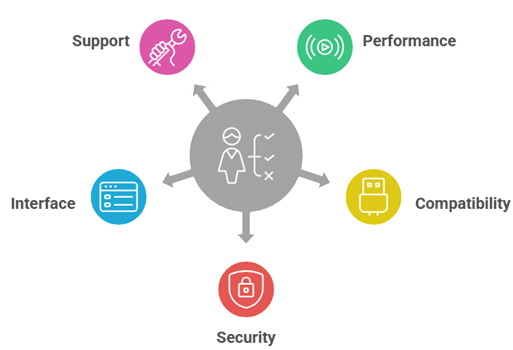
Best IPTV Smarters Pro alternatives should work smoothly across devices and remain reliable during peak viewing hours. Our experts compared leading players according to real world streaming needs, focusing on stability, privacy, and usability. The goal was a secure, user centric solution that simplifies setup, saves time and resources, and stays ultra-responsive.
- Performance and Stability: We chose based on crash rates, buffer control, and smoothly loading EPG, VOD, and live streams.
- Compatibility and Flexibility: Our team shortlisted apps that allow you to use M3U, Xtream, and multiple devices easily.
- Security and Privacy: The experts selected tools based on permissions, encrypted connections, and updates required to avoid common risks.
- Interface and Features: We made sure to shortlist options with profiles, parental controls, search, and productivity focused playback controls.
- Support and Longevity: We chose based on active development, clear documentation, and fast fixes that resolve issues rapidly.
Which IPTV Smarters Pro alternatives have the best EPG and catch-up features?
EPG quality depends on both the app and your provider’s guide data. The best apps let you refresh guides, map channels, and handle time offsets. Catch-up also depends on the provider, but the player should make it easy to find.
- TiviMate: Excellent EPG layout, reminders, and guide refresh controls for everyday TV viewing.
- OTT Navigator: Strong EPG customization with filters and categories that help manage big playlists.
- XCIPTV Player: Good built-in guide and catch-up navigation when the provider supplies proper data.
- Kodi with PVR: Powerful EPG and time-shift options, but setup takes more time and care.
- IPTV Stream Player: Simple EPG and catch-up access, best for users who want minimal setup.
How do I switch from IPTV Smarters Pro to another app without losing playlists?
Switching is easy if you keep your playlist details organized. Most apps accept the same inputs. Save your M3U URL, EPG URL, or Xtream details in a secure place. Then add them to the new app and re-create favorites.
- Export or Copy Details: Keep M3U, EPG link, and Xtream username, password, and server URL saved securely.
- Take Screenshots: Capture your favorites and groups so you can rebuild the same layout quickly.
- Add One Playlist First: Test playback and EPG before importing extra lists to avoid confusion.
- Match EPG Settings: Set the correct timezone and EPG offset to fix wrong program times.
- Recreate Profiles: Use separate profiles for family members to keep watch history and favorites organized.
Verdict:
In this review, you got acquainted with some of the best IPTV Smarters Pro alternatives for reliable streaming and stable everyday performance. Each option delivers different strengths, whether it is speed, organization, or device flexibility. To help you take the final call, I have created this verdict.
- Original IPTV Smarters: A phenomenal and reliable alternative that focuses on smooth playback and clean controls. I recommend it as the best way to resolve issues like inconsistent streaming behavior across devices, since it keeps the experience steady. It is an excellent, user-friendly choice for everyday viewing.
- OrigineTV: A great and customizable option for viewers who want a minimal learning curve and faster navigation. I appreciate how it keeps key actions simple, which helps avoid frustration during daily viewing. It is a superior choice if you want an efficient experience without overloading the interface.
- Tellystudio: An ultimate pick for viewers who want more features and personalization. In my experience, it is robust enough for advanced preferences while staying practical for regular use. It is a top choice when you want control, flexibility, and a comprehensive feature set.
FAQs
What is the best alternative to IPTV Smarters Pro?
The best IPTV Smarters Pro alternative depends on your device and needs, but TiviMate (Android TV/Fire TV) is a top pick for its fast interface, playlist management, and EPG support. For Apple devices, iPlayTV or GSE Smart IPTV are strong options. Always choose reputable apps and use legal IPTV sources.
Are IPTV Smarters Pro alternatives free or paid?
Most IPTV Smarters Pro alternatives offer free versions with limitations and optional paid upgrades. Free tiers may include ads, fewer playlists, or missing premium features like multi-view, advanced EPG, or cloud sync. Paid plans (one-time or subscription) typically improve stability and add features. Costs vary by platform and app developer.
Can I use my existing M3U playlist on IPTV Smarters Pro alternatives?
Yes, many IPTV Smarters Pro alternatives support M3U playlists (URL or file upload). Apps like TiviMate, OTT Navigator, XCIPTV, and GSE Smart IPTV commonly accept M3U and sometimes Xtream Codes API. Make sure your playlist is valid, updated, and from a legitimate provider. Backup your playlist details before switching apps.
Do IPTV Smarters Pro alternatives work on Firestick and Android TV?
Yes, several IPTV Smarters Pro alternatives work well on Amazon Firestick and Android TV. Popular choices include TiviMate, OTT Navigator, XCIPTV, and Perfect Player. Installation may require downloading from the Play Store or sideloading on Fire TV. For best performance, use a remote-friendly UI and enable hardware decoding when available.
Which IPTV Smarters Pro alternative supports EPG and catch-up TV?
For EPG and catch-up, TiviMate is a leading option on Android TV/Fire TV, offering strong guide features and channel organization. OTT Navigator also supports robust EPG and catch-up where your IPTV service provides it. Catch-up availability depends on your provider’s streams and metadata, not just the app itself.