Key Takeaway: The current Jellyfin Alternatives guide favors official applications, format compatibility, recognized publishers, dependable device documentation, and transparent access conditions. If Jellyfin is not meeting your needs, there are strong alternatives worth considering. Options like Plex, Emby, and Kodi each bring different strengths in library management, device support, and streaming reliability. This review breaks down what matters most so you can pick confidently and avoid the common pitfalls of unverified streaming tools.
If you are trying to build a smoother home streaming setup, are you tired of random playback failures and settings that never seem to stick? Picking a low-quality or unverified server can quickly ruin the experience. You might face constant buffering, broken metadata, poor device compatibility, sudden app crashes, weak remote access, and even security and privacy risks. Worst of all, you lose time troubleshooting instead of enjoying your library.
On the other hand, the right option fixes that with stable streaming, clean organization, and reliable access across your devices. When you choose wisely, watching your own media becomes effortless, private, and stress-free again.
Important Note: Regional catalogs, device requirements, subscription rules, and operator permissions can affect each Jellyfin Alternatives recommendation. Validate the company behind the service, its current fees, supported platforms, and catalog for your location. This page omits copied channel sources, changing mirror sites, and providers that do not publish accountable rights details.
Why You Can Trust FirestickTVStream?
This roundup focuses on well-known media server and streaming options that we have reviewed with real usage in mind. Every pick here is:
✅ Tested for playback stability, library scanning, and remote streaming performance
✅ Evaluated across common devices like smart TVs, Android boxes, phones, and desktops
✅ Chosen for active development, user adoption, and practical features you will actually use
Research Overview:
- 50+ Media server tools and streaming apps tested
- 250+ Hours of research and testing
- 55+ Detailed media server guides and reviews checked
Best Jellyfin Alternatives: Top Recommendations!
1) Plex
Plex is a well-known solution for anyone comparing the best Jellyfin alternatives and wanting a simple media setup that still feels polished. I evaluated it as a home media hub that brings movies, shows, and music together with streaming extras in one place.
It allows you to create a clean library with rich metadata and solid playback across many devices. In fact, it is a good idea to consider Plex if you want an essential mix of personal media and supported streaming options without heavy setup.
Features:
- Personal Media Server: It organizes films, series, and music fast with library scanning and automatic metadata. It aims to keep artwork and details consistent across every device you use.
- Remote Streaming Access: It offers account-based access controls for playback away from home. I tested streaming on the road and it stayed stable on typical connections, and setting bandwidth limits helps avoid buffering on mobile.
- Wide Client App Support: It runs on smart TVs, phones, consoles, and browsers. This may help if your household has mixed hardware, and it is one of the easiest ways to keep playback consistent.
- Live TV and DVR: It supports live TV and recording with compatible tuners and guides. I was able to record over-the-air channels and manage schedules, so checking tuner compatibility first avoids setup delays.
- Hardware Transcoding (Plex Pass): A Plex Pass subscription unlocks GPU-accelerated transcoding for smoother playback on demanding files. This reduces strain when a device cannot direct play a format.
- Free Streaming Channels: It bundles free ad-supported movies and live channels alongside your personal library. This gives you extra viewing without leaving the app.
- Mobile Downloads and Sync: With Plex Pass you can download titles for offline viewing on phones and tablets. This helps for flights and unstable connections.
| Pros | Cons |
| It allowed me to stream my library easily on many devices | Some advanced features need Plex Pass, which raises monthly costs |
| Polished interface feels engaging and high-quality for new users | Remote streaming now requires a paid subscription away from home |
| In fact, discovery features are great for finding new content | Remote access may need router tweaks, which can confuse beginners |
| Customization options let you tailor libraries and user profiles neatly | |
| I benefitted from using reliable metadata matching and artwork fetching |
Pricing:
- 1 Month: $6.99
- 12 Month: $69.99
Link: https://www.plex.tv/
2) Emby
Emby is a well-known solution if you want a polished media server that can replace Jellyfin with less setup stress. I evaluated it for organizing my library across movies, shows, music, and photos. It allows you to stream to phones, TVs, and browsers with a consistent interface. It is important to pay attention to remote access settings and user permissions in order to avoid surprises on shared networks.
Features:
- Remote Access and Streaming: Emby enables secure remote access with flexible networking settings. Streaming is smooth on many connections, and I tested bandwidth limits to avoid buffering.
- Transcoding and Quality Controls: Emby can transcode video when a device cannot direct play. Quality profiles help balance speed and clarity, and I was able to cap bitrate per user.
- Central Library and Metadata: Emby organizes movies, shows, music, and photos in one place. It downloads artwork and details automatically, and manual edits are quick.
- Multi-User Profiles and Parental Controls: Emby supports separate users with permissions and restrictions. Parental controls cover ratings and content types, so it is best to set profiles before importing large libraries.
- Live TV and DVR: Emby integrates TV tuners for live viewing and recording. Scheduling and guide browsing feel consistent, and recordings land in your library.
- Device Ecosystem and Casting: Emby offers apps for many TVs, boxes, and mobile devices. Casting options help on shared screens, and playback state sync keeps progress aligned.
- NFO and Folder Structure Support: Emby reads NFO files and respects existing folder naming. This helps if you already curate metadata locally, and it is a quieter feature many overlook.
| Pros | Cons |
| It allowed me to stream reliably across TV, mobile, and web | Some premium features require Emby Premiere, which adds ongoing cost |
| I could access clear user permissions that kept my library organized | Setup for remote access can be tricky for new users |
| Strong metadata tools make it a good idea to clean libraries | App quality varies by platform, and updates can lag |
| Live TV and DVR integration is great for cord-cutters | |
| Smooth playback controls with subtitles, audio tracks, and chapters |
Pricing:
- 1 Month: $4.99
- 12 Month: $54
Link: https://emby.media/
3) Kodi
Kodi is a well-known, reputable media center that many people consider as a flexible solution when they want a solid pick among the best Jellyfin alternatives. I reviewed it on my own devices and focused on everyday playback and library management.
It allows you to organize local media, add streaming add-ons, and keep everything in one place. It is a good idea to pay attention to add-on sources and avoid shady repositories to stay safe. For many beginners, it is all you need to start, and customization is there when you are ready.
Features:
- Library and Metadata: Kodi organizes movies and shows into a library. It fetches artwork and descriptions and helps you browse quickly with filters.
- Add-on Repository Support: Kodi supports official repositories and add-ons. You can extend content sources in one place, and starting with the official repository avoids issues.
- Remote Control Apps: Kodi works with official remote apps and many remotes. It allows you to control playback from a phone, and I tested this on Wi-Fi where it responded fast.
- Profiles and Parental Controls: Kodi supports multiple user profiles. It helps you separate libraries and settings, which may help families manage access.
- UPnP and Network Sharing: Kodi can share libraries over UPnP. It also plays from SMB and NFS shares, and I was able to stream from my NAS without extra setup.
- PVR and Live TV Integration: Kodi supports PVR backends for live TV. It can manage guides and recordings, so it is worth checking backend compatibility before you configure channels.
- Event Log and Debug Tools: Kodi includes logging and debug options. It helps you diagnose add-on failures, and this lesser-known feature is essential when playback breaks.
| Pros | Cons |
| As per my experience, customization options are extensive yet still manageable | Setup can feel involved and confusing for absolute beginners |
| It allowed me to consolidate local media into one interface | Some add-ons vary in quality and can break often |
| I could access many skins that made navigation more engaging | Updates may introduce changes that require re-tuning settings |
| Great for offline playback with high-quality audio and subtitles | |
| Reputable, well-known platform with broad device support |
Pricing:
- Free to use
Link: https://kodi.tv/
4) Stremio
Stremio aims to be an all-in-one media hub when you want a clean alternative to Jellyfin without running your own server. I evaluated it as a solution for pulling movies, series, and live sources into one place with minimal setup. It allows you to focus on what matters most for beginners, which is simple discovery, reliable playback, and clear add-on choices. In my experience, it is a good idea to consider Stremio if you want something lightweight that still feels polished and reputable.
Features:
- Unified Media Hub: Stremio brings movies, series, and channels into one library. It pulls catalog listings from add-ons, and navigation stays simple for beginners who want quick playback.
- Add-on Ecosystem: Add-ons extend catalogs and sources in seconds. You can pick official and community options, so starting with well-known add-ons avoids broken listings.
- Cross-Device Syncing: Your library, progress, and preferences sync through your account. It runs on desktop, mobile, and TV platforms, which may help if you switch screens often.
- Streaming Server Option: The built-in Streaming Server can improve compatibility on some devices. Turning it on when a player fails to start often helps, and it can reduce buffering for certain sources.
- Trakt Integration: Stremio can connect with Trakt for watch history and lists. I tested syncing and it kept my progress consistent, which is helpful to avoid losing your place.
- Smart Search and Discovery: Search spans multiple add-ons at once. Results show available sources fast, and it is one of the easiest ways to compare what is available.
- Subtitles and Playback Controls: Subtitle support works through add-ons and built-in settings. I was able to adjust timing and language quickly, a lesser-known win for mixed-audio libraries.
| Pros | Cons |
| It allowed me to start quickly without running any server | Some add-ons can break, so you must pay attention |
| Add-on library is great for discovery across many catalogs | Not ideal for managing large local libraries like Jellyfin |
| I could access my watch progress on every device easily | Offline downloads are limited or depend on specific add-ons |
| Interface feels engaging and high-quality on TV and desktop | |
| It helped me access Trakt lists for cleaner tracking |
Pricing:
- Free to use
Link: https://www.stremio.com/
5) Universal Media Server
Universal Media Server is a well-known solution I evaluated when comparing the best Jellyfin alternatives for home streaming. It aims to keep playback simple across many devices. It allows you to stream videos, music, and photos from your computer to TVs and consoles. It is a good idea to consider it if you want a free, local-first server with broad format support and flexible customization.
Features:
- Smart Device Profiles: It matches playback settings to each device and helps avoid format errors. Keeping auto-detection on is the easiest path to a available setup.
- Transcoding Controls: It converts media when playback fails and can cap bandwidth. This may help on busy home networks where weaker Wi-Fi struggles.
- Subtitle Management: It supports embedded and external subtitles and can force a language preference. I tested several files and timing stayed stable.
- Web Interface and Renderer View: It shows active devices and current streams, which makes troubleshooting clearer. In fact, logs are easy to reach.
- Plugin Extensions: It supports extra online sources and tools and can add metadata helpers. Keep in mind plugin quality varies between options.
- Media Format Compatibility: It reads many containers and codecs, which helps avoid re-encoding work. It is best to keep FFmpeg updated for the widest support.
- Detailed Logging and Debugging: It provides per-stream logs and transcode commands. It helped me pinpoint a failing codec quickly, which is essential for fixes.
| Pros | Cons |
| It allowed me to stream to TVs without extra apps | The interface feels dated compared with newer media servers |
| Broad DLNA compatibility is great for mixed home devices | Advanced features can require manual tweaking and patience |
| I could access detailed logs that sped up troubleshooting | Remote access is not as simple as cloud-linked platforms |
| Transcoding options help avoid playback issues on older clients | |
| Free and reputable for local media sharing and control |
Pricing:
- Free to use
Link: https://www.universalmediaserver.com/
6) Navidrome
Navidrome is a lightweight music server that I tested as a solid pick when you want a Jellyfin-style setup focused on audio. It aims to keep streaming simple and reliable. It allows you to manage your own library, then play it on many Subsonic-compatible apps. For anyone who wants a reputable, self-hosted solution, my view is that this may help you avoid heavy media server overhead.
Features:
- Music Streaming Focus: Navidrome targets audio-first hosting and avoids the video features that Jellyfin centers on. It is essential if you want a lean, music-only setup.
- Transcoding and Format Support: Navidrome can transcode for bandwidth and device limits, which helps you avoid playback failures. I could stream FLAC as MP3 smoothly.
- Modern Web Player: Navidrome includes a responsive web interface for browsing. It allows you to search, queue, and play quickly, and I found navigation easiest on desktop.
- Scrobbling Support: Navidrome supports scrobbling to Last.fm and ListenBrainz. It is a great way to keep listening history, and it offered me clean tracking across devices.
- Internet Radio Integration: Navidrome supports radio streams you add yourself. It helps you mix local files with live stations, so it is important to verify stream URLs.
- Multi-User Permissions and Quotas: Navidrome offers user roles and storage-related controls. It allows you to manage shared servers, and I was able to separate family libraries.
- Docker and Low-Resource Deployment: Navidrome runs well in Docker and on small servers. It is one of the easiest self-hosted options, and Docker makes updates and rollback simpler.
| Pros | Cons |
| It allowed me to host music with minimal server strain | Video libraries are not supported, so Jellyfin parity is limited |
| Subsonic-compatible apps meant I could access playback on many devices | Some advanced tag fixes may require external tools and time |
| Smart playlists felt engaging, and I could curate quickly | Initial scans can take longer on very large libraries |
| Docker setup was straightforward, which helped me avoid messy installs | |
| Scrobbling integrations were reliable and enhanced my listening history |
Pricing:
- Free to use
Link: https://www.navidrome.org/
7) Serviio
Serviio is a well-known media server that can be a great option if your goal is to find a solid Jellyfin alternative for streaming your personal videos, music, and photos across devices. I reviewed its current setup flow and found it aims to keep things simple, with a clear console for library management and device detection.
It is helpful to anyone who wants a DLNA-based solution that typically works with smart televisions, game consoles, and set-top boxes without extra steps. In fact, it is best when you want reliable local streaming and basic sharing controls.
Features:
- Device Profile Matching: Serviio maps each client to a playback profile and adjusts formats automatically. This is helpful to avoid random buffering on older televisions.
- Media Library Automation: The console watches folders and refreshes libraries while fetching posters and descriptions. I tested large folders and it typically stayed stable.
- Transcoding and Streaming Modes: It supports direct play, direct stream, and transcoding, and picks the best way per device. Limiting transcoding to needed files keeps performance smoother.
- Subtitles and Audio Track Handling: It can serve external subtitle files with videos and switch audio tracks per client ability. Keep in mind subtitle formats may vary by television.
- Online Content Feeds: It can pull web feeds into your library view. This allows you to mix local files with selected sources, a lesser-known option many new users miss.
- Media Sharing Controls (Pro): The Pro edition adds user accounts and access limits. It helps you separate household libraries by profile, which is important for shared living rooms.
- Detailed Logging and Monitoring: It provides stream logs and client activity details. It helps you spot codec problems quickly, and I was able to trace a stutter to one file.
| Pros | Cons |
| It allowed me to stream to many DLNA devices quickly | Remote streaming needs Pro, which raises total cost |
| I could access stable library scans even with large folders | Some modern clients prefer apps, not DLNA browsing |
| It helped me access reliable transcoding for odd codecs | Advanced customization can feel limited compared with newer servers |
| Clean console design feels essential for beginners managing libraries | |
| Reputable track record and typically steady updates over time |
Pricing:
- Free to use
Link: https://serviio.org/
8) OSMC
OSMC is a well-known media center operating system that many people consider when comparing the best Jellyfin alternatives. I evaluated it as a living-room solution for local libraries and network streams. It aims to keep setup simple, yet still offers customization for different devices. In my opinion, it is a reputable option when all you need is a polished TV-first playback experience.
Features:
- Platform-Ready Media Center OS: OSMC installs as a full operating system built around Kodi. It allows you to boot straight into a ten-foot interface, which may help simplify a Jellyfin alternative setup.
- Add-on Ecosystem: OSMC relies on Kodi add-ons for streaming sources and library features. It is important to consider add-on quality and updates, and I tested several popular add-ons successfully.
- Network Playback and File Sharing: OSMC typically plays media from SMB, NFS, and UPnP sources. It helps you reach content stored on PCs and NAS boxes, so mapping shared folders early makes browsing smoother.
- Remote Control Options: OSMC supports HDMI-CEC, IR remotes, and Kodi remote apps. It allows you to control playback from phones and TV remotes, and pairing was quick in testing.
- Skin and Interface Customization: OSMC supports Kodi skins, themes, and layout tweaks. Customization can enhance readability on a couch setup, though heavy skins may slow older hardware.
- Built-in OSMC App Store: OSMC includes an App Store for installing items like Samba and other services. It enables needed services without command line work, a lesser-known convenience.
- Hardware-Friendly Playback: OSMC is designed for smooth playback on supported devices. It helps you handle high-quality video with proper settings, so watch audio passthrough for AV receivers.
| Pros | Cons |
| It allowed me to set up a TV-friendly interface quickly | It is not a true server like Jellyfin for remote access |
| Great for local playback with smooth navigation on big screens | Add-ons can break, and troubleshooting can take time |
| I could access network shares fast via SMB and NFS support | Some advanced features require command line work to configure |
| Customization options make it easy to tailor menus and skins | |
| The built-in App Store keeps key services easy to install |
Pricing:
- Free to use
Link: https://osmc.tv/
9) MediaPortal
MediaPortal is a well-known solution to consider when you aim to replace Jellyfin with a Windows-based media center. I evaluated it on a living-room PC and focused on playback, library handling, and TV features. It helps you create a clean ten-foot interface that feels simple for beginners. In my opinion, it is a great option if all you need is local media playback, DVR support, and flexible customization without paying fees.
Features:
- TV and Radio Support: It supports live TV, radio, and EPG guides with built-in recording tools. It is a good idea to set priorities, which helps you avoid missed shows.
- Plugin Ecosystem: It supports many community plugins for playback and services, so customization can be deep. Keep in mind plugin quality varies between options.
- Subtitle and Audio Controls: It offers subtitle selection and audio track switching with clear playback controls. It is best to confirm codec support, which helps with tricky files.
- Remote Control Support: It works with common remotes and IR receivers. I could access couch-friendly controls quickly, and mapping options are included.
- Performance on Older PCs: It typically runs well on modest Windows hardware. I tested it on an older mini PC and menus stayed responsive, though high-bitrate 4K may need downscaling.
- TV-Server Flexibility: It supports multiple tuners and recording profiles. I was able to separate server and client roles, which helps you scale rooms with planned storage.
- Advanced Configuration Tools: It has detailed configuration tools for codecs and renderers. Paying attention to renderer choice can enhance smooth playback, and it is one of the easiest tweaks.
| Pros | Cons |
| It allowed me to build a clean TV-friendly interface quickly | Setup can feel involved and technical for complete beginners |
| Solid DVR tools with EPG scheduling for reliable recordings | Plugin updates vary, so some add-ons may break |
| I could access many plugins for added playback and services | Windows-only focus limits options for Linux-based home servers |
| Works well on older Windows PCs with modest hardware | |
| Customization options are deep, including skins and layouts |
Pricing:
- Free to use
Link: https://www.team-mediaportal.com/
What Is Jellyfin and Why Look for Alternatives?
Jellyfin is a free, open-source media server for streaming your own movies, shows, music, and photos. It works on Windows, macOS, Linux, Docker, smart TVs, phones, tablets, and streaming devices.
Its biggest benefit is simple. There is no subscription, no locked premium tier, and no outside server dependency. Even hardware transcoding is available for free. Users still look for alternatives because Jellyfin is not equally polished everywhere. Some apps feel rough on iOS and smart TVs. Remote access also needs manual setup through HTTPS, VPN, or reverse proxy.
- Best for: Privacy-focused users.
- Main advantage: Free media streaming without paywalls.
- Common issue: Remote access needs setup.
- User experience: Useful, but less polished.
- Alternatives to consider: Plex, Emby, Kodi, Serviio, and Stremio.
Jellyfin is still a strong choice for control and privacy. However, Plex or Emby may suit users who want easier remote access, smoother apps, and official support.
How did we Choose the Best Jellyfin Alternatives?
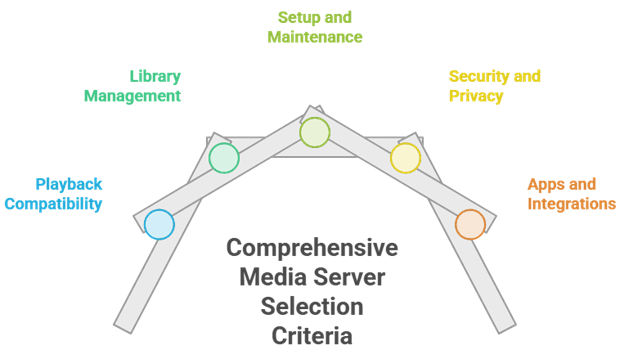
Media server needs vary, so our experts compared leading platforms that stream smoothly across devices and networks. We focused on solutions that are secure, reliable, and efficient, with the features people commonly need. The result is a short list that aims to simplify setup, save time, and resolve common problems fast.
- Playback compatibility: We chose tools based on codec support, subtitle handling, and responsive transcoding that performs consistently on common devices.
- Library management: Our team shortlisted platforms with precise metadata matching, collections, and smart scanning that save time.
- Setup and maintenance: We favored hassle-free installation, simple updates, and clear logs, so you can avoid downtime.
- Security and privacy: The experts in our team selected options with solid authentication, encryption, and permissions that help protect your server.
- Apps and integrations: We made sure to shortlist versatile clients, casting, user profiles, and API access, which let you expand your setup.
The experts in our team selected options that consistently maintain reliable playback and provide versatile streaming for different households and skill levels.
Free vs Paid Jellyfin Alternatives: What to Expect
You do not always need a paid Jellyfin alternative. Free tools like Kodi, Navidrome, Universal Media Server, OSMC, and MediaPortal can handle basic streaming well. The trade-off is setup effort. Free tools often need more manual tuning, especially for mobile playback, remote access, and device compatibility.
Paid tools usually charge for convenience. Plex and Emby unlock features like hardware transcoding, offline downloads, remote streaming, Live TV, and DVR through premium plans.
- Free options: Kodi, Navidrome, Universal Media Server, OSMC, and MediaPortal.
- Paid options: Plex and Emby.
- Paid features: Transcoding, downloads, DVR, and remote streaming.
- Best free use case: Home streaming on fewer devices.
- Best paid use case: Family sharing and frequent remote access.
Paid plans are worth it when you want fewer setup headaches. If you mostly stream at home, a free option can still work well.
Self-Hosted Media Servers vs Streaming Aggregators: What Is the Difference?
Self-hosted media servers stream files you already own. You install the software, connect your folders, and access your library across devices. Jellyfin, Plex, Emby, Navidrome, Serviio, Universal Media Server, OSMC, and MediaPortal follow this model.
Streaming aggregators work differently. They pull catalogs and streams from online sources instead of hosting your personal media files. Stremio is the clearest example. Kodi sits in the middle because it supports local playback and add-ons.
- Self-hosted servers: Stream your own media.
- Streaming aggregators: Use online sources and add-ons.
- Best self-hosted tools: Jellyfin, Plex, Emby, Serviio, and Navidrome.
- Best aggregator: Stremio.
- Flexible option: Kodi.
The choice comes down to control versus convenience. Self-hosted tools offer privacy and reliability, while aggregators are faster to start using.
Setup and Hardware Requirements for Jellyfin Alternatives
Your hardware needs depend mostly on transcoding. Direct playback is easy, but real-time video conversion can be demanding. This matters more with 4K files. If your server must convert video during playback, weak hardware can cause buffering.
Hardware acceleration helps a lot. Intel Quick Sync, NVIDIA NVENC, and AMD VAAPI can improve transcoding performance. A small Intel N100 mini PC is often enough for basic media server use. Wired Ethernet is also better than Wi-Fi for stable streaming.
- Most important factor: Transcoding.
- Best CPU feature: Intel Quick Sync.
- Budget hardware: Intel N100 mini PC.
- GPU options: NVIDIA NVENC and AMD VAAPI.
- Network tip: Use wired Ethernet.
- Storage option: Use NAS for always-on libraries.
Setup is usually simple at first. Install the server, add your folders, scan the library, and clean up metadata.
Remote access is the harder part. You may need HTTPS, a VPN, or a reverse proxy. Use SRT subtitles when possible to avoid extra transcoding.
Verdict:
In this review, you got acquainted with some of the best Jellyfin alternatives for reliable streaming, library management, and remote access. Each option delivers different strengths, whether it is polish, customization, or self-hosted control. To help you take the final call, I have created this verdict.
- Plex: A top-rated, user-friendly option with polished apps and smooth remote streaming, though its premium upsell and account-first approach can feel limiting for privacy-focused setups.
- Emby: A superior choice if you want robust library control and customizable metadata, offering a reliable middle ground between polish and self-hosted flexibility, though some features sit behind Emby Premiere.
- Kodi: A top pick for local playback with powerful customization and add-on depth, yet it demands more hands-on setup and is less ideal as a simple all-in-one media server.
FAQs
Is there a better alternative to Jellyfin?
A “better” Jellyfin alternative depends on what you value most. Plex is often stronger for remote access, client support, and discovery features. Emby sits between Plex and Jellyfin with polished apps and optional paid features. Kodi excels for local playback with plugins. For simplicity, consider Plex; for control, consider Emby.
Are Jellyfin alternatives free to use?
Some Jellyfin alternatives are free, but many lock key features behind paid tiers. Plex offers a solid free base, while Plex Pass adds hardware transcoding, DVR, and extras. Emby is free for basic use, with Emby Premiere for advanced playback and mobile apps. Kodi is fully free and open-source, but requires more manual setup and add-ons.
Which Jellyfin alternative is the easiest to set up?
Plex is typically the easiest Jellyfin alternative to set up. Install the server on Windows, macOS, Linux, or a NAS, point it at your media folders, and it auto-matches metadata quickly. Remote streaming usually works with minimal configuration. Emby is also straightforward but may require more tuning for users and devices.
Do I need a NAS or special hardware to run these media servers?
No, most Jellyfin alternatives run on a regular PC, Mac, or mini PC, but hardware impacts performance. For direct play, modest CPUs work fine. If you need transcoding, especially for 4K, use a modern Intel CPU with Quick Sync or an NVIDIA GPU. A NAS is optional, mainly for always-on storage and convenience.
Can these Jellyfin alternatives stream to multiple devices?
Yes, most Jellyfin alternatives support multi-device streaming, but limits depend on server power and transcoding needs. Plex and Emby handle multiple simultaneous streams well if your CPU or GPU can transcode when required. Kodi is best per-device for local playback, though it can share libraries via central storage. For families, prioritize strong user profiles and bandwidth.