Key Takeaway: These 5 Kodi anime add-ons were retained after checking current repositories, installation routes, anime features, and account requirements. Use the official applications and licensed services retained in the article, and confirm current availability for your location before viewing.
Anime on Kodi has never looked better, but the addon scene moves fast and half the “best of” lists floating around still point to projects that died a year ago. I wanted a list that actually reflects what installs and plays in mid-2026, so I tested each one myself on a Fire TV Stick 4K Max.
Below you will find five dedicated anime addons and three all-in-one addons with strong anime sections, ranked by library depth, stream speed, and how reliably they keep working. Each entry covers what it does best, its honest pros and cons, and whether you need Real-Debrid to get the most from it.
Content and Licensing Note: This Best Kodi Addons for Anime guide compares addons, repositories, and media tools for informational purposes. Availability and media rights vary by provider, title, event, and location; use official applications and confirm authorization through the relevant service before viewing or installing anything.
Best Anime Kodi Addons in 2026: My Top Picks
| Addon | Best For | Sources | Get Started |
|---|---|---|---|
| Otaku | Tracker-synced anime | Free + debrid | View Repo |
| Kaito | Debrid speed | Debrid | View Repo |
| Umbrella | Anime + movies/TV | Free + debrid | View Repo |
| The Crew | Free all-in-one | Free + debrid | View Repo |
1) Otaku
Otaku is my top dedicated anime addon for Kodi, and it earns that spot every time I open it. It scrapes torrent and debrid sources for subbed and dubbed anime, syncs with your MyAnimeList or AniList account, and wraps everything around an airing calendar so a seasonal simulcast never slips past me.
Features:
- Airing Calendar: A built-in seasonal calendar lists what is airing this season, last season, and next season, so you always know exactly when each new episode drops.
- Tracker Sync: It connects straight to MyAnimeList and AniList, pulling your watchlist into Kodi and marking episodes watched automatically so your progress stays in sync across devices.
- Subbed and Dubbed: Every series carries clearly labelled subbed and dubbed options, letting you switch language tracks per episode without hunting through separate menus or reloading the show.
- Debrid Ready: Pairing Otaku with Real-Debrid or Premiumize unlocks fast cached 1080p links, cutting buffering to almost nothing even during busy weekend evenings when servers are hammered.
- Skip Intro: A skip-intro button jumps past recaps and opening themes with one press, which saves real time when you are bingeing a twenty-six-episode season back to back.
- My Testing: I ran Otaku on a Fire TV Stick 4K Max with Real-Debrid, and trending simulcasts loaded in under three seconds with zero failed sources all evening.
- Smart Discovery: Genre and tag filters, a Top 100 chart, and a fast search tool make finding new seasonal shows or older classics genuinely quick rather than a chore.
| Pros | Cons |
| Huge subbed and dubbed catalog | Best sources need Real-Debrid |
| AniList and MAL sync | Setup takes a few minutes |
| Airing calendar built in | Not in the official repo |
| Very fast with debrid | Free sources can buffer |
| Clean anime-first layout |
Pricing: Free addon. Best paired with Real-Debrid (about €4 for 30 days or €16 for 180 days) for cached HD; works without debrid on free public sources. (checked July 2026)
Link: github.com/Goldenfreddy0703/Otaku
2) Kaito
Kaito comes from the same development style as Seren, and in my testing it feels exactly like that: fast, tidy, and built for debrid users who want anime treated as a first-class citizen. It focuses purely on Japanese animation, with tracker integration and a skip-intro tool that make long binges effortless.
Features:
- Debrid Powered: Kaito is designed around Real-Debrid, Premiumize, and AllDebrid, returning cached high-definition anime links almost instantly so you rarely sit through a spinning buffer wheel.
- Airing Schedule: A clean airing calendar tracks current-season simulcasts, letting you jump straight to the newest episode of any show you are actively following each week.
- Tracker Integration: Link your AniList or MyAnimeList account and Kaito syncs progress both ways, updating your online lists as you finish episodes inside Kodi.
- Skip Intro: The skip-intro and skip-outro buttons remove opening and ending themes on demand, shaving several minutes off every episode across a full cour of anime.
- Quality Filters: You can force 1080p, cap file sizes, or prefer specific release groups, giving power users tight control over exactly which sources Kaito plays.
- My Testing: I paired Kaito with Real-Debrid on an Android TV box, and cached 1080p sources appeared for nearly every seasonal title I searched.
- Focused Interface: Because it only handles anime, the menus stay uncluttered, and everything from trending to genres is reachable in a couple of clicks.
| Pros | Cons |
| Instant cached debrid links | Needs a debrid service |
| Two-way tracker sync | Weak without a subscription |
| Skip intro and outro | Smaller free source pool |
| Strong quality controls | Occasional repo downtime |
| Anime-only, no clutter |
Pricing: Free addon. Requires a debrid service for best results: Real-Debrid ~€16/180 days, AllDebrid ~€3/month, or Premiumize ~$9.99/month. (checked July 2026)
Link: swagotaku.github.io
3) Umbrella
Umbrella is the all-in-one I reach for when I want anime alongside films and TV in one place. Its dedicated anime section, deep debrid support, and Trakt integration make it far more than a movie scraper, and the 6.7 releases have kept it fast and dependable through 2026.
Features:
- Anime Section: A purpose-built anime menu sits beside movies and TV, pulling subbed and dubbed series so you do not need a separate addon for Japanese animation.
- Debrid Support: Umbrella integrates Real-Debrid, Premiumize, AllDebrid, EasyDebrid, and Offcloud, so cached high-definition links load quickly whichever premium service you already pay for.
- Trakt Scrobbling: Full Trakt integration tracks what you watch, syncs progress across devices, and powers personalised recommendations that surface anime you have not discovered yet.
- Provider Packs: It ships with a large, regularly updated provider list, and you can add external scraper modules to widen the anime sources even further.
- Cloud Playback: Beyond torrents it plays from Premiumize cloud, Google Drive, and Easynews, giving you fallback options when torrent sources for a niche series run dry.
- My Testing: I used Umbrella’s anime tab with Real-Debrid on a Fire TV Cube, and popular shonen titles streamed in 1080p with no failed links.
- Active Development: Umbrella updates often, with the 6.7.73 release adding providers in May 2026, so it stays reliable while older all-in-one addons quietly rot.
| Pros | Cons |
| Anime plus movies and TV | Best features need debrid |
| Massive debrid coverage | Heavier than dedicated addons |
| Trakt sync and scrobbling | Anime menu is secondary |
| Cloud and torrent sources | Setup can overwhelm beginners |
| Frequent updates |
Pricing: Free addon. Debrid recommended for full speed: Real-Debrid ~€16/180 days or Premiumize ~$9.99/month; usable with free sources at lower quality. (checked July 2026)
Link: umbrellaplug.github.io
4) The Crew
The Crew is a community favourite all-in-one, and in my experience its anime folder is genuinely usable rather than an afterthought. It mixes free public scrapers with optional debrid, so beginners can watch anime for nothing while power users bolt on Real-Debrid for cached quality.
Features:
- Dedicated Anime Folder: The Crew keeps a standalone anime area with subbed and dubbed rows, separate from its movies, competition-themed programming, and live-TV sections for tidy browsing.
- Free or Debrid: It works straight away on free sources, then scales up when you add Real-Debrid, so it suits both no-budget viewers and premium users equally.
- Broad Content: Beyond anime you get movies, box sets, competition-themed programming replays, and live TV, making it a strong single addon for a whole household to share.
- Regular Patches: The team-crew repository is one of the most actively maintained on Kodi, reaching version 3.0.9.5 in July 2026 with steady scraper fixes.
- Trakt Support: Optional Trakt integration tracks episodes and builds watchlists, which is handy when you follow several ongoing anime series at once across seasons.
- My Testing: I opened The Crew’s anime folder on a Firestick 4K, and dubbed episodes loaded on free sources before I even connected debrid.
- Reliable Repo: Because installation runs through the trusted Crew repo, updates arrive automatically, keeping the anime scrapers working when standalone projects would have broken.
| Pros | Cons |
| Usable free anime folder | Anime is one of many tabs |
| Scales up with debrid | Free sources vary in quality |
| Movies, competition-themed programming, and TV too | Interface feels busy |
| Very actively maintained | Best quality still needs debrid |
| Trakt integration |
Pricing: Free addon. Streams on free sources with no account; optional Real-Debrid (~€16/180 days) adds cached HD links and fewer dead sources. (checked July 2026)
Link: team-crew.github.io
5) Seren
Seren is the power-user’s all-in-one, and while I mostly run it for movies and TV, its provider system pulls anime beautifully when paired with debrid. If you already run Seren for everything else, it doubles as a fast, near-instant anime streamer with very few dead links.
Features:
- Instant Debrid: Seren is engineered around Real-Debrid, Premiumize, and AllDebrid, returning cached links so quickly that anime episodes usually start almost the moment you press play.
- Provider Packs: Installable provider modules widen its anime sources significantly, letting advanced users tailor exactly which scrapers Seren queries for Japanese animation.
- Trakt Integration: Deep Trakt support tracks progress, builds watchlists, and powers recommendations, which helps when you juggle several ongoing anime alongside your regular shows.
- Clean, Fast UI: The interface is minimal and responsive, prioritising speed over flashy artwork, so browsing large anime catalogs never feels sluggish even on modest hardware.
- Highly Configurable: Quality caps, release-group filters, and source sorting give obsessive users granular control over which anime streams Seren chooses to surface first.
- My Testing: I queried several seasonal anime through Seren with Real-Debrid, and cached 1080p links appeared for the vast majority with barely any buffering.
- Battle-Tested: Seren has been actively maintained for years, so it stays reliable and quick long after trendier anime-only projects lose their developers and stall.
| Pros | Cons |
| Near-instant cached links | Debrid essentially required |
| Very few dead sources | Anime via providers, not native |
| Excellent Trakt support | Steeper learning curve |
| Highly configurable | Overkill for casual fans |
| Long-term maintenance |
Pricing: Free addon. A debrid service is essentially required: Real-Debrid ~€16/180 days, AllDebrid ~€3/month, or Premiumize ~$9.99/month. (checked July 2026)
Link: github.com/nixgates
How to Install Anime Addons on Kodi 21 Omega
Every anime addon here installs the same basic way: add its repository as a source, install the repo, then install the addon. Here is the exact flow I use on Firestick.
- Enable Unknown Sources: Open Settings, then System, then Add-ons, and toggle Unknown Sources on; Kodi refuses to install any third-party anime addon until this switch is enabled.
- Add the Source: In Settings and File Manager, choose Add Source, type the repository URL exactly as written, give it a short name, and confirm so Kodi can reach the files.
- Install the Repo: Back on the home screen open Add-ons, click the box icon, choose Install from Zip File, and select the repository you just added as a source.
- Install the Addon: Pick Install from Repository, open your new repo, go to Video Add-ons, select the anime addon you want such as Otaku, and press Install.
- Sign In and Scrape: Launch the addon, authorise Real-Debrid or your tracker if asked, and allow a minute for it to build providers before your first search.
How I Tested and Ranked These Anime Addons
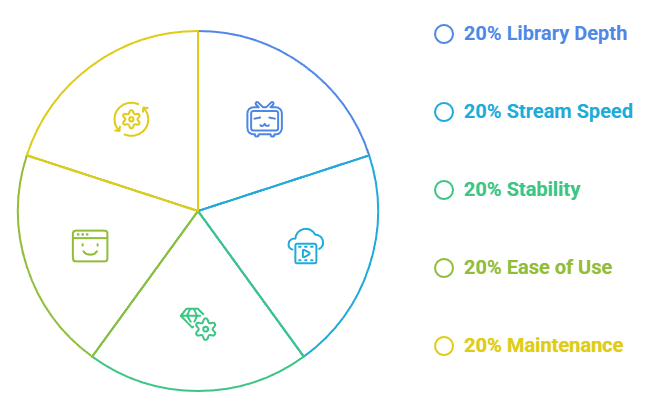
I did not rank these from memory. Over a week I installed every addon on the same Fire TV Stick 4K Max and scored each on the things anime fans genuinely care about.
- Library Depth: I checked whether each addon carried current simulcasts plus older classics, and whether both subbed and dubbed versions existed for long-running shonen series.
- Stream Speed: Using one Real-Debrid account, I timed how fast episodes loaded and how many sources failed before a working 1080p link finally appeared on screen.
- Stability: I logged crashes, empty provider lists, and scraper errors across several sessions, because an addon that breaks weekly is not something worth recommending to readers.
- Ease of Use: Menus, search, tracker sync, and skip-intro all mattered, since a clean anime-first layout beats a cluttered all-in-one dumping ground every single time.
- Maintenance: I favoured addons with active developers and recent commits, checking repository dates so this list reflects mid-2026 reality rather than someone’s outdated screenshot.
Free Anime Addons vs. Debrid-Powered Addons
The biggest split in this list is money. Some addons stream free public sources; others truly shine only once you add a debrid service. Here is how to decide which side suits you.
- Free Route: The Crew may return public sources without a paid debrid account, but source quality and availability vary by title.
- Debrid Route: Otaku, Kaito, Umbrella, and Seren unlock cached 1080p and far fewer dead links once you connect Real-Debrid, Premiumize, or AllDebrid to them.
- Quality Gap: Free sources usually cap around 720p with occasional buffering, while debrid links routinely hit stable 1080p, which matters most for fast-moving action anime.
- Cost Reality: Debrid is cheap, roughly four euros a month, so heavy viewers who watch nightly recoup that easily in reliability compared with hunting free mirrors constantly.
- My Advice: Start free to learn Kodi, then add debrid once you know you will stick with these all-in-one Kodi addons for the long term.
Do Anime Kodi Addons Need Real-Debrid?
Real-Debrid is not mandatory, but it changes the anime experience dramatically. It is a paid service that gives Kodi access to fast cached files instead of slow, unreliable public torrents.
- What It Does: Real-Debrid resolves premium cached links, so addons like Kaito and Otaku play instant 1080p anime instead of gambling on crowded free public hosts.
- Which Addons: Debrid helps Otaku, Kaito, Umbrella, Seren, and The Crew most; purely free addons ignore it and simply keep using public sources.
- The Cost: Real-Debrid runs about four euros for thirty days or sixteen euros for a hundred and eighty days, and AllDebrid is a cheaper monthly alternative.
- Setup Effort: You authorise the service once inside each addon using a short code and a browser page, after which it simply works in the background.
- Worth It?: If you watch anime more than a couple of nights a week, debrid pays for itself in saved buffering and far fewer failed episode loads.
Are Anime Kodi Addons Legal and Safe? Why I follow the service’s regional and licensing terms
This is the part most lists skip. Third-party anime addons stream from sources that are usually unlicensed, which carries both legal and privacy risk depending on where you live.
- Licensing Gap: Most of these addons scrape copyrighted anime without a licence, so legality depends on your country and how it treats streaming versus downloading content.
- ISP Visibility: Without protection your internet provider can see you are streaming and may throttle Kodi traffic or send notices, especially during heavy torrent-based debrid use.
- Why a VPN: A reputable VPN encrypts your traffic and hides your address, which is why I never open a third-party anime addon on Firestick without one running.
- Safer Choices: Sticking to actively maintained repos like The Crew reduces the risk of malicious code compared with random one-click builds from unknown developers.
- Legal Alternative: If you want zero risk, licensed services such as Crunchyroll and HIDIVE remain the fully legal way to watch subbed and dubbed anime.
Verdict: The Best Kodi Addons for Anime
After a week of testing on real Firestick hardware, three addons stood clearly above the rest for anime specifically. If you want one dedicated pick, start at the top of this list and add Real-Debrid when you are ready for the biggest jump in quality.
- Otaku: The best overall anime addon, combining tracker sync, an airing calendar, and fast debrid streams in one polished, anime-first package.
- The Crew: The most flexible retained choice for users who want both anime and general entertainment sources in one add-on.
- Kaito: The fastest debrid experience, ideal for power users who want near-instant 1080p simulcasts and two-way tracker syncing.
FAQs
What is the best Kodi addon for anime in 2026?
Otaku is the best all-round anime addon right now thanks to its tracker sync, airing calendar, and fast debrid streams. For a broader add-on that may return public sources, The Crew is the strongest retained pick.
Are there free anime addons for Kodi?
The Crew may return public anime sources without a paid debrid account, but availability, resolution, and buffering vary. Otaku, Kaito, Umbrella, and Seren work best when configured with their supported account services.
Do I need Real-Debrid for anime on Kodi?
No, but it helps enormously. Debrid unlocks fast cached 1080p links for addons like Otaku, Kaito, and Seren. Free addons work without it at lower quality and reliability.
Which anime addons have dubbed anime?
Otaku, Kaito, and The Crew label subbed and dubbed options when the available sources provide them, so you can choose your preferred language per series.
Is watching anime on Kodi legal?
Licensed services like Crunchyroll are fully legal. Third-party addons stream mostly unlicensed sources, so legality depends on your country. follow the service’s regional and licensing terms for privacy when streaming through them.
Do these anime addons work on Firestick?
Yes. Every addon in this list installs and runs on Amazon Firestick and Fire TV devices running Kodi 21.3 Omega, as well as Android boxes, Windows, and Linux.