Key Takeaway: The Crew is still working in 2026 and reached version 3.0.9.5, which keeps it the best all-in-one Kodi addon for movies, shows, live TV, and sports. Install it by adding the team-crew repository source, then installing from zip. Nearly every failed install is caused by a single typo in that URL.
The Crew is one of the last genuinely all-in-one Kodi addons still standing, covering films, shows, live TV, and sports in a single install. Most failures come down to one mistyped character.
I installed The Crew from scratch on Kodi 21 Omega using a Fire TV Stick, confirming the repository still resolves, the addon version is current, and streams actually play. Below is the full step-by-step method, how to link Real-Debrid, every fix worth knowing, and three alternatives if it fails.
What Is The Crew Kodi Addon?
The Crew is an all-in-one third-party Kodi addon, and that phrase means something specific here. Most addons handle films and TV only. The Crew bundles movies, series, live channels, sports, documentaries, and even radio into one install, which is exactly why it has outlasted so many rivals that tried to do less.
- One Addon, Every Category: Films, shows, live TV, sports, documentaries, and radio all sit in a single addon, so your Kodi build stays clean rather than sprawling.
- Scraper-Based, Not Torrent: The Crew searches hosted file links across the web, so it needs no torrent engine and begins playback faster than torrent addons manage.
- Works With or Without Debrid: It finds free links on its own, but attaching Real-Debrid dramatically upgrades both the resolution and the reliability of every stream it returns.
- Version 3.0.9.5: The July 2026 release confirms the developers remain active, which genuinely matters in a scene where most addons are quietly abandoned.
- Runs on Firestick: It is light enough to run properly on a Fire TV Stick, which is where the majority of Kodi users actually watch their content.
What You Need Before Installing The Crew
The Crew is far less demanding than a torrent addon, but there are still a few things to line up first. Getting these right is what separates a five-minute install from an evening of could not connect errors. Run through this short checklist before you add the repository source.
- Kodi 20 or 21: The Crew works best on Kodi 20 Nexus or 21 Omega, so update first if you are still running an older, unsupported version.
- Kodi Already Installed: If Kodi is not on your device yet, set it up first with our guide on how to install Kodi on Firestick, then return to this page.
- Unknown Sources Enabled: Kodi blocks every third-party addon until you allow them, so this toggle must be on before the repository will install at all.
- The Exact Repo URL: Have the team-crew address ready and type it precisely, because a single wrong character is the most common cause of a failed install.
- A VPN Connected: The Crew streams copyrighted content, so connect a reputable VPN before you use it to keep your activity private from your provider.
- Real-Debrid (Optional): Not required, but a debrid account transforms link quality, so have your login ready if you intend to connect one during setup.
How to Install The Crew on Kodi (Step by Step)
The whole process takes under ten minutes, and the only step people genuinely get wrong is typing the repository URL. Enter it exactly, with no trailing characters and no https typed twice. Work through these six steps in order and The Crew will install cleanly on a Firestick every time.
- Step 1 — Enable Unknown Sources: Open Kodi, go to Settings, then System, then Add-ons, and switch on Unknown Sources, confirming the warning message that appears on screen.
- Step 2 — Add the Source: Return to Settings, choose File Manager, double-click Add Source, then click None to open the address entry box for typing.
- Step 3 — Enter the Repo URL: Carefully type the team-crew repository address, press OK, then name the source team-crew in the lower box and confirm with OK.
- Step 4 — Install From Zip File: Go to the home screen, open Add-ons, click the box icon at the top, select Install from zip file, then choose team-crew.
- Step 5 — Pick the Repository Zip: Select the file beginning repository.thecrew and wait for the Crew Repository installed notification to appear in the top corner of the screen.
- Step 6 — Install the Addon: Choose Install from repository, open The Crew Repo, select Video add-ons, click The Crew, then press Install and wait for the enabled notification.
How to Set Up Real-Debrid and Trakt in The Crew
The Crew works without paying a penny, but free links are where all the frustration lives: buffering, low resolution, and dead sources at peak times. Real-Debrid fixes that for a small monthly fee, and Trakt keeps your viewing organised. Together they turn The Crew into something genuinely comparable to a paid streaming service.
- Why Debrid Helps So Much: Real-Debrid supplies fast cached links, so streams start immediately in high quality instead of buffering through overloaded free file hosts.
- Linking Real-Debrid: Open The Crew settings, go to the accounts section, select Real-Debrid authorise, then enter the on-screen code at the debrid site to link it.
- Adding Trakt: In the same accounts menu, authorise Trakt to sync your watchlist and progress, so you resume exactly where you stopped on any device.
- Set a Quality Filter: Under playback settings, set a minimum resolution of 1080p so The Crew stops offering low-grade sources you would never actually watch.
- Prioritise Cached Links: Enable the option to show debrid results first, which pushes instant cached streams to the top and buries the unreliable free links.
How to Use The Crew: Menus, Live TV and Sports
Once installed, The Crew opens into a menu that can look overwhelming, because it genuinely does carry everything. Knowing which sections are actually worth your time saves a lot of aimless scrolling. These are the parts of the addon I use most, and what each one is genuinely good for.
- Movies and TV Shows: The main sections use proper metadata, artwork, and trending lists, so browsing feels closer to a streaming app than a plain link list.
- The Crew Live TV: A dedicated live section carries international channels, and this is the biggest single advantage The Crew holds over movie-only Kodi addons.
- Sports Section: Live fixtures and event replays sit under sports, which makes The Crew genuinely useful on match day rather than only for films.
- Tools Menu: Built-in maintenance tools clear cache and purge old data, and running these monthly prevents most of the buffering people later complain about.
- Search Across Everything: The global search pulls results from every category at once, which I find far quicker than digging through individual menus for a title.
The Crew Repo URL Not Working? Fixes
If your install fails, the addon is almost never the culprit. In practice nearly every could not connect error traces back to a typo or a stale saved source. I have hit each of these myself, and every one is fixable in about a minute once you know exactly what to look for.
- Check for Typos: A single wrong character or missing slash breaks the source entirely, and this remains by far the most common cause of failure.
- Delete the Old Source: A cached previous entry can override the new one, so remove the old source in File Manager before re-adding the corrected address again.
- Unknown Sources Disabled: If Kodi was never allowed to install third-party addons, the process fails silently, so confirm that toggle is genuinely switched on first.
- Restart Kodi Fully: Close Kodi completely rather than just backing out, because a fresh launch often resolves an install that appeared to hang or stall.
- Try a Different Network: Some internet providers block addon repositories outright, so connect a VPN and retry, which frequently fixes an otherwise inexplicable connection error.
How to Fix Buffering and Clear Cache in The Crew
Buffering is the complaint I hear most, and it is almost always fixable without abandoning the addon. On a Firestick the usual culprits are a bloated cache, free links at peak hours, and an overloaded device. Here is the maintenance routine that keeps The Crew running smoothly for me.
- Clear the Cache Monthly: Open the Tools menu inside The Crew and run Clear Cache, which alone resolves the majority of sudden buffering and playback failures.
- Purge Old Providers: Also run Purge Packages and delete thumbnails, since these files quietly consume Firestick storage and slow the whole device down over time.
- Add Real-Debrid: Free links buffer badly during peak evening hours, so a debrid account is genuinely the single most effective fix for persistent buffering.
- Lower the Resolution: If your connection is modest, capping playback at 1080p rather than 4K stops the stream stalling every few minutes during busy periods.
- Restart the Firestick: Fire TV devices leak memory over weeks, so a full restart before a long viewing session noticeably improves streaming stability.
Is The Crew Safe and Legal in 2026?
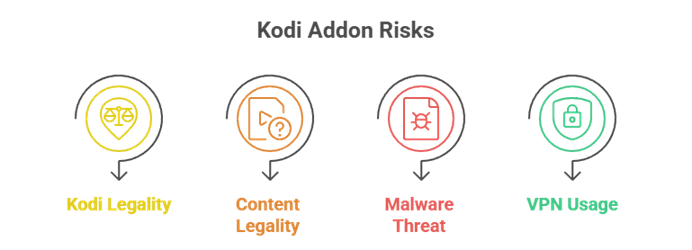
Kodi is entirely legal software, and installing an addon is not in itself an offence. The complication is what The Crew actually streams. It surfaces copyrighted films, shows, and live channels without a licence, which places it in a grey area that varies by country. Knowing that lets you decide sensibly. Our best Kodi addons roundup covers safer options too.
- Kodi Itself Is Legal: The Kodi application is open-source and completely legal, and nothing about simply running it puts you at any risk whatsoever.
- The Content Is Grey: The Crew streams copyrighted material without permission, and the legality of watching that genuinely differs from one country to the next.
- Malware Is the Real Threat: The practical danger is a modified zip from an unknown site, so only ever use the official team-crew repository address you trust.
- Always Run a VPN: A VPN hides your streaming from your internet provider and is sensible protection whenever you use any third-party Kodi addon at all.
Best The Crew Alternatives
If The Crew stops resolving links, buffers badly on your hardware, or you simply want faster playback, these three are the addons I would move to next. The first two are noticeably quicker with Real-Debrid, while the third is built for older Firesticks.
1) Umbrella
Umbrella is the addon I reach for when The Crew feels sluggish and I want speed above everything else. Built around Real-Debrid and Premiumize, it resolves cached links almost instantly and wraps them in the smartest interface on Kodi. It has no live TV, but for films and shows it is superb.
Features:
- Instant Cached Links: Because Umbrella queries debrid caches rather than scraping the open web, sources appear in seconds and almost never fail during playback.
- Best-Looking Interface: Artwork, layouts, and menus feel like a commercial streaming app, making browsing on a big screen genuinely enjoyable rather than merely functional.
- Guided Setup Wizard: A first-run wizard links your debrid and Trakt accounts step by step, removing the configuration barrier that puts beginners off similar addons.
- Consistent 4K Sources: With debrid attached it reliably surfaces 4K and HDR links, delivering picture quality that free scraping through The Crew rarely manages.
- Trakt Watchlist Sync: Native Trakt support keeps your progress aligned across every device, so you resume exactly where you stopped no matter what you use.
- Expanded Providers: The developer added further provider support through 2026, keeping results plentiful while other debrid addons have narrowed or stalled entirely.
- Rock-Solid Repository: Its GitHub source has stayed live for years, so the could not connect error is far less likely than with shakier repositories.
| Pros | Cons |
| ✅ Fastest debrid results | ❌ Needs a debrid account |
| ✅ Superb interface | ❌ Virtually no free links |
| ✅ Easy setup wizard | ❌ No live TV or sports |
| ✅ Reliable 4K and HDR | |
| ✅ Trakt sync | |
| ✅ Very stable repo |
Link: umbrellaplug.github.io
2) Seren
Seren is the enthusiast’s choice and the most configurable addon here. It refuses to touch free links, querying only debrid caches, which is why its results are so fast and so consistently playable. If you already pay for Real-Debrid, it will outperform The Crew for films and shows every single time.
Features:
- Debrid Only, By Design: Seren deliberately ignores free scraped links, so every source it returns is cached, fast, and dramatically less likely to be broken.
- Exceptional Speed: Results appear within a second or two, which feels transformative compared with waiting on The Crew to work through free hosted sources.
- Granular Settings: Provider, filter, and quality controls run far deeper than rivals offer, letting power users tune exactly which sources they ever see.
- Trakt and Premiumize: Native integration with both keeps your library synced and your links premium across every device you happen to stream on.
- Beautiful Metadata: Season layouts, artwork, and descriptions are handled carefully, giving a browsing experience closer to Netflix than to a scraper addon.
- Very Few Dead Links: Because everything comes from a debrid cache, I almost never hit the endless dead-link scrolling that free scraping inevitably produces.
- Reliably Maintained: The Nixgates repository stays current, so Seren survives major Kodi upgrades rather than breaking the moment a new version arrives.
| Pros | Cons |
| ✅ Fastest results on Kodi | ❌ Pointless without debrid |
| ✅ Almost zero dead links | ❌ Not beginner friendly |
| ✅ Extremely configurable | ❌ Movies and TV only |
| ✅ Great metadata | |
| ✅ Trakt integration | |
| ✅ Well maintained |
Link: nixgates.github.io
3) Fen Light
Fen Light exists for one reason: to run properly on hardware that chokes on heavier addons. If The Crew stutters on your older Fire TV Stick, this is the fix. It scrapes both free and debrid sources, loads quickly, and stays responsive where bulkier addons slow to an unusable crawl.
Features:
- Built to Run Lean: Fen Light is deliberately lightweight, staying quick and responsive on ageing Firestick models where The Crew often stutters or freezes entirely.
- Free and Premium Sources: It finds free hosted links as well as debrid ones, so it stays useful whether or not you pay for a premium account.
- Rapid Scraping: Without heavy overhead, sources return quickly, making everyday browsing feel noticeably snappier than on more feature-packed streaming addons.
- Beginner Friendly Menus: The layout is plain and logical, so navigating with a remote is straightforward even if this is your very first Kodi addon.
- Minimal Cache Use: Low memory and storage demands mean fewer crashes and less buffering, which is exactly what an older Firestick genuinely needs.
- Trakt Support: Progress and watchlists sync through Trakt, keeping your viewing organised across devices without any manual tracking on your part.
- Three Addons, One Repo: Installing the Tikipeter source also gives you Homelander and Nightwing, so a single URL delivers three dependable addons at once.
| Pros | Cons |
| ✅ Excellent on old hardware | ❌ Plain visuals |
| ✅ Free and debrid links | ❌ Fewer 4K sources |
| ✅ Very fast to browse | ❌ No live TV |
| ✅ Easy for beginners | |
| ✅ Low crash rate | |
| ✅ Three addons per repo |
Link: tikipeter.github.io
Verdict:
The Crew is still the most complete Kodi addon available in 2026, and for most people it is genuinely the only one they need. If you want faster links or you are running older hardware, these three alternatives cover every remaining scenario.
- Umbrella: The fastest and most polished option once you attach a Real-Debrid or Premiumize account.
- Seren: The power-user pick, returning cached debrid links almost instantly with very few dead sources.
- Fen Light: The best choice for older Firesticks, staying fast and stable where heavier addons stutter badly.
FAQs
Is The Crew Kodi addon still working in 2026?
Yes. The Crew reached version 3.0.9.5 in July 2026 and the team-crew repository is still actively maintained, so it remains one of the most reliable all-in-one Kodi addons.
What is The Crew Kodi repo URL?
The current source is the team-crew GitHub address. Add it in File Manager, name the source team-crew, then install the repository.thecrew zip file from it.
Why does The Crew repo say could not connect?
This is nearly always a typo in the URL or an old cached source. Delete the previous source in File Manager, re-enter the address carefully, and ensure Unknown Sources is enabled.
How do I stop The Crew from buffering?
Clear the cache from the addon Tools menu, purge old packages, and cap playback at 1080p. Adding Real-Debrid is the single most effective fix for persistent buffering.
Is The Crew safe to install on Firestick?
The addon is safe when installed from the official team-crew repository. Avoid modified zips from unknown sites, and always run a VPN when streaming through third-party addons.