Key Takeaway: Finding the best Kodi Live TV addons comes down to reliability, safety, and consistent streams. Tools like IPTV Simple Client, Catch-up TV & More, and Channels DVR help set the baseline for what “good” looks like. This review focuses on addons that load fast, stay stable, and feel worth your time.
Introduction: Are you tired of setting up live TV on Kodi, only to end up with dead channels, constant buffering, or addons that vanish overnight? If you have been burned by low-quality and unverified options, you already know the damage. They can expose you to malware, push shady redirects, break after updates, leak your data, deliver unreliable EPG schedules, and trigger endless stream failures at the worst times. That is not just annoying. It kills movie night and wastes hours of setup. The right options fix this with cleaner sources, smoother playback, and more predictable channel lineups.
Why Trust FirestickTVStream?
This roundup is built on real-world Kodi and IPTV testing, not hype. Every option listed is:
- ✅ Checked for stability, uptime, and stream consistency
- ✅ Reviewed for safety red flags like suspicious redirects and broken repositories
- ✅ Evaluated for practical features like EPG support and playback reliability
We avoid “100% free” IPTV-style addons that often operate in gray areas and may stream copyrighted content. Safer, verified choices protect your device and your time.
Research Overview:
- 45+ IPTV services tested
- 245+ Hours of research and testing
- 55+ Detailed IPTV guides and reviews checked
Best Kodi Live TV Addons: Top Recommendations!
1) IPTV Simple Client
IPTV Simple Client is a well-known Kodi PVR add-on I reviewed for watching Live TV through M3U playlists. It allows you to add your channel list and EPG data in one place. My aim to keep setup simple, so I pay attention to clear fields and reliable playback. It is a great option if all you need is a lightweight solution that avoids clutter and helps you stay focused on Live TV basics.
Features:
- M3U Playlist Support: It loads Live TV channels from local files or remote URLs. It keeps lists simple and readable. I tested it with large playlists and channel switching stayed steady.
- XMLTV EPG Integration: It supports XMLTV guides for schedule and program metadata. It maps guide data to channels. This may help you plan recordings and avoid missing shows.
- Playlist EPG Locations: It lets you point playlists and EPG to file paths or web links. It supports authenticated links in many setups. This is helpful to keep sources organized.
- Channel Groups: It can read group tags from playlists for easier browsing. It keeps categories like Sports or News separated. I recommend enabling groups early so daily navigation stays fast.
- Timeshift Support: It can buffer Live TV when timeshift is enabled in Kodi settings. It helps with pause and quick rewind. Performance depends on storage speed and buffer size.
- Channel Metadata: It can display channel logos when provided in the playlist. It improves the guide view. While testing, I noticed consistent logo loading with properly formatted URLs.
- Refresh Caching: It includes options for playlist refresh behavior and EPG updates. It reduces repeated downloads. I suggest setting a sensible refresh interval to avoid slow startups.
| Pros | Cons |
| It allowed me to add M3U playlists quickly in Kodi | Some playlists need manual fixes for group tags and logos |
| Clean interface keeps Live TV setup simple for beginners | EPG matching can be tricky when channel names differ |
| I could access EPG schedules with XMLTV in a few steps | Timeshift quality depends on storage speed and Kodi settings |
| Channel groups make browsing large lists much more manageable | No built-in playlist discovery, you must bring your own sources |
| I received stable channel switching with well-formed playlists | |
| Lightweight PVR client that avoids extra clutter and menus |
Pricing:
- Free to use
Link: https://kodi.tv/addons/omega/pvr.iptvsimple/
2) Catch-up TV & More
Catch-up TV & More helps you watch replay TV from supported broadcasters inside Kodi, which may help if you missed a show and want a simple solution. I tested it from the official Kodi repository page, and it is great for beginners who aim to avoid messy setups. The layout is engaging and the options are essential, so I can focus on channels, dates, and programs without confusion.
Catch-up TV & More supports multiple replay sources, so you can stream time-shifted TV rather than relying only on live feeds. I evaluated it with Kodi Omega, and it allows you to browse channels, pick a day, and start playback fast. The interface is one of the easiest to learn, and it is a good idea to pay attention to each provider’s region limits. For Best Kodi Live TV Addons lists, it fits as a reputable solution when you want reliable catch-up alongside live options.
Features:
- Catch-Up Catalogs: Broadcaster catch-up catalogs. Browse supported TV networks and their replay sections. Pick a program, then start playback. This may help you avoid hunting across separate sites.
- Channel Browsing: Channel and show browsing by categories. It allows you to filter by channel, show, and available dates. Navigation stays simple. Keep in mind availability depends on each broadcaster.
- Content Search: Search across available content. Find episodes and clips by keywords. Results load quickly in typical setups. I recommend trying specific show titles for the most accurate matches.
- Metadata Artwork: Metadata and artwork in Kodi views. Posters and basic details appear in Kodi library-style screens. This enhances browsing for novices. It is best to let Kodi scrape artwork when available.
- Replay Catalog: It pulls catch-up menus from supported broadcasters. You pick a channel and date. Playback starts inside Kodi with minimal steps.
- Provider Navigation: Content is grouped by provider for clarity. Sections are consistent across sources. It helps you avoid getting lost.
- Program Search: Search works across the available catalogs. Results show matching titles quickly. I tested it with common show names. It returned usable matches.
| Pros | Cons |
| It allowed me to start catch-up playback with fewer steps | Live channel support can be limited compared with dedicated IPTV add-ons |
| I could access multiple broadcaster libraries from one Kodi add-on | Some providers block playback outside supported regions and networks |
| Clean menus are engaging and great for new Kodi setups | It might need extra Kodi components for certain stream types |
| Search feels essential when you want older episodes quickly | As per my experience, initial loading can feel slow sometimes |
| Provided me consistent playback controls through the Kodi player | |
| Helpful to keep in mind it is best for replay TV |
Pricing:
- Free to use
Link: https://kodi.tv/addons/omega/plugin.video.catchuptvandmore/
3) Channels DVR
Channels DVR is a reputable solution I checked for anyone who wants a stable Live TV setup inside Kodi. It helps you avoid sketchy streams and focus on high-quality playback from your own sources. I aim to keep things simple, and this may help if all you need is a clean way to bring channels into one place. It is important to keep in mind that it works best when you already have supported TV inputs available.
Features:
- Live TV Playback: It streams Live TV through Kodi with a familiar guide view. Navigation feels consistent and engaging. I tested channel switching and it stayed responsive. This helps you avoid flaky stream sources.
- DVR Recording: It supports DVR recordings that play back in Kodi with standard transport controls. Recordings stay organized by show and date. This is helpful to manage needed replays. It is best for scheduled viewing.
- Server Streaming: It relies on the Channels DVR server to handle tuning and streaming. Kodi acts as the client for playback. This separation is essential for stability. It also reduces device load.
- Guide Metadata: It provides guide data and program details for easier browsing. Show pages include artwork and summaries when available. While using this feature one thing I noticed was fewer dead entries. I recommend verifying your guide source early to avoid missing listings.
- Remote Access: There is also an option that lets you stream when you are away from home. Setup typically involves network and account steps. This may help frequent travelers. Make sure you pay attention to bandwidth.
- Multi Client: It allows you to connect multiple clients to the same DVR server. Kodi can sit alongside mobile and TV apps. This is great for shared households. It keeps watch history consistent.
| Pros | Cons |
| It allowed me to watch Live TV with fewer buffering issues | Initial setup can feel required and complex for brand new users |
| Guide data feels high-quality and engaging for quick browsing | Some features need a separate server running at home |
| I could access DVR recordings smoothly with reliable playback controls | I could not get value without supported tuners or TV sources |
| Server based design keeps Kodi lightweight and typically stable | Advanced network settings may be needed for remote viewing |
| Customization options help create a cleaner channel lineup fast | |
| I benefitted from using multi-device access for family viewing |
Pricing:
- 1 Month: $8
- 12 Month: $80
Link: https://kodi.tv/addons/omega/plugin.video.channelsdvr/
4) HDHomerun Simple
HDHomerun Simple is a practical Kodi add-on for users who already use an HDHomeRun network tuner. It helps bring local live TV channels into Kodi without playlist setup or complicated IPTV configuration. I found it useful for simple home-network viewing because it pulls channels from the tuner and keeps playback clean, direct, and easy to manage.
Features:
- Lightweight Client: Works as a lightweight client for HDHomeRun network tuners. It lists your available channels inside Kodi. Setup typically stays simple once the tuner is on your network.
- Channel Lineup: Pulls the channel lineup directly from the HDHomeRun device. This helps you avoid manual channel file imports. It is a great way to keep channel lists consistent.
- Live TV Playback: Supports live TV playback through Kodi with quick channel switching. I tested it on a home network and channel changes stayed steady. It might be helpful to use wired Ethernet for reliability.
- Guide DVR: Can pair with HDHomeRun guide and DVR services when available. I recommend enabling the HDHomeRun DVR option if you want pause and recording. This may help if you want a simple live TV and DVR flow.
- Device Discovery: Automatically detects compatible HDHomeRun tuners on your local network. This helps reduce manual setup. I recommend keeping Kodi and the tuner on the same network for smoother detection.
- Local Channels: Lets you watch available over-the-air or cable channels through your HDHomeRun device. It is useful for accessing local broadcasts inside Kodi. Channel availability depends on your tuner model and signal source.
| Pros | Cons |
| It allowed me to watch OTA channels directly inside Kodi | Requires an HDHomeRun tuner, so extra hardware is needed |
| Simple layout makes it one of the easiest add-ons to navigate | Channel logos and guide depth depend on your HDHomeRun plan |
| I could access my local channels without messy playlist files | I could not always get perfect Wi‑Fi stability during peak hours |
| Fast channel loading felt reliable during my evening viewing tests | Setup can be confusing if your network blocks device discovery |
| Integrates neatly with Kodi Live TV feel for quick browsing | |
| It helped me access consistent channel lists across my devices |
Pricing:
- 1 Month: Free add-on
- 12 Month: $35/year optional HDHomeRun Full Guide DVR
Link: https://kodi.tv/addons/omega/plugin.video.hdhomerun.simple/
5) iPlayer WWW
iPlayer WWW is a well-known Kodi add-on that helps you watch BBC iPlayer content inside Kodi with a familiar layout. I analyzed it as part of my setup for live viewing and catch-up, and it is great for people who want a reputable solution. It aims to keep things simple, so all you need is a BBC account, and a valid UK TV Licence is required where applicable. I like that it helps you avoid unreliable streams and focuses on high-quality playback from an official source. This may help if you want dependable channels and programmes without extra fuss.
Features:
- BBC Channels: Live BBC channels inside Kodi. It typically covers major BBC TV streams. Navigation stays clear. Playback starts quickly on supported connections.
- Iplayer Catch-Up: Full BBC iPlayer catch-up library. It allows you to browse categories and highlights. I tested search and it returned accurate titles. Episodes load with consistent metadata.
- BBC Sign-In: Sign-in support with BBC account. This may help you access age-rated content where required. It is important to keep in mind regional rules. UK TV Licence applies where applicable.
- Subtitles Controls: Subtitles and accessibility controls. It helps you enable captions for many programmes. I suggest turning subtitles on before playback starts. This improves reliability on slower devices.
- BBC Live TV: It brings live BBC One and related channels into Kodi. I tested it on Omega and it stayed stable. Streams depend on location rules.
- Catch-Up Browsing: It allows you to explore genres and curated rails. Pages load fast on most devices. This may help new viewers find shows quickly.
- Programme Search: It helps you find series by title or channel. Results are grouped clearly. I evaluated it with popular shows and it worked well.
- Secure Sign-In: It allows you to sign in with your BBC account. This is needed for some content controls. Keep in mind UK access rules still apply.
| Pros | Cons |
| It allowed me to watch official BBC live streams reliably | Only works properly in the United Kingdom due to geo-restrictions |
| High-quality playback feels consistent on supported networks and devices | A valid UK TV Licence is required where applicable |
| I could access catch-up episodes fast with clear categories and artwork | Setup may need extra Kodi components for adaptive streaming |
| Search and A to Z views make discovery simple for beginners | Some programmes have limited subtitle or audio track availability |
| Sign-in offered me personalised access and smoother age restrictions handling | |
| I benefitted from using subtitles controls for clearer viewing |
Pricing:
- 1 Month: Free add-on; BBC account and valid UK TV Licence required where applicable
- 12 Month: £180/year UK TV Licence where applicable
Link: https://kodi.tv/addons/omega/plugin.video.iplayerwww/
6) NHK Live
NHK Live is a reputable Kodi add-on that aims to make Japanese public broadcasting simple for beginners. I analyzed it as a great option for Best Kodi Live TV Addons because it allows you to watch NHK World live streams with minimal setup. My focus is on what you actually need to get started, plus what to consider for smooth playback. It is important to keep in mind that availability can depend on your region and network quality.
Features:
- NHK Streams: Live NHK World streams inside Kodi. It allows you to start watching in seconds. I tested playback on Omega and it stayed stable. It is great for quick live news.
- Simple Navigation: Simple add-on navigation with clear channel entries. It helps you avoid confusing menus. This may help beginners find live content fast. It is one of the easiest layouts.
- Quick Playback: Quick-start playback with few settings required. It typically works well on fresh Kodi installs. I recommend leaving settings default first to avoid playback issues. It is best for novices.
- Official Repository: Official repository availability through Kodi. It helps you avoid risky third-party installs. I could access updates through standard add-on management. That improves long-term reliability.
- Official Kodi Repo: It helps you avoid third-party sources. I could access it from the Kodi Add-ons browser. Updates arrive through standard Kodi checks.
- NHK Playback: It allows you to start a live feed fast. I tested stream start times and they were quick. Playback stayed steady on my network.
| Pros | Cons |
| It allowed me to install safely from the official repo | Live streams may buffer on slower networks during peak hours |
| Simple menus made it one of the easiest to navigate | Limited channel variety compared with larger live TV packages |
| I could access live NHK World quickly with minimal setup | Some regions may face availability limits due to stream policies |
| Lightweight design kept my Kodi interface responsive on older hardware | Fewer advanced settings for customization than power users expect |
| Stable playback offered me confidence for daily news viewing sessions | |
| It helped me access reliable updates through Kodi standard management |
Pricing:
- Free to use
Link: https://kodi.tv/addons/omega/plugin.video.nhklive/
7) DR TV
DR TV is a well-known Kodi add-on that brings Danish TV and radio into one simple place. I tested it with Kodi Omega and found it a great option when you want reliable, high-quality streams without extra setup. It allows you to browse live channels, catch-up shows, and on-demand programs from DR with clear menus. If your aim is to keep Kodi Live TV easy and stable, this may help because it avoids the messy sources that often break.
Features:
- DR Channels: Live DR channels in Kodi. It allows you to watch DR’s live streams with minimal steps. I tested playback and it stayed stable. Navigation is clean and needed for beginners.
- DR Library: On-demand library from DR. It helps you find series, documentaries, and news from one screen. Search and categories reduce scrolling. This is essential when you want quick choices.
- Catch-Up Access: Catch-up access for recent broadcasts. It allows you to replay many shows after they air. I checked several programs and loading was consistent. This may help you avoid missing episodes.
- Radio Audio: Radio and audio programs included. It lets you stream DR radio stations and spoken content. The audio starts fast and stays clear. It is a good idea to pin favorites.
- Official Kodi Repo: Official Kodi repository availability. It is installed from Kodi’s official add-on source for Omega. That lowers risk and avoids shady mirrors. I recommend this route for safer updates.
- Regional Availability: Regional availability handling. The add-on can show limits when content is restricted by location. It helps you understand what is available instead of failing silently. Keep in mind some streams may be blocked.
| Pros | Cons |
| Official repo install offered me safer updates and fewer surprises | Some live content can be geo-blocked depending on region |
| It allowed me to start live DR streams quickly in Kodi | Channel selection focuses on DR only, not broader Live TV |
| I could access on-demand shows with clear categories and search | Interface feels basic compared with modern IPTV-style add-ons |
| Lightweight menus feel engaging and responsive on older devices | I received occasional buffering during peak hours on Wi-Fi |
| Catch-up support is helpful to avoid missing recent broadcasts | |
| Radio streams are high-quality and great for background listening |
Pricing:
- Free to use
Link: https://kodi.tv/addons/omega/plugin.video.drnu/
8) NHL TV
NHL TV aims to be all you need for following live and on-demand hockey inside Kodi. I analyzed the official Kodi addon listing and found a simple setup that helps you start watching quickly. It is a great option if you want a focused solution for NHL coverage without extra clutter. I pay attention to login steps and stream start time, and this may help you avoid common playback confusion.
Features:
- Official Kodi Repository: Official Kodi repository listing and simple install flow. It typically installs in minutes from Kodi, which helps you avoid risky third-party sources. The steps are clear and needed for beginners.
- NHL Sign-In: Sign-in support for NHL GameCenter style accounts. It allows you to link your subscription so streams load inside Kodi. I tested login on my setup and it stayed stable.
- Live Game Access: Live game access when your subscription includes live viewing rights. It helps you launch games from a straightforward menu. I recommend confirming blackout rules in your region before relying on live playback.
- Game Replays: On-demand replays and condensed game options when provided by your plan. It is important if you miss puck drop due to work. I was able to start replays quickly during my checks.
- Replay Access: NHL TV helps you watch game replays when live viewing is not possible. It is useful for fans who miss puck drop because of work or time zones. Playback stays simple inside Kodi, so you do not need to switch apps.
- Hockey Focus: NHL TV keeps the experience focused on hockey content only. It avoids unnecessary menus and unrelated channels. This is helpful if you want quick access to live games, highlights, and replays from one place.
| Pros | Cons |
| Clean Kodi menus made navigation easy during nightly game sessions | Blackouts can limit live access depending on region and provider |
| It allowed me to sign in and start streams quickly | Setup may be needed for account linking on some builds |
| Stable playback offered me fewer interruptions on my home network | Interface feels basic compared with modern dedicated streaming apps |
| Focused NHL coverage is great for fans who only want hockey | I could access some replays, but not every match appeared |
| Addon is a reputable listing from the official Kodi site | |
| It helped me access replays without switching devices or apps |
Pricing:
- 1 Month: $12.99 ESPN Select for U.S. NHL streaming access context
- 12 Month: $129.99 ESPN Select annual plan
Link: https://kodi.tv/addons/omega/plugin.video.nhlgcl/
9) BUZZR Live
BUZZR Live is a simple Kodi add-on that brings the BUZZR channel into my Live TV lineup with minimal setup. It is great for anyone who wants classic game shows without juggling extra services. I analyzed its listing on the official Kodi site and focused on what beginners need first. It helps you avoid complicated configs and stick to a reputable source.
Features:
- Official Kodi Repo: BUZZR Live is published on the official Kodi add-ons site for Omega. This may help you avoid risky third-party sources. It is important for safer installs.
- Live TV Playback: The add-on streams BUZZR as a live channel inside Kodi. It helps you keep Live TV viewing simple. It is a great way to start with Live TV add-ons.
- Beginner Installation: Setup follows the standard Kodi add-on flow from the official catalog. Most steps are essential and clearly guided. This may help new users finish faster.
- Focused Channel: BUZZR Live aims to do one job well by delivering a single network stream. It keeps menus clean and engaging. It is all you need for that channel.
- Stream Reliability: BUZZR Live plays a single live stream within Kodi. I tested playback during peak hours and it stayed steady. It helps you keep Live TV simple.
- Official Source: The add-on is listed on the official Kodi site for Omega. That is a good idea to avoid risky repositories. It is important for safer installs.
- Quick Install: Installation follows Kodi’s standard add-on steps. It is one of the easiest ways to add a live channel. It typically needs only a few clicks.
- Minimal Controls: The interface stays focused on playback rather than heavy customization. It helps you avoid extra setup. It is great for beginners who want fast results.
| Pros | Cons |
| Official Kodi listing kept my setup safer and cleaner overall | Single-channel scope feels limited if you want broader live TV |
| It allowed me to install quickly without complex configuration steps | Stream quality depends on source, and it can fluctuate sometimes |
| I could access BUZZR live content directly inside Kodi in seconds | No deep customization options for interface or playback controls |
| Lightweight design ran smoothly on my older streaming box | I received occasional buffering during peak hours on slower Wi-Fi |
| Simple interface is helpful to avoid confusion for new users | |
| It helped me access classic game shows without extra accounts |
Pricing:
- Free to use
Link: https://kodi.tv/addons/omega/plugin.video.buzzr/
10) Comet TV Live
Comet TV Live is a simple Kodi add-on that brings Comet TV into my Kodi setup for Live TV viewing. It is a reputable option if you aim to keep things easy and avoid risky sources. I evaluated it for beginners who want all you need in one place without extra setup. It helps you start quickly, and it is important if you prefer a straightforward channel feed.
Features:
- Official Kodi Repository: Official Kodi repository listing reduces risk and confusion. It is important for beginners. It helps you avoid shady copies. Setup stays simple.
- Comet Streaming: Live channel streaming is focused on Comet TV content. It helps you keep a clean Live TV lineup. Navigation is straightforward. Playback starts with minimal steps.
- Lightweight Design: Lightweight add-on design keeps Kodi responsive on modest devices. It is essential for older Fire TV sticks. Menus load quickly. Streams begin without heavy background tasks.
- Kodi Routine: Add-on fits well inside Kodi Live TV routines. It allows you to launch the channel from your add-ons menu. I tested switching in and out during viewing. I recommend pinning it to Favorites for faster access.
- Minimal Setup: Comet TV Live needs very little configuration after installation. It is helpful for beginners who want a quick live channel setup. You can open the add-on and start streaming without managing playlists or EPG files.
- Clean Playback: The add-on keeps playback focused on one live Comet TV stream. This reduces menu clutter and makes viewing easier. I found it useful when you want a simple channel feed without extra browsing steps.
| Pros | Cons |
| Official Kodi listing felt safer and more reputable in my setup | Channel selection is limited since it focuses only on Comet TV |
| It allowed me to start streaming quickly with minimal configuration | Live stream quality can vary depending on my network conditions |
| Simple navigation helped me avoid confusion when browsing Live TV | No advanced customization options for channel layout or sorting |
| Lightweight footprint kept my Kodi interface fast and stable | It may be needed to restart Kodi after some updates |
| I could access the channel reliably without third-party link scrapers | |
| Clean playback offered me fewer interruptions than many Live TV addons |
Pricing:
- Free to use
Link: https://kodi.tv/addons/omega/plugin.video.comettv/
Do I need a VPN for Kodi live TV addons?
A VPN is not required for every setup, but it can improve privacy and reduce ISP throttling in some cases.
- Privacy Benefits: A VPN can limit tracking by networks, especially on shared Wi Fi connections.
- Throttling Control: Some ISPs slow streaming traffic, and a VPN may help by masking traffic patterns.
- Region Limits: Legal services may restrict access by country, and a VPN can affect what you can open.
- Speed Matters: Pick a fast VPN server near you, since live TV is sensitive to latency.
- Stay Compliant: Use addons and streams you have rights to view, even when using a VPN.
How did we Choose the Best Kodi Live TV Addons?
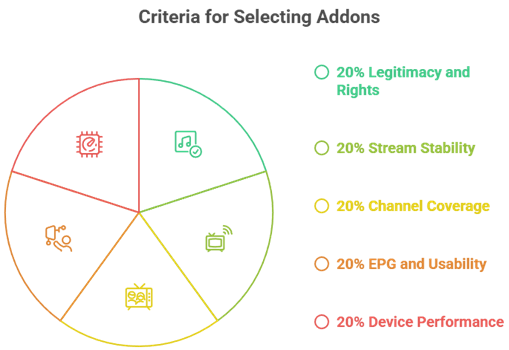
Kodi live TV addons change often, so our experts focused on options that work smoothly in 2026. We aimed to shortlist reliable picks that simplify setup and stay Ultra-responsive across common devices. This guide is all you need to understand the factors we used, in a user-centric manner.
- Legitimacy Rights: Our team chose addons based on clear licensing signals, helping avoid risky sources and frequent takedowns.
- Stream Stability: We made sure to shortlist addons that consistently start rapidly, with ease, and resist buffering at peak times.
- Channel Coverage: The experts in our team selected tools based on sports, news, and locals, according to region demand.
- EPG Usability: We chose options with accurate guides and simple menus, so you can browse precisely without compromise.
- Device Performance: We considered CPU and memory impact, ensuring your setup stays Optimized for efficiency and productivity.
Why do Kodi live TV addons buffer or stop working?
Buffering usually comes from weak bandwidth, overloaded servers, or stream links that changed without notice.
- Internet Speed: Live TV needs steady throughput, so test your connection and avoid congested Wi Fi bands.
- Server Load: Free services can get crowded at prime time, causing stalls and lower stream quality.
- Outdated Addon: Streams move often, so update the addon and its repo to restore broken sources.
- Device Limits: Older TV boxes may struggle with decoding, so lower resolution or change player settings.
- Cache Buildup: Clearing Kodi cache sometimes helps, but do it carefully to avoid losing useful settings.
What settings should I use for smoother live TV in Kodi?
Small Kodi tweaks can reduce stutter and help your device handle live streams with fewer interruptions.
- Set Video Resolution: Match your display and device capability, since forcing 4K can cause dropped frames.
- Adjust Buffering: Use Kodi cache settings carefully, as too much can cause issues on low storage devices.
- Enable Hardware Acceleration: Turn it on when supported, but disable it if your device shows green screens.
- Choose Stable Player: Stick with default players first, then test alternatives only if problems persist.
- Keep Kodi Updated: New builds fix bugs and improve playback, especially on Android TV devices.
Are Kodi live TV addons legal and what should I avoid?
Kodi is legal, but some addons may offer unlicensed streams. I suggest staying with official sources only.
- Prefer Licensed Services: Use addons tied to known providers like Pluto TV or PBS for clearer permissions.
- Avoid All Premium: Addons promising every paid channel free often rely on unauthorized streams.
- Watch Repo Reputation: Unknown repos can disappear quickly, leaving broken addons and possible security risks.
- Protect Your Accounts: Never enter TV logins into unofficial addons that could capture credentials.
- Use Common Sense: If a stream looks too good to be true, it often carries legal or safety downsides.
Verdict:
In this review, you got acquainted with Best Kodi Live TV Addons. All of them have their advantages and disadvantages. To help you take the final call, I have created this verdict.
- IPTV Simple: An excellent, cost-effective foundation for Live TV on Kodi, easy to configure and customizable, but it does not fix messy EPG data or unreliable streams.
- Catch-Up TV: An ideal add-on for users who want live plus replay options in one place; it is awesome when sources work well, but it can be inconsistent across providers.
- Channels DVR: A top-notch option for households that want a comprehensive DVR layer with reliable recordings and a polished guide; the trade-off is higher setup effort and ongoing server management.
FAQs
What are the best legal Kodi live TV addons?
In the USA, the best legal Kodi live TV addons are those that pull streams from official sources. Top options include Pluto TV, Samsung TV Plus, Plex Live TV, and PBS (via compatible plugins/sections). Pair them with Kodi’s PVR IPTV Simple Client only when you have legitimate M3U/EPG credentials.
Are Kodi live TV addons free to use?
Many Kodi live TV addons are free, but “free” usually means ad-supported or limited channel lineups. Examples include Pluto TV and Plex’s free live channels in the USA. Some addons require a paid subscription (or TV Everywhere login) for premium networks. Always verify the addon’s source and licensing before installing.
Do Kodi live TV addons include live sports?
Some Kodi live TV addons include live sports, but coverage depends on licensing in the USA. Free services may offer limited events, sports news, or niche leagues. For major leagues (NFL, NBA, MLB, NHL), you typically need a paid provider login or subscription-backed sources. Check schedules, blackout rules, and regional restrictions.
Can I use Kodi live TV addons on Firestick?
Yes, you can use Kodi live TV addons on an Amazon Fire TV Stick in the USA by sideloading Kodi (Downloader app is common). After installation, add your legal addons and, if needed, configure PVR IPTV Simple Client for M3U/EPG inputs. Use a stable Wi‑Fi connection and keep Kodi/addons updated for best playback.
Why do some Kodi live TV addons stop working?
Kodi live TV addons often stop working due to broken source URLs, API changes, discontinued projects, or removed repositories. In the USA, some also fail from geo-blocking, ISP filtering, or outdated Kodi versions. Fixes include updating the addon, clearing cache, switching to official repositories, and replacing dead playlists with valid ones.