Key Takeaway: Each Live TV Apps for Firestick option was reconsidered for licensed catalogs, official applications, traceable publishing details, everyday device usability, and accessible account information. The best live TV apps for Firestick run from free FAST channels to full cable replacements. Sling TV is the best-value paid option, YouTube TV carries the fullest channel lineup, and Pluto TV and Plex add genuinely free live channels. Six of the eight cost nothing.
Cutting cable only works if your Firestick actually has live channels on it. These eight apps cover everything from local networks and news to free 24/7 channels, and most of them cost nothing at all.
I have installed every app here on my own Fire TV Stick 4K Max and watched real live channels through each one, judging channel choice, guide quality, stream stability, and how quickly you can actually reach something worth watching. Below are the eight best, with honest pros, cons, and current 2026 pricing.
Important Note: When choosing among Live TV Apps for Firestick options, account for local availability, hardware support, plan limits, and the operator’s documented rights. Consult official product and help pages for publisher details, plan charges, device requirements, and regional access. The article does not endorse redirected mirrors, unidentified feeds, or platforms that fail to document lawful distribution.
Best Live TV Apps for Firestick: Top Recommendations!
| App | Best For | Content Focus | Get Started |
|---|---|---|---|
| Sling TV | Best paid value | Live cable channels | Visit Site |
| YouTube TV | Fullest channel lineup | Live TV & unlimited DVR | Visit Site |
| Pluto TV | Best free live TV | Free 24/7 FAST channels | Visit Site |
| Plex | Free live TV plus media | Free channels + your media | Visit Site |
| Kodi | IPTV playlists and PVR | Your own M3U live TV | Visit Site |
1) Sling TV
Sling TV is the live TV app I recommend first to anyone leaving cable, because it gives you real channels for roughly half the price of its rivals. You pick Orange or Blue based on the channels you actually watch, add what you need, and skip the bloated bundles. For most homes it replaces a cable box outright.
Features:
- Two Flexible Plans: Orange covers ESPN and Disney channels while Blue focuses on news and entertainment, so you only pay for the lineup you genuinely watch.
- Cloud DVR Included: a generous cloud DVR records live shows automatically, so clashing programmes or awkward schedules never mean missing something you wanted to see.
- Cheapest Cable Replacement: at around half the price of rival live services, it delivers real cable channels for the lowest monthly cost of anything here.
- Add-On Channel Packs: cheap themed extras let you bolt on sports, kids, or news channels, so your bill grows only when you actually want more.
- Reliable Fire TV App: the Fire TV app is fast and remote-friendly, and it held a steady HD stream through peak evening hours in my testing.
- Local Channels In Cities: major-market locals are included in many areas, covering the network shows most cord-cutters miss most after dropping cable.
- Three-Stream Blue Option: Sling Blue allows several simultaneous streams, so different rooms can watch different live channels on one household subscription.
| Pros | Cons |
| Cheapest live cable replacement | No single plan has every channel |
| Flexible Orange and Blue plans | Local channels vary by market |
| Cloud DVR included | Orange allows one stream only |
| Cheap add-on packs | Interface can feel busy |
| Reliable Fire TV app | |
| Free trial often available |
Pricing:
- Sling Orange or Blue: $45.99–$50.99/month (checked July 2026)
- Orange + Blue: $65.99/month
- Free trial and first-month deals often available
Link: sling.com
2) YouTube TV
YouTube TV is the closest thing to a full cable package on a Firestick, and it is what I recommend to households that want everything in one app. It carries local networks, sports, news, and entertainment channels, with an unlimited cloud DVR and excellent multi-view. It is not cheap, but nothing else is this complete.
Features:
- Full Channel Lineup: it carries local networks, ESPN, regional sports, news, and entertainment channels, covering nearly everything a traditional cable package once did.
- Unlimited Cloud DVR: record as many shows as you like and keep them for nine months, which comfortably outclasses every rival DVR on this list.
- Six Household Accounts: up to six profiles keep everyone’s recordings and recommendations separate, so the whole family gets a personalised live TV experience.
- Reliable Local Channels: local ABC, CBS, NBC, and Fox stations are included in most areas, which is the feature cord-cutters miss most.
- Multi-View Streaming: watch up to four channels at once on one screen, which I found genuinely useful across a busy evening of overlapping programmes.
- Three Simultaneous Streams: three devices can stream at the same time, so different rooms watch different live channels without any extra charge.
- Polished Fire TV App: the Fire TV app is fast and stable, with a clean guide that navigates easily using just the standard Firestick remote.
| Pros | Cons |
| Fullest channel lineup here | The most expensive option |
| Unlimited cloud DVR | Overkill for light viewers |
| Reliable local channels | Price has risen steadily |
| Multi-view and six profiles | No cheaper entry tier |
| Three simultaneous streams | |
| Polished, stable app |
Pricing:
- Base Plan: $82.99/month (checked July 2026)
- Frequent multi-month intro discounts
- Add-ons available for premium networks
Link: tv.youtube.com
3) Pluto TV
Pluto TV is the best genuinely free live TV app on a Firestick, and it surprises people. Owned by Paramount, it runs hundreds of free 24/7 channels covering news, movies, sport, and classic shows, all laid out in a familiar cable-style guide. It will not show your local networks, but it costs nothing whatsoever.
Features:
- Hundreds Of Channels: it streams hundreds of always-on channels covering news, films, sport, and classic TV, all completely free with no account needed.
- Familiar Cable Guide: a proper scrolling channel guide makes browsing feel exactly like traditional cable, which is why it clicks instantly with older viewers.
- Completely Free: Paramount funds everything through short ads, so there is no subscription, no trial, and no card details requested at any point.
- No Account Needed: you can launch a live channel within seconds of opening the app, with nothing to register, verify, or configure beforehand.
- Huge On-Demand Library: beyond live channels it adds thousands of free on-demand films and shows, so one app covers both live and catch-up viewing.
- Very Light App: the Fire TV app runs smoothly even on older Firestick hardware, launching quickly where heavier live TV apps stutter or lag.
- Refreshed Lineups: channels rotate and expand regularly, so I always find new pop-up channels around events rather than the same static list.
| Pros | Cons |
| Genuinely free live TV | No local network channels |
| Familiar cable-style guide | Ads throughout |
| Hundreds of channels | Cannot pause live channels |
| Huge on-demand library | No DVR function |
| Runs on old Firesticks | |
| No signup or fees |
Pricing:
- Price: Free (ad-supported)
- No account required
- No subscription of any kind
Link: pluto.tv
4) Plex
Plex quietly built one of the best free live TV offerings on Firestick, and it does something nobody else here manages. Alongside hundreds of free ad-supported live channels, the same app organises any media you own into a tidy library. It is legal, needs no subscription, and doubles as your personal media server.
Features:
- Free Live Channels: it streams hundreds of free ad-supported live channels covering news, sport, and entertainment, adding legitimate no-cost live TV without any subscription.
- Doubles As Media Server: the same app catalogues films, shows, and music you own into a polished library, which nothing else on this list offers.
- Completely Legal: every live channel is properly licensed, so there is none of the malware or legal uncertainty attached to unofficial free TV apps.
- Clean Universal App: Plex runs on Firestick, phones, and browsers with one polished interface, syncing across devices so you can switch screens mid-programme.
- No Subscription Needed: the free tier covers live channels fully with no card required, so you can start watching immediately after installing it.
- Optional Plex Pass DVR: a paid upgrade adds DVR recording for live channels, though I find the free tier already covers casual live TV well.
- Lightweight Playback: streams start quickly and hold steady on a normal home connection, which matters most when you are watching something genuinely live.
| Pros | Cons |
| Free legal live channels | No local network channels |
| Doubles as a media server | Ads on the free tier |
| Clean cross-platform app | DVR needs paid Plex Pass |
| No subscription needed | Setup deeper than rivals |
| Quick, stable playback | |
| Syncs across devices |
Pricing:
- Live TV: Free (ad-supported)
- Plex Pass: $6.99/month or $69.99/year (checked July 2026)
- Lifetime Plex Pass also available
Link: plex.tv
5) Tubi
Tubi is best known for movies, but its live channel section now carries a solid slate of news, sport, and entertainment, which makes it a smart free addition. Backed by Fox, it pairs free live TV with an enormous on-demand library. Everything is legal, free, and requires no account whatsoever.
Features:
- Free Live Channels: its live section carries dozens of channels covering news, sport, and entertainment, all streaming free with only short advertising breaks.
- Backed By Fox: Fox ownership means proper licensing and a steady supply of channels, rather than the dubious feeds found on unofficial live TV apps.
- Massive Film Library: beyond live TV you get tens of thousands of free movies and shows, so one app covers both live and lazy evenings.
- No Signup Required: you can start watching live channels instantly without an account, though signing in lets you save favourites across your devices.
- Official Fire TV App: it installs directly from the Amazon Appstore, launching fast and navigating cleanly with the standard Firestick remote and no sideloading.
- Light Ad Load: ads appear as short breaks rather than deceptive pop-ups, so the free live experience stays genuinely watchable throughout.
- Growing Lineup: Fox keeps adding live channels, and I have watched the section expand steadily rather than stagnate over the past year.
| Pros | Cons |
| Free legal live channels | Live TV is a secondary focus |
| Huge film library included | No local networks |
| No signup or cost | Region-limited channels |
| Official Firestick app | No DVR |
| Light ads | |
| Growing lineup |
Pricing:
- Price: Free (ad-supported)
- No account required
- No subscription of any kind
Link: tubitv.com
6) Xumo Play
Xumo Play is a free, completely legal live TV app that most Firestick owners overlook. It streams hundreds of free channels covering news, sport, movies, and reality, wrapped in a clean cable-style guide. There is no subscription and no account, which makes it one of the easiest free live TV apps to just switch on.
Features:
- Hundreds Of FAST Channels: it streams hundreds of free ad-supported channels across news, sport, movies, and reality, giving genuine live variety at no cost.
- Clean Channel Guide: a tidy scrolling guide makes finding a live channel quick and intuitive, feeling far more like real television than a menu.
- Completely Free: the whole service is funded by short ads, so there is no subscription, no trial, and no card details asked for at any stage.
- No Account Required: you can start watching a live channel immediately, with nothing to register or verify before the picture appears on screen.
- On-Demand Too: alongside live channels it offers a free on-demand library, so you can switch to a film when nothing live appeals right now.
- Official Fire TV App: it installs straight from the Amazon Appstore and navigates cleanly with a remote, so setup takes well under a minute.
- Light On Resources: it ran smoothly on my older Firestick, launching quickly where heavier live TV apps noticeably stuttered and lagged.
| Pros | Cons |
| Genuinely free live channels | No local network channels |
| Clean cable-style guide | Ads throughout |
| Hundreds of FAST channels | No DVR or pause |
| Runs on old hardware | Lineup varies by region |
| No signup or fees | |
| Official Firestick app |
Pricing:
- Price: Free (ad-supported)
- No account required
- No subscription of any kind
Link: play.xumo.com
7) Kodi
Kodi is the enthusiast route, and it is the most flexible way to watch live TV on a Firestick. The software is free, legal, and open-source; the PVR IPTV Simple Client turns any M3U playlist and EPG into a full channel guide. It demands genuine setup effort, but nothing else lets you build exactly the live TV setup you want.
Features:
- Free And Open-Source: Kodi itself is entirely legal and free, providing a trustworthy foundation without the malware risk attached to random live TV APKs.
- Full PVR Support: the PVR IPTV Simple Client loads any M3U playlist and EPG, turning Kodi into a proper live TV box with a real guide.
- Recording And Timeshift: paired PVR backends let you pause live TV and record channels to disk, which no free FAST app on this list can match.
- Deep Customisation: skins and builds let you reshape the interface entirely, so your live TV menus sit exactly where you want them on screen.
- Runs Everywhere: Kodi works across Firestick, Android, Windows, and Linux, so the same live TV setup follows you onto whichever device you use.
- Any IPTV Subscription: any legitimate IPTV playlist you own slots straight in, which is exactly how I run my own live channels through it.
- Active Community: a large community keeps PVR addons and guides current, so when something breaks a fix is usually already posted online.
| Pros | Cons |
| Free and open-source | Real setup effort required |
| Full PVR with EPG | Needs your own playlist |
| Recording and timeshift | Steeper learning curve |
| Deeply customisable | A VPN is recommended |
| Cross-platform | |
| Huge community support |
Pricing:
- Price: Free (open-source)
- No account required
- IPTV subscription optional but common
Link: kodi.tv
8) IPTV Smarters Pro
IPTV Smarters Pro is the free player I keep installed for any IPTV subscription I own, and it is the simplest way to turn one into live TV. It carries no channels itself; you log in with an M3U URL or Xtream Codes, and it presents your live channels, guide, and catch-up in one clean layout.
Features:
- Free IPTV Player: it is completely free with fast Xtream Codes or M3U login, turning any live TV subscription you own into a tidy channel list.
- All-In-One Layout: live channels, movies, and series sit in one clean interface, which kept my large provider playlist organised and easy to navigate.
- Built-In EPG: it loads your provider’s electronic programme guide, giving you a proper what’s-on-now grid rather than a bare list of channel names.
- Catch-Up Support: where your provider supplies it, catch-up lets you rewind past programmes, which is ideal for live events you missed earlier.
- Parental Controls: built-in parental controls and multi-screen support suit family homes, letting you manage access easily across shared Firestick devices.
- Wide Platform Support: it runs across Firestick, Android, iOS, and smart TVs, so the same familiar live TV layout follows you between screens.
- Quick Setup: logging in with Xtream Codes takes seconds, which makes it the fastest way to get your live channels running on a new Firestick.
| Pros | Cons |
| Completely free player | Supplies no channels itself |
| Clean all-in-one layout | Needs an IPTV subscription |
| Fast Xtream Codes login | Sideloaded on Firestick |
| Built-in EPG and catch-up | A VPN is recommended |
| Wide platform support | |
| Parental controls |
Pricing:
- Price: Free
- Requires your own IPTV subscription
- No in-app subscription needed
Link: iptvsmarters.com
Setting Up Live TV Apps on Your Firestick
Most apps here install straight from the Amazon Appstore in under a minute, which is exactly why I lean on official apps for live TV. Kodi and IPTV Smarters are sideloaded through Downloader, but the rest are a simple search-and-install. Here is the routine I run through when setting up a new Firestick.
- Install From The Appstore: press Find, search for Pluto TV, Plex, Tubi, or Sling, and choose Get to install it.
- Sideload The Rest: use the Downloader app to install Kodi or IPTV Smarters from their official links if you need them.
- Sign In Early: log into paid apps before you settle in, since typing a password with a remote mid-programme is genuinely painful.
- Load Your Guide: let the channel guide and EPG populate fully before browsing, so live channels open instantly rather than stalling.
- Wire In If Possible: use Ethernet or sit near the router, since live TV suffers more from a weak signal than on-demand video.
How I Tested These Firestick Live TV Apps
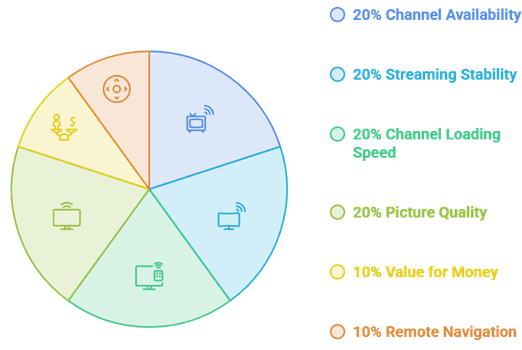
Live TV apps are only useful when channels load quickly and streams remain stable during busy viewing hours. I installed every app on a Fire TV Stick 4K Max and watched real live channels instead of relying on feature lists, promotional claims, or app store descriptions.
- Channel availability: Whether popular live channels were available and current.
- Streaming stability: How well streams performed during peak viewing hours.
- Channel loading speed: How quickly a channel opened from the TV guide.
- Picture quality: Whether the video remained clear without frequent buffering or freezing.
- Value for money: How the channel selection and performance compared with the price.
- Remote navigation: How easily I could browse menus, switch channels, and use the guide with a standard Firestick remote.
These tests helped me rank the apps based on real viewing performance rather than advertised features alone.
Free vs Paid Live TV Apps: What You Actually Get
Free live TV apps are far better than people expect, but they share one hard limit. Pluto TV, Plex, Tubi, and Xumo give you hundreds of channels for nothing, yet none carry your local ABC, CBS, NBC, or Fox stations. That is precisely what a paid subscription buys, so the right choice depends on whether you need locals.
- What Free Apps Give: free FAST apps deliver news, sport, movies, and 24/7 themed channels, which is more live variety than most people expect.
- What Free Apps Lack: no free FAST app carries live local network channels, because those rights cost far more than advertising covers.
- When Paying Makes Sense: if you want locals, live sport, or a cloud DVR, a subscription like Sling or YouTube TV earns its cost.
- The Sensible Mix: pair one free FAST app with an antenna or a cheap Sling plan, and you cover almost every live viewing need.
- IPTV Is A Third Route: a legitimate IPTV subscription played through a player app can fill channel gaps the mainstream services leave.
Do You Need an IPTV Subscription for Live TV?
Not necessarily, but it is one of three routes to live TV, and it is worth understanding how it differs. Free FAST apps and paid services like Sling stream channels directly, while player apps such as Kodi and IPTV Smarters need a separate IPTV subscription to feed them channels. Our guide to the best IPTV for Firestick covers that route in full.
- Player Versus Service: a player app like IPTV Smarters supplies no channels itself and needs an IPTV subscription to work.
- Direct Apps Need Nothing: Pluto, Tubi, Sling, and YouTube TV stream their own channels, so no separate IPTV subscription is required.
- Xtream Codes Or M3U: most IPTV subscriptions provide an M3U URL or Xtream Codes login that you paste into your chosen player.
- Check Reliability First: IPTV providers vary hugely, so choose one with a free trial before committing any money to a plan.
- Antenna Alternative: a cheap indoor antenna adds free local channels, which pairs neatly with free FAST apps for a complete lineup.
Beating Buffering and Regional Blackouts
Two things ruin live TV on a Firestick more than anything else: buffering during peak hours and regional blackouts that hide the channel you want. A VPN helps with both, and it also unlocks region-limited catalogues on some services. Our roundup of the best VPNs for Firestick compares the fastest options.
- Why Blackouts Happen: broadcasters sell local rights separately, so live services deliberately hide channels in the market a local station owns.
- Stopping ISP Throttling: a VPN hides your streaming traffic, which can stop the throttling that causes buffering during busy evening hours.
- Switching Your Region: connecting to another region can restore a hidden channel, since the service then treats you as an out-of-market viewer.
- Use A Wired Link: an Ethernet adapter beats Wi-Fi for live TV, because live channels tolerate a weak signal far less than on-demand video.
- Pick A Fast Server: choose a nearby, high-speed VPN server, because live TV is far less forgiving of latency than recorded content.
Are Free Live TV Apps Legal and Safe?
The apps in this guide are all fully licensed, which is deliberate. The free live TV APKs people usually sideload restream copyrighted channels without permission, and that is where the malware and legal grey area come from. Choosing licensed apps costs you a little coverage but removes the risk entirely, so it is always the safer route.
- These Apps Are Licensed: Pluto TV, Plex, Tubi, Xumo, Sling, and YouTube TV all pay for their channels, so watching them is completely legal.
- Unofficial APKs Are Not: free live TV APKs restream channels without permission, sitting in a legal grey area that varies by country.
- The Real Danger: the bigger practical risk with sideloaded APKs is malware and fake buttons, which is why official sources matter so much.
- Kodi Sits In Between: Kodi itself is legal, but the IPTV playlist you load into it may not be, so run a VPN.
- Protect Your Details: only ever buy an IPTV subscription through secure payment methods, and never share card details with unknown sellers.
Verdict:
After watching real channels through all eight on a Fire TV Stick, the best live TV app depends on whether you need local networks and how much you want to spend. For most cord-cutters wanting reliable live channels, these three consistently deliver the strongest experience.
- Sling TV: the best-value paid option, with real cable channels, a cloud DVR, and flexible Orange and Blue plans for roughly half the usual price.
- YouTube TV: the fullest channel lineup, with reliable locals, unlimited DVR, and multi-view for households that want everything in a single app.
- Pluto TV: the best genuinely free live TV, with hundreds of channels and a familiar cable-style guide that costs nothing at all.
FAQs
What is the best live TV app for Firestick in 2026?
Sling TV is the best overall paid option because it delivers real cable channels and a cloud DVR for roughly half the price of rivals. If you want the fullest lineup with reliable local networks, YouTube TV is stronger. For a free option, Pluto TV leads with hundreds of channels.
Are there free live TV apps for Firestick?
Yes. Pluto TV, Plex, Tubi, and Xumo Play all stream live channels free and legally with ads. They cover news, sport, movies, and 24/7 themed channels, though none carry your local ABC, CBS, NBC, or Fox stations, which only paid services and an antenna provide.
Can I watch local channels free on Firestick?
Free apps rarely carry live local networks. The cheapest way to get them free is a small indoor antenna paired with a compatible tuner, or you can use a paid service like YouTube TV or Sling, which include local ABC, CBS, NBC, and Fox in most markets.
Do I need a VPN for live TV apps on Firestick?
A VPN is not required for these legal apps, but it helps considerably. It can stop ISP throttling that causes buffering, bypass some regional blackouts, and keep your streaming private. It is strongly recommended if you play an IPTV subscription through a player app like Kodi or IPTV Smarters.
Which live TV app has the best channel guide?
YouTube TV has the most polished guide with reliable EPG data and unlimited DVR, while Sling TV offers a strong guide at a lower price. Among free apps, Pluto TV and Xumo Play both replicate a familiar cable-style scrolling guide that feels like traditional television.