Key Takeaway: MoviesJoy is barely functional in 2026, so I switched to alternatives that actually load and stay online. Tubi is my top legal pick, Goku delivers clean no-signup HD streaming, and FlixHQ carries a huge library. For grey sites, always run a VPN and choose the highest-quality source available.
By 2026, MoviesJoy is mostly a broken shell: empty playlists, dead links, constant downtime, and ISP blocks, with a swarm of copycat clones muddying every search result.
I spent a week loading each option on my Fire TV Stick, testing playback, buffering, and how often mirrors died mid-movie. The picks below are the ones that actually opened, streamed in real HD, and kept working across multiple nights of testing without vanishing.
Best MoviesJoy Alternatives in 2026: My Top Picks
| App / Site | Best For | Content Focus | Get Started |
|---|---|---|---|
| Tubi | Best overall free replacement | Movies, TV, some anime | Visit Site |
| Goku | Clean no-signup HD streaming | Movies & TV series | Visit Site |
| FlixHQ | Big HD movie/TV library | Movies & TV series | Visit Site |
| Pluto TV | Live channels + on-demand | Movies, TV, FAST channels | Visit Site |
| TinyZone | Fast mobile-friendly streaming | Movies & TV series | Visit Site |
1) Tubi
Tubi is my top overall replacement for MoviesJoy because it is completely legal, free, and stocked with roughly 300,000 movies and TV episodes. Fox owns it, so the catalog is licensed and the streams never vanish. On my Fire TV Stick it loaded instantly, played in clean HD, and needed no account to start watching.
Features:
- Licensed library: Fox holds real distribution rights, so every title streams legally without the takedown risk that plagues grey clone sites.
- Huge catalog: Roughly 300,000 movies and shows span new studio releases, cult classics, documentaries, and a surprisingly deep anime and horror section.
- Fire TV app: I installed the native app straight from the Amazon Appstore, and it ran smoother than any MoviesJoy mirror ever did.
- No account: Playback starts immediately with zero signup, so you avoid the email and password walls newer free sites keep adding.
- Ad model: Short commercial breaks fund the service, running roughly like broadcast television rather than the misleading popup ads on pirate mirrors.
- Tubi originals: The platform now produces its own exclusive films and series, giving you titles you cannot legally stream anywhere else free.
- Kid safety: A dedicated Tubi Kids mode with parental controls keeps younger viewers inside an age-appropriate, ad-light corner of the catalog.
| Pros | Cons |
| Completely legal and free | Ad breaks during playback |
| Massive 300,000-title library | No live sports channels |
| No signup to watch | Catalog rotates monthly |
| Reliable HD with no downtime | US library differs abroad |
Pricing:
- Free forever — Tubi charges nothing and never asks for a credit card.
- Ad-supported — short commercials replace any subscription fee across the entire catalog.
- No premium tier — every movie and show is unlocked for all users.
Link: https://tubitv.com/
2) Goku
Goku recreates MoviesJoy’s old experience done right: a clean, no-signup interface streaming movies and TV series in genuine HD quality. In my testing it loaded fast with far fewer redirects than most clones. Because domains rotate between goku.sx and goku.to, bookmark the live mirror and keep a VPN running for steady, private access.
Features:
- Clean interface: The layout stays minimal and poster-driven, with no flashing banners crowding the player, a rarity among free grey streaming sites.
- No signup: You stream instantly without creating an account, entering an email, or clearing any registration wall before the movie plays.
- HD playback: I streamed several new releases at 1080p on my Fire TV Stick, and the picture held sharp without constant buffering.
- Fast servers: Multiple hosting sources sit behind each title, so if one link stalls you can switch and keep watching quickly.
- Search and browse: Genre filters, release-year sorting, and a responsive search bar make finding any specific film quick, smooth, and genuinely painless.
- Subtitles included: Most titles ship with selectable English subtitles baked into the player, which helps with quieter dialogue or foreign films.
- Mirror rotation: When goku.sx goes down the catalog reappears on goku.to, so the service survives ISP blocks that killed MoviesJoy.
| Pros | Cons |
| Clean, ad-light interface | Domains rotate frequently |
| No account required | Occasional popup redirects |
| Reliable 1080p streams | Legally grey streaming source |
| Fast mirror switching | No official Firestick app |
Pricing:
- 100% free — Goku never charges or asks for payment details.
- Ad-supported — occasional video and popup ads fund the free streams.
- No paid tier — the full library is open without any upgrade.
Link: https://goku.sx/
3) FlixHQ
FlixHQ carries one of the biggest HD movie and TV libraries in the grey streaming space, which is why it lands third. The catalog spans blockbusters, boxsets, and older seasons most free sites drop. Mirrors rotate around flixhq.to, so links occasionally break. When a mirror was live it streamed cleanly on my Fire TV Stick with solid 1080p.
Features:
- Massive library: Tens of thousands of movies and complete TV boxsets sit in one catalog, dwarfing what MoviesJoy offered at its peak.
- HD quality: Most mainstream titles offer 720p or 1080p sources, and popular films frequently list multiple streaming servers at several different resolutions.
- TV boxsets: I binged a full drama season without hunting for missing episodes, since FlixHQ keeps complete runs organized by series.
- Multiple servers: Each title lists several backup hosts, so a dead link rarely ends your session, you simply pick another source.
- Subtitle support: Built-in subtitle tracks cover most major languages and can be toggled inside the player without downloading any separate files.
- Clean layout: Poster grids, genre tabs, and trending rows make browsing feel like a paid platform rather than a spammy pirate page.
- Frequent updates: New cinema releases and current TV episodes appear quickly after they leak online, keeping the whole library feeling genuinely current.
| Pros | Cons |
| Enormous HD library | Mirrors break without warning |
| Multiple backup servers | Popup ads on clicks |
| Complete TV boxsets | Legally grey source |
| Fast release updates | No official app |
Pricing:
- Free, ad-supported — FlixHQ costs nothing and requires no account.
- Ad-supported — popup and banner ads fund every free stream.
- No premium plan — the entire catalog stays fully unlocked.
Link: https://flixhq.to/
4) Pluto TV
Pluto TV, owned by Paramount, blends 250-plus live FAST channels with a big on-demand vault of movies and shows, all completely legal and free. It mimics traditional cable, so you can lean back and channel-surf. On my Fire TV Stick the official app installed in seconds and streamed live channels without a single buffering stall.
Features:
- Live channels: Over 250 FAST channels run 24/7 across movies, news, sports, and niche themes, recreating a full cable-style lineup for free.
- On-demand vault: Beyond live TV, thousands of movies and full series sit ready to stream whenever you want to pick something specific.
- Channel surfing: I left it running like background cable, flipping between old sitcoms and action movies without ever picking a single title.
- No signup: The service streams instantly with no account, no email, and no payment details required at all to start watching anything.
- Program guide: A familiar scrolling TV guide shows what is playing now and next, making the whole experience feel exactly like cable.
- Paramount catalog: Ownership means licensed content from major studios, including recognizable shows and films that pirate clones often cannot host reliably.
- Official app: The native Fire TV listing installs straight from the Amazon Appstore, with no sideloading, APK risk, or mirror hunting.
| Pros | Cons |
| Legal and totally free | Ads even on demand |
| 250-plus live channels | No pause on live |
| Official Firestick app | Catalog smaller than rivals |
| Great cable replacement | Channels can feel repetitive |
Pricing:
- Free forever — Pluto TV never charges and needs no card.
- Ad-supported — commercial breaks run on live channels and on-demand titles.
- No paid upgrade — every channel and movie is fully unlocked.
Link: https://pluto.tv/
5) TinyZone
TinyZone earns its spot for speed: a lightweight, mobile-friendly grey site that loads movies and TV series fast, even on modest connections. The interface stays simple and the streams are usually clean HD. Because it is blocked in some regions and the domain shifts, pairing it with a VPN kept access steady during testing.
Features:
- Fast loading: The stripped-down pages open almost instantly, so browsing and starting a stream feels quicker than most heavier grey rivals.
- Mobile-friendly design: The responsive layout scales neatly to any screen, which also translates into a tidy, remote-navigable view on a Fire TV browser.
- HD streams: I watched a couple of recent releases in crisp 1080p, and playback held steady without the endless spinning I feared.
- Simple search: A clean search bar and basic genre lists make finding a specific title straightforward, without cluttered menus slowing you down.
- No account: Streaming starts with zero registration, so there is no email capture or password wall standing between you and playback.
- Backup servers: Several source links accompany most titles, letting you jump to another host the moment one stream stutters or dies.
- Regular updates: Fresh movies and new episodes get added soon after release, keeping the catalog surprisingly current for such a lightweight site.
| Pros | Cons |
| Very fast page loads | Blocked in some regions |
| Lightweight, low-data streaming | Domain changes often |
| No account needed | Popup ads present |
| Usually reliable HD | Legally grey status |
Pricing:
- Completely free — TinyZone never asks for money or card details.
- Ad-supported — popup ads fund the free, no-account streaming.
- No premium tier — every title is available to everyone free.
Link: https://tinyzone.to/
6) Plex
Plex is best known as a personal media server, but its free, ad-supported side offers thousands of licensed movies, TV shows, and live FAST channels at no cost. It is fully legal with an official Fire TV app. In my testing the free catalog loaded reliably, and one app neatly handled both streaming and personal files.
Features:
- Free catalog: Thousands of licensed on-demand movies and shows stream free with ads, no Plex Pass or subscription required at all.
- Live FAST channels: Hundreds of free ad-supported streaming channels cover movies, news, and niche genres, giving Plex a genuine cable-like backbone.
- Media server: I pointed Plex at my own downloaded files, and it streamed my personal library to the Firestick alongside the free catalog.
- Official app: A polished, native Fire TV app installs from the Amazon Appstore, so no sideloading or sketchy mirror hunting is needed.
- Cross-device sync: Your watch progress and library follow you between phone, laptop, and Firestick, resuming a movie exactly where you paused it.
- Clean interface: The polished, poster-rich layout feels like a premium paid service, with none of the popup clutter grey sites carry.
- Easy start: A free account unlocks the full ad-supported catalog in minutes, and there is never a credit card requested upfront.
| Pros | Cons |
| Legal and free | Free account needed |
| Doubles as media server | Ads on free tier |
| Official Firestick app | Interface can overwhelm beginners |
| Live FAST channels included | Best features behind Plex Pass |
Pricing:
- Free with optional Plex Pass — core streaming costs nothing.
- Ad-supported free tier — movies and FAST channels stream at no charge.
- Plex Pass optional — a paid upgrade adds DVR, downloads, and extras.
Link: https://www.plex.tv/
7) Movie4k
Movie4k is the grey site I turn to for depth: its back-catalog browsing digs up older films, foreign titles, and obscure series that mainstream free apps simply do not carry. It streams movies and TV in HD when servers cooperate. The domain hops often, so expect to chase the current mirror and keep a VPN switched on.
Features:
- Deep back-catalog: The library reaches well beyond new releases into decades of older films and cult titles most free sites quietly ignore.
- Foreign titles: International cinema, from European dramas to Asian action, appears in real depth, giving the catalog a genuinely global reach.
- Rare finds: I tracked down a 1980s cult film that three other free sites had dropped, and Movie4k streamed it in decent quality.
- Genre browsing: Detailed genre, year, and country filters make digging through the deep catalog manageable instead of overwhelming when you explore.
- HD sources: When a healthy server is online, mainstream titles play in 720p or 1080p rather than the grainy rips clones offer.
- No signup: Streaming needs no account or email, so you can search, click, and watch without handing over any personal information.
- Mirror hopping: Frequent domain changes are annoying but also how Movie4k dodges ISP blocks, keeping the catalog alive when clones disappear.
| Pros | Cons |
| Huge back-catalog depth | Domain hops constantly |
| Strong foreign film selection | Server quality varies |
| No account required | Frequent popup ads |
| Good genre filtering | Legally grey source |
Pricing:
- Free, ad-supported — Movie4k charges nothing to stream anything.
- Ad-supported — popup and redirect ads bankroll the free library.
- No paid tier — the whole catalog is open without upgrades.
Link: https://movie4k.to/
8) Prime Video (Watch for Free)
Prime Video’s Watch for Free section is the Firestick-native option that absorbed Amazon Freevee in 2025. It streams thousands of movies, TV shows, and former Freevee originals free with ads, no Prime membership needed. Since it is already built into your Fire TV home screen, I found it the lowest-effort, most reliable free source on this entire list.
Features:
- Firestick-native: The free section lives right inside the Prime Video app already on your Fire TV, so nothing extra needs installing.
- No Prime needed: The Watch for Free catalog streams without a paid Prime subscription, funded entirely by short ad breaks instead.
- Freevee originals: I streamed a few ex-Freevee exclusive series here that I could not find free on any grey MoviesJoy clone.
- Licensed quality: Because Amazon holds the rights, streams play in stable HD with proper audio, no dead links or mislabeled files.
- Familiar interface: Free titles use the same polished Prime Video player and remote controls you already know, with no learning curve involved.
- Watchlist support: You can add free films to your Amazon watchlist and resume them later across any device signed into your account.
- Safe and legal: There is genuinely zero malware risk or piracy exposure, since everything streams through Amazon’s own official, fully licensed infrastructure.
| Pros | Cons |
| Already on your Firestick | Smaller than paid Prime |
| No Prime subscription needed | Ads interrupt playback |
| Fully legal and safe | Free titles rotate out |
| Rock-solid HD streams | Upsells to paid rentals |
Pricing:
- Free, no Prime required — the Watch for Free section costs nothing.
- Ad-supported — short commercial breaks replace any subscription fee.
- Optional Prime — a paid membership adds the larger premium catalog separately.
Link: https://www.amazon.com/
9) Hurawatch
Hurawatch is the grey site to check first for newer releases: fresh movies, current TV episodes, and anime often land here fast, all with no signup. Streams are usually HD. The catch is volatility, mirrors multiply and the real domain gets confusing, so I stuck to the verified link and kept a VPN active throughout testing.
Features:
- Newest releases: Recently released films and same-week TV episodes appear here faster than on almost any other free grey streaming site.
- Anime section: Beyond movies and TV, a solid anime library with subbed and dubbed options gives fans a genuine reason to visit.
- Fast additions: I found a film still in theaters listed within days, and the stream I opened played in watchable HD.
- No signup: You stream immediately with no registration or email, so there is no barrier between searching and starting a movie.
- Subtitles built in: Selectable subtitle tracks come attached to most titles, which is especially handy for the subbed anime and foreign films.
- Multiple servers: Each title offers several playback sources, so when the first stream stalls you can switch hosts and continue watching.
- Verify the mirror: Copycat clones impersonate Hurawatch, so confirming the real domain before streaming protects you from the sketchiest fake lookalike pages.
| Pros | Cons |
| Fastest new releases | Very volatile mirrors |
| Solid anime library | Confusing fake clones |
| No signup needed | Frequent popup ads |
| Multiple streaming servers | Legally grey source |
Pricing:
- Free, ad-supported — Hurawatch never charges for streaming.
- Ad-supported — popup and banner ads fund the free catalog.
- No paid tier — every title streams free without any upgrade.
Link: https://hurawatch.cc/
10) Flixtor
Flixtor rounds out the list with a curated, boutique feel: instead of dumping everything, it highlights a tighter selection of popular movies and TV series that feels almost exclusive. Streams are typically clean HD. Like its peers, domains rotate, so the live mirror changes. Once I found the current one, playback on the Firestick was smooth and quick.
Features:
- Curated selection: Rather than an endless dump, Flixtor spotlights popular, well-reviewed titles, so browsing feels intentional instead of overwhelming or spammy.
- HD streams: Featured movies and series generally play in crisp 1080p, with fewer low-quality rips than the sprawling catch-all grey sites carry.
- Polished feel: I clicked through a clean, poster-driven layout that felt closer to a paid streaming app than a throwaway pirate mirror.
- No signup: Streaming starts without registration or email, so you skip the account walls and jump straight into a featured title.
- Fast playback: On a live mirror, streams load quickly and buffering stays minimal, which makes it comfortable for a full movie night.
- Subtitles included: Most featured titles carry selectable subtitle tracks in the player, so foreign films and quiet dialogue stay easy to follow.
- Rotating mirrors: Domains shift to survive takedowns, so the trade-off for reliability is checking for the current, verified Flixtor address before streaming.
| Pros | Cons |
| Curated, quality selection | Smaller overall library |
| Clean, app-like interface | Domains rotate often |
| Reliable 1080p streams | Popup ads appear |
| No account required | Legally grey source |
Pricing:
- Completely free — Flixtor never asks for payment or card details.
- Ad-supported — occasional popup ads fund the curated free library.
- No premium tier — the full selection streams without any upgrade.
Link: https://flixtor.to/
What Happened to MoviesJoy in 2026?
MoviesJoy was never a single stable site, and by 2026 the original is effectively gone. What survives is a rotating mess of copycat domains that flicker online for days then die. When I loaded the best-known mirrors, most served empty playlists, dead links, or endless buffering, and ISP blocks made even those hard to reach.
- Empty playlists: Many titles now open to blank players with no working video source behind them.
- Dead links: Clicking a movie frequently leads to broken hosts, error pages, or infinite loading spinners.
- ISP blocks: US and UK providers now block the main domains, forcing constant mirror hunting.
- Clone swarm: Dozens of fake MoviesJoy copies now compete in search, many packed with malware.
- Frequent downtime: Even working mirrors vanish within days, so no single link stays reliable for long.
How Did We Test These MoviesJoy Alternatives?
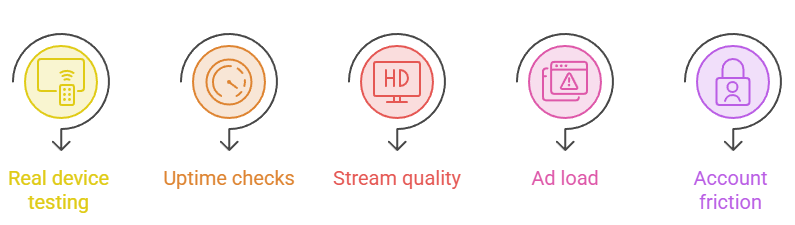
I didn’t just collect names from other lists. Every service here went onto my actual Fire TV Stick, where I judged load times, stream quality, ad load, and whether the site survived a week.
- Real device testing: Every site loaded directly on my Fire TV Stick, never a phone browser.
- Uptime checks: I revisited each mirror across several days to confirm it stayed reachable.
- Stream quality: Resolution, buffering, and audio sync were compared on a real living-room television.
- Ad load: I noted redirect pop-ups, fake download buttons, and how intrusive ads felt.
- Account friction: Each service was checked for forced signups, payment walls, or personal-data demands.
Which Free Movie Sites Work Without an Account?
One reason MoviesJoy felt convenient was that it never demanded a login, and the best replacements keep that no-signup habit. Several picks on this list let you search, click, and stream instantly, with no email, password, or payment wall in the way. In my testing, these were the ones that started playback the fastest.
- Tubi: Streams roughly 300,000 legal titles instantly, with no account or payment ever required.
- Goku: Loads clean HD movies and shows immediately, with zero registration or email capture.
- Pluto TV: Delivers 250-plus live channels and on-demand titles without any signup or login step.
- FlixHQ: Opens its huge HD library straight to playback, no account creation needed at all.
- Prime free section: Streams the Watch for Free catalog with no Prime signup required.
Are MoviesJoy Alternatives Safe to Use?
Safety depends entirely on which type of site you pick. The legal services here, Tubi, Pluto TV, Plex, and Prime’s free section, are completely safe with official Firestick apps. The grey sites carry real risks: aggressive popups, fake download buttons, and clone domains hiding malware. In my testing, a VPN and ad-blocker made them safer. For more picks, see our guide to the best SolarMovie alternatives.
- Legal picks: Tubi, Pluto TV, Plex, and Prime’s free tier carry no malware or piracy risk.
- Use a VPN: On grey sites, a VPN hides your activity and reduces exposure to blocks.
- Block popups: An ad-blocker stops most fake buttons and redirect ads that grey mirrors push.
- Never download: Stream only, and ignore any prompt asking you to install apps or codecs.
- Verify domains: Confirm the real mirror before streaming, since clone lookalikes often hide the worst malware.
Why a VPN Helps When Streaming Free Movies
A VPN is the single upgrade that changed my free-streaming experience most. On grey sites it hides what you are watching from your ISP, sidesteps the domain blocks that broke MoviesJoy, and can unlock geo-restricted titles. Even on legal apps like Tubi, it stops throttling and keeps your viewing private.
- Hides activity: Your ISP cannot see which movies or grey sites you actually stream.
- Beats blocks: A VPN routes around the ISP domain blocks that made MoviesJoy unreachable.
- Stops throttling: Masking your traffic can prevent providers from deliberately slowing your video streams down.
- Unlocks regions: Switching servers opens geo-locked libraries on Tubi, Pluto TV, and grey sites alike.
- Adds privacy: Encryption keeps your streaming habits private on shared, public, or home Wi-Fi networks.
Verdict:
After a week of loading every option on my Fire TV Stick, three rose above the rest for reliability, quality, and how rarely they broke. If MoviesJoy left you stranded, start with these before touching any other clone.
- Tubi: The best overall pick: legal, free, 300,000 titles, and rock-solid HD that never vanished mid-movie during testing.
- Goku: My favorite grey option: clean, no-signup HD streaming that loaded fast with far fewer redirects than rival clones.
- FlixHQ: The library heavyweight: a huge HD movie and TV boxset catalog with multiple backup servers per title.
FAQs
What is the best MoviesJoy alternative in 2026?
Tubi is the best overall alternative in 2026. It is completely legal, needs no account, and streams roughly 300,000 movies and shows in reliable HD. For grey-area picks, Goku and FlixHQ topped my testing for quality and uptime.
Is MoviesJoy still working in 2026?
Barely. The original MoviesJoy is effectively dead, and surviving clones flicker on rotating domains with empty playlists, dead links, and downtime. Even when a mirror loads, ISP blocks and buffering make it unreliable, so switching alternatives is smarter.
Are free MoviesJoy alternatives legal?
It depends. Tubi, Pluto TV, Plex, and Prime Video’s free section are fully legal and licensed. Grey sites like Goku, FlixHQ, and Hurawatch operate in a legal grey area, so I always run a VPN when using them.
Do these alternatives work on Firestick?
Yes. Tubi, Pluto TV, Plex, and Prime’s free section have official Fire TV apps. The grey sites run through a sideloaded browser like Silk or a Downloader-installed one, which I tested and confirmed streams smoothly.
Which free alternative has the newest movies?
For the freshest releases, Hurawatch adds new films and current TV episodes fastest among the grey sites. FlixHQ and Flixtor also update quickly. For legal options, Tubi and Prime’s free section rotate in newer titles regularly, though later. You may also like our best 123Movies alternatives guide.