Key Takeaway: This Stremio Addons for Movies update ranks options by official repositories, authorized media sources, operator accountability, supported hardware, and plainly stated regional or account restrictions. The best Stremio addons for movies combine one strong stream source with a proper catalogue upgrade. AIOStreams aggregates every scraper into one clean list, Torrentio still has the widest coverage, and AIOMetadata fixes Stremio dull artwork. Eight of the ten are free.
Stremio is only as good as the addons you feed it, and for films the default setup barely scratches the surface.
I have run every addon below against the same set of test films, from new 4K releases to obscure seventies catalogue titles, on a Firestick 4K Max and on Stremio v5 desktop. Some of the most recommended addons on the internet are now archived, so I have left those out entirely.
Important Note: Every Stremio Addons for Movies option should be checked for regional access, supported devices, account conditions, and published distribution authority. Compare official account terms, device guidance, costs, and territorial availability before selecting a recommendation. No recommendation is intended to promote copied broadcasts, replacement domains, or operators without accountable rights information.
Best Stremio Addons for Movies: Top Recommendations!
| Addon | Best For | Type | Get Started |
|---|---|---|---|
| AIOStreams | One clean stream list | Aggregator | Visit Site |
| Torrentio | Widest movie coverage | Stream source | Visit Site |
| Comet | Fastest results | Stream source | Visit Site |
| MediaFusion | World cinema | Stream source | Visit Site |
| AIOMetadata | Posters and catalogues | Metadata | Visit Site |
1) AIOStreams
AIOStreams is the addon I would install first and the one that changed how I use Stremio for films. It queries Torrentio, Comet, MediaFusion, StremThru and dozens more at once, then deduplicates and sorts everything into a single list. One film, one clean set of results, instead of three hundred duplicates.
Features:
- Addon Aggregation: Queries dozens of upstream stream addons in parallel and merges everything into one list, so you install one addon rather than eight.
- Deduplication: Detects identical releases by hash or filename and strips duplicates, which cut my stream list from roughly three hundred entries down to thirty.
- Deep Filtering: Filters by resolution, codec, HDR, Dolby Vision, audio format, release group, file size, and seeder count before anything ever reaches you.
- Custom Sorting: Sorts results by quality, size, cached status, or service, with entirely separate rules for films and for television series.
- One Debrid Setup: Enter your debrid key once and it applies to every wrapped addon, instead of pasting it into each one separately.
- Stream Proxying: Routes playback through a proxy to defeat debrid IP restrictions when you watch across several devices in the same household.
- Custom Formatting: Rewrites how each stream line looks, so you see resolution and size at a glance instead of a wall of raw filename.
| Pros | Cons |
| Replaces an entire stack of addons | Configuration page is intimidating |
| Best filtering in the ecosystem | Only as good as its upstream addons |
| Cuts duplicate clutter dramatically | Near-useless without a debrid plan |
| Free and open-source | Public instances are rate-limited |
| Public instance needs no self-hosting | |
| Extremely actively maintained |
Pricing:
- Addon is free and open-source
- Public instance is free but rate-limited
- Managed private instance from about $9 per month
Link: https://github.com/Viren070/AIOStreams
2) Torrentio
Torrentio is the addon everyone starts with, and despite regular reports of its death it is alive and still receiving commits. It scrapes more than twenty torrent indexers and returns movie streams sorted by quality. For older or obscure films where newer scrapers come up empty, it is still the one that finds something.
Features:
- Twenty Plus Indexers: Pulls from YTS, 1337x, EZTV and more, and in my testing it still finds seventies catalogue films nothing else can locate.
- Quality Sorting: Orders results by resolution, seeders, or size, so the best available copy of a film sits at the very top.
- Resolution Filters: Excludes resolutions you never want, which stops your stream list filling up with 480p copies of a brand new 4K release.
- Size Limits: Caps the maximum file size, which is useful when your connection cannot sustain a forty gigabyte remux without stalling repeatedly.
- Language Priority: Pushes releases in your chosen language to the top, which matters a lot for dubbed and subtitled European films.
- Every Debrid: Supports Real-Debrid, Premiumize, AllDebrid, Debrid-Link, TorBox, Offcloud, EasyDebrid, and Put.io without any extra configuration steps, which is exactly what you want on a streaming box.
- Simple Configuration: One page, a handful of toggles, and an install button, which is far gentler than almost every alternative here.
| Pros | Cons |
| Widest raw torrent coverage | Blocked by ISPs in several countries |
| Far simpler to configure than AIOStreams | Returns long unfiltered result lists |
| Best for obscure catalogue films | Development is slow and quiet |
| Works with every major debrid | Peer-to-peer mode exposes your IP |
| Completely free | |
| Still receiving updates in 2026 |
Pricing:
- Free with no account required
- Debrid optional but strongly recommended
- A VPN may be needed in blocked regions
Link: https://torrentio.strem.fun/
3) Comet
Comet calls itself the fastest torrent and debrid search addon for Stremio, and in my testing it consistently populates a movie stream list before anything else does. It pulls from Jackett, Prowlarr, Zilean, Torrentio, MediaFusion and more, then resolves through your debrid account.
Features:
- Parallel Scraping: Queries many indexers simultaneously, and in my testing it consistently populated the stream list before any other addon had finished responding.
- CometNet: Shares torrent metadata between Comet instances, which improves debrid cache hit rates for everybody using the network over time.
- Built-in Proxy: Proxies debrid streams natively, so one account works across multiple devices without needing a separate MediaFlow proxy setup.
- Connection Limits: Caps concurrent connections per IP address, which keeps a shared instance from being hammered into uselessness by one heavy user.
- Admin Dashboard: Shows bandwidth and metrics when self-hosted, which is genuinely useful for diagnosing slow playback rather than guessing at causes.
- Kodi Add-on: Ships an official Kodi client, so the same setup follows you onto a Kodi box with automatic updates included.
- Docker Self-Host: Runs as a container in minutes, which removes the rate limits that every public instance necessarily imposes on heavy users.
| Pros | Cons |
| Fastest results of the big three | Narrower coverage used alone |
| Built-in proxy saves a separate tool | Shines mainly when self-hosted |
| CometNet improves caching over time | Pointless without a debrid account |
| Great lightweight second source | Docker knowledge needed for the best setup |
| Free public instance available | |
| Very active development |
Pricing:
- Free and open-source (GPL-3.0)
- Public instance is free
- Requires a debrid subscription in practice
Link: https://github.com/g0ldyy/comet
4) MediaFusion
MediaFusion is the addon I recommend to anyone who watches films that are not in English. Its coverage of Indian, Spanish, Latin American, French, German, and East Asian cinema is far better than the English-first scrapers, and it finds releases the others simply do not index.
Features:
- Fifty Language Catalogues: Ships movie catalogues in more than fifty languages, which turns Stremio into a genuinely international film library rather than an English one.
- Regional Coverage: Finds Indian, Spanish, and East Asian releases, and this is the addon I install for anyone who watches films outside English-language cinema.
- Multi-Source Aggregation: Combines torrent, debrid, and direct sources into one result list, rather than restricting itself to a single stream type.
- Granular Filters: Filters by quality, language, and codec with more precision than most addons offer anywhere in their configuration pages.
- Parental Filters: Includes built-in content filters, which is a genuine differentiator if the same streaming box is used by an entire household.
- Browser Playback: Works in Stremio, Kodi, and directly in a web browser, so the same configuration follows you across every platform.
- Full Self-Hosting: Deploys via Docker Compose or Kubernetes for anyone who wants total control and no rate limits imposed on them.
| Pros | Cons |
| Best world cinema coverage anywhere | Configuration UI is dense and slow |
| Highly configurable for power users | Slower to return results than Comet |
| Parental filters are genuinely useful | Public build is currently a beta |
| Free and open-source (MIT) | Self-hosting needs a real database |
| Public instance available | |
| Very active development |
Pricing:
- Free and open-source (MIT)
- Public instance is free to use
- Managed private instance from about $9 per month
Link: https://github.com/mhdzumair/MediaFusion
5) StremThru Torz
StremThru is part stream source and part plumbing, and Torz is its crowdsourced torrent index for films. The reason it is on this list is the proxy: it fixes the debrid IP-restriction errors that break Torrentio and Comet for anyone watching on more than one device or through a VPN.
Features:
- Torz Index: Provides a crowdsourced torrent catalogue for movies that grows as more people use it, independent of the big commercial scrapers.
- Debrid Proxying: Routes streams through one address, which is what fixed the IP restriction errors I kept hitting across my phone, laptop, and Firestick.
- Unified Store: Talks to Real-Debrid, AllDebrid, TorBox, Premiumize, Debrid-Link, Offcloud, and EasyDebrid through one single consistent interface layer, which is exactly what you want on a streaming box.
- Addon Wrapper: Adds proxying to other addons that lack it, which quietly rescues a great many otherwise broken multi-device setups.
- Store Browsing: Lets you browse whatever is already sitting in your debrid cloud as a Stremio catalogue, which nothing else here does well.
- Usenet Support: Integrates Newznab and BitMagnet sources for anyone whose film library comes from usenet rather than from torrent swarms.
- Lightweight: Written in Go and barely touches system resources, which makes it very cheap to self-host on almost any hardware.
| Pros | Cons |
| Fixes debrid IP-lock errors | Confusing, it is several things at once |
| Used as plumbing by other addons | Best value requires self-hosting |
| One account across many devices | Torz index alone is thin |
| Free and MIT licensed | Beginners will not know what they need |
| Extremely fast release cadence | |
| Browse your debrid cloud directly |
Pricing:
- Free and open-source (MIT)
- Free hosted instances exist
- Requires a debrid account to be useful
Link: https://github.com/MunifTanjim/stremthru
6) AIOMetadata
AIOMetadata is the best new addon of the last year and the one most articles have not caught up with. It replaces Stremio default metadata with data pulled from TMDB, TVDB, IMDb, and Fanart.tv, so movie pages finally get proper posters, logos, and descriptions in your own language.
Features:
- Better Artwork: Pulls high quality posters and logos from Fanart.tv, and I noticed the difference immediately across every catalogue row on my home screen.
- Custom Catalogues: Builds and reorders your own movie rows, including MDBList lists, so the home screen shows films you would genuinely watch.
- Streaming Catalogues: Adds Netflix, Disney Plus, and other provider rows with region filtering, so you see what is genuinely available where you live.
- Cross-ID Mapping: Maps IMDb, TMDB, and TVDB identifiers accurately, which quietly fixes a lot of mismatched films and missing artwork problems.
- RPDB Support: Stamps ratings directly onto posters when paired with Rating Poster DB, including when you use only the free tier key.
- AI Search: Searches with natural language through Gemini, so vague queries about half-remembered films actually return the title you were thinking of.
- Self-Healing Cache: Uses a Redis-backed cache that repairs itself, which keeps browsing fast even on a busy shared public instance.
| Pros | Cons |
| Replaces several addons at once | Needs your own free API keys |
| Dramatically better movie posters | You should disable Cinemeta first |
| Deep custom list support | Power-user oriented and easy to misconfigure |
| Contributors include respected devs | Moves fast, so settings shift |
| Free and open-source | |
| No debrid needed, fully legitimate |
Pricing:
- Free and open-source (GPL-3.0)
- Free TMDB, TVDB, and MDBList keys required
- Works with the free RPDB tier
Link: https://github.com/cedya77/aiometadata
7) The Movie Database Addon
The TMDB Addon is the gentler alternative to AIOMetadata and the one I would give a beginner. It swaps Stremio metadata for TMDB data, adding proper posters, trailers, cast, and localised titles in more than two hundred languages, plus discovery catalogues that stock Stremio does not have.
Features:
- Two Hundred Languages: Displays film titles, descriptions, and artwork in your own language, rather than defaulting to English across the entire interface.
- Extra Catalogues: Adds Popular, Top Rated, and genre rows, and this is the addon I hand beginners because it needs almost no configuration at all.
- TMDB Account Sync: Pulls your TMDB watchlist, favourites, and ratings straight into Stremio as browsable rows on your home screen.
- Trailer Support: Shows trailers on film pages, which is a small thing that makes browsing feel like a real commercial streaming service.
- RPDB Integration: Adds ratings to your posters when you supply an RPDB key, including the free tier that costs nothing at all.
- MDBList and Trakt: Reads external lists, so curated collections appear as catalogue rows that you can actually click straight through into.
- Regional Proxy: Optionally routes requests through a proxy for anyone whose network or country blocks TMDB access entirely, which is exactly what you want on a streaming box.
| Pros | Cons |
| Much better looking than stock Stremio | Overlaps heavily with AIOMetadata |
| Far gentler learning curve | Duplicate rows if you run both |
| Brings your TMDB watchlist across | Can conflict with Cinemeta |
| Excellent for non-English speakers | Best features need extra API keys |
| Free and Apache licensed | |
| Self-hosting no longer needs a database |
Pricing:
- Free and open-source (Apache-2.0)
- Free TMDB API key required
- Optional free RPDB key for ratings
Link: https://github.com/mrcanelas/tmdb-addon
8) Streaming Catalogs
Streaming Catalogs answers a different question to everything else here: not where to watch a film, but what to watch tonight. It adds rows showing what is trending or newly added on Netflix, Prime Video, Disney Plus and twenty other services, filtered to your actual country.
Features:
- Twenty Plus Services: Covers Netflix, Prime Video, Disney Plus, HBO Max, Apple TV Plus, Paramount Plus, Hulu, Peacock and many more besides.
- Region Filtering: Shows only what is available in your country, which I check every week before deciding whether to hunt a film down elsewhere.
- Trending Rows: Surfaces what is popular right now, so your home screen reflects current releases rather than a stale static list.
- New Release Rows: Highlights films newly added to each service, which is realistically the row most people scroll through every single week.
- Service Toggles: Switches individual services on and off, so you only ever see the platforms you genuinely subscribe to and pay for.
- RPDB Support: Adds ratings to posters when combined with Rating Poster DB, which makes an entire row scannable in a couple of seconds.
- Simple Config: Uses a clean configuration interface, so setup takes a couple of minutes rather than an entire evening of trial and error.
| Pros | Cons |
| Solves the what-to-watch problem | Provides no streams whatsoever |
| Region accurate, unlike most sites | Catalogues can lag real libraries |
| Pairs perfectly with a stream addon | Netflix top ten rows were removed |
| Completely free and legitimate | Development is light and occasional |
| One of the most popular addons | |
| No debrid or account needed |
Pricing:
- Free and open-source
- No account required
- No debrid service needed
Link: https://github.com/rleroi/Stremio-Streaming-Catalogs-Addon
9) Rating Poster DB
RPDB is the highest impact-to-effort upgrade in Stremio, and it is not really an addon at all. It overlays IMDb, TMDB, and Rotten Tomatoes ratings directly onto your movie posters, so you can triage an entire catalogue row at a glance instead of clicking into every film.
Features:
- Ratings on Posters: Burns IMDb and Rotten Tomatoes scores onto the artwork, and I now triage a whole row of films without clicking into any.
- Multiple Sources: Selects and reorders which rating services appear, which matters if you trust critics more than audiences or the other way round.
- Textless Option: Uses clean posters without burned-in titles, which looks considerably more professional across a full catalogue row on a big screen.
- Badge Options: Offers well over a hundred badge styles, so the ratings complement rather than clash with the rest of your interface.
- Poster Manager: Sets your preferred look once in a web manager, then applies it across every single addon that supports RPDB.
- Wide Compatibility: Works through AIOMetadata, TMDB Addon, and Streaming Catalogs, rather than being locked to just one host addon, which is exactly what you want on a streaming box.
- Beyond Stremio: Also works with Plex, Emby, Jellyfin, and Kodi, so a single subscription covers your entire home streaming setup.
| Pros | Cons |
| Transforms how you browse films | Not standalone, needs a host addon |
| Free tier available to try it | Full features require a subscription |
| Works across many catalogue addons | Free tier limits poster styles |
| Also works outside Stremio | Key delivery by email is clunky |
| Paid plans are genuinely cheap | |
| Thirty day refund policy |
Pricing:
- Free tier available with a public key
- Paid plans start at about $2 per month (checked July 2026)
- Verify current tiers on the official site before subscribing
Link: https://ratingposterdb.com/
10) SubSense
SubSense replaces the whole confusing pile of subtitle addons with one. It queries OpenSubtitles, SubDL, SubSource, Podnapisi and AnimeTosho simultaneously and returns whichever responds first. For foreign-language films, and for any movie where the default addon returns nothing, this is the fix.
Features:
- Five Provider Search: Queries several subtitle databases at once, rather than relying on a single source that may well have nothing at all.
- Fast-First Strategy: Returns results from whichever provider responds quickest, so you are not staring at a loading spinner halfway through a film.
- Five Languages: Selects up to five languages with equal priority, which suits bilingual households far better than a single hardcoded default.
- Web Configuration: Sets everything up in a browser, then hands you a manifest URL to paste straight into the Stremio addon screen.
- SQL Caching: Caches previous lookups, so repeat searches for the same film return almost instantly rather than querying every provider again.
- Encrypted Keys: Stores your provider API keys encrypted inside the manifest URL, rather than leaving them sitting there in plain text.
- Higher Hit Rate: Finds subtitles for obscure and non-English films, and it recovered several foreign titles where the stock addon returned nothing for me.
| Pros | Cons |
| Replaces three subtitle addons | Single maintainer project |
| Much higher hit rate on rare films | Young, so less battle tested |
| Noticeably faster than the default | Best results need free API keys |
| Free, MIT licensed, self-hostable | No debrid or catalogue function |
| No ads or spam results | |
| Fastest rising subtitle addon |
Pricing:
- Free and open-source (MIT)
- Free provider API keys recommended
- No subscription of any kind
Link: https://github.com/NepiRaw/Stremio-SubSense
How to Install Stremio Movie Addons on Firestick
Stremio addons install from a manifest URL, not from an app store, which trips a lot of people up. You configure the addon on its website, it gives you a link, and Stremio installs it. The one wrinkle on a Firestick is that typing long URLs with a remote is miserable, so configure on a phone or laptop and log into the same Stremio account.
- Install Stremio first: Follow our guide on how to install Stremio on Firestick if it is not on your device yet.
- Sign in everywhere: Use the same Stremio account on your phone and your Firestick so addons sync between them automatically.
- Configure on a computer: Open the addon configure page in a browser, set your options, and enter your debrid key there.
- Hit install: The configure page hands you an install link that opens Stremio and adds the addon to your account.
- Check the Firestick: Reopen Stremio on the Firestick and the addon will already be there, with no typing required.
How I Ranked These Stremio Movie Addons
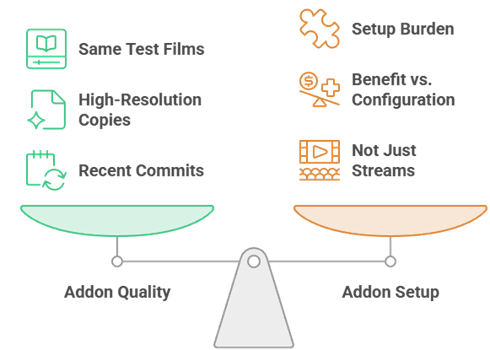
I ran the same four test films through every addon: a current 4K blockbuster, a mid-budget film from three years ago, a foreign-language title, and something obscure from the seventies. Anything that only found new releases got marked down, because that is the easy half of the job. I then checked every repository for genuine recent activity.
- Same test films: Every addon faced identical titles, including deliberately awkward catalogue films, not just this month blockbusters.
- Result quality: Judged on whether it returned playable, correctly matched, high-resolution copies rather than a wall of junk.
- Repository health: Confirmed recent commits and releases, which immediately eliminated several addons still topping search results.
- Setup burden: Weighed how much configuration was needed against how much benefit it actually delivered.
- Not just streams: Deliberately included catalogue, poster, and subtitle addons, because a movie setup is more than a link finder.
Do You Need Real-Debrid for Movies on Stremio?
For the stream addons here, effectively yes. Without a debrid service, Torrentio and Comet fall back to raw peer-to-peer, which is slower, less reliable, and exposes your IP address to the swarm. With one, streams come from a cached server at full speed and start instantly. Our explainer on what is Real-Debrid covers how it works.
- What it does: Downloads the file to its own servers first, then streams it to you as a fast, direct link.
- Instant playback: Cached films start in seconds, with no waiting for peers or buffering partway through.
- Cheap: Most debrid services cost only a few pounds a month, though prices change so check the provider directly.
- Not required for four: AIOMetadata, TMDB Addon, Streaming Catalogs, and SubSense need no debrid at all.
- IP restrictions: If you watch on several devices, use a proxy addon like StremThru to avoid tripping debrid IP checks.
Catalogue Addons vs Stream Addons
This is the distinction that separates a decent Stremio setup from a great one, and most guides never explain it. Stream addons find you a playable file. Catalogue addons decide what appears on your home screen and what the posters look like. You need both, and running two of the same kind causes duplicate rows.
- Stream addons: AIOStreams, Torrentio, Comet, MediaFusion, and StremThru find playable copies of a chosen film.
- Catalogue addons: AIOMetadata, TMDB Addon, and Streaming Catalogs decide what you browse and how it looks.
- Support addons: RPDB and SubSense improve posters and subtitles without touching streams or catalogues at all.
- Do not double up: Running AIOMetadata and TMDB Addon together creates duplicate rows, so pick one and commit.
- Disable Cinemeta: Stremio default metadata addon will fight a replacement, so turn it off once yours is functional.
Stremio Movie Addons unavailable? Quick Fixes
Nine times out of ten it is not the addon, it is your configuration or your network. The most common cause is an expired or missing debrid key, and the second is an ISP block on the addon domain. Work through these in order before assuming a project is dead.
- Check your debrid key: An expired subscription silently returns nothing at all, which looks exactly like a broken addon.
- Try a VPN: Several countries block Torrentio at DNS level, and switching your connection often restores it instantly.
- Reduce your filters: Aggressive resolution or size filters in AIOStreams can silently remove every single result.
- Check the instance: Public instances go down occasionally, so try a different one before uninstalling anything.
- Confirm it is alive: Some popular addons are now archived, including Nuvio Streams, so check the repository before troubleshooting.
Are Stremio Movie Addons Legal? Use a VPN
Stremio itself is legal software, and four of the ten addons here are pure metadata and subtitle tools that touch no copyrighted streams at all. The torrent-indexing addons sit in a grey area, because what they index is frequently copyrighted. A VPN protects your privacy either way and costs very little.
- Legitimate tools: AIOMetadata, TMDB Addon, Streaming Catalogs, and RPDB handle only metadata and artwork.
- Grey area: Torrentio, Comet, MediaFusion, and StremThru index torrent content that is often copyrighted.
- Debrid is legal: The services themselves are legitimate businesses, but what you stream through them is your responsibility.
- Peer-to-peer exposure: Without debrid, your IP address is visible to every other peer in the swarm.
- Pick a fast VPN: A slow provider will ruin 4K playback, so choose one with servers near you and a Fire TV app.
Verdict:
A great Stremio movie setup is two addons, not ten. One strong stream source to find the film, and one catalogue addon so the home screen is worth opening. Add a subtitle addon if you watch foreign cinema, and you are done. These three are where I would start.
- AIOStreams: Replaces every other stream addon with one filtered, deduplicated list, and it is the single biggest upgrade available.
- Torrentio: Still the widest coverage for older and obscure films, and by far the simplest thing to set up.
- AIOMetadata: Fixes Stremio drab artwork and builds proper movie catalogues, without touching streams at all.
FAQs
What is the best Stremio addon for movies in 2026?
AIOStreams, if you are willing to spend twenty minutes configuring it. It queries every other stream addon at once, removes duplicates, and lets you filter down to exactly the resolution and codec you want. If that sounds like too much work, Torrentio still does an excellent job with a fraction of the setup and remains the easiest place to start.
Is Nuvio Streams still functional?
No, and this is worth knowing because most articles still recommend it. The Nuvio Streams repository was archived in February 2026 and development has stopped. The public instance may still respond for now, but nothing is being fixed and forks are unmaintained. Use AIOStreams, Comet, or MediaFusion instead, all of which are actively developed.
Do I need a debrid service for Stremio movies?
For the stream addons, in practice yes. Without one, Torrentio and Comet fall back to peer-to-peer, which means slower starts, more buffering, and your IP address visible to the swarm. With a debrid account, films play instantly from a cached server. The catalogue and subtitle addons on this list need no debrid at all.
Why is Torrentio unavailable for me?
Almost always an ISP block rather than an outage. Several countries block the Torrentio domain at DNS level, and the addon simply returns nothing. Switching to a VPN or changing your DNS usually restores it immediately. The second most common cause is an expired debrid subscription, which fails silently in exactly the same way.
How many Stremio addons should I install?
Fewer than you think. One stream addon, one catalogue addon, and one subtitle addon is a complete setup. Running several stream addons produces hundreds of duplicate results for every film, and running two catalogue addons creates duplicate home screen rows. AIOStreams exists precisely so you can consolidate the first category into a single entry.