Key Takeaway: The SubSense, OpenSubtitles PRO, and Stremio Community Subtitles add-ons cover almost every subtitle problem you can hit in Stremio. This 2026 guide ranks the six best subtitle add-ons, from a ten-source aggregator to a machine translator, so you always get accurate, well-timed subtitles.
Nothing ruins a film faster than missing or badly synced subtitles. Stremio’s built-in support is basic, and the right subtitle add-on is the difference between struggling through a foreign title and enjoying it properly. The trouble is that people install four overlapping add-ons and still end up with the wrong language.
I tested every subtitle add-on below on a Fire TV Stick and desktop, checking each one against mainstream films, brand-new episodes, and anime. I confirmed each add-on’s manifest is reachable and updated in 2026, then ranked them by how reliably they found accurate, well-timed subtitles. The result is a short, practical list that covers depth, sync, language range, and even TV playback.
Content and Licensing Note: This Best Stremio Subtitles Add-ons guide compares addons, repositories, and media tools for informational purposes. Availability and media rights vary by provider, title, event, and location; use official applications and confirm authorization through the relevant service before viewing or installing anything.
Best Stremio Subtitle Add-ons: Top Picks!
| Add-on | Best For | API Key | Get Started |
|---|---|---|---|
| SubSense | Best all-round aggregator | No | Visit Site |
| OpenSubtitles PRO | Deepest database | Optional | Visit Site |
| SubSource | New releases | No | Visit Site |
| SubDL | Multilingual breadth | Yes | Visit Site |
| Community Subtitles | TV & mobile playback | No | Visit Site |
1) SubSense
SubSense is the subtitle add-on I now recommend first, because it replaces the whole confusing pile of single-site subtitle add-ons with one. Instead of installing four providers and hoping one has your language, SubSense queries around ten trusted sources at once, including OpenSubtitles, SubDL, SubSource, Podnapisi, and AnimeTosho, then returns whichever responds with a good match. You pick your languages once and it does the rest. In my testing on a Fire TV Stick it consistently found well-timed subtitles for both mainstream films and fansubbed anime episodes, where a single-source add-on often came up empty. It is the most recently updated pick here and the closest thing to a set-and-forget subtitle solution.
Features:
- Ten-Source Aggregation: Queries around ten trusted subtitle providers at once, including OpenSubtitles, SubDL, SubSource, Podnapisi, and AnimeTosho, so you rarely need any other subtitle add-on installed alongside it.
- Language Preselection: You choose your preferred languages once during setup, and every result is filtered to them, which removes the endless scrolling through dozens of irrelevant foreign-language subtitle entries.
- Fastest-Match Return: It returns whichever source responds first with a solid match, so subtitles appear quickly instead of making you wait on a single slow or overloaded provider.
- Strong Anime Coverage: Because it queries AnimeTosho and specialist sources, it finds accurate, well-timed fansub subtitles for anime episodes that mainstream-only add-ons frequently miss during a season.
- Tested On Fire TV: I ran SubSense on a Fire TV Stick and it found well-timed subtitles for both films and anime where a single-source add-on came up empty.
- Actively Maintained: It is the most recently updated pick on this list, so broken providers get patched quickly and the source list stays current as subtitle sites change over time.
- Clean Result List: Duplicate and low-quality entries are trimmed before results reach you, leaving a short, readable list where the best-matching subtitle is easy to spot and select.
| Pros | Cons |
| Replaces several single-source subtitle add-ons | Aggregation can surface occasional mismatches |
| Excellent anime and mainstream coverage | No uploading of your own subtitles |
| Set your languages once and forget | Depends on upstream sources staying online |
| Most actively updated pick here |
Pricing: Free. No account or API key required for its core sources.
Link: stremio-addons.net/addons/subsense
2) OpenSubtitles PRO
OpenSubtitles PRO taps the largest subtitle database on the internet, but strips away the ads and spam that make the free OpenSubtitles experience frustrating. OpenSubtitles has subtitles for practically every film and show in almost any language, and this community build delivers that depth cleanly inside Stremio. I installed it as my primary provider and rarely failed to find a match, even for older or obscure titles. It works with the free OpenSubtitles account tier, and linking one raises your daily download limits. If you want the deepest, most reliable subtitle library available, plus a clean interface to browse it, this is the add-on to build your setup around.
Features:
- Largest Subtitle Database: Taps OpenSubtitles, the biggest subtitle library online, so you can find matches for nearly every film and show in almost any language you might need.
- Ad And Spam Free: Strips out the intrusive ads and spam entries that clutter the standard OpenSubtitles experience, leaving a clean list of genuine subtitle files to choose from.
- Massive Language Coverage: Because OpenSubtitles is community-fed worldwide, it carries subtitles in a huge range of languages, which makes it especially strong for non-English viewers and rare regional dubs.
- Account-Based Limits: It works with a free OpenSubtitles account, and linking one raises your daily download allowance, so heavy binge sessions do not hit the anonymous usage cap.
- Set As My Primary: I used it as my main provider and rarely failed to find a match, even for older or obscure titles other add-ons could not cover.
- Reliable Manifest: The add-on’s manifest stayed reachable throughout testing with no report spikes, which matters for something you rely on every time you press play on a title.
- Simple Installation: Setup takes seconds from its listing, with no API key needed for basic use, so beginners can add deep subtitle coverage without any technical configuration.
| Pros | Cons |
| The deepest subtitle database available | Anonymous use has daily limits |
| Clean, ad-free and spam-free interface | No release-group filtering built in |
| Enormous multilingual coverage | Best paired with a fresher source |
| Free account raises download limits |
Pricing: Free. Works with a free OpenSubtitles account to raise daily download limits.
Link: stremio-addons.net/addons/opensubtitles-pro
3) SubSource
SubSource pulls from SubSource.net, one of the fastest-growing community subtitle sites, and it has become a favourite for new releases. When a film or series drops, SubSource’s community often uploads well-synced subtitles quickly, which makes this add-on a strong companion to a big database like OpenSubtitles. I kept it installed alongside my main provider and it repeatedly had accurate subtitles for brand-new episodes before other sources caught up. Setup is straightforward with no API key required. If you watch a lot of current, just-released content and want subtitles that are actually in sync from day one, SubSource earns its place in your Stremio subtitle stack.
Features:
- SubSource.net Access: Pulls subtitles directly from SubSource.net, a fast-growing community site, giving Stremio a fresh source that often carries well-synced files the older databases have not indexed yet.
- Strong On New Releases: Its community uploads subtitles quickly after a film or episode drops, so it frequently has accurate matches for current content before larger, slower databases catch up.
- Good Sync Quality: Files from SubSource tend to be well-timed against popular release groups, which reduces the constant nudging of subtitle offsets that ruins immersion during a film.
- No API Key Needed: Unlike some subtitle add-ons, it works straight after installation without registering a key, making it one of the simplest fresh sources to add to Stremio.
- Kept As A Companion: I ran it beside my main provider and it repeatedly had accurate subtitles for brand-new episodes before other sources had indexed them at all.
- Growing Library: The underlying site is expanding quickly, so coverage keeps improving over time, especially for popular movies, trending series, and the release groups most viewers actually download.
- Multilingual Uploads: Community members contribute subtitles in many languages, so it is not limited to English and often surfaces regional options for internationally popular films and shows.
| Pros | Cons |
| Excellent for brand-new releases | Smaller catalog than OpenSubtitles |
| Well-synced against popular release groups | Weaker on very old titles |
| No API key or account needed | Community uploads vary in quality |
| Coverage keeps growing |
Pricing: Free. No account or API key required to use it.
Link: stremio-addons.net/addons/subsource-subtitles
4) SubDL
SubDL is backed by SubDL.com, another large multilingual subtitle database, and it is a great choice when you want breadth across languages. The one catch is that it uses your own free SubDL API key, which takes a minute to set up but keeps your requests under your control. Once configured, it returned a wide spread of language options in my testing, which made it genuinely useful for a mixed-language household. It handles both movies and series cleanly, matching the right file to a specific episode. If you already use OpenSubtitles and want a second deep, multilingual source with different uploads, SubDL is a solid, reliable pick to slot into your Stremio subtitle stack.
Features:
- SubDL.com Database: Draws on SubDL.com, a large multilingual subtitle library, giving you a deep second source that often carries uploads the other big databases do not happen to have.
- Broad Language Spread: It is particularly strong across many languages, which makes it a smart pick for mixed-language households where one English-only subtitle add-on simply is not enough.
- Personal API Key: Setup uses your own free SubDL key, which keeps requests under your control and avoids the shared rate limits that can throttle keyless community subtitle add-ons.
- Movies And Series: It handles both films and multi-season shows cleanly, matching the correct subtitle to a specific episode rather than dumping a whole season’s files into one list.
- Tested For Breadth: In my testing it returned a wide spread of language options per title, which made it the most useful second source for my mixed-language setup.
- Reliable Matching: The add-on matches subtitles accurately against release names, so the file you pick usually lines up with your stream instead of drifting out of sync.
- Clean, Focused Add-on: It does one job, delivering SubDL’s catalog into Stremio without extra bloat, so results load quickly and stay easy to read on a TV screen.
| Pros | Cons |
| Deep, multilingual second source | Requires a free API key to work |
| Your own key avoids shared limits | Setup step deters some beginners |
| Accurate release-name matching | Overlaps with OpenSubtitles for English |
| Clean and lightweight |
Pricing: Free. Requires a free SubDL API key, which takes about a minute to create.
Link: stremio-addons.net/addons/subdl-subtitles
5) Stremio Community Subtitles
Stremio Community Subtitles fixes a problem many people do not realise Stremio has: on mobile, TV, and VR, the app cannot load external subtitle files the way the desktop version can. This community add-on solves exactly that, and does much more. It is community-driven, with user accounts, uploading, and a web interface where you can edit and resync subtitles, then have them appear on all your devices. It also integrates with external subtitle providers for broad automatic coverage. I set up an account and uploaded a corrected subtitle file, and it synced straight to my Fire TV Stick. For anyone who watches on a TV or phone and fights with subtitles, this add-on is a genuine fix.
Features:
- TV And Mobile Fix: It solves the known problem where Stremio on TV, mobile, and VR cannot load external subtitle files, delivering working subtitles on the devices most people watch.
- User Accounts: You create an account so your subtitle preferences, uploads, and corrections follow you across every device signed into the add-on, rather than living only on one machine.
- Upload Your Own: You can upload subtitle files you already have, invaluable when a perfectly synced file exists on your computer but Stremio refuses to load it on TV.
- Web Editing Interface: A companion web interface lets you edit and resync subtitles, then push the fixed version to your devices, so timing problems get solved once and stay solved.
- Set Up An Account: I created an account and uploaded a corrected subtitle file, and it synced straight to my Fire TV Stick without any extra fiddling on the device.
- Provider Integration: Beyond its own community pool, it also pulls from external subtitle providers, so you still get broad automatic coverage on top of the manual upload and editing features.
- Community-Driven Pool: Corrections and uploads from other users build a shared library over time, meaning popular titles gradually gain better-synced subtitles than any single automated source usually provides.
| Pros | Cons |
| Fixes subtitles on TV, mobile, and VR | Community pool is still growing |
| Upload and edit your own files | Best value needs an account |
| Web interface for resyncing | More setup than a plain search addon |
| Also pulls from external providers |
Pricing: Free. A free account unlocks uploading, editing, and cross-device sync.
Link: stremio-addons.net/addons/stremio-community-subtitles
6) GTSubs
GTSubs takes a completely different approach: instead of searching for an existing file, it auto-translates subtitles using Google Translate. That means if a subtitle exists in one language but not yours, GTSubs can generate a version in your language on the fly. It is a lifesaver for niche foreign films and rare content where nobody has uploaded subtitles in your language at all. The translations are machine-generated, so they are not as polished as a human fansub, but they are usually more than good enough to follow the story. I used it on an untranslated foreign film and finally understood what was happening. As a safety net, GTSubs is brilliant to keep installed.
Features:
- On-The-Fly Translation: Auto-translates existing subtitles into your language using Google Translate, so you can follow a film even when nobody has uploaded subtitles in your language at all.
- Fills Coverage Gaps: It is ideal for niche foreign films and rare content where every other subtitle add-on returns nothing, turning an unwatchable title into something you can actually enjoy.
- Any-Language Output: Because it translates rather than searches, it can produce subtitles in languages that simply have no community uploads, which is invaluable for less widely spoken target languages.
- Works With Other Add-ons: It complements search-based subtitle add-ons rather than replacing them, acting as a fallback that kicks in only when a real human subtitle cannot be found anywhere.
- Used On A Foreign Film: I ran it on an untranslated foreign film and finally understood the plot, with machine subtitles that were rough but easily good enough to follow.
- Quick Setup: Installation is simple from its listing with minimal configuration, so you can have translated-subtitle support running within a minute of deciding you want it as a fallback.
- Honest Limitations: The output is machine translation, so it is less polished than a human fansub, but for otherwise unwatchable content it remains a genuinely useful safety net.
| Pros | Cons |
| Creates subtitles where none exist | Machine translation, not human quality |
| Any target language via translation | Depends on a source subtitle existing |
| Perfect fallback for niche content | Not for polished, everyday viewing |
| Fast, simple setup |
Pricing: Free. No account or payment required; uses Google Translate for output.
Link: stremio-addons.net/addons/gtsubs
Why You Need a Subtitle Add-on in Stremio
Stremio ships with basic subtitle support, but a dedicated add-on transforms it. Here is why serious viewers always install one:
- Deeper Databases: Built-in subtitles are limited, while add-ons like SubSense and OpenSubtitles PRO tap millions of files, so you find matches for obscure films the default option misses.
- Better Sync: Dedicated add-ons match subtitles to specific release groups, which cuts the constant offset-nudging that makes watching foreign films with default subtitles such a frustrating experience.
- Language Choice: A good subtitle add-on lets you preselect languages, which is essential for multilingual homes and for viewers who watch anime or European titles regularly.
- Device Coverage: Some add-ons fix Stremio’s inability to load external subtitle files on TV and mobile, which is the exact problem many Fire TV Stick users repeatedly hit.
- Accessibility: Reliable subtitles matter for deaf and hard-of-hearing viewers and for anyone watching quietly, so a dependable subtitle add-on is far more than a nice-to-have.
How to Set Up Subtitle Languages in Stremio
Getting subtitles right is mostly about configuring language preferences once. Follow these steps after installing any add-on above:
- Open Settings: In Stremio, go to Settings and then Subtitles to set your default language, size, and delay, which apply across every subtitle add-on you have installed.
- Preselect Languages: Inside subtitle add-ons like SubSense, choose the languages you actually use, so results are filtered and you stop scrolling past dozens of irrelevant foreign entries.
- Enable Auto-Select: Turn on automatic subtitle selection where offered, and Stremio applies the best-matching subtitle without you choosing one manually every single time you press play.
- Adjust Timing: If subtitles drift, use Stremio’s delay control to nudge them into sync, or pick a file from a release-matched source like SubSource instead.
- Install On All Devices: Because add-ons sync to your account, set languages once and they follow you; see our install Stremio on Firestick guide.
How We Ranked These Subtitle Add-ons
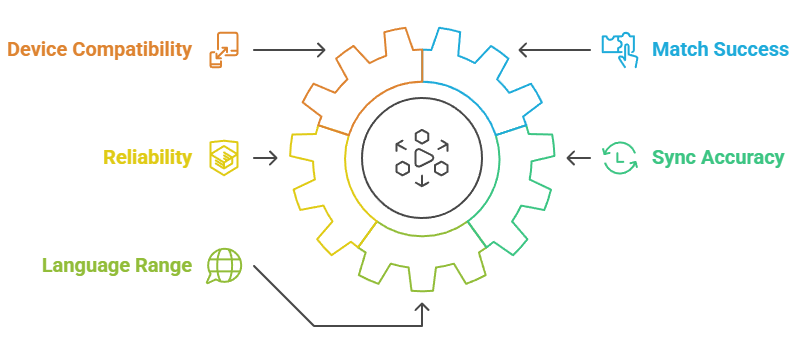
Subtitles are easy to get wrong, so we judged each add-on on real-world use rather than database size alone. Our criteria were:
- Match Success: We tested each add-on against mainstream films, new episodes, and anime, keeping the ones that consistently returned an accurate subtitle rather than an empty list.
- Sync Accuracy: We favoured add-ons whose subtitles lined up with popular releases out of the box, because a poorly timed subtitle is almost as bad as none.
- Language Range: We prioritised broad multilingual coverage, since a subtitle add-on that only serves English is of little use to a large share of Stremio’s users.
- Reliability: We checked manifest status and recent report data on stremio-addons.net, dropping anything unreachable or showing configuration errors during our testing window.
- Device Compatibility: We valued add-ons that work where people watch, including the TV and mobile builds where Stremio otherwise struggles to load external subtitle files reliably.
Final Verdict
For most people, one great aggregator plus one deep database covers everything. Install SubSense as your everyday subtitle engine, keep OpenSubtitles PRO for depth, and add a specialist only if you have a specific need like TV playback or machine translation.
- SubSense: the best all-round pick, aggregating around ten sources so you rarely need another subtitle add-on installed.
- OpenSubtitles PRO: the deepest database available, clean and ad-free, ideal as your reliable fallback for obscure titles.
- Stremio Community Subtitles: the fix if you watch on a TV or phone and need subtitles that actually load.
Frequently Asked Questions (FAQs)
What is the best subtitle add-on for Stremio?
SubSense is the best all-round choice because it aggregates around ten subtitle sources at once, including OpenSubtitles, SubDL, SubSource, and AnimeTosho, so you rarely need any other subtitle add-on installed.
Why won’t subtitles show on my Fire TV Stick?
Stremio on TV cannot always load external subtitle files. Use an add-on like Stremio Community Subtitles that serves subtitles directly, and check Settings then Subtitles to confirm your language is set and enabled.
Do Stremio subtitle add-ons cost money?
No. Every add-on in this guide is free. Some, like SubDL, ask for a free API key, and OpenSubtitles works better with a free account, but none require any payment to use.
How do I fix out-of-sync subtitles?
Use Stremio’s subtitle delay control to nudge the timing, or pick a file from a release-matched source like SubSource. Choosing a subtitle that matches your exact release group usually fixes sync instantly.
Can I get subtitles in a language nobody uploaded?
Yes. GTSubs auto-translates existing subtitles into your language using Google Translate, so even niche foreign films become watchable when no human-made subtitle exists. The quality is rough but readable enough to follow.