Key Takeaway: Start with Tubi when you want a straightforward, advertising-funded movie library. Keep Plex for discovery across devices and legally owned personal media. Choose The Roku Channel when a United States-focused live guide matters alongside films. This three-app mix replaces YesMovies search convenience without depending on an anonymous host.
YesMovies made streaming feel effortless: search a title, pick a server, and watch without creating another subscription. That convenience has become difficult to separate from rotating domains, dead players, ISP blocks, overlay ads, and sites using the YesMovies name without a verifiable operator. A replacement should reduce friction without asking you to trust a mystery host or install questionable software.
I researched nine licensed alternatives through their current product, help, device, account, and availability pages. The ranking favors services that remain free, work through official Fire TV routes, explain how the catalog is funded, and disclose their real limitations. You will not find a promise of every new release; you will find stable options for movies, shows, live channels, library viewing, and curated cinema.
Best YesMovies Alternatives for Safe, Free Streaming
| Streaming Service | Best For | Access Model | Get Started |
|---|---|---|---|
| Tubi | Best overall free replacement | Movies, series, live channels | Visit Site |
| Plex | Global access and personal media | On-demand, FAST, watchlist | Visit Site |
| The Roku Channel | Free movies plus live television | Roku Originals, movies, 500+ channels | Visit Site |
| Pluto TV | Cable-style channel surfing | Live channels and on-demand | Visit Site |
| Sling Freestream | Free channels and account features | 600+ live channels, on-demand | Visit Site |
1) Tubi
Tubi is the closest legal match to the frictionless side of YesMovies: open the app, search a large rotating catalog, and start watching without a subscription or payment card. I rank it first because its licensed movies, television series, live channels, polished Fire TV app, and optional account features cover the broadest range of everyday viewing.
Features:
- Licensed Catalog: Thousands of studio-backed movies, television episodes, documentaries, children’s programs, and live channels rotate through a clearly operated, advertising-supported platform.
- No Card Needed: Basic viewing requires neither a paid plan nor payment details, which preserves YesMovies-style immediacy without relying on an unknown mirror or file host.
- Fire TV App: Amazon Fire TV support comes through the official app store, avoiding browser navigation, sideloaded packages, fake update prompts, and remote-control frustration.
- Useful Account: Registration remains optional for watching, while a free profile adds a synchronized list, viewing history, resume playback, and parental-control tools.
- My Playback Note: I found browsing fast and remote-friendly, although picture quality still depends on each source master, title rights, device capability, and connection.
- Catalog Rotation: Licensed titles enter and leave regularly, so a movie visible today may disappear later or remain unavailable in another supported country.
- Best Match: Choose Tubi when broad free movies and series matter more than finding every brand-new theatrical release immediately after its cinema debut.
| Pros | Cons |
|---|---|
| Large free licensed catalog | Commercial breaks during playback |
| No subscription or card required | Titles rotate with licensing deals |
| Excellent Fire TV application | Catalog differs by country |
| Optional watchlist and parental controls |
Pricing:
- Access: Free with advertising (checked August 18, 2026)
- Account: Optional and free (checked August 18, 2026)
- Payment Card: Not required for ordinary viewing (checked August 18, 2026)
Link: https://tubitv.com/
2) Plex
Plex combines free ad-supported movies and shows with live channels, universal discovery, and optional tools for organizing media you legally own. I place it second because it works across a remarkably broad device range and in many countries, while its watchlist can track titles beyond Plex instead of trapping your queue inside one rotating catalog.
Features:
- Free On-Demand: Licensed movies, documentaries, television programs, and live channels are available without Plex Pass, although advertisements fund the streaming catalog.
- Wide Availability: Free content reaches users in many countries, but distribution agreements still determine which titles, languages, subtitles, and channels appear locally.
- Device Coverage: Official players support Amazon Fire TV, Roku, Android TV, Apple TV, smart televisions, consoles, computers, mobile devices, and browsers.
- Unified Watchlist: A free account can save discoveries from multiple services, helping rebuild a YesMovies queue without depending on one unstable website address.
- My Playback Note: I value the clean big-screen interface, though ad repetition, audio options, and subtitle availability can vary between titles and devices.
- No Free Downloads: Plex-provided free movies cannot be downloaded for offline viewing, and Plex Pass does not remove their ads or unlock additional streaming titles.
- Personal Libraries: Optional Plex Media Server tools organize owned files separately, giving advanced households one interface for licensed streaming and their lawful collection.
| Pros | Cons |
|---|---|
| Available in many countries | Free catalog includes advertisements |
| Free movies and live channels | Streaming titles cannot download offline |
| Universal watchlist included | Some server features need setup |
| Optional personal-media organization |
Pricing:
- Free Streaming: Included with advertising (checked August 18, 2026)
- Plex Account: Free for core viewing and watchlists (checked August 18, 2026)
- Plex Pass: Optional; does not remove free-catalog ads (checked August 18, 2026)
Link: https://www.plex.tv/watch-free-tv/
3) The Roku Channel
The Roku Channel blends free films, television seasons, Roku Originals, and more than 500 live channels inside a familiar guide. I recommend it to United States Fire TV households that want more than an on-demand poster wall, since the official Amazon app provides both lean-back channel surfing and searchable movies without a conventional cable package.
Features:
- Mixed Library: Free movies and television sit beside Roku Originals, children’s programming, news, themed channels, and scheduled entertainment streams in one destination.
- Live Guide: More than 500 live channels create an easy channel-surfing option when choosing a specific movie from a large catalog feels time-consuming.
- Fire TV Route: Compatible Amazon Fire TV devices in the United States can install the official application directly rather than visiting Roku through Silk browser.
- Account Benefits: A free Roku account can synchronize progress and preferences across supported screens, while a cable television subscription is not required.
- My Playback Note: I found the guide particularly convenient for background viewing, but advertisements and scheduled start times make it unlike pure on-demand streaming.
- Regional Limit: Fire TV availability is officially restricted to the United States, and web, mobile, Samsung, or Roku access still varies by market.
- Premium Add-Ons: Optional paid channels appear beside free content, so confirm the price and billing terms before starting any subscription or trial offer.
| Pros | Cons |
|---|---|
| Free movies and original programs | Fire TV access is region-limited |
| More than 500 live channels | Advertisements remain unavoidable |
| Official Fire TV app in the US | Paid add-ons mix with free content |
| No cable plan required |
Pricing:
- Free Catalog: Advertising-supported (checked August 18, 2026)
- Roku Account: Free to create (checked August 18, 2026)
- Premium Channels: Optional subscriptions priced separately (checked August 18, 2026)
Link: https://therokuchannel.roku.com/
4) Pluto TV
Pluto TV is strongest when you want television to start playing immediately rather than search through endless posters. It combines themed live channels with on-demand movies and shows at no charge. I use it as a YesMovies alternative for casual viewing, classic television, reality, news, and background entertainment, not for guaranteed access to specific new releases.
Features:
- Channel First: A cable-like program guide organizes news, comedy, crime, reality, children’s shows, movies, and single-series channels into scheduled streams.
- On-Demand Area: Movies and television episodes can also be selected directly, although the available catalog and live lineup change by licensing territory.
- Quick Start: Many supported platforms allow immediate viewing without payment details, while an optional account can save favorites and viewing preferences.
- Fire TV Support: The official Amazon Fire TV application works with a standard remote and avoids the pop-ups, tiny controls, and redirects common in browsers.
- My Playback Note: I prefer Pluto TV when indecision is the problem, because the guide makes it easy to join something already playing.
- Ad Breaks: Commercial interruptions support both live and on-demand viewing, and there is no universal paid upgrade that removes every advertisement from content.
- Regional Differences: Channel counts, local news, title rights, language options, and device availability vary across the United States and other supported markets.
| Pros | Cons |
|---|---|
| Excellent cable-style guide | Commercial breaks are frequent |
| Free on-demand movies included | Specific titles can be hard to find |
| No traditional subscription needed | Lineup changes by country |
| Remote-friendly Fire TV app |
Pricing:
- Access: Free with advertising (checked August 18, 2026)
- Account: Optional where supported (checked August 18, 2026)
- Ad-Free Tier: Not offered for the full service (checked August 18, 2026)
Link: https://pluto.tv/
5) Sling Freestream
Sling Freestream offers more than 600 live channels and a large on-demand collection without requiring a paid Sling package. I include it for viewers who liked opening YesMovies without payment details but now want an official Fire TV application, recognizable program guide, optional profiles, parental controls, favorites, and limited free DVR features in one place.
Features:
- Large Free Lineup: More than 600 live channels sit alongside tens of thousands of on-demand movies and episodes spanning news, crime, reality, comedy, and international programming.
- No Card Entry: Freestream can begin without a credit card, and Sling states that the service is not merely a short promotional trial.
- Optional Profile: Creating a free account unlocks favorites, multiple profiles, parental controls, personalization, and supported viewing-history features without requiring a channel package.
- Amazon Devices: The regular Sling TV application provides Freestream access on compatible Fire TV and Fire tablet devices using a standard television interface.
- My Playback Note: I found the mix most useful for live browsing, while the on-demand area works better as a supplement than a complete release catalog.
- Paid Content Nearby: Premium subscriptions, rentals, and passes appear within the broader Sling experience, so distinguish Freestream labels before confirming any upgrade.
- United States Focus: The service and its channel rights primarily target United States viewers, making it a weaker choice for households streaming from other countries.
| Pros | Cons |
|---|---|
| More than 600 free channels | Primarily designed for the US |
| No payment card for Freestream | Paid offers appear beside free content |
| Profiles and parental controls available | On-demand catalog still rotates |
| Official Amazon device support |
Pricing:
- Freestream: Free with advertising (checked August 18, 2026)
- Account: Optional and free (checked August 18, 2026)
- Paid Sling Plans: Separate and not required for Freestream (checked August 18, 2026)
Link: https://watch.sling.com/
6) Xumo Play
Xumo Play is a simple free option when account creation itself feels like too much friction. The service offers hundreds of live channels and a substantial on-demand catalog funded by ads. I recommend it for quick Fire TV movie browsing because no subscription, login, or credit card is required, although its current territory list remains limited.
Features:
- Instant Access: Xumo Play requires no subscription, account, or payment card for ordinary viewing, preserving the quickest part of the YesMovies experience.
- Channel Scale: The service advertises more than 350 live channels alongside thousands of on-demand titles across movies, television, news, lifestyle, and entertainment.
- Fire TV App: Compatible Fire TV and Fire Stick devices receive an official application, along with support for Roku, mobile, browser, and smart-TV platforms.
- Multiple Screens: Xumo states that viewers can enjoy the service on multiple supported devices, without charging a household subscription for basic access.
- My Playback Note: I like the low-friction launch, though discovering one exact movie can take longer than browsing a tightly searchable on-demand service.
- Mandatory Advertising: There is no service-wide ad-free version, because commercial breaks finance the free channels and on-demand programming available to viewers.
- Territory Rules: Official access is intended for the United States, Canada, United Kingdom, and Ireland, including applicable territories, under current service terms.
| Pros | Cons |
|---|---|
| No login or card required | No ad-free upgrade exists |
| Hundreds of live channels | Limited supported territories |
| Official Fire TV support | Exact-title discovery can be slower |
| On-demand library included |
Pricing:
- Access: Free with advertising (checked August 18, 2026)
- Account: Not required for Xumo Play (checked August 18, 2026)
- Ad-Free Option: Unavailable for the full service (checked August 18, 2026)
Link: https://play.xumo.com/
7) Fawesome
Fawesome focuses on free movies and television with no registration or subscription, making it one of the closest legal substitutes for YesMovies-style instant playback. I recommend it as a secondary catalog for genre browsing and less obvious titles. Its licensed advertising model is transparent, though its catalog and interface are smaller than Tubi or Plex.
Features:
- No Registration: Visitors can stream available movies and shows without creating an account, entering payment information, or starting a temporary subscription trial.
- Legal Advertising: Fawesome identifies itself as a legal advertising-supported platform working with recognized content partners rather than anonymous third-party video hosts.
- Genre Variety: Action, comedy, horror, drama, documentaries, true crime, family programming, and other curated categories help surface titles beyond obvious blockbusters.
- Web and Apps: Viewing is available through the official website and platform applications, with device availability depending on the current regional app store.
- My Playback Note: I found it most valuable as a second search stop when the larger free services lack a particular older or independent title.
- Smaller Footprint: The library, search tools, account features, and cross-device continuity are less comprehensive than the biggest free streaming competitors provide.
- Best Use: Pair Fawesome with Tubi or Plex instead of expecting one catalog to replace every movie, series, and current release YesMovies listed.
| Pros | Cons |
|---|---|
| No registration required | Smaller catalog than market leaders |
| Legal free catalog | Fewer account continuity features |
| Useful genre collections | Availability varies by app store |
| Official website and applications |
Pricing:
- Streaming: Free with advertising (checked August 18, 2026)
- Registration: Not required (checked August 18, 2026)
- Subscription: No paid plan needed for listed free content (checked August 18, 2026)
Link: https://fawesome.tv/
8) Hoopla
Hoopla turns a participating library card into free access to movies, shows, music, audiobooks, ebooks, and comics. I include it because the catalog is licensed, the television apps are polished, and borrowed titles begin without waiting lists. It is not universal, however: each library controls participation, monthly borrowing limits, and available collections.
Features:
- Library Access: A valid card from a participating public library unlocks the institution’s collection without charging the patron a separate monthly streaming subscription.
- Instant Borrowing: Eligible movies and shows can be borrowed immediately without traditional hold queues, although monthly limits and available titles depend on the library.
- Television Apps: Official applications support Fire TV Stick, Roku, Apple TV, Samsung, and LG televisions, allowing remote-controlled playback after account pairing.
- Broader Media: The same account can include music, audiobooks, ebooks, and comics, creating more household value than a movie-only streaming website.
- My Playback Note: I appreciate the absence of pop-up advertising during borrowed videos, particularly for family viewing and longer movies on a television.
- Borrowing Limits: Libraries decide the monthly checkout allowance and collection access, so neighboring cardholders may receive different choices under the same Hoopla brand.
- Mobile Downloads: Supported mobile applications can store eligible borrowed items temporarily, but downloads remain protected inside Hoopla rather than becoming unrestricted video files.
| Pros | Cons |
|---|---|
| Free with participating library card | Library participation is required |
| No waiting lists for eligible titles | Monthly borrowing limits vary |
| Official Fire TV application | Catalog differs between libraries |
| Includes several media formats |
Pricing:
- Patron Cost: Free through participating libraries (checked August 18, 2026)
- Library Card: Required (checked August 18, 2026)
- Borrowing Limit: Set by the local library (checked August 18, 2026)
Link: https://www.hoopladigital.com/
9) Kanopy
Kanopy is the strongest specialist choice for documentaries, independent films, classics, world cinema, educational video, and curated children’s programming. I recommend it when YesMovies browsing felt broad but shallow. Access requires a participating public library or university, and most library patrons receive a monthly ticket allowance rather than unlimited viewing across the entire catalog.
Features:
- Curated Films: The catalog emphasizes documentaries, independent cinema, classics, international titles, educational programs, and thoughtful collections that commercial FAST services often overlook.
- Library Sign-In: Public-library users connect a participating card and create a Kanopy account, while university access follows the institution’s authentication and licensing arrangement.
- Ticket System: Libraries issue a monthly number of viewing tickets, unused tickets do not roll over, and each title displays its current ticket cost.
- Unlimited Shelves: Some titles require zero tickets, and Kanopy Kids viewing remains unlimited when that collection is included by the participating library.
- My Playback Note: I consider Kanopy the best complement for serious film discovery, not a source for every current studio release or television season.
- Device Requirements: The official Fire TV app requires FireOS 6 or newer, with additional support for Roku, Apple TV, Android TV, mobile, and web.
- Institution Differences: Available titles, monthly tickets, children’s access, and temporary budget restrictions depend on the library or university funding the service locally.
| Pros | Cons |
|---|---|
| Excellent curated film selection | Library or university access required |
| Free through participating institutions | Monthly tickets limit many titles |
| Kanopy Kids can be unlimited | Catalog varies by institution |
| Official Fire TV support |
Pricing:
- Patron Cost: Free through participating institutions (checked August 18, 2026)
- Tickets: Monthly allowance set by the library (checked August 18, 2026)
- Unlimited Viewing: Selected titles and Kanopy Kids where offered (checked August 18, 2026)
Link: https://www.kanopy.com/
Keep the Useful Parts of YesMovies Without Copying Its Risks
YesMovies appealed because it removed the subscription decision and placed movies and episodes behind one search box. The safer platforms above preserve parts of that simplicity, but they replace unknown hosts with licensed catalogs and visible business models. Expect the tradeoff to be advertising, regional rights, library eligibility, or a smaller selection—not deceptive buttons, forced downloads, or mystery operators.
- Start Officially: Install from Amazon, Roku, Google, Apple, or the service’s verified website instead of searching for APK files through lookalike streaming domains.
- Reject Codecs: A legitimate television app will not demand a special browser codec, security extension, download manager, or unknown player before a movie begins.
- Check the Label: Free, rent, buy, premium, and trial titles can share one storefront, so read the access badge before pressing a confirmation button.
- Expect Ads: Licensed free platforms normally fund programs through clear commercial breaks; promises of every current release free and ad-free deserve immediate skepticism.
- Protect Accounts: Use a unique password when registration adds value, decline unnecessary permissions, and never reuse credentials previously entered on an unofficial streaming mirror.
How I Evaluated a YesMovies Replacement Beyond “Does It Play?”
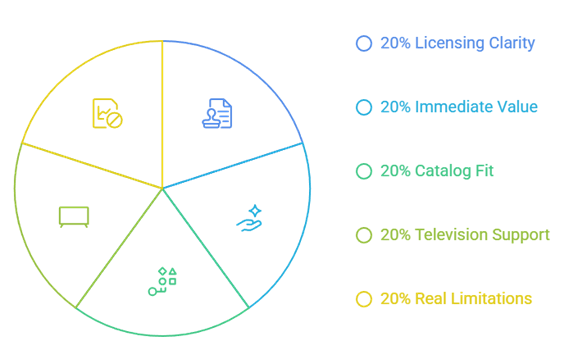
A YesMovies replacement has to solve more than a broken video server. I compared whether each platform identifies its operator, explains how content is funded, supports Fire TV through an official route, starts without unnecessary payment details, and discloses the limits that affect daily viewing. Different services rank well for different habits because no licensed catalog contains every movie or series.
- Licensing Clarity: Each recommendation comes from an identifiable operator with official product or support pages, rather than an anonymous domain copying YesMovies branding.
- Immediate Value: Free access, account requirements, payment-card requests, advertisements, library eligibility, and optional upgrades were checked before judging how quickly viewing starts.
- Catalog Fit: Broad movies and television ranked highly, while live channels, documentaries, independent films, children’s programs, and personal-media tools earned distinct use cases.
- Television Support: Fire TV compatibility mattered most, followed by Roku, smart televisions, mobile applications, game consoles, web browsers, casting, and cross-device continuity.
- Real Limitations: I recorded regional blocks, rotating licenses, ad breaks, ticket allowances, missing offline playback, and paid content displayed beside free choices.
Use a Two-Service Stack Instead of Chasing Another Mirror
The most reliable YesMovies replacement is usually a combination, not one site. Start with a broad free catalog, then add a service that covers your missing viewing habit. This approach survives title rotation and avoids the endless hunt for new mirror domains. It also makes each limitation predictable: ads on FAST platforms, tickets at libraries, or a rental fee for one recent release.
- Broad Base: Use Tubi or Plex for general searching because both combine recognizable applications, large rotating libraries, and optional account continuity across devices.
- Live Layer: Add Pluto TV, The Roku Channel, Sling Freestream, or Xumo Play when scheduled channels and background viewing matter as much as search.
- Curated Layer: Use Kanopy for documentaries, classics, and independent films, while Hoopla can cover library-funded entertainment across several media formats.
- Backup Search: Fawesome works well as a secondary catalog for older, independent, or genre titles that may not appear on the largest free services.
- Recent Releases: Rent one specific new movie through a recognized storefront when needed instead of spending an evening testing mirrors, fake players, and dead hosts.
Install YesMovies Alternatives on Firestick Without Sideloading
Every ranked option has an official television route, but availability differs by country and device generation. Search the Amazon Appstore using the exact service name, confirm the developer, and open the listing before installing. If an app is absent, do not assume a random APK is equivalent. Our free FMovies alternatives guide explains more licensed choices for the same viewing problem.
- Search by Voice: Hold the Alexa button and say the exact app name, then compare the listing icon, developer, description, and supported-device notice.
- Use Appstore: Install through Amazon’s store so updates, signatures, permissions, and device compatibility come from the normal Fire TV distribution route.
- Check Region: The Roku Channel, Sling Freestream, Xumo Play, Hoopla, and Kanopy may depend on country, library, institution, or local app availability.
- Pair Safely: When a television app displays a code, enter it only on the official activation address shown by that service’s verified support instructions.
- Avoid Impersonators: Reject listings that borrow a familiar logo, misspell the brand, request unrelated permissions, or promise premium movies through an unknown downloader.
Recognize Whether a Free Movie Stream Is Actually Licensed
A clean design and HTTPS padlock do not prove that a streaming catalog is authorized. Look for an identifiable company, supported applications, clear advertising or library funding, region information, content-partner details, and help documentation. Legal services explain why viewing is free and what you give up in return. Clone sites usually emphasize unlimited releases while hiding the operator and rights position.
- Named Operator: Tubi, Plex, Roku, Paramount-owned Pluto TV, Sling, Xumo, Future Today, Hoopla, and Kanopy publicly identify the organizations running their services.
- Funding Model: Advertising, library payments, university licensing, rentals, or optional subscriptions explain how creators and distributors can be compensated for authorized viewing.
- Official Support: Real help pages document compatible devices, accounts, captions, regional limits, borrowing rules, billing, and troubleshooting instead of sending users toward mirrors.
- Catalog Restraint: Licensed services admit that titles rotate and territories differ; a claim to carry every cinema release worldwide for nothing is not credible.
- No Mystery Files: Streaming should occur inside a supported website or application, without executable downloads, browser extensions, push-notification traps, or password-stealing activation pages.
Best YesMovies Alternatives Verdict
Begin with Tubi when you want the least complicated daily replacement: one official app, a wide rotating library, and no checkout screen. Add Plex when cross-device discovery or a personal-media shelf matters, then use The Roku Channel for a United States-focused blend of films and scheduled channels. A small rotation works better than forcing every search through one free catalog.
- Tubi: Best overall for free licensed movies, a polished Fire TV application, broad genres, optional account continuity, and no ordinary payment-card requirement.
- Plex: Best for broad international availability, free on-demand viewing, live channels, universal discovery, and optional organization of legally owned personal media.
- The Roku Channel: Best for United States viewers who want free films, Roku Originals, children’s programming, and more than 500 scheduled live channels.
FAQs
What is the best free YesMovies alternative?
Tubi is my first stop in supported regions. Its library is licensed and advertising-funded, its Fire TV application is official, and viewing does not begin at a payment screen. A free profile remains optional but helps with parental controls, saved titles, and continuing on another device.
Which YesMovies alternatives work without an account?
Tubi, Xumo Play, Fawesome, and portions of Plex or Sling Freestream can start without registration on supported devices and regions. An optional free account may add favorites, profiles, parental controls, synchronized progress, or watchlist features.
Can I watch these YesMovies alternatives on Firestick?
Yes. Each pick has either an official Fire TV application or a television route documented by its operator, although country, FireOS, library eligibility, and current store listings can affect access. Use the verified Amazon Appstore result and skip unrelated APK packages carrying a familiar service name.
Are YesMovies mirror sites safe and legal?
A YesMovies label does not establish ownership, safety, or licensing. YesMovies-branded domains have appeared in copyright-blocking orders, while clones can change operators and addresses. Use licensed applications with transparent companies, funding, permissions, and support documentation.
Where can I compare more replacements for unofficial movie sites?
Our 123Movies alternatives guide covers another set of streaming-site replacements. Compare current region support, specific-title availability, account rules, advertisements, library eligibility, and Fire TV compatibility before choosing.