Key Takeaway: Cocoleech is a premium multi-host downloader and link generator that unlocks 100+ file hosts and cached torrents from one account. Plans run $14.99/month, $29.99 for 90 days, or $79.99/year as one-off payments. It is excellent for heavy downloaders but has weaker Kodi and Stremio integration than Real-Debrid.
Cocoleech is often listed alongside Real-Debrid and AllDebrid, but it is really a different kind of tool: a premium link generator and download manager first, and a streaming debrid second. This review covers what it does well, where it falls short, current 2026 pricing, and whether it earns a place in a Firestick or Kodi setup.
I tested Cocoleech across a browser, a download manager, and a Kodi box to see how it compares with the debrid services I use daily. It shone at grabbing files from dozens of hosts at full speed, but I hit friction trying to wire it into Kodi and Stremio the way Real-Debrid slots in, and that shapes my verdict below.
Cocoleech at a Glance
If you only want the headline verdict, this table sums up Cocoleech in a few rows: what it costs, what it unlocks, and who it really suits. The detail follows underneath for anyone weighing it against Real-Debrid or AllDebrid.
| Detail | At a glance |
|---|---|
| Our rating | 3.5 / 5 |
| Starting price | $14.99 / month ($79.99 / year) |
| File hosts | 100+ |
| Torrent support | Yes (growing) |
| Kodi & Stremio | Limited native integration |
| Best for | Heavy downloaders across many hosts |
What Is Cocoleech?
Cocoleech is a premium multi-hoster and debrid-style service that turns capped, throttled links from dozens of file hosts into fast, direct downloads through a single subscription. Instead of buying separate premium accounts for each host, you paste a link into Cocoleech and it generates a high-speed one for you, and it has since added support for cached torrents too.
- Multi-host generator: it unlocks fast links from 100+ supported file hosts under one login.
- Web download manager: it runs in the browser, so no software install is strictly required.
- Torrent support: it has added magnet and torrent handling on top of classic host links.
- Any device: it works on anything with a browser, from a phone to a smart TV.
- One-off plans: it sells fixed-length plans rather than an auto-renewing subscription.
Cocoleech Key Features
Cocoleech leans hard into downloading rather than streaming, and its feature set reflects that. If you regularly pull large files from a mix of hosts, the following features are where it earns its keep and separates itself from a streaming-first service.
- Multi-host support: unlock 100+ file hosts from one account without separate logins.
- Premium link generator: paste a capped link and get a fast, direct one back.
- Torrent and magnet handling: cache and download torrents through the same dashboard.
- Web-based access: no mandatory app, so it works on almost any device.
- Generous daily quota: higher plans lift the daily download allowance considerably.
- No auto-renewal: plans are one-off purchases, so nothing charges you unexpectedly.
- Reseller and voucher options: handy if you cannot or prefer not to pay by card.
Cocoleech Pricing and Plans
Cocoleech uses simple one-off plans priced in US dollars, with no automatic renewal, so you always choose when to top up. It sits at the pricier end of the market compared with Real-Debrid and AllDebrid, though the 90-day plan narrows that gap. For a wider view, see our roundup of the best debrid services.
| Plan | Price (checked July 2026) | Effective monthly |
|---|---|---|
| 1 month (31 days) | $14.99 | ~$14.99 |
| 3 months (90 days) | $29.99 | ~$9.99 |
| 1 year (365 days) | $79.99 | ~$6.67 |
Note: plans are one-time payments with no auto-renew, and the yearly option is by far the best value. Occasional voucher codes and resellers can lower the price further, but always confirm a reseller is legitimate before buying.
How Cocoleech Works?
The core idea is simple: Cocoleech holds premium accounts with dozens of file hosts and lets you piggyback on them. You hand it a link or a torrent, and it returns a fast, unrestricted download. Understanding that flow makes it clear why it excels at downloading but is less seamless for on-demand streaming.
- Sign in: open the members area and go to the premium link generator.
- Paste a source: drop in a supported host link or add a magnet or torrent.
- Server fetch: Cocoleech grabs the file at premium speed on its own servers.
- Direct download: you download the resulting direct link to your device or player.
- Cache advantage: cached items return almost instantly; new ones take time to fetch first.
How to Set Up Cocoleech on Kodi and Stremio
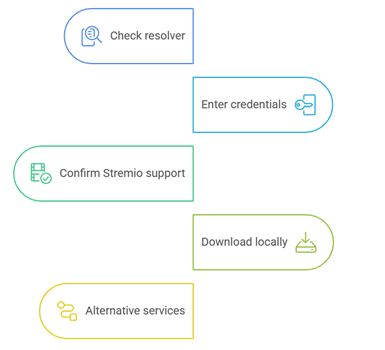
This is where Cocoleech is weaker than the big streaming debrids. It is not natively listed in most Kodi and Stremio debrid menus, so integration is more manual and, in some apps, not possible at all. If Kodi and Stremio are your main goal, weigh this carefully against a service built for them.
- Check whether your Kodi resolver (such as ResolveURL) lists Cocoleech as a supported host.
- If it does, enter your Cocoleech credentials or API details in that resolver’s settings.
- For Stremio, confirm your chosen addon actually supports Cocoleech before relying on it.
- Where native support is missing, use Cocoleech to download files and play them locally instead.
- For plug-and-play Kodi and Stremio streaming, a service like Real-Debrid remains the easier route.
Getting Started With Cocoleech (Quick Start)
If you decide Cocoleech fits your needs, getting up and running takes only a few minutes. There is no mandatory software to install, because everything runs from the members area in your browser, which is part of what makes it so device-agnostic. Here is the fastest way to your first download.
- Create an account on the official Cocoleech site and verify your email address.
- Open the Pricing page and buy a plan, or redeem a voucher code if you have one.
- Wait for your account to switch to Premium, then open the link generator.
- Paste a supported host link or add a magnet, then start the fetch.
- Download the generated direct link to your device, or send it to a download manager.
Cocoleech Supported File Hosts
The heart of Cocoleech is its long list of supported file hosts, which is exactly why heavy downloaders choose it. Rather than paying for premium on each host separately, one Cocoleech plan unlocks fast links across the lot. The exact list changes over time, but these are the kinds of hosts it covers.
- File lockers: mainstream hosts such as Rapidgator, Nitroflare, and DDownload.
- Media hosts: image and archive hosts used for large collections and backups.
- Video hosts: sites that normally throttle or gate direct downloads for free users.
- Cloud and Usenet links: supported sources where Cocoleech offers coverage.
- Torrents: magnet and torrent sources through the built-in torrent handler.
- Live list: always check the current supported-hosts page, as it is updated regularly.
Tips to Get the Most From Cocoleech
A few habits make Cocoleech noticeably better to live with, especially if you are coming from a streaming-first debrid and expect everything to be instant. These are the adjustments I found most useful during testing.
- Favour cached links: stick to cached links and popular hosts for the fastest downloads.
- Queue early: start large torrents ahead of time so they are cached when you need them.
- Use a manager: pair it with a download manager to grab generated links at full speed.
- Go yearly: buy the yearly plan if you download often, as it slashes the monthly cost.
- Add a VPN: run a VPN alongside it for privacy, since Cocoleech does not hide your IP.
Cocoleech Supported Devices and Apps
Because Cocoleech is web-first, it technically runs anywhere with a browser, but the experience varies a lot by device. It is strongest on a computer and weakest as a hands-off TV streaming resolver, so match it to how you actually watch.
- Computer: the best experience, with the full download manager and dashboard.
- Phone and tablet: works through the browser for downloads on the go.
- Firestick and Android TV: usable via browser downloads, limited as a live resolver.
- Kodi: only if your resolver explicitly supports Cocoleech as a host.
- Download managers: pairs well with tools that accept generated direct links.
Cocoleech Interface and Ease of Use
Cocoleech keeps things functional rather than flashy. The members dashboard is straightforward once you know where the link generator and torrent tools live, but it does feel dated next to newer services that have polished, app-style interfaces. For a downloader, though, function matters more than looks, and everything you need is only a click or two away.
- Generator up front: the link generator sits front and centre once you sign in.
- Tools in one place: torrent and magnet tools live in the same dashboard, not a separate app.
- No install: there is no mandatory desktop or TV app to configure.
- Low learning curve: the layout is dated but stable, with nothing tricky to learn.
- Clear account info: plan, quota, and account details are easy to find at a glance.
Cocoleech Pros and Cons
Cocoleech is a capable downloader with a clear niche, but it is not a like-for-like Real-Debrid replacement. Here is the honest balance after testing it against streaming-first services.
| Pros | Cons |
|---|---|
| Unlocks 100+ file hosts from one account | Pricier per month than Real-Debrid or AllDebrid |
| Torrent and magnet support included | Limited native Kodi and Stremio integration |
| One-off plans with no auto-renewal | Best suited to downloading, not live streaming |
| Runs in any browser, no install needed | Smaller community and fewer setup guides |
| Voucher and reseller payment options | Interface feels dated next to newer rivals |
Cocoleech Speed and Reliability
For downloads, Cocoleech is genuinely fast, saturating a good connection on cached files and popular hosts. Reliability is solid for downloading, though as a real-time streaming resolver it cannot match the instant, cached-link experience that Kodi and Stremio users expect from Real-Debrid.
- Fast on cached files: cached files and popular hosts download at full line speed.
- Caching delay: newly requested torrents need caching time before they are fast.
- Solid uptime: the download service is generally dependable day to day.
- Not for live streams: it is not designed for instant, on-demand streaming resolution.
- No privacy layer: a VPN is worth adding, as Cocoleech does not hide your IP.
Cocoleech vs Real-Debrid
The honest summary is that these tools overlap but aim at different users. Cocoleech is a downloader that also does some streaming; Real-Debrid is a streaming resolver that also downloads. If Kodi and Stremio are your priority, the difference is stark, as our best Real-Debrid alternatives guide explains in more detail.
| Feature | Cocoleech | Real-Debrid |
|---|---|---|
| Starting price | $14.99 / month | €4 / 30 days |
| File hosts | 100+ | 90+ |
| Torrent support | Yes (growing) | Yes (cached) |
| Kodi & Stremio addons | Limited | Extensive |
| Best for | Heavy downloaders | Kodi/Stremio streaming |
Cocoleech Alternatives Worth Considering
Cocoleech is not the only option, and for many Firestick users it will not be the best one. If your priority is smooth Kodi or Stremio streaming rather than raw downloading, the following services are worth a look, and our best Real-Debrid alternatives guide compares them in depth.
- Real-Debrid: the streaming favourite, with the widest Kodi and Stremio support.
- AllDebrid: a cheap, torrent-friendly alternative that integrates cleanly with addons.
- Premiumize: an all-in-one with cloud storage, Usenet, and a built-in VPN.
- TorBox: a newer service that also appears in our best Real-Debrid addons roundup.
Is Cocoleech Safe and Legal?
Cocoleech is a legitimate paid service, and using a premium link generator is legal in itself. As with any debrid tool, legality depends on the specific files you access, so the responsibility sits with you rather than the service.
- Legal service: the tool itself is legal; your usage determines the rest.
- Not private: it does not mask your IP, so it is not a privacy tool on its own.
- Official only: buy only from the official site or a verified reseller.
- Avoid freebies: steer clear of “free” account offers, which are almost always scams.
- Add a VPN: pair it with a VPN if you want privacy while downloading or streaming.
Is Cocoleech Worth It?
Cocoleech is worth it for a specific person: the heavy downloader who pulls files from many hosts and wants one fast account to rule them all. For that user it is excellent. For the typical Firestick owner who just wants buffer-free Kodi or Stremio playback, it is harder to recommend over cheaper, better-integrated rivals.
- Great for downloaders: superb value if you pull files from lots of different hosts.
- Weak for streaming: less compelling if your only goal is Kodi or Stremio playback.
- Yearly wins: the annual plan makes the price much more reasonable.
- Easier rivals: Real-Debrid or AllDebrid are simpler for plug-and-play streaming.
- Test first: try a shorter plan first to see if it fits your workflow.
Verdict
Cocoleech earns a solid 3.5 out of 5. It is a fast, flexible multi-host downloader with useful torrent support and honest one-off pricing, and heavy downloaders will love it. But its limited Kodi and Stremio integration and higher monthly price keep it out of the top tier for streaming-focused Firestick users, who are usually better served by Real-Debrid or AllDebrid.
FAQs
What is Cocoleech used for?
Cocoleech is a premium multi-host downloader and link generator. It unlocks fast, direct downloads from 100+ file hosts and cached torrents through one account, mainly for downloading rather than live streaming.
How much does Cocoleech cost in 2026?
Cocoleech costs $14.99 for one month, $29.99 for 90 days, or $79.99 for a year, as one-off payments with no auto-renewal. The yearly plan is the best value at about $6.67 per month.
Does Cocoleech work with Kodi and Stremio?
Only partially. Cocoleech is not natively supported by most Kodi resolvers or Stremio addons, so integration is limited. For plug-and-play Kodi and Stremio streaming, Real-Debrid is a smoother choice.
Does Cocoleech support torrents?
Yes. Alongside its file-host link generator, Cocoleech can cache and download magnets and torrents from the same dashboard, though newly requested torrents need caching time before they download quickly.
Is Cocoleech safe to use?
The service is legitimate and legal to use, but it does not hide your IP address. Buy only from the official site, avoid free-account scams, and add a VPN if you want privacy.
Does Cocoleech auto-renew?
No. All Cocoleech plans are one-off purchases, so nothing charges your card automatically. You simply buy a new plan when your current one runs out.
Is Cocoleech better than Real-Debrid?
For heavy downloading across many hosts, Cocoleech is excellent. For Kodi and Stremio streaming, Real-Debrid is better integrated and cheaper. See our best Real-Debrid alternatives guide to compare the top options.
Can I use Cocoleech on a Firestick?
Yes, through the browser for downloads, but it is not a smooth live-streaming resolver on Fire TV. For hands-off Firestick streaming in Kodi or Stremio, a service like Real-Debrid is the easier fit.
Does Cocoleech offer a free trial?
Cocoleech does not advertise a standard free trial, so you generally start on a paid one-off plan. The one-month option is the lowest-risk way to test whether it suits your download habits.
Is Cocoleech good for downloading large files?
Yes. Downloading large files from supported hosts is exactly what Cocoleech does best, saturating a good connection on cached content. Pair it with a download manager for the most reliable results.